warning light MINI Countryman 2011 User Guide
[x] Cancel search | Manufacturer: MINI, Model Year: 2011, Model line: Countryman, Model: MINI Countryman 2011Pages: 196, PDF Size: 3.06 MB
Page 59 of 196

Controls overviewControls
57
More information on the MINI Maintenance Sys-
tem can be found on page 142.
Clock
Setting the time
Radio MINI Boost CD:
1.Press the MENU button.
2. Press the button.
3. Press the button.
4. Select the desired menu item "FORMAT",
"STD" or "MIN" and press the respective but-
ton.
5. Turn the button on the right to set values.
6. Press the button on the right to store values.
7. Press the button to exit setting
values.
Date
Setting date
Radio MINI Boost CD:
1. Press the MENU button.
2. Press the button.
3. Press the button.
4. Select the desired menu item "TT", "MM" or
"JJ".
5. Turn the button on the right to set values.
6. Press the button on the right to store values.
7. Press the button to exit setting
values.
Check Control
The concept
The Check Control monitors vehicle functions
and alerts you to any ma lfunctions in the sys-
tems monitored. Check Control messages
involve indicator or warning lamps in the dis-
plays and, in some circumstances, an acoustic
signal.
Indicator and warning lamps can light up in var-
ious combinations and colors in the indicator
areas 1 and 2.
Brake fluid
Exit display
54
Next setting or item of
information 54
SymbolFunction
Page 61 of 196
Technology for driving comfort and safetyControls
59
Technology for driving comfort and
safety
Park Distance Control
PDC*
The concept
PDC assists you with parking in reverse. Acoustic
signals warn you of the presence of an object
behind the vehicle. The measurement is carried
out by four ultrasonic sensors in the rear
bumper.An acoustic warning sounds when an
object is approx. 24 in/60 cm from the
corner sensors or appr ox. 5 ft/1.50 m from the
center sensors. PDC is a parking aid that can dis-
play objects, which are slowly being
approached, which is the usual case when park-
ing a vehicle. Avoid approaching an object at
high speed; otherwise, physical circumstances
may lead to the system warning being issued
too late. <
Automatic mode
With the engine running or the ignition switched
on, the system is activated automatically after
approx. 1 second when you engage reverse
gear or move the automatic transmission selec-
tor lever to position R. Wait this short period
before driving.
Acoustic signals
As the distance between vehicle and object
decreases, the intervals between the tones
become shorter. If the distance to the nearest
object falls to below roughly 1 ft/30 cm, then a
continuous tone sounds.
If the distance remains co nstant, e.g. when driv-
ing parallel to a wall, th e acoustic signal stops
after approx. 3 seconds.
Adjustments
The volume of the acoustic signals can be set,
refer to page 102.
Malfunction
Indicator lamp lights up. PDC has failed.
Have the system checked.
To avoid this problem, keep the sensors
clean and free of ice or snow in order to ensure
that they will continue to operate effectively.
When using a high-pressure cleaner, do not
direct the jet toward the sensors for lengthy
periods and only spray from a distance of at least
4in/10cm.
System limitations
Even with PDC, final re sponsibility for esti-
mating the distance between the vehicle
and any obstructions always remains with the
driver. Sensors, too, ha ve blind spots in which
objects cannot be detected. Moreover, ultra-
sonic detection can reach its physical limits with
objects such as trailer tow bars and couplings,
thin and wedge-shaped objects, etc. Low
objects already indicated, such as curbs, may
enter the sensors' blind spots before or after a
continuous audible signal is given. Higher, pro-
truding objects, such as wall ledges, may not be
detectable. Therefore, al ways drive cautiously;
otherwise, there is a risk of personal injury or
property damage. Loud sound sources outside
or inside the car can drown out the PDC signal. <
Driving stability control
systems
Your MINI has a number of systems that help to
maintain the vehicle's st ability even in adverse
driving conditions.
Page 69 of 196
Technology for driving comfort and safetyControls
67
Malfunction
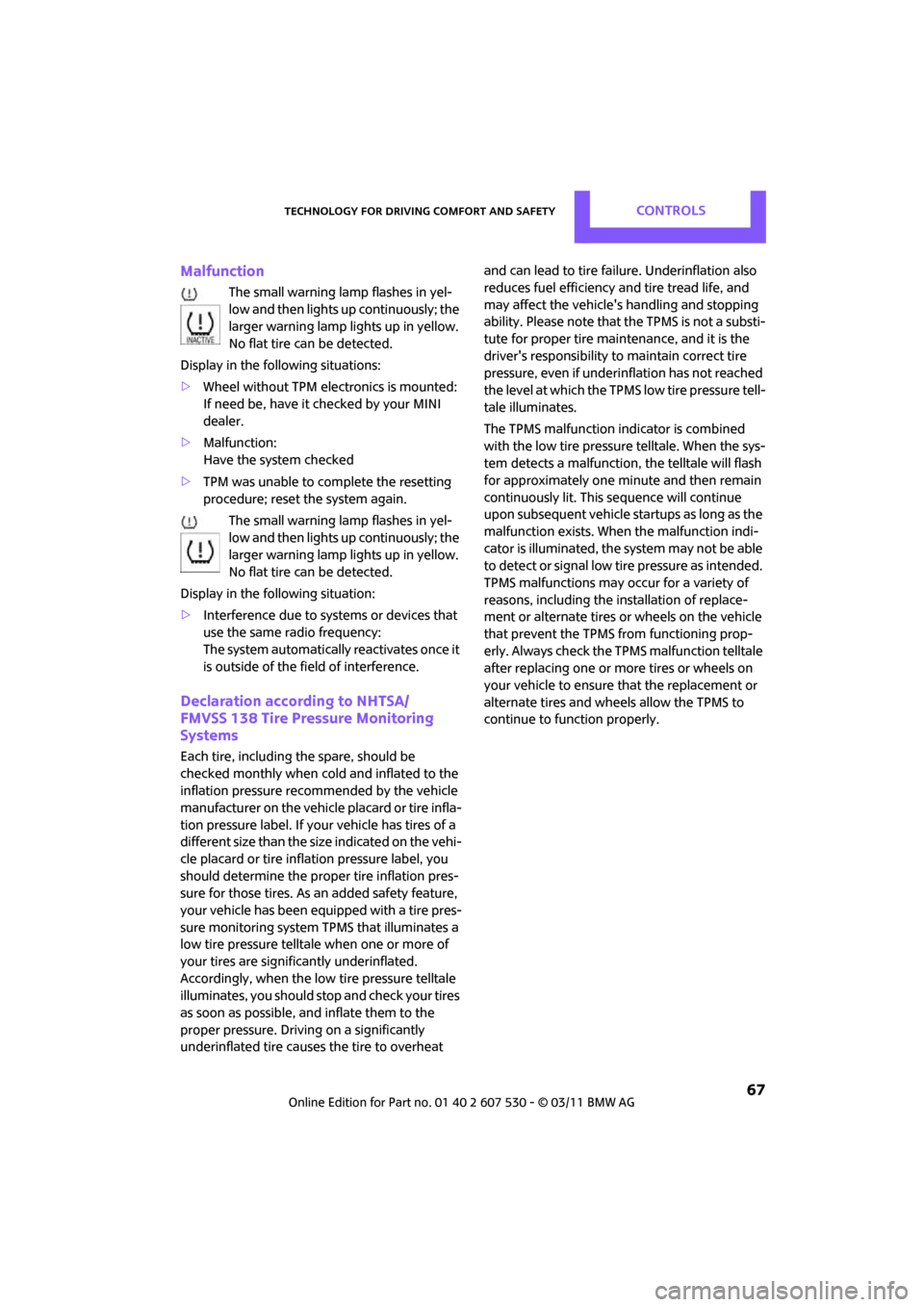
The small warning lamp flashes in yel-
low and then lights up continuously; the
larger warning lamp lights up in yellow.
No flat tire can be detected.
Display in the following situations:
> Wheel without TPM electronics is mounted:
If need be, have it checked by your MINI
dealer.
> Malfunction:
Have the system checked
> TPM was unable to complete the resetting
procedure; reset the system again.
The small warning lamp flashes in yel-
low and then lights up continuously; the
larger warning lamp lights up in yellow.
No flat tire can be detected.
Display in the following situation:
> Interference due to systems or devices that
use the same radio frequency:
The system automatically reactivates once it
is outside of the field of interference.
Declaration according to NHTSA/
FMVSS 138 Tire Pressure Monitoring
Systems
Each tire, including the spare, should be
checked monthly when cold and inflated to the
inflation pressure recommended by the vehicle
manufacturer on the vehicle placard or tire infla-
tion pressure label. If yo ur vehicle has tires of a
different size than the size indicated on the vehi-
cle placard or tire inflat ion pressure label, you
should determine the prop er tire inflation pres-
sure for those tires. As an added safety feature,
your vehicle has been equipped with a tire pres-
sure monitoring system TPMS that illuminates a
low tire pressure telltale when one or more of
your tires are significantly underinflated.
Accordingly, when the low tire pressure telltale
illuminates, you should st op and check your tires
as soon as possible, an d inflate them to the
proper pressure. Drivin g on a significantly
underinflated tire causes the tire to overheat and can lead to tire failure. Underinflation also
reduces fuel efficiency and tire tread life, and
may affect the vehicle's handling and stopping
ability. Please note that the TPMS is not a substi-
tute for proper tire maintenance, and it is the
driver's responsibility to
maintain correct tire
pressure, even if underi nflation has not reached
the level at which the TPMS low tire pressure tell-
tale illuminates.
The TPMS malfunction indicator is combined
with the low tire pressure telltale. When the sys-
tem detects a malfunction, the telltale will flash
for approximately one minute and then remain
continuously lit. This sequence will continue
upon subsequent vehicle startups as long as the
malfunction exists. When the malfunction indi-
cator is illuminated, the system may not be able
to detect or signal low tire pressure as intended.
TPMS malfunctions may occur for a variety of
reasons, including the in stallation of replace-
ment or alternate tires or wheels on the vehicle
that prevent the TPMS from functioning prop-
erly. Always check the TP MS malfunction telltale
after replacing one or mo re tires or wheels on
your vehicle to ensure that the replacement or
alternate tires and wheels allow the TPMS to
continue to function properly.
Page 72 of 196
ControlsTechnology for driving comfort and safety
70
Operational readiness of airbag system
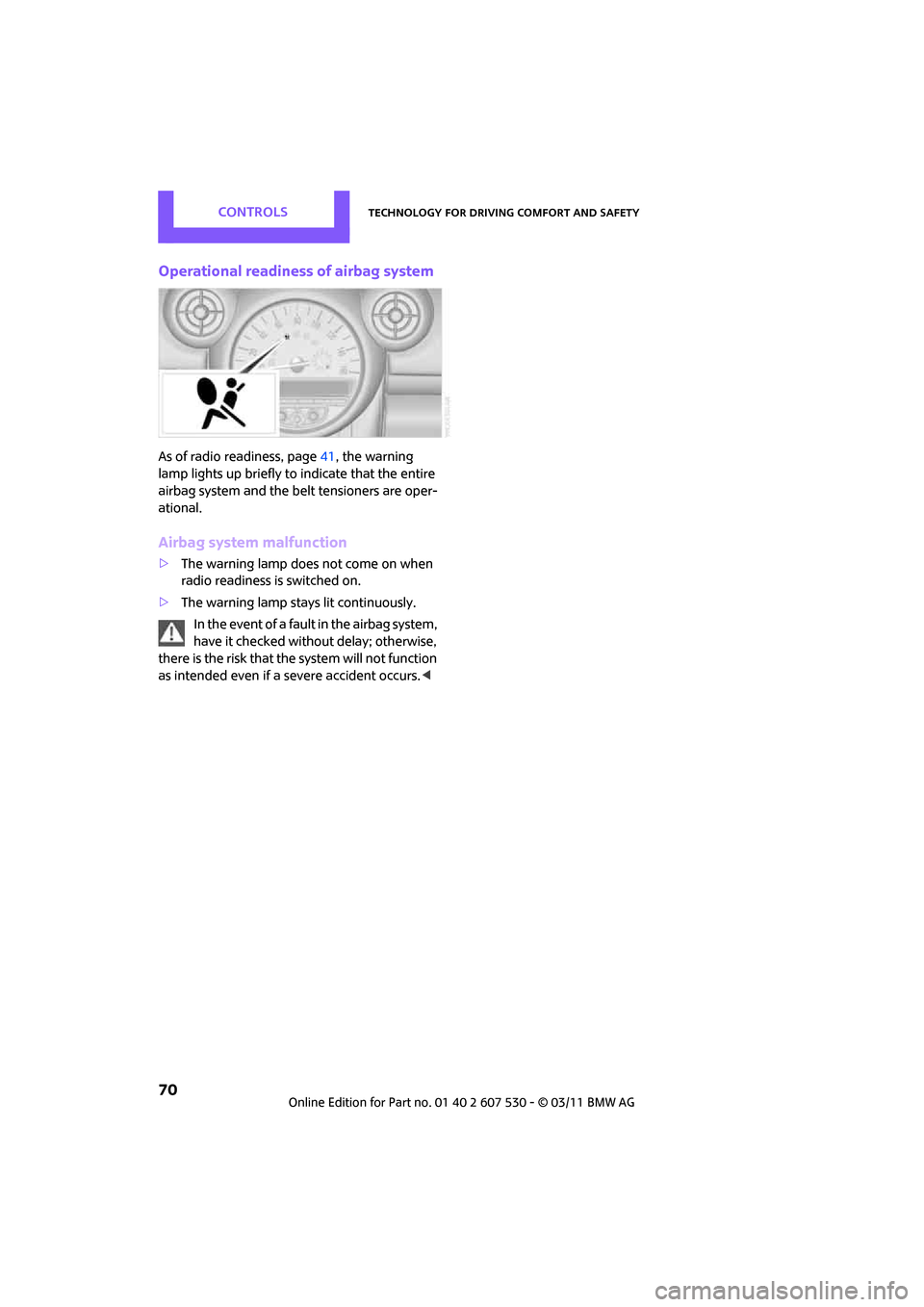
As of radio readiness, page41, the warning
lamp lights up briefly to indicate that the entire
airbag system and the be lt tensioners are oper-
ational.
Airbag system malfunction
> The warning lamp does not come on when
radio readiness is switched on.
> The warning lamp stays lit continuously.
In the event of a fault in the airbag system,
have it checked without delay; otherwise,
there is the risk that the system will not function
as intended even if a severe accident occurs. <
Page 143 of 196

Under the hoodMobility
141
Coolant temperature
If the coolant, and therefore the engine, should
overheat, then a warning light will go on, refer to
page 165.
Checking coolant level
Do not add coolant to the cooling system
when the engine is hot. Escaping coolant
can cause burns. <
Do not open the hood until the engine has
cooled down.
The coolant level is correct if it is between the
Min and Max markings.
Topping off
1. Turn the cap of the expansion tank a little
counterclockwise to allow any accumulated
pressure to escape, then continue turning to
open.
2. Slowly fill to the correct fluid level; do not
overfill.
3. Close by turning the cap.
Have the reason for the coolant loss eliminated
as soon as possible.
Page 145 of 196
MaintenanceMobility
143
Socket for On-Board
Diagnosis OBD
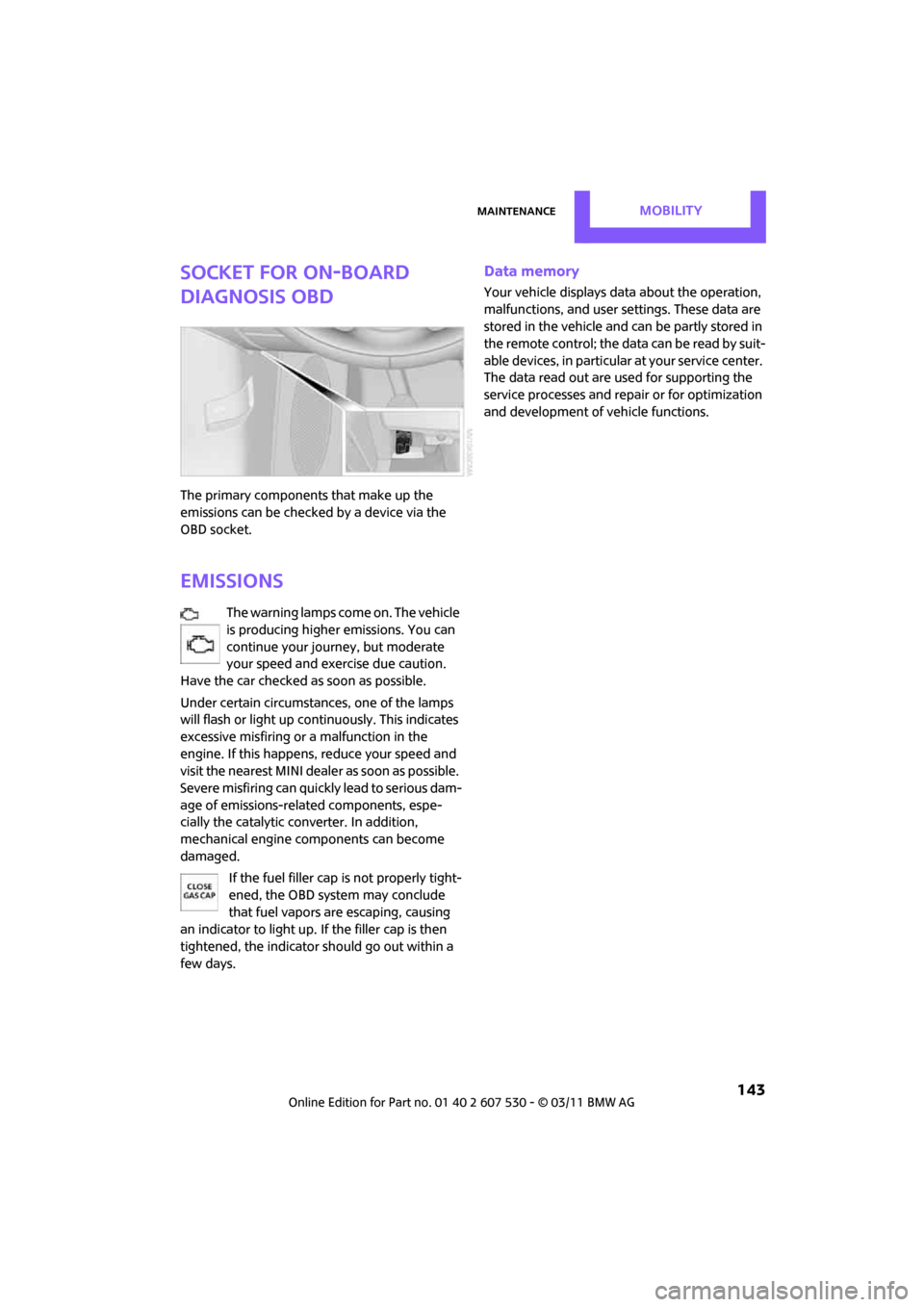
The primary components that make up the
emissions can be checked by a device via the
OBD socket.
Emissions
The warning lamps come on. The vehicle
is producing higher emissions. You can
continue your journey, but moderate
your speed and exercise due caution.
Have the car checked as soon as possible.
Under certain circumstances, one of the lamps
will flash or light up continuously. This indicates
excessive misfiring or a malfunction in the
engine. If this happens, reduce your speed and
visit the nearest MINI dealer as soon as possible.
Severe misfiring can quickly lead to serious dam-
age of emissions-related components, espe-
cially the catalytic converter. In addition,
mechanical engine components can become
damaged.
If the fuel filler cap is not properly tight-
ened, the OBD system may conclude
that fuel vapors are escaping, causing
an indicator to light up. If the filler cap is then
tightened, the indicator should go out within a
few days.
Data memory
Your vehicle displays data about the operation,
malfunctions, and user settings. These data are
stored in the vehicle and can be partly stored in
the remote control; the da ta can be read b y su it-
able devices, in particular at your service center.
The data read out are used for supporting the
service processes and repair or for optimization
and development of vehicle functions.
Page 164 of 196
MobilityIndicator and warning lamps
162
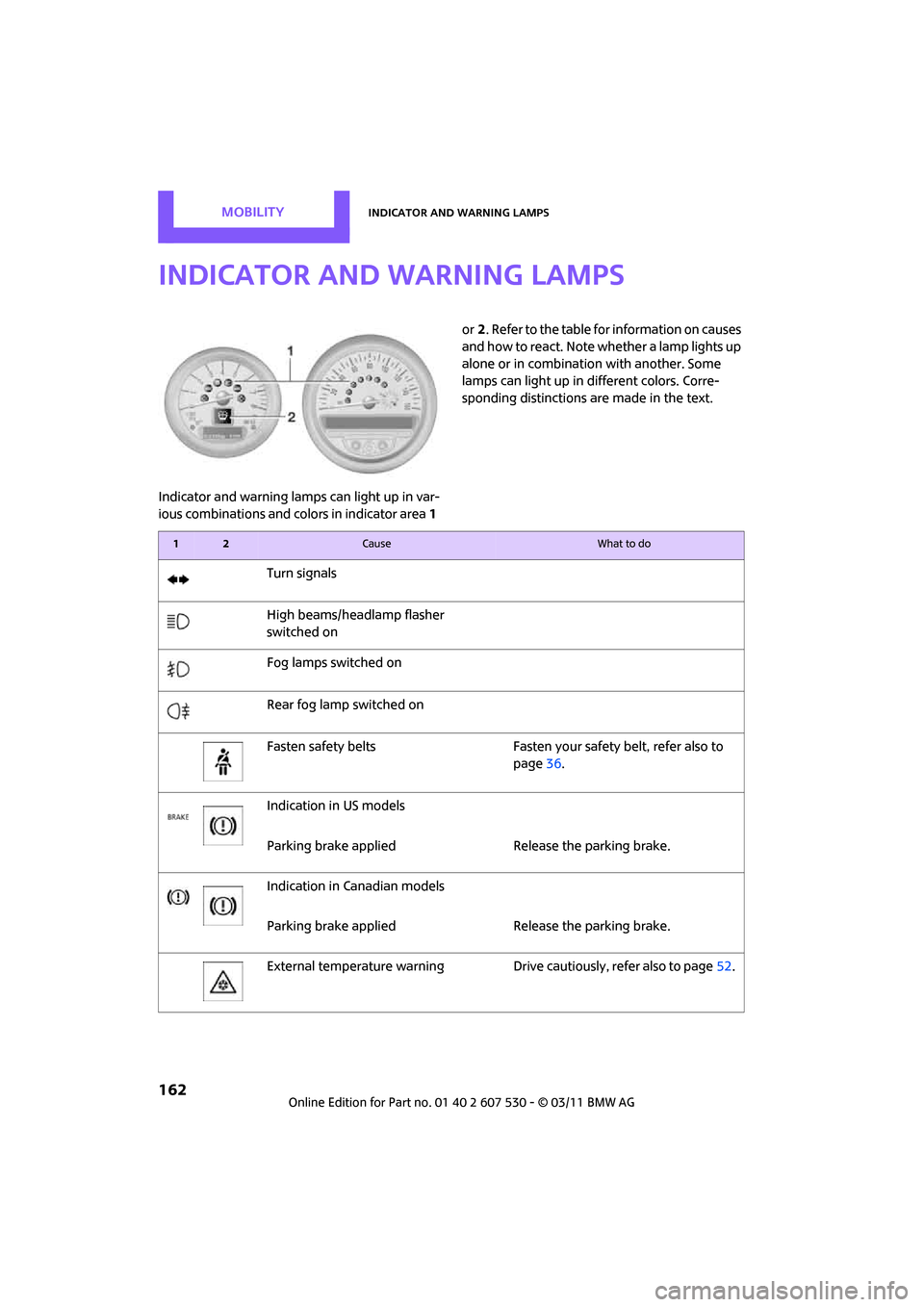
Indicator and warning lamps
Indicator and warning lamps can light up in var-
ious combinations and colors in indicator area 1 or
2. Refer to the table for information on causes
and how to react. Note whether a lamp lights up
alone or in combination with another. Some
lamps can light up in different colors. Corre-
sponding distinctions are made in the text.
12Cause What to do
Turn signals
High beams/headlamp flasher
switched on
Fog lamps switched on
Rear fog lamp switched on
Fasten safety belts Fasten your safety belt, refer also to
page36.
Indication in US models
Parking brake applied Release the parking brake.
Indication in Canadian models
Parking brake applied Release the parking brake.
External temperature warning Drive cautiously, refer also to page52.
Page 165 of 196
Indicator and warning lampsMobility
163
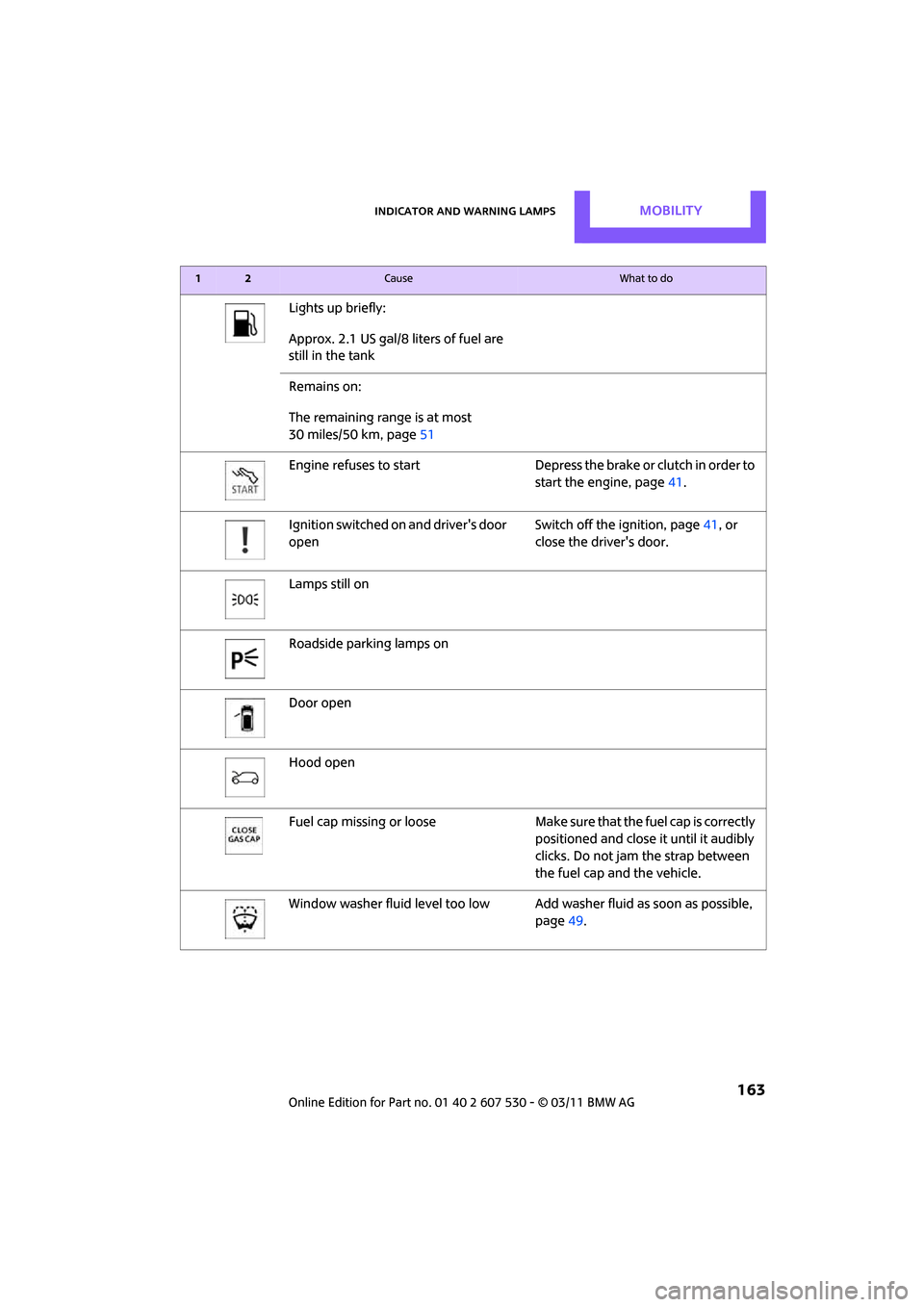
Lights up briefly:
Approx. 2.1 US gal/8 liters of fuel are
still in the tank
Remains on:
The remaining range is at most
30 miles/50 km, page 51
Engine refuses to start Depress the brake or clutch in order to start the engine, page41.
Ignition switched on and driver's door
open Switch off the ignition, page
41, or
close the driver's door.
Lamps still on
Roadside parking lamps on
Door open
Hood open
Fuel cap missing or loose Make sure that the fuel cap is correctly
positioned and close it until it audibly
clicks. Do not jam the strap between
the fuel cap and the vehicle.
Window washer fluid level too low Add washer fluid as soon as possible,
page 49.
12Cause What to do
Page 166 of 196
MobilityIndicator and warning lamps
164
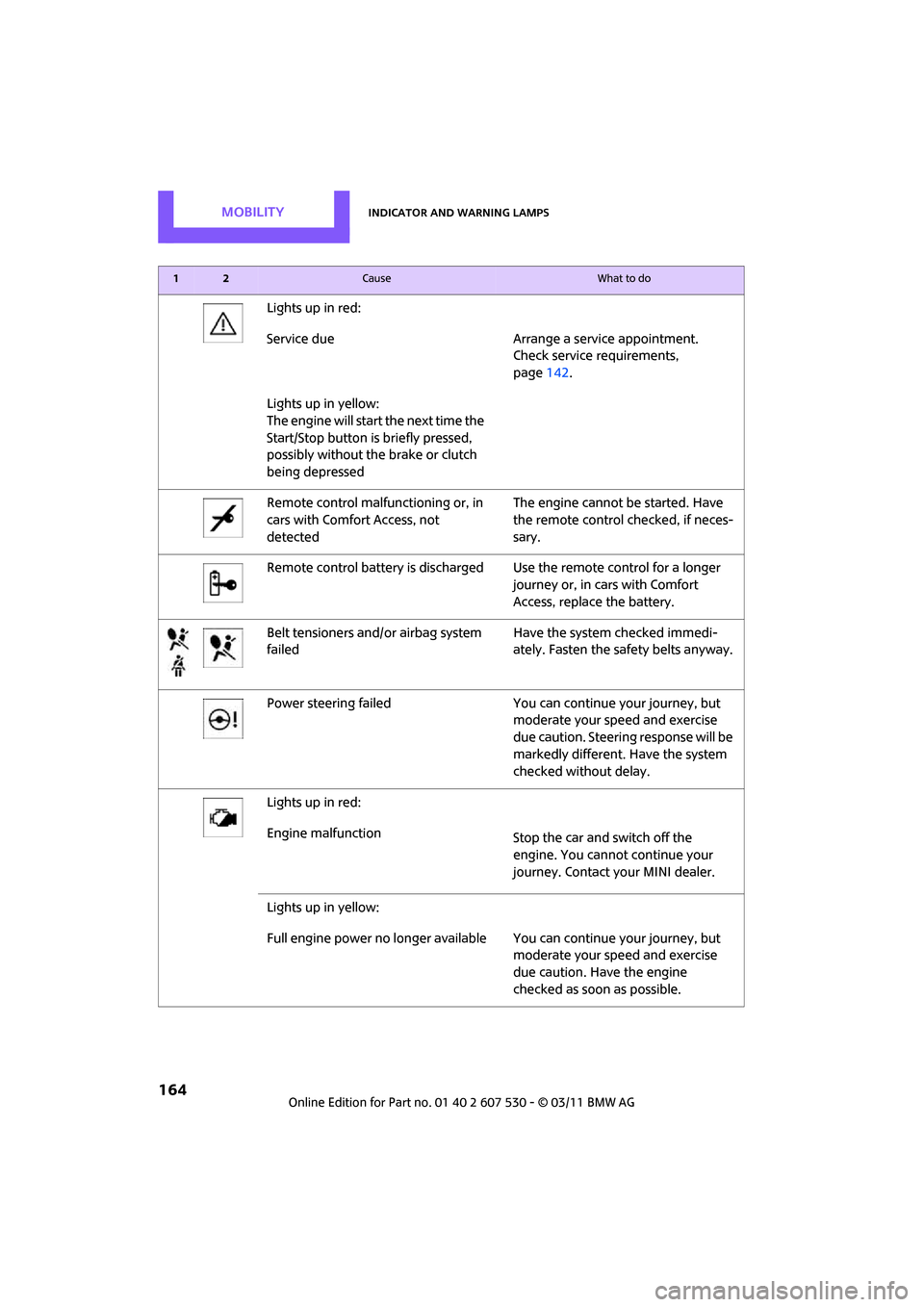
Lights up in red:
Service due Arrange a service appointment.Check service requirements,
page142.
Lights up in yellow:
The engine will start the next time the
Start/Stop button is briefly pressed,
possibly without the brake or clutch
being depressed
Remote control malfunctioning or, in
cars with Comfort Access, not
detected The engine cannot be started. Have
the remote control
checked, if neces-
sary.
Remote control battery is discharged Use the remote control for a longer journey or, in cars with Comfort
Access, replace the battery.
Belt tensioners and/ or airbag system
failed Have the system checked immedi-
ately. Fasten the safety belts anyway.
Power steering failed You can continue your journey, but moderate your speed and exercise
due caution. Steering response will be
markedly different. Have the system
checked without delay.
Lights up in red:
Engine malfunction Stop the car and switch off the
engine. You cannot continue your
journey. Contact your MINI dealer.
Lights up in yellow:
Full engine power no longer available Y ou can continue your journey, but
moderate your speed and exercise
due caution. Have the engine
checked as soon as possible.
12Cause What to do
Page 167 of 196
Indicator and warning lampsMobility
165
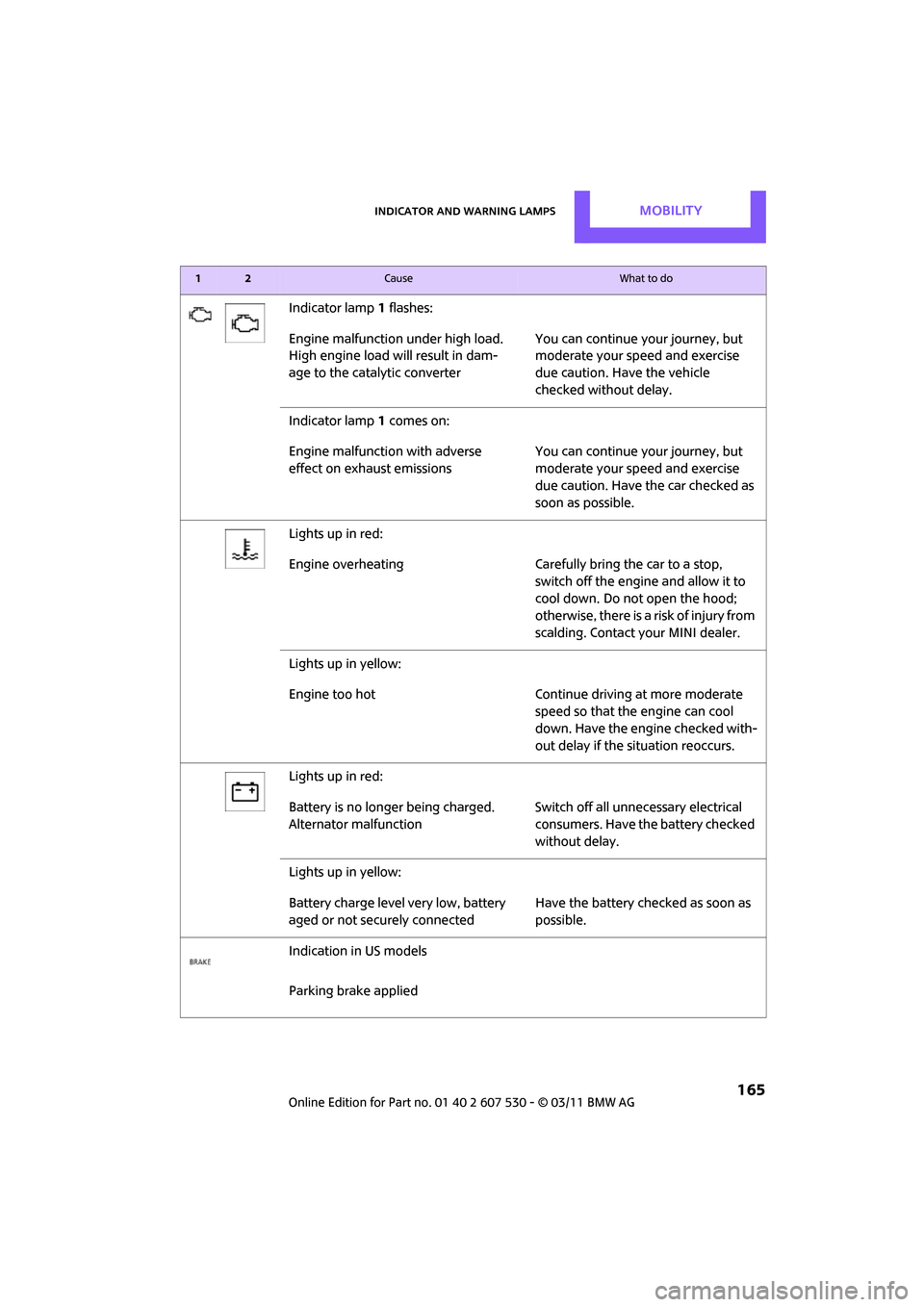
Indicator lamp1 flashes:
Engine malfunction under high load.
High engine load will result in dam-
age to the catalytic converter You can continue your journey, but
moderate your speed and exercise
due caution. Have the vehicle
checked without delay.
Indicator lamp 1 comes on:
Engine malfunction with adverse
effect on exhaust emissions You can continue your journey, but
moderate your speed and exercise
due caution. Have the car checked as
soon as possible.
Lights up in red:
Engine overheating Carefully bring the car to a stop,
switch off the engine and allow it to
cool down. Do not open the hood;
otherwise, there is a risk of injury from
scalding. Contact your MINI dealer.
Lights up in yellow:
Engine too hot Continue driving at more moderate speed so that the engine can cool
down. Have the engine checked with-
out delay if the situation reoccurs.
Lights up in red:
Battery is no longer being charged.
Alternator malfunction Switch off all unne
cessary electrical
consumers. Have the battery checked
without delay.
Lights up in yellow:
Battery charge level very low, battery
aged or not securely connected Have the battery checked as soon as
possible.
Indication in US models
Parking brake applied
12Cause What to do