brake MINI Countryman 2011 Owner's Guide
[x] Cancel search | Manufacturer: MINI, Model Year: 2011, Model line: Countryman, Model: MINI Countryman 2011Pages: 196, PDF Size: 3.06 MB
Page 147 of 196
CareMobility
145
5.Insert the remote control in the ignition lock
so that the vehicle can roll.
Steam jets/high-pressure washers
When using steam jets or high-pressure
washers, make sure th at you maintain suf-
ficient distance from the vehicle and do not
exceed a maximum temperature of 140 7/60 6.
If the distance is too close, the pressure too high,
or the temperature too high, parts of the vehicle
can be damaged, or water can penetrate.
Observe the operating in structions for high-
pressure washers. <
Do not spray sensors such as Park Dis-
tance Control with hi gh-pressure washers
for a long time and main tain the greatest possi-
ble distance of approx. 1 ft/30 cm from them. <
Manual washing
Use a great deal of water and, if necessary, car
shampoo when washing your car by hand. Clean
the vehicle with a sponge or a washing brush
applying a slight amount of pressure.
Before cleaning the windshield, deacti-
vate the rain sensor or turn off the ignition
to prevent unintentional wiping. <
Observe local regulati ons regarding wash-
ing vehicles by hand. <
Headlamps
Do not wipe dry and do not use abrasive or cor-
rosive cleaning agents. Remove dirt and con-
tamination, such as inse cts, by soaking with
shampoo and then washing with plenty of
water.
Do not remove accumula ted ice and snow with
an ice scraper; use window deicers instead.
Windows
Clean the outside and inside of the windows and
mirrors with a window cleaner.
Do not clean the mirrors with cleaners
containing quartz. <
Wiper blades
Clean with soapy water an d change regularly to
prevent the formation of streaks.
Wax, preservatives and dirt on the win-
dows cause streaks when the windshield
wipers are on, and can cause premature wear of
the wiper blades and interfere with the rain sen-
sor. <
Paintwork, care
Regular care helps your vehicle retain its value
and protects the pain t from the long-term
effects of aggressive substances.
In some regions, envi ronmental factors can
affect the vehicl e paintwork and damage it. It is
therefore important to adjust the frequency and
extent of vehicle ca re correspondingly.
Immediately remove aggr essive materials such
as spilled fuel, oil, grease, brake fluid, tree sap or
bird droppings to preven t damage to the paint-
work.
Removing paintwork damage
Depending on the severity of the damage,
immediately repair stone damage or
scratches to prevent rusting. <
The manufacturer of the MINI recommends
repairing paint damage pr ofessionally according
to factory specifications with original MINI
paints.
Preservation
Preservation is necessary when water no longer
beads on the clean paint surface. To preserve
the paint, only use pres ervatives that contain
carnauba or synthetic waxes.
Rubber seals
Only treat with water or rubber care products.
Do not use silicon spra ys or other silicon-
containing care products on rubber seals;
otherwise, noise and damage could occur. <
Page 148 of 196
MobilityCare
146
Chrome parts*
Carefully clean vehicle parts such as the radiator
grill and door handles with copious quantities of
water and, if necessary, a shampoo additive,
especially when contaminated with road salt.
For additional treatmen t, use chrome polish.
Light alloy wheels*
The system produces brake dust that collects on
the light alloy wheels. Clean them regularly with
acid-free wheel cleaner.
Do not use aggressive, acid-containing,
highly alkaline, or abrasive cleansers or
steam jets hotter than 140 7/60 6 as they may
cause damage. <
External sensors
Keep the outside sensors on the vehicle
such as the Park Di stance Control clean
and ice-free to ensure that they function prop-
erly. <
internal Care
Upholstery/fabrics
Regularly use a vacuum cleaner to remove sur-
face dirt.
In case of serious spots su ch as liquid stains, use
a soft sponge or lint-free microfiber cloth and
suitable interior cleaners. Observe the instruc-
tions on the packaging.
Clean upholstery up to the seams. Do not
rub forcefully. <
Velcro fasteners on pa nts or other items of
clothing can damage seat covers. Make
sure that all Velcro fasteners are closed. <
Leather/leather coverings*
The leather processed by the manufac-
turer of your MINI is a high-quality natural
product. Light variations in the grain is one of
the typical properties of natural leather.
leather have an abrasive effect, leading to
increased wear and causing the leather surface
to become brittle prematurely. Use a cloth or
vacuum cleaner to remo ve dust on a regular
basis.
Especially when the leather has a light color, it
should be cleaned regularl y since it tends to get
heavily soiled.
Treat the leather twice a year using a leather
lotion since dirt and grease will gradually attack
the leather's protective layer.
Carpets/floor mats*
Keep floor mats, carpet, and other objects
out of the movement range of the pedals;
otherwise, they may inhibit the function of the
pedals during driving.
Do not place additional floor mats onto an exist-
ing one or onto other objects.
Only use floor mats that have been approved for
the vehicle and can be appropriately fastened.
Make sure that the floo r mats are securely fas-
tened again after they ha ve been removed, e.g.
for cleaning. <
Floor mats can be removed to be cleaned.
If the carpets are very di rty, clean with a microfi-
ber cloth and water or an interior cleaner. When
doing so, rub forward and back in the driving
direction; otherwise, the carpet may become
matted.
Interior plastic parts
These include:
> Plastic surfaces
> Lamp glass
> Display panes
> Mat parts
Only clean with water and, if necessary, solvent-
free plastic cleaners. Do not use solvents such as alcohol, lac-
quer thinner, cold clea ners, fuel, or similar,
as these will damage the surfaces. <
Page 153 of 196

Replacing componentsMobility
151
Replacing a fog lamp bulb
H8 bulb, 35 watts
1.Turn in the wheel.
2. Remove cover 2.
To do so, turn the cover counterclockwise.
3. Pull the cable connector.
4. Unscrew the lower bulb counterclockwise.
5. To insert the new bulb and replace the
cover, proceed in reverse order.
Side turn signals
5watt bulb, W5W
1.Open hood.
2. Squeeze clamping clip, arrows, and remove
bulb holder.
3. Unscrew bulb counterclockwise and
replace.
4. To insert the new bulb and replace the
cover, proceed in reverse order.
Side marker lamps
Have these bulbs replaced by your MINI dealer.
Tail lamps
Bulb P 21 W
1Brake/tail lamp
2 Turn signal
3 Brake/tail lamp
4 Backup lamps
5 Backup lamps
Changing
All bulbs are integrated in a central bulb holder.
1.Switch off the light and remove the infrared
remote control from the ignition lock.
2. Push the cover panel out from the rear of the
cargo area side trim panel and remove it.
Page 154 of 196
MobilityReplacing components
152
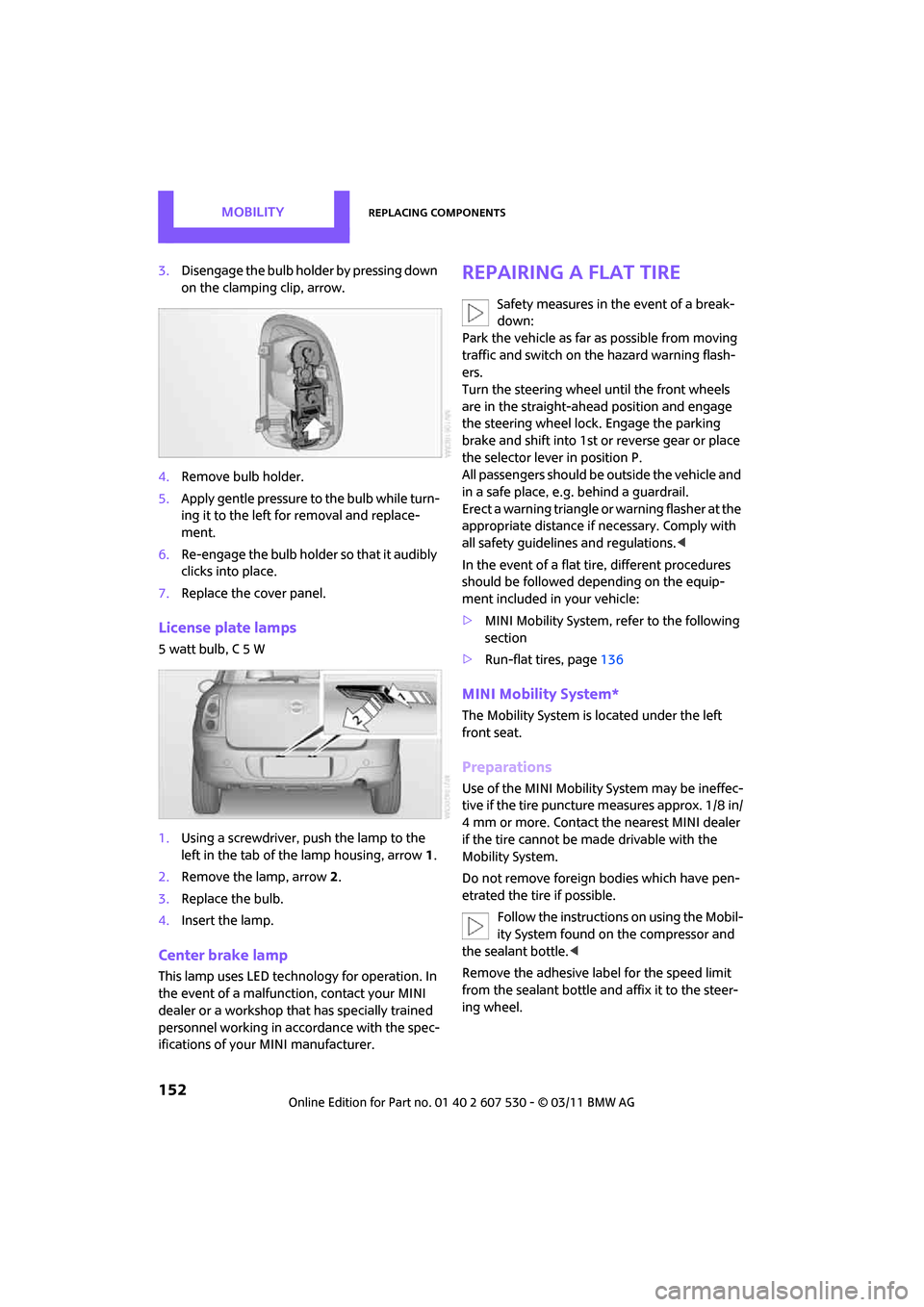
3.Disengage the bulb holder by pressing down
on the clamping clip, arrow.
4. Remove bulb holder.
5. Apply gentle pressure to the bulb while turn-
ing it to the left for removal and replace-
ment.
6. Re-engage the bulb holder so that it audibly
clicks into place.
7. Replace the cover panel.
License plate lamps
5 watt bulb, C 5 W
1.Using a screwdriver, push the lamp to the
left in the tab of the lamp housing, arrow 1.
2. Remove the lamp, arrow 2.
3. Replace the bulb.
4. Insert the lamp.
Center brake lamp
This lamp uses LED techno logy for operation. In
the event of a malfunction, contact your MINI
dealer or a workshop th at has specially trained
personnel working in acco rdance with the spec-
ifications of your MINI manufacturer.
Repairing a flat tire
Safety measures in the event of a break-
down:
Park the vehicle as far as possible from moving
traffic and switch on the hazard warning flash-
ers.
Turn the steering wheel until the front wheels
are in the straight-ahead position and engage
the steering wheel lock. Engage the parking
brake and shift into 1st or reverse gear or place
the selector leve r in position P.
All passengers should be outside the vehicle and
in a safe place, e.g. behind a guardrail.
Erect a warning triangle or warning flasher at the
appropriate distance if necessary. Comply with
all safety guidelines and regulations. <
In the event of a flat ti re, different procedures
should be followed depending on the equip-
ment included in your vehicle:
> MINI Mobility System, refer to the following
section
> Run-flat tires, page 136
MINI Mobility System*
The Mobility System is located under the left
front seat.
Preparations
Use of the MINI Mobility System may be ineffec-
tive if the tire puncture measures approx. 1/8 in/
4 mm or more. Contact the nearest MINI dealer
if the tire cannot be made drivable with the
Mobility System.
Do not remove foreign bodies which have pen-
etrated the tire if possible.
Follow the instructions on using the Mobil-
ity System found on the compressor and
the sealant bottle. <
Remove the adhesive label for the speed limit
from the sealant bottle an d affix it to the steer-
ing wheel.
Page 164 of 196
MobilityIndicator and warning lamps
162
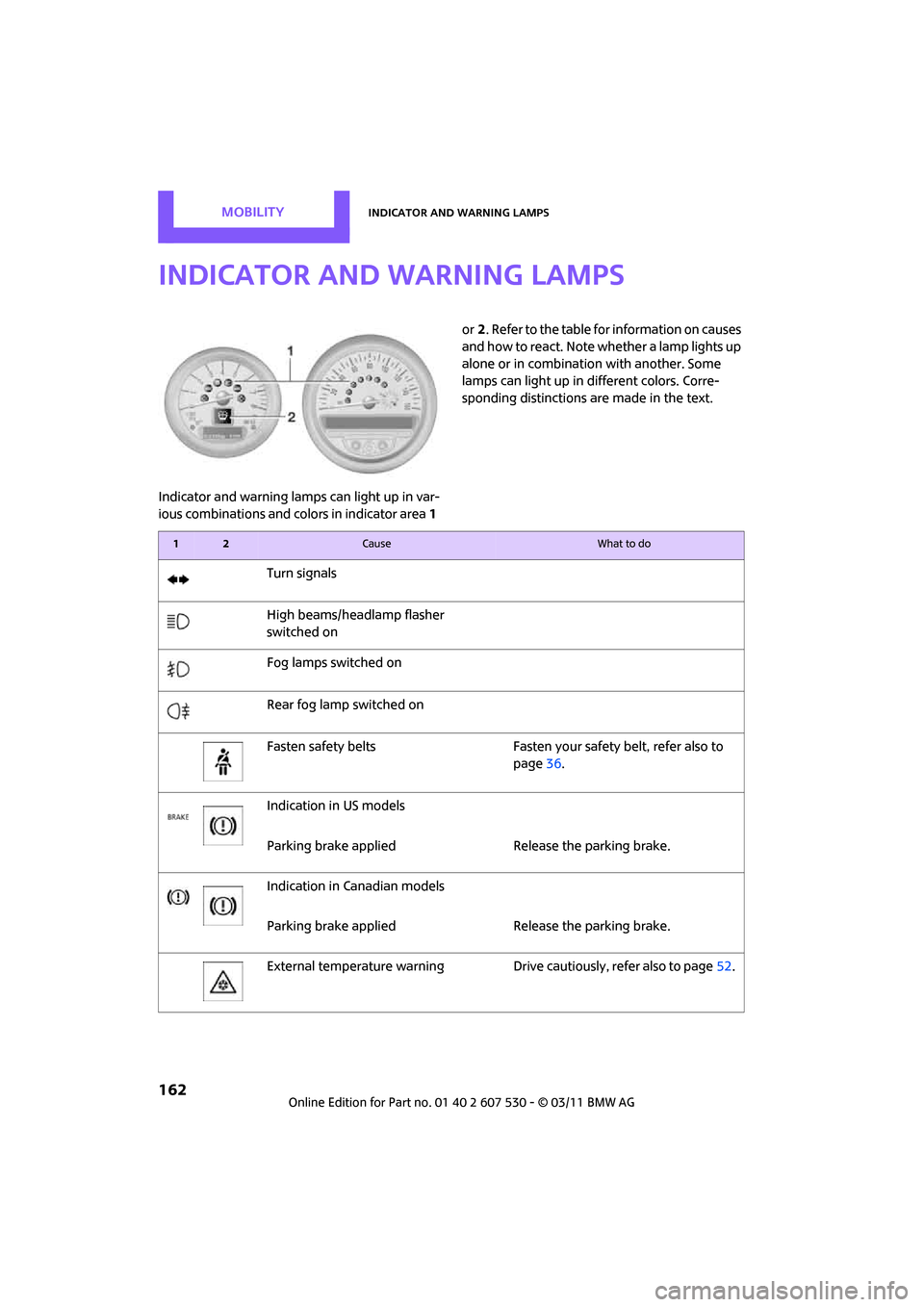
Indicator and warning lamps
Indicator and warning lamps can light up in var-
ious combinations and colors in indicator area 1 or
2. Refer to the table for information on causes
and how to react. Note whether a lamp lights up
alone or in combination with another. Some
lamps can light up in different colors. Corre-
sponding distinctions are made in the text.
12Cause What to do
Turn signals
High beams/headlamp flasher
switched on
Fog lamps switched on
Rear fog lamp switched on
Fasten safety belts Fasten your safety belt, refer also to
page36.
Indication in US models
Parking brake applied Release the parking brake.
Indication in Canadian models
Parking brake applied Release the parking brake.
External temperature warning Drive cautiously, refer also to page52.
Page 165 of 196
Indicator and warning lampsMobility
163
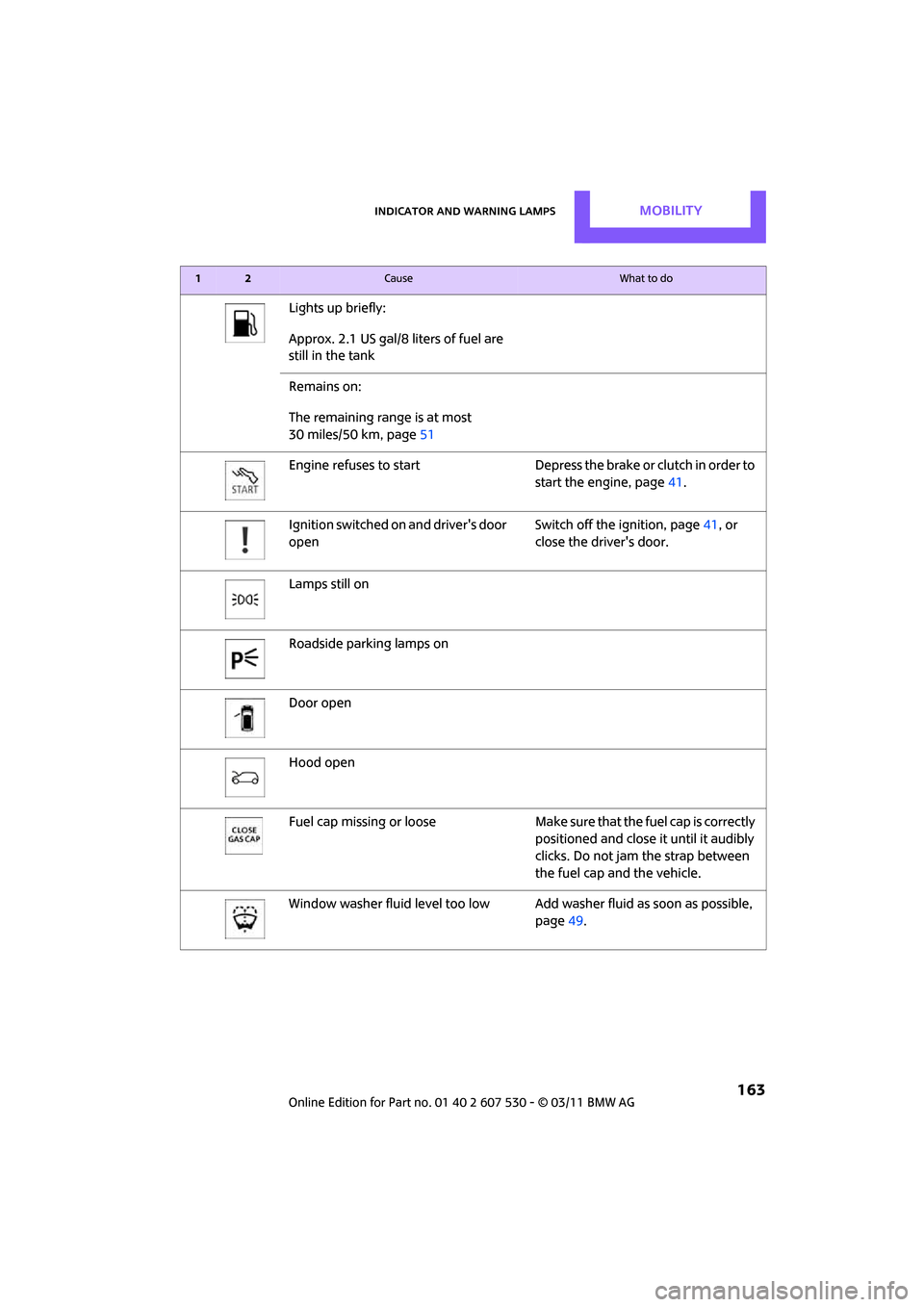
Lights up briefly:
Approx. 2.1 US gal/8 liters of fuel are
still in the tank
Remains on:
The remaining range is at most
30 miles/50 km, page 51
Engine refuses to start Depress the brake or clutch in order to start the engine, page41.
Ignition switched on and driver's door
open Switch off the ignition, page
41, or
close the driver's door.
Lamps still on
Roadside parking lamps on
Door open
Hood open
Fuel cap missing or loose Make sure that the fuel cap is correctly
positioned and close it until it audibly
clicks. Do not jam the strap between
the fuel cap and the vehicle.
Window washer fluid level too low Add washer fluid as soon as possible,
page 49.
12Cause What to do
Page 166 of 196
MobilityIndicator and warning lamps
164
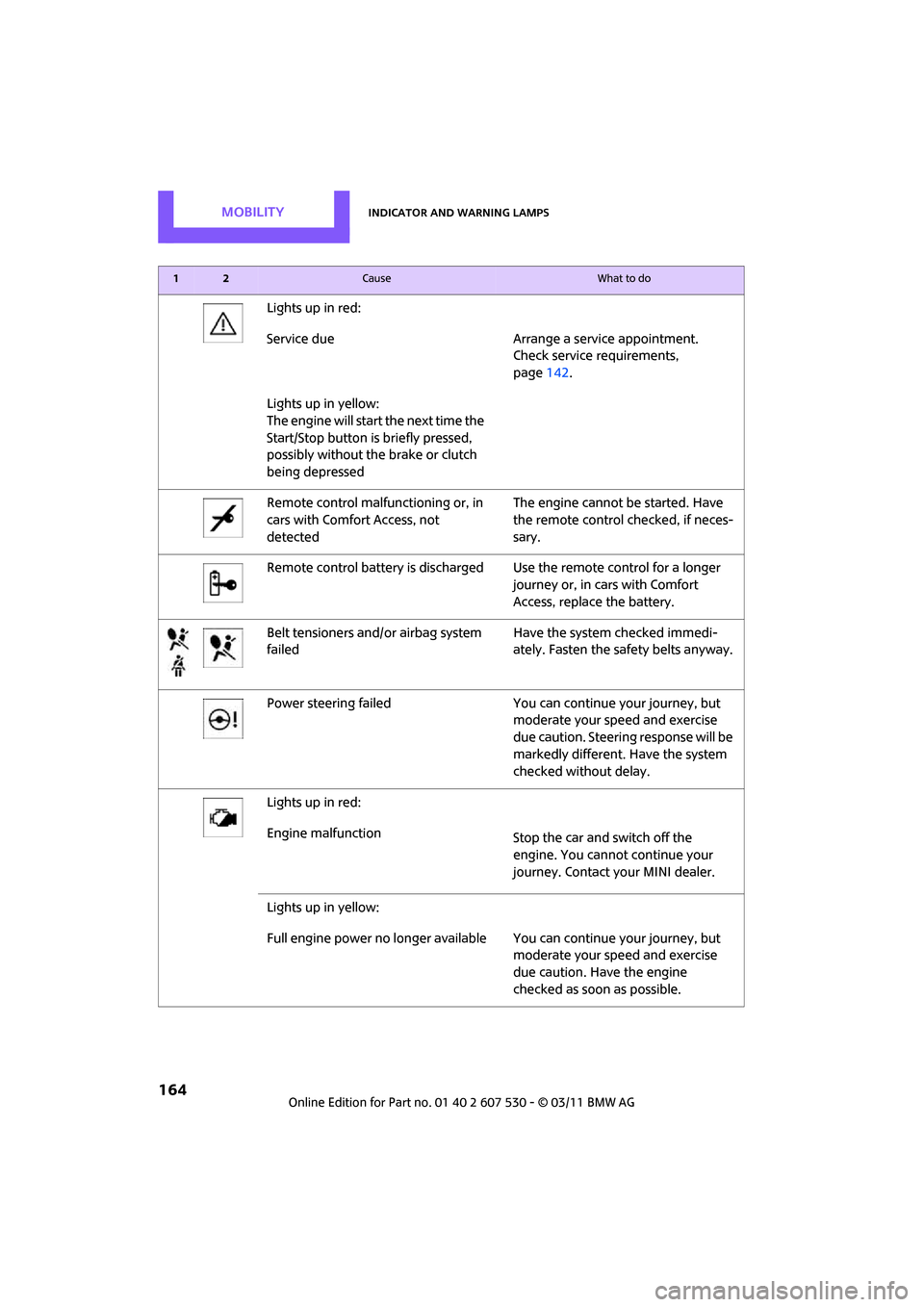
Lights up in red:
Service due Arrange a service appointment.Check service requirements,
page142.
Lights up in yellow:
The engine will start the next time the
Start/Stop button is briefly pressed,
possibly without the brake or clutch
being depressed
Remote control malfunctioning or, in
cars with Comfort Access, not
detected The engine cannot be started. Have
the remote control
checked, if neces-
sary.
Remote control battery is discharged Use the remote control for a longer journey or, in cars with Comfort
Access, replace the battery.
Belt tensioners and/ or airbag system
failed Have the system checked immedi-
ately. Fasten the safety belts anyway.
Power steering failed You can continue your journey, but moderate your speed and exercise
due caution. Steering response will be
markedly different. Have the system
checked without delay.
Lights up in red:
Engine malfunction Stop the car and switch off the
engine. You cannot continue your
journey. Contact your MINI dealer.
Lights up in yellow:
Full engine power no longer available Y ou can continue your journey, but
moderate your speed and exercise
due caution. Have the engine
checked as soon as possible.
12Cause What to do
Page 167 of 196
Indicator and warning lampsMobility
165
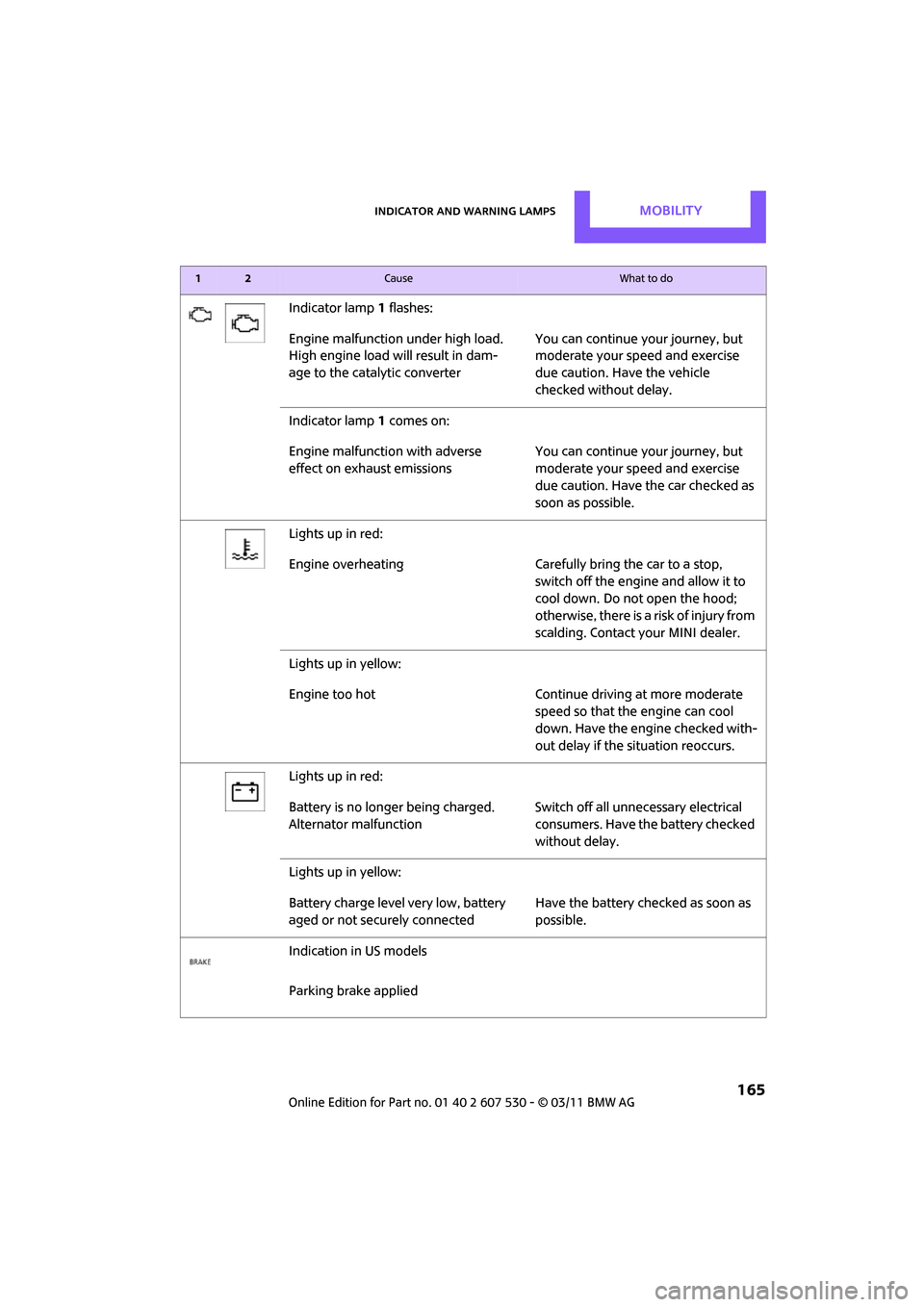
Indicator lamp1 flashes:
Engine malfunction under high load.
High engine load will result in dam-
age to the catalytic converter You can continue your journey, but
moderate your speed and exercise
due caution. Have the vehicle
checked without delay.
Indicator lamp 1 comes on:
Engine malfunction with adverse
effect on exhaust emissions You can continue your journey, but
moderate your speed and exercise
due caution. Have the car checked as
soon as possible.
Lights up in red:
Engine overheating Carefully bring the car to a stop,
switch off the engine and allow it to
cool down. Do not open the hood;
otherwise, there is a risk of injury from
scalding. Contact your MINI dealer.
Lights up in yellow:
Engine too hot Continue driving at more moderate speed so that the engine can cool
down. Have the engine checked with-
out delay if the situation reoccurs.
Lights up in red:
Battery is no longer being charged.
Alternator malfunction Switch off all unne
cessary electrical
consumers. Have the battery checked
without delay.
Lights up in yellow:
Battery charge level very low, battery
aged or not securely connected Have the battery checked as soon as
possible.
Indication in US models
Parking brake applied
12Cause What to do
Page 168 of 196
MobilityIndicator and warning lamps
166
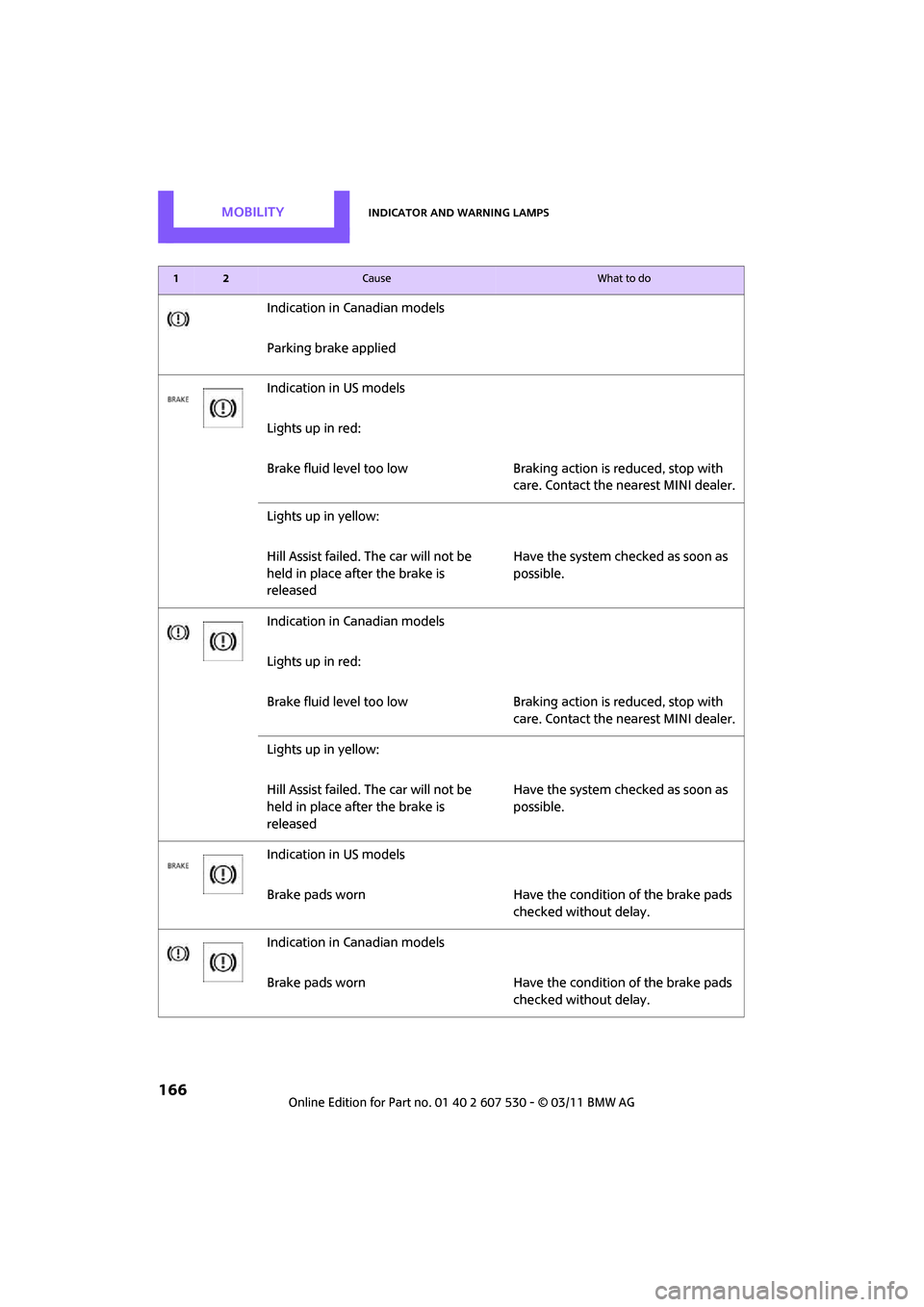
Indication in Canadian models
Parking brake applied
Indication in US models
Lights up in red:
Brake fluid level too low Braking action is reduced, stop with
care. Contact the nearest MINI dealer.
Lights up in yellow:
Hill Assist failed. The car will not be
held in place after the brake is
released Have the system checked as soon as
possible.
Indication in Canadian models
Lights up in red:
Brake fluid level too low Braking action is reduced, stop with
care. Contact the nearest MINI dealer.
Lights up in yellow:
Hill Assist failed. The car will not be
held in place after the brake is
released Have the system checked as soon as
possible.
Indication in US models
Brake pads worn Have the condition of the brake pads checked without delay.
Indication in Canadian models
Brake pads worn Have the condition of the brake pads checked without delay.
12Cause What to do
Page 169 of 196

Indicator and warning lampsMobility
167
Indication in US models
Vehicle electronics failedYou cannot continue your journey.
Contact your MINI dealer.
Indication
* in Canadian models
Vehicle electronics failed You cannot continue your journey.
Contact your MINI dealer.
Lights up in red: Have the system in question checked
without delay.
> Starter failed or The engine cannot be restarted.
> ignition malfunctioning. Engine
restart only possible when brake
is depressed or
> lighting system failed. Low
beams/tail lamps and brake
lamps still operational. All other
lamps failed Depress the brake to start the engine
again.
Lights up in yellow:
> Control of the brake lamps failed
or
> fuel supply malfunctioning You can continue your journey, but
moderate your speed and exercise
due caution. Have the system in ques-
tion checked without delay.
> Drive malfunctioning You can continue your journey, but
moderate your speed and exercise
due caution. Transmission limp-home
program active with restricted range
of gears. Have the system checked
immediately.
Flashing:
Dynamic Stability Control DSC or
Dynamic Traction Control DTC is con-
trolling drive and braking forces, refer
also to page 59
12Cause What to do