ignition MINI Countryman 2011 Service Manual
[x] Cancel search | Manufacturer: MINI, Model Year: 2011, Model line: Countryman, Model: MINI Countryman 2011Pages: 196, PDF Size: 3.06 MB
Page 124 of 196

CommunicationsTelephone
122
3.Press and hold the button to dial the
phone number.
Dialing a phone number stored in a list
To select an entry and establish a connection:
1.Press the MENU button.
2. Press the button.
3. Press the desired button to select
one of the four lists.
4. Turn the right rotary knob to select an entry
and press the right rotary knob to dial the
phone number.
Deleting an individual entry
1.Select the desired entry from the list.
2. Press the button.
Displaying call duration
To display the duration during a call:
Press the button.
Hands-free system
General information
Calls being conducted using the hands-free sys-
tem can be continued using the mobile phone
and vice versa.
From the mobile phone to the hands-
free system
Calls that have been initiated from outside the
Bluetooth range of the ve hicle can be continued
using the hands-free system if the ignition is
switched on.
Depending on the mobile phone, the call is
automatically switched to hands-free mode. If the switch does not occur automatically, then
follow the instructions that appear on the dis-
play of the mobile phone, also refer to the
Owner's Manual for the mobile phone.
From hands-free system to mobile
phone
Calls being conducted using the hands-free sys-
tem can also be continued using the mobile
phone if so desired, de
pending on the mobile
phone.
At this point, follow the instructions that appear
on the display of the mobile phone, also refer to
the Owner's Manual for the mobile phone.
Operation by voice*
The concept
> The mobile phone can be operated without
removing your hand from the steering
wheel.
> In many cases, the entry process is sup-
ported by means of announcements or
questions.
> {... } Verbal instructions to use with the voice
activation system.
> {{...}}
Identifies the anwsers generated by
the voice activation system.
Voice commands
Activating voice activation system
1. Briefly press the button on the steering
wheel.
An acoustic signal indicates that commands
can be spoken aloud. Display on the radio:
2. Say the command.
Page 126 of 196

CommunicationsTelephone
124
Deleting all entries
To listen to and select the entries:
Selecting an entry
Adjusting volume
Turn knob during announcement.
>The volume remains the same, even if the
volume of other audi o sources is changed.
> The volume is stored for the remote control
currently in use.
Notes
Do not use the voice activation system to initiate
an emergency call. In st ressful situations, the
voice and vocal pitch can change. This can
unnecessarily delay the establishment of a tele-
phone connection.
Ambient conditions
> Say the commands, numbers and letters
smoothly and with normal volume, empha-
sis and speed.
> Always say commands in the language of
the voice activation system.
> Keep doors, windows, glass sunroof
*/pan-
oramic sunroof
*, or convertible top* closed
to avoid noise interference. >
Avoid ambient noise in the vehicle while
speaking.
MINI contact*
When the ignition is switched on, several MINI
dealer phone numbers can be displayed.
>"Road Assist": roadside service
*, if you
require assistance in th e event of a flat tire.
> "Service": MINI dealer, for example if you
need to make a service appointment.
> "Cust Relat": MINI Hotline
* for information
about your vehicle.
Displaying phone numbers
1. Press the MENU button.
2. Press the button.
3. Turn the right rotary knob until the desired
phone number is displayed.
Snap-in adapter*
Installation location
In the center armrest.
Inserting snap-in adapter
1.Press the button and remove the cover.
1.
{Delete phonebook }.
The dialog for deleting phone book is
opened.
2. Confirm the query with {Yes }.
3. Confirm the query again with {Yes }.
1. {Read phonebook }.
The dialog for reading phone book is
opened.
2. Say {Dial number } when the desired
entry is read.
1. {Dial name }.
2. Say the name when prompted.
3. Confirm the query with {Yes }.
Page 146 of 196
MobilityCare
144
Care
Car-care products
Regular cleaning and care helps to maintain the
value of your MINI.
The manufacturer of your MINI recommends
using manufacturer-approved products to clean
and care for your vehicle.
Your MINI dealer would be pleased to advise
you on cleaning and care products and services
for your MINI.The ingredients of original MINI Care Prod-
ucts have been tested, and the products
have been tested in the laboratory and in prac-
tice. They offer optimum care and protection for
your vehicle. <
Do not use any cleansers containing alco-
hol or solvents as these may cause dam-
age. <
Cleaning agents may contain hazardous
or health-damaging substances. Follow
the warning and hazard instructions on the
packaging. For interior cleaning, always open
the doors or windows of the vehicle.
Do not use any products that are not intended
for cleaning the vehicle. <
External care
Washing your vehicle
Especially during the winter months the
vehicle should be frequently washed. Dirt
and road salt can damage the vehicle. <
After washing the vehicle, apply the
brakes briefly to dry them; otherwise,
water can reduce braking efficiency over the
short term and the brake rotors can corrode. <
Car washes
Preference should be given to cloth car washes.
Do not use automatic high-pressure car
washes; otherwise, water may drip into
the vehicle around the windows. <
Before driving in to the car wash, check if the sys-
tem is suitable for your MINI. Observe the fol-
lowing points:
> Vehicle dimensions, page 177
> If necessary: fold in the outside mirrors,
page 36
> Maximum permissible tire width
Avoid car washes with tracks higher than
4 in/10 cm; otherwise, the chassis could
be damaged. <
Preparations for driving into the car wash:
> Unscrew the rod antenna.
> Deactivate the rain sensor
* to prevent unin-
tentional wiping.
> Deactivate rear window wiper and protect it
from damage. Ask the car wash operator
about measures that can be taken to protect
the wipers.
> Remove additional atta chments, e.g. spoil-
ers or telephone antennas, if there is a pos-
sibility that they could be damaged.
> Inserting the remote control into the ignition
lock.
Automatic transmission
Before driving into the car wash, make sure that
the vehicle can roll:
1.Place the remote control, even with Comfort
Access, in the ignition lock.
2. Move the selector le ver to position N.
3. Release the parking brake.
4. Switch off the engine.
Page 147 of 196
CareMobility
145
5.Insert the remote control in the ignition lock
so that the vehicle can roll.
Steam jets/high-pressure washers
When using steam jets or high-pressure
washers, make sure th at you maintain suf-
ficient distance from the vehicle and do not
exceed a maximum temperature of 140 7/60 6.
If the distance is too close, the pressure too high,
or the temperature too high, parts of the vehicle
can be damaged, or water can penetrate.
Observe the operating in structions for high-
pressure washers. <
Do not spray sensors such as Park Dis-
tance Control with hi gh-pressure washers
for a long time and main tain the greatest possi-
ble distance of approx. 1 ft/30 cm from them. <
Manual washing
Use a great deal of water and, if necessary, car
shampoo when washing your car by hand. Clean
the vehicle with a sponge or a washing brush
applying a slight amount of pressure.
Before cleaning the windshield, deacti-
vate the rain sensor or turn off the ignition
to prevent unintentional wiping. <
Observe local regulati ons regarding wash-
ing vehicles by hand. <
Headlamps
Do not wipe dry and do not use abrasive or cor-
rosive cleaning agents. Remove dirt and con-
tamination, such as inse cts, by soaking with
shampoo and then washing with plenty of
water.
Do not remove accumula ted ice and snow with
an ice scraper; use window deicers instead.
Windows
Clean the outside and inside of the windows and
mirrors with a window cleaner.
Do not clean the mirrors with cleaners
containing quartz. <
Wiper blades
Clean with soapy water an d change regularly to
prevent the formation of streaks.
Wax, preservatives and dirt on the win-
dows cause streaks when the windshield
wipers are on, and can cause premature wear of
the wiper blades and interfere with the rain sen-
sor. <
Paintwork, care
Regular care helps your vehicle retain its value
and protects the pain t from the long-term
effects of aggressive substances.
In some regions, envi ronmental factors can
affect the vehicl e paintwork and damage it. It is
therefore important to adjust the frequency and
extent of vehicle ca re correspondingly.
Immediately remove aggr essive materials such
as spilled fuel, oil, grease, brake fluid, tree sap or
bird droppings to preven t damage to the paint-
work.
Removing paintwork damage
Depending on the severity of the damage,
immediately repair stone damage or
scratches to prevent rusting. <
The manufacturer of the MINI recommends
repairing paint damage pr ofessionally according
to factory specifications with original MINI
paints.
Preservation
Preservation is necessary when water no longer
beads on the clean paint surface. To preserve
the paint, only use pres ervatives that contain
carnauba or synthetic waxes.
Rubber seals
Only treat with water or rubber care products.
Do not use silicon spra ys or other silicon-
containing care products on rubber seals;
otherwise, noise and damage could occur. <
Page 153 of 196

Replacing componentsMobility
151
Replacing a fog lamp bulb
H8 bulb, 35 watts
1.Turn in the wheel.
2. Remove cover 2.
To do so, turn the cover counterclockwise.
3. Pull the cable connector.
4. Unscrew the lower bulb counterclockwise.
5. To insert the new bulb and replace the
cover, proceed in reverse order.
Side turn signals
5watt bulb, W5W
1.Open hood.
2. Squeeze clamping clip, arrows, and remove
bulb holder.
3. Unscrew bulb counterclockwise and
replace.
4. To insert the new bulb and replace the
cover, proceed in reverse order.
Side marker lamps
Have these bulbs replaced by your MINI dealer.
Tail lamps
Bulb P 21 W
1Brake/tail lamp
2 Turn signal
3 Brake/tail lamp
4 Backup lamps
5 Backup lamps
Changing
All bulbs are integrated in a central bulb holder.
1.Switch off the light and remove the infrared
remote control from the ignition lock.
2. Push the cover panel out from the rear of the
cargo area side trim panel and remove it.
Page 163 of 196
Giving and receiving assistanceMobility
161
With tow rope
When starting off in the towing vehicle, make
sure that the tow rope is taut.To avoid jerking and the associated
stresses on vehicle components when
towing, always use nylon ropes or nylon straps.
Attach the tow rope to the tow fittings only, as
attaching it to other parts of the vehicle could
result in damage. <
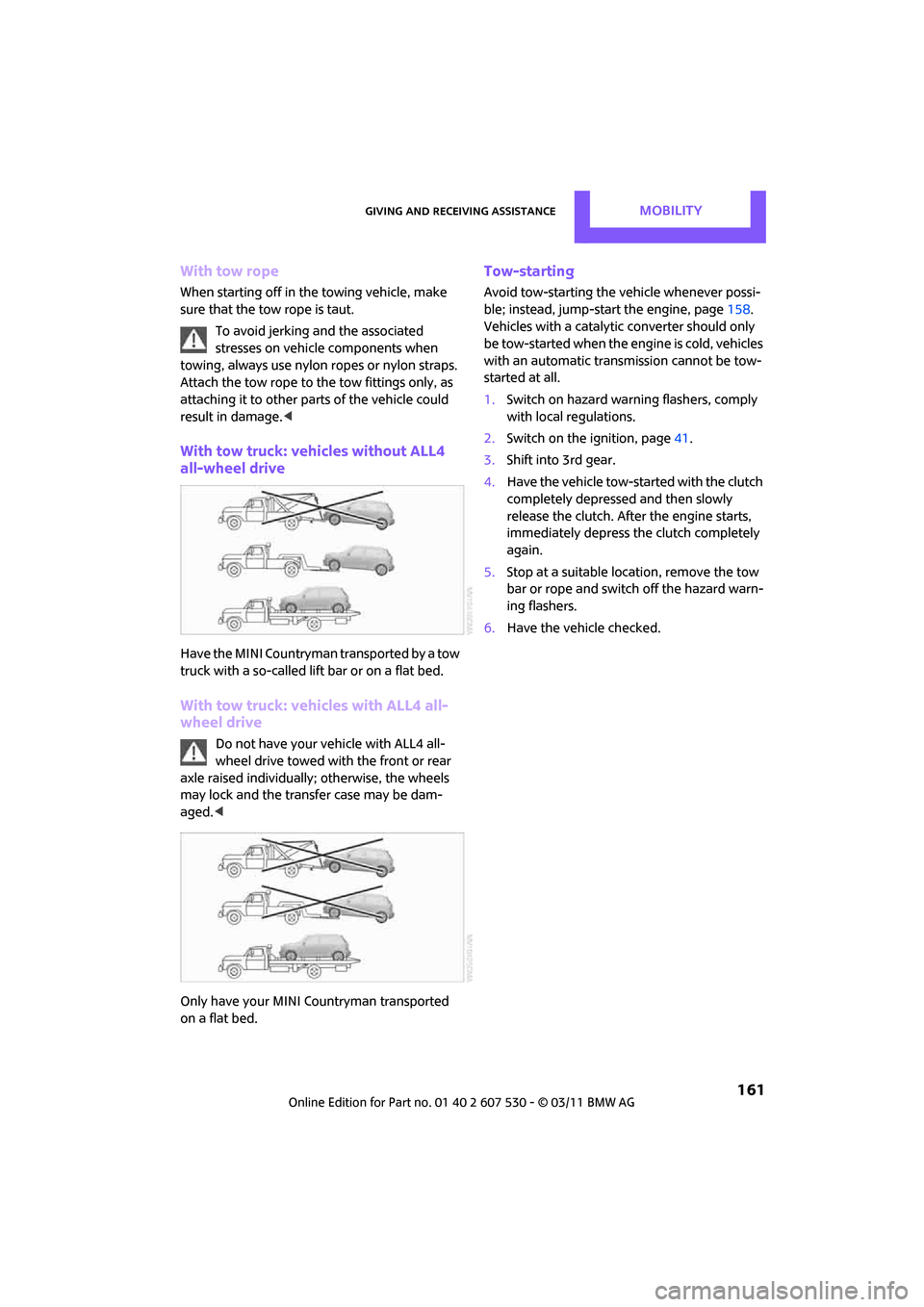
With tow truck: vehicles without ALL4
all-wheel drive
Have the MINI Countryman transported by a tow
truck with a so-called lift bar or on a flat bed.
With tow truck: vehicles with ALL4 all-
wheel drive
Do not have your vehicle with ALL4 all-
wheel drive towed with the front or rear
axle raised individually; otherwise, the wheels
may lock and the transfer case may be dam-
aged. <
Only have your MINI Countryman transported
on a flat bed.
Tow-starting
Avoid tow-starting the vehicle whenever possi-
ble; instead, jump-start the engine, page 158.
Vehicles with a catalytic converter should only
be tow-started when the engine is cold, vehicles
with an automatic transmission cannot be tow-
started at all.
1. Switch on hazard warn ing flashers, comply
with local regulations.
2. Switch on the ignition, page 41.
3. Shift into 3rd gear.
4. Have the vehicle tow-started with the clutch
completely depressed and then slowly
release the clutch. Afte r the engine starts,
immediately depress the clutch completely
again.
5. Stop at a suitable lo cation, remove the tow
bar or rope and switch off the hazard warn-
ing flashers.
6. Have the vehicle checked.
Page 165 of 196
Indicator and warning lampsMobility
163
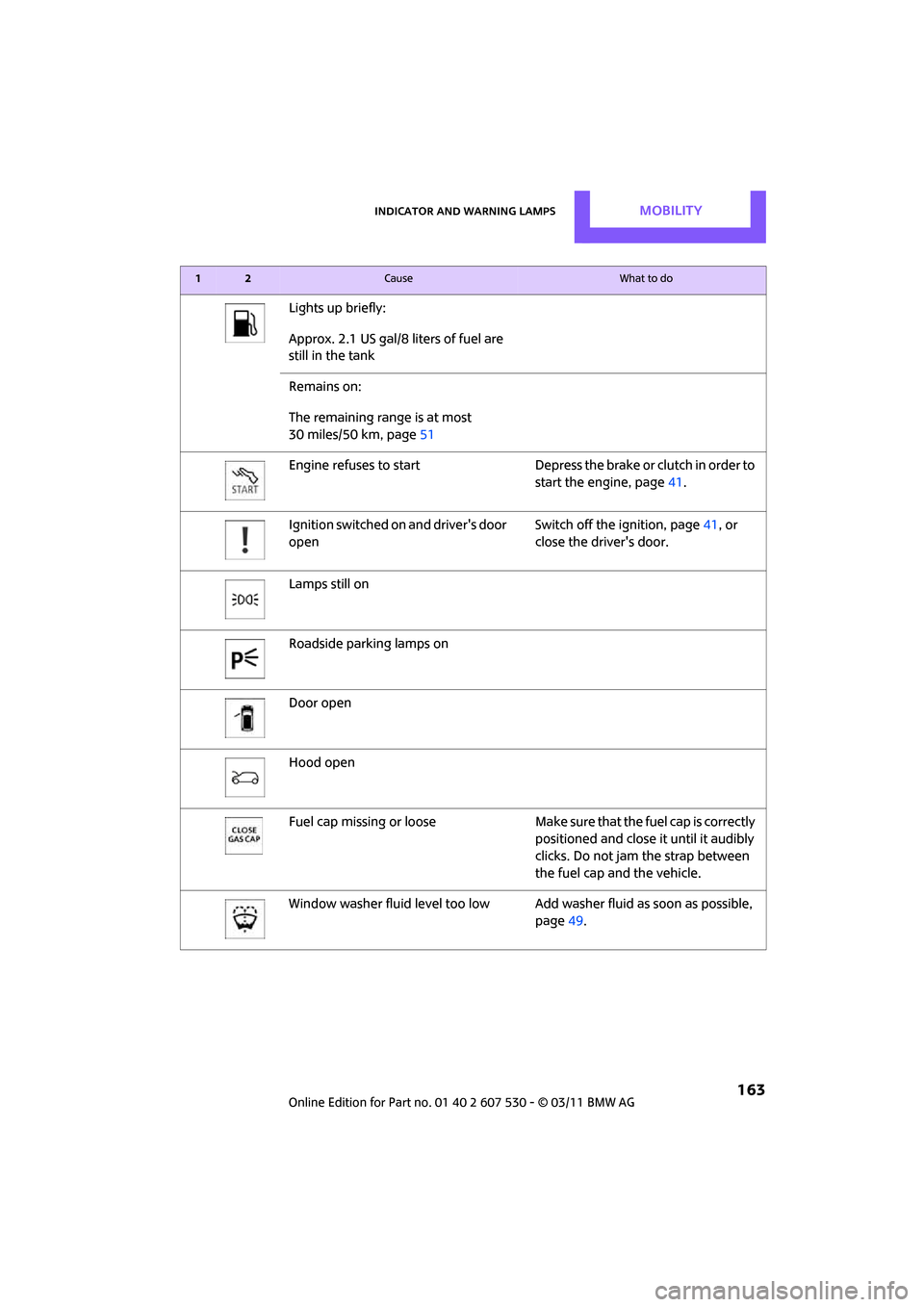
Lights up briefly:
Approx. 2.1 US gal/8 liters of fuel are
still in the tank
Remains on:
The remaining range is at most
30 miles/50 km, page 51
Engine refuses to start Depress the brake or clutch in order to start the engine, page41.
Ignition switched on and driver's door
open Switch off the ignition, page
41, or
close the driver's door.
Lamps still on
Roadside parking lamps on
Door open
Hood open
Fuel cap missing or loose Make sure that the fuel cap is correctly
positioned and close it until it audibly
clicks. Do not jam the strap between
the fuel cap and the vehicle.
Window washer fluid level too low Add washer fluid as soon as possible,
page 49.
12Cause What to do
Page 169 of 196

Indicator and warning lampsMobility
167
Indication in US models
Vehicle electronics failedYou cannot continue your journey.
Contact your MINI dealer.
Indication
* in Canadian models
Vehicle electronics failed You cannot continue your journey.
Contact your MINI dealer.
Lights up in red: Have the system in question checked
without delay.
> Starter failed or The engine cannot be restarted.
> ignition malfunctioning. Engine
restart only possible when brake
is depressed or
> lighting system failed. Low
beams/tail lamps and brake
lamps still operational. All other
lamps failed Depress the brake to start the engine
again.
Lights up in yellow:
> Control of the brake lamps failed
or
> fuel supply malfunctioning You can continue your journey, but
moderate your speed and exercise
due caution. Have the system in ques-
tion checked without delay.
> Drive malfunctioning You can continue your journey, but
moderate your speed and exercise
due caution. Transmission limp-home
program active with restricted range
of gears. Have the system checked
immediately.
Flashing:
Dynamic Stability Control DSC or
Dynamic Traction Control DTC is con-
trolling drive and braking forces, refer
also to page 59
12Cause What to do
Page 174 of 196
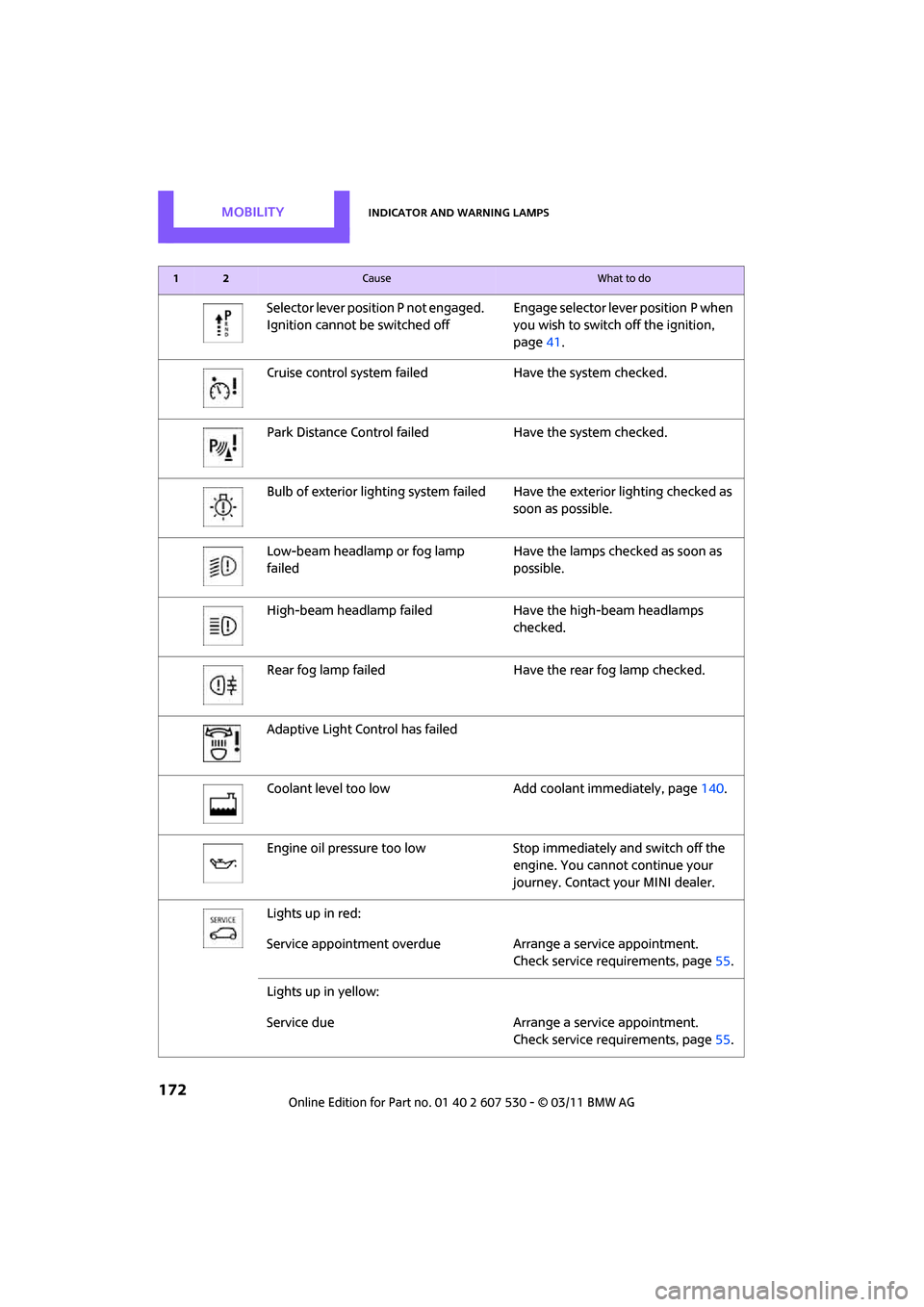
MobilityIndicator and warning lamps
172
Selector lever position P not engaged.
Ignition cannot be switched offEngage selector lever position P when
you wish to switch off the ignition,
page
41.
Cruise control system fail edHave the system checked.
Park Distance Control fail edHave the system checked.
Bulb of exterior lighting system failed Have the exterior lighting checked as
soon as possible.
Low-beam headlamp or fog lamp
failed Have the lamps checked as soon as
possible.
High-beam headlamp failed Have the high-beam headlamps
checked.
Rear fog lamp failed Have the rear fog lamp checked.
Adaptive Light Control has failed
Coolant level too low Add coolant immediately, page140.
Engine oil pressure too low Stop immediately and switch off the
engine. You cannot continue your
journey. Contact your MINI dealer.
Lights up in red:
Service appointment overdue Arrange a service appointment.
Check service requirements, page 55.
Lights up in yellow:
Service due Arrange a service appointment.
Check service requirements, page 55.
12Cause What to do
Page 184 of 196
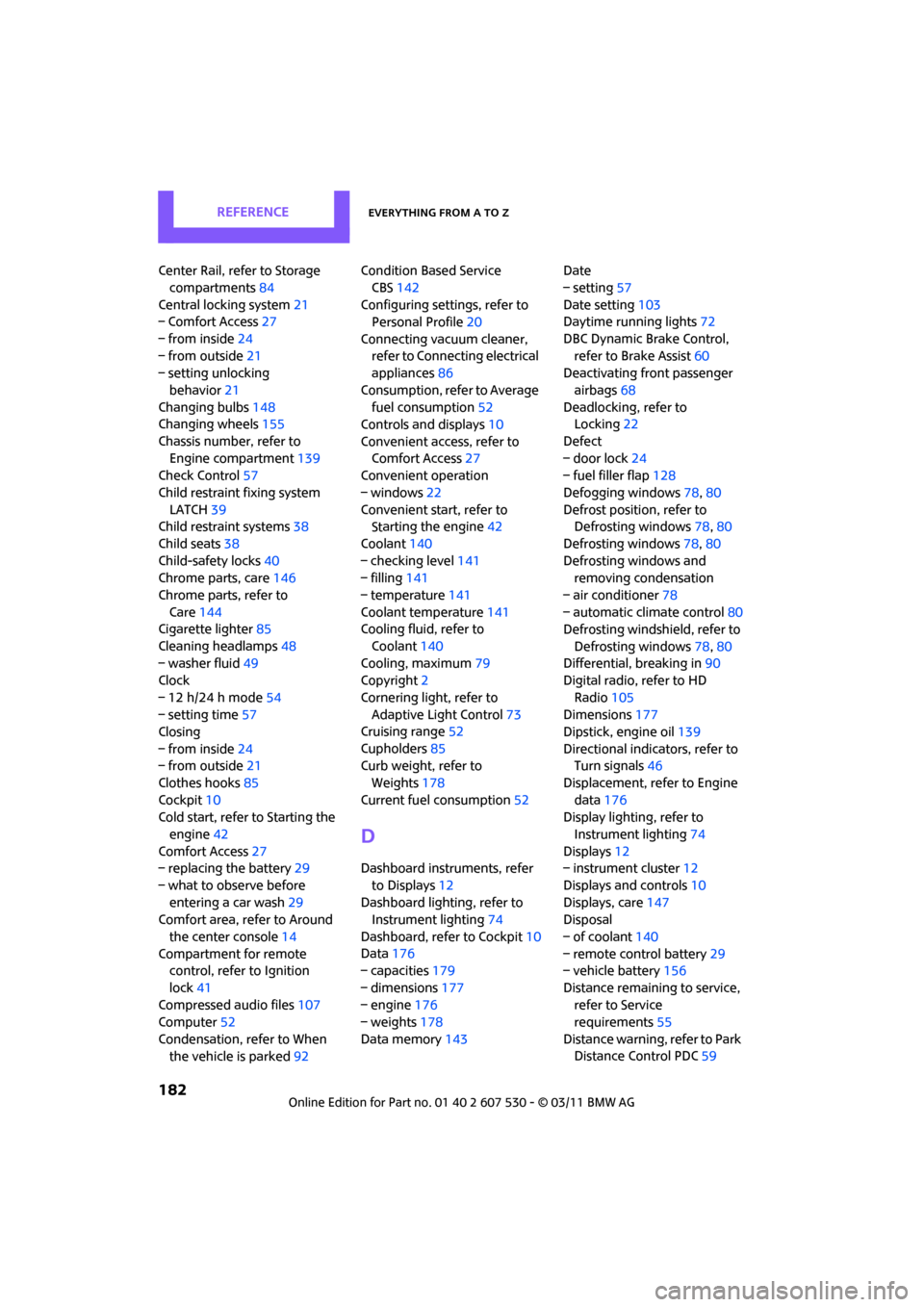
ReferenceEverything from A to Z
182
Center Rail, refer to Storage compartments 84
Central locking system 21
– Comfort Access 27
– from inside 24
– from outside 21
– setting unlocking
behavior 21
Changing bulbs 148
Changing wheels 155
Chassis number, refer to Engine compartment 139
Check Control 57
Child restraint fixing system LATCH 39
Child restraint systems 38
Child seats 38
Child-safety locks 40
Chrome parts, care 146
Chrome parts, refer to Care 144
Cigarette lighter 85
Cleaning headlamps 48
– washer fluid 49
Clock
– 12 h/24 h mode 54
– setting time 57
Closing
– from inside 24
– from outside 21
Clothes hooks 85
Cockpit 10
Cold start, refer to Starting the
engine 42
Comfort Access 27
– replacing the battery 29
– what to observe before entering a car wash 29
Comfort area, refer to Around
the center console 14
Compartment for remote control, refer to Ignition
lock 41
Compressed audio files 107
Computer 52
Condensation, refer to When the vehicle is parked 92Condition Based Service
CBS 142
Configuring settings, refer to Personal Profile 20
Connecting vacuum cleaner, refer to Connecting electrical
appliances 86
Consumption, refer to Average fuel consumption 52
Controls and displays 10
Convenient access, refer to Comfort Access 27
Convenient operation
– windows 22
Convenient start, refer to
St
arting the engine 42
Coolant 140
– checking level 141
– filling 141
– temperature 141
Coolant temperature 141
Cooling fluid, refer to
Coolant 140
Cooling, maximum 79
Copyright 2
Cornering light, refer to Adaptive Light Control 73
Cruising range 52
Cupholders 85
Curb weight, refer to
Weights 178
Current fuel consumption 52
D
Dashboard instruments, refer
to Displays 12
Dashboard lighting, refer to Instrument lighting 74
Dashboard, refer to Cockpit 10
Data 176
– capacities 179
– dimensions 177
– engine 176
– weights 178
Data memory 143 Date
– setting
57
Date setting 103
Daytime running lights 72
DBC Dynamic Brake Control, refer to Brake Assist 60
Deactivating front passenger
airbags 68
Deadlocking, refer to Locking 22
Defect
– door lock 24
– fuel filler flap 128
Defogging windows 78,80
Defrost position, refer to Defrosting windows 78,80
Defrosting windows 78,80
Defrosting windows and removing condensation
– air conditioner 78
– automatic climate control 80
Defrosting windshield, refer to
Defrosting windows 78,80
Differential, breaking in 90
Digital radio, refer to HD
Radio 105
Dimensions 177
Dipstick, engine oil 139
Directional indicators, refer to Turn signals 46
Displacement, refer to Engine data 176
Display lighting, refer to
Instrument lighting 74
Displays 12
– instrument cluster 12
Displays and controls 10
Displays, care 147
Disposal
– of coolant 140
– remote control battery 29
– vehicle battery 156
Distance remaining to service, refer to Service
requirements 55
Distance warning, refer
to Park
Distance Control PDC 59