language MINI Countryman 2012 (Mini Connected) User Guide
[x] Cancel search | Manufacturer: MINI, Model Year: 2012, Model line: Countryman, Model: MINI Countryman 2012Pages: 259, PDF Size: 3.07 MB
Page 181 of 259
COMMUNICATIONSMobile phone preparation Bluetooth
180
Reading and selecting the entries
Selecting an entry
Adjusting volume
Turn knob during announcement.
>The volume remains the same, even if the
volume of other audi o sources is changed.
> The volume is stored for the remote control
currently in use.
Notes
Do not use the voice oper ation system to initiate
an emergency call. In st ressful situations, the
voice and vocal pitch can change. This can
unnecessarily delay the establishment of a tele-
phone connection.
Ambient conditions
> Say the commands, numbers and letters
smoothly and with normal volume,
emphasis and speed.
> Always say the commands in the language
of the system. The language for voice
operation system is preset and can not be
changed via the Control Display.
> Keep doors, windows, glass sunroof/
panoramic sunroof, or convertible top
closed to avoid noise interference.
> Avoid ambient noise in the vehicle while
speaking.
Snap-in adapter
The concept
The snap-in adapter makes it possible to do the
following:
>Accommodate the mobile phone.
> Recharge its battery.
> Connect to the outside antenna of the
vehicle.
This assures a better network connection
and constant sound quality.
General information
Detailed information on snap-in adapters that
compatibly support mobile phone functions can
be found at your MINI dealer.
Do not expose your mobile phone to extreme
ambient conditions, for example, very high tem-
peratures; otherwise, fu nctions on your mobile
phone may not work. Follow the operating
instructions for yo ur mobile phone.
Installation location
In the center armrest.
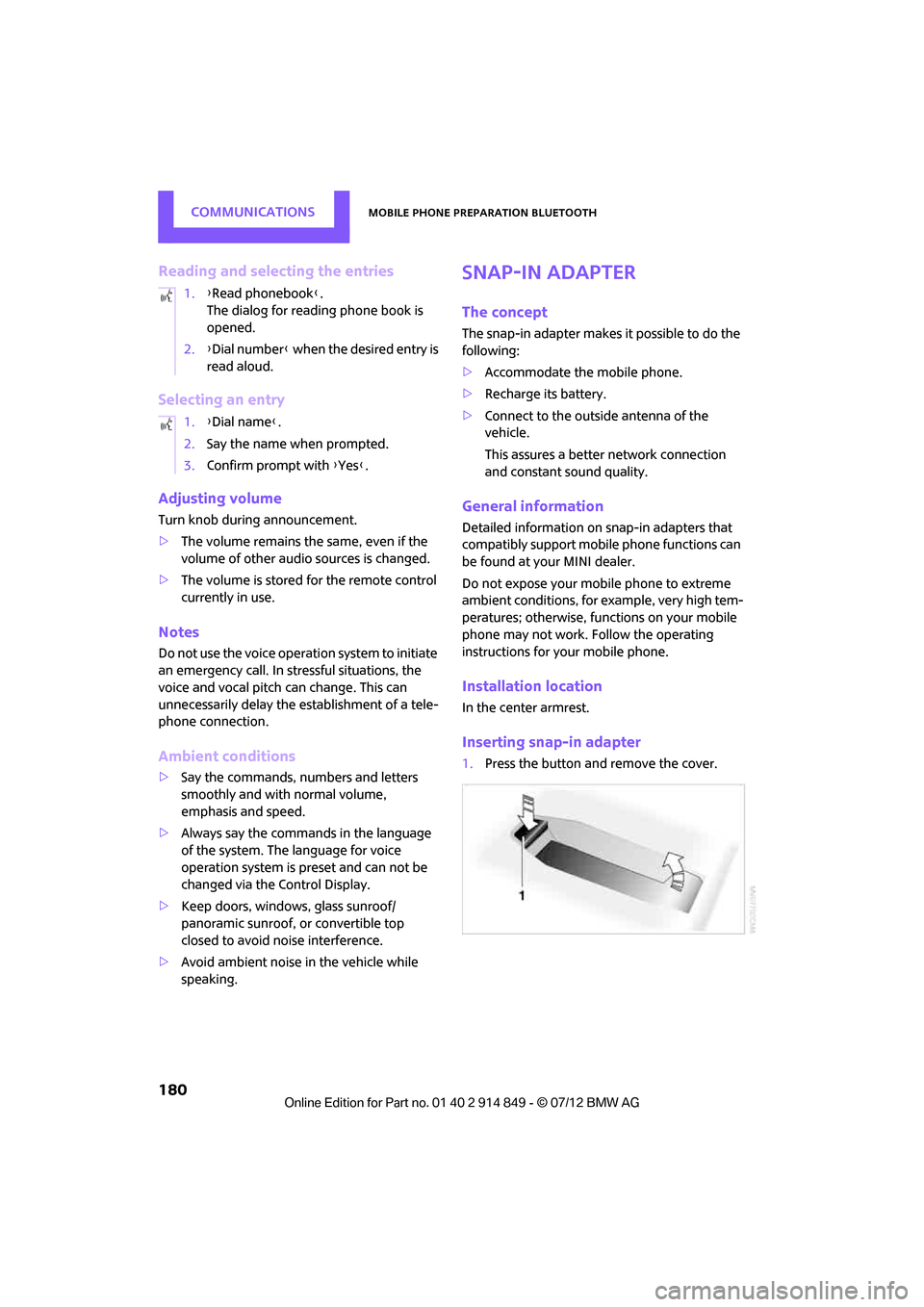
Inserting snap-in adapter
1.Press the button and remove the cover.
1.
{Read phonebook }.
The dialog for reading phone book is
opened.
2. {Dial number } when the desired entry is
read aloud.
1. {Dial name }.
2. Say the name when prompted.
3. Confirm prompt with {Yes }.
Online Edition for Part no. 01 40 2 914 849 - \251 07/12 BMW AG
Page 243 of 259

REFERENCEShort commands for the voice activation system
242
Route guidance with intermediate destinations
Vehicle information
Settings
Vehicle
FunctionCommand
Entering a new destination {Enter address}
FunctionCommand
Accessing the onboard computer {Onboard info }
Accessing the trip computer {Trip computer}
Accessing vehicle information {Vehicle info}
Accessing vehicle status {Vehicle status }
FunctionCommand
Opening the main menu {Main menu}
Accessing settings {Settings }
Accessing options {Options}
Settings on the Control Display {Control display }
Accessing time and date settings {Time and date }
Accessing language and unit settings {Language and units }
Online Edition for Part no. 01 40 2 914 849 - \251 07/12 BMW AG
Page 247 of 259
REFERENCEEverything from A to Z
246
CD player147
– controls 136
– fast forward/reverse 148
– random order 148
– selecting a track 147
– switching on/off 136
– tone control 137
– volume 137
Center armrest 94
Center brake lamp 219
Center console, refer to Around the center
console 14
Center Rail 95
Center Rail, refer to Storage compartments 95
Central locking system 27
– Comfort Access 32
– from inside 30
– from outside 27
– setting unlocking behavior 27
Changing bulbs 215
Changing the language on the Control Display 67
Changing the measurement units on the Control
Display 61
Changing wheels 222
Charging the battery 223
Chassis number, refer to Engine compartment 205
Check Control 65
Child restraint fixing system LATCH 45
Child restraint systems 44
Child-safety locks 47
Child seats 44
Chrome parts, care 213
Chrome parts, refer to Care 211
Cigarette lighter 97
Cleaning headlamps 54
– washer fluid 55
Clock
– setting time 64
– 12 h/24 h mode 64Closing
– from inside
30
– from outside 27
Clothes hooks 97
Cockpit 10
Cold start, refer to Starting the engine 49
Comfort Access 32
– replacing the battery 34
– what to observe before
entering a car wash 34
Comfort area, refer to Around the center console 14
Comp a
rtment for remote
c
ontrol, refer to Ignition
lock 48
Compass 92
Computer 59
– displays on Control
Display 60
Condensation, refer to When the vehicle is parked 104
Condition Based Service CBS 209
Configuring settings, refer to
Personal Profile 26
Connecting vacuum cleaner, refer to Connecting electrical
appliances 98
Consumption, refer to Average
fuel consumption 59
Contact editing 168
Contacts 167,183
– new contact 184
Continuing route guidance 125
Control Display
– adjusting brightness 68
Control Display, refer to iDrive
– switching on/off 16
Control Display, refer to Onboard computer 16
– adjusting brightness 68
Controls and displays 10
Control stick, refer to Onboard
computer 16 Control unit, refer to Onboard
computer 16
Convenience operation
– windows 28
Convenient access, refer to Comfort Access 32
Convenient star t, refer to
Starting the engine 49
Coolant 208
– checking level 208
– filling 208
– temperature 208
Coolant temperature 208
Cooling, maximum 88
Cooling fluid, refer to Coolant 208
Copyright 2
Cornering light, refer to Adaptive Light Control 82
Criteria for route 125
Cruise control
– indicator lamp 13
Cruising range 59
Cupholders 97
Curb weight, refer to
Weights 234
Current fuel consumption 60
Current playback
– ext ernal
d
evices152
D
Dashboard, refer to Cockpit 10
Dashboard instruments, refer to Displays 12
Dashboard lighting, refer to
Instrument lighting 83
Data 232
– capacities 235
– dimensions 233
– engine 232
– weights 234
Data memory 210
Date
– setting 65
– setting format 65
Daytime running lights 82
Online Edition for Part no. 01 40 2 914 849 - \251 07/12 BMW AG
Page 252 of 259
Everything from A to ZREFERENCE
251
Menus, refer to Onboard computer 16
Messages 185
Microfilter
– for air conditioner 87
– for automatic climate control 89
– MINI Maintenance System 209
Microfilter/activated-charcoal
filter
– MINI Maintenance System 209
Microphone for telephone 14
MINI Connected 190
MINI Internet page 4
MINI joystick, refer to Onboard computer 16
MINI Maintenance System 209
Mirror dimming feature 43
Mirrors 42
– exterior mirrors 42
– heating 43
– interior rearview mirror 43
Mobile phone
– adjusting volume 163,174
– connecting, refer to Mobile phone, pairing 160,170
– installation location, refer to Center armrest 94
– pairing 160,170
– What to do if…. 162,173
Mobile phone preparation
Bluetooth 169
Mobility Kit 220
Modifications, te chnical, refer
to For your own safety 4
Monitor, refer to MINI controls with navigation 16
Monitoring system for tire pressures, refer to Flat Tire
Monitor 73
Multifunctional steering wheel, refer to Buttons on
the steering wheel 11Multifunction switch
– refer to Turn signals/
headlamp flasher 53
– refer to Wiper system 53
N
Navigation
– storing current position 118
Navigation data 114
Navigation destination
– entering manually 116,122
– home address 119
Navigation instructions, refer to Switching voice
instructions on/off 129
Navigation system 114
– address book 118
– bypassing a route
section 126
– continuing route guidance 125
– destination entry 116
– dynamic route guidance 132
– entering a destination
manually 116,122
– planning a trip 123
– route list 126
– selecting destination via map 121
– selecting route criteria 125
– special destinations 120
– starting route guidance 125
– terminating route guidance 125
– voice instructions 129
– volume adjustment 129
Neck support, refer to Head restraints 39
Nets, refer to Storage compartments 95
New tires 203
North-facing map 127
Notes 187
Number of cylinders, refer to
Engine data 232 Number of safety belts
37
Nylon rope, refer to Tow rope 228
O
OBD socket, refer to Socket for
On-Board Diagnosis 210
Octane ratings, refer to Fuel specifications 195
Odometer 59
Office 182
– current office 182
– What to do if…. 188
Oil, refer to Engine oil 206
Oil consumption 206
Oil level 206
Oil types 207
Old batteries, refer to
Disposal 223
Onboard computer 16
– changing language 67
– menu guidance 17
– operating principles 16
– overview 16
– status information 19
Opening and closing
– Comfort Access 32
– from inside 30
– from outside 27
– using the door lock 29
– using the remote control 27
Opening and unlocking
– from inside 30
Options, selecting for navigation 125
Orientation menu, refer to Main menu 17
Outlets
– refer to Ventilation 89
Outlets, refer to Air vents 85
Output, refer to Engine
data 232
Outside-air mode
– automatic climate control 88
Overheated engine, refer to Coolant temperature 208
Online Edition for Part no. 01 40 2 914 849 - \251 07/12 BMW AG
Page 254 of 259
Everything from A to ZREFERENCE
253
Roof load capacity234
Roof-mounted luggage rack 109
Rope, refer to Tow-starting,
towing away 228
Route 125,126
– bypassing sections 126
– changing 125,126
– changing criteria 125
– displaying arrow view 126
– displaying map view 127
– displaying streets or towns/ cities 126
– selecting 125
Route guidance 125
– bypassing a route
section 126
– changing specified route 125
– distance and arrival 125
– voice instructions 129
– volume of voice instructions 129
Route section, changing 126
Route selection 125
RSC Run-flat System
Component, refer to Run-flat
tires 203
Rubber parts, care 213
Run-flat System Component RSC, refer to Run-flat
tires 203
Run-flat tires 203
– flat tire 74
– Flat Tire Monitor 74
– tire inflation pressure 196
– tire replacement 203
– winter tires 204
S
Safety belt
– number37 Safety belts
40
– care 214
– center belt 41
– damage 42
– indicator lamp 42
– reminder 42
– sitting safely 37
Safety systems
– airbags 78
– Antilock Brake System
ABS 70
– driving stability control systems 70
– Dynamic Stability Control DSC 70
– safety belts 40
Safety tires, refer to Run-flat tires 203
Satellite radio 141
– channel, activating or deactivating 142
– channel, selecting 142
– channel, storing 143
– favorites 144
– time shift 143
– Traffic Jump 145
Screen, refer to Onboard computer controls 16
Screw thread for tow fitting 227
SDARS, refer to Satellite radio 141
Seat adjustment
– mechanical 38
– rear 39
Seats 38
– adjusting the seats 38
– heating 40
– sitting safely 37
Securing the vehicle
– from inside 30
– from outside 27
Selecting navigation system 114
Selecting new scale for
navigation 128 Selector lever
– automatic transmission with
Steptronic 51
Selector lever lock
– automatic transmission with Steptronic, refer to
Shiftlock 51
– overriding manually 52
Selector lever positions
– automatic transmission with
Steptronic 51
Service, refer to Roadside Assistance 225
Service car, refer to Roadside Assistance 225
Service data in the remote
control 209
Servi c
e Interv
al Display, refer
to Condition Based Service
CBS 209
Service requirement display, refer to Condition Based
Service CBS 209
Service requirements 62
Settings
– clock, 12 h/24 h mode 64
– date format 65
– language 67
Settings and information 60
Setting time and date 64
Setting time zone, time, and date 64
Shifting gears
– automatic transmission with Steptronic 52
– manual transmission 50
Shiftlock
– automatic transmission, refer to Changing selector lever
positions 51
Shift paddles 52
Short commands for the voice
activation system 236
Short route in navigation, refer to Selecting route 125
Online Edition for Part no. 01 40 2 914 849 - \251 07/12 BMW AG