phone MINI Countryman 2012 Owner's Manual
[x] Cancel search | Manufacturer: MINI, Model Year: 2012, Model line: Countryman, Model: MINI Countryman 2012Pages: 201, PDF Size: 3.19 MB
Page 4 of 201
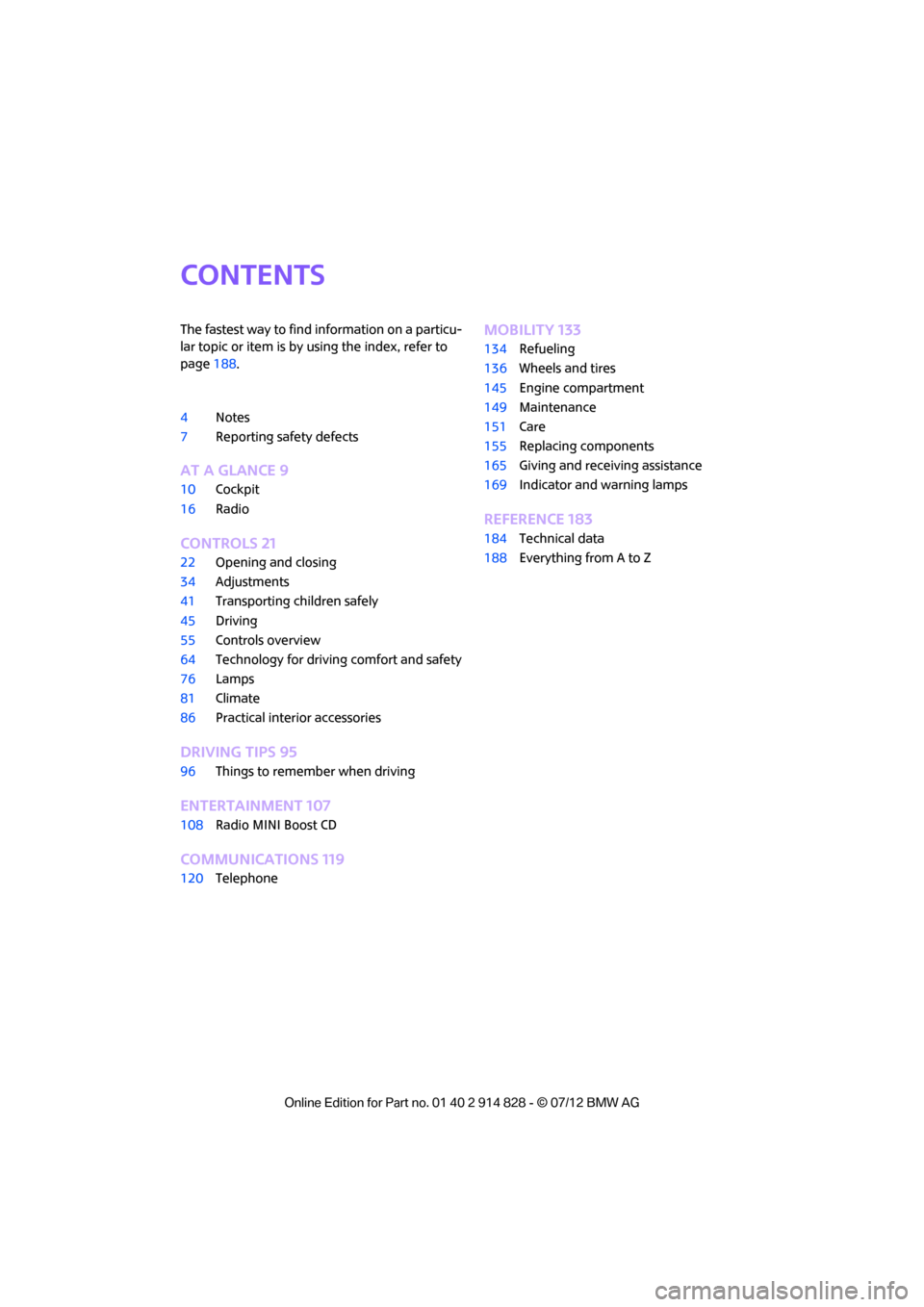
Contents
The fastest way to find information on a particu-
lar topic or item is by using the index, refer to
page188.
4 Notes
7 Reporting safety defects
AT A GLANCE 9
10Cockpit
16 Radio
CONTROLS 21
22Opening and closing
34 Adjustments
41 Transporting children safely
45 Driving
55 Controls overview
64 Technology for drivin g comfort and safety
76 Lamps
81 Climate
86 Practical interior accessories
DRIVING TIPS 95
96Things to remember when driving
ENTERTAINMENT 107
108Radio MINI Boost CD
COMMUNICATIONS 119
120Telephone
MOBILITY 133
134Refueling
136 Wheels and tires
145 Engine compartment
149 Maintenance
151 Care
155 Replacing components
165 Giving and receiving assistance
169 Indicator and warning lamps
REFERENCE 183
184Technical data
188 Everything from A to Z
Online Edition for Part no. 01 40 2 914 828 - \251 07/12 BMW AG
Page 6 of 201
Notes
5
the specifications of the MINI manufacturer. If
this work is not carried out properly, there is a
danger of subsequent damage and related
safety hazards.<
Parts and accessories
For your own safety, use genuine parts
and accessories approved by the manu-
facturer of the MINI.
When you purchase accessories tested
and approved by the manufacturer of the MINI
and Original MINI Parts, you simultaneously
acquire the assurance that they have been
thoroughly tested by the manufacturer of the
MINI to ensure optimum performance when
installed on your vehicle.
The manufacturer of the MINI warrants these
parts to be free from defects in material and
workmanship.
The manufacturer of the MINI will not accept any
liability for damage result ing from installation of
parts and accessories not approved by the man-
ufacturer of the MINI.
The manufacturer of the MINI cannot test every
product made by other manufacturers to verify
if it can be used on a MINI safely and without risk
to either the vehicle, its operation, or its occu-
pants.
Original MINI Parts, MINI Accessories and other
products approved by the manufacturer of the
MINI, together with professional advice on using
these items, are available from all MINI dealers.
Installation and operation of accessories that
have not been approved by the manufacturer of
your MINI, such as alarms, radios, amplifiers,
radar detectors, wheels, suspension compo-
nents, brake dust shield s, telephones, including
operation of any mobile phone from within the
vehicle without using an externally mounted
antenna, or transceiver equipment, for instance,
CBs, walkie-talkies, ham radios or similar acces-
sories, may cause extensiv e damage to the vehi-
cle, compromise its safe ty, interfere with the
vehicle's electrical s y s t e m o r a f f e c t t h e v a l i d i t y o f the MINI Limited Warranty. See your MINI dealer
for additional information.
<
Maintenance, replacement, or repair of
the emission control devices and systems
may be performed by any automotive repair
establishment or individu al using any certified
automotive part. <
California Proposition 65 warning
California law requires us to issue the following
warning:
Engine exhaust and a wide variety of
automobile components and parts,
including components foun d in the interior fur-
nishings in a vehicle, contain or emit chemicals
known to the State of California to cause cancer
and birth defects and reproductive harm. In
addition, certain fluids co ntained in vehicles and
certain products of component wear contain or
emit chemicals known to the State of California
to cause cancer and birth defects or other repro-
ductive harm.
Battery posts, terminals and related accessories
contain lead and lead compounds. Wash your
hands after handling.
Used engine oil contains chemicals that have
caused cancer in laboratory animals. Always
protect your skin by washing thoroughly with
soap and water.<
Service and warranty
We recommend that you read this publication
thoroughly.
Your MINI is covered by the following warran-
ties:
> New Vehicle Limited Warranty
> Rust Perforation Limited Warranty
> Federal Emissions System Defect Warranty
> Federal Emissions Performance Warranty
> California Emission Control System Limited
Warranty
Online Edition for Part no. 01 40 2 914 828 - \251 07/12 BMW AG
Page 8 of 201
Notes
7
Reporting safety defects
For US customers
The following applies only to vehicles owned
and operated in the US.
If you believe that your vehicle has a defect that
could cause a crash or could cause injury or
death, you should immediately inform the
National Highway Traffic Safety Administration,
NHTSA, in addition to notifying MINI of North
America, LLC, P.O. Box 1227, Westwood, New
Jersey 07675-1227, Telephone 1-800-831-
1117.
If NHTSA receives similar complaints, it may
open an investigation, and if it finds that a safety
defect exists in a group of vehicles, it may order
a recall and remedy campaign. However, NHTSA
cannot become involved in individual problems
between you, your dealer, or MINI of North
America, LLC.
To contact NHTSA, you may call the Vehicle
Safety Hotline toll-free at 1-888-327-4236 (TTY:
1-800-424-9153); go to http://www.safer-
car.gov; or write to: Administrator, NHTSA, 400
Seventh Street, SW., Washington, DC 20590. You
can also obtain other information about motor
vehicle safety from http://www.safercar.gov
For Canadian customers
Canadian customers wh o wish to report a
safety-related defect to Transport Canada,
Defect Investigations and Recalls, may tele-
phone the toll-free hotline 1-800-333-0510.
You can also obtain ot her information about
motor vehicle safety from http://www.tc.gc.ca/
roadsafety.
Online Edition for Part no. 01 40 2 914 828 - \251 07/12 BMW AG
Page 12 of 201
CockpitAT A GLANCE
11
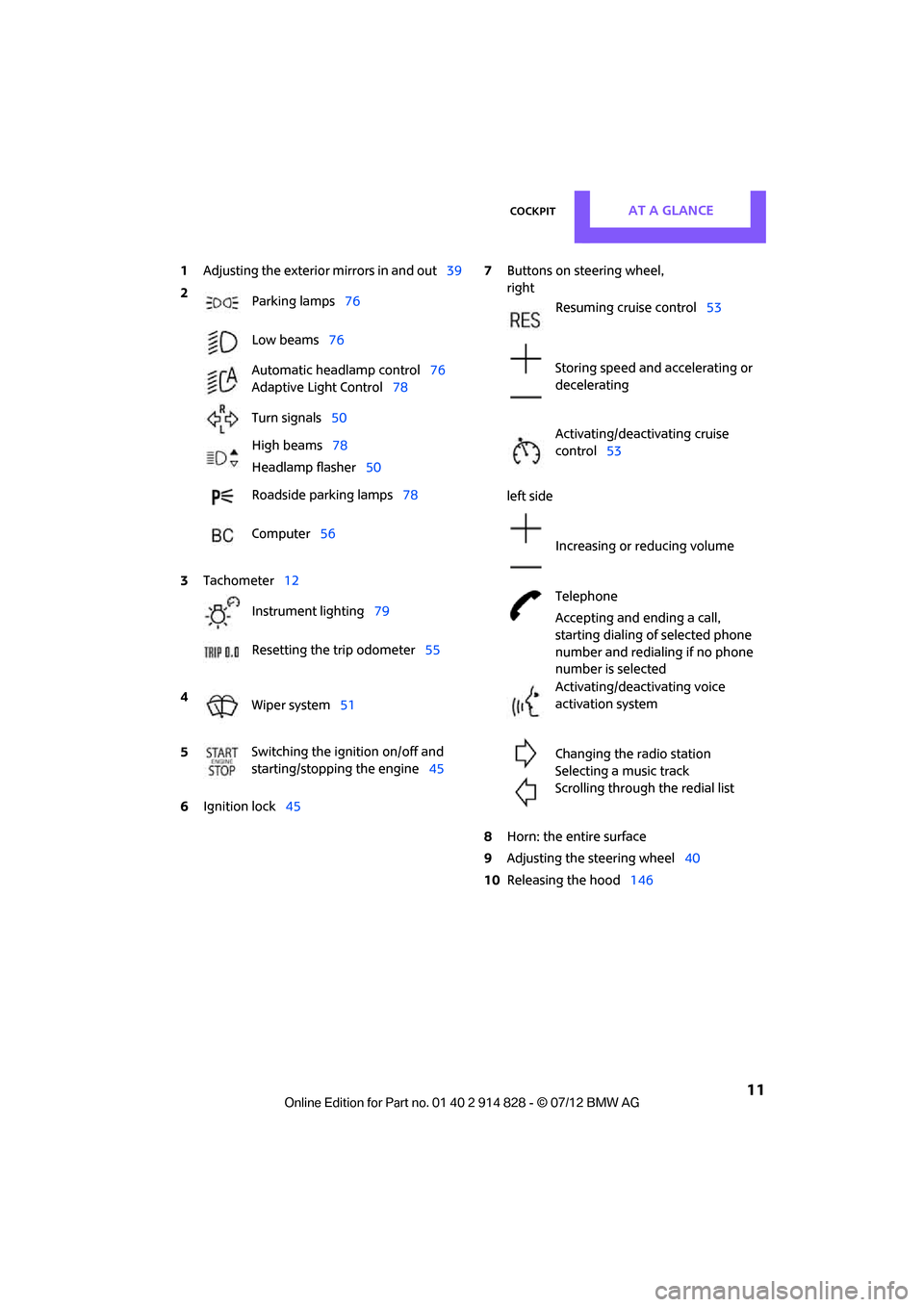
1Adjusting the exterior mirrors in and out39
6 Ignition lock 45 7
Buttons on steering wheel,
right
left side
8 Horn: the entire surface
9 Adjusting the steering wheel 40
10 Releasing the hood 146
2
Parking lamps 76
Low beams 76
Automatic headlamp control 76
Adaptive Light Control 78
Turn signals 50
High beams 78
Headlamp flasher 50
Roadside parking lamps 78
Computer 56
3 Tachometer 12
Instrument lighting 79
Resetting the trip odometer 55
4 Wiper system 51
5 Switching the ignition on/off and
starting/stopping the engine
45
Resuming cruise control53
Storing speed and accelerating or
decelerating
Activating/deactivating cruise
control 53
Increasing or reducing volume
Telephone
Accepting and ending a call,
starting dialing of selected phone
number and redialing if no phone
number is selected
Activating/deactivating voice
activation system
Changing the radio station
Selecting a music track
Scrolling through the redial list
Online Edition for Part no. 01 40 2 914 828 - \251 07/12 BMW AG
Page 16 of 201
CockpitAT A GLANCE
15
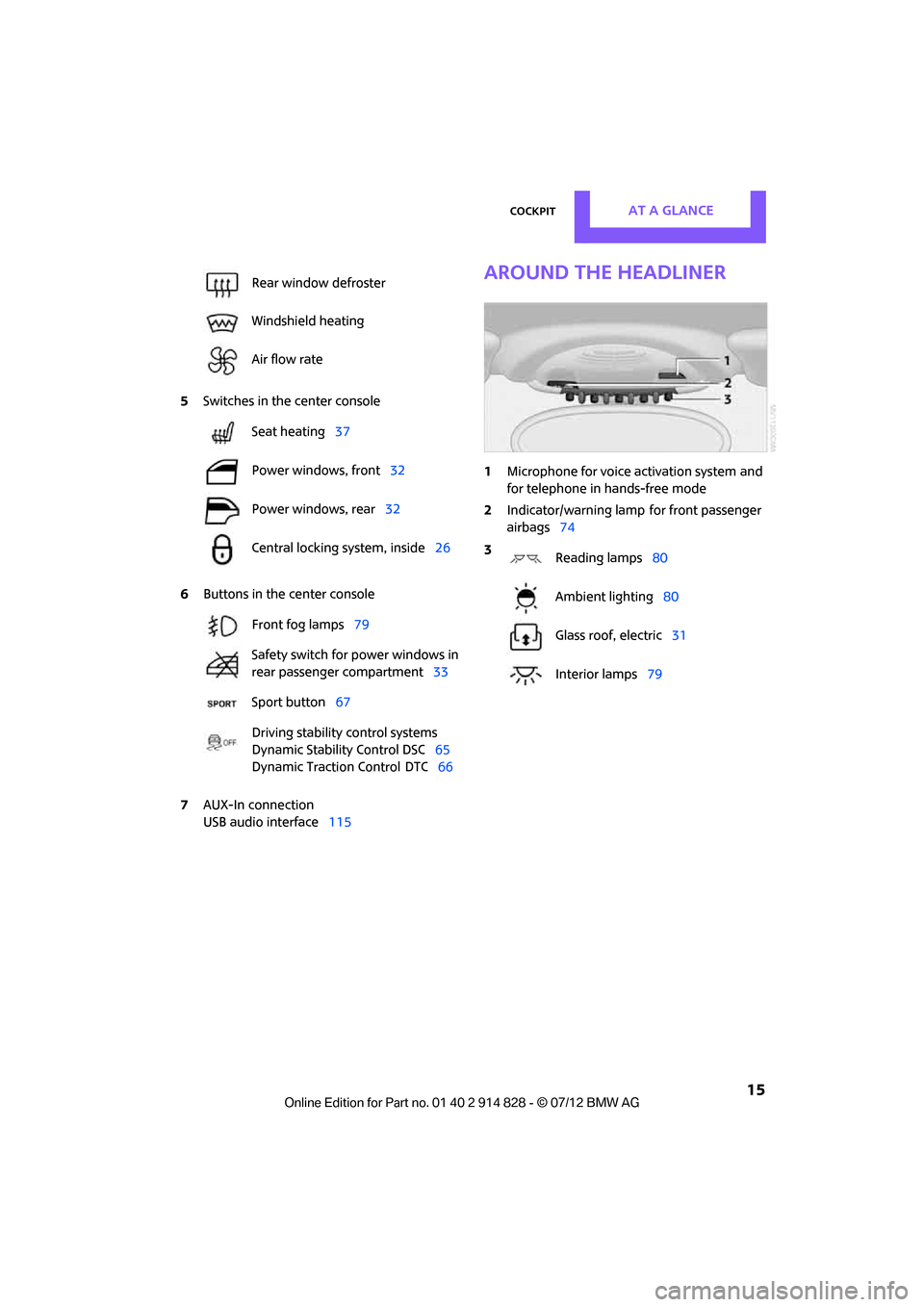
5Switches in the center console
6 Buttons in the center console
7 AUX-In connection
USB audio interface 115
Around the headliner
1Microphone for voice activation system and
for telephone in hands-free mode
2 Indicator/warning lamp
for front passenger
airbags 74
Rear window defroster
Windshield heating
Air flow rate
Seat heating
37
Power windows, front 32
Power windows, rear 32
Central locking system, inside 26
Front fog lamps 79
Safety switch for power windows in
rear passenger compartment 33
Sport button 67
Driving stability control systems
Dynamic Stability Control DSC 65
Dynamic Traction Control
DTC 66
3
Reading lamps 80
Ambient lighting 80
Glass roof, electric 31
Interior lamps 79
Online Edition for Part no. 01 40 2 914 828 - \251 07/12 BMW AG
Page 18 of 201
RadioAT A GLANCE
17
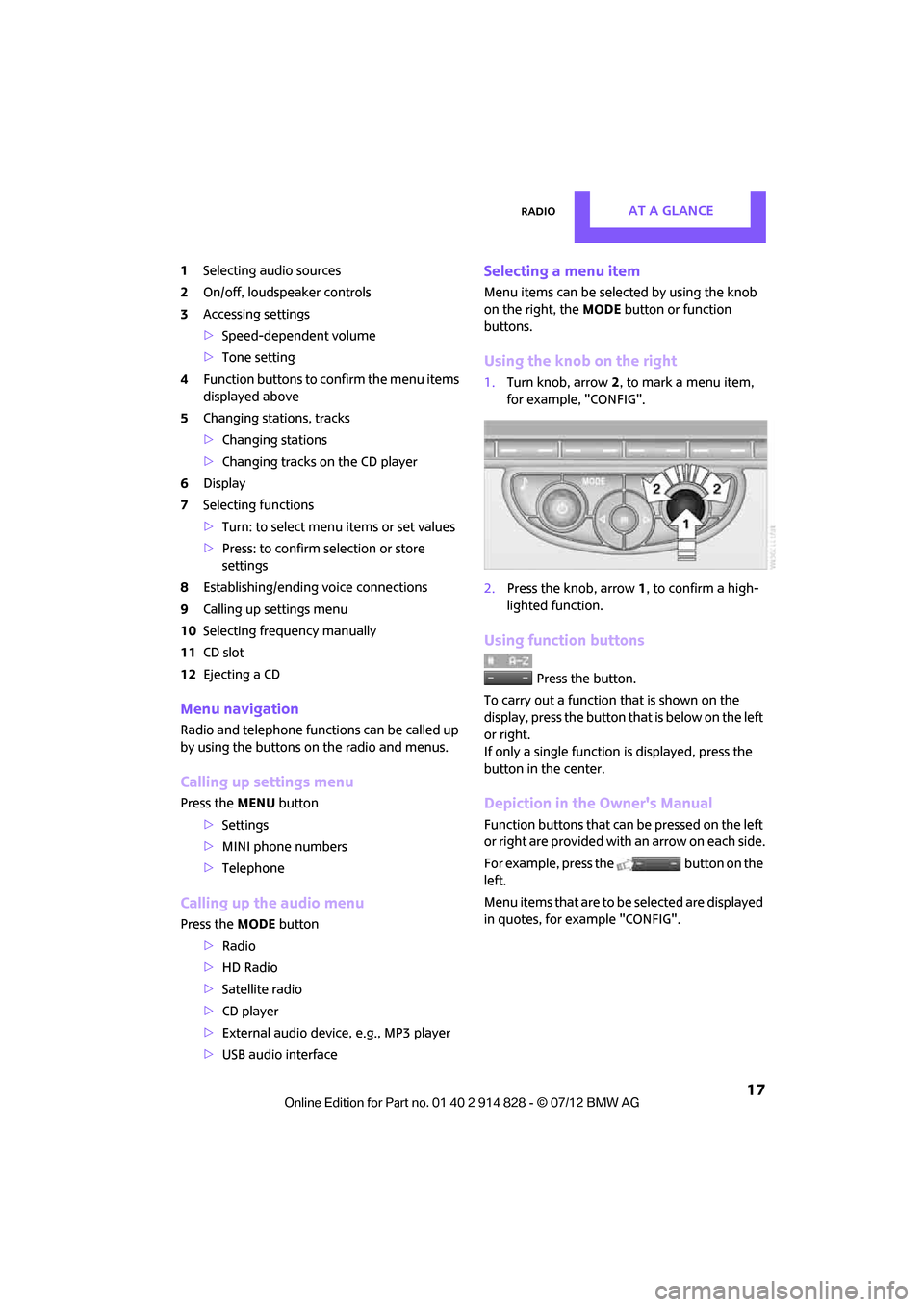
1Selecting audio sources
2 On/off, loudsp eaker controls
3 Accessing settings
>Speed-dependent volume
> Tone setting
4 Function buttons to confirm the menu items
displayed above
5 Changing stations, tracks
>Changing stations
> Changing tracks on the CD player
6 Display
7 Selecting functions
>Turn: to select menu items or set values
> Press: to confirm selection or store
settings
8 Establishing/ending voice connections
9 Calling up settings menu
10 Selecting frequency manually
11 CD slot
12 Ejecting a CD
Menu navigation
Radio and telephone functions can be called up
by using the buttons on the radio and menus.
Calling up settings menu
Press the MENU button
> Settings
> MINI phone numbers
> Telephone
Calling up the audio menu
Press the MODEbutton
> Radio
> HD Radio
> Satellite radio
> CD player
> External audio devi ce, e.g., MP3 player
> USB audio interface
Selecting a menu item
Menu items can be selected by using the knob
on the right, the MODEbutton or function
buttons.
Using the knob on the right
1. Turn knob, arrow 2, to mark a menu item,
for example, "CONFIG".
2. Press the knob, arrow 1, to confirm a high-
lighted function.
Using function buttons
Press the button.
To carry out a function that is shown on the
display, press the button that is below on the left
or right.
If only a single function is displayed, press the
button in the center.
Depiction in the Owner's Manual
Function buttons that can be pressed on the left
or right are provided with an arrow on each side.
For example, press the button on the
left.
Menu items that are to be selected are displayed
in quotes, for example "CONFIG".
Online Edition for Part no. 01 40 2 914 828 - \251 07/12 BMW AG
Page 74 of 201
Technology for driving comfort and safetyCONTROLS
73
Airbags
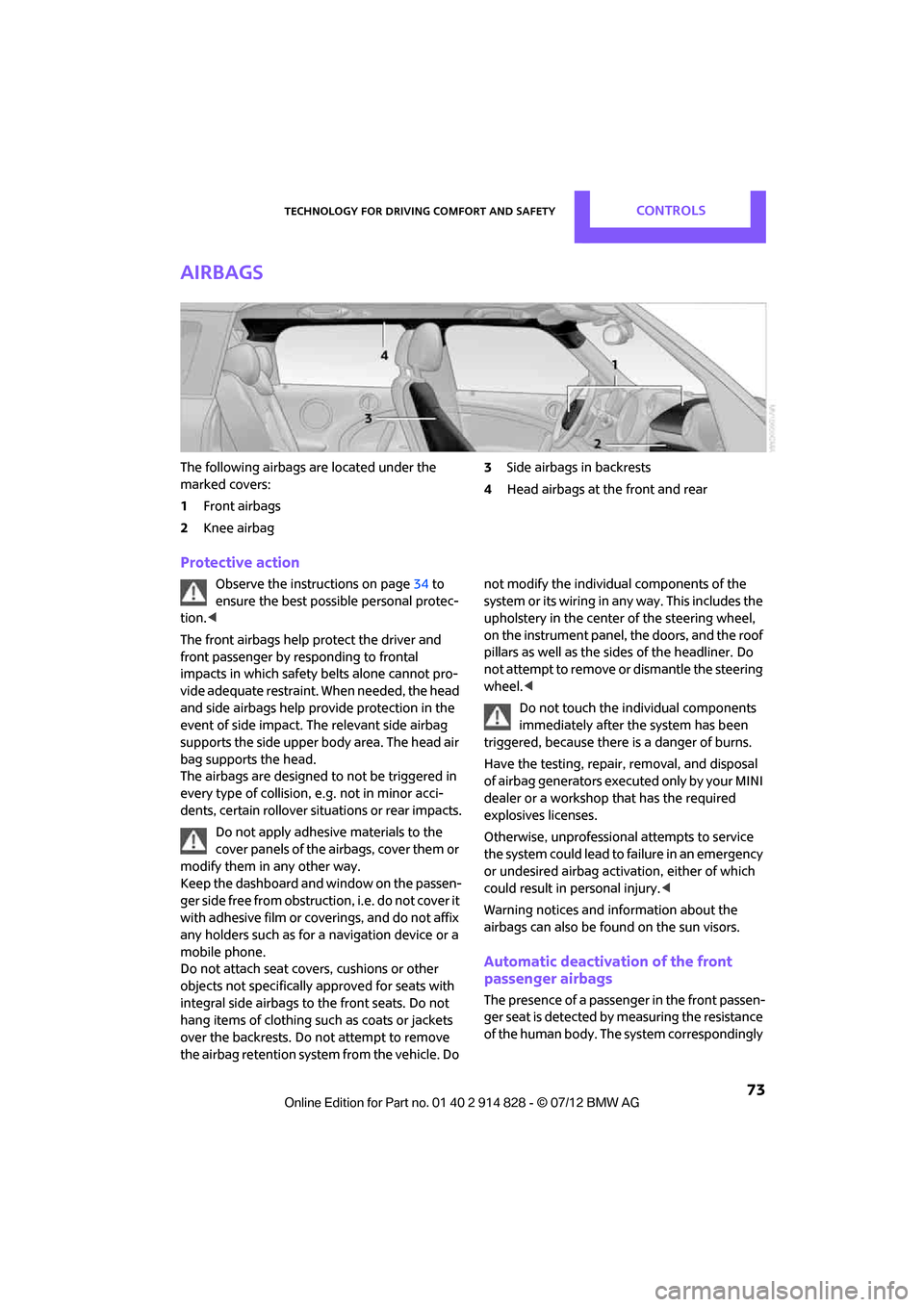
The following airbags are located under the
marked covers:
1Front airbags
2 Knee airbag 3
Side airbags in backrests
4 Head airbags at the front and rear
Protective action
Observe the instructions on page 34 to
ensure the best possible personal protec-
tion. <
The front airbags help protect the driver and
front passenger by responding to frontal
impacts in which safety belts alone cannot pro-
vide adequate restraint. When needed, the head
and side airbags help provide protection in the
event of side impact. Th e relevant side airbag
supports the side upper body area. The head air
bag supports the head.
The airbags are designed to not be triggered in
every type of collision, e.g. not in minor acci-
dents, certain rollover si tuations or rear impacts.
Do not apply adhesive materials to the
cover panels of the airbags, cover them or
modify them in any other way.
Keep the dashboard and window on the passen-
g e r s i d e f r e e f r o m o b s t r u c t i o n , i . e . d o n o t c o v e r i t
with adhesive film or coverings, and do not affix
any holders such as for a navigation device or a
mobile phone.
Do not attach seat covers, cushions or other
objects not specifically approved for seats with
integral side airbags to the front seats. Do not
hang items of clothing such as coats or jackets
over the backrests. Do not attempt to remove
the airbag retention system from the vehicle. Do not modify the individual components of the
syst em o r it s w iring in an y w ay . This inclu des th e
upholstery in the center of the steering wheel,
on the instrument panel, the doors, and the roof
pillars as well as the side
s of the headliner. Do
not attempt to remove or dismantle the steering
wheel. <
Do not touch the individual components
immediately after the system has been
triggered, because there is a danger of burns.
Have the testing, repair , removal, and disposal
o f a i r b a g g e n e r a t o r s e x e c u t e d o n l y b y y o u r M I N I
dealer or a workshop that has the required
explosives licenses.
Otherwise, unprofessional attempts to service
the system could lead to failure in an emergency
or undesired airbag activation, either of which
could result in personal injury. <
Warning notices and in formation about the
airbags can also be found on the sun visors.
Automatic deactivation of the front
passenger airbags
The presence of a passenger in the front passen-
ger seat is detected by measuring the resistance
of the human body. The system correspondingly
Online Edition for Part no. 01 40 2 914 828 - \251 07/12 BMW AG
Page 92 of 201
Practical interior accessoriesCONTROLS
91
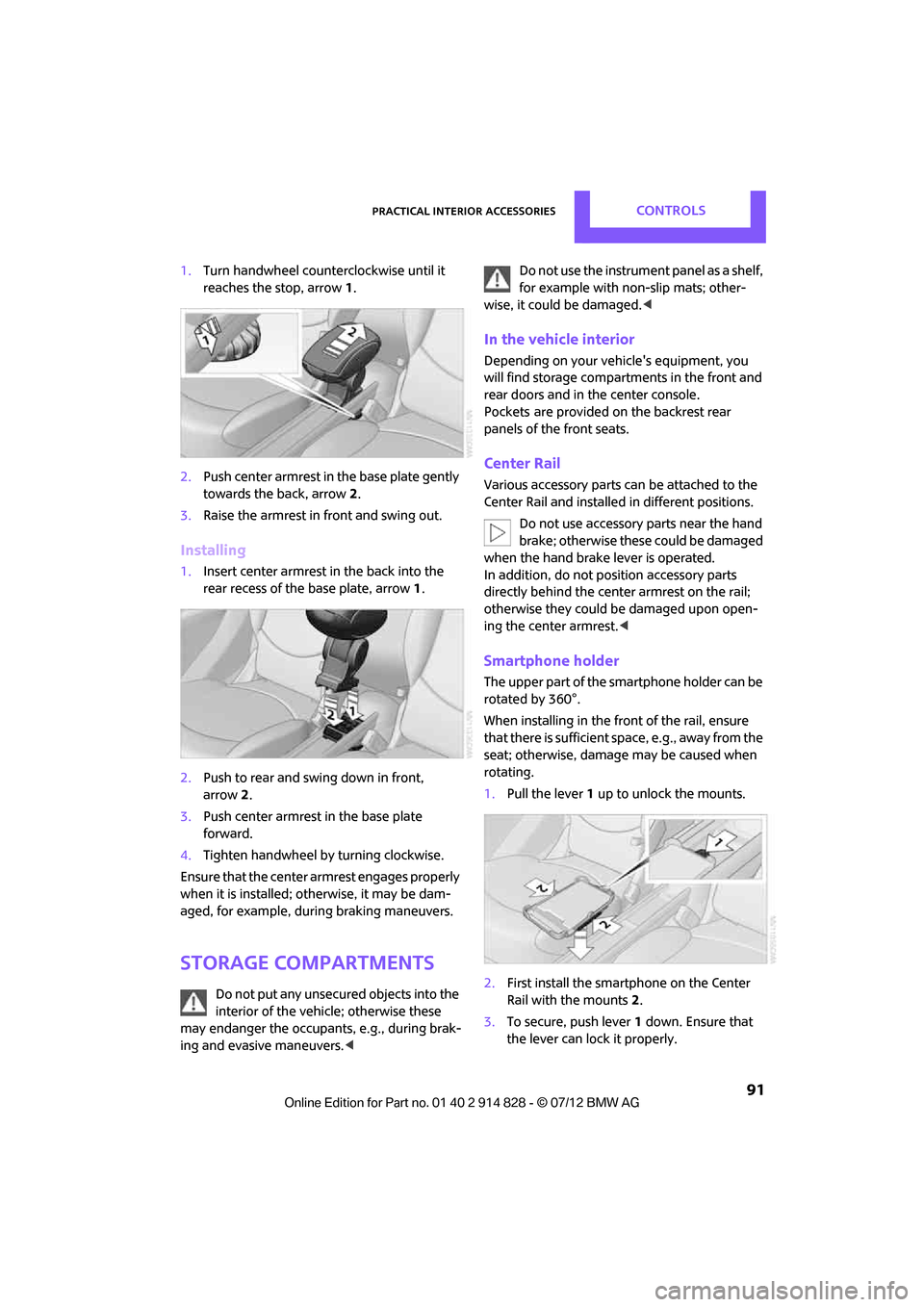
1.Turn handwheel counterclockwise until it
reaches the stop, arrow 1.
2. Push center armrest in the base plate gently
towards the back, arrow 2.
3. Raise the armrest in front and swing out.
Installing
1.Insert center armrest in the back into the
rear recess of the base plate, arrow 1.
2. Push to rear and sw ing down in front,
arrow 2.
3. Push center armrest in the base plate
forward.
4. Tighten handwheel by turning clockwise.
Ensure that the center armrest engages properly
when it is installed; ot herwise, it may be dam-
aged, for example, during braking maneuvers.
Storage compartments
Do not put any unsecured objects into the
interior of the vehicle; otherwise these
may endanger the occupants, e.g., during brak-
ing and evasive maneuvers. < Do not use the instrument panel as a shelf,
for example with non-slip mats; other-
wise, it could be damaged. <
In the vehicle interior
Depending on your vehicle's equipment, you
will find storage compartments in the front and
rear doors and in the center console.
Pockets
are provided on the backrest rear
panels of the front seats.
Center Rail
Various accessory parts ca n be attached to the
Center Rail and installed in different positions.
Do not use accessory parts near the hand
brake; otherwise these could be damaged
when the hand brake lever is operated.
In addition, do not po sition accessory parts
directly behind the center armrest on the rail;
otherwise they could be damaged upon open-
ing the center armrest. <
Smartphone holder
The upper part of the smartphone holder can be
rotated by 360°.
When installing in the front of the rail, ensure
that there is sufficient space, e.g., away from the
seat; otherwise, damage may be caused when
rotating.
1.Pull the lever 1 up to unlock the mounts.
2. First install the smartp hone on the Center
Rail with the mounts 2.
3. To secure, push lever 1 down. Ensure that
the lever can lock it properly.
Online Edition for Part no. 01 40 2 914 828 - \251 07/12 BMW AG
Page 93 of 201

CONTROLSPractical interior accessories
92
When connecting a smartphone to the USB
audio interface, see page115, guide the con-
nection cable under the smartphone holder.
Base plate
On the base plate, vari ous accessories can be
attached, such as cup holders, holders for sun-
glasses and cell phone holders.
Inserting base plate
The lever 3 can be locked in three positions.
0 Locking
1 Sliding along the rail
2 Inserting base plate
For inserting, move the lever into position 2.
Sliding and locking
1. Push lever 3 into position 1.
2. Slide the base plate.
3. Push the lever 3 down, into position 0, and
lock the base plate in place.
Lock the base plate in place before driv-
ing; otherwise, injuries may result in the
event of an accident. <
Example: cupholder
Put cupholder in the back between the rear
seats and push in.
Installing cupholder
1.Lock base plate in place if necessary, refer to
Sliding and locking.
2. Pull the lever 6 up to unlock the mounts. 3.
First insert the cupholder into the front
mounts 4 and then snap it into the rear
mounts 5.
Make sure that the lever 6 is situated
opposite the mount 4.<
Clothes hooks
There are clothes hooks on the grab handles in
the rear passenger compartment.
Items of clothing hung from the hooks
must not obstruct the driver's view. Do not
hang heavy objects from the hooks; otherwise,
they could endanger the car's occupants, e.g. in
case of heavy braking or sudden swerving. <
In the cargo area
Depending on your vehicle's equipment, you
have the following storage options:
>Storage compartment under the flat load
floor
> Bag holder on the support for the cargo area
cover
Online Edition for Part no. 01 40 2 914 828 - \251 07/12 BMW AG
Page 109 of 201

ENTERTAINMENTRadio MINI Boost CD
108
Radio MINI Boost CD
Vehicle equipment
In this chapter, all production, country, and
optional equipment that is offered in the model
range is described. Equipment is also described
that is not available because of, for example,
selected options or coun try version. This also
applies to safety relate d functions and systems.
Switching radio on/off
Press the left rotary knob. The radio
selects the last set audio source:
>Radio
> HD Radio
> Satellite radio
> CD
> External audio device
> USB audio interface.
Listening to the radi o when the ignition
is switched off
After switching off the radio readiness, the radio
functions are available for approx. 20 minutes.
To do so, switch the radio on again.
To spare the battery, ensure that the radio
is switched off when leaving the vehicle. <
Adjusting volume
Turn left rotary knob. The setting is
stored for the remote control in use.
As soon as you make a phone call using
the hands-free device, the radio will auto-
matically be muted. <
Setting the volume for the PDC and gong
You can raise or lower the audio signals for the
PDC or gong with respect to the volume of the audio sources.
The audio signals have a set minimum and max-
imum volume, below which they can not fall and
above which they can not go.
Set the audio source to a high volume to
be able to better set the volume of the
audio signals. <
1. Press the button.
2. Press the button if necessary.
3. Press the button.
or
Press the button.
4. Select the desired vo lume and press the
knob on the right.
Setting the speed-dependent volume
The speed-dependent volume controls auto-
matically increases the volume as the speed of
the vehicle increases. You can set different levels
for increasing the volume.
1. Press the button.
2. Press the button if necessary.
3. Press the button.
4. Select the desired vo lume and press the
knob on the right.
Setting the volume for external audio
devices
Your radio has the option of connecting an
external audio device, e.g., an MP3 player, and
playing it over the loudspeakers in the vehicle.
You can set the volume by using the radio.
Connecting an external device, refer to
page 115.
Online Edition for Part no. 01 40 2 914 828 - \251 07/12 BMW AG