maintenance MINI Countryman 2015 (Mini Connected) User Guide
[x] Cancel search | Manufacturer: MINI, Model Year: 2015, Model line: Countryman, Model: MINI Countryman 2015Pages: 283, PDF Size: 6.76 MB
Page 218 of 283
Wheels and tiresVehicle equipment
This chapter describes all series equipment as
well as country-specific and special equipment
offered for this model series. Therefore, it also
describes equipment that may not be found in
your vehicle, for instance due to the selected
special equipment or the country version. This
also applies to safety-related functions and sys‐
tems.
When using the features and systems described
here, adhere to local regulations.
Tire inflation pressure
Safety information It is not merely the tires' service life, but also
driving comfort and, to a great extent, driving
safety that depend on the condition of the tires
and the maintenance of the specified tire pres‐
sure.
Checking the pressure Tires naturally lose pressure uniformly across all
four tires.
Check the tire inflation pressure regularly
Regularly check the tire inflation pressure
and correct it as needed: at least twice a month
and before a long trip. If you fail to observe this
precaution, you may be driving on tires with in‐
correct tire pressures, a condition that may not
only compromise your vehicle's driving stabil‐
ity, but also lead to tire damage and the risk of
an accident.
Do not drive with depressurized or flat tires, ex‐
cept for run-flat tires. A flat tire will seriously
impair your vehicle's handling and braking re‐
sponse. Attempts to drive on a flat tire can lead
to a loss of control over the vehicle. ◀Tires warm up during driving and the tire infla‐
tion pressure increases as the temperature
rises. The tire inflation pressure specifications
apply to cold tires or tires at ambient tempera‐
ture.
Only check the tire inflation pressure when the
tires are cold. This means after a maximum of
1.25 miles/2 km driving or when the vehicle
has been parked for at least 2 hours. When the
tires are warm, the tire inflation pressure is
higher.
After correcting the tire inflation pressure, reset
the Tire Pressure Monitor, refer to page 87
or reinitialize the Flat Tire Monitor, refer to
page 85.
Pressure specifications
The tables below provide all the correct infla‐
tion pressures for the specified tire sizes at am‐
bient temperature.
The inflation pressures apply to the tire sizes
approved and tire brands recommended by the
manufacturer of the MINI; a list of these is
available from the service center.
For correct identification of the right tire infla‐
tion pressures, observe the following:▷Tire sizes of your vehicle▷Maximum allowable driving speed
Tire inflation pressures for driving up to
100 mph or 160 km/h
For normal driving up to 100 mph/160 km/h,
adjust pressures to the respective tire inflation
pressures listed on the following pages in the
column for traveling speeds up to 100 mph/
160 km/h to achieve optimum driving comfort.
These tire inflation pressures can also be found
on the driver's side door pillar when the driver's
door is open.
Seite 216MOBILITYWheels and tires216
Online Edition for Part no. 01 40 2 961 110 - II/15
Page 235 of 283

MaintenanceVehicle equipment
This chapter describes all series equipment as
well as country-specific and special equipment
offered for this model series. Therefore, it also
describes equipment that may not be found in
your vehicle, for instance due to the selected
special equipment or the country version. This
also applies to safety-related functions and sys‐
tems.
When using the features and systems described
here, adhere to local regulations.
MINI maintenance system
The MINI maintenance system provides infor‐
mation on required maintenance measures and
thus provides support in maintaining road
safety and the operational reliability of the ve‐
hicle.
Condition Based Service
CBS
Sensors and special algorithms take into ac‐
count the various driving conditions of your
MINI. Based on this, Condition Based Service
determines the current and future mainte‐
nance requirements.
The system makes it possible to adapt the
amount of maintenance you need to your user
profile.
Detailed information on service requirements
can be displayed on the Control Display, refer
to page 73.
Service data in the remote control
Information on the required maintenance is continuously stored in the remote control. Your
service center will read out this data and sug‐
gest the right array of service procedures for
your vehicle. Therefore, hand your service spe‐
cialist the remote control that you used most
recently.
Setting the correct date
Make sure the date is set correctly; other‐
wise, the effectiveness of CBS Condition Based
Service is not ensured. ◀
Service and Warranty In‐
formation Booklet for
US models and Warranty and Service Guide Book‐
let for Canadian models
Please consult your Service and Warranty Infor‐
mation Booklet for US models and Warranty
and Service Guide Booklet for Canadian models
for additional information on service require‐
ments.
Maintenance and repair should be performed
by your service center. Make sure to have regu‐
lar maintenance procedures recorded in the ve‐
hicle's Service and Warranty Information Book‐
let for US models, and in the Warranty and
Service Guide Booklet for Canadian models.
These entries are proof of regular maintenance.Seite 233MaintenanceMOBILITY233
Online Edition for Part no. 01 40 2 961 110 - II/15
Page 236 of 283

Socket for OBD Onboard
Diagnosis
Socket for Onboard Diagnosis
The socket for Onboard Diagnosis may
only be used by the service center, by work‐
shops that operate according to the specifica‐
tions of the vehicle manufacturer with appro‐
priately trained personnel, and by other
authorized persons. Otherwise, its use may
lead to vehicle malfunctions. ◀
Primary components in the vehicle emissions
can be checked via the OBD socket using a de‐
vice.
Emissions The warning lamps light up. The vehicle
is producing higher emissions. You can
continue your journey, but moderate
your speed and exercise due caution. Have the
vehicle checked as soon as possible.
Under certain circumstances, one of the lamps
flashes or lights up continuously. This indicates
that there is excessive misfiring or a malfunc‐
tion in the engine. If this happens, reduce the
vehicle speed and drive to the next service cen‐
ter promptly. Serious engine misfiring within a
brief period can seriously damage emission
control components, in particular the catalytic
converter. In addition, the mechanical engine
components may become damaged.
If the fuel filler cap is not properly tight‐
ened, the OBD system may conclude
that fuel vapor is escaping; this will cause a dis‐
play to light up. If the filler cap is then tight‐
ened, the display should go out in a few days.Seite 234MOBILITYMaintenance234
Online Edition for Part no. 01 40 2 961 110 - II/15
Page 245 of 283
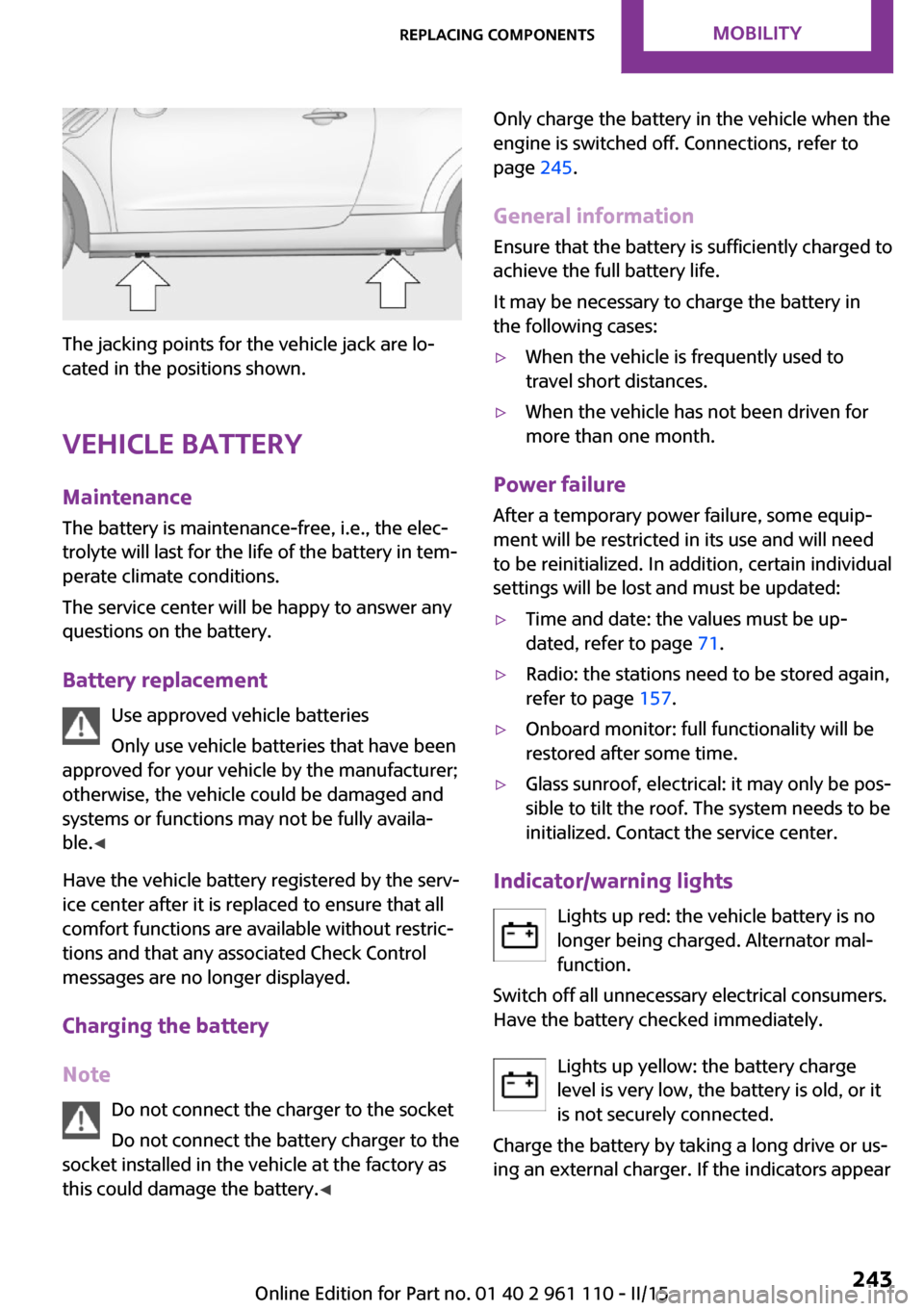
The jacking points for the vehicle jack are lo‐
cated in the positions shown.
Vehicle battery Maintenance
The battery is maintenance-free, i.e., the elec‐
trolyte will last for the life of the battery in tem‐
perate climate conditions.
The service center will be happy to answer any
questions on the battery.
Battery replacement Use approved vehicle batteries
Only use vehicle batteries that have been
approved for your vehicle by the manufacturer;
otherwise, the vehicle could be damaged and
systems or functions may not be fully availa‐
ble. ◀
Have the vehicle battery registered by the serv‐
ice center after it is replaced to ensure that all
comfort functions are available without restric‐
tions and that any associated Check Control
messages are no longer displayed.
Charging the battery
Note Do not connect the charger to the socket
Do not connect the battery charger to the
socket installed in the vehicle at the factory as this could damage the battery. ◀
Only charge the battery in the vehicle when the
engine is switched off. Connections, refer to
page 245.
General information Ensure that the battery is sufficiently charged to
achieve the full battery life.
It may be necessary to charge the battery in
the following cases:▷When the vehicle is frequently used to
travel short distances.▷When the vehicle has not been driven for
more than one month.
Power failure
After a temporary power failure, some equip‐
ment will be restricted in its use and will need
to be reinitialized. In addition, certain individual
settings will be lost and must be updated:
▷Time and date: the values must be up‐
dated, refer to page 71.▷Radio: the stations need to be stored again,
refer to page 157.▷Onboard monitor: full functionality will be
restored after some time.▷Glass sunroof, electrical: it may only be pos‐
sible to tilt the roof. The system needs to be
initialized. Contact the service center.
Indicator/warning lights
Lights up red: the vehicle battery is nolonger being charged. Alternator mal‐function.
Switch off all unnecessary electrical consumers.
Have the battery checked immediately.
Lights up yellow: the battery charge
level is very low, the battery is old, or it
is not securely connected.
Charge the battery by taking a long drive or us‐
ing an external charger. If the indicators appear
Seite 243Replacing componentsMOBILITY243
Online Edition for Part no. 01 40 2 961 110 - II/15
Page 271 of 283
Black and white map dis‐play 148
Bluetooth audio 171
Bluetooth connection, activat‐ ing/deactivating, hands-free
system 179
Bluetooth connection, activat‐ ing/deactivating, mobile
phone preparation 189
Bluetooth hands-free sys‐ tem 178
Brake assistant 92
Brake discs, breaking in 120
Brake fluid, refer to Service re‐ quirements 73
Brake force distribution, elec‐ tronic 92
Brake pads, breaking in 120
Brake, refer to Parking brake 59
Brakes, MINI maintenance system 233
Brakes, service require‐ ments 73
Brake system, MINI mainte‐ nance system 233
Braking, notes 121
Braking, parking brake 59
Breakdown assistance, Road‐ side Assistance 245
Breaking in 120
Brightness on the Control Dis‐ play 73
Buckle tongue, height adjust‐ ment 47
Button for starting the engine, refer to Start/Stop button 57
C
Calendar 203
California Proposition 65 Warning 7
Car battery, refer to Vehicle battery 243
Car care products 251 Care, displays 253
Care, vehicle 251
Cargo area, Comfort Ac‐ cess 37
Cargo area door, refer to Tail‐ gate 35
Cargo area, enlarging, cargo cover 111
Cargo area, flat loading floor 113
Cargo area light, refer to Inte‐ rior lights 80
Cargo area, multi-function hook 114
Cargo area, opening from the outside 35
Cargo area, partition net 113
Car horn, refer to Horn 12
Carpet, care 253
Car phone, refer to Tele‐ phone 178
Car phone, refer to Telephone, mobile phone prepara‐
tion 188
Car wash 250
CBC, Cornering Brake Con‐ trol 92
CBS Condition Based Serv‐ ice 233
CD 164
CD/DVD drives, care 254
CD player 164
Center armrest 116
Center console, refer to Around the center con‐
sole 16
Center rail 116
Center rail, refer to Storage compartments 116
Central locking, Comfort Ac‐ cess 37
Central locking from the in‐ side 34
Central locking system, con‐ cept 31 Central locking system, from
the outside 31
Central screen, see Control Display 18
Changes, technical, refer to Safety 6
Changing wheels/tires 223
Check Control 74
Children, transporting 52
Child restraint fixing system LATCH 53
Child restraint fixing sys‐ tems 52
Child restraint fixing systems, mounting 52
Child seat, mounting 52
Child seats, refer to Transport‐ ing children safely 52
Chrome parts, care 253
Circulation of air, refer to Re‐ circulated air mode, air con‐
ditioner 100
Circulation of air, refer to Re‐ circulated air mode, auto‐
matic climate control 102
Cleaning, displays 253
Cleaning, refer to Care 250
Climate 99
Climate mode, ventila‐ tion 104
Clock 67
Clock, 12h/24h format 71
Clock, setting the time and date 71
Clock, setting the time zone 72
Closing from the inside 34
Closing, from the outside 32
Clutch, breaking in 120
Cockpit 12
Cold start, refer to Starting the engine 58
Combination instrument, refer to Displays 14 Seite 269Everything from A to ZREFERENCE269
Online Edition for Part no. 01 40 2 961 110 - II/15
Page 273 of 283
DTMF suffix dialing, mobilephone preparation pack‐
age 193
Dynamic destination guid‐ ance 150
Dynamic Stability Control DSC 92
Dynamic Traction Control DTC 93
E Electrical malfunction, door lock 34
Electrical malfunction, fuel filler flap 212
Electronic brake-force distri‐ bution 92
Electronic Stability Program ESP, refer to Dynamic Stabil‐
ity Control DSC 92
Emergency operation, fuel filler flap, unlocking man‐
ually 212
Emergency operation, refer to Manual operation 34
Emergency operation, Step‐ tronic transmission, refer to
Selector lever lock, overrid‐
ing 66
Energy, saving, refer to Saving fuel 128
Engine, breaking in 120
Engine compartment 228
Engine oil, adding 230
Engine oil, additives, refer to Approved engine oils 231
Engine oil, alternative oil types 231
Engine oil change intervals, refer to Service require‐
ments 73
Engine oil, dip stick 230
Engine oil, filling capacity 261
Engine oil, MINI maintenance system 233 Engine oil types, alterna‐
tive 231
Engine oil types, ap‐ proved 231
Engine, overheating, refer to Coolant temperature 68
Engine start, assistance 245
Engine, starting 58
Engine, starting, Comfort Ac‐ cess 37
Engine, starting, Start/Stop button 57
Engine, stopping, Start/Stop button 57
Engine, switching off 59
Equipment, interior 105
ESP Electronic Stability Pro‐ gram, refer to Dynamic Sta‐
bility Control DSC 92
Exchanging wheels/tires 223
Exterior mirrors 49
Exterior mirrors, adjusting 49
Exterior mirrors, folding in and out 50
Exterior sensors, care 253
External devices 167
External temperature dis‐ play 67
External temperature display, changing the unit of meas‐
ure 71
External temperature display, on onboard computer 71
External temperature warn‐ ing 67
F Fader 154
Failure messages, refer to Check Control 74
False alarm, refer to Avoiding unintentional alarms 40
Fan, refer to Air flow rate for air conditioner 100 Fan, refer to Air flow rate with
automatic climate con‐
trol 102
Fastening safety belts, refer to Safety belts 46
Fault messages, refer to Check Control 74
Filling capacities 261
Filter, refer to Activated-char‐ coal filter 101
Filter, refer to Microfilter 101
Filter, refer to Microfilter/acti‐ vated-charcoal filter with au‐
tomatic climate control 103
First aid kit 245
First aid, refer to First aid kit 245
Flashing when locking/unlock‐ ing 33
Flat tire, Flat Tire Monitor 85
Flat tire, indicator/warning lamp 85
Flat Tire Monitor FTM 84
Flat Tire Monitor FTM, flat tire message 85
Flat Tire Monitor FTM, initializ‐ ing the system 85
Flat Tire Monitor FTM, snow chains 84
Flat Tire Monitor FTM, system limits 84
Flat tire, run-flat tire 86
Flat tire, Tire Pressure Moni‐ tor 86
Flat tire, Tire Pressure Monitor TPM 86
Flat tire, wheel change 242
Floor mats, care 253
FM/AM station 156
Fog lights 79
Foot brake 121
Footwell lights, refer to Inte‐ rior lights 80
Four-wheel drive, refer to ALL4 94
Front airbags 81 Seite 271Everything from A to ZREFERENCE271
Online Edition for Part no. 01 40 2 961 110 - II/15
Page 276 of 283
Longlife oils, refer to Ap‐proved engine oils 231
Low beams 77
Low beams, automatic 77
Low beams, bulb replace‐ ment 237
Lower back support, refer to Lumbar support 45
Lumbar support 45
M
Main inspection, refer to Serv‐ ice requirements 73
Maintenance, refer to Service booklet
Maintenance, refer to Service requirements 73
Maintenance require‐ ments 233
Maintenance system MINI 233
Makeup mirror 107
Malfunction, door lock 34
Malfunction, fuel filler flap 212
Malfunction, Steptronic trans‐ mission 66
Malfunction warnings, refer to Check Control 74
Manual air distribution, air conditioner 100
Manual air distribution, auto‐ matic climate control 103
Manual mode, Steptronic transmission 65
Manual operation, door lock 34
Manual operation, fuel filler flap 212
Manual operation, selector lever lock, Steptronic trans‐
mission 66
Map, destination entry 139
Map display in black and white 148 Map view 146
Marking on approved tires 223
Maximum cooling 102
Maximum speed, winter tires 224
Menu operation, onboard monitor 18
Menus, refer to Onboard monitor operating con‐
cept 19
Message list, traffic bulle‐ tins 147
Messages 202
Microfilter 101
Microfilter, with automatic cli‐ mate control 103
MINI Connected 207
MINI Homepage 6
MINI Internet page 6
MINI maintenance sys‐ tem 233
MINI Mobility System 225
Minimum tread, tires 222
Mirrors 49
Mirrors, folding in and out 50
Mirrors, interior mirror 50
Mobile communication devi‐ ces in the vehicle 121
Mobile phone, refer to Tele‐ phone, mobile phone prepa‐
ration 188
Mobile phone, refer to Tele‐ phone with hands-free sys‐
tem 178
Mobile phone with hands-free system 178
Mobile phone with mobile phone preparation 188
Mobility System 225
Modifications, technical, refer to Safety 6
Monitor, see Control Dis‐ play 18
Mounting of child restraint fix‐ ing systems 52 MP3 player 167
N
Navigation 132
Navigation data 132
Navigation data, updat‐ ing 132
Navigation system, destina‐ tion entry by voice 140
Neck restraints, refer to Head restraints 48
New wheels and tires 223
Notes 6, 204
Nozzles, refer to Ventila‐ tion 104
O
OBD Onboard Diagnos‐ tics 234
OBD socket, refer to Socket for OBD Onboard Diagno‐
sis 234
Octane number, refer to Fuel quality 214
Octane rating, refer to Recom‐ mended fuel grade 214
Odometer 67
Office 199
Oil additives 231
Oil level 230
Oil types, alternative 231
Oil types, approved 231
Onboard Diagnostics OBD 234
Onboard monitor 18
Opening and closing, Comfort Access 37
Opening and closing from the inside 34
Opening and closing, from the outside 32
Opening and closing, using the door lock 34 Seite 274REFERENCEEverything from A to Z274
Online Edition for Part no. 01 40 2 961 110 - II/15