child restraint MINI Countryman 2015 Owner's Manual (Mini Connected)
[x] Cancel search | Manufacturer: MINI, Model Year: 2015, Model line: Countryman, Model: MINI Countryman 2015Pages: 283, PDF Size: 6.76 MB
Page 54 of 283

Transporting children safelyVehicle equipment
This chapter describes all series equipment as
well as country-specific and special equipment
offered for this model series. Therefore, it also
describes equipment that may not be found in
your vehicle, for instance due to the selected
special equipment or the country version. This
also applies to safety-related functions and sys‐
tems.
When using the features and systems described
here, adhere to local regulations.
The right place for chil‐
dren
Notes Children in the vehicle
Do not leave children unattended in the
vehicle; otherwise, they could endanger them‐
selves and other persons, e.g., by opening the
doors. ◀
Children should always be in the rear Accident research shows that the safest place
for children is on the rear seat.
Transporting children in the rear
Transport children younger than 13 years
of age or shorter than 5 ft/150 cm in the rear
only, using child restraint fixing systems suita‐
ble for the age, weight, and height of the child;
otherwise, there is an increased risk of injury in
an accident.
Children 13 years of age or older must wear a
safety belt as soon as a suitable child restraint
fixing system can no longer be used, due to
their age, weight and size. ◀Installing child seats
Only install child seats in the rear when
the rear seat backrest is folded all the way back
and engaged; otherwise, there is an increased
risk of injury in an accident. ◀
Children on the front passenger seat
Front passenger airbags Should it be necessary to use a child restraint
fixing system on the front passenger seat,
make sure that the front and side airbags on
the front passenger side are deactivated, refer
to page 82.
Deactivating the front passenger airbags
If a child restraint fixing system is used in
the front passenger seat, the front passenger
airbags must be deactivated; otherwise, there
is an increased risk of injury to the child when
the airbags are triggered, even with a child re‐
straint fixing system. ◀
Installing child re‐
straint fixing systems
Before mounting MINI Countryman: before mounting a child re‐
straint fixing system on the rear seats, move
the seats into the rearmost positions.
Adjust the inclination of the center backrest to
that of the respective outer backrest.
After mounting the child restraint fixing system
on the respective outer rear seat, adjust the
backrest forward, if necessary, to ensure that
the backrest is in contact with the child re‐
straint fixing system. Rear seat backrests, refer
to page 111.Seite 52CONTROLSTransporting children safely52
Online Edition for Part no. 01 40 2 961 110 - II/15
Page 55 of 283
NotesManufacturer's information for child re‐
straint fixing systems
To select, mount and use child restraint fixing
systems, observe the information provided by
the system manufacturer; otherwise, the pro‐
tective effect can be impaired. ◀
On the front passenger seat
Deactivating the airbags After installing a child restraint fixing system on
the front passenger seat, ensure that the front,
side, and knee airbags on the front passenger
side are deactivated.
Deactivating the front passenger airbags
If a child restraint fixing system is used in
the front passenger seat, the front passenger
airbags must be deactivated; otherwise, there
is an increased risk of injury to the child when
the airbags are triggered, even with a child re‐
straint fixing system. ◀
Seat position and height
Before installing a child restraint fixing system,
move the front passenger seat as far back as
possible and adjust its height to the highest po‐
sition to obtain the best possible position for
the belt and to offer optimal protection in the
event of an accident.
Do not change this seat position once it has
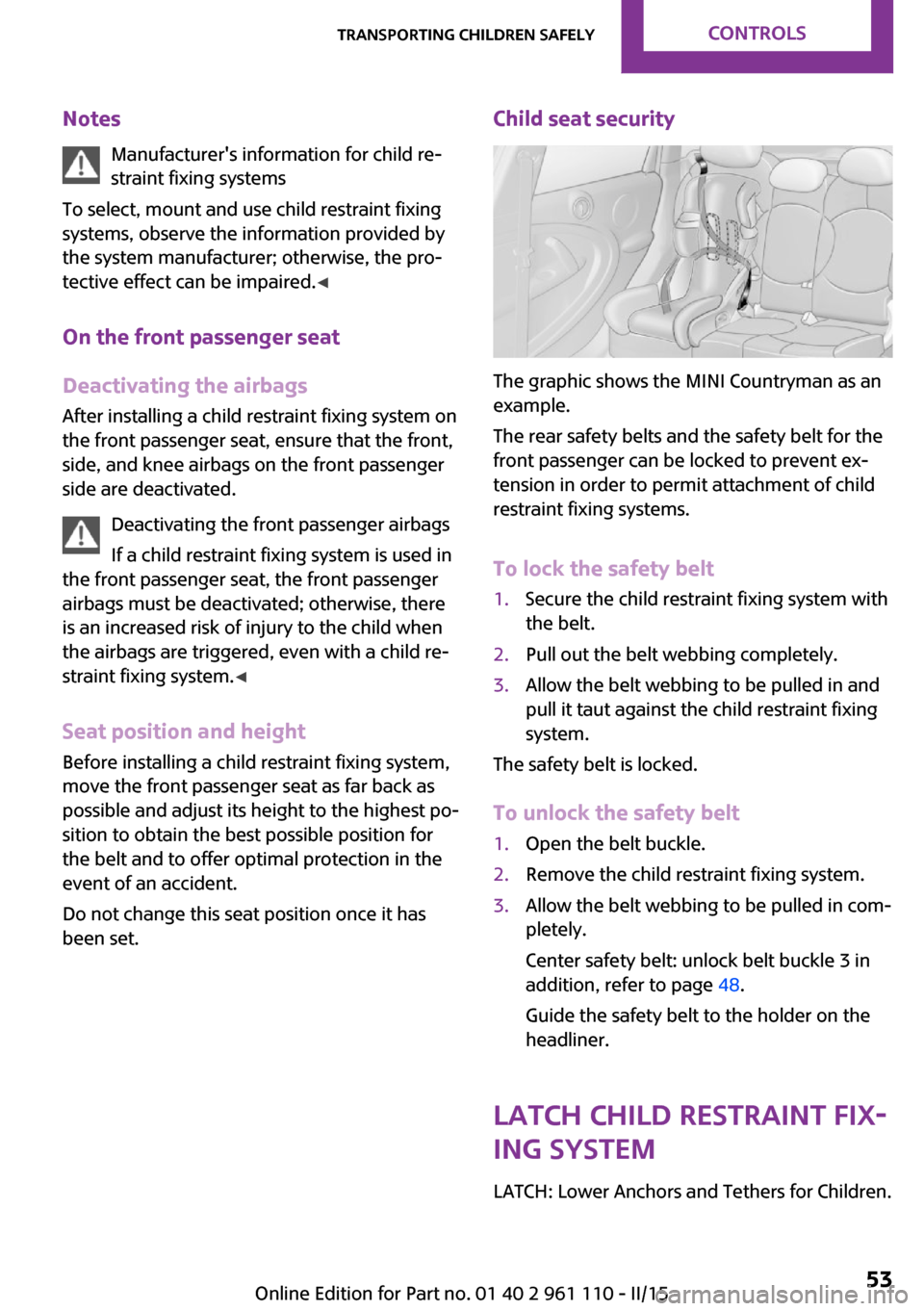
been set.Child seat security
The graphic shows the MINI Countryman as an
example.
The rear safety belts and the safety belt for the
front passenger can be locked to prevent ex‐
tension in order to permit attachment of child
restraint fixing systems.
To lock the safety belt
1.Secure the child restraint fixing system with
the belt.2.Pull out the belt webbing completely.3.Allow the belt webbing to be pulled in and
pull it taut against the child restraint fixing
system.
The safety belt is locked.
To unlock the safety belt
1.Open the belt buckle.2.Remove the child restraint fixing system.3.Allow the belt webbing to be pulled in com‐
pletely.
Center safety belt: unlock belt buckle 3 in
addition, refer to page 48.
Guide the safety belt to the holder on the
headliner.
LATCH child restraint fix‐
ing system
LATCH: Lower Anchors and Tethers for Children.
Seite 53Transporting children safelyCONTROLS53
Online Edition for Part no. 01 40 2 961 110 - II/15
Page 56 of 283

NotesManufacturer's information for LATCH
child restraint fixing systems
To mount and use the LATCH child restraint fix‐
ing systems, observe the operating and safety
information from the system manufacturer;
otherwise, the level of protection may be re‐
duced. ◀
Mounts for the lower LATCH anchors
The lower anchors may be used to attach the
CRS to the vehicle seat up to a combined child
and CRS weight of 65 lb/30 kg when the child is
restrained by the internal harnesses.
Correctly engage the lower LATCH an‐
chors
Make sure that the lower LATCH anchors have properly engaged and that the child restraint
fixing system is resting snugly against the back‐
rest; otherwise, the degree of protection of‐
fered may be reduced. ◀
Before installing the child seat, pull the belt out
of the area for the child restraint fixing system.
MINI Countryman
The mounts for the lower LATCH anchors are
located at the points indicated by the arrows.
MINI Paceman
The mounts for the lower LATCH anchors are
located at the points indicated by the arrows.
The corresponding symbol shows the
mounts for the lower LATCH anchors.
Mounting LATCH child restraint fixing systems
1.Mount the child restraint fixing system; re‐
fer to the operating instructions of the sys‐
tem.2.Ensure that both LATCH anchors are prop‐
erly connected.
Child restraint fixing
systems with an upper re‐
taining strap
Mounting points LATCH mounting points
Only use the mounting points for the up‐
per LATCH retaining strap to secure child re‐
straint systems; otherwise, the mounting points
could be damaged. ◀
Seite 54CONTROLSTransporting children safely54
Online Edition for Part no. 01 40 2 961 110 - II/15
Page 57 of 283

MINI Countryman
There are two additional mounting points for
child restraint fixing systems with an upper re‐
taining strap, arrows.
MINI Paceman
There are two additional mounting points for
child restraint fixing systems with an upper re‐
taining strap, arrows.
Guide of the upper LATCH retaining
strap
Retaining strap
Make sure the upper retaining strap does
not run over sharp edges and is not twisted as
it passes to the top anchor. Otherwise, the
strap will not properly secure the child restraint
fixing system in the event of an accident. ◀
Outer seats:1Direction of travel2Head restraint3Cargo area floor4Hook for upper retaining strap5Mounting point6Backrest7Upper retaining strap of child restraint fix‐
ing system
MINI Countryman, center seat
1Direction of travel2Head restraint3Hook for upper retaining strap4Mounting point5Cargo area floor6Backrest7Upper retaining strap of child restraint fix‐
ing systemSeite 55Transporting children safelyCONTROLS55
Online Edition for Part no. 01 40 2 961 110 - II/15
Page 58 of 283
Attaching the upper retaining strap to
the mounting point1.Slide the head restraint upward.2.Center seat: fold the cargo area floor for‐
ward.3.Guide the upper retaining strap between
the supports of the head restraint.4.Attach the upper retaining strap to the
mounting point with the hook.5.Slide the head restraint into the bottom po‐
sition.6.Pull the upper retaining strap taut.
MINI Countryman: lock‐
ing doors and windows
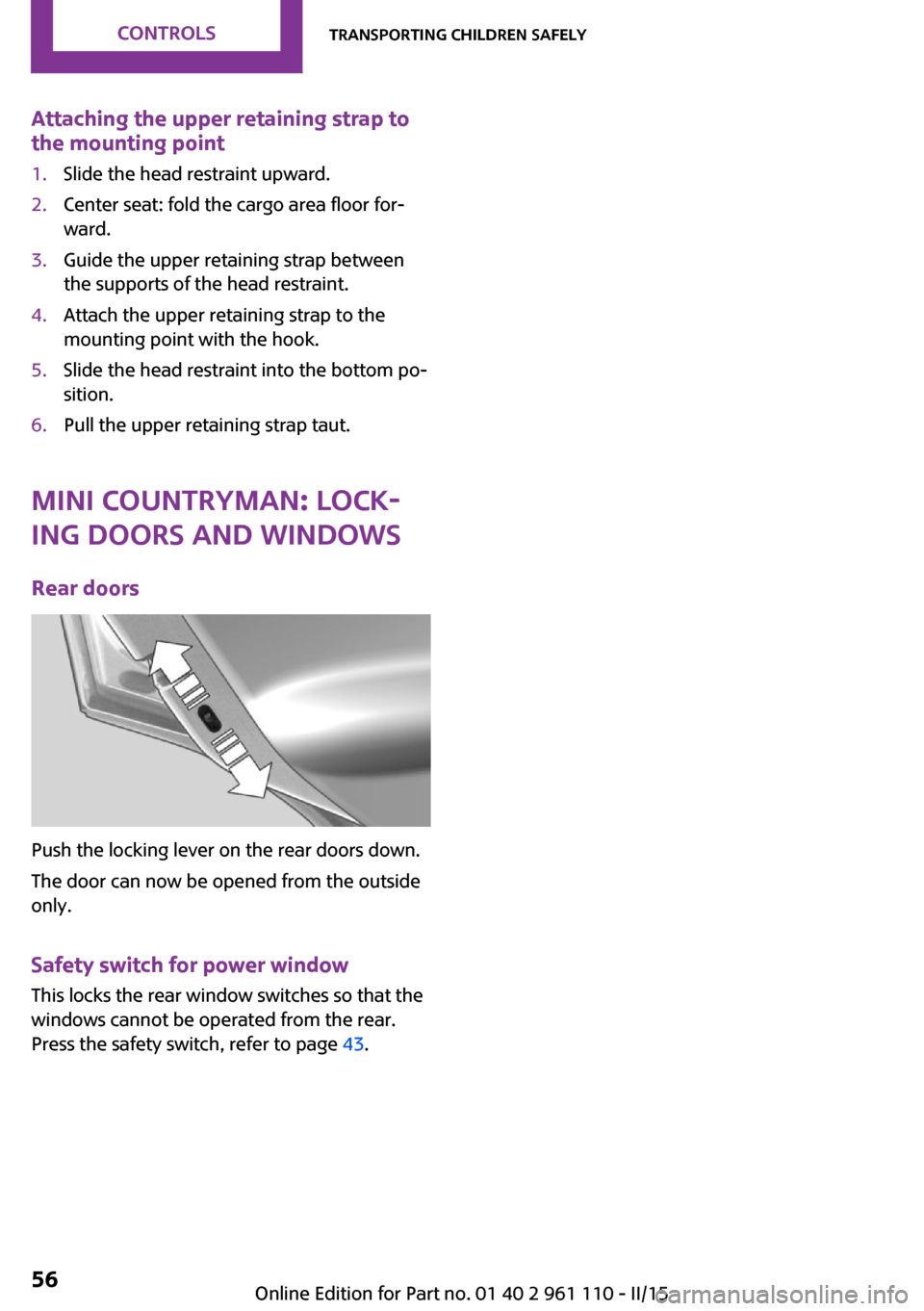
Rear doors
Push the locking lever on the rear doors down.
The door can now be opened from the outside
only.
Safety switch for power window This locks the rear window switches so that the
windows cannot be operated from the rear.
Press the safety switch, refer to page 43.
Seite 56CONTROLSTransporting children safely56
Online Edition for Part no. 01 40 2 961 110 - II/15
Page 85 of 283

Leave feet in the footwell
Make sure that the front passenger keeps
his or her feet in the footwell; otherwise, the
front passenger airbags may not function prop‐
erly. ◀
Child restraint fixing system in the front
passenger seat
Before transporting a child on the front passen‐
ger seat, read the safety and operating instruc‐
tions under Transporting children safely, refer
to page 52.◀
Malfunction of the automatic deactivation system
When transporting older children and adults,
the front passenger airbags may be deactivated
in certain sitting positions. In this case, the indi‐
cator lamp for the front passenger airbags
lights up.
In this case, change the sitting position so that
the front passenger airbags are activated and
the indicator lamp goes out.
If it is not possible to activate the airbags, have
the person sit in the rear.
To make sure that occupation of the seat cush‐
ion can be detected correctly:▷Do not attach seat covers, seat cushion
padding, ball mats, or other items to the
front passenger seat unless they are specifi‐
cally recommended by the manufacturer of
your MINI.▷Do not place electronic devices on the pas‐
senger seat if a child restraint fixing system
is mounted on the seat.▷Do not place objects under the seat that
could press against the seat from below.Indicator light for the front passenger airbags
The indicator lamp for the front passenger air‐
bags indicates the operating state of the front
passenger airbags.
The light indicates whether the airbags are acti‐
vated or deactivated.
▷The indicator lamp lights up
when a child who is properly
seated in a child restraint fix‐
ing system intended for that
purpose is detected on the
seat or the seat is empty. The
airbags on the front passen‐
ger side are not activated.▷The indicator lamp does not light up when,
for example, a correctly seated person of
sufficient size is detected on the seat. The
airbags on the front passenger side are ac‐
tivated.
Most child seats are detected by the system.
Especially the child seats required by NHTSA at
the time that the vehicle was manufactured.
After installing a child seat, make sure that the
indicator lamp for the front passenger airbags
lights up. This indicates that the child seat has
been detected and the front passenger airbags
are not activated.
Seite 83SafetyCONTROLS83
Online Edition for Part no. 01 40 2 961 110 - II/15
Page 114 of 283
Open the center safety belt and insert it in the
belt holder on the headliner, refer to page 47.
Enlarge the cargo area by adjusting the rear
seat backrests to a more upright position.
The backrests can be adjusted to 10 different
positions between the comfort and transport
positions and they can be folded down.
In the comfort position, the backrests are tilted
back to the greatest possible angle and in the
transport position they are nearly vertical.
Before beginning with the mounting of a child
restraint fixing system, note the instructions,
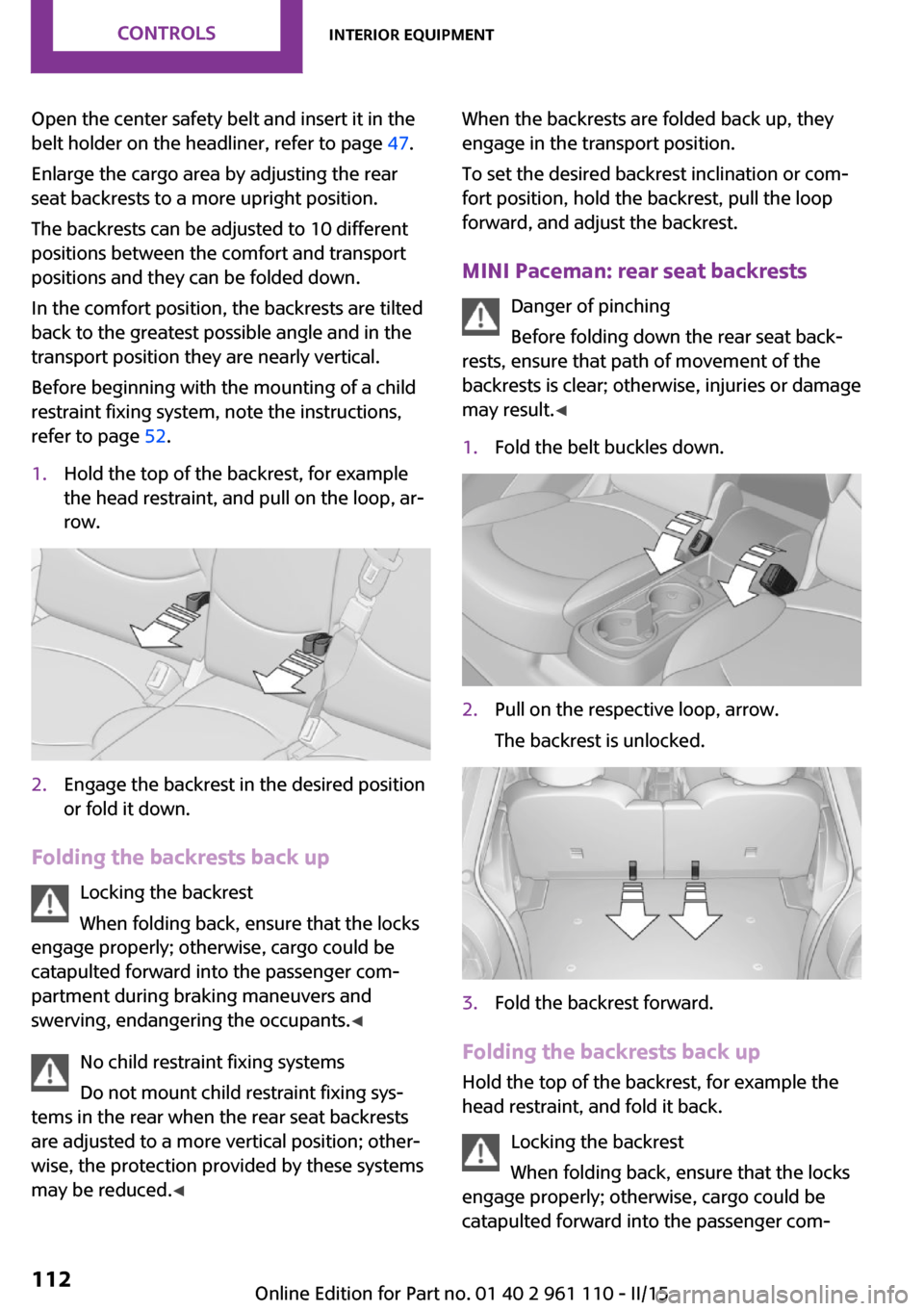
refer to page 52.1.Hold the top of the backrest, for example
the head restraint, and pull on the loop, ar‐
row.2.Engage the backrest in the desired position
or fold it down.
Folding the backrests back up
Locking the backrest
When folding back, ensure that the locks
engage properly; otherwise, cargo could be
catapulted forward into the passenger com‐
partment during braking maneuvers and
swerving, endangering the occupants. ◀
No child restraint fixing systems
Do not mount child restraint fixing sys‐
tems in the rear when the rear seat backrests
are adjusted to a more vertical position; other‐
wise, the protection provided by these systems
may be reduced. ◀
When the backrests are folded back up, they
engage in the transport position.
To set the desired backrest inclination or com‐
fort position, hold the backrest, pull the loop
forward, and adjust the backrest.
MINI Paceman: rear seat backrests Danger of pinching
Before folding down the rear seat back‐
rests, ensure that path of movement of the
backrests is clear; otherwise, injuries or damage
may result. ◀1.Fold the belt buckles down.2.Pull on the respective loop, arrow.
The backrest is unlocked.3.Fold the backrest forward.
Folding the backrests back up Hold the top of the backrest, for example the
head restraint, and fold it back.
Locking the backrest
When folding back, ensure that the locks
engage properly; otherwise, cargo could be
catapulted forward into the passenger com‐
Seite 112CONTROLSInterior equipment112
Online Edition for Part no. 01 40 2 961 110 - II/15
Page 271 of 283
Black and white map dis‐play 148
Bluetooth audio 171
Bluetooth connection, activat‐ ing/deactivating, hands-free
system 179
Bluetooth connection, activat‐ ing/deactivating, mobile
phone preparation 189
Bluetooth hands-free sys‐ tem 178
Brake assistant 92
Brake discs, breaking in 120
Brake fluid, refer to Service re‐ quirements 73
Brake force distribution, elec‐ tronic 92
Brake pads, breaking in 120
Brake, refer to Parking brake 59
Brakes, MINI maintenance system 233
Brakes, service require‐ ments 73
Brake system, MINI mainte‐ nance system 233
Braking, notes 121
Braking, parking brake 59
Breakdown assistance, Road‐ side Assistance 245
Breaking in 120
Brightness on the Control Dis‐ play 73
Buckle tongue, height adjust‐ ment 47
Button for starting the engine, refer to Start/Stop button 57
C
Calendar 203
California Proposition 65 Warning 7
Car battery, refer to Vehicle battery 243
Car care products 251 Care, displays 253
Care, vehicle 251
Cargo area, Comfort Ac‐ cess 37
Cargo area door, refer to Tail‐ gate 35
Cargo area, enlarging, cargo cover 111
Cargo area, flat loading floor 113
Cargo area light, refer to Inte‐ rior lights 80
Cargo area, multi-function hook 114
Cargo area, opening from the outside 35
Cargo area, partition net 113
Car horn, refer to Horn 12
Carpet, care 253
Car phone, refer to Tele‐ phone 178
Car phone, refer to Telephone, mobile phone prepara‐
tion 188
Car wash 250
CBC, Cornering Brake Con‐ trol 92
CBS Condition Based Serv‐ ice 233
CD 164
CD/DVD drives, care 254
CD player 164
Center armrest 116
Center console, refer to Around the center con‐
sole 16
Center rail 116
Center rail, refer to Storage compartments 116
Central locking, Comfort Ac‐ cess 37
Central locking from the in‐ side 34
Central locking system, con‐ cept 31 Central locking system, from
the outside 31
Central screen, see Control Display 18
Changes, technical, refer to Safety 6
Changing wheels/tires 223
Check Control 74
Children, transporting 52
Child restraint fixing system LATCH 53
Child restraint fixing sys‐ tems 52
Child restraint fixing systems, mounting 52
Child seat, mounting 52
Child seats, refer to Transport‐ ing children safely 52
Chrome parts, care 253
Circulation of air, refer to Re‐ circulated air mode, air con‐
ditioner 100
Circulation of air, refer to Re‐ circulated air mode, auto‐
matic climate control 102
Cleaning, displays 253
Cleaning, refer to Care 250
Climate 99
Climate mode, ventila‐ tion 104
Clock 67
Clock, 12h/24h format 71
Clock, setting the time and date 71
Clock, setting the time zone 72
Closing from the inside 34
Closing, from the outside 32
Clutch, breaking in 120
Cockpit 12
Cold start, refer to Starting the engine 58
Combination instrument, refer to Displays 14 Seite 269Everything from A to ZREFERENCE269
Online Edition for Part no. 01 40 2 961 110 - II/15
Page 275 of 283
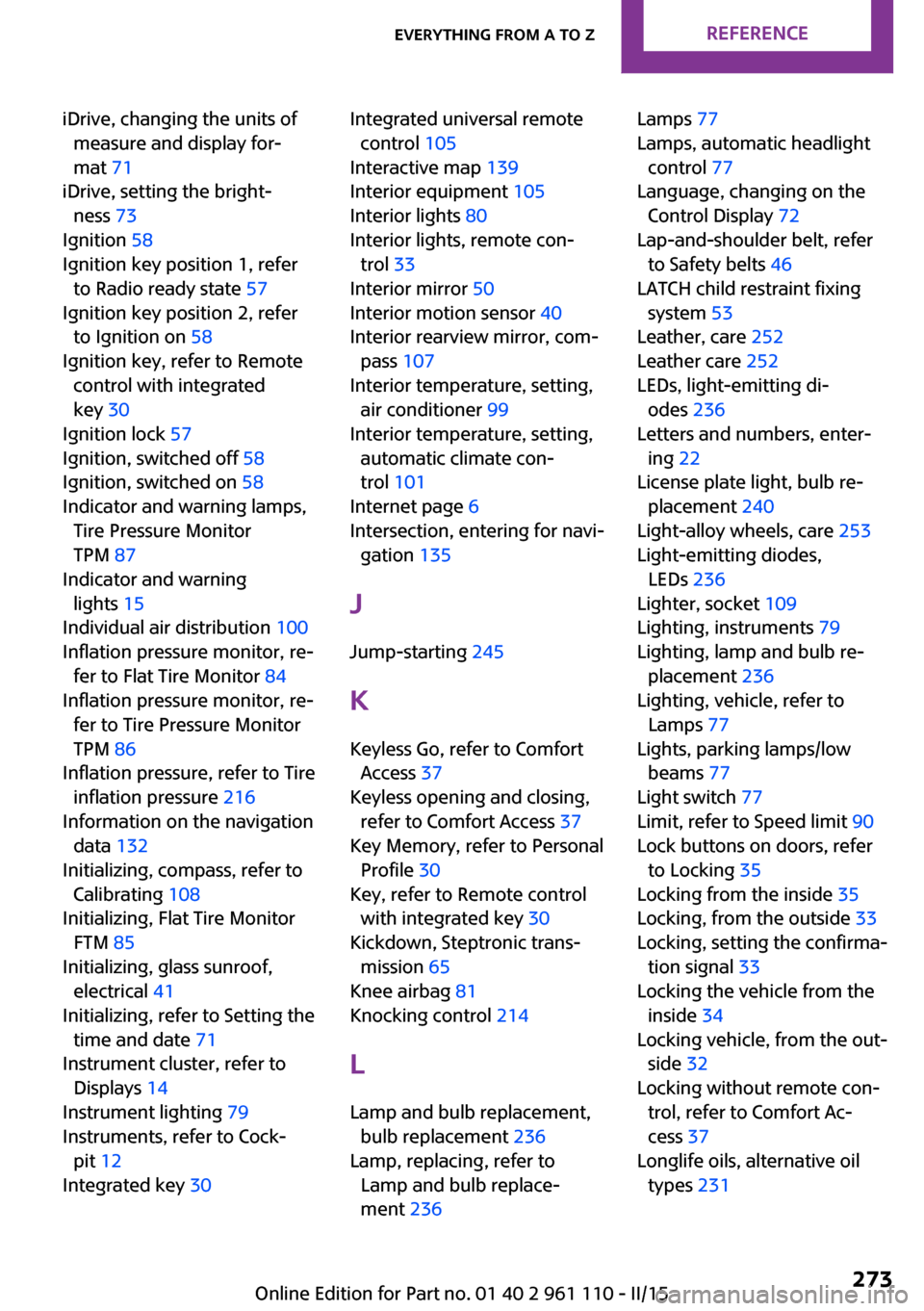
iDrive, changing the units ofmeasure and display for‐
mat 71
iDrive, setting the bright‐ ness 73
Ignition 58
Ignition key position 1, refer to Radio ready state 57
Ignition key position 2, refer to Ignition on 58
Ignition key, refer to Remote control with integrated
key 30
Ignition lock 57
Ignition, switched off 58
Ignition, switched on 58
Indicator and warning lamps, Tire Pressure Monitor
TPM 87
Indicator and warning lights 15
Individual air distribution 100
Inflation pressure monitor, re‐ fer to Flat Tire Monitor 84
Inflation pressure monitor, re‐ fer to Tire Pressure Monitor
TPM 86
Inflation pressure, refer to Tire inflation pressure 216
Information on the navigation data 132
Initializing, compass, refer to Calibrating 108
Initializing, Flat Tire Monitor FTM 85
Initializing, glass sunroof, electrical 41
Initializing, refer to Setting the time and date 71
Instrument cluster, refer to Displays 14
Instrument lighting 79
Instruments, refer to Cock‐ pit 12
Integrated key 30 Integrated universal remote
control 105
Interactive map 139
Interior equipment 105
Interior lights 80
Interior lights, remote con‐ trol 33
Interior mirror 50
Interior motion sensor 40
Interior rearview mirror, com‐ pass 107
Interior temperature, setting, air conditioner 99
Interior temperature, setting, automatic climate con‐
trol 101
Internet page 6
Intersection, entering for navi‐ gation 135
J
Jump-starting 245
K Keyless Go, refer to Comfort Access 37
Keyless opening and closing, refer to Comfort Access 37
Key Memory, refer to Personal Profile 30
Key, refer to Remote control with integrated key 30
Kickdown, Steptronic trans‐ mission 65
Knee airbag 81
Knocking control 214
L Lamp and bulb replacement, bulb replacement 236
Lamp, replacing, refer to Lamp and bulb replace‐
ment 236 Lamps 77
Lamps, automatic headlight control 77
Language, changing on the Control Display 72
Lap-and-shoulder belt, refer to Safety belts 46
LATCH child restraint fixing system 53
Leather, care 252
Leather care 252
LEDs, light-emitting di‐ odes 236
Letters and numbers, enter‐ ing 22
License plate light, bulb re‐ placement 240
Light-alloy wheels, care 253
Light-emitting diodes, LEDs 236
Lighter, socket 109
Lighting, instruments 79
Lighting, lamp and bulb re‐ placement 236
Lighting, vehicle, refer to Lamps 77
Lights, parking lamps/low beams 77
Light switch 77
Limit, refer to Speed limit 90
Lock buttons on doors, refer to Locking 35
Locking from the inside 35
Locking, from the outside 33
Locking, setting the confirma‐ tion signal 33
Locking the vehicle from the inside 34
Locking vehicle, from the out‐ side 32
Locking without remote con‐ trol, refer to Comfort Ac‐
cess 37
Longlife oils, alternative oil types 231 Seite 273Everything from A to ZREFERENCE273
Online Edition for Part no. 01 40 2 961 110 - II/15
Page 276 of 283
Longlife oils, refer to Ap‐proved engine oils 231
Low beams 77
Low beams, automatic 77
Low beams, bulb replace‐ ment 237
Lower back support, refer to Lumbar support 45
Lumbar support 45
M
Main inspection, refer to Serv‐ ice requirements 73
Maintenance, refer to Service booklet
Maintenance, refer to Service requirements 73
Maintenance require‐ ments 233
Maintenance system MINI 233
Makeup mirror 107
Malfunction, door lock 34
Malfunction, fuel filler flap 212
Malfunction, Steptronic trans‐ mission 66
Malfunction warnings, refer to Check Control 74
Manual air distribution, air conditioner 100
Manual air distribution, auto‐ matic climate control 103
Manual mode, Steptronic transmission 65
Manual operation, door lock 34
Manual operation, fuel filler flap 212
Manual operation, selector lever lock, Steptronic trans‐
mission 66
Map, destination entry 139
Map display in black and white 148 Map view 146
Marking on approved tires 223
Maximum cooling 102
Maximum speed, winter tires 224
Menu operation, onboard monitor 18
Menus, refer to Onboard monitor operating con‐
cept 19
Message list, traffic bulle‐ tins 147
Messages 202
Microfilter 101
Microfilter, with automatic cli‐ mate control 103
MINI Connected 207
MINI Homepage 6
MINI Internet page 6
MINI maintenance sys‐ tem 233
MINI Mobility System 225
Minimum tread, tires 222
Mirrors 49
Mirrors, folding in and out 50
Mirrors, interior mirror 50
Mobile communication devi‐ ces in the vehicle 121
Mobile phone, refer to Tele‐ phone, mobile phone prepa‐
ration 188
Mobile phone, refer to Tele‐ phone with hands-free sys‐
tem 178
Mobile phone with hands-free system 178
Mobile phone with mobile phone preparation 188
Mobility System 225
Modifications, technical, refer to Safety 6
Monitor, see Control Dis‐ play 18
Mounting of child restraint fix‐ ing systems 52 MP3 player 167
N
Navigation 132
Navigation data 132
Navigation data, updat‐ ing 132
Navigation system, destina‐ tion entry by voice 140
Neck restraints, refer to Head restraints 48
New wheels and tires 223
Notes 6, 204
Nozzles, refer to Ventila‐ tion 104
O
OBD Onboard Diagnos‐ tics 234
OBD socket, refer to Socket for OBD Onboard Diagno‐
sis 234
Octane number, refer to Fuel quality 214
Octane rating, refer to Recom‐ mended fuel grade 214
Odometer 67
Office 199
Oil additives 231
Oil level 230
Oil types, alternative 231
Oil types, approved 231
Onboard Diagnostics OBD 234
Onboard monitor 18
Opening and closing, Comfort Access 37
Opening and closing from the inside 34
Opening and closing, from the outside 32
Opening and closing, using the door lock 34 Seite 274REFERENCEEverything from A to Z274
Online Edition for Part no. 01 40 2 961 110 - II/15