warning lights MINI Coupe 2014 User Guide
[x] Cancel search | Manufacturer: MINI, Model Year: 2014, Model line: Coupe, Model: MINI Coupe 2014Pages: 224, PDF Size: 5.46 MB
Page 92 of 224

Notes on the car washes and care, refer to
page 191.
Automatic operation
If the rear spoiler is retracted, it is in automatic
mode when the engine is started. In this case,
the system is initialized when the vehicle is set
into motion; this may cause a short noise to be heard.
Automatic extension:
When the vehicle exceeds a speed of ap‐
prox. 50 mph/80 km/h.
Automatic retraction:
When the vehicle drops below a speed of ap‐
prox. 38 mph/60 km/h.
The rear spoiler cannot be manually retracted
in automatic mode at speeds above
38 mph/60 km/h.
Manual mode Manual mode can, for example, be used to
clean the rear spoiler when the ignition is
switched on or the engine is running. In manual
mode, the LED in the switch is lit.
If the rear spoiler stops in an intermediate posi‐
tion after it is extended and retracted multiple
times, the system is overheated. The rear
spoiler can be operated again after a short
cooling period.
Extending the rear spoiler
Press the switch back.
Retracting the rear spoiler
If the rear spoiler was manually extended and a
speed of 50 mph/80 km/h has not been ex‐
ceeded, the rear spoiler can be retracted again.
Otherwise, it can only be retracted after the
speed drops to below 38 mph/60 km/h.▷Speed range between 12 mph/20 km/h and
50 mph/80 km/h: press the switch forward
briefly or hold.▷Speed below 12 mph/20 km/h: press the
switch forward and hold.
Malfunction
The indicator lamp lights up briefly
when the ignition is switched on and an
acoustic signal is issued.
Display in the following situations:
▷The rear spoiler is extended.
Retract the rear spoiler manually, or it is re‐
tracted again automatically at ap‐
prox. 12 mph/20 km/h.▷The rear spoiler cannot be extended from
the rear spoiler box.
Check whether the rear spoiler is free of
snow or ice, for example. Clear the rear
spoiler or de-ice it.
The warning lamp lights up and an
acoustic signal is issued a number of
times.
Display in the following situation:
The rear spoiler cannot be fully extended; re‐
frain from exceeding a speed of
50 mph/80 km/h. Have the system checked.
If a malfunction occurs, Dynamic Stability Con‐
trol DSC is activated at speeds greater than
30 mph/50 km/h.
Seite 92ControlsDriving stability control systems92
Online Edition for Part no. 01 40 2 911 475 - VI/13
Page 94 of 224

▷The transmission position D is disengaged.▷DSC intervenes.
Maintaining, storing the current speedPress button 1 or button 3.
The current speed is maintained and stored. It
is displayed briefly in the tachometer.
On downhill gradients, it may prove impossible
to maintain the set speed if the engine braking
power is insufficient. On uphill gradients, it may
prove impossible to maintain the set speed if
the engine power output is insufficient.
Increasing speed
▷Press button 1 repeatedly until the desired
speed is reached.
Each time the button is pressed, the speed
increases by approx. 1 mph/1 km/h.▷Press and hold button 1 until the desired
speed is reached.
The vehicle accelerates without pressure on
the accelerator pedal. After the button is
released, the achieved speed is maintained
and stored.
Decreasing speed
Press button 3 repeatedly or hold it until the
desired speed is reached.
The functions are the same those when the
speed is increased, only that the speed is re‐
duced.
Resuming a speed stored beforehand Press button 4.
The last stored speed is resumed and main‐
tained.
The stored speed is cleared when the ignition is
switched off.
Display in the tachometer
The selected speed is displayed briefly.
If the display --- mph or --- km/h appears
briefly, conditions may not be adequate to op‐
erate the system.
For better control The indicator lamp lights up in the
speedometer. Cruise control is ready to
operate and can be activated.
Malfunction The warning lamp in the tachometer
lights up. The system is malfunctioning
or has failed.
Park Distance Control
PDC
The concept
PDC provides support when parking in reverse.
Signal tones indicate that the vehicle is ap‐
proaching an object behind it. Measurements
are made by four ultrasound sensors in the
bumpers.
The range of these sensors is approx. 6 ft/2 m.
An acoustic warning is first given:
▷By the two corner sensors at ap‐
prox. 24 in/60 cm.▷By the rear middle sensors at approx.
5 ft/1.50 m.Seite 94ControlsDriving comfort94
Online Edition for Part no. 01 40 2 911 475 - VI/13
Page 95 of 224

Avoid driving quickly with PDC
PDC is a parking aid that can display ob‐
jects when the vehicle approaches them slowly,
as is the case during parking maneuvers. Avoid
driving toward an object quickly as the system
may then be too late in issuing a warning for
technical reasons. ◀
Automatic operation
The system is activated after approx. one sec‐ ond when reverse gear or selector lever posi‐
tion R is engaged while the engine is running or
the ignition is switched on. Await this short pe‐
riod before setting the vehicle into motion.
Signal tones
The closer the vehicle is to the object, the
shorter the intervals become. If the distance to
a detected object is less than approx.
12 in/30 cm, a continuous tone is sounded.
If the distance remains constant, for example
when driving parallel to a wall, the signal tone
is stopped after approx. 3 seconds.
Volume
The signal tone volume can be adjusted.
Radio MINI Boost CD, refer to page 126.
System limits Check the traffic situation as well
PDC cannot serve as a substitute for the
driver's personal judgment of the traffic situa‐
tion. Check the traffic situation around the ve‐
hicle with your own eyes. Otherwise, an acci‐
dent could result from road users or objects
located outside of the PDC detection range.
Loud noises from outside and inside the vehicle
may prevent you from hearing the PDC's signal
tone. ◀Malfunction
The warning lamp lights up. PDC is mal‐functioning or has failed. Have the sys‐
tem checked.
To ensure full functionality of the sensors, keep
the sensors clean and free of ice. When using
high-pressure washers, do not spray the sen‐
sors for long periods and maintain a distance of
at least 12 in/30 cm.Seite 95Driving comfortControls95
Online Edition for Part no. 01 40 2 911 475 - VI/13
Page 172 of 224

CoolantVehicle equipment
This chapter describes all series equipment as
well as country-specific and special equipment
offered for this model series.Therefore, it also
describes equipment that may not be found in
your vehicle, for instance due to the selected
special equipment or the country version. This
also applies to safety-related functions and sys‐
tems.
General information Danger of burns from hot engine
Do not open the cooling system while the
engine is hot; otherwise, escaping coolant may
cause burns. ◀
Suitable additives
Only use suitable additives; otherwise,
engine damage may occur. The additives are
harmful to your health. ◀
Coolant consists of water and additives.
Not all commercially available additives are
suitable for your MINI vehicle. Ask your service
center for suitable additives.
Coolant temperature
If the coolant and therefore the engine over‐
heat, a warning lamp lights up, refer to
page 196.
Coolant level
Checking1.Do not open the hood until the engine has
cooled down.2.Turn the expansion tank cap counterclock‐
wise slightly to allow any accumulated
pressure to escape; then continue turning
to open.3.The coolant level is correct if it is between
the markings. The markings are located on
the side of the coolant reservoir.
Refilling
1.Do not open the hood until the engine has
cooled down.2.Turn the expansion tank cap counterclock‐
wise slightly to allow any accumulated
pressure to escape, then continue turning
to open.3.If the coolant level is low, slowly add cool‐
ant up to the specified level; do not overfill.4.Twist the cap closed.5.Have the cause of the coolant loss elimi‐
nated as soon as possible.
Disposal
Comply with the appropriate environ‐mental protection regulations when dis‐
posing of coolant additives.
Seite 172MobilityCoolant172
Online Edition for Part no. 01 40 2 911 475 - VI/13
Page 174 of 224

Socket for OBD Onboard
Diagnosis
Socket for Onboard Diagnosis
The socket for Onboard Diagnosis may
only be used by the service center, by work‐
shops that operate according to the specifica‐
tions of the vehicle manufacturer with appro‐
priately trained personnel, and by other
authorized persons. Otherwise, its use may
lead to vehicle malfunctions. ◀
Primary components in the vehicle emissions
can be checked via the OBD socket using a de‐
vice.
Emissions The warning lamps light up. The vehicle
is producing higher emissions. You can
continue your journey, but moderate
your speed and exercise due caution. Have the
vehicle checked as soon as possible.
Under certain circumstances, one of the lamps
flashes or lights up continuously. This indicates
that there is excessive misfiring or a malfunc‐
tion in the engine. If this happens, reduce the
vehicle speed and drive to the next service cen‐
ter promptly. Serious engine misfiring within a
brief period can seriously damage emission
control components, in particular the catalytic
converter. In addition, the mechanical engine
components may become damaged.
If the fuel filler cap is not properly tight‐
ened, the OBD system may conclude
that fuel vapor is escaping; this will cause a dis‐
play to light up. If the filler cap is then tight‐
ened, the display should go out in a few days.Seite 174MobilityMaintenance174
Online Edition for Part no. 01 40 2 911 475 - VI/13
Page 196 of 224

Indicator/warning lampsVehicle equipment
This chapter describes all series equipment as
well as country-specific and special equipment
offered for this model series.Therefore, it alsodescribes equipment that may not be found in
your vehicle, for instance due to the selected
special equipment or the country version. This
also applies to safety-related functions and sys‐
tems.
Overview
The indicator and warning lamps can light up in
a variety of combinations and colors in display
area 1 or 2. The table contains information on
causes and how to respond. Note whether a
lamp lights up alone or in combination with an‐
other. Some lamps can light up in different col‐
ors. Corresponding distinctions are made in the
text. 12CauseHow to respondTurn signalThe high beams/headlamp flasher are
switched on.The front fog lamps are switched on.The rear fog lamps are switched on.Fasten safety belts.Fasten safety belt, refer to page 47.External temperature warningDrive conservatively, refer to
page 65.Lights up briefly:
Approx. 2.1 US gal/8 liters of fuel remain in
the tank.
Remains on:
The remaining range is no more than
30 miles/50 km, refer to page 66.Seite 196MobilityIndicator/warning lamps196
Online Edition for Part no. 01 40 2 911 475 - VI/13
Page 197 of 224
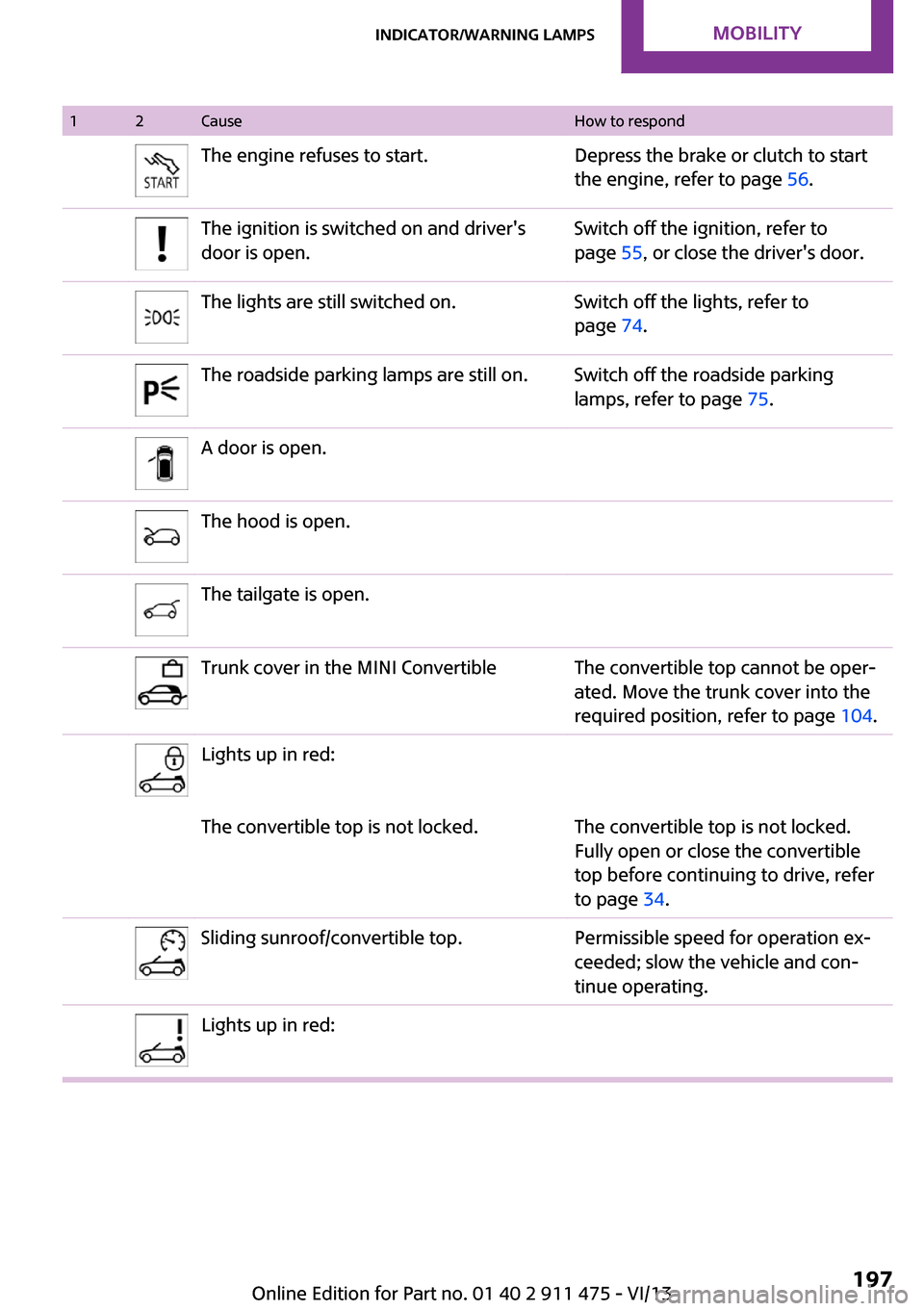
12CauseHow to respondThe engine refuses to start.Depress the brake or clutch to start
the engine, refer to page 56.The ignition is switched on and driver's
door is open.Switch off the ignition, refer to
page 55, or close the driver's door.The lights are still switched on.Switch off the lights, refer to
page 74.The roadside parking lamps are still on.Switch off the roadside parking
lamps, refer to page 75.A door is open.The hood is open.The tailgate is open.Trunk cover in the MINI ConvertibleThe convertible top cannot be oper‐
ated. Move the trunk cover into the
required position, refer to page 104.Lights up in red:The convertible top is not locked.The convertible top is not locked.
Fully open or close the convertible
top before continuing to drive, refer
to page 34.Sliding sunroof/convertible top.Permissible speed for operation ex‐
ceeded; slow the vehicle and con‐
tinue operating.Lights up in red:Seite 197Indicator/warning lampsMobility197
Online Edition for Part no. 01 40 2 911 475 - VI/13
Page 198 of 224

12CauseHow to respondConvertible top control failed!The convertible top position and lock
cannot be detected. When the
convertible top has been securely
locked, you can continue driving.
Close the convertible top/sliding sun‐
roof manually, refer to page 35.
Have the system checked by the
service center.Lights up in yellow:Convertible top drive overheated!Allow the convertible top drive to
cool, refer to page 34.Sliding sunroof/convertible top.Failure of the convertible top/sliding
sunroof control. Close the convertible
top/sliding sunroof manually, refer to
page 35. Contact your service center.Tailgate of the MINI Convertible is not
closedClose the tailgate.MINI Roadster: the indicator lamp lights
up. Fully open the semi-automatic
convertible top.MINI Roadster: the indicator lamp lights
up. The semi-automatic convertible top
movement is completed. Close the
convertible top using the handle.Lights up in yellow:The rear spoiler is extended, refer to
page 91.Before driving into the car wash, re‐
tract the rear spoiler.The rear spoiler cannot be fully extended,
refer to page 91.Drive slowly and have the system
checked by the nearest service cen‐
ter.The fuel cap is missing or loose.Make sure that the fuel cap is cor‐
rectly positioned and close it until it
clicks audibly. Do not jam the strap
between the fuel cap and the vehi‐
cle.Seite 198MobilityIndicator/warning lamps198
Online Edition for Part no. 01 40 2 911 475 - VI/13
Page 199 of 224

12CauseHow to respondThe windshield washer fluid level is too
low.Add washer fluid, refer to page 61,
as soon as possible.Lights up in red:Service is due.Arrange a service appointment.
Check the service requirements, re‐
fer to page 173.Lights up in yellow:The engine will start the next time the
Start/Stop button is touched, possibly with‐
out the brake or clutch being depressedThe remote control is malfunctioning or, in
cars with Comfort Access, was not de‐
tected.The engine cannot be started. Have
the remote control checked, if nec‐
essary.The battery in the remote control is dis‐
charged.Use the remote control for a longer
journey or, in cars with Comfort Ac‐
cess, replace the battery.The belt tensioners and/or airbag system
has failed.Have the system checked immedi‐
ately.
Fasten the safety belts anyway.Steering assistance has failed.You can continue your journey, but
moderate your speed and exercise
due caution. Markedly different
steering response. Have the system
checked as soon as possible.Lights up in red:Engine malfunctionStop the car and switch off the en‐
gine. You cannot continue your jour‐
ney. Contact your service center.Lights up in yellow:Full engine power is no longer available.You can continue your journey, but
moderate your speed and exercise
due caution. Have the engine
checked as soon as possible.Seite 199Indicator/warning lampsMobility199
Online Edition for Part no. 01 40 2 911 475 - VI/13
Page 200 of 224

12CauseHow to respondIndicator lamp 1 flashes:Engine malfunction under high load. High
engine load will result in damage to the
catalytic converter.You can continue your journey, but
moderate your speed and exercise
due caution. Have the vehicle
checked immediately.Indicator lamp 1 lights up:Engine malfunction with adverse effect on
emissions.You can continue your journey, but
moderate your speed and exercise
due caution. Have the vehicle
checked as soon as possible.Lights up in red:The engine is overheating.Carefully bring the car to a stop,
switch off the engine and allow it to
cool down. Do not open the hood;
otherwise, there would be a risk of
injury due to scalding. Contact your
service center.Lights up in yellow:The engine is too hot.Continue driving at more moderate
speed so that the engine can cool
down. Have the engine checked
without delay if the situation reoc‐
curs.Lights up in red:Battery is no longer being charged. Alter‐
nator malfunction.Switch off all unnecessary electrical
consumers. Have the power supply
system checked without delay.Lights up in yellow:The battery charge level is very low, the
battery is old or is not securely connected.Charge the battery by taking a long
drive or using an external charger. If
necessary, switch off automatic
power consumers. Have the battery
checked as soon as possible.Seite 200MobilityIndicator/warning lamps200
Online Edition for Part no. 01 40 2 911 475 - VI/13