radio MINI Coupe 2014 Owner's Guide
[x] Cancel search | Manufacturer: MINI, Model Year: 2014, Model line: Coupe, Model: MINI Coupe 2014Pages: 224, PDF Size: 5.46 MB
Page 108 of 224

MINI Coupe, MINI Road‐
ster: rear storage shelf
behind the seats
This space can be used to store briefcases, for
example.
No heavy objects
Only transport light and small objects on
the rear storage shelf; otherwise, braking ma‐
neuvers and swerving may lead to a safety haz‐
ard due to objects flying about the passenger
compartment. Only transport heavy luggage in
the cargo area if it has been appropriately se‐
cured. ◀
Connection for an exter‐
nal audio device
This can be used to connect an external audio
device, such as a CD or MP3 player.
Radio MINI Boost CD, refer to page 132.
Seite 108ControlsStorage compartments108
Online Edition for Part no. 01 40 2 911 475 - VI/13
Page 124 of 224

Radio MINI Boost CDVehicle equipment
This chapter describes all series equipment as
well as country-specific and special equipment
offered for this model series.Therefore, it alsodescribes equipment that may not be found in
your vehicle, for instance due to the selected
special equipment or the country version. This
also applies to safety-related functions and sys‐
tems.
General information
At a glance
1Change the audio sources.2On/off, volume.▷Press: switch on/off.▷Turn: adjust the volume.3Show the tone settings.4Function buttons for selecting the menu
items shown directly above them on the
display.5Change the station or track.6Display.7Select the functions.▷Turn: highlight the menu item on the
display or set the value.▷Press: select the highlighted menu item
or store the settings.8Place/end calls.9Opens the main menu.10Manually select the frequency.Seite 124EntertainmentRadio MINI Boost CD124
Online Edition for Part no. 01 40 2 911 475 - VI/13
Page 125 of 224
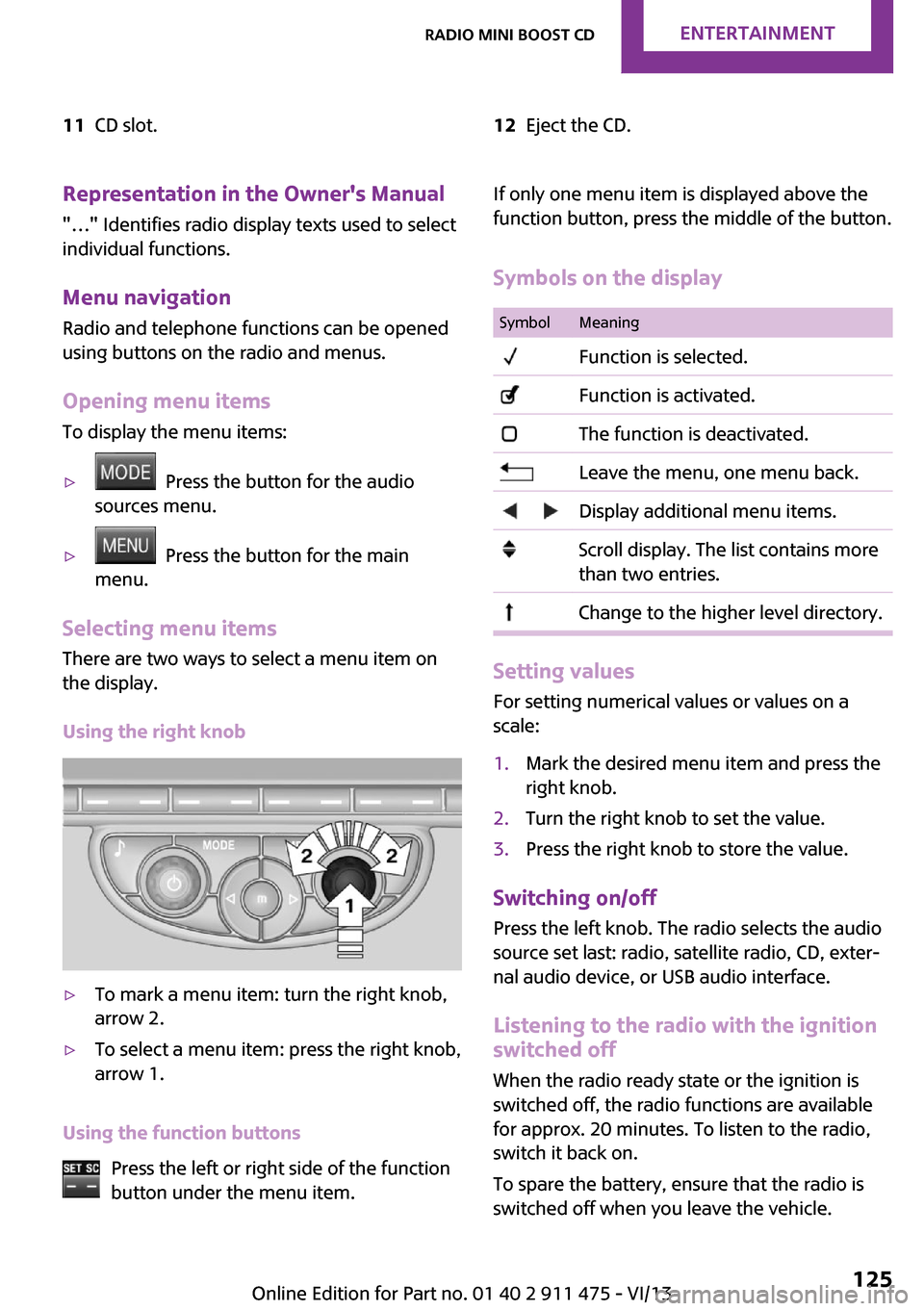
11CD slot.12Eject the CD.Representation in the Owner's Manual
"…" Identifies radio display texts used to select individual functions.
Menu navigation Radio and telephone functions can be opened
using buttons on the radio and menus.
Opening menu items
To display the menu items:▷ Press the button for the audio
sources menu.▷ Press the button for the main
menu.
Selecting menu items
There are two ways to select a menu item on
the display.
Using the right knob
▷To mark a menu item: turn the right knob,
arrow 2.▷To select a menu item: press the right knob,
arrow 1.
Using the function buttons
Press the left or right side of the function
button under the menu item.
If only one menu item is displayed above the
function button, press the middle of the button.
Symbols on the displaySymbolMeaning Function is selected. Function is activated. The function is deactivated. Leave the menu, one menu back. Display additional menu items. Scroll display. The list contains more
than two entries. Change to the higher level directory.
Setting values
For setting numerical values or values on a
scale:
1.Mark the desired menu item and press the
right knob.2.Turn the right knob to set the value.3.Press the right knob to store the value.
Switching on/off
Press the left knob. The radio selects the audio
source set last: radio, satellite radio, CD, exter‐
nal audio device, or USB audio interface.
Listening to the radio with the ignition
switched off
When the radio ready state or the ignition is
switched off, the radio functions are available for approx. 20 minutes. To listen to the radio,
switch it back on.
To spare the battery, ensure that the radio is
switched off when you leave the vehicle.
Seite 125Radio MINI Boost CDEntertainment125
Online Edition for Part no. 01 40 2 911 475 - VI/13
Page 126 of 224

Adjusting the volumeTurn the left knob. The setting is stored for the
remote control currently in use.
When a call is placed using the hands-free sys‐
tem, the audio sources are muted.
Speed-dependent volume and volumes
of PDC signal tone and gong▷"PDC": volume of the PDC signal tone com‐
pared to the audio sources.▷"GONG": volume of the gong compared to
the audio sources.▷"S-VOL": speed-dependent volume control.
Set the audio sources to a high volume to be
able to adjust the volume of the signal tones
more easily.
1. Press the button.2. Select the symbol if necessary.3.Select the desired volume setting.4.Set the desired volume and press the right
knob.
Volume of external audio devices
An external audio device such as an MP3 player
can be connected via the AUX-IN port in the
center console and the audio tracks can be
played over the car's loudspeaker system.
The volume of the external audio device can be
adjusted to the car radio.
1. Press the button.2."AUX"3."Vol-AUX"4.Set the desired volume and press the right
knob.
Tone settings
▷"BASS": depth adjustment.▷"TREBLE": treble adjustment.▷"FADER": front/rear volume distribution.▷"BAL": left/right volume distribution.
The sound settings are set globally for all audio
sources.
Setting the treble, bass, and volume distribution
1. Press the button.2.Highlight the desired tone setting and press
the right knob.3.Create the desired setting and press the
right knob.
Resetting the tone settings
The tone settings are reset to medium values.
1. Press the button.2."RESET"
Time
Setting the time, date, and time format
1.Switch on the radio ready state or the igni‐
tion.2. Press the button.3."CONFIG"4."TIME"5.Select the desired category.6.Create the settings and press the right
knob.
Setting the units of measure of the
computer and the language
1.Switch on the radio ready state or the igni‐
tion.2. Press the button.3."CONFIG"4.▷"DIST": change the unit of measure for
the range.Seite 126EntertainmentRadio MINI Boost CD126
Online Edition for Part no. 01 40 2 911 475 - VI/13
Page 127 of 224

▷"LANG": select the language of the dis‐
play texts.▷"CONSMP": change the unit of measure
for the average fuel consumption.▷"TEMP": change the unit of measure for
the external temperature.5.Highlight the desired menu item and press
the button.6.Create the desired setting.
Computer
The following vehicle information can be call up
via the computer:
▷Average fuel consumption▷Average speed▷Range
Displaying information
1.Switch on the radio ready state or the igni‐
tion.2. Press the button.3."COMP"
Average fuel consumption
The average fuel consumption is calculated for
the time during which the engine is running.
To start calculation of the average fuel con‐
sumption:
1."CONSMP"2."RESET"
The previous display is set to zero and the sys‐
tem begins recalculating the average fuel con‐
sumption.
Average speed
The average speed is calculated for the time
during which the engine is running.
To start calculation of the average speed:
1."SPEED"2."RESET"
Estimated range
"RANGE"
The display shows the estimated distance that
can be still be driven on the remaining fuel,
taking into consideration the driving style over
the last 18 miles/30 km.
Radio
Listening to the radio
The radio is designed for reception in the FM
and AM wavebands.
1.Switch on the radio, refer to page 125.2. Press this button if necessary.3."TUNER"4."FM" or"AM"
Press the corresponding button repeatedly
until the desired waveband is displayed.▷FM: FM1, FM2, FMA▷AM: AM, AMA
Selecting a station
The setting is stored for the remote control cur‐
rently in use.
Next station
Press the button.
The next station with reception is selected.
Selecting the station manually by
frequency
1. Press the button.2.▷Press the respective function button to
set the desired frequency.▷Turn the right knob until the desired
frequency is set.Seite 127Radio MINI Boost CDEntertainment127
Online Edition for Part no. 01 40 2 911 475 - VI/13
Page 128 of 224

Automatically updating the stations
with the best reception, AUTOSTORE
In the FMA and AMA memory levels, stations
are automatically stored according to their re‐
ception strength. If the AUTOSTORE function is
not used, six stations can be manually stored in
each of the FMA and AMA memory levels.1."FM" or"AM"
Press the corresponding button until the
following is displayed:
"AUTOSTORE"
It may take several seconds for the stations to
be stored and for one of these stations to be
played back.
Briefly playing and selecting a station "SC"
All stations with reception are played briefly.
To interrupt the function and select a station:
"SC"
Storing and retrieving a station
Memory locations It is possible to store up to 30 stations.
▷FM1, FM2, AM: six stations each.▷FMA, AMA: the six stations with the best re‐
ception (automatically) or any six stations
(manually).
Storing a station
1."FM" or"AM"
Select the desired function repeatedly until
the desired waveband is displayed.2.Select the station.3."1" ... "6"
Press and hold the function button under
the desired memory location until the sta‐
tion is audible again after a brief interrup‐
tion.Retrieving a stored station1."FM" or"AM"
Select the desired function repeatedly until
the desired waveband is displayed.2."1" ... "6"
Press and hold the desired function button
or turn the right knob until the desired sta‐
tion is displayed.
Radio Data System, RDS
RDS broadcasts additional information, such as
the station name or text messages, in the FM
waveband. When playing a station with multi‐
ple frequencies, the system automatically
switches to the frequency with the best recep‐
tion, if needed.
Some stations broadcast the type of program
received, or PTY, via RDS. This information is
displayed briefly when the station is selected,
for instance NEWS.
PTY can also be used to display catastrophe
alerts, such as "ALARM".
The alert is issued on the loudspeakers.
Switching the RDS on/off
1."SET"2."RDS"
When the RDS is switched off, the PTY function
is switched off as well.
Switching the program type display
on/off
1."SET"2."PTY"
HD Radio™ reception
Many stations broadcast both analog and digi‐
tal signals. These stations can be received digi‐
tally and therefore with better sound quality. A
digital radio network must be available to be
able to receive digital stations.
License conditions
Seite 128EntertainmentRadio MINI Boost CD128
Online Edition for Part no. 01 40 2 911 475 - VI/13
Page 129 of 224
HD Radio Technology manufactured under li‐
cense from iBiquity Digital Corporation. U.S.
and Foreign Patents. HD Radio™ and the HD,
HD Radio, and Arc logos are proprietary trade‐
marks of iBiquity Digital Corp.
Activating/deactivating digital radio
reception1. Press the button.2."TUNER"3."SET"4."HD"
Displays
▷"HD": a station is received digitally.▷"(HD)": a station broadcasts digital signals
but digital radio reception is switched off.
In areas in which the selected station is not
continuously received in digital mode, playback
switches between analog and digital reception.
In this case, switch off digital radio reception.
Selecting the programs of a digital
station
Some stations broadcast multiple programs. To
select one of these programs:
1. Press the button repeatedly
until the desired digital station is displayed.
If a station broadcasts multiple programs,
the following display appears, for example:
"HD1"2."LIST"3."HD1" ... "HD8" Select the desired pro‐
gram. Up to eight programs can be se‐
lected per station.
Displaying additional information
For digital stations, additional information can
be displayed on the current track, such as the
name of the artist.
"INFO"
Operational displays▷"acquiring": the system is looking for digital
stations.▷"No Signal": no digital stations are being re‐
ceived.
Satellite radio
Over 100 different channels with high fidelity
can be received. The channels are offered in
fixed packages and must be activated.
You may experience signal drops and muting
events related to this new technology.
Activating or deactivated channels
1. Press the button.2."SAT"3."CAT"4.Select the desired category.
The channels are displayed.
This symbol identifies the current chan‐
nel.
Activating
1.Turn the right knob to select a channel that
is not yet activated.2.Press the right knob to confirm a channel.
A phone number and the electronic serial
number, ESN, are displayed. The electronic
serial number is required for activation.3.To have the channels activated, call the
phone number.
Deactivating
1. Press the button.2."SAT"3."SAT"
Hold the button down.Seite 129Radio MINI Boost CDEntertainment129
Online Edition for Part no. 01 40 2 911 475 - VI/13
Page 130 of 224

A phone number and the electronic serial
number, ESN, are displayed. The electronic
serial number is required for deactivation.4.To have the channels deactivated, call the
phone number.
Selecting and storing a channel
1. Press the button.2."SAT"3."CAT"4.Select the desired category.5.Select the desired channel.
To display all channels:
"ALL"
To store a channel:
1. Select the symbol.2."SAT"
Press the button repeatedly until the de‐
sired memory level, SAT 1 or SAT 2, is
reached.3."1" ... "6"
Press and hold the function button under
the desired memory location until the
channel is audible again after a brief inter‐
ruption.
Changing to the current channel
"CURR"
Additional information
The name of the channel and additional infor‐
mation on the current track are displayed, such
as the name of the artist.
1.Select the desired channel.2."INFO"Changing the channel using the buttons
Press the button for the corre‐
sponding direction. The next enabled channel
is opened.
Search
1. Press and hold the button for
the corresponding direction. The activated
channels appear on the display one after
the other.2.Release the button to select the displayed
channel.
Notes
When there is a signal blockage or the trans‐
mission is suspended momentarily for more
than 4 seconds, a message will appear on the
display.
Service may be interrupted or unavailable for
specific reasons such as environmental or topo‐
graphic conditions and others that Satellite
Radio cannot directly control. Signal may not be
available under tunnels, in parking garages,
next to tall buildings, nearby trees with dense
foliage, nearby mountains or other possible
strong sources of radio interference. Service
should resume normally after the source of sig‐
nal unavailability has been cleared.
CD player
Loading the CD player Insert the CD into the CD drive with the printed
side up.
Playback begins automatically.
Reading can take a few minutes with com‐
pressed audio files.
Seite 130EntertainmentRadio MINI Boost CD130
Online Edition for Part no. 01 40 2 911 475 - VI/13
Page 131 of 224

Starting the CD playerA CD is contained in the CD player.1.Switch on the car radio if necessary.2. Press the button.3."CD"
Skipping to another track
Press the button repeatedly until
the desired track is played.
With the right knob:
Turn the right knob until the desired track is
played back.
Fast forward/reverse
Hold the button down.
Tracks can be heard but are distorted.
Briefly playing and selecting a track
"SC"
All tracks are played briefly one after the other.
To interrupt the function and select a track:
"SC"
Random playback "RND"
To end random playback:
"RND"
Compressed audio files CD players can play back CDs with compressed
audio data: MP3 and WMA.
Selecting a track
1."LIST"2.Select the desired directory using the right
knob.▷ : press the right knob to open a di‐
rectory.▷ : press the right knob to close a di‐
rectory.3.Select other directories if you wish.4.Highlight the desired track and press the
right knob.
You can scroll through the directories during
playback.
To change to the current track:
"CURR"
Displaying information on the track
Any information stored on the currently se‐
lected track can be displayed.
1."LIST"2."TRACK"
Ejecting a CD from the CD player
Press the button.
The CD emerges slightly from the CD drive.
Operational displays
▷"Insert CD"
The CD slot is empty.▷"Error CD"
The CD cannot be read or is defective.▷"Temp. CD"
Operating temperature is too high.
Notes
CD player Do not remove the cover
The CD players are officially designated
Class 1 laser products. Do not operate if the
cover is damaged; otherwise, severe eye dam‐
age can result. ◀
Seite 131Radio MINI Boost CDEntertainment131
Online Edition for Part no. 01 40 2 911 475 - VI/13
Page 132 of 224

CDsUsing CDs▷Do not use self-recorded CDs with la‐
bels applied, as these can become
detached during playback due to
heat buildup and can cause irrepara‐
ble damage to the device.▷Only use round CDs with a standard diame‐
ter of 4.7 in/12 cm and do not play CDs
with an adapter, e.g., single CDs; otherwise,
the CDs or the adapter may jam and no lon‐
ger eject. ◀
General malfunctions
▷The CD players have been optimized for
performance in vehicles. In some instances
they may be more sensitive to faulty CDs
than stationary devices would be.▷If a CD cannot be played, first check if it has
been inserted correctly.
Humidity
High levels of humidity can lead to condensa‐
tion on the CD or the laser's scan lens, and tem‐
porarily prevent playback.
Malfunctions with particular CDs If malfunctions occur only with particular CDs,
this can be due to one of the following causes:
Self-recorded CDs
▷Possible reasons for malfunctions with self-
recorded CDs are inconsistent data creation
or recording processes, or poor quality or
old age of the blank CD.▷Only label CDs on the upper side with a pen
intended for this purpose.
Damage
▷Avoid fingerprints, dust, scratches and
moisture.▷Store CDs in a sleeve.▷Do not subject CDs to temperatures over
50 ℃/122 ℉, high humidity, or direct sun‐
light.
CDs with copy protection
CDs are often provided with a copy protection
feature by the manufacturer. This can mean
that some CDs cannot be played or can only be
played to a limited extent.
MACROVISION
This product contains copyrighted technology
that is based on multiple registered US patents
and the intellectual property of the Macrovision
Corporation and other manufacturers. The use
of this copy protection must be approved by
Macrovision. Media protected by this product -
unless otherwise agreed with Macrovision -
may only be used for private purposes. Copying
of this technology is prohibited.
External devices AUX-IN port
At a glance
▷For connecting audio devices, e.g., MP3
player. The sound is output on the vehicle
loudspeakers.▷Recommendation: use medium tone and
volume settings on the audio device. The
tone depends on the quality of the audio
files.Seite 132EntertainmentRadio MINI Boost CD132
Online Edition for Part no. 01 40 2 911 475 - VI/13