radio MINI Coupe 2014 Service Manual
[x] Cancel search | Manufacturer: MINI, Model Year: 2014, Model line: Coupe, Model: MINI Coupe 2014Pages: 224, PDF Size: 5.46 MB
Page 145 of 224
Snap-in adapter
General information More information on compatible snap-in
adapters that support the functions of the mo‐
bile phone is available at the service center.
Notes At high temperatures, the charging function of
the mobile phone may be limited and functions
may not be executed.
When using the mobile phone via the vehicle,
note the operating instructions of the mobile
phone.
Installation position In the center armrest.
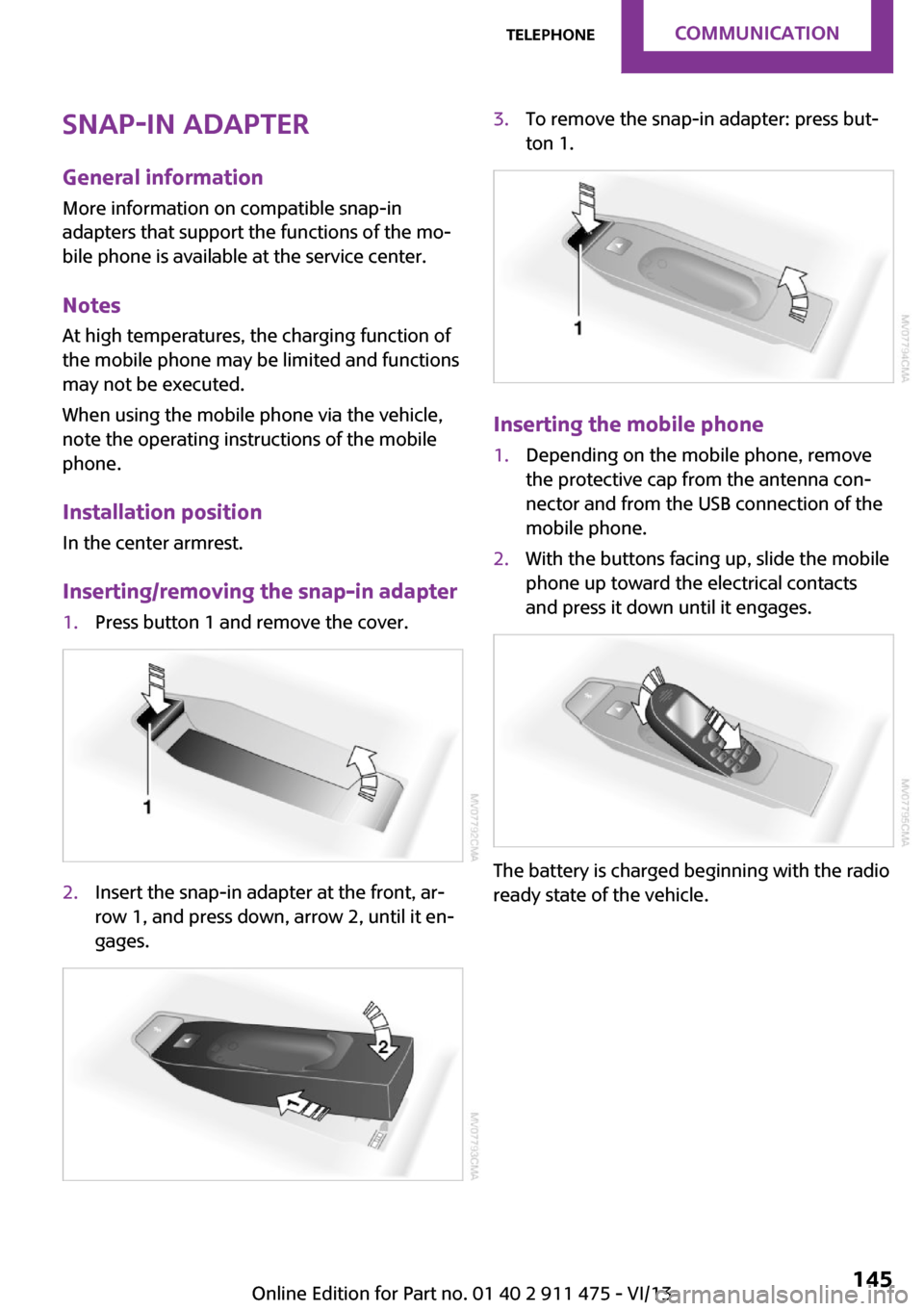
Inserting/removing the snap-in adapter1.Press button 1 and remove the cover.2.Insert the snap-in adapter at the front, ar‐
row 1, and press down, arrow 2, until it en‐
gages.3.To remove the snap-in adapter: press but‐
ton 1.
Inserting the mobile phone
1.Depending on the mobile phone, remove
the protective cap from the antenna con‐
nector and from the USB connection of the
mobile phone.2.With the buttons facing up, slide the mobile
phone up toward the electrical contacts
and press it down until it engages.
The battery is charged beginning with the radio
ready state of the vehicle.
Seite 145TelephoneCommunication145
Online Edition for Part no. 01 40 2 911 475 - VI/13
Page 184 of 224

3.Mount the new wheel.4.Screw in at least two bolts crosswise.5.Screw in the remaining lug bolts.6.Fully tighten all lug bolts in a diagonal pat‐
tern.7.Lower the vehicle.8.Remove the jack.
Retightening the lug bolts
Retighten the lug bolts diagonally.
Checking that the lug bolts are tight
Always have the lug bolts checked with a
calibrated torque wrench as soon as possible to
ensure that they are tightened to the specified
torque. Otherwise, incorrectly tightened lug
bolts are a hidden safety risk. ◀
The tightening torque equals
103.3 lb ft/140 Nm.
Replace the defective tire as soon as possible
and have the new wheel balanced.
Vehicle battery Maintenance
The battery is maintenance-free, i.e., the elec‐
trolyte will last for the life of the battery in tem‐
perate climate conditions.
The service center will be happy to answer any
questions on the battery.
Battery replacement Use approved vehicle batteries
Only use vehicle batteries that have been
approved for your vehicle by the manufacturer;
otherwise, the vehicle could be damaged and
systems or functions may not be fully availa‐
ble. ◀
Have the vehicle battery registered by the serv‐
ice center after it is replaced to ensure that all comfort functions are available without restric‐
tions and that any associated Check Control
messages are no longer displayed.
Charging the battery
Note Do not connect the charger to the socket
Do not connect the battery charger to the
socket installed in the vehicle at the factory as
this could damage the battery. ◀
Only charge the battery in the vehicle when the
engine is switched off. Connections, refer to
page 186.
General information Ensure that the battery is sufficiently charged to
achieve the full battery life.
It may be necessary to charge the battery in
the following cases:▷When the vehicle is frequently used to
travel short distances.▷When the vehicle has not been driven for
more than one month.
Power failure
After a temporary power failure, some equip‐
ment will be restricted in its use and will need
to be reinitialized. In addition, certain individual
settings will be lost and must be updated:
▷Time and date: the values must be up‐
dated, refer to page 70.▷Radio: the stations need to be stored again,
refer to page 128.
Disposing of old batteries
Have used batteries disposed of by the
service center after they are replaced or
take them to a recycling center.
Maintain the battery in an upright position for
transport and storage. Secure the battery so
that it does not tip over during transport.
Seite 184MobilityReplacing components184
Online Edition for Part no. 01 40 2 911 475 - VI/13
Page 186 of 224

Breakdown assistanceVehicle equipment
This chapter describes all series equipment as
well as country-specific and special equipment
offered for this model series.Therefore, it also
describes equipment that may not be found in
your vehicle, for instance due to the selected
special equipment or the country version. This
also applies to safety-related functions and sys‐
tems.
Hazard warning flash‐
ers
The button is located on the speedometer.
Warning triangle The warning triangle is located in the front on
the trunk floor.
First aid kit Some of the articles contained in the first aid kit
have a limited service life. Therefore, check the
use-by dates of the contents regularly and re‐
place the items before they expire.
The first aid kit is located in the left side trim on
the cargo area floor.
Roadside Assistance
Service availability Roadside Assistance can be reached around the
clock in many countries. You can obtain assis‐
tance there in the event of a vehicle break‐
down.
Roadside Assistance A phone number for Roadside Assistance can
be displayed, refer to page 144, via the radio.
Jump-starting Notes
If the battery is discharged, the engine can be
started using the battery of another vehicle and
two jumper cables. In the same way, you can
help jump-start another vehicle. Only use
jumper cables with fully insulated clamp han‐
dles.
To prevent personal injury or damage to both
vehicles, adhere strictly to the following proce‐
dure.
Seite 186MobilityBreakdown assistance186
Online Edition for Part no. 01 40 2 911 475 - VI/13
Page 195 of 224

Only use floor mats that have been approved
for the vehicle and can be properly fixed in
place.
Ensure that the floor mats are securely fastened
again when they are returned after being re‐
moved, such as for cleaning. ◀
Floor mats can be removed for cleaning.
If they are very dirty, clean with a microfiber
cloth and water or an interior cleaner. To pre‐
vent matting of the carpet, rub back and forth
in the direction of travel only.
Displays
To clean the displays, such as the radio or dis‐
play elements, use an antistatic microfiber
cloth.
Cleaning displays
Do not use chemical or household cleans‐
ers.
Keep all fluids and moisture away from the
unit.
Otherwise, they could affect or damage surfa‐
ces or electrical components.
Avoid pressing too hard when cleaning and do
not use abrasive materials; otherwise, damage
can result. ◀
CD/DVD drives No cleaning CD
Do not use cleaning CDs; otherwise, parts
of the drive may become damaged. ◀
Long-term vehicle storage
Your service center can advise you on what to
consider when storing the vehicle for longer
than three months.Seite 195CareMobility195
Online Edition for Part no. 01 40 2 911 475 - VI/13
Page 204 of 224

12CauseHow to respondLight up in yellow and red:A tire is deflated.Carefully bring the car to a stop. Ad‐
ditional information, refer to
page 83.The Flat Tire Monitor was not initialized.Initialize the Flat Tire Monitor, refer
to page 83.Light up in yellow:Flat Tire Monitor failed. Punctures are not
indicated.Have the system checked.In vehicles with the Tire Pressure MonitorLight up in yellow and red:There is a flat tire or substantial loss of tire
pressure.Carefully bring the car to a stop. Ad‐
ditional information, refer to
page 85.In vehicles with the Tire Pressure MonitorLight up in yellow:Tire Pressure Monitor not initialized.Check the inflation pressure and re‐
set the system, refer to page 85.The small lamp flashes yellow and then
stays on, the large lamp lights up in yellow:Tire Pressure Monitor failed. Punctures are
not indicated.Have the system checked.A wheel without TPM electronics is
mounted.Have the system checked.TPM is temporarily malfunctioning due to
other systems or devices using the same
radio frequency.In vehicles with the Tire Pressure MonitorThe small lamp flashes yellow and then
stays on, the large lamp lights up in yellow:Seite 204MobilityIndicator/warning lamps204
Online Edition for Part no. 01 40 2 911 475 - VI/13
Page 218 of 224

I
Ice warning, refer to External temperature warning 65
Icy roads, refer to External temperature warning 65
Identification marks, run-flat tires 164
Identification marks, tires 160
Ignition 55
Ignition key position 1, refer to Radio ready state 55
Ignition key position 2, refer to Ignition on 55
Ignition key, refer to Remote control with integrated
key 20
Ignition lock 55
Ignition, switched off 56
Ignition, switched on 55
Indicator and warning lamps 15
Indicator and warning lamps– Tire Pressure Monitor
TPM 86
Indicator and warning lamps,
overview 196
Individual air distribution 97
Inflation pressure monitor, re‐ fer to Flat Tire Monitor 83
Inflation pressure monitor, re‐ fer to Tire Pressure Monitor
TPM 85
Inflation pressure, refer to Tire inflation pressure 154
Initializing, Flat Tire Monitor FTM 83
Instrument cluster, refer to Displays 14
Instrument lighting 77
Instruments, refer to Cock‐ pit 12
Integrated key 20
Interior lamps 78
Interior lamps
– Remote control 24
Interior mirror 48
Interior temperature, setting– Air conditioner 96– Automatic climate con‐
trol 98
Internet page 6
J Jump-starting 186
K
Keyless Go, refer to Comfort Access 28
Keyless opening and closing, refer to Comfort Access 28
Key Memory, refer to Personal Profile 21
Key, refer to Remote control with integrated key 20
Kickdown
– Automatic transmission with
Steptronic 63
Knocking control 152
L Lamp and bulb replacement, bulb replacement 176
Lamp, replacing, refer to Lamp and bulb replace‐
ment 176
Lamps 74
Lamps, automatic headlamp control 74
Lamps, parking lamps/low beams 74
Lap-and-shoulder belt, refer to Safety belts 46
LATCH child restraint fixing system 52
Leather, care 193
Leather care 193
LEDs, light-emitting di‐ odes 177
License plate lamp, bulb re‐ placement 179
Light-alloy wheels, care 194
Light-emitting diodes, LEDs 177
Lighter– Socket 102
Lighting
– Instruments 77
Lighting, lamp and bulb re‐
placement 176
Lighting, vehicle, refer to Lamps 74
Light switch 74
Lock buttons on doors, refer to Locking 26
Locking
– From the inside 26– From the outside 23– Setting the confirmation sig‐
nal 23– Without remote control, re‐
fer to Comfort Access 28
Locking, vehicle
– From the inside 25– From the outside 22
Longlife oils, alternative oil
types 171
Longlife oils, refer to Ap‐ proved engine oils 171
Low beams 74
Low beams
– Automatic 74
Low beams, automatic 74
Low beams, bulb replace‐ ment 177
Lower back support, refer to Lumbar support 45
Lumbar support 45
M
Main inspection, refer to Serv‐ ice requirements 70
Maintenance, refer to Service booklet
Maintenance, refer to Service requirements 70
Seite 218ReferenceEverything from A to Z218
Online Edition for Part no. 01 40 2 911 475 - VI/13
Page 220 of 224
Pressure warning, tires 83
Profile depth, refer to Mini‐ mum tread depth 162
Profile, tires 161
R
Radio MINI Boost CD 124
Radio-operated key, refer to Remote control with
integrated key 20
Radio ready state 55
Radio ready state, switched off 56
Radio ready state, switched on 55
Radio setting, refer to Radio ready state 55
Rain sensor 59
Range 67
Rear fog lamp 77
Rear fog lamp, bulb replace‐ ment 179
Rear lamps, refer to Tail lamps 179
Rear spoiler 91
Rearview mirror, refer to Mir‐ rors 48
Rear window de‐ froster 97, 100
Recirculated air mode 97, 99
Recommended tire brands 163
Releasing, refer to Unlock‐ ing 29
Remaining range for service, refer to Service require‐
ments 70
Remaining range, refer to Range 67
Remote control– Battery replacement 30– Comfort Access 28– Malfunctions 24, 30– Tailgate 24
Remote control, removing
from the ignition lock 55
Remote control, service
data 173
Replacement remote con‐ trol 20
Replacing wheels/tires 163
Reporting safety defects 9
Reserve warning, refer to Fuel gauge 66
Reservoir for washer fluid, re‐ fer to Washer fluid reser‐
voir 61
Restraining systems– Refer to Safety belts 46
Restraint systems for chil‐
dren 50
Retreaded tires 163
Reverse gear, manual trans‐ mission 62
Roadside Assistance 186
Roadside parking lamp, bulb replacement 178
Roadside parking lamps 75
RON gasoline quality 152
RON, refer to Fuel quality 152
RPM, refer to Engine data 210
Rubber seals, care 194
Run-flat tires 164
Run-flat tires
– Flat tire 84
Run-flat tires, tire inflation
pressure 154
Running lights, refer to Park‐ ing lamps/low beams 74
S Safe braking 114
Safety 6
Safety belts 46
Safety belts
– Damage 47
Safety belts, care 194
Safety belts, indicator/warning lamp 47
Safety belts, reminder 47
Safety systems
– Safety belts 46Safety systems, airbags 80
Saving fuel 119
Seat adjustment– Manual 44
Seat belts
– Refer to Safety belts 46
Seat heating 46
Seats
– Adjusting 44– Heating 46– Sitting safely 44
Selector lever, automatic
transmission with Step‐
tronic 62
Selector lever lock, overrid‐ ing 64
Selector lever lock, refer to Changing selector lever posi‐
tions, Shiftlock 62
Selector lever positions, auto‐ matic transmission with
Steptronic 62
Service and warranty 7
Service data in the remote control 173
Service interval display, refer to Condition Based Service
CBS 173
Service interval display, refer to Service requirements 70
Service requirements 70
Service requirements, CBS Condition Based Service 173
Settings
– Clock, 12h/24h format 69
Settings and information 68
Settings, configuring, refer to Personal Profile 21
Shifting
– Automatic transmission with
Steptronic 63
Shifting, manual transmis‐
sion 61
Shift lever
– Automatic transmission with
Steptronic 62Seite 220ReferenceEverything from A to Z220
Online Edition for Part no. 01 40 2 911 475 - VI/13