pairing phone MINI COUPE ROADSTER CONVERTIBLE 2012 User Guide
[x] Cancel search | Manufacturer: MINI, Model Year: 2012, Model line: COUPE ROADSTER CONVERTIBLE, Model: MINI COUPE ROADSTER CONVERTIBLE 2012Pages: 283, PDF Size: 9.38 MB
Page 185 of 283
COMMUNICATIONSMobile phone preparation Bluetooth
184
Activate and connect the mobile phone in
vehicle, refer to page 182.
The mobile phone is used as an audio source if
no other device is connected as an audio source.
If a device is already connected as an audio
source:
1. Activate and connect the mobile phone in
vehicle, refer to page 182.
2. "Use for audio"
The mobile phone is connected as an audio
source. The previous audio source is no
longer connected to the vehicle.
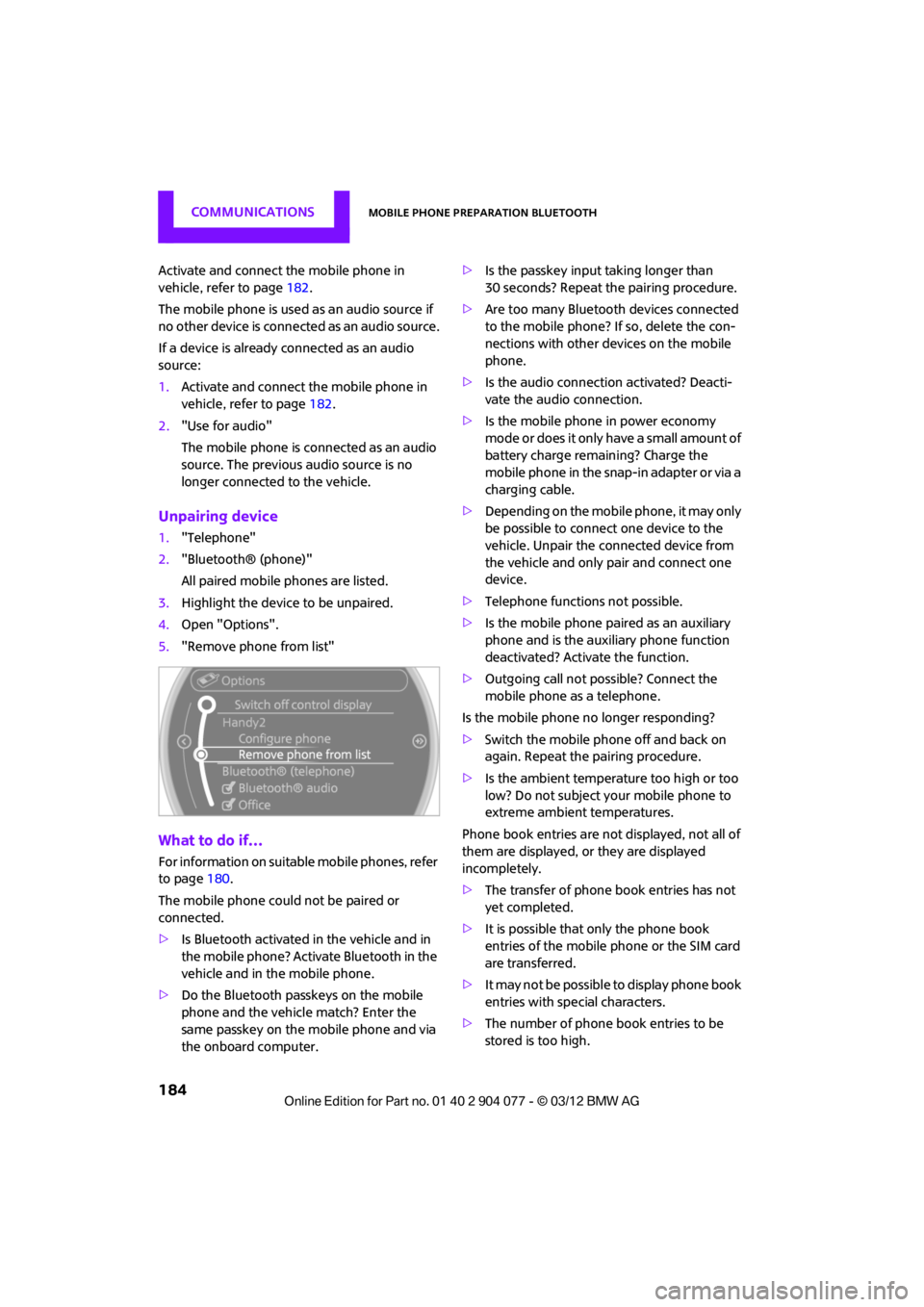
Unpairing device
1."Telephone"
2. "Bluetooth® (phone)"
All paired mobile phones are listed.
3. Highlight the device to be unpaired.
4. Open "Options".
5. "Remove phone from list"
What to do if…
For information on suitab le mobile phones, refer
to page 180.
The mobile phone could not be paired or
connected.
> Is Bluetooth activated in the vehicle and in
the mobile phone? Activate Bluetooth in the
vehicle and in the mobile phone.
> Do the Bluetooth passkeys on the mobile
phone and the vehicle match? Enter the
same passkey on the mobile phone and via
the onboard computer. >
Is the passkey input taking longer than
30 seconds? Repeat th e pairing procedure.
> Are too many Bluetoot h devices connected
to the mobile phone? If so, delete the con-
nections with other devices on the mobile
phone.
> Is the audio connection activated? Deacti-
vate the audio connection.
> Is the mobile phone in power economy
m o d e o r d o e s i t o n l y have a small amount of
battery charge remaining? Charge the
mobile phone in the snap-in adapter or via a
charging cable.
> Depending on the mobile phone, it may only
be possible to connect one device to the
vehicle. Unpair the connected device from
the vehicle and only pair and connect one
device.
> Telephone functions not possible.
> Is the mobile phone paired as an auxiliary
phone and is the auxiliary phone function
deactivated? Activate the function.
> Outgoing call not possible? Connect the
mobile phone as a telephone.
Is the mobile phone no longer responding?
> Switch the mobile phone off and back on
again. Repeat the pairing procedure.
> Is the ambient temperature too high or too
low? Do not subject your mobile phone to
extreme ambient temperatures.
Phone book entries are not displayed, not all of
them are displayed, or they are displayed
incompletely.
> The transfer of phone book entries has not
yet completed.
> It is possible that only the phone book
entries of the mobile phone or the SIM card
are transferred.
> It may not be possible to display phone book
entries with special characters.
> The number of phone book entries to be
stored is too high.
00320051004F004C00510048000300280047004C0057004C005200510003
Page 270 of 283

Everything from A to ZREFERENCE
269
Average fuel consumption72
– setting the units 74
Average speed 72
Avoiding highways for
navigation 135
Axle loads, refer to Weights 257
B
Background ligh ting, refer to
Ambient lighting 100
Backrests, refer to Seats 51
Backup lamps
– replacing bulb 235
Band-aids, refer to First aid
pouch 243
Bar, refer to Tow-starting, towing away 245
Base plate for telephone or mobile phone
– refer to Snap-in adapter 191
Bass sounds, refer to Tone control 147
Battery 241
– disposal 38,242
– jump-starting 243
– temporary power failure 242
Battery renewal
– remote control 38
Being towed 245
Belts, refer to Safety belts 53
Belt tensioner, refer to Safety
belts 53
Beverage holders, refer to Cupholders 109
Black ice, refer to External temperature warning 71
Blower, refer to Air flow
rate 102,104
Bluetooth, activating/ deactivating 171,181 Bluetooth audio
163
– device pairing 163
– disconnecting an audio connection 165
– playback 164
– unpairing device 165
– what to do if... 166
Bottle holders, refer to Cupholders 109
Brake Assist 83
Brake fluid, refer to Service requirements 75
Brake lamps
– replacing bulbs 235
Brake pads, breaking in 114
Brake rotors 116
– brakes 114
– breaking in 114
Brakes
– ABS 83
– breaking in 114
– MINI Maintenance
System 225
– parking brake 62
– service requirements 75
Br akes,
refer to Braking
safely 115
Brake system 114
– breaking in 114
– disc brakes 116
– MINI Maintenance System 225
Breakdown service, refer to
Roadside Assistance 243
Breaking in the clutch 114
Break-in period 114
Bulb changing, refer to Lamps and bulbs 232
Button for starting the
engine 60
Buttons on the steering wheel 11
C
Calendar 197
– displaying appointment 197
– selecting calendar day 197
California Proposition 65 warning 5
Call
– accepting 173,185
– ending 174,186
– muting the microphone 187
Calling, refer to Phone numbers, dialing 174,186
Calling, refer to Telephone 108
Can holders, refer to Cupholders 109
Capacities 259
Car battery, refer to Vehicle battery 241
Car care 227
Care 227
– car-care products 227
– car washes 227
– CD/DVD drives 230
– high-pressure washers 228
– leather 230
– manual washing 228
– upholstery and fabrics 229
– windows 228
– wiper blades 228
Cargo, securing 119
Cargo area 116
– capacity 257
– Comfort Access 37
– lamp 99
– opening from outside 33
Cargo area lamp 99
Cargo area lid, refer to Tailgate 33
Cargo loading 118
– securing cargo 119
– stowing cargo 119
– vehicle 116
Car key, refer to Keys/remote controls 28
00320051004F004C00510048000300280047004C0057004C005200510003
Page 276 of 283

Everything from A to ZREFERENCE
275
Manual operation
– door lock32
– fuel filler flap 206
– power convertible top 41,48
– tailgate 33
– transmission lock, automatic transmission 64
Manual transmission 62
Manual washing 228
Map
– changing scale 138
Map for navigation
– entering destination 131
Master key, refe r to Integrated
key/remote control 28
Maximum cooling 104
Maximum speed
– with winter tires 220
Medical assistance, refer to
First aid pouch 243
MENU button 17
Menus, refer to Onboard
computer 17
Messages 196
Microfilter
– for air conditioner 103
– for automatic climate control 105
– MINI Maintenance System 225
Microfilter/activated-charcoal filter
– MINI Maintenance
System 225
Microphone for telephone 14
MINI Connected 201
MINI Internet page 4
MINI joystick, refer to Onboard computer 17
MINI Maintenance System 225
Mirror dimming feature 55
Mirrors 54
– exterior mirrors 54
– heating 54
– interior rearview mirror 55Mobile phone
– adjusting volume
173,185
– connecting, refer to Mobile phone, pairing 170,181
– installation location, refer to Center armrest 108
– pairing 170,181
– refer to Telephone 108
– what to do if…. 172,184
Mobile phone, installation
location, refer to Center
arm r
est 10
8
Mobile phone, refer to
Telephone 108
Mobile phone preparation Bluetooth 180
Mobility Kit 237
Modifications, technical, refer to For your own safety 5
Monitor, refer to MINI controls with navigation 17
Monitoring system for tire
pressures, refer to Flat Tire
Monitor 87
Multifunctional steering
wheel, refer to Buttons on
the steering wheel 11
Multifunction switch
– refer to Turn signals/ headlamp flasher 65
– refer to Wiper system 66
N
Navigation
– storing current position 129
Navigation data 124
Navigation destination
– entering manually 126,132
– home address 129
Navigation instructions, refer to Switching voice
instructions on/off 139Navigation system
124
– address book 128
– bypassing a route section 136
– continuing route guidance 135
– destination entry 126
– dynamic route guidance 142
– entering a destination manually 126,132
– planning a trip 133
– route list 136
– selecting destination via
map 131
– selecting route criteria 135
– special destinations 130
– starting route guidance 135
– terminating route guidance 135
– voice instructions 139
– volume adjustment 139
Neck support, re fer to Head
restraints 52
Nets, refer to Storage compartments 108
New tires 219
North-facing map 137
Notes 198
Number of cylinders, refer to Engine data 250
Number of safety belts 50
Nylon rope, refer to Tow rope 246O
OBD socket, refer to Socket for
On-Board Diagnosis 226
Octane ratings, refer to Fuel
specifications 207
Odometer 71
Office 193
– current office 193
– what to do if…. 199
Oil, refer to Engine oil 222
Oil consumption 222
Oil level 222
00320051004F004C00510048000300280047004C0057004C005200510003