lock MINI Hardtop 2 Door 2010 (Mini Connected) Workshop Manual
[x] Cancel search | Manufacturer: MINI, Model Year: 2010, Model line: Hardtop 2 Door, Model: MINI Hardtop 2 Door 2010Pages: 230, PDF Size: 4.02 MB
Page 196 of 230
Replacing components
194
Only change the tire when parked on a surface
that is level, firm and not slippery.
The vehicle or the jack could slip sideways on
soft or slippery support surfaces, such as snow,
ice, flagstones, etc.
Do not use a wooden block or similar object as a
support base for the jack, as this would prevent
it from extending to its full support height and
reduce its load-carrying capacity.
Do not lie under the vehicle or start the engine
when the vehicle is supported by the jack; other-
wise, there is a risk of fatal injury.<
1.Place the foldable chock
* behind the front
wheel on the other side of the vehicle or in
front of the wheel if the vehicle is on an
incline. If the wheel is changed on a surface
with a more severe slope, take additional
precautions to secure the vehicle from
rolling.
2.Uncover the lug bolts if necessary.
If the wheel is equipped with a hub cover,
pry it off using the screwdriver from the tire
change kit.
3.Loosen the lug bolts by a half turn.
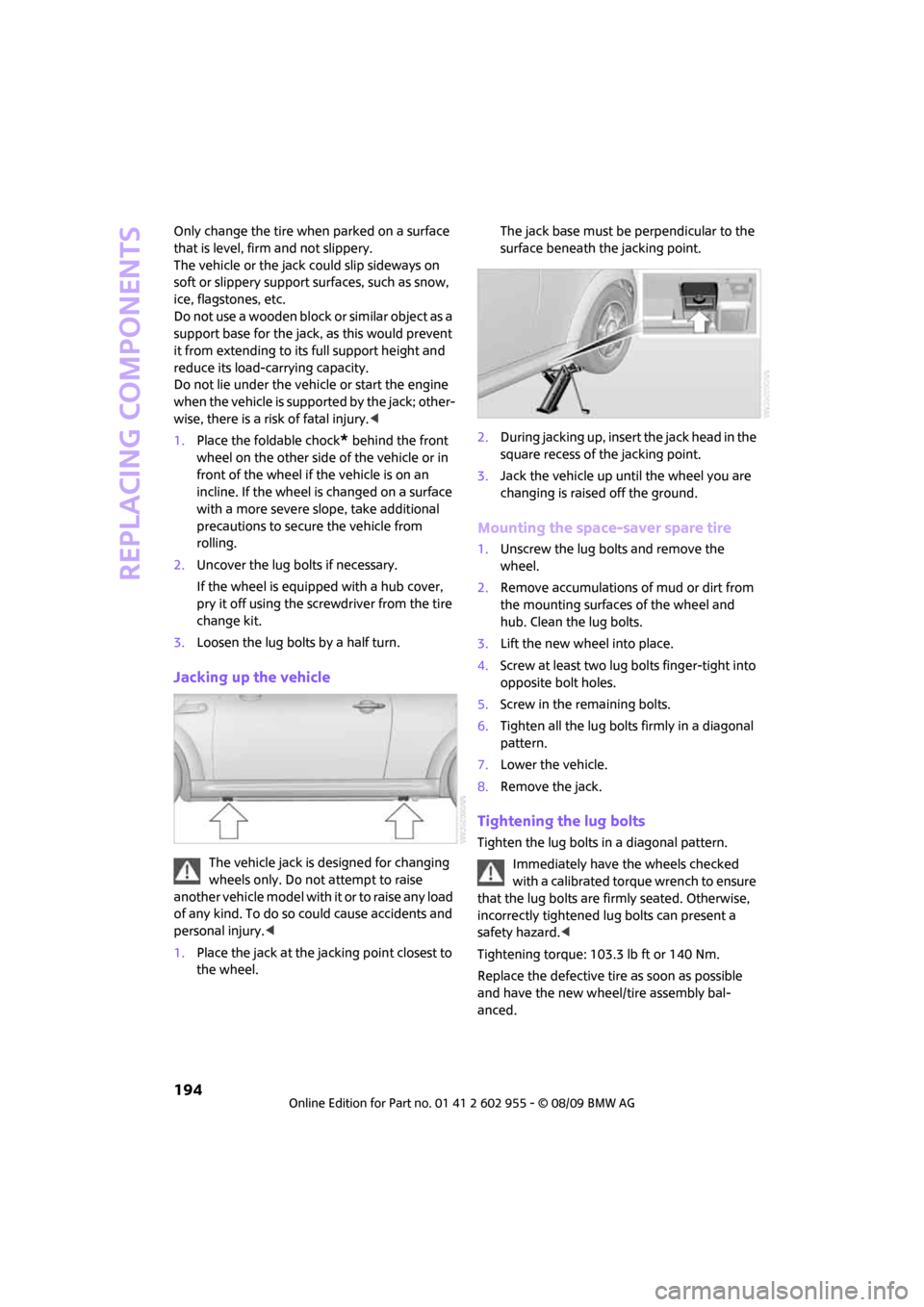
Jacking up the vehicle
The vehicle jack is designed for changing
wheels only. Do not attempt to raise
another vehicle model with it or to raise any load
of any kind. To do so could cause accidents and
personal injury.<
1.Place the jack at the jacking point closest to
the wheel.The jack base must be perpendicular to the
surface beneath the jacking point.
2.During jacking up, insert the jack head in the
square recess of the jacking point.
3.Jack the vehicle up until the wheel you are
changing is raised off the ground.
Mounting the space-saver spare tire
1.Unscrew the lug bolts and remove the
wheel.
2.Remove accumulations of mud or dirt from
the mounting surfaces of the wheel and
hub. Clean the lug bolts.
3.Lift the new wheel into place.
4.Screw at least two lug bolts finger-tight into
opposite bolt holes.
5.Screw in the remaining bolts.
6.Tighten all the lug bolts firmly in a diagonal
pattern.
7.Lower the vehicle.
8.Remove the jack.
Tightening the lug bolts
Tighten the lug bolts in a diagonal pattern.
Immediately have the wheels checked
with a calibrated torque wrench to ensure
that the lug bolts are firmly seated. Otherwise,
incorrectly tightened lug bolts can present a
safety hazard.<
Tightening torque: 103.3 lb ft or 140 Nm.
Replace the defective tire as soon as possible
and have the new wheel/tire assembly bal-
anced.
Page 198 of 230

Giving and receiving assistance
196
Giving and receiving assistance
Roadside Assistance
The Roadside Assistance service is there to assist
you around the clock in the event of a break-
down, including on weekends and public
holidays.
The phone numbers of the Roadside Assistance
in your home country can be found in the Con-
tact brochure.
First aid pouch*
Some of the articles contained in the first aid
pouch have a limited service life. Therefore,
check the expiration dates of the contents regu-
larly and replace any items in good time, if nec-
essary.
By way of example, the illustration shows the
cargo bay in the MINI.
The first aid pouch is located on the cargo bay
floor by the left side trim panel.
Warning triangle*
MINI
On the inside of the tailgate.
Press the tab to take it out.
MINI Convertible
The warning triangle is located at the bottom of
the luggage compartment floor.
Jump-starting
If the car's own battery is flat, your MINI's engine
can be started by connecting two jumper cables
to another vehicle's battery. You can also use
the same method to help start another vehicle.
Only use jumper cables with fully-insulated
clamp handles.
Do not touch any electrically live parts
when the engine is running, or a fatal acci-
dent may occur. Carefully adhere to the follow-
ing sequence, both to prevent damage to one or
both vehicles, and to guard against possible per-
sonal injuries.<
Preparation
1.Check whether the battery of the other vehi-
cle has a voltage of 12 volts and approxi-
mately the same capacitance in Ah. This
information can be found on the battery.
2.Switch off the engine of the support vehicle.
3.Switch off any consumers in both vehicles.
Page 212 of 230
Short commands for the voice activation system
210
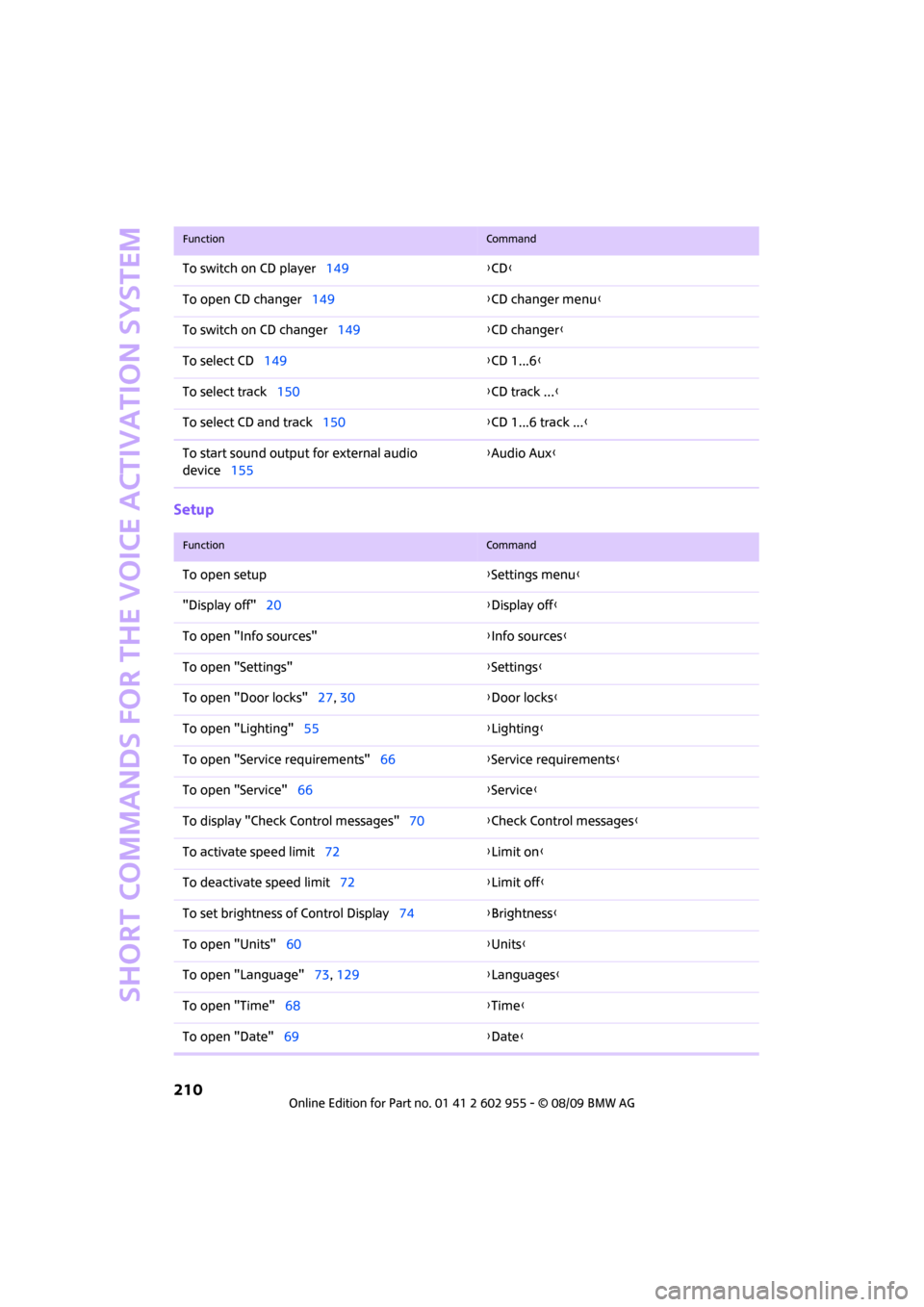
Setup
To switch on CD player149{CD}
To open CD changer149{CD changer menu}
To switch on CD changer149{CD changer}
To select CD149{CD 1...6}
To select track150{CD track ...}
To select CD and track150{CD 1...6 track ...}
To start sound output for external audio
device155{Audio Aux}
FunctionCommand
FunctionCommand
To open setup{Settings menu}
"Display off"20{Display off}
To open "Info sources"{Info sources}
To open "Settings"{Settings}
To open "Door locks"27, 30{Door locks}
To open "Lighting"55{Lighting}
To open "Service requirements"66{Service requirements}
To open "Service"66{Service}
To display "Check Control messages"70{Check Control messages}
To activate speed limit72{Limit on}
To deactivate speed limit72{Limit off}
To set brightness of Control Display74{Brightness}
To open "Units"60{Units}
To open "Language"73, 129{Languages}
To open "Time"68{Time}
To open "Date"69{Date}
Page 214 of 230
From A to Z
212
From A to Z
INDEX
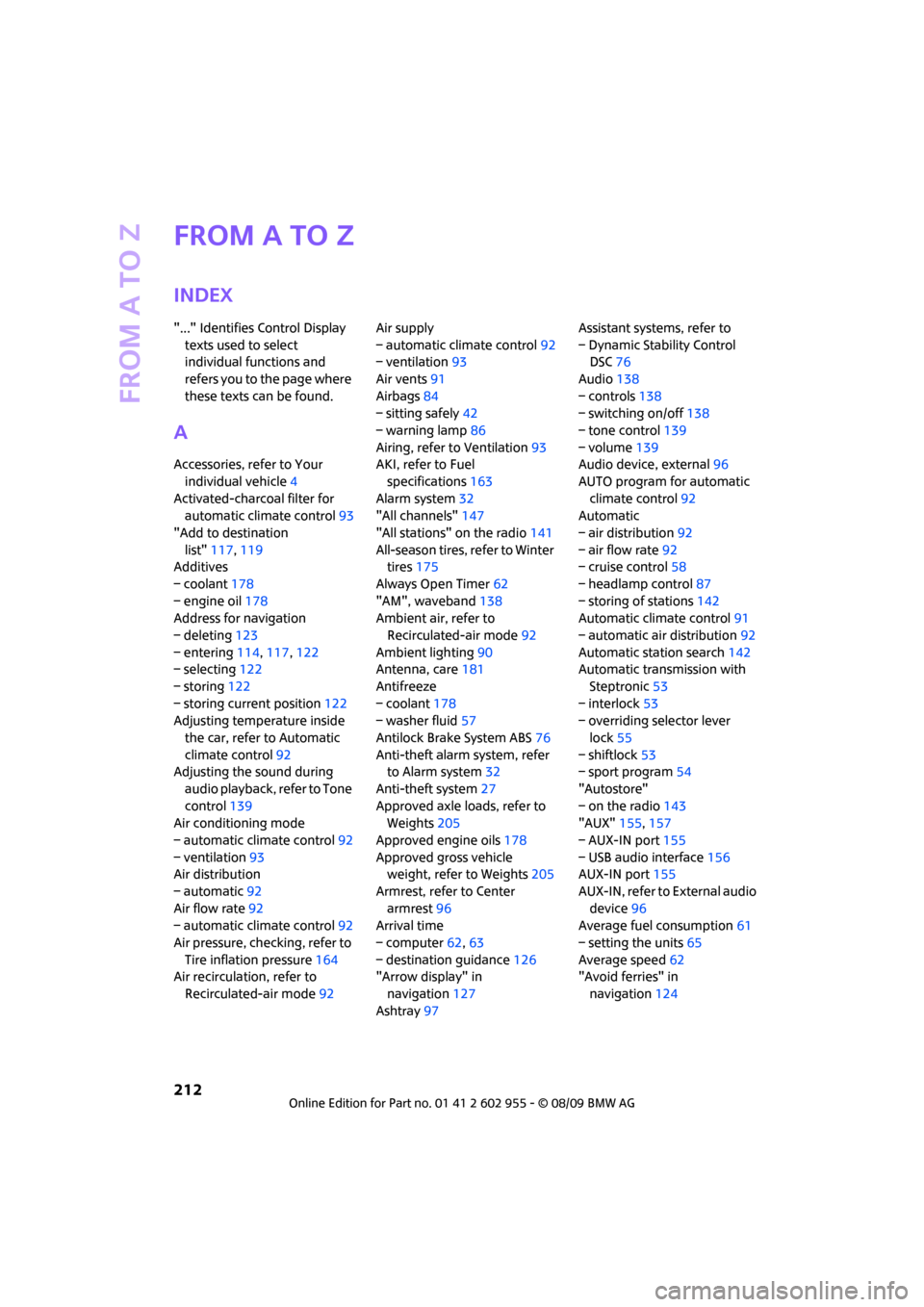
"..." Identifies Control Display
texts used to select
individual functions and
refers you to the page where
these texts can be found.
A
Accessories, refer to Your
individual vehicle4
Activated-charcoal filter for
automatic climate control93
"Add to destination
list"117,119
Additives
– coolant178
– engine oil178
Address for navigation
– deleting123
– entering114,117,122
– selecting122
– storing122
– storing current position122
Adjusting temperature inside
the car, refer to Automatic
climate control92
Adjusting the sound during
audio playback, refer to Tone
control139
Air conditioning mode
– automatic climate control92
– ventilation93
Air distribution
– automatic92
Air flow rate92
– automatic climate control92
Air pressure, checking, refer to
Tire inflation pressure164
Air recirculation, refer to
Recirculated-air mode92Air supply
– automatic climate control92
– ventilation93
Air vents91
Airbags84
– sitting safely42
– warning lamp86
Airing, refer to Ventilation93
AKI, refer to Fuel
specifications163
Alarm system32
"All channels"147
"All stations" on the radio141
All-season tires, refer to Winter
tires175
Always Open Timer62
"AM", waveband138
Ambient air, refer to
Recirculated-air mode92
Ambient lighting90
Antenna, care181
Antifreeze
– coolant178
– washer fluid57
Antilock Brake System ABS76
Anti-theft alarm system, refer
to Alarm system
32
Anti-theft system27
Approved axle loads, refer to
Weights205
Approved engine oils178
Approved gross vehicle
weight, refer to Weights205
Armrest, refer to Center
armrest96
Arrival time
– computer62,63
– destination guidance126
"Arrow display" in
navigation127
Ashtray97Assistant systems, refer to
– Dynamic Stability Control
DSC76
Audio138
– controls138
– switching on/off138
– tone control139
– volume139
Audio device, external96
AUTO program for automatic
climate control92
Automatic
– air distribution92
– air flow rate92
– cruise control58
– headlamp control87
– storing of stations142
Automatic climate control91
– automatic air distribution92
Automatic station search142
Automatic transmission with
Steptronic53
– interlock53
– overriding selector lever
lock55
– shiftlock53
– sport program54
"Autostore"
– on the radio143
"AUX"155,157
– AUX-IN port155
– USB audio interface156
AUX-IN port155
AUX-IN, refer to External audio
device96
Average fuel consumption61
– setting the units65
Average speed62
"Avoid ferries" in
navigation124
Page 216 of 230
From A to Z
214
CD changer149
– controls138
– fast forward/reverse152
– playing a track151
– random order152
– repeating a track151
– selecting a CD149
– selecting a track150
– switching on/off138
– tone control139
– volume139
CD player149
– controls138
– fast forward/reverse152
– playing a track151
– random order152
– repeating a track151
– selecting a track150
– switching on/off138
– tone control139
– volume139
Center armrest96
Center brake lamp189
Center console, refer to
Around the center
console14
"Central locking"28
Central locking system27
– Comfort Access33
– from inside30
– from outside27
Changing bulbs185
Changing the language on the
Control Display73
Changing the measurement
units on the Control
Display65
Changing wheels192
Chassis number, refer to
Engine compartment177
Check Control70
"Check Control messages"72
Child restraint systems48
Child seats48
Child-restraint fixing system
LATCH49
Chock, folding
– space-saver spare tire192
Chrome parts, care183Chrome parts, refer to
Care181
Cigarette lighter97
Cleaning headlamps57
– washer fluid58
Clock60
– 12h/24h mode
69
– hour signal69
– setting time68
Closing
– from inside30
– from outside27
Clothes hooks97
Cockpit10
Cold start, refer to Starting the
engine52
Comfort Access33
– replacing the battery35
Comfort access
– what to observe before
entering a car wash34
Comfort area, refer to Around
the center console14
Compact disc, refer to
– CD changer149
– CD player149
Compartment for remote
control, refer to Ignition
lock51
Computer61
– displays on Control
Display62
– hour signal69
Condensation, refer to When
the vehicle is parked103
Condition Based Service
CBS179
Configuring settings, refer to
Personal Profile26
Confirmation signals for
vehicle locking/unlocking28
Connecting vacuum cleaner,
refer to Connecting electrical
appliances98
Consumption indicator
– average fuel consumption61
Consumption, refer to Average
fuel consumption61Control Display
– settings64
– switching off/on20
Control Display, refer to
Onboard monitor16
Control stick, refer to Onboard
monitor16
Control unit, refer to Onboard
monitor16
Controls and displays10
Convenient access, refer to
Comfort Access33
Convenient operation
– convertible top30
– windows28
Convenient start, refer to
Starting the engine52
Convertible top37
Coolant178
– checking level178
– filling178
Coolant temperature61
Cooling fluid, refer to
Coolant178
Cooling, maximum92
Copyright2
Country of destination for
navigation115
Cross-hairs in navigation119
Cruise control
– indicator lamp13
Cruising range61
Cupholders97
Curb weight, refer to
Weights205
Current fuel consumption62
"Current position"134
Current position
– displaying134
– entering122
– storing122
D
Dashboard instruments, refer
to Displays12
Dashboard lighting, refer to
Instrument lighting89
Page 217 of 230
215
MOBILITYAT A GLANCE CONTROLS DRIVING TIPS ENTERTAINMENT NAVIGATION REFERENCE
Dashboard, refer to Cockpit10
Data202
– capacities206
– dimensions203
– engine202
– weights205
Data recorders180
"Date"70
Date
– setting69
– setting format70
"Date format"70
"Daytime running lamps"88
Daytime running lights88
DBC Dynamic Brake Control,
refer to Brake Assist76
Deactivating front passenger
airbags85
Deadlocking, refer to
Locking28
Defect
– door lock30
– fuel filler flap162
Defogging windows93
Defrost position, refer to
Defrosting windows93
Defrosting windows93
Defrosting windows and
removing condensation
– automatic climate control93
Destination address
– deleting123
– entering114,117
Destination for navigation
– destination list121
– entry114
– home address123
– manual entry114,117
– selecting from address
book122
– selecting using
information120
– selecting via map119
– storing122Destination guidance126
– changing specified route124
– displaying route127
– distance and arrival126
– interrupting126
– starting126
– taking detours130
– terminating/continuing126
– voice instructions129
– volume for voice
instructions129
Destination list for navigation
system121
Destinations recently driven
to121
Detour, refer to Driving around
a traffic congestion134
Differential, breaking in102
Digital clock60
Digital radio, refer to HD
Radio144
Dimensions203
Dipstick, engine oil177
Direction instructions, refer to
Voice instructions129
Directional indicators, refer to
Turn signals55
Directory for navigation, refer
to Address book121
Displacement, refer to Engine
data202
Display lighting, refer to
Instrument lighting89
"Display off"20
Display, refer to Onboard
monitor controls16
Displays12
– instrument combination12
– on the Control Display16
Displays and controls10
Displays, care184
Disposal
– of coolant178
– remote control battery35
– vehicle battery195
"Dist. to dest."63Distance remaining to service,
refer to Service
requirements65
Distance warning, refer to Park
Distance Control PDC75
Diving stability control
systems76
Door key, refer to Integrated
key/remote control26
Door lock29
Door lock, confirmation
signals28
"Door locks"28,30
Doors, manual operation30
DOT Quality Grades172
Drinks holders, refer to
Cupholders97
Drive-off assistant, refer to Hill
Assist78
Driving around a traffic
congestion134
Driving dynamics control, refer
to Sport button78
Driving lamps, refer to Parking
lamps/low beams87
Driving notes102
Driving off on inclines, refer to
Hill Assist78
Driving route, refer to
Displaying route127
Driving through water103
Driving tips, refer to Driving
notes102
Dry air, refer to Cooling
function93
DTC Dynamic Traction Control
DTC77
DVD for navigation112
Dynamic Brake Control DBC,
refer to Brake Assist76
Dynamic Stability Control
DSC76
Dynamic Traction Control77
E
Eject button, refer to Buttons
on the CD player138
Page 218 of 230
From A to Z
216
Electric power windows
– initializing36
Electrical malfunction
– convertible top39
– door lock30
– fuel filler flap162
– trunk lid31
Electronic brake-force
distribution76
Electronic Stability Program
ESP, refer to Dynamic
Stability Control DSC76
Emergency operation, refer to
Manual operation
– convertible top39
– door lock30
– fuel filler flap162
– transmission lock, automatic
transmission55
– trunk lid31
Emergency services, refer to
Roadside Assistance196
Engine
– breaking in102
– data202
– overheated, refer to Coolant
temperature61
– speed202
– starting52
– starting, Comfort Access33
– switching off52
Engine compartment177
Engine coolant, refer to
Coolant178
Engine malfunction
– indicator lamp13Engine oil
– adding178
– additives, refer to Approved
engine oils178
– alternative oil types178
– approved engine oils178
– capacity178
– checking level177
– dipstick177
– intervals between changes,
refer to Service
requirements65
– MINI Maintenance
System179
Engine oil level, checking177
Engine output, refer to Engine
data202
Engine starting, refer to
Starting the engine52
Entering address117
Entering destination115
Entering intersection116
Error messages, refer to Check
Control70
"ESN"145,146,147
ESP Electronic Stability
Program, refer to Dynamic
Stability Control DSC76
Exhaust system, refer to Hot
exhaust system102
Exterior mirrors46
– adjusting46
– automatic heating46
– folding in and out46
External audio device96
External audio device, refer to
AUX-IN port155
Eyes
– for tow-starting and towing
away197
– for tying down loads106
F
Fader, tone control139
Failure messages, refer to
Check Control70
Failure of an electrical
consumer195Fast forward
– CD changer152
– CD player152
"Fast route" in navigation124
Fasten safety belts reminder,
refer to Seat belt
reminder46
Fastening safety belts, refer to
Safety belts45
Fastest route for
navigation124
Filter
– microfilter/activated-
charcoal filter for automatic
climate control93
Fine wood, care184
First aid pouch196
Fixture for remote control,
refer to Ignition lock51
Flash when locking/
unlocking28
Flat tire
– run-flat tires174
– Tire Pressure Monitor TPM80
Flat Tire Monitor FTM78
– indicating a flat tire79
– initializing the system79
– snow chains79
– system limits79
Flat tires, refer to Tire
condition173
Floor mats, care183
"FM", waveband138,141
FM, waveband141
Fog lamps
– replacing bulb187,189
Folding rear seat backrest104
Folding roof, refer to
Convertible top with
integrated sliding sunroof37
Footbrake, refer to Braking
safely103
Footwell lamps89
For your own safety5
Frequency, selecting
manually142
Front airbags84
Front fog lamps89
– replacing bulb187
Page 219 of 230
217
MOBILITYAT A GLANCE CONTROLS DRIVING TIPS ENTERTAINMENT NAVIGATION REFERENCE
Front seat adjustment42
Frost on windows, refer to
Defrosting windows93
"FTM"81
FTM, refer to Flat Tire
Monitor78
Fuel163
– gauge61
– high-quality brands163
– quality163
– specifications163
– tank capacity206
Fuel clock, refer to Fuel
gauge61
Fuel display, refer to Fuel
gauge61
Fuel filler flap162
– releasing in the event of
electrical malfunction162
Fuses195
G
Garage door opener, refer to
Integrated universal remote
control94
Gasoline
– refer to Average
consumption61
Gasoline display, refer to Fuel
gauge61
Gasoline, refer to Required
fuel163
Gear indicator
– automatic transmission with
Steptronic53
Gear shifting
– automatic transmission53
– manual transmission53
Gearshift lever
– automatic transmission with
Steptronic53
– manual transmission53
General driving notes102
Glass sunroof, electric35
– convenient operation28,30
– opening, closing35
– raising35
– remote control28Glove compartment95
GPS navigation, refer to
Navigation system112
Grills91
Gross vehicle weight, refer to
Weights205
H
Halogen lamps
– replacing bulb186
Handbrake, refer to Parking
brake52
Hands-free system14
Hazard warning flashers14
"HD radio"144
HD radio, refer to High
Definition Radio144
Head airbags84
Head restraints44
– sitting safely42
Headlamp control,
automatic87
Headlamp flasher55
– indicator lamp11,13
Headlamps
– replacing bulb186
Headlamps, care182
Heated
– mirrors46
– rear window93
– seats45
Heating
– mirrors46
– rear window93
– seats45
Heavy loads, refer to Stowing
cargo106
Height adjustment
– seats43
– steering wheel47
Height, refer to
Dimensions203
High beams88
– headlamp flasher88
– indicator lamp13
– replacing bulb186
High Definition Radio, refer to
HD Radio144High water, refer to Driving
through water103
Highways, refer to Route
criteria124
Hill Assist78
Hills103
Holders for cups97
Home address123
"Home address" in
navigation124
Homepage4
Horn10
Hot exhaust system102
"Hour memo"69
"House number" in
destination entry117
Hydroplaning102
I
IBOC, refer to HD Radio144
Ice warning60
Icy roads, refer to Outside
temperature warning60
ID3 tag, refer to Information
about the track150
Ignition51
– switched off51
– switched on51
Ignition key position 1, refer to
Radio readiness51
Ignition key position 2, refer to
Ignition on51
Ignition key, refer to
Integrated key/remote
control26
Ignition lock51
Imprint2
Indicator and warning
lamps13
– Tire Pressure Monitor TPM82
Indicator lighting, refer to
Instrument lighting89
Individual settings, refer to
Personal Profile26
Inflation pressure monitoring,
refer to Tire Pressure Monitor
TPM80
Page 220 of 230
From A to Z
218
Information
– on another location120
– on country120
– on current position120
– on destination location120
"Information" in
navigation120
"Information on
destination"121
Initializing
– Flat Tire Monitor FTM79
– glass sunroof, electric36
Installation location
– drive for navigation DVD and
audio CD112
Instructions for navigation
system, refer to Voice
instructions129
Instrument cluster, refer to
Displays12
Instrument lighting89
Instrument panel, refer to
Cockpit10
Instrument panel, refer to
Displays12
Integrated key26
Integrated universal remote
control94
Interesting destination for
navigation120
"Interim time"73
Interior lamps89
– remote control29
Interior rearview mirror46
– automatic dimming
feature47
Interlock53
Intermittent mode of the
wipers56
Internet page4
J
Jacking points194
Jets, refer to Window washer
nozzles57Joystick, refer to Onboard
monitor16
Jumpering, refer to Jump-
starting196
Jump-starting196
K
Key Memory, refer to Personal
Profile26
Key, refer to Keys/remote
controls26
Keyless go, refer to Comfort
Access33
Keyless opening and closing,
refer to Comfort Access33
Kickdown54
– automatic transmission with
Steptronic54
Knock control163
L
Lamps and bulbs, replacing
bulbs185
Lamps, refer to Parking lamps/
Low beams87
"Language" in navigation129
"Languages" in
navigation112
Lashing eyes, refer to Securing
cargo106
Last destinations, refer to
Destination list121
LATCH child-restraint fixing
system49
Leather care183
LEDs light-emitting diodes186
Length, refer to
Dimensions203
License plate lamp
– bulb replacement189
Light switch87
Light-alloy wheels, care183
Light-emitting diodes
LEDs186Lighter97
– socket98
"Lighting"88
Lighting
– lamps and bulbs185
– of the instruments89
– of vehicle, refer to Lamps87
"Limit"73
Limit, refer to Speed limit72
Load105
Load securing equipment,
refer to Securing cargo106
Lock buttons of doors, refer to
Locking30
Locking
– adjusting confirmation
signal28
– from inside30
– from outside28
– without remote control, refer
to Comfort Access33
Locking and unlocking doors
– confirmation signals28
– from inside30
– from outside27
Low beams87
– automatic87
– replacing bulb186
Lower back support, refer to
Lumbar support43
Luggage compartment
– emergency operation, refer
to Manual release31
– increasing the capacity105
– opening from the inside31
Luggage compartment lid
– emergency operation, refer
to Manual release31
Luggage compartment lid,
refer to Tailgate31
Luggage compartment, refer
to Cargo bay31
Luggage rack, refer to Roof-
mounted luggage rack107
Lumbar support43
Page 221 of 230
219
MOBILITYAT A GLANCE CONTROLS DRIVING TIPS ENTERTAINMENT NAVIGATION REFERENCE
M
M+S tires, refer to Winter
tires175
Maintenance, refer to Service
Booklet
Maintenance system179
Malfunction
– convertible top39
– trunk lid31
Malfunction warnings, refer to
Check Control70
Manual mode
– automatic transmission with
Steptronic54
"Manual" on the radio142
Manual operation
– door lock30
– fuel filler flap162
– power convertible top39
– transmission lock, automatic
transmission55
– trunk lid31
Manual transmission53
Manual washing182
Map
– changing scale128
– destination entry119
"Map direction of travel"128
"Map facing north"128
Master key, refer to Integrated
key/remote control26
Maximum cooling92
Maximum speed
– with winter tires175
Medical assistance, refer to
First aid pouch196
MENU button16
Menus, refer to Onboard
monitor16
Microfilter
– for automatic climate
control93
– MINI Maintenance
System179Microfilter/activated-charcoal
filter
– MINI Maintenance
System179
Microphone for telephone14
MINI Internet page4
MINI joystick, refer to Onboard
monitor16
MINI Maintenance System179
Mirror dimming feature47
Mirrors46
– exterior mirrors46
– heating46
– interior rearview mirror46
Mobile phone
– installation location, refer to
Center armrest96
– refer to separate Owner's
Manual
Mobile phone, installation
location, refer to Center
armrest96
Mobile phone, refer to the
separate Owner's Manual
Mobility System190
Modifications, technical, refer
to For your own safety5
Monitor, refer to MINI controls
with navigation16
Monitoring system for tire
pressures, refer to Flat Tire
Monitor78
MP3, refer to Compressed
audio files149
Multifunction switch
– refer to Turn signals/
headlamp flasher55
– refer to Wiper system56
Multifunctional steering
wheel, refer to Buttons on
the steering wheel11
Music track
– playback, scan151
– random order152
– search151
Muting TV138
N
Navigation announcements,
refer to Switching voice
instructions on/off129
Navigation drive, location112
Navigation DVD112
Navigation system112
– address book121
– changing a route130
– destination entry114
– destination list121
– displaying current
position134
– entering a destination
manually114,117
– last destinations121
– opening114
– route display127
– route list129
– searching for a special
destination120
– selecting destination using
information120
– selecting destination via
map119
– selecting route criteria124
– starting destination
guidance126
– switching off, refer to
Terminating/continuing
destination guidance126
– terminating/continuing
destination guidance126
– voice instructions129
– volume adjustment129
"Navigation voice
instructions"112
Neck support, refer to Head
restraints44
Nets, refer to Storage
compartments96
"New address" in
navigation122
"New destination"114,119
"New route"130
New tires174
North-facing map127
Nozzles91