sport mode MINI Hardtop 2 Door 2010 Owner's Manual (Mini Connected)
[x] Cancel search | Manufacturer: MINI, Model Year: 2010, Model line: Hardtop 2 Door, Model: MINI Hardtop 2 Door 2010Pages: 230, PDF Size: 4.02 MB
Page 8 of 230
Notes
6
Service and warranty
We recommend that you read this publication
thoroughly.
Your MINI is covered by the following war-
ranties:
>New Vehicle Limited Warranty
>Rust Perforation Limited Warranty
>Federal Emissions System Defect Warranty
>Federal Emissions Performance Warranty
>California Emission Control System Limited
Warranty
Detailed information about these warranties is
listed in the Service and Warranty Information
Booklet for US models or in the Warranty and
Service Guide Booklet for Canadian models.
Reporting safety defects
For US customers
The following applies only to vehicles owned
and operated in the US.
If you believe that your vehicle has a defect
which could cause a crash or could cause injury
or death, you should immediately inform the
National Highway Traffic Safety Administration,
NHTSA, in addition to notifying MINI of
North America, LLC, P.O. Box 1227,
Westwood, New Jersey 07675-1227,
Telephone 1-800-831-1117.
If NHTSA receives similar complaints, it may
open an investigation, and if it finds that a safety
defect exists in a group of vehicles, it may order
a recall and remedy campaign. However, NHTSA
cannot become involved in individual problems
between you, your dealer, or MINI of North
America, LLC.
To contact NHTSA, you may call the Vehicle
Safety Hotline toll-free at 1-888-327-4236
(TTY: 1-800-424-9153);
go to http://www.safercar.gov; or write to:
Administrator, NHTSA, 400 Seventh Street, SW.,
Washington, DC 20590. You can also obtain other information about motor vehicle safety
from http://www.safercar.gov
For Canadian customers
Canadian customers who wish to report a
safety-related defect to Transport Canada,
Defect Investigations and Recalls, may call
1-800-333-0510 toll-free from anywhere in
Canada or 1-613-993-9851 from the Ottawa
region and from other countries, or contact
Transport Canada by mail at: Transport Canada,
ASFAD, Place de Ville, Tower C, 330 Sparks
Street, Ottawa, ON, K1A 0N5.
You can also obtain other information about
motor vehicle safety from http://www.tc.gc.ca
Page 17 of 230
MOBILITYAT A GLANCE CONTROLS DRIVING TIPS ENTERTAINMENT
15
NAVIGATION REFERENCE
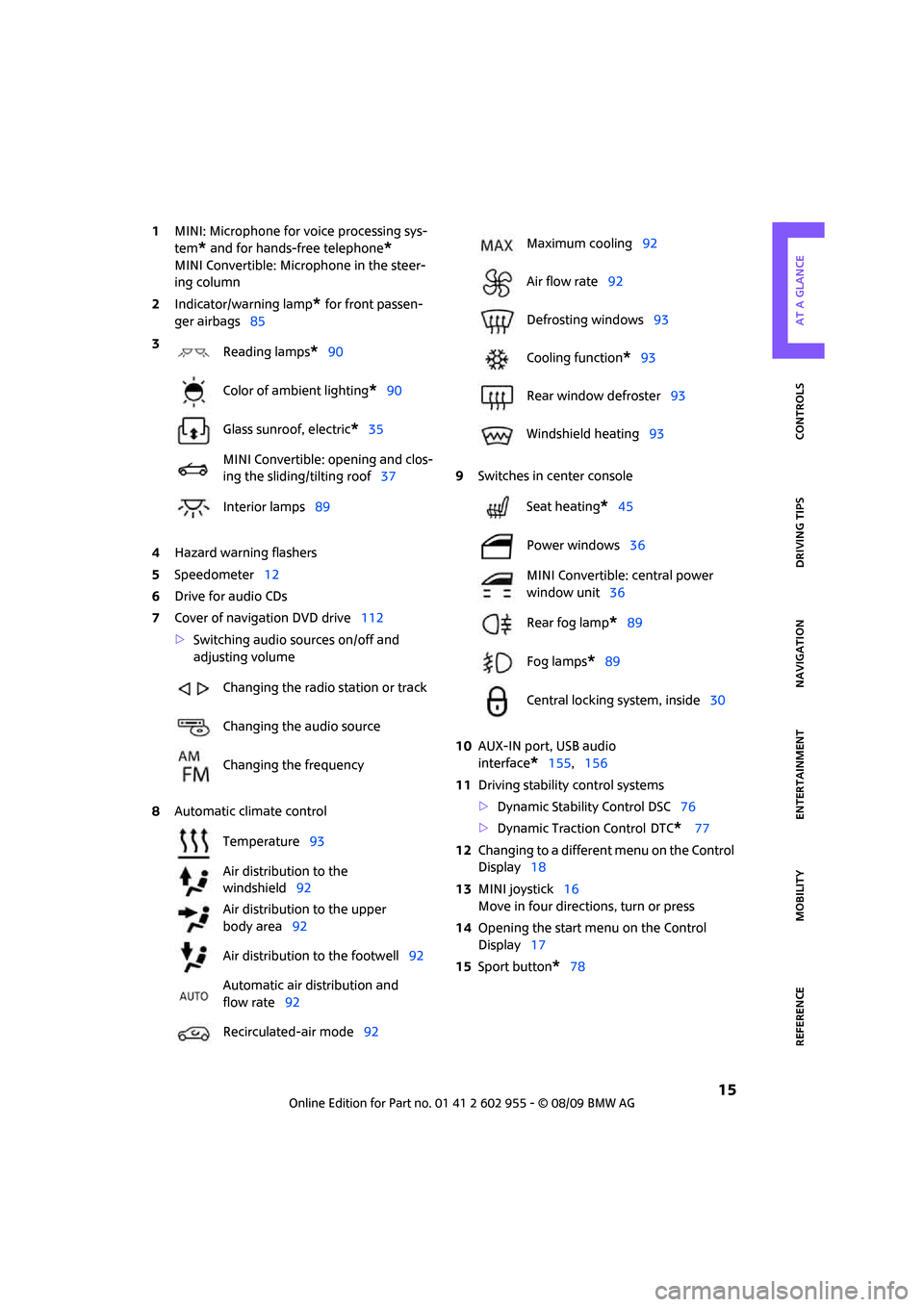
1MINI: Microphone for voice processing sys-
tem
* and for hands-free telephone*
MINI Convertible: Microphone in the steer-
ing column
2Indicator/warning lamp
* for front passen-
ger airbags85
4Hazard warning flashers
5Speedometer12
6Drive for audio CDs
7Cover of navigation DVD drive112
>Switching audio sources on/off and
adjusting volume
8Automatic climate control9Switches in center console
10AUX-IN port, USB audio
interface
*155,156
11Driving stability control systems
>Dynamic Stability Control DSC76
>Dynamic Traction Control
DTC* 77
12Changing to a different menu on the Control
Display18
13MINI joystick16
Move in four directions, turn or press
14Opening the start menu on the Control
Display17
15Sport button
*78 3
Reading lamps
*90
Color of ambient lighting
*90
Glass sunroof, electric
*35
MINI Convertible: opening and clos-
ing the sliding/tilting roof37
Interior lamps89
Changing the radio station or track
Changing the audio source
Changing the frequency
Temperature93
Air distribution to the
windshield92
Air distribution to the upper
body area92
Air distribution to the footwell92
Automatic air distribution and
flow rate92
Recirculated-air mode92
Maximum cooling92
Air flow rate92
Defrosting windows93
Cooling function
*93
Rear window defroster93
Windshield heating93
Seat heating
*45
Power windows36
MINI Convertible: central power
window unit36
Rear fog lamp
*89
Fog lamps
*89
Central locking system, inside30
Page 56 of 230

Driving
54
To prevent the vehicle from creeping
after you select a driving position,
depress the brake until you are ready to
start.<
A lock prevents accidental shifting into selector
lever positions R and P.
Overriding the selector lever lock
Press the button on the front of the selector
lever, arrow.
P Park
Select this only when the vehicle is stationary.
The transmission locks to prevent the drive
wheels from turning.
R Reverse
Select this only when the vehicle is stationary.
N Neutral
Select this when you are in a car wash, for exam-
ple. The vehicle can roll.
D Drive, automatic position
Position for normal vehicle operation. All for-
ward gears are selected automatically.
Under normal operation conditions, fuel con-
sumption is lowest when you drive in position D.
Kickdown
Kickdown enables you to achieve maximum
performance.
Depress the accelerator pedal beyond the full-
throttle resistance point.
Sport program and manual
operation M/S
Move the selector lever from position D to the
left into the M/S shifting slot:
The Sport program is activated and DS is dis-
played. This position is recommended for a per-
formance-oriented driving style.
To deactivate the sport program or manual
mode M/S, move the selector lever to the right
into position D.
Shifting with the selector lever
Push the selector lever forward or pull it back
to activate manual operation. Steptronic shifts
the gear.
>Pull the selector lever in the + direction.
Transmission shifts up.
>Push the selector lever in the – direction.
Transmission shifts down.
The tachometer displays M1 to M6.
To use the automatic mode again, move the
selector lever to the right into position D.
Upshifts and downshifts are executed only when
they will result in a plausible combination of
engine and vehicle speed; thus, for example, a
downshift that would cause the engine to over-
rev will not be executed by the system. The
selected gear is displayed briefly, followed by
the actual gear.
Shifting on the steering wheel*
With the selector lever in position D, automatic
drive, you can shift gears using the shift paddles
on the steering wheel. The transmission auto-
matically switches to manual mode.
Page 214 of 230
From A to Z
212
From A to Z
INDEX
"..." Identifies Control Display
texts used to select
individual functions and
refers you to the page where
these texts can be found.
A
Accessories, refer to Your
individual vehicle4
Activated-charcoal filter for
automatic climate control93
"Add to destination
list"117,119
Additives
– coolant178
– engine oil178
Address for navigation
– deleting123
– entering114,117,122
– selecting122
– storing122
– storing current position122
Adjusting temperature inside
the car, refer to Automatic
climate control92
Adjusting the sound during
audio playback, refer to Tone
control139
Air conditioning mode
– automatic climate control92
– ventilation93
Air distribution
– automatic92
Air flow rate92
– automatic climate control92
Air pressure, checking, refer to
Tire inflation pressure164
Air recirculation, refer to
Recirculated-air mode92Air supply
– automatic climate control92
– ventilation93
Air vents91
Airbags84
– sitting safely42
– warning lamp86
Airing, refer to Ventilation93
AKI, refer to Fuel
specifications163
Alarm system32
"All channels"147
"All stations" on the radio141
All-season tires, refer to Winter
tires175
Always Open Timer62
"AM", waveband138
Ambient air, refer to
Recirculated-air mode92
Ambient lighting90
Antenna, care181
Antifreeze
– coolant178
– washer fluid57
Antilock Brake System ABS76
Anti-theft alarm system, refer
to Alarm system
32
Anti-theft system27
Approved axle loads, refer to
Weights205
Approved engine oils178
Approved gross vehicle
weight, refer to Weights205
Armrest, refer to Center
armrest96
Arrival time
– computer62,63
– destination guidance126
"Arrow display" in
navigation127
Ashtray97Assistant systems, refer to
– Dynamic Stability Control
DSC76
Audio138
– controls138
– switching on/off138
– tone control139
– volume139
Audio device, external96
AUTO program for automatic
climate control92
Automatic
– air distribution92
– air flow rate92
– cruise control58
– headlamp control87
– storing of stations142
Automatic climate control91
– automatic air distribution92
Automatic station search142
Automatic transmission with
Steptronic53
– interlock53
– overriding selector lever
lock55
– shiftlock53
– sport program54
"Autostore"
– on the radio143
"AUX"155,157
– AUX-IN port155
– USB audio interface156
AUX-IN port155
AUX-IN, refer to External audio
device96
Average fuel consumption61
– setting the units65
Average speed62
"Avoid ferries" in
navigation124
Page 224 of 230

From A to Z
222
Seats42
– adjusting the seats43
– heating45
– sitting safely42
Securing the vehicle
– from inside30
– from outside27
"Select as destination"120
"Select current speed"73
Selecting an audio source138
Selecting menu items19
Selecting the route124
Selection options for
navigation124
Selector lever
– automatic transmission with
Steptronic53
Selector lever lock
– automatic transmission with
Steptronic, refer to
Shiftlock53
– overriding manually55
Selector lever positions
– automatic transmission with
Steptronic53
"Service"72
Service car, refer to Roadside
Assistance196
Service data in the remote
control179
Service Interval Display, refer
to Condition Based Service
CBS179
Service, refer to Roadside
Assistance196
Service requirement display,
refer to Condition Based
Service CBS179
"Service requirements"66,67
Service requirements65
"Set date"70
Settings
– clock, 12h/24h mode69
– date format70
Shifting gears
– automatic transmission with
Steptronic54
– manual transmission53Shiftlock
– automatic transmission, refer
to Changing selector lever
positions53
Short commands for the voice
activation system207
"Short route" in
navigation124
Shortest route in navigation,
refer to Selecting route124
"Show current position"119
"Show destination
position"119
Shuffled, refer to Random
– CD changer152
– CD player152
Side airbags84
Side turn signal indicator
– replacing bulb188
Side windows, refer to
Windows36
Signal horn, refer to Horn10
Sitting safely42
– airbags42
– safety belts42
– with head restraint42
Size, refer to Dimensions203
Sliding/tilt sunroof
– refer to Glass sunroof,
electric35
Slipstream deflector, refer to
Wind deflector40
Slot for remote control51
Smokers' package, refer to
Ashtray97
Snap-in adapter, refer to
Center armrest storage
compartment96
Snow chains175
Socket for Onboard Diagnosis
OBD179
Socket, refer to Connecting
electrical appliances98
Song search, refer to Playing a
track151
Sound output for
entertainment on/off138Space-saver spare tire
– changing tires192
– inflation pressure164
Spare wheel, refer to Space-
saver spare tire192
Speaking, refer to Voice
instructions from navigation
system129
Special oils, refer to Approved
engine oils178
Speed202
– with winter tires175
Speed control, refer to Cruise
control58
Speed limit72
– setting72
Speed limit warning, refer to
Speed limit72
"Speed volume", refer to Tone
control140
Speed-dependent volume139
Speedometer12
Split rear backrest, refer to
Through-loading system105
Split rear seat backrest, refer to
Expanding the cargo
bay104
Sport button78
Stability control, refer to
Driving stability control
systems76
"Start guidance"121,123
Start menu17
Start/stop button51
– starting the engine52
– switching off the engine52
Starting assistance, refer to
Jump-starting196
Starting, refer to Starting the
engine52
Starting the engine
– start/stop button51
Start-off assistance, refer to
– DSC76
– Hill Assist78
"State / Province" in
destination entry115
Station, refer to Radio141
"Status"66
Page 226 of 230
From A to Z
224
Tires, FTM79
Tires with safety features, refer
to Run-flat tires174
TMC station, refer to Traffic
information130
Tone in audio mode
– adjusting139
– middle setting140
Tools, refer to Onboard vehicle
tool kit185
Torque202
– lug bolts194
Tow bar198
Tow fitting197
– screw thread198
Tow fittings for tow-starting
and towing away197
Tow rope198
Towing197
– car with automatic
transmission198
– methods198
"Town / City" in destination
entry115
Tow-starting197
TPM, refer to Tire Pressure
Monitor80
Track width, refer to
Dimension203
Traction control, refer to
– Dynamic Stability Control
DSC76
Traffic congestion
– displaying traffic
information130
Traffic information for
navigation
– calling up130,131
– display on route map131
– during destination
guidance134
Traffic information message
list131
Trailer operation
– trailer loads and gross vehicle
weight205Transmission
– automatic transmission with
Steptronic53
– manual transmission53
– overriding selector lever lock
for automatic transmission
with Steptronic55
Transport securing devices,
refer to Securing cargo106
Transporting children safely48
Tread depth, refer to Minimum
tire tread173
Treble, refer to Tone
control139
Treble, refer to Treble and
bass139
Treble, tone control139
"Trip computer"
63
Trip computer63
Trip odometer60
Trip-distance counter, refer to
Trip odometer60
"Triple turn signal"56
Triple turn signal activation55
Trunk lid
– emergency operation31
– releasing manually31
Trunk, refer to Luggage
compartment in the MINI
Convertible104
Turn signal indicator55
– front, replacing bulb187
– indicator lamp12,13
– rear, replacing bulb188
– side, replacing bulb188
Turning circle, refer to
Dimensions203
Tying down loads, refer to
Cargo loading106
U
Uniform Tire Quality Grading
UTQR172
"Units"65
Units
– average fuel consumption65
– temperature65Universal garage door opener,
refer to Integrated universal
remote control94
Universal remote control94
Unlatching, refer to
Unlocking34
"Unlock button"28
Unlocking
– from inside30
– from outside27
– tailgate34
– without remote control, refer
to Comfort Access33
Upholstery, care183
USB audio interface156
V
Valve
– dust cap193
Vehicle
– battery195
– breaking in102
– cargo loading104
– dimensions203
– Identification Number, refer
to Engine compartment177
– parking52
– storage184
– weight205
Vehicle jack192
– jacking points194
Vehicle position, refer to
Displaying current
position134
Ventilation
– air conditioner93
Vents, refer to Ventilation93
Voice commands
– overview21
– short commands207
Voice instructions from
navigation system129
– switching on/off129
– volume129