wipers MINI Hardtop 4 Door 2016 Owner's Manual (Mini Connected)
[x] Cancel search | Manufacturer: MINI, Model Year: 2016, Model line: Hardtop 4 Door, Model: MINI Hardtop 4 Door 2016Pages: 246, PDF Size: 6.36 MB
Page 15 of 246
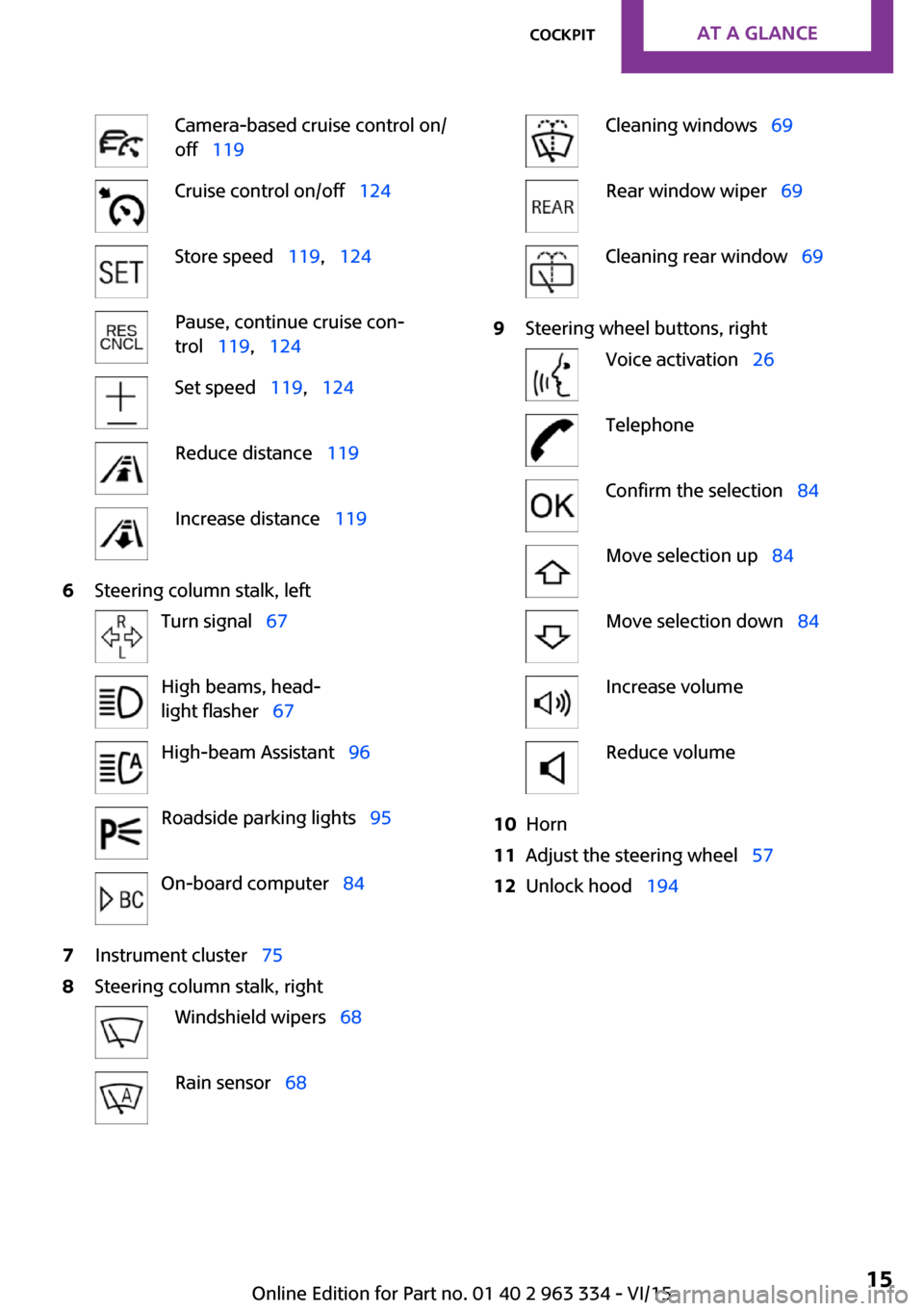
Camera-based cruise control on/
off 119Cruise control on/off 124Store speed 119, 124Pause, continue cruise con‐
trol 119, 124Set speed 119, 124Reduce distance 119Increase distance 1196Steering column stalk, leftTurn signal 67High beams, head‐
light flasher 67High-beam Assistant 96Roadside parking lights 95On-board computer 847Instrument cluster 758Steering column stalk, rightWindshield wipers 68Rain sensor 68Cleaning windows 69Rear window wiper 69Cleaning rear window 699Steering wheel buttons, rightVoice activation 26TelephoneConfirm the selection 84Move selection up 84Move selection down 84Increase volumeReduce volume10Horn11Adjust the steering wheel 5712Unlock hood 194Seite 15CockpitAT A GLANCE15
Online Edition for Part no. 01 40 2 963 334 - VI/15
Page 68 of 246

Washer/wiper system
Switching the wipers on/off and brief
wipe
General information Do not use the wipers if the windshield is dry,
as this may damage the wiper blades or cause
them to become worn more quickly.
Information CAUTION
If the wipers are frozen to the windshield,
the wiper blades can be torn off and the wiper
motor overheat on switching on. There is risk of
property damage. Defrost the windshield prior
to switching the wipers on. ◀
WARNING
If the wipers start moving in the folded
away state, damage may occur to parts of the
vehicle or body parts can be jammed. There is
risk of injuries or risk of property damage. Make
sure that the vehicle is switched off when the
wipers are in the folded away state and the
wipers are folded in when switching on. ◀
Switching on
The lever automatically returns to its initial po‐
sition when released.
▷Normal wiper speed: tap up once.
The wipers switch to intermittent operation
when the vehicle is stationary.▷Fast wiper speed: tap up twice or tap once
beyond the resistance point.
Wipers change to normal speed when vehi‐
cle comes to standstill.
Switch off and brief wipe
The lever automatically returns to its initial po‐
sition when released.
▷Single wipe: press down once.▷To switch off from normal wiper speed:
press down once.▷To switch off from fast wiper speed: press
down twice.
Interval mode or rain sensor
The concept
Without the rain sensor, the frequency of the
wiper operation is preset.
The rain sensor automatically controls the time
between wipes depending on the intensity of
the rainfall. The sensor is located on the wind‐
shield, directly behind the interior rearview mir‐
ror.
Seite 68CONTROLSDriving68
Online Edition for Part no. 01 40 2 963 334 - VI/15
Page 69 of 246

Activating/deactivating
Press button on the wiper lever.
Wiping is started. If the vehicle is equipped with
a rain sensor: LED in wiper lever lights up.
When wipers are frozen to windshield, wiper
operation is deactivated.
CAUTION
If the rain sensor is activated, the wipers
can accidentally start moving in car washes.
There is risk of property damage. Deactivate
the rain sensor in car washes. ◀
Setting the frequency or sensitivity of
the rain sensor
Turn the thumbwheel to adjust the frequency
or sensitivity of the rain sensor.
Up: short interval or high sensitivity of the rain
sensor.
Down: long interval or low sensitivity of the rain
sensor.
Washing the windshield
Pull the wiper lever towards you.
The system sprays washer fluid on the wind‐
shield and activates the wipers briefly.
WARNING
The washer fluid can freeze onto the win‐
dow at low temperatures and obstruct the
view. There is risk of an accident. Only use the
washer systems, if the washer fluid cannot
freeze. Use antifreeze if needed. ◀
CAUTION
When the wiper water container is empty,
the wash pump cannot work as intended.
There is risk of property damage. Do not use
the washer system when the wash water con‐
tainer is empty. ◀
Rear window wiper
Switching on the rear window wiper
Turn the switch from idle position 0 upward, ar‐
row 1: interval mode. When reverse gear is en‐
Seite 69DrivingCONTROLS69
Online Edition for Part no. 01 40 2 963 334 - VI/15
Page 70 of 246

gaged, the system switches to continuous op‐
eration.
Cleaning rear window In interval mode: turn the switch further, ar‐
row 2. The switch automatically returns to its
interval position when released.
In idle position: turn switch downward, arrow 3.
The switch automatically returns to its idle posi‐
tion when released.
Fold-out position of the wipers
Helpful when changing the wiper blades or un‐
der frosty conditions, e.g.
WARNING
If the wipers start moving in the folded
away state, damage may occur to parts of the
vehicle or body parts can be jammed. There is
risk of injuries or risk of property damage. Make
sure that the vehicle is switched off when the
wipers are in the folded away state and the
wipers are folded in when switching on. ◀1.Switch the ignition on and off again.2.With icy conditions make sure that blades
are not frozen to the windshield.3.Press the wiper lever up beyond the point
of resistance and hold it for approx. 3 sec‐
onds, until the wiper remains in a nearly
vertical position.
After the wipers are folded back down, the
wiper system must be reactivated.
1.Switch on the ignition.2.Push wiper lever down. Wipers move to
their resting position and are ready again
for operation.Washer fluid
Information WARNING
Some antifreeze agents can contain
harmful substances and are flammable. There
is risk of fire and risk of injuries. Observe the in‐
structions on the containers. Keep antifreeze
away from ignition sources. Do not refill oper‐
ating materials into different bottles. Store op‐
erating materials out of reach of children.
United States: The washer fluid mixture ratio is
regulated by the U.S. EPA and many individual
states; do not exceed the allowable washer
fluid dilution ratio limits that apply. Follow the
usage instructions on the washer fluid con‐
tainer.
Use of BMW’s Windshield Washer Concentrate
or the equivalent is recommended. ◀
WARNING
Improperly executed work under the
hood can damage components and lead to a
safety risk. There is risk of accidents or risk of
property damage. Have work under the hood
be executed by a dealer’s service center or an‐
other qualified service center or repair shop. ◀
Washer fluid reservoir
All washer nozzles are supplied from one reser‐
voir in the engine compartment.
Fill with a mixture of windshield washer con‐
centrate and tap water and – if required – with
Seite 70CONTROLSDriving70
Online Edition for Part no. 01 40 2 963 334 - VI/15
Page 194 of 246
Hood
Information WARNING
Improperly executed work in the engine
compartment can damage components and
lead to a safety risk. There is risk of accidents or
risk of property damage. ◀
WARNING
The engine compartment accommodates
moving components. Certain components can
move in the engine compartment with the ve‐
hicle switched off, e.g. the cooler fan. There is
risk of injuries. Do not reach into the area of
moving parts. Keep articles of clothing and hair
away from moving parts. ◀
CAUTION
Folded-away wipers can be jammed
when the hood is opened. There is risk of prop‐
erty damage. Make sure that the wipers with
the wiper blades mounted are folded down onto the windshield before opening the
hood. ◀
WARNING
There are protruding parts, e.g. lock
hook, on the inside of the hood. There is risk of
injuries. If the hood is open, pay attention to
protruding parts and keep these areas clear. ◀
WARNING
An incorrectly locked hood can open
while driving and restrict visibility. There is risk
of an accident. Stop immediately and correctly
close the hood. ◀
WARNING
Body parts can be jammed on opening
and closing the hood. There is risk of injuries.
Make sure that the area of movement of the
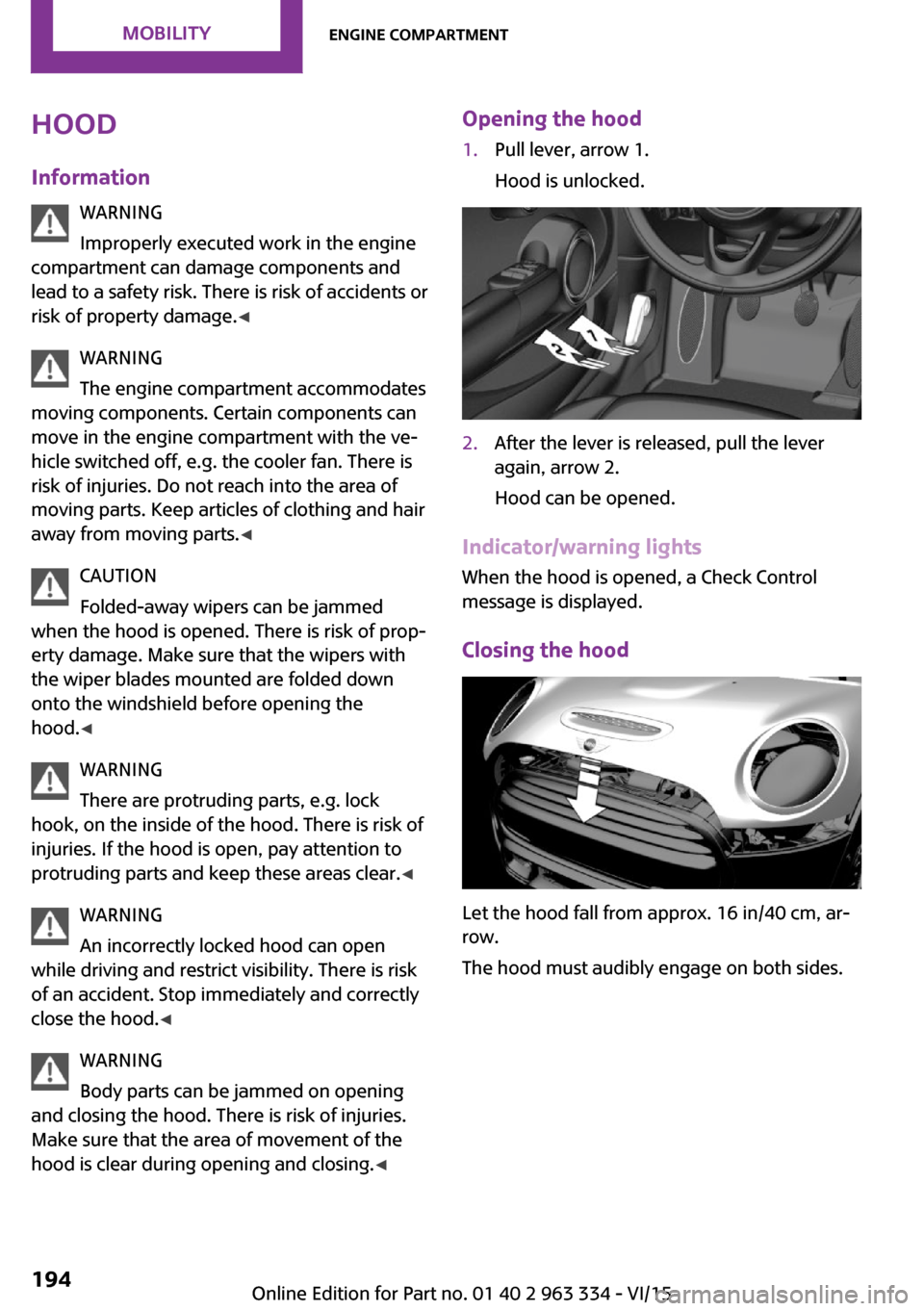
hood is clear during opening and closing. ◀Opening the hood1.Pull lever, arrow 1.
Hood is unlocked.2.After the lever is released, pull the lever
again, arrow 2.
Hood can be opened.
Indicator/warning lights
When the hood is opened, a Check Control
message is displayed.
Closing the hood
Let the hood fall from approx. 16 in/40 cm, ar‐
row.
The hood must audibly engage on both sides.
Seite 194MOBILITYEngine compartment194
Online Edition for Part no. 01 40 2 963 334 - VI/15
Page 202 of 246

Replacing componentsVehicle features and op‐
tions
This chapter describes all standard, country-
specific and optional features offered with the
series. It also describes features that are not
necessarily available in your car, e. g., due to
the selected options or country versions. This
also applies to safety-related functions and sys‐
tems. The respectively applicable country provi‐
sions must be observed when using the respec‐
tive features and systems.
Onboard vehicle tool kit
The onboard vehicle tool kit is located in the
trough under the trunk floor.
The warning triangle is located in the tailgate.
To remove, loosen the brackets.
Wiper blade replacement
Information CAUTION
If the wiper arm falls onto the windshield
without the wiper blades installed, the wind‐
shield can be damaged. There is risk of prop‐
erty damage. Secure the wiper arm when re‐
placing the wiper blades and do not fold down
the wipers without the wiper blades installed. ◀
CAUTION
Folded-away wipers can be jammed
when the hood is opened. There is risk of prop‐
erty damage. Make sure that the wipers with
the wiper blades mounted are folded down
onto the windshield before opening the
hood. ◀
Replacing the front wiper blades1.Fold up and hold the wiper arm firmly.2.Open the wiper blade lock, arrow.3.Pull the wiper blade down first out of the
holder on the wiper arm, arrow 1.Seite 202MOBILITYReplacing components202
Online Edition for Part no. 01 40 2 963 334 - VI/15
Page 203 of 246

Then pull the wiper blade free from the
holder of the wiper arm, arrow 2.4.Insert and latch a new wiper blade in re‐
verse order.5.Fold down the wipers.
Replace rear wiper blade
1.Fold up and hold the wiper arm firmly.2.Turn the wiper blade all the way back.3.Continue turning the wiper blade all the
way so that it pops out of the holder.4.Press the new wiper blade into the holder
until you hear it snap into place.5.Fold the wipers in.
Lamp and bulb replace‐
ment
General information Lights and bulbs make an essential contribution
to vehicle safety.
The manufacturer of the vehicle recommends
that you have appropriate work performed by a
dealer’s service center or another qualified
service center or repair shop if you are unfami‐
liar with it or if it has not been described here.
A spare lamp box is available from a dealer’s
service center or another qualified service cen‐
ter or repair shop.
Information
Lights and bulbs WARNING
Bulbs can get hot during operation. Con‐
tact with the bulbs can cause burns. There is
risk of injuries. Only change bulbs after they
have cooled off. ◀
WARNING
Work on switched-on lighting systems
can cause short circuits. There is risk of injuries
or risk of property damage. When working on
the lighting system, switch off the lamps in
question. If necessary, heed the bulb manufac‐
turer's instructions. ◀
CAUTION
Contaminated bulbs reduce their service
life. There is risk of property damage. Do not
hold new bulbs with your bare hands. Use a
clean cloth or something similar, or hold the
bulb by its base. ◀
Light-emitting diodes (LEDs)
Some items of equipment use light-emitting di‐
odes installed behind a cover as a light source.
These light-emitting diodes, which are related
to conventional lasers, are officially designated
as Class 1 light-emitting diodes.
WARNING
Too intensive brightness can irritate or
damage the retina of the eye. There is risk of
injuries. Do not look directly into the headlights
or other light sources for an extended period of
time. Do not remove the LED covers. ◀Seite 203Replacing componentsMOBILITY203
Online Edition for Part no. 01 40 2 963 334 - VI/15
Page 216 of 246

3.Let both engines run for several minutes.4.Disconnect the jumper cables in the reverse
order.
Check the battery and recharge if needed.
Tow-starting and towing
Information WARNING
Due to system limits, individual functions
can malfunction during tow-starting/towing
with the Intelligent Safety systems activated,
e.g. approach control warning with light brak‐
ing function. There is risk of an accident. Switch
all Intelligent Safety systems off prior to tow-
starting/towing. ◀
Switching off Intelligent Safety systems, refer to
page 108.
Steptronic transmission: transporting
your vehicle
Information Your vehicle must not be towed if the front
wheels are touching the ground.
CAUTION
The vehicle can be damaged when tow‐
ing the vehicle with a lifted rear axle. There is
risk of property damage. Have vehicle trans‐
ported only with lifted front axle or on a load‐
ing platform. ◀
Tow truck
Have your vehicle transported with a tow truck
with a so-called lift bar or on a flat bed.
CAUTION
When lifting the vehicle by the tow fitting
or body and chassis parts; damage can occur
on vehicle parts. There is risk of property dam‐
age. Lift vehicle using suitable means. ◀
Use tow fitting located in the front only for po‐
sitioning the vehicle.
Manual transmission
Observe before towing your vehicle
Gearshift lever in neutral position.
Towing CAUTION
If manual unlocking of the parking brake
is not possible, the vehicle cannot be moved or
towed. There is risk of property damage. The
vehicle should only be transported on a loading
platform. ◀
Information the following instructions:
▷Make sure that the ignition is switched on;
otherwise, the low beams, tail lights, turn
signals, and wipers may be unavailable.▷Do not tow the vehicle with the rear axle
tilted, as the front wheels could turn.▷When the engine is stopped, there is no
power assist. Consequently, more forceSeite 216MOBILITYBreakdown assistance216
Online Edition for Part no. 01 40 2 963 334 - VI/15
Page 239 of 246

Fold-out position, windshieldwipers 70
Foot brake 159
Front airbags 99
Front-end collision warning with City Braking func‐
tion 109
Front fog lights 97
Front-seat passenger airbags, automatic deactivation 101
Front-seat passenger airbags, indicator lamp 101
FTM Flat Tire Monitor 106
Fuel 176
Fuel consumption, see Aver‐ age fuel consumption 85
Fuel filler flap 174
Fuel gauge 80
Fuel lid 174
Fuel quality 176
Fuel recommendation 176
Fuel, tank capacity 230
Fuse 213
G Garage door opener, see Uni‐ versal Integrated Remote
Control 143
Gasoline 176
Gear change, Steptronic trans‐ mission 71
Gear shift indicator 82
General driving notes 158
Glare shield 147
Glass sunroof, refer to Panor‐ amic glass sunroof 46
Glove compartment 151
GREEN mode 165
GREEN mode, bonus range 167
GREEN mode driving style analysis 169
GREEN mode indicator 165
GREEN - program, driving dy‐ namics 117 GREEN tip 167
Gross vehicle weight, ap‐ proved 227
Ground clearance 160
H
Halogen headlights 204
Handbrake, refer to parking brake 66
Hand-held transmitter, alter‐ nating code 144
Hazard warning flashers 214
Head airbag 99
Headlight control, auto‐ matic 95
Headlight courtesy delay fea‐ ture 95
Headlight flasher 67
Headlight glass 204
Headlights, care 221
Head restraints 49
Head restraints, front 53
Head restraints, rear 54
Head-up Display 89
Head-Up Display, Shift point indicator 91
Head-up Display, sport dis‐ plays 91
Head-up Display, standard view 90
Heavy cargo, stowing 162
High-beam Assistant 96
High beams 67
High beams/low beams, see High-beam Assistant 96
Hills 160
Hill start assistant, see Drive- off assistant 118
Holder for beverages 152
Homepage 6
Hood 194
Horn 14
Hot exhaust system 159
HUD Head-up Display 89
Hydroplaning 159 I
Ice warning, see External tem‐ perature warning 80
Icy roads, see External tem‐ perature warning 80
Identification marks, tires 184
Identification number, see ve‐ hicle identification num‐
ber 10
Ignition key, see Remote con‐ trol 34
Ignition off 62
Ignition on 62
Illuminated ring, central in‐ strument cluster 88
Indication of a flat tire 103 , 106
Indicator lamp, see Check Control 76
Individual air distribu‐ tion 137, 140
Individual settings, see Per‐ sonal Profile 36
Inflation pressure, tires 178
Inflation pressure warning, tires 106
Info display, refer to On-Board computer 84
Information 6
Initialize, Tire Pressure Moni‐ tor TPM 103
Initializing, Flat Tire Monitor FTM 106
Instrument cluster 75
Instrument cluster, electronic displays 76
Instrument lighting 97
Integrated key 34
Integrated Owner's Manual in the vehicle 29
Intelligent Safety 108
Intensity, AUTO program 139
Interior equipment 143
Interior lights 98 Seite 239Everything from A to ZREFERENCE239
Online Edition for Part no. 01 40 2 963 334 - VI/15
Page 244 of 246

WWarning and indicator lamps, see Check Control 76
Warning displays, see Check Control 76
Warning messages, see Check Control 76
Warning triangle 214
Warranty 7
Washer fluid 70
Washing, vehicle 220
Water on roads 159
Weights 227
Welcome lamps during un‐ locking 37
Welcome lights 95
Wheels, changing 186
Wheels, everything on wheels and tires 178
Wheels, Flat Tire Monitor FTM 106
Wheels, Tire Pressure Monitor TPM 102
Window defroster, rear 138, 140
Windows, powered 44
Windshield cleaning sys‐ tem 68
Windshield de‐ froster 138, 140
Windshield washer fluid 70
Windshield wipers, fold-out position 70
Windshield wipers, see wiper system 68
Winter storage, care 223
Winter tires, suitable tires 187
Winter tires, tread 185
Wiper blades, replacing 202
Wiper fluid 70
Wiper system 68
Wood, care 222
Word match concept, naviga‐ tion 25
Wrench 202 Seite 244REFERENCEEverything from A to Z244
Online Edition for Part no. 01 40 2 963 334 - VI/15