maintenance MINI Paceman 2013 User Guide
[x] Cancel search | Manufacturer: MINI, Model Year: 2013, Model line: Paceman, Model: MINI Paceman 2013Pages: 275, PDF Size: 4.23 MB
Page 204 of 275

Wheels and tiresMOBILITY
203
Wheels and tires
Vehicle equipment
In this chapter, all production, country, and
optional equipment that is offered in the model
range is described. Equipment is also described
that is not available because of, for example,
selected options or count ry version. This also
applies to safety related functions and systems.
Tire inflation pressures
Information for your safety
It is not merely the tires' service life, but also
driving comfort and, to a great extent, driving
safety that depend on the condition of the tires
and the maintenance of the specified tire pres-
sure.
Checking pressure
Check the tire inflatio n pressure regularly
and correct it, if nece ssary: at least twice a
month and before starting long trips. If you fail
to observe this precaution you may be driving
on tires with incorrect tire pressures, a condition
that can not only compromise your vehicle's
driving stability, but also lead to tire damage and
the risk of an accident. Do not drive with
deflated, i.e. flat tires, except when using run-
flat tires. A flat tire will seriously impair your
vehicle's handling and braking response.
Attempts to drive on a flat tire can lead to loss of
control over the vehicle. <
Check the tire inflation pressures only on cold
tires. This means after a maximum of 1.25 miles/
2 km driving or when the vehicle has been
parked for at least 2 hours. When tires are warm,
the tire inflation pressure is higher. After adjusting the tire inflation pressure,
reinitialize the Flat Tire Monitor, page 75,
or reset the Tire Pressure Monitor, page 78.<
Pressure specifications
The tables below provide all the correct inflation
pressures for the specifie d tire sizes at ambient
temperature.
The tire inflation pressures apply to the
tire sizes approved and the tire brands
recommended by the manufacturer of your
MINI. Your MINI dealer will be glad to advise
you. <
For correct identification of the right tire infla-
tion pressures, observe the following:
> Tire sizes for your vehicle
> Maximum allowable driving speed
Tire inflation pressures for driving up to
100 mph or 160 km/h
For normal driving up to 100 mph or 160 km/h
and to achieve optimum dr iving comfort, adjust
pressures to the respective tire inflation pres-
sures listed on the foll owing pages in the col-
umns for traveling speeds up to a maximum of
100 mph or 160 km/h.
These tire inflation pre ssures can also be found
on the driver's side door pillar when the driver's
door is open.
MINI Countryman:
00320051004F004C00510048000300280047004C0057004C005200510003
Page 219 of 275

MOBILITYMaintenance
218
Maintenance
Vehicle equipment
In this chapter, all production, country, and
optional equipment that is offered in the model
range is described. Equipment is also described
that is not available because of, for example,
selected options or coun try version. This also
applies to safety relate d functions and systems.
MINI Maintenance System
The MINI Maintenance System supports the
preservation of the traffic and operating safety
of your MINI. The objectiv e is to optimize efforts
with respect to minimal vehicle maintenance
costs.
If and when you come to sell your MINI, a com-
prehensive record of serv icing will prove a signif-
icant benefit.
Condition Based Service CBS
Sensors and special algorithms take the different
driving conditions of your MINI into account.
Condition Based Service uses this to determine
the current and future se rvice requirements. By
letting you define a service and maintenance
regimen that reflects your own individual
requirements, the system builds the basis for
trouble-free driving. On the Control Display, you can have the
remaining times or distan
ces for selected main-
tenance tasks and any legally prescribed dates
displayed, page 64.
Service data in the remote control
Your vehicle continuously stores service-
requirement information in the remote control
while you are driving. Your MINI dealer can read
out this data from the remote control unit, and
propose an optimized maintenance approach.
Whenever you take your car in for servicing you
should therefore hand your MINI dealer the
remote control unit that you last used.
Make sure that the date is always set cor-
rectly, page 67; otherwise, the effective-
ness of Condition Based Service CBS is not
assured. <
Service and Warranty Information
Booklet for US mode ls and Warranty and
Service Guide Booklet for Canadian
models
Please consult your Service and Warranty Infor-
mation Booklet for US models and Warranty and
Service Guide Booklet for Canadian models for
additional information on service requirements.
The manufacturer of the MINI recom-
mends that you have service and repair
operations performed at your MINI dealer.
Take the time to ensure that these service pro-
cedures are confirmed by entries in your vehi-
cle's Service and Warran ty Information Booklet
for US models and Warranty and Service Guide
Booklet for Canadian models. These entries ver-
ify that your vehicle has received the specified
regular maintenance. <
00320051004F004C00510048000300280047004C0057004C005200510003
Page 220 of 275

MaintenanceMOBILITY
219
Socket for On-Board
Diagnosis OBD
The primary components that make up the
emissions can be checked by a device via the
OBD socket.
Emissions
The warning lamps come on. The vehicle
is producing higher emissions. You can
continue your journey, but moderate
your speed and exercise due caution.
Have the car checked as soon as possible.
Under certain circumstances, one of the lamps
will flash or light up continuously. This indicates
excessive misfiring or a malfunction in the
engine. If this happens, reduce your speed and
visit the nearest MINI dealer as soon as possible.
Severe misfiring can quickly lead to serious dam-
age of emissions-related components, espe-
cially the catalytic converter. In addition,
mechanical engine components can become
damaged.
If the fuel cap is not properly tightened,
the OBD system may conclude that fuel
vapors are escaping, causing an indica-
tor to light up. If the fuel cap is then tightened,
the indicator should go out within a few days.
00320051004F004C00510048000300280047004C0057004C005200510003
Page 234 of 275

Replacing componentsMOBILITY
233
MINI Countryman:
MINI Paceman:
2. Slide reversible ratchet onto the fixture on
the jack, arrow 1.
3. As you ratchet up the jack, place the jack
head onto the lifting point on the body,
arrow 2.
4. Jack the vehicle up until the wheel you are
changing is raised off the ground.
Mounting the wheel
1.Unscrew the lug bolts and remove the
wheel.
2. Remove accumulations of mud or dirt from
the mounting surfaces of the wheel and
hub. Clean the lug bolts. 3.
Lift the new wheel into place.
4. Screw at least two lug bo lts finger-tight into
opposite bolt holes.
5. Screw in the remaining bolts.
6. Tighten all the lug bolts firmly in a diagonal
pattern.
7. Lower the vehicle.
8. Remove the jack.
Tightening the lug bolts
Tighten the lug bolts in a diagonal pattern.
Immediately have the wheels checked
with a calibrated torque wrench to ensure
that the lug bolts are firmly seated. Otherwise,
incorrectly tightened lug bolts can present a
safety hazard. <
Tightening torque: 103.3 lb ft or 140 Nm.
Replace the defective tire as soon as possible
and have the new wheel/tire assembly bal-
anced.
Vehicle battery
Maintenance
The battery is maintenance-free; that is, the
electrolyte will last for the life of the battery
when the vehicle is operated in a temperate cli-
mate.
If you have any questions regarding your bat-
tery, please contact your MINI dealer.
Battery replacement
Only use vehicle batteries that have been
approved for your vehicle by the manu-
facturer; otherwise, the vehicle could be dam-
aged and systems or func tions may not be fully
available. <
After a battery replacement, have the battery
registered on the vehicle by your MINI dealer to
ensure that all convenie nce functions are fully
available and, if nece ssary, the corresponding
00320051004F004C00510048000300280047004C0057004C005200510003
Page 262 of 275
Everything from A to ZREFERENCE
261
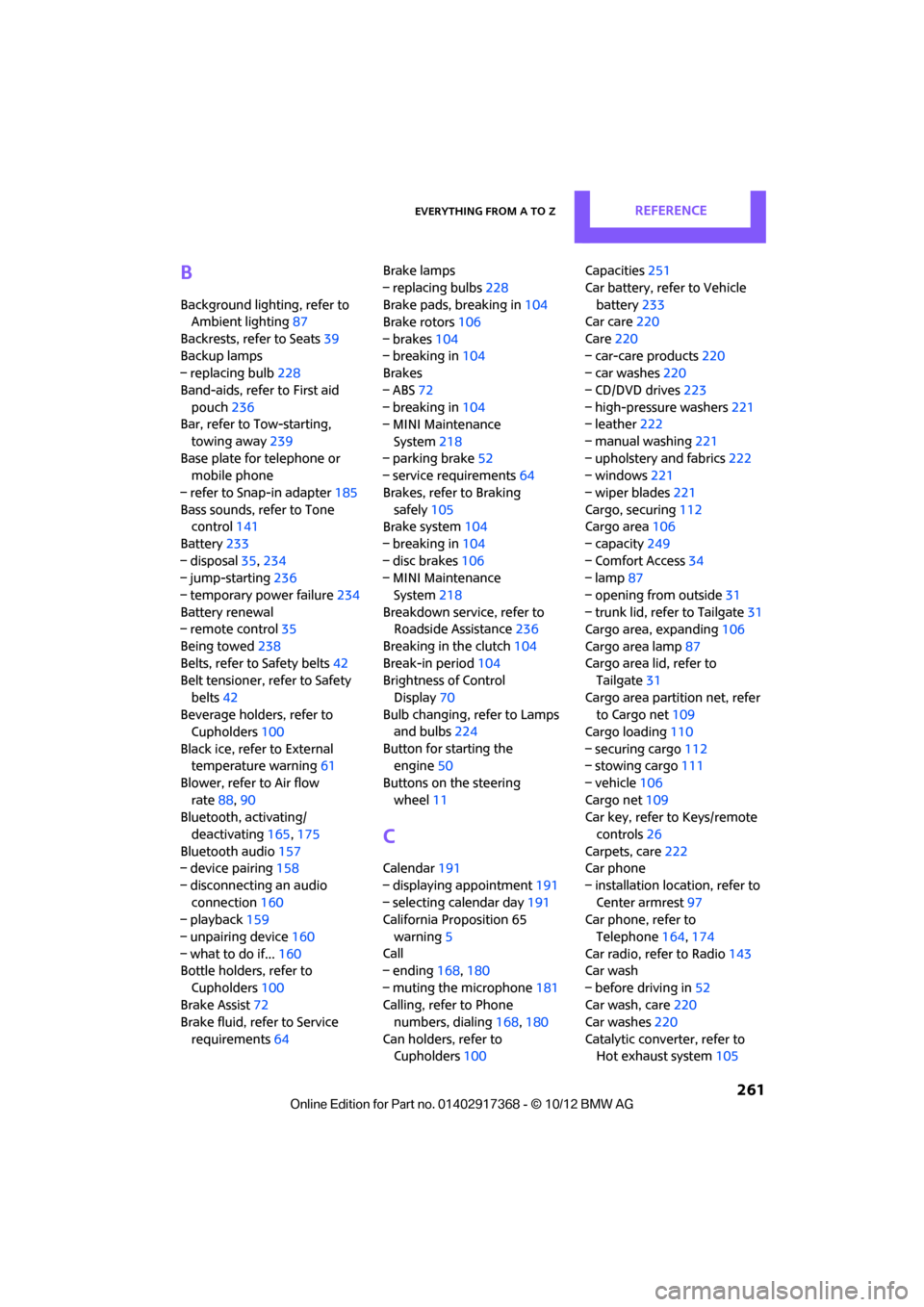
B
Background lighting, refer to
Ambient lighting 87
Backrests, refer to Seats 39
Backup lamps
– replacing bulb 228
Band-aids, refer to First aid pouch 236
Bar, refer to Tow-starting,
towing away 239
Base plate for telephone or mobile phone
– refer to Snap-in adapter 185
Bass sounds, refer to Tone control 141
Battery 233
– disposal 35,234
– jump-starting 236
– temporary power failure 234
Battery renewal
– remote control 35
Being towed 238
Belts, refer to Safety belts 42
Belt tensioner, refer to Safety
belts 42
Beverage holders, refer to Cupholders 100
Black ice, refer to External temperature warning 61
Blower, refer to Air flow rate 88,90
Bluetooth, activating/
deactivating 165,175
Bluetooth audio 157
– device pairing 158
– disconnecting an audio connection 160
– playback 159
– unpairing device 160
– what to do if... 160
Bottle holders, refer to
Cupholders 100
Brake Assist 72
Brake fluid, refer to Service
requirements 64 Brake lamps
– replacing bulbs
228
Brake pads, breaking in 104
Brake rotors 106
– brakes 104
– breaking in 104
Brakes
– ABS 72
– breaking in 104
– MINI Maintenance
System 218
– parking brake 52
– service requirements 64
Brakes, refer to Braking safely 105
Br ake system
104
– breaki ng
in104
– disc brakes 106
– MINI Maintenance
System 218
Breakdown service, refer to Roadside Assistance 236
Breaking in the clutch 104
Break-in period 104
Brightness of Control
Display 70
Bulb changing, refer to Lamps and bulbs 224
Button for starting the engine 50
Buttons on the steering wheel 11
C
Calendar 191
– displaying appointment 191
– selecting calendar day 191
California Proposition 65
warning 5
Call
– ending 168,180
– muting the microphone 181
Calling, refer to Phone numbers, dialing 168,180
Can holders, refer to Cupholders 100 Capacities
251
Car battery, refer to Vehicle battery 233
Car care 220
Care 220
– car-care products 220
– car washes 220
– CD/DVD drives 223
– high-pressure washers 221
– leather 222
– manual washing 221
– upholstery and fabrics 222
– windows 221
– wiper blades 221
Cargo, securing 112
Cargo area 106
– capacity 249
– Comfort Access 34
– lamp 87
– opening from outside 31
– trunk lid, refer to Tailgate 31
Cargo area, expanding 106
Cargo area lamp 87
Cargo area lid, refer to Tailgate 31
Cargo area partition net, refer to Cargo net 109
Cargo loading 110
– securing cargo 112
– stowing cargo 111
– vehicle 106
Cargo net 109
Car key, refer to Keys/remote
controls 26
Carpets, care 222
Car phone
– installation location, refer to Center armrest 97
Car phone, refer to
Telephone 164,174
Car radio, refer to Radio 143
Car wash
– before driving in 52
Car wa sh, care
220
Car w a
shes220
Catalytic converter, refer to Hot exhaust system 105
00320051004F004C00510048000300280047004C0057004C005200510003
Page 265 of 275
REFERENCEEverything from A to Z
264
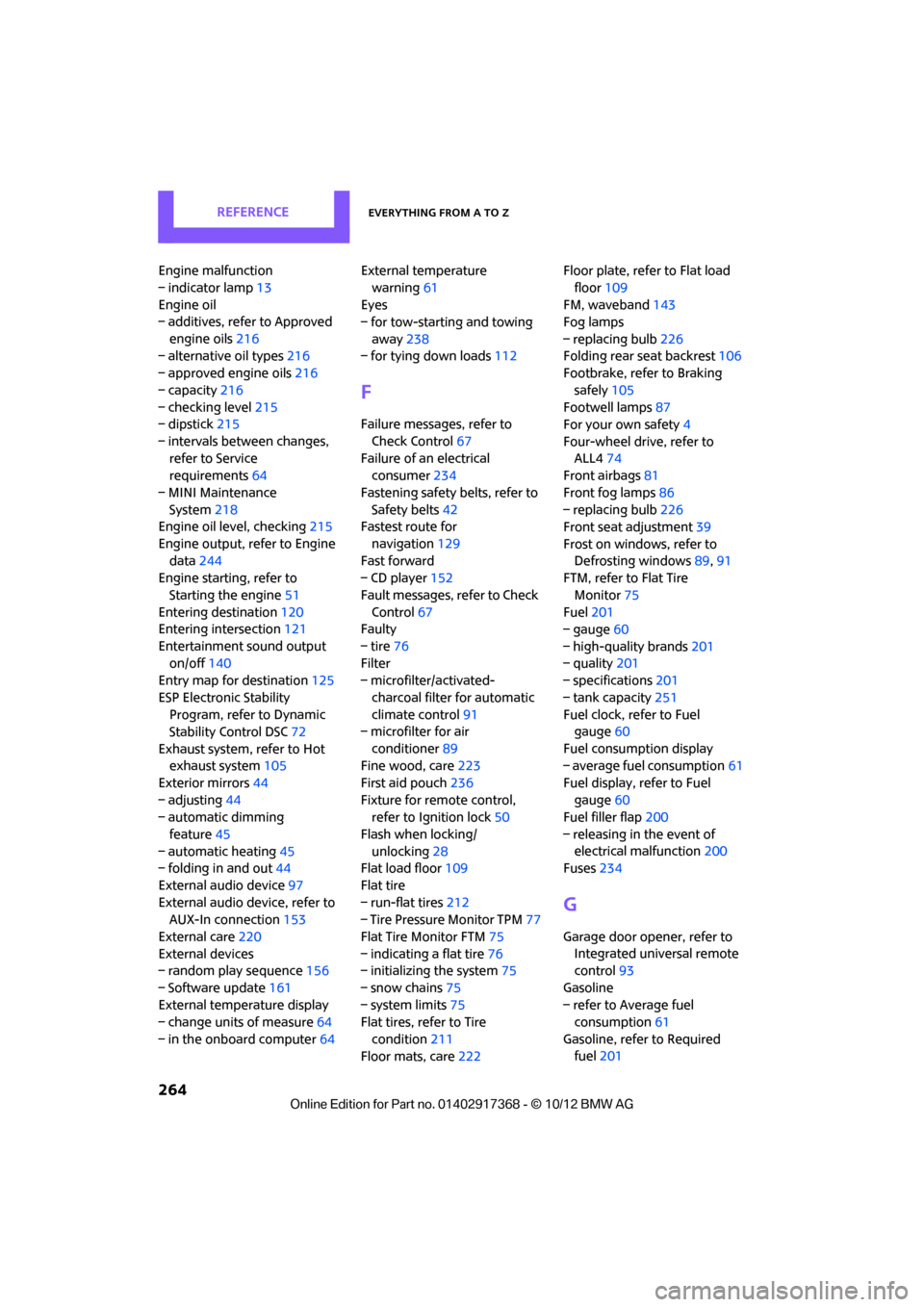
Engine malfunction
– indicator lamp13
Engine oil
– additives, refer to Approved
engine oils 216
– alternative oil types 216
– approved engine oils 216
– capacity 216
– checking level 215
– dipstick 215
– intervals between changes, refer to Service
requirements 64
– MINI Maintenance System 218
Engine oil level, checking 215
Engine output, refer to Engine data 244
Engine starti ng, refer to
Starting the engine 51
Entering destination 120
Entering intersection 121
Entertainment sound output on/off 140
Entry map for destination 125
ESP Electronic Stability Program, refer to Dynamic
Stability Control DSC 72
Exhaust system, refer to Hot exhaust system 105
Exterior mirrors 44
– adjusting 44
– automatic dimming
feature 45
– automatic heating 45
– folding in and out 44
External audio device 97
External audio device, refer to AUX-In connection 153
External care 220
External devices
– random play sequence 156
– Software update 161
External temperature display
– change units of measure 64
– in the onboard computer 64External temperature
warning 61
Eyes
– for tow-starting and towing
away 238
– for tying down loads 112
F
Failure messages, refer to
Check Control 67
Failure of an electrical consumer 234
Fastening safety belts, refer to Safety belts 42
Fastest route for
navigation 129
Fast forward
– CD player 152
Fault messages, refer to Check Control 67
Faulty
– tire 76
Filter
– microfilter/activated-
charcoal filter for automatic
climate control 91
– microfilter for air
conditioner 89
Fine wood, care 223
First aid pouch 236
Fixture for remote control, refer to Ignition lock 50
Flash when locking/ unlocking 28
Flat load floor 109
Flat tire
– run-flat tires 212
– Tire Pressure Monitor TPM 77
Flat Tire Monitor FTM 75
– indicating a flat tire 76
– initializing the system 75
– snow chains 75
– system limits 75
Flat tires, refer to Tire
condition 211
Floor mats, care 222 Floor plate, refer to Flat load
floor 109
FM, waveband 143
Fog lamps
– replacing bulb 226
Folding rear seat backrest 106
Footbrake, refer to Braking
safely 105
Footwell lamps 87
For your own safety 4
Four-wheel drive, refer to ALL4 74
Front airbags 81
Front fog lamps 86
– replacing bulb 226
Front seat adjustment 39
Frost on windows, refer to Defrosting windows 89,91
FTM, refer to Flat Tire
Monitor 75
Fuel 201
– gauge 60
– high-quality brands 201
– quality 201
– specificati
o
ns201
– tank capacity 251
Fuel clock, refer to Fuel gauge 60
Fuel consumption display
– average fuel consumption 61
Fuel display, refer to Fuel gauge 60
Fuel filler flap 200
– releasing in the event of electrical malfunction 200
Fuses 234
G
Garage door opener, refer to
Integrated universal remote
control 93
Gasoline
– refer to Average fuel consumption 61
Gasoline, refer to Required fuel 201
00320051004F004C00510048000300280047004C0057004C005200510003
Page 267 of 275
REFERENCEEverything from A to Z
266
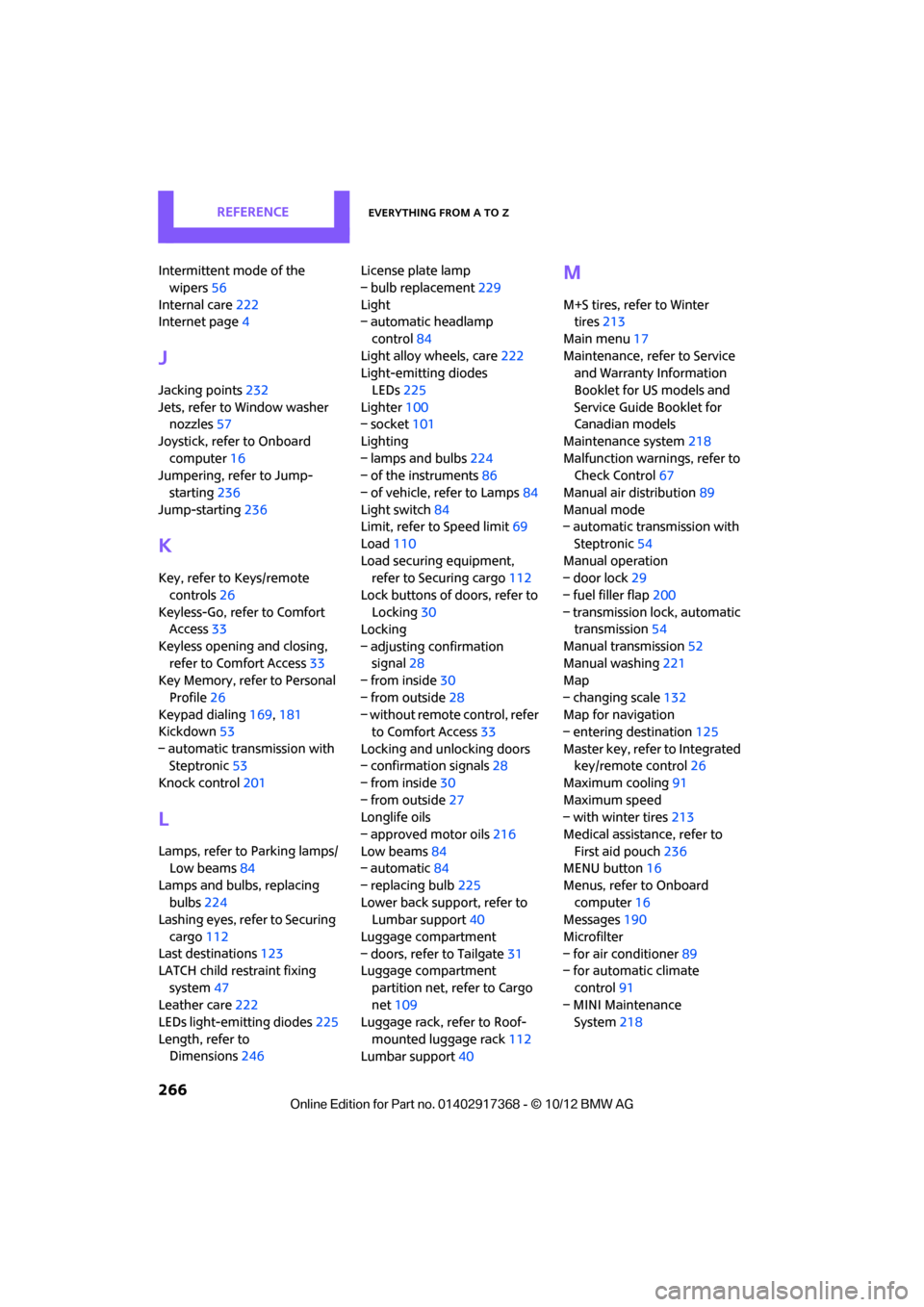
Intermittent mode of the wipers 56
Internal care 222
Internet page 4
J
Jacking points 232
Jets, refer to Window washer nozzles 57
Joystick, refer to Onboard computer 16
Jumpering, refer to Jump-
starting 236
Jump-starting 236
K
Key, refer to Keys/remote
controls 26
Keyless-Go, refer to Comfort Access 33
Keyless opening and closing, refer to Comfort Access 33
Key Memory, refer to Personal
Profile 26
Keypad dialing 169,181
Kickdown 53
– automatic transmission with Steptronic 53
Knock control 201
L
Lamps, refer to Parking lamps/
Low beams 84
Lamps and bulbs, replacing bulbs 224
Lashing eyes, refer to Securing
cargo 112
Last destinations 123
LATCH child restraint fixing
system 47
Leather care 222
LEDs light-emitting diodes 225
Length, refer to Dimensions 246 License plate lamp
– bulb replacement
229
Light
– automatic headlamp
control 84
Light alloy wheels, care 222
Light-emitting diodes
LEDs 225
Lighter 100
– socket 101
Lighting
– lamps and bulbs 224
– of the instruments 86
– of vehicle, refer to Lamps 84
Light switch 84
Limit, refer to Speed limit 69
Load 110
Load securing equipment, refer to Securing cargo 112
Lock buttons of doors, refer to Locking 30
Locking
– adjusting confirmation signal 28
– from inside 30
– from outside 28
– without remote control, refer
to Comfort Access 33
Locking and unlocking doors
– confirmation signals 28
– from inside 30
– from outside 27
Longlife oils
– approved motor oils 216
Low beams 84
– automatic 84
– replacing bulb 225
Lower back support, refer to Lumbar support 40
Luggage compartment
– doors, refer to Tailgate 31
Luggage compartment
partition net, refer to Cargo
net 109
Luggage rack, refer to Roof-
mounted luggage rack 112
Lumbar support 40
M
M+S tires, refer to Winter
tires 213
Main menu 17
Maintenance, refer to Service and Warranty Information
Booklet for US models and
Service Guide Booklet for
Canadian models
Maintenance system 218
Malfunction warnings, refer to Check Control 67
Manual air distribution 89
Manual mode
– automatic transmission with
Steptronic 54
Manual operation
– door lock 29
– fuel filler flap 200
– transmission lock, automatic transmission 54
Manual transmission 52
Manual washing 221
Map
– changing scale 132
Map for navigation
– entering destination 125
Master key, refer to Integrated key/remote control 26
Maximum cooling 91
Maximum speed
– with winter tires 213
Medical assistance, refer to First aid pouch 236
MENU button 16
Menus, refer to Onboard computer 16
Messages 190
Microfilter
– for air conditioner 89
– for automatic climate
control 91
– MINI Maintenance System 218
00320051004F004C00510048000300280047004C0057004C005200510003
Page 268 of 275

Everything from A to ZREFERENCE
267
Microfilter/activated-charcoal filter
– MINI Maintenance System 218
Microphone for telephone 14
MINI Connected 195
MINI Internet page 4
MINI joystick, refer to Onboard computer 16
MINI Maintenance System 218
Mirror dimming feature 45
Mirrors 44
– exterior mirrors 44
– heating 45
– interior rearview mirror 45
Mobile phone
– adjusting volume 167,179
– connecting, refer to Mobile phone, pairing 164,175
– installation location, refer to Center armrest 97
– pairing 164,175
– what to do if…. 166,178
Mobile phone, installation location, refer to Center
armrest 97
Mobile phone preparation Bluetooth 174
Mobility Kit 230
Modifications, te chnical, refer
to For your own safety 4
Monitor, refer to MINI controls with navigation 16
Monitoring system for tire pressures, refer to Flat Tire
Monitor 75
Multifunctional steering wheel, refer to Buttons on
the steering wheel 11
Multifunction switch
– refer to Turn signals/ headlamp flasher 55
– refer to Wiper system 55N
Navigation
– storing current position 122
Navigation data 118
Navigation destination
– entering manually 120,126
– home address 123
Navigation instructions, refer to Switching voice
instructions on/off 133
Navigation system 118
– address book 122
– bypassing a route section 130
– continuing route
guidance 129
– destination entry 120
– dynamic route guidance 136
– entering a destination manually 120,126
– planning a trip 127
– route list 130
– selecting destination via map 125
– selecting route criteria 129
– special destinations 124
– starting route guidance 129
– terminating route guidance 129
– voice instructions 133
– volume adjustment 133
Neck support, refer to Head
restraints 41
Nets, refer to Storage compartments 98
New tires 212
North-facing map 131
Notes 192
Number of cylinders, refer to Engine data 244
Number of safety belts 38
Nylon rope, refer to Tow rope 239
O
OBD socket, refer to Socket for
On-Board Diagnosis 219
Octane ratings, refer to Fuel specifications 201
Odometer 61
Office 187
– current office 187
– what to do if…. 193
Oil, refer to Engine oil 215
Oil consumption 215
Oil level 215
Oil types 216
Old batteries, refer to Disposal 234
Onboard computer 16
– changing language 69
– menu guidance 17
– operating principles 16
– overview 16
– status information 19
Opening and closing
– Comfort Access 33
– from inside 30
– from outside 27
– using the door lock 29
– using the remote control 27
Opening and unlocking
– from inside 30
Options, selecting for navigation 129
Orientation menu, refer to
Main menu 17
Outlets
– refer to Ventilation 92
Output, refer to Engine data 244
Outside-air mode
– automatic climate control 90
Overheated engine, refer to Coolant temperature 217
00320051004F004C00510048000300280047004C0057004C005200510003