ad blue MINI Paceman 2014 (Mini Connected) Owner's Guide
[x] Cancel search | Manufacturer: MINI, Model Year: 2014, Model line: Paceman, Model: MINI Paceman 2014Pages: 282, PDF Size: 6.76 MB
Page 199 of 282
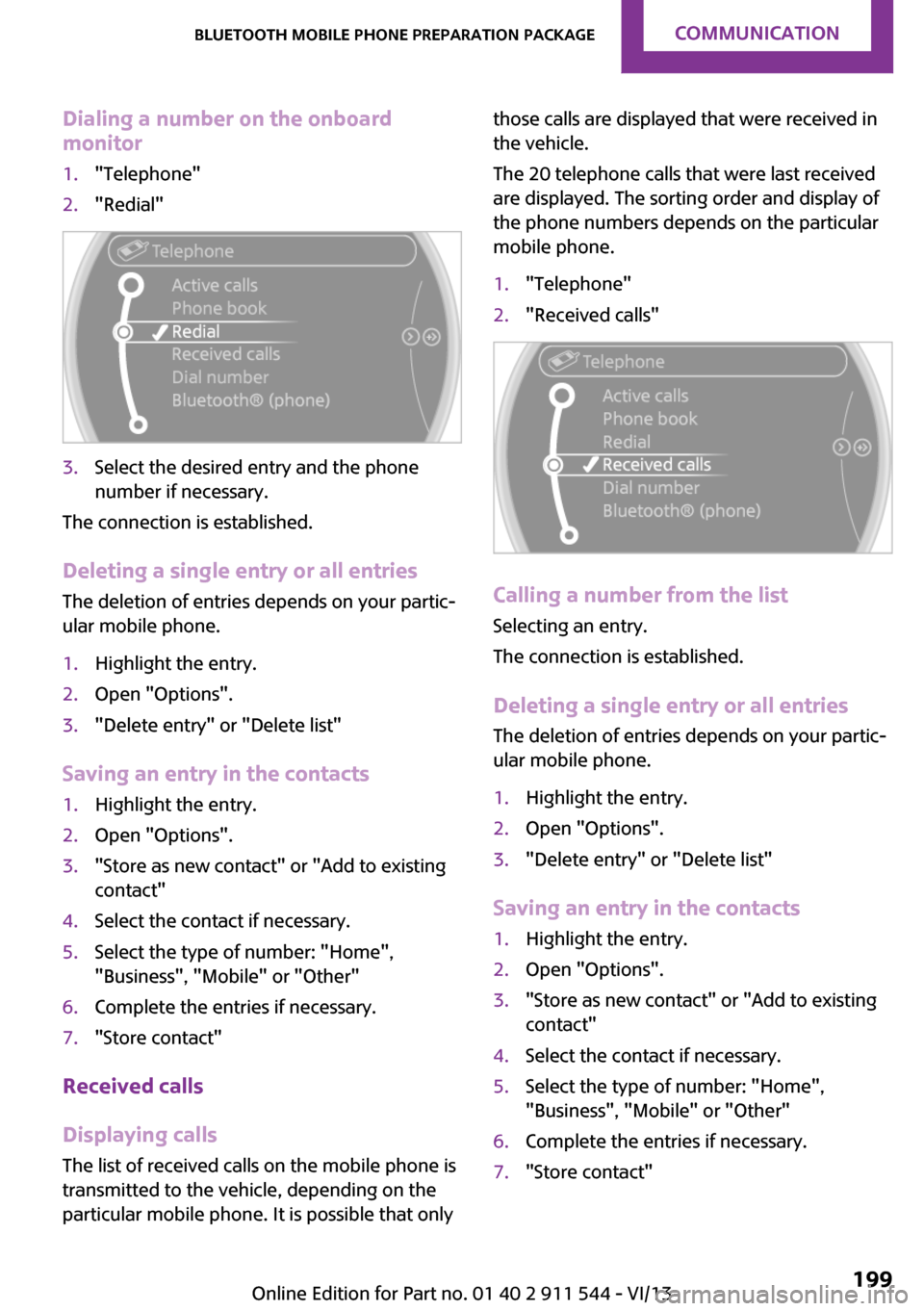
Dialing a number on the onboard
monitor1."Telephone"2."Redial"3.Select the desired entry and the phone
number if necessary.
The connection is established.
Deleting a single entry or all entries
The deletion of entries depends on your partic‐
ular mobile phone.
1.Highlight the entry.2.Open "Options".3."Delete entry" or "Delete list"
Saving an entry in the contacts
1.Highlight the entry.2.Open "Options".3."Store as new contact" or "Add to existing
contact"4.Select the contact if necessary.5.Select the type of number: "Home",
"Business", "Mobile" or "Other"6.Complete the entries if necessary.7."Store contact"
Received calls
Displaying calls
The list of received calls on the mobile phone is
transmitted to the vehicle, depending on the
particular mobile phone. It is possible that only
those calls are displayed that were received in
the vehicle.
The 20 telephone calls that were last received
are displayed. The sorting order and display of
the phone numbers depends on the particular
mobile phone.1."Telephone"2."Received calls"
Calling a number from the list
Selecting an entry.
The connection is established.
Deleting a single entry or all entries
The deletion of entries depends on your partic‐
ular mobile phone.
1.Highlight the entry.2.Open "Options".3."Delete entry" or "Delete list"
Saving an entry in the contacts
1.Highlight the entry.2.Open "Options".3."Store as new contact" or "Add to existing
contact"4.Select the contact if necessary.5.Select the type of number: "Home",
"Business", "Mobile" or "Other"6.Complete the entries if necessary.7."Store contact"Seite 199Bluetooth mobile phone preparation packageCommunication199
Online Edition for Part no. 01 40 2 911 544 - VI/13
Page 200 of 282
Snap-in adapter
General information More information on compatible snap-in
adapters that support the functions of the mo‐
bile phone is available at the service center.
Notes At high temperatures, the charging function of
the mobile phone may be limited and functions
may not be executed.
When using the mobile phone via the vehicle,
note the operating instructions of the mobile
phone.
Installation position In the center armrest.
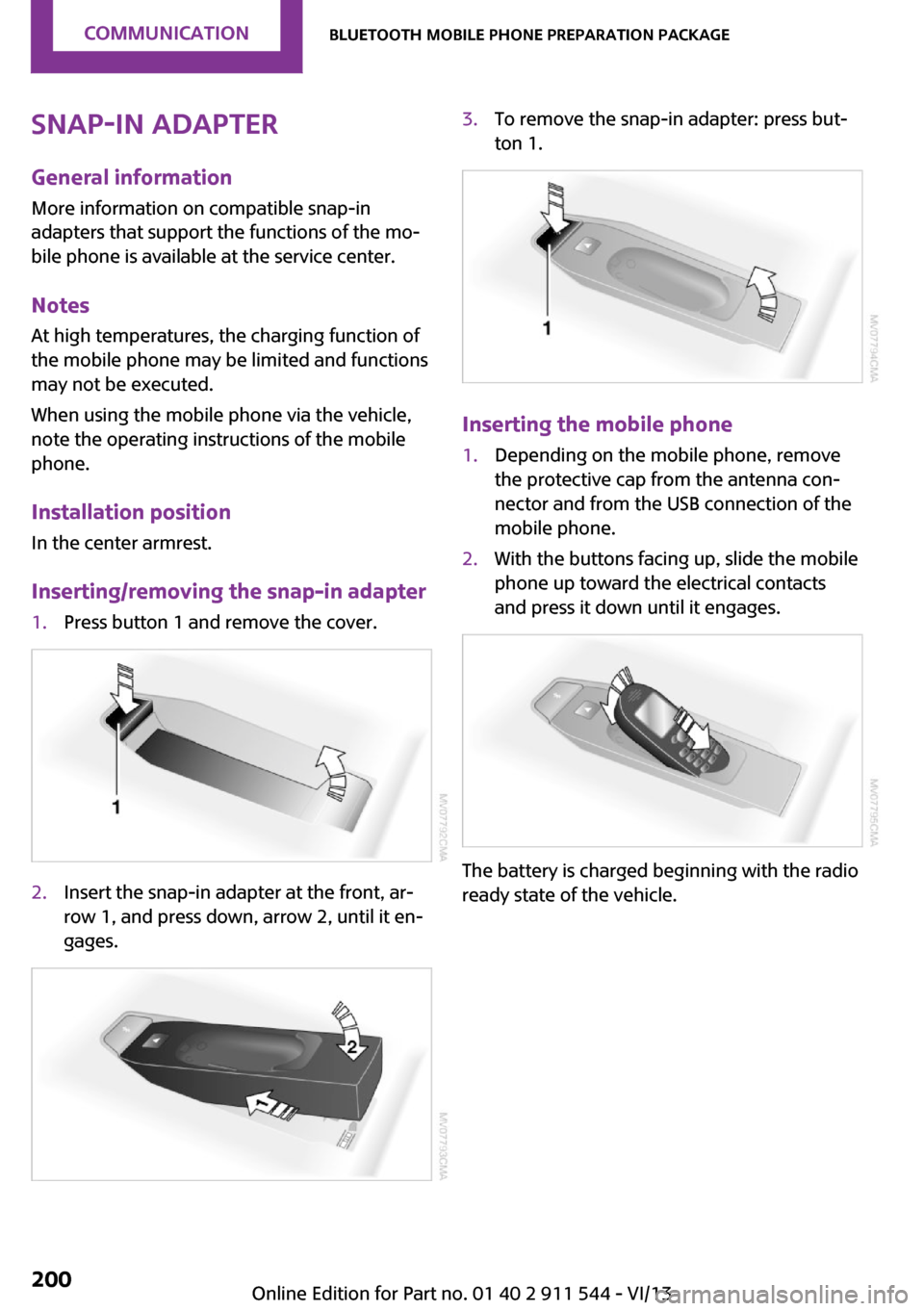
Inserting/removing the snap-in adapter1.Press button 1 and remove the cover.2.Insert the snap-in adapter at the front, ar‐
row 1, and press down, arrow 2, until it en‐
gages.3.To remove the snap-in adapter: press but‐
ton 1.
Inserting the mobile phone
1.Depending on the mobile phone, remove
the protective cap from the antenna con‐
nector and from the USB connection of the
mobile phone.2.With the buttons facing up, slide the mobile
phone up toward the electrical contacts
and press it down until it engages.
The battery is charged beginning with the radio
ready state of the vehicle.
Seite 200CommunicationBluetooth mobile phone preparation package200
Online Edition for Part no. 01 40 2 911 544 - VI/13
Page 201 of 282
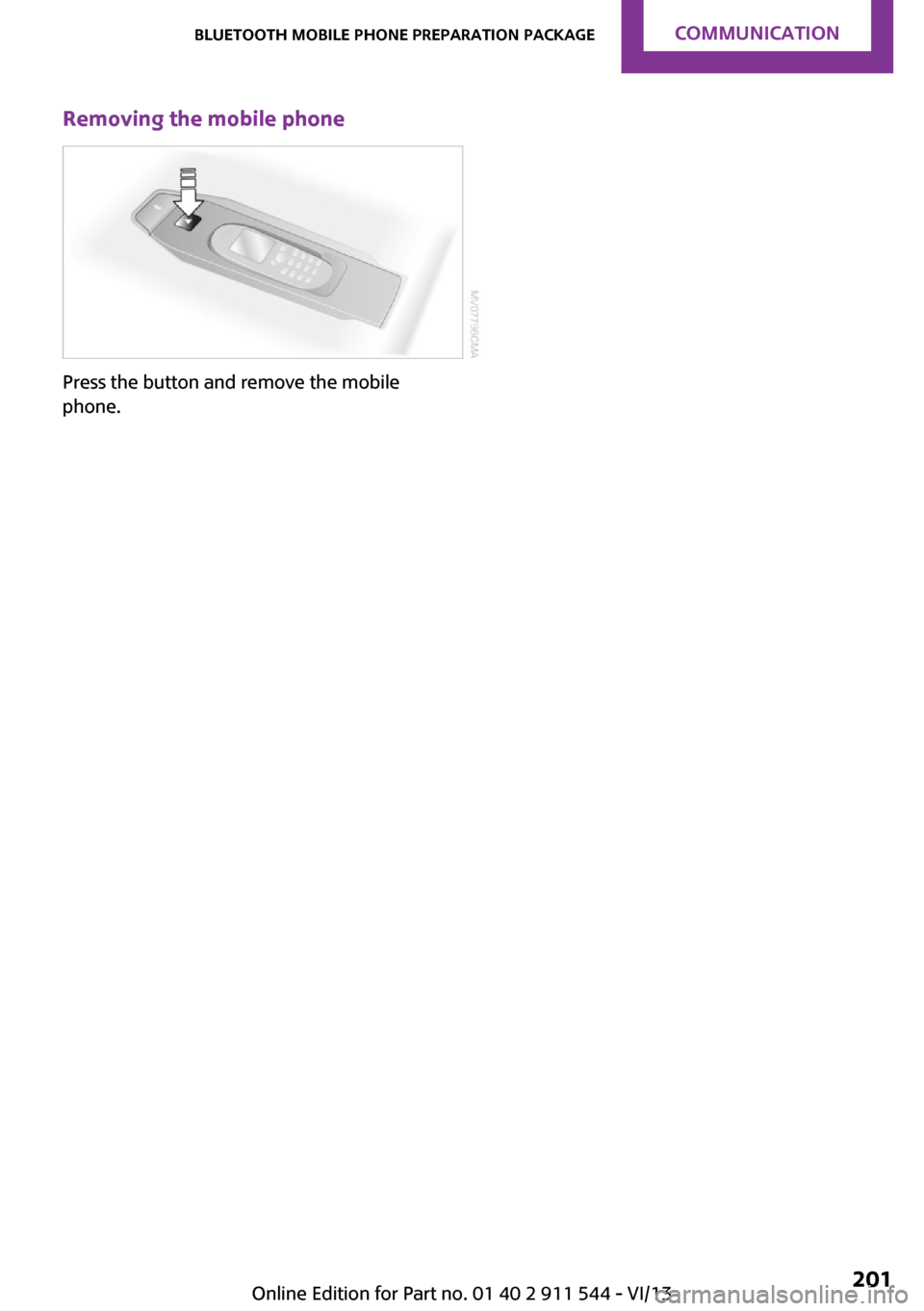
Removing the mobile phone
Press the button and remove the mobile
phone.
Seite 201Bluetooth mobile phone preparation packageCommunication201
Online Edition for Part no. 01 40 2 911 544 - VI/13
Page 202 of 282
OfficeVehicle equipmentThis chapter describes all series equipment as
well as country-specific and special equipment
offered for this model series.Therefore, it also
describes equipment that may not be found in
your vehicle, for instance due to the selected
special equipment or the country version. This
also applies to safety-related functions and sys‐
tems.
At a glance General information
Contacts, appointments, tasks, notes, text mes‐
sages, and e-mails from the mobile phone can
be displayed on the Control Display if the mo‐
bile phone provides compatible support of
these functions and the necessary Bluetooth
standards.
Information about which mobile phones and
functions are available can be found at
www.mini.com/connectivity.
Contents are only displayed in full length when
the vehicle is stationary.
The mobile phone has read-access only.
Do not use Office while driving
To avoid becoming distracted and posing
an unnecessary hazard to your vehicle's occu‐
pants and to other road users, never attempt to
use the controls or enter information unless
traffic and road conditions allow this. ◀
Requirements▷A suitable mobile phone is paired with the
vehicle and connected. In some mobile
phones, data access must be confirmed on
the mobile phone.▷The time, time zone, and date, refer to
page 72, are correctly set on the Control
Display and on the mobile phone, for in‐
stance to correctly display appointments.
Updating
Data are updated every time the mobile phone
is connected to the vehicle. Appointment en‐
tries, tasks, notes and reminders can be up‐ dated separately.
1."Office"2."Current office", "Calendar", "Tasks",
"Notes" or "Reminders"3.Open "Options".4."Update data"
Mobile phone data are transmitted again to
the vehicle.
Office information
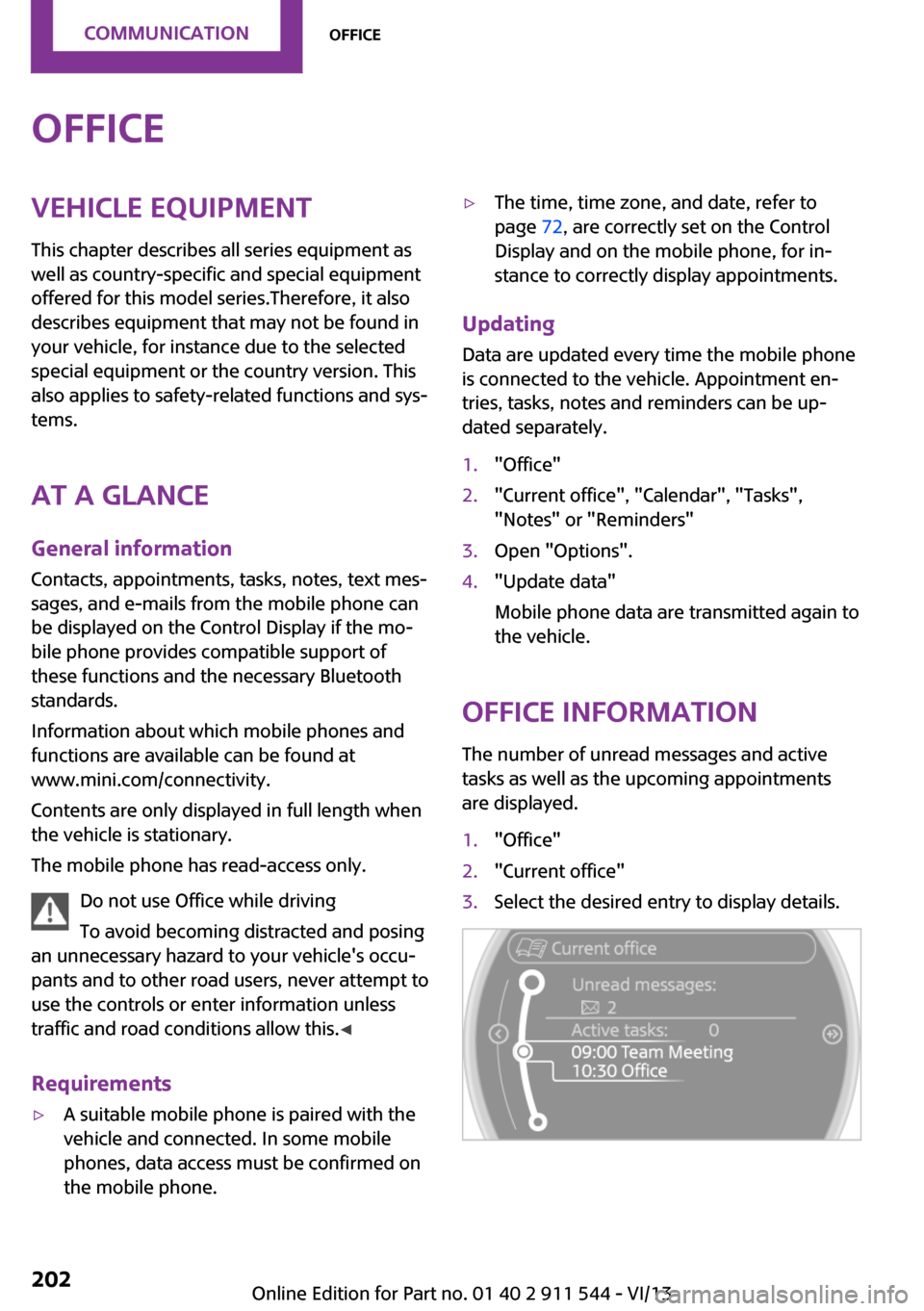
The number of unread messages and active
tasks as well as the upcoming appointments
are displayed.
1."Office"2."Current office"3.Select the desired entry to display details.Seite 202CommunicationOffice202
Online Edition for Part no. 01 40 2 911 544 - VI/13
Page 205 of 282
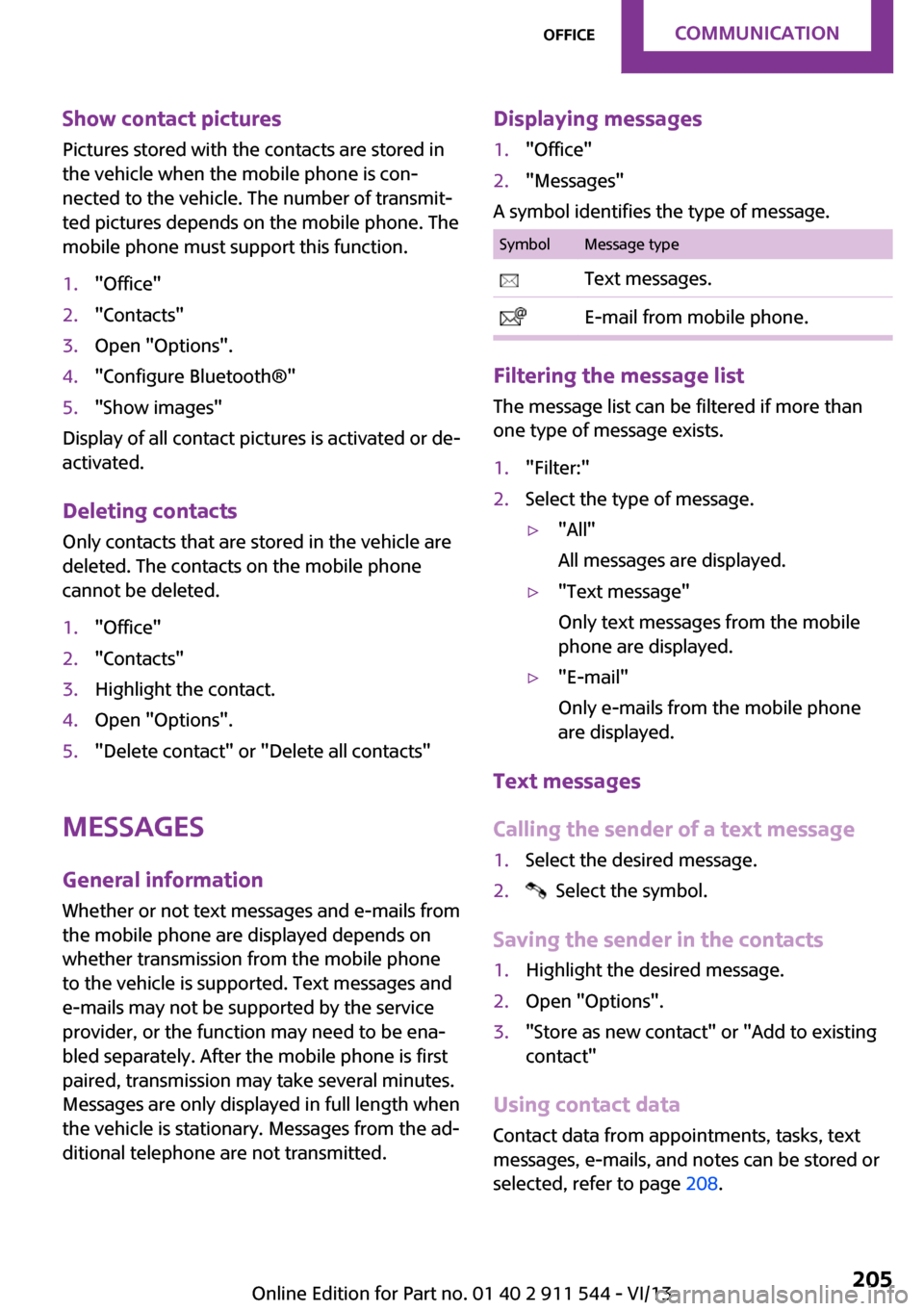
Show contact pictures
Pictures stored with the contacts are stored in
the vehicle when the mobile phone is con‐
nected to the vehicle. The number of transmit‐
ted pictures depends on the mobile phone. The
mobile phone must support this function.1."Office"2."Contacts"3.Open "Options".4."Configure Bluetooth®"5."Show images"
Display of all contact pictures is activated or de‐
activated.
Deleting contacts
Only contacts that are stored in the vehicle are
deleted. The contacts on the mobile phone
cannot be deleted.
1."Office"2."Contacts"3.Highlight the contact.4.Open "Options".5."Delete contact" or "Delete all contacts"
Messages
General information Whether or not text messages and e-mails from
the mobile phone are displayed depends on
whether transmission from the mobile phone
to the vehicle is supported. Text messages and
e-mails may not be supported by the service
provider, or the function may need to be ena‐
bled separately. After the mobile phone is first
paired, transmission may take several minutes.
Messages are only displayed in full length when
the vehicle is stationary. Messages from the ad‐
ditional telephone are not transmitted.
Displaying messages1."Office"2."Messages"
A symbol identifies the type of message.
SymbolMessage type Text messages. E-mail from mobile phone.
Filtering the message list
The message list can be filtered if more than
one type of message exists.
1."Filter:"2.Select the type of message.▷"All"
All messages are displayed.▷"Text message"
Only text messages from the mobile
phone are displayed.▷"E-mail"
Only e-mails from the mobile phone
are displayed.
Text messages
Calling the sender of a text message
1.Select the desired message.2. Select the symbol.
Saving the sender in the contacts
1.Highlight the desired message.2.Open "Options".3."Store as new contact" or "Add to existing
contact"
Using contact data
Contact data from appointments, tasks, text
messages, e-mails, and notes can be stored or
selected, refer to page 208.
Seite 205OfficeCommunication205
Online Edition for Part no. 01 40 2 911 544 - VI/13
Page 211 of 282

Control Display and can be operated using the
MINI joystick.
The volume can be set using the following con‐
trols:▷
Buttons on the steering
wheel or
▷Volume button on the radio, refer to
page 1581.Connect the mobile phone via the snap-in
adapter or via the USB audio interface.2. Press the button. The main menu is
opened.3."MINI Connected"4.Select the desired software application.
Notes
▷The scope of MINI Connected that can be
displayed on the Control Display depends
on the range of software applications in‐
stalled on the mobile phone.▷The data transmission of the software ap‐
plications from the mobile phone to the ve‐
hicle can last some time. Some software
applications depend on the speed of the
available Internet connection of the mobile
phone.▷Some mobile phones cannot simultane‐
ously use MINI Connected and the Blue‐
tooth hands-free system.If necessary, restart the software applica‐
tion on the mobile phone after a phone
conversation.▷Audio and video playback from the snap-in
adapter is only possible if no cable is con‐
nected to the AV-IN port.
PlugIn
The concept
Selected functions of a compatible Apple de‐
vice can be displayed on the Control Display via
a video connection. They are operated using
the MINI joystick and the button on the
MINI joystick.
Functional requirement
▷Suitable iPhone or iPod: as of iPhone 3GS or
iPod with software version iOS 4.1 and
higher.▷The MINI Connected app is not required.
Information on compatible adapters and inter‐
faces can be obtained from the service center.
Activating
1.Connect the Apple device.
Operation takes place via the MINI joystick
with its buttons.2."MINI Connected"3."PlugIn"4.Select the connection type: "Activate via
AUX connection" or"Activate via Snap-In
adapter"5."Activate PlugIn"6.Use the MINI joystick to navigate among
the displayed functions and select, for ex‐
ample, a desired category or track.
Controls
The PlugIn is activated to display the graphic
output of the connected device on the Control
Seite 211MINI ConnectedCommunication211
Online Edition for Part no. 01 40 2 911 544 - VI/13
Page 268 of 282
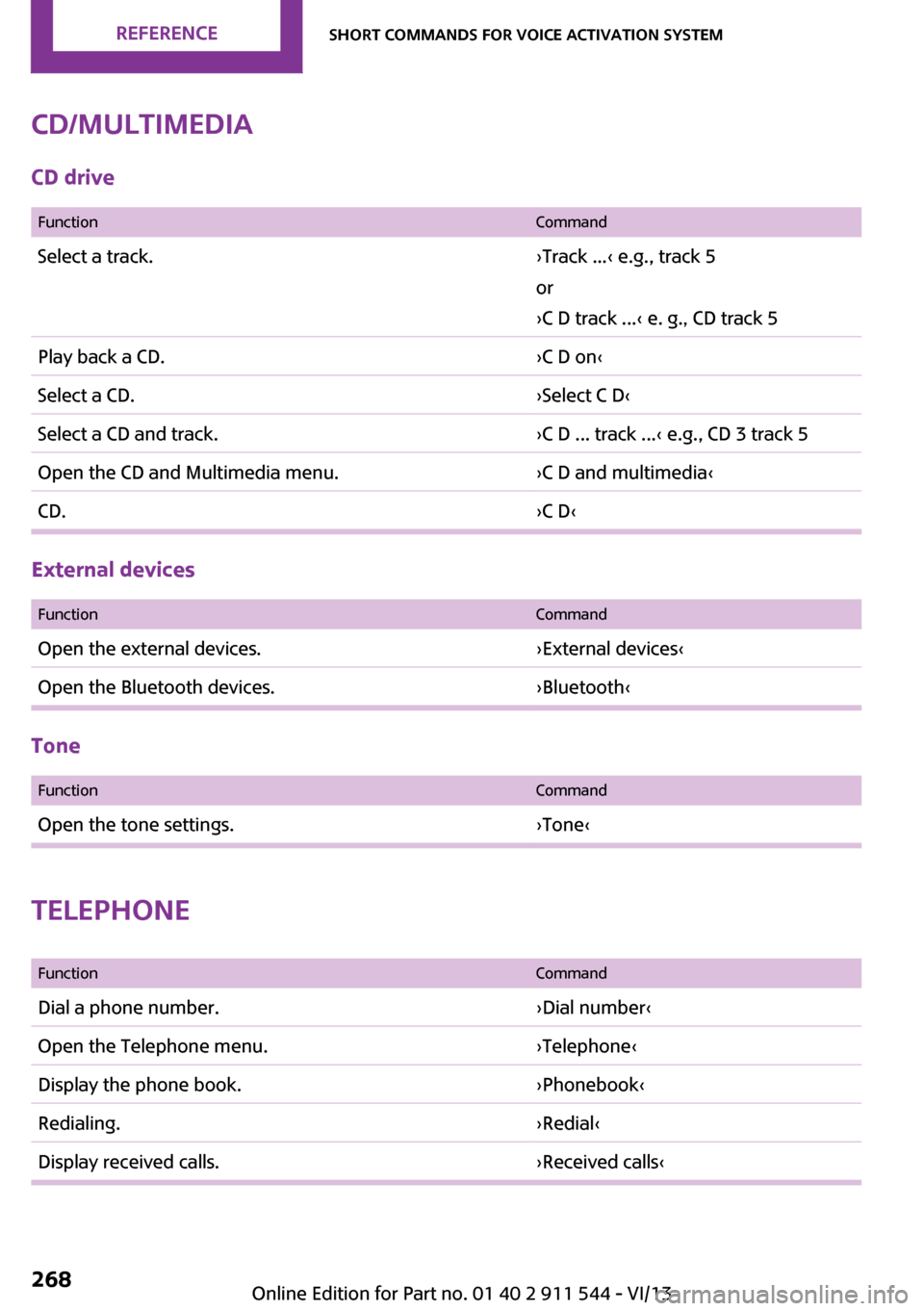
CD/multimediaCD drive
FunctionCommandSelect a track.›Track ...‹ e.g., track 5
or
›C D track ...‹ e. g., CD track 5Play back a CD.›C D on‹Select a CD.›Select C D‹Select a CD and track.›C D ... track ...‹ e.g., CD 3 track 5Open the CD and Multimedia menu.›C D and multimedia‹CD.›C D‹
External devices
FunctionCommandOpen the external devices.›External devices‹Open the Bluetooth devices.›Bluetooth‹
Tone
FunctionCommandOpen the tone settings.›Tone‹
Telephone
FunctionCommandDial a phone number.›Dial number‹Open the Telephone menu.›Telephone‹Display the phone book.›Phonebook‹Redialing.›Redial‹Display received calls.›Received calls‹Seite 268ReferenceShort commands for voice activation system268
Online Edition for Part no. 01 40 2 911 544 - VI/13
Page 269 of 282

FunctionCommandList of messages.›Messages‹Open the Bluetooth devices.›Bluetooth‹
Office
FunctionCommandOpen the Office menu.›Office‹Display Office Today.›Current office‹Display the contacts.›Contacts‹Display the messages.›Messages‹Display the calendar.›Calendar‹Display the tasks.›Tasks‹Display the reminders.›Reminders‹
Contacts
FunctionCommandSelect a name.›Choose name‹My contacts.›My contacts‹Open the contacts.›Contacts‹New contact.›New contact‹Seite 269Short commands for voice activation systemReference269
Online Edition for Part no. 01 40 2 911 544 - VI/13
Page 270 of 282
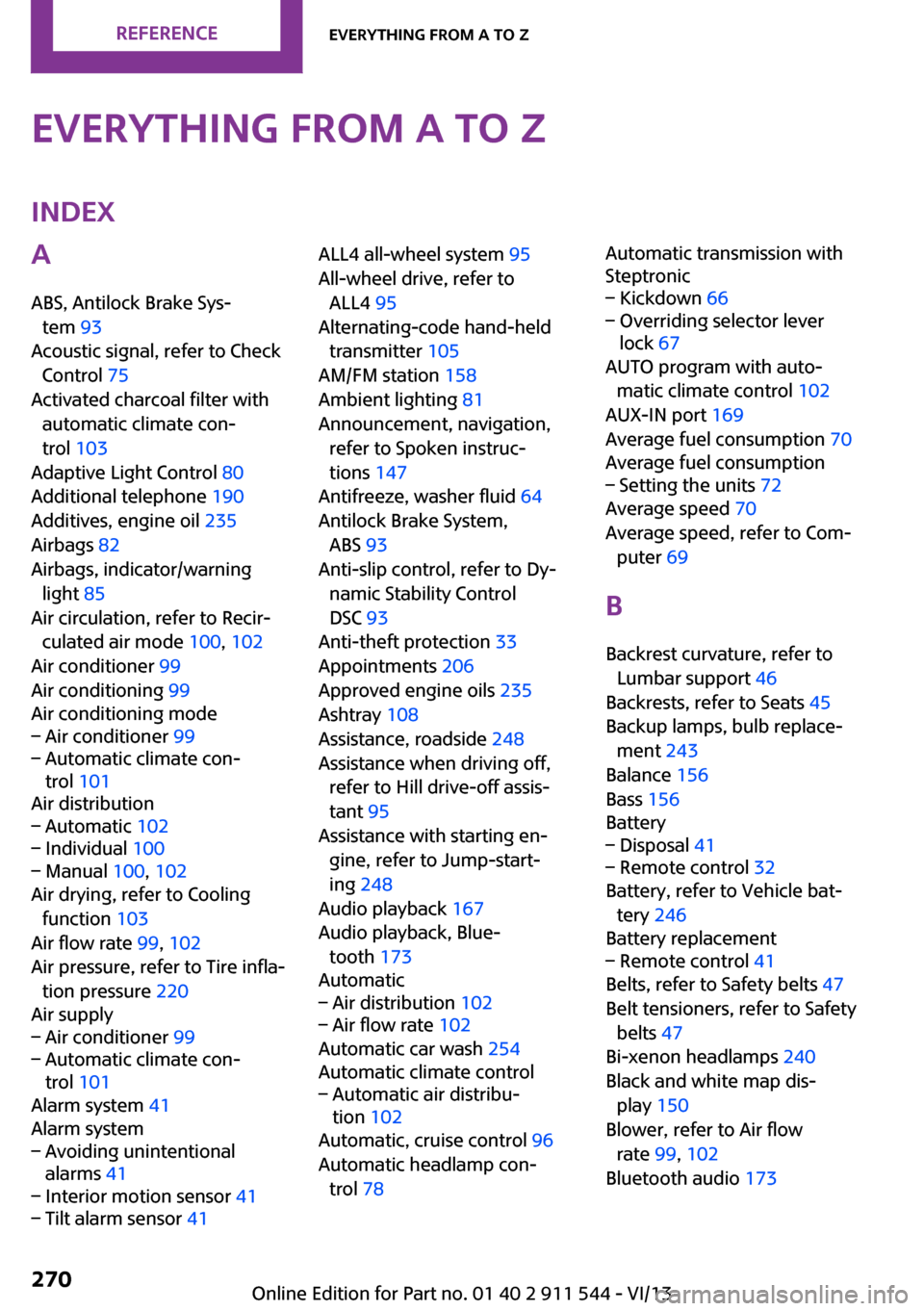
Everything from A to ZIndexA
ABS, Antilock Brake Sys‐ tem 93
Acoustic signal, refer to Check Control 75
Activated charcoal filter with automatic climate con‐
trol 103
Adaptive Light Control 80
Additional telephone 190
Additives, engine oil 235
Airbags 82
Airbags, indicator/warning light 85
Air circulation, refer to Recir‐ culated air mode 100, 102
Air conditioner 99
Air conditioning 99
Air conditioning mode– Air conditioner 99– Automatic climate con‐
trol 101
Air distribution
– Automatic 102– Individual 100– Manual 100, 102
Air drying, refer to Cooling
function 103
Air flow rate 99, 102
Air pressure, refer to Tire infla‐ tion pressure 220
Air supply
– Air conditioner 99– Automatic climate con‐
trol 101
Alarm system 41
Alarm system
– Avoiding unintentional
alarms 41– Interior motion sensor 41– Tilt alarm sensor 41ALL4 all-wheel system 95
All-wheel drive, refer to ALL4 95
Alternating-code hand-held transmitter 105
AM/FM station 158
Ambient lighting 81
Announcement, navigation, refer to Spoken instruc‐
tions 147
Antifreeze, washer fluid 64
Antilock Brake System, ABS 93
Anti-slip control, refer to Dy‐ namic Stability Control
DSC 93
Anti-theft protection 33
Appointments 206
Approved engine oils 235
Ashtray 108
Assistance, roadside 248
Assistance when driving off, refer to Hill drive-off assis‐
tant 95
Assistance with starting en‐ gine, refer to Jump-start‐
ing 248
Audio playback 167
Audio playback, Blue‐ tooth 173
Automatic– Air distribution 102– Air flow rate 102
Automatic car wash 254
Automatic climate control
– Automatic air distribu‐
tion 102
Automatic, cruise control 96
Automatic headlamp con‐ trol 78
Automatic transmission with
Steptronic– Kickdown 66– Overriding selector lever
lock 67
AUTO program with auto‐
matic climate control 102
AUX-IN port 169
Average fuel consumption 70
Average fuel consumption
– Setting the units 72
Average speed 70
Average speed, refer to Com‐ puter 69
B Backrest curvature, refer to Lumbar support 46
Backrests, refer to Seats 45
Backup lamps, bulb replace‐ ment 243
Balance 156
Bass 156
Battery
– Disposal 41– Remote control 32
Battery, refer to Vehicle bat‐
tery 246
Battery replacement
– Remote control 41
Belts, refer to Safety belts 47
Belt tensioners, refer to Safety belts 47
Bi-xenon headlamps 240
Black and white map dis‐ play 150
Blower, refer to Air flow rate 99, 102
Bluetooth audio 173
Seite 270ReferenceEverything from A to Z270
Online Edition for Part no. 01 40 2 911 544 - VI/13
Page 271 of 282
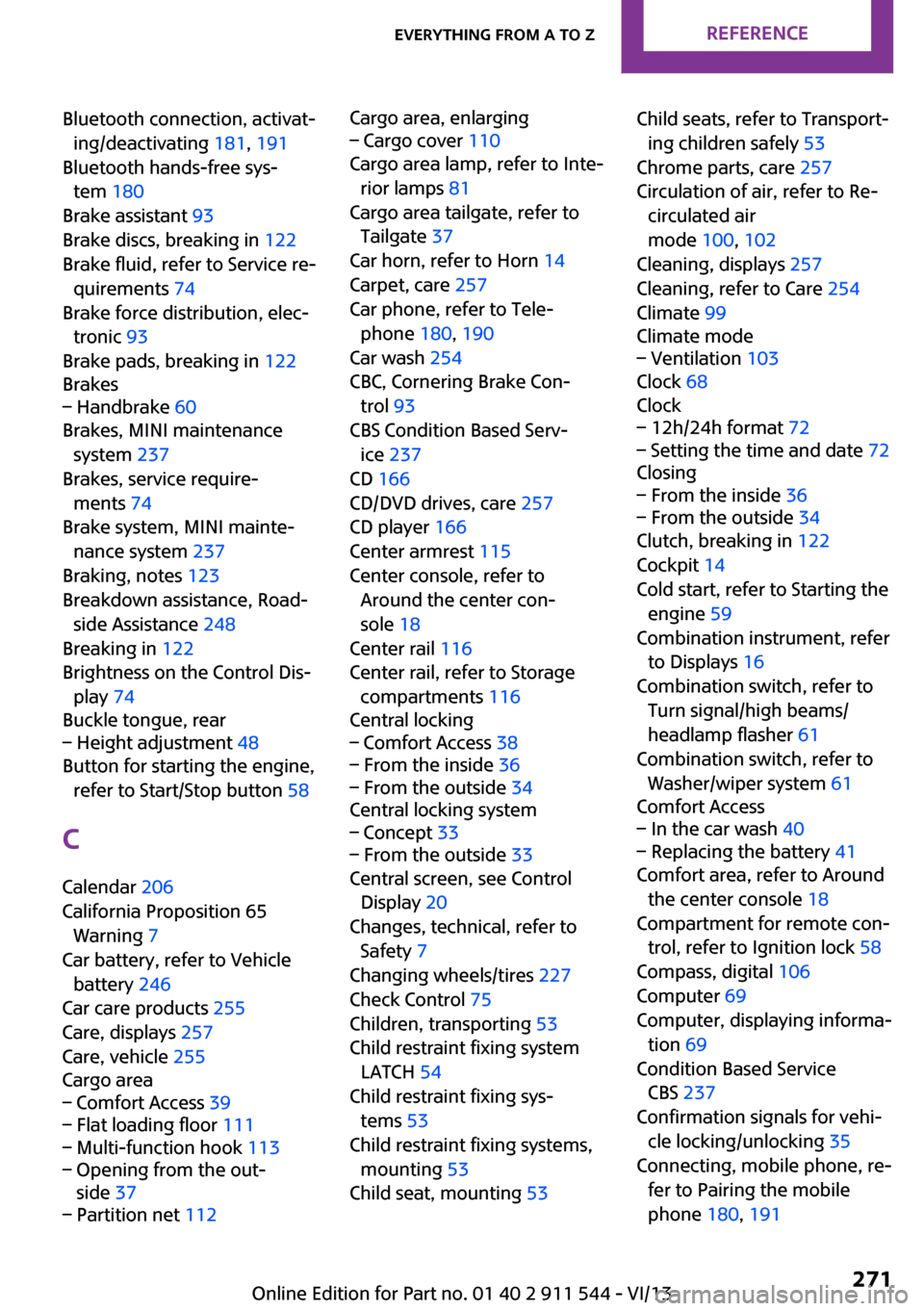
Bluetooth connection, activat‐ing/deactivating 181, 191
Bluetooth hands-free sys‐ tem 180
Brake assistant 93
Brake discs, breaking in 122
Brake fluid, refer to Service re‐ quirements 74
Brake force distribution, elec‐ tronic 93
Brake pads, breaking in 122
Brakes– Handbrake 60
Brakes, MINI maintenance
system 237
Brakes, service require‐ ments 74
Brake system, MINI mainte‐ nance system 237
Braking, notes 123
Breakdown assistance, Road‐ side Assistance 248
Breaking in 122
Brightness on the Control Dis‐ play 74
Buckle tongue, rear
– Height adjustment 48
Button for starting the engine,
refer to Start/Stop button 58
C
Calendar 206
California Proposition 65 Warning 7
Car battery, refer to Vehicle battery 246
Car care products 255
Care, displays 257
Care, vehicle 255
Cargo area
– Comfort Access 39– Flat loading floor 111– Multi-function hook 113– Opening from the out‐
side 37– Partition net 112Cargo area, enlarging– Cargo cover 110
Cargo area lamp, refer to Inte‐
rior lamps 81
Cargo area tailgate, refer to Tailgate 37
Car horn, refer to Horn 14
Carpet, care 257
Car phone, refer to Tele‐ phone 180, 190
Car wash 254
CBC, Cornering Brake Con‐
trol 93
CBS Condition Based Serv‐ ice 237
CD 166
CD/DVD drives, care 257
CD player 166
Center armrest 115
Center console, refer to Around the center con‐
sole 18
Center rail 116
Center rail, refer to Storage compartments 116
Central locking
– Comfort Access 38– From the inside 36– From the outside 34
Central locking system
– Concept 33– From the outside 33
Central screen, see Control
Display 20
Changes, technical, refer to Safety 7
Changing wheels/tires 227
Check Control 75
Children, transporting 53
Child restraint fixing system LATCH 54
Child restraint fixing sys‐ tems 53
Child restraint fixing systems, mounting 53
Child seat, mounting 53
Child seats, refer to Transport‐
ing children safely 53
Chrome parts, care 257
Circulation of air, refer to Re‐ circulated air
mode 100, 102
Cleaning, displays 257
Cleaning, refer to Care 254
Climate 99
Climate mode– Ventilation 103
Clock 68
Clock
– 12h/24h format 72– Setting the time and date 72
Closing
– From the inside 36– From the outside 34
Clutch, breaking in 122
Cockpit 14
Cold start, refer to Starting the engine 59
Combination instrument, refer to Displays 16
Combination switch, refer to Turn signal/high beams/
headlamp flasher 61
Combination switch, refer to Washer/wiper system 61
Comfort Access
– In the car wash 40– Replacing the battery 41
Comfort area, refer to Around
the center console 18
Compartment for remote con‐ trol, refer to Ignition lock 58
Compass, digital 106
Computer 69
Computer, displaying informa‐ tion 69
Condition Based Service CBS 237
Confirmation signals for vehi‐ cle locking/unlocking 35
Connecting, mobile phone, re‐ fer to Pairing the mobile
phone 180, 191
Seite 271Everything from A to ZReference271
Online Edition for Part no. 01 40 2 911 544 - VI/13