engine removal MITSUBISHI 3000GT 1995 2.G User Guide
[x] Cancel search | Manufacturer: MITSUBISHI, Model Year: 1995, Model line: 3000GT, Model: MITSUBISHI 3000GT 1995 2.GPages: 738, PDF Size: 35.06 MB
Page 527 of 738
Downloaded from www.Manualslib.com manuals search engine CHASSIS ELECTRICAL - Meters and Gauges54-31
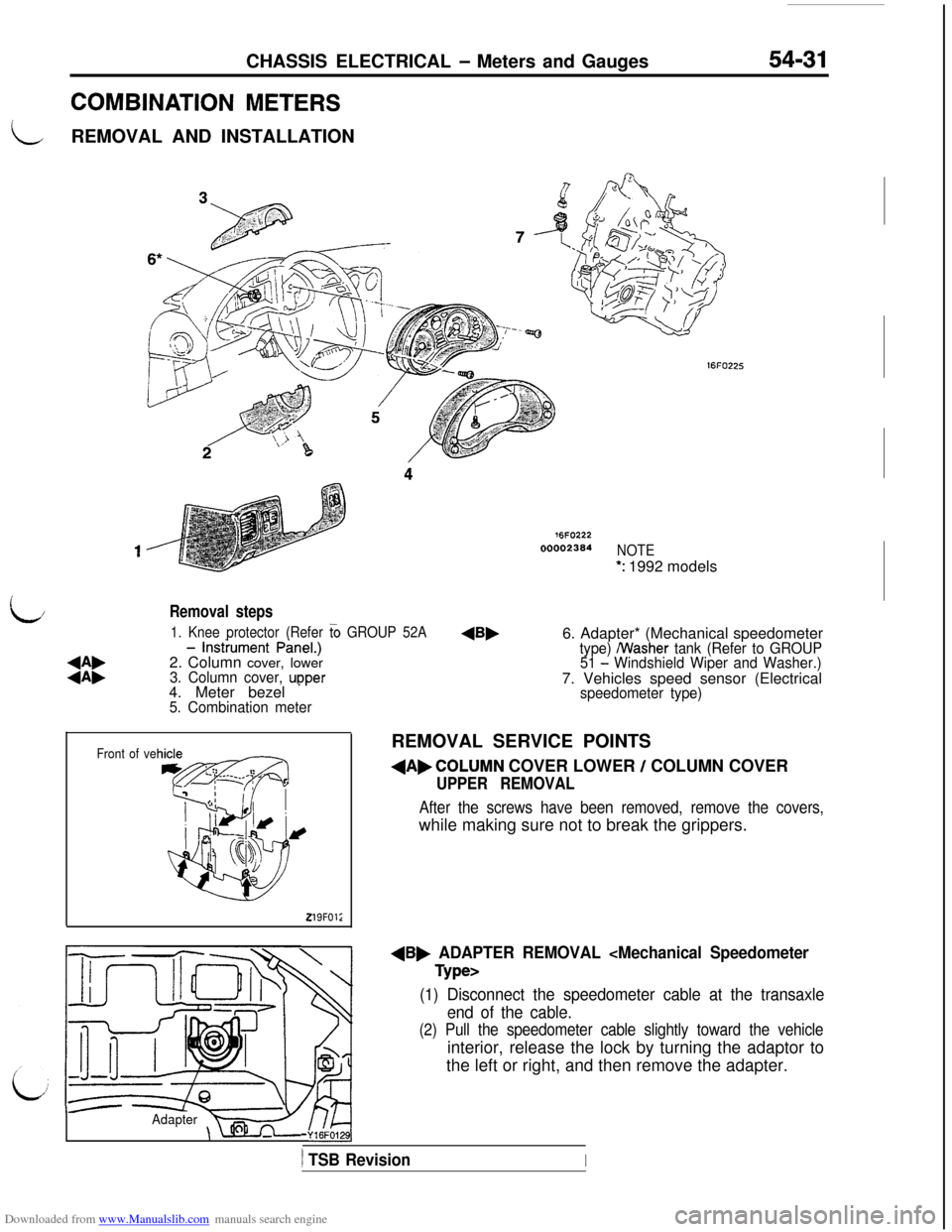
COMBINATION METERS
LREMOVAL AND INSTALLATION
76FO22200002364
NOTE
*: 1992 models
L/
:i:
- lnstiument PineI.)
2. Column cover, lower
3. Column cover, upper 1. Knee protector (Refer
G GROUP 52A4. Meter bezel
* ’5. Combination meter
Removal steps6. Adapter* (Mechanical speedometer
type) /Washer tank (Refer to GROUP
51 - Windshield Wiper and Washer.)7. Vehicles speed sensor (Electrical
Front of ve
219FOl;
speedometer type)REMOVAL SERVICE POINTS
dAbCOLUMN COVER LOWER / COLUMN COVER
UPPER REMOVAL
After the screws have been removed, remove the covers,while making sure not to break the grippers.
dB, ADAPTER REMOVAL
(1) Disconnect the speedometer cable at the transaxle
end of the cable.
(2) Pull the speedometer cable slightly toward the vehicleinterior, release the lock by turning the adaptor to
the left or right, and then remove the adapter.
Adapter-Y16FO129],
) TSB RevisionI
Page 529 of 738
Downloaded from www.Manualslib.com manuals search engine CHASSIS ELECTRICAL - Meters and Gauges
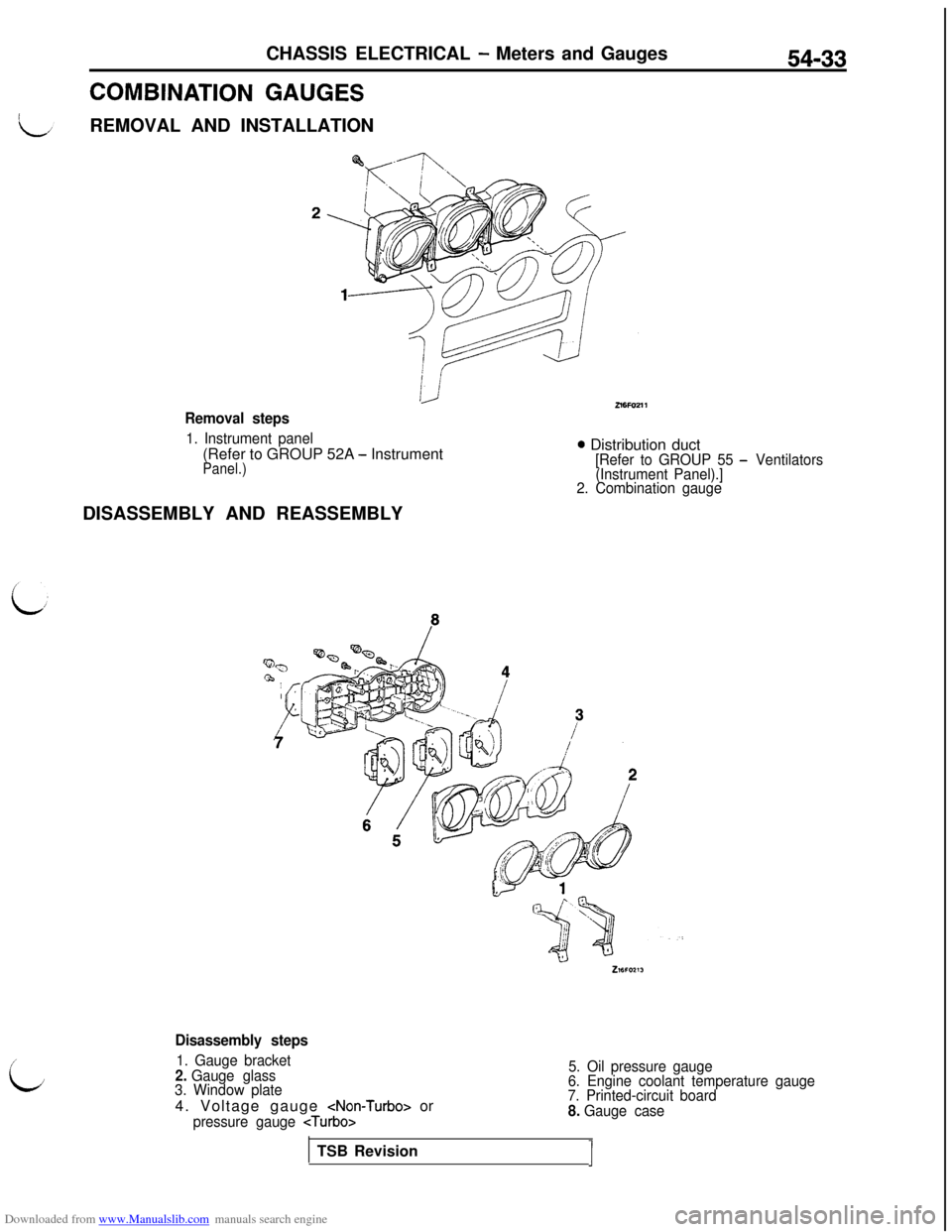
COMBINATION GAUGESREMOVAL AND INSTALLATION
54-33
Removal steps
1. Instrument panel(Refer to GROUP 52A
- InstrumentPanel.)
0 Distribution duct[Refer to GROUP 55 - Ventilators
(Instrument Panel).]
2. Combination gaugeDISASSEMBLY AND REASSEMBLY
i;
Disassembly steps
1. Gauge bracket2. Gauge glass
3. Window plate4. Voltage gauge
pressure gauge
5. Oil pressure gauge
6. Engine coolant temperature gauge
7. Printed-circuit board
8. Gauge caseTSB Revision
J
Page 599 of 738
Downloaded from www.Manualslib.com manuals search engine HEADLIGHT
CHASSIS ELECTRICAL - Lighting System54-103
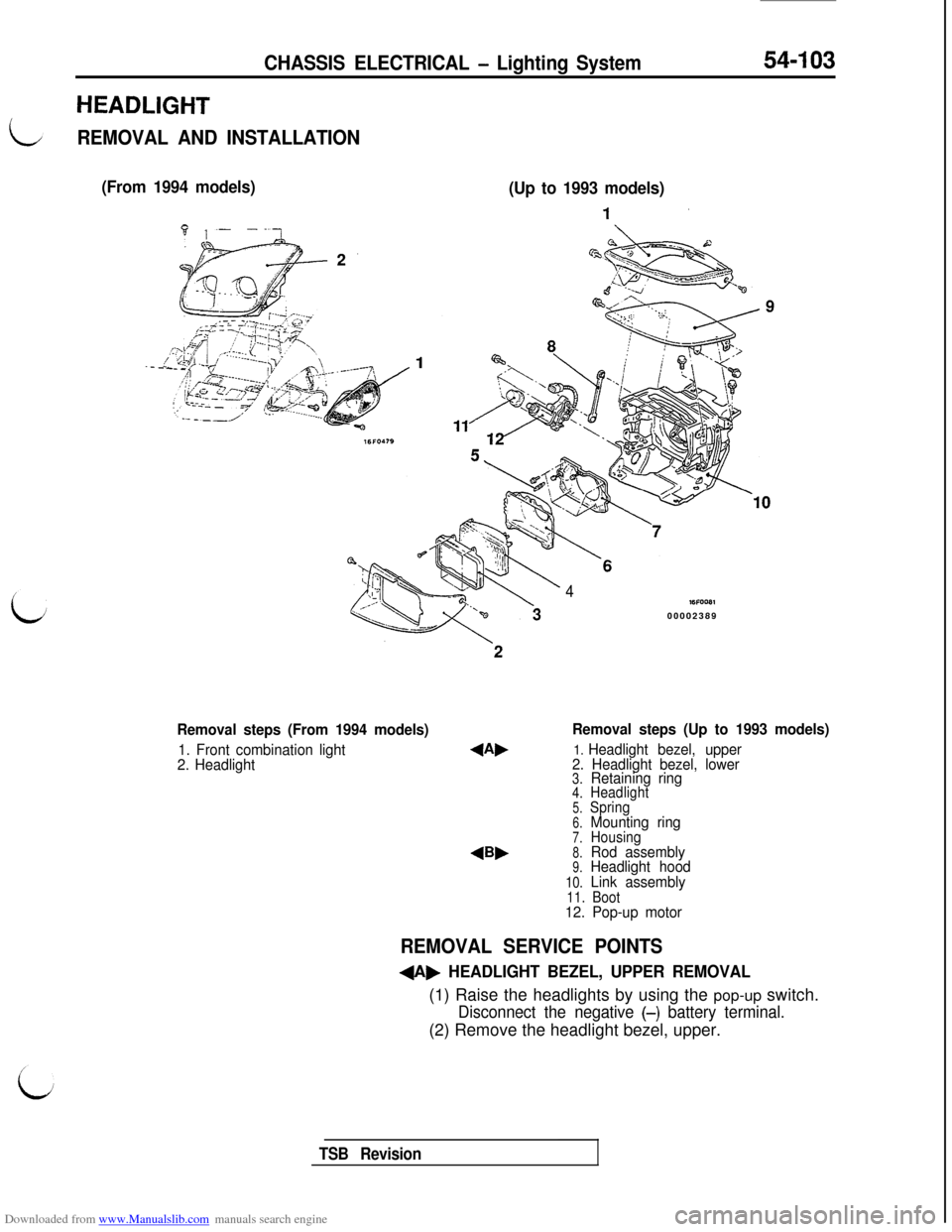
REMOVAL AND INSTALLATION
(From 1994 models)
(Up to 1993 models)
Removal steps (From 1994 models)
1. Front combination light
2. Headlight
4Bb
4WFOOB100002389
Removal steps (Up to 1993 models)
1. Headlight bezel, upper
2. Headlight bezel, lower
3.Retaining ring4.Headlight5.Spring6.Mounting ring7.Housing8.Rod assembly9.Headlight hood
10.Link assembly11. Boot12. Pop-up motor
REMOVAL SERVICE POINTS
+A, HEADLIGHT BEZEL, UPPER REMOVAL(1) Raise the headlights by using the pop-up switch.
Disconnect the negative (-) battery terminal.(2) Remove the headlight bezel, upper.
TSB Revision
Page 600 of 738
Downloaded from www.Manualslib.com manuals search engine CHASSIS ELECTRICAL - Lighting System
16A0833
A(Conductivity
Headlight lower
stop position
16FO17100002390
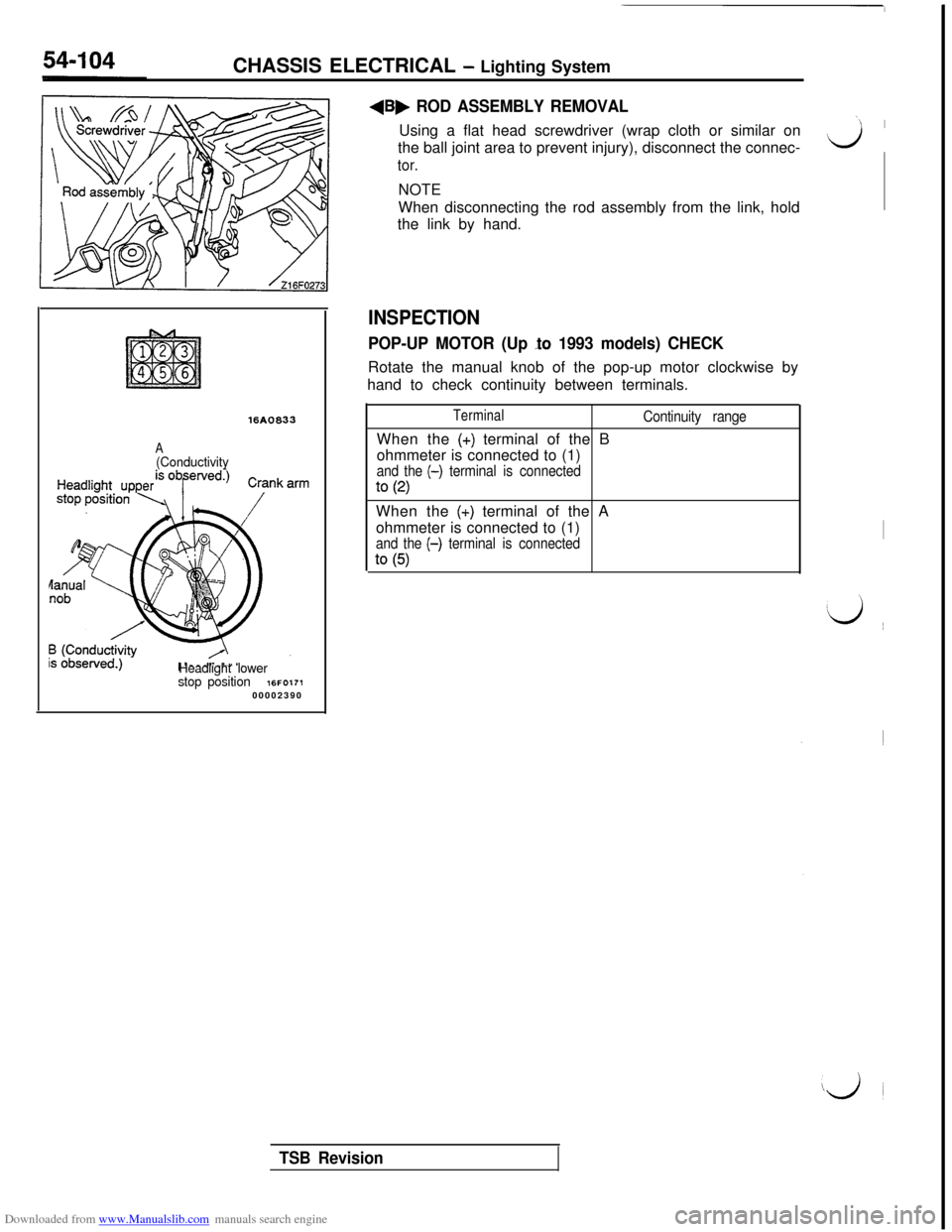
+B, ROD ASSEMBLY REMOVALUsing a flat head screwdriver (wrap cloth or similar on
the ball joint area to prevent injury), disconnect the connec-
tor.NOTE
When disconnecting the rod assembly from the link, hold
the link by hand.
INSPECTION
POP-UP MOTOR (Up lo 1993 models) CHECKRotate the manual knob of the pop-up motor clockwise by
hand to check continuity between terminals.
TerminalWhen the
(+) terminal of the B
ohmmeter is connected to (1)
and the (-) terminal is connected
to (2)
Continuity rangeWhen the
(+) terminal of the A
ohmmeter is connected to (1)
and the (-) terminal is connected
to (5)
‘1 I
Lj
I
‘d ~~
iji
TSB Revision
Page 601 of 738
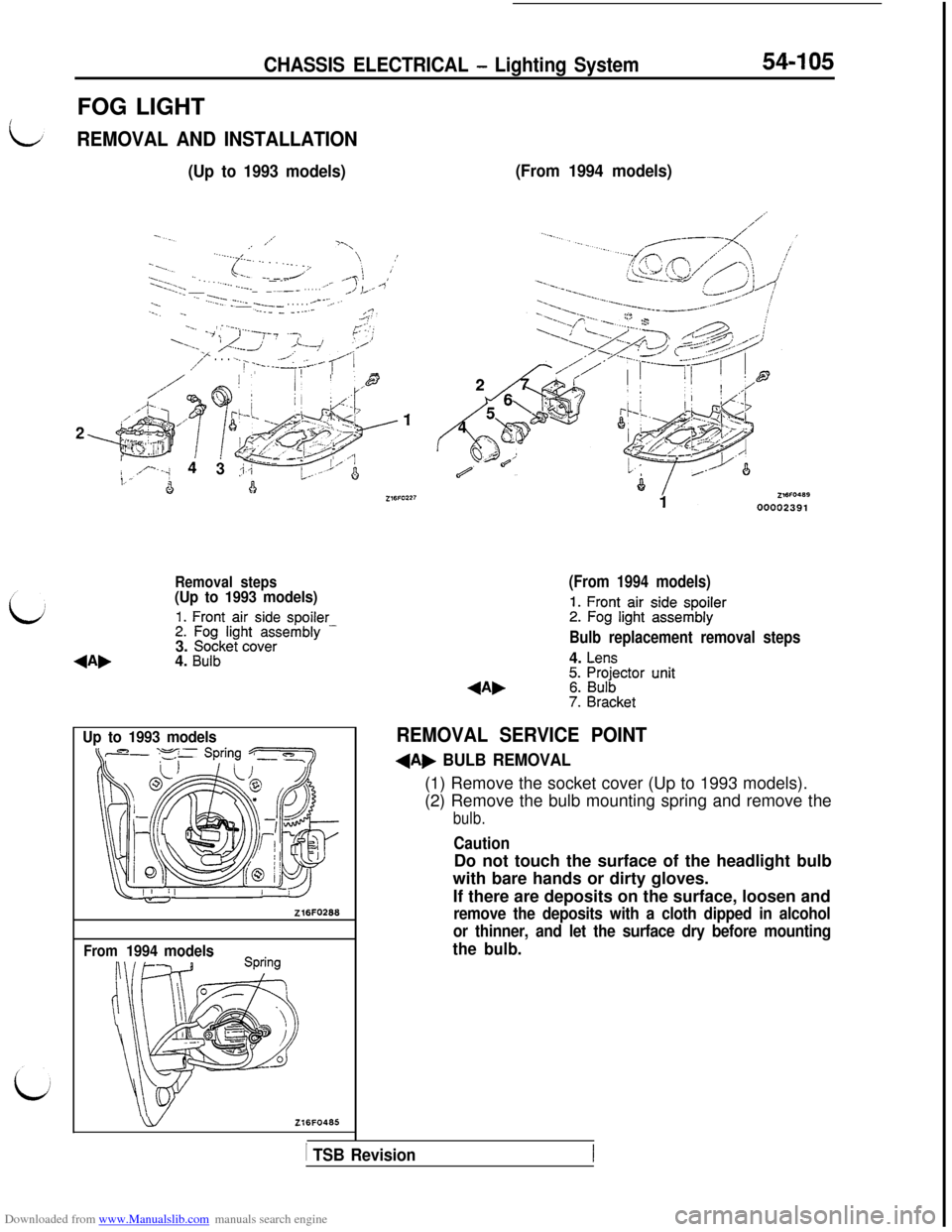
Downloaded from www.Manualslib.com manuals search engine CHASSIS ELECTRICAL - Lighting System54-105FOG LIGHT
REMOVAL AND INSTALLATION
(Up to 1993 models)
,’
..-.-f .- . . .._ 1’yI’-’--.._ . . . ./’‘._,/‘.:‘. . . . . .--ye=.,/‘c’ !:I’:.;; ____-... _.__-.-__~___. . . . . ._./i L.- -3...-.._:.y- .‘...-____ y--. . . . . --‘-T---..-_ -_--._ _ __.-.-.;.? ::.._/ ; .--_.‘7 ,,-y-? ..-,r-; ‘;
‘....lr/I..j ,/L7 rl,-’/I” . . . ..-. ~ -,-.-A:..____ p
A’7----p--*@
,,A..
*~~~~1;’ -“‘.,.
, ‘!U ,.I,/ Ii
8, $&$Jqk2&
4&;. +I+ ’
,,, ’ .’- ‘-I,i
4!a
Removal steps(Up to 1993 models)
1. Front air side spoiler2. Fog light assembly -3. Socket cover4. Bulb
Up to 1993 models
Z16FO268
From1994 models
wZl6FO465
(From 1994 models)
(From 1994 models)
1. Front air side spoiler2. Fog light assembly
Bulb replacement removal steps4.
Lens5. Projector unit6. Bulb7. Bracket
REMOVAL SERVICE POINT
+A, BULB REMOVAL(1) Remove the socket cover (Up to 1993 models).
(2) Remove the bulb mounting spring and remove the
bulb.
CautionDo not touch the surface of the headlight bulb
with bare hands or dirty gloves.
If there are deposits on the surface, loosen and
remove the deposits with a cloth dipped in alcohol
or thinner, and let the surface dry before mounting
the bulb.
1 TSB Revision
Page 602 of 738
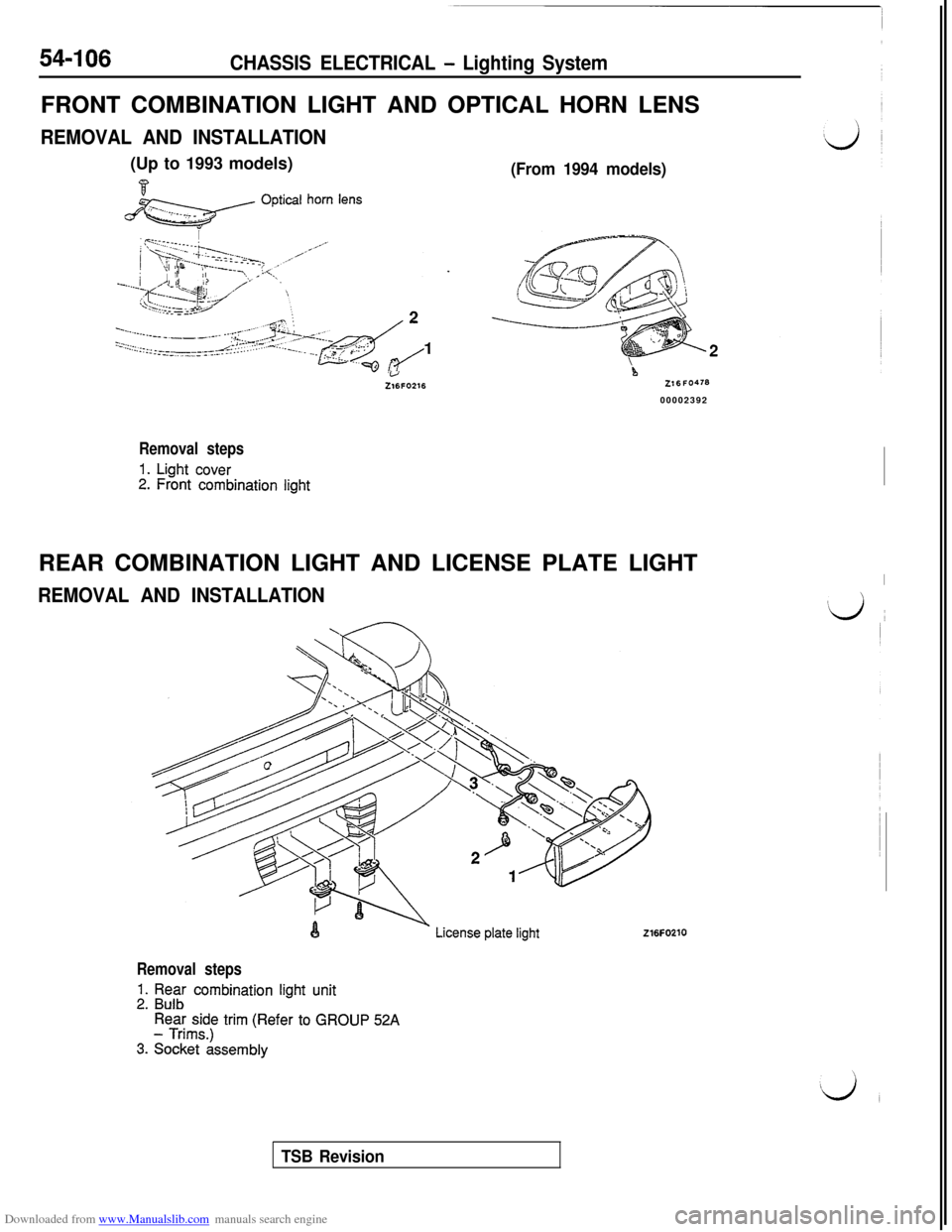
Downloaded from www.Manualslib.com manuals search engine 54-106CHASSIS ELECTRICAL - Lighting SystemFRONT COMBINATION LIGHT AND OPTICAL HORN LENS
REMOVAL AND INSTALLATION(Up to 1993 models)
j&z?&/ optica’ horn Iens
(From 1994 models)
L.JZ16FO216Z16FO47600002392
Removal steps
1. Light cover2. Front combination lightREAR COMBINATION LIGHT AND LICENSE PLATE LIGHT
REMOVAL AND INSTALLATION
I
#d ~
216FO210
Removal steps
1. Rear combination light unit2. Bulb
Rear side trim (Refer to GROUP 52A- Trims.)
3. Socket assembly
TSB Revision
Page 603 of 738
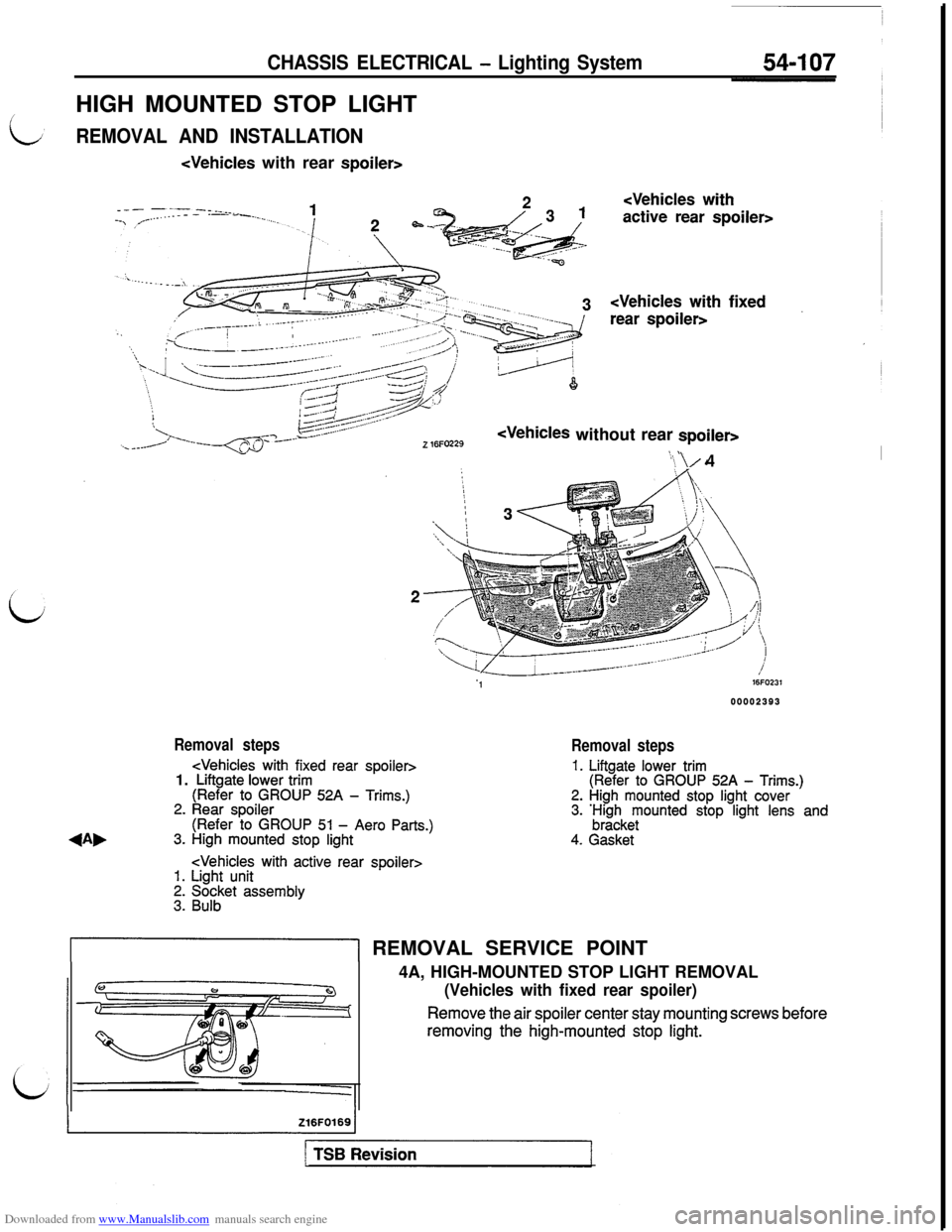
Downloaded from www.Manualslib.com manuals search engine CHASSIS ELECTRICAL - Lighting SystemHIGH MOUNTED STOP LIGHT
REMOVAL AND INSTALLATION
Z 16FO229Z 16FO229
‘\ \/4
116FcJ23100002393 00002393
Removal steps
Removal steps
1. Liftgate lower trim(Refer to GROUP 52A - Trims.)2. High mounted stop light cover3. ;;z;keyounted stop light lens and
4. Gasket
&I REMOVAL SERVICE POINT
4A, HIGH-MOUNTED STOP LIGHT REMOVAL
(Vehicles with fixed rear spoiler)
Remove the air spoiler center stay mounting screws beforeremoving the high-mounted stop
light.
Page 605 of 738
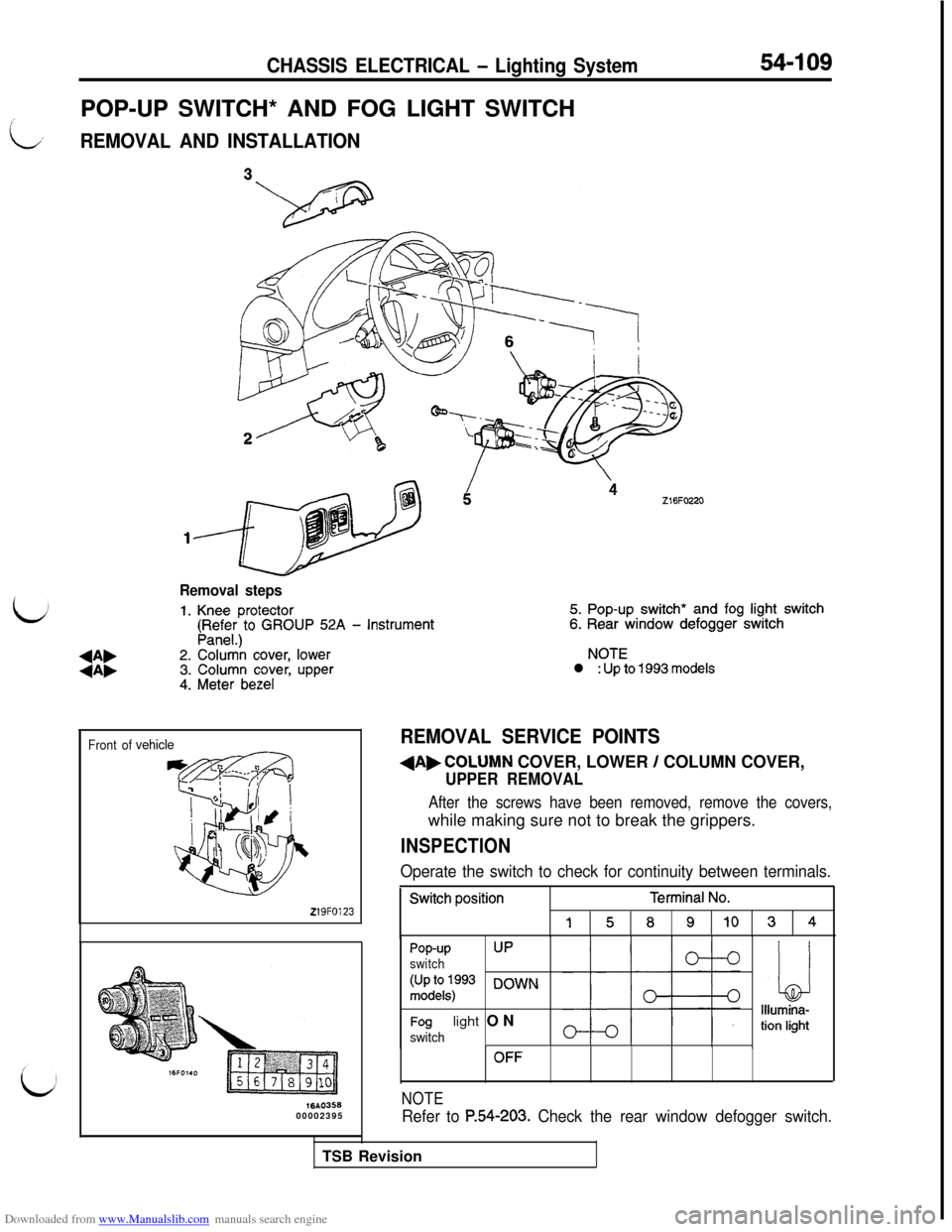
Downloaded from www.Manualslib.com manuals search engine CHASSIS ELECTRICAL - Lighting System54-109
POP-UP SWITCH* AND FOG LIGHT SWITCH
i
LREMOVAL AND INSTALLATION
bZ16FO220
b
Removal steps
1. Knee protector5. Pop-up switch* and fog light switch
(pR,;$)to GROUP 52A - Instrument6. Rear window defogger switch
+A,2. Colur& cover, lowerNOTE
+A,3. Column cover, upperl : Up to 1993 models
4. Meter bezel
Front ofvehicle
219FO123
lbA035600002395
REMOVAL SERVICE POINTS
dAbCOLUMN COVER, LOWER / COLUMN COVER,
UPPER REMOVAL
After the screws have been removed, remove the covers,while making sure not to break the grippers.
INSPECTION
Operate the switch to check for continuity between terminals.
Switch positionTerminal No.
15891034
Pop-upUP
switch
:;;1kq:p93 DOWN
Foglight ONswitch
OFF
NOTE
Refer to P.54-203. Check the rear window defogger switch.TSB Revision
Page 608 of 738
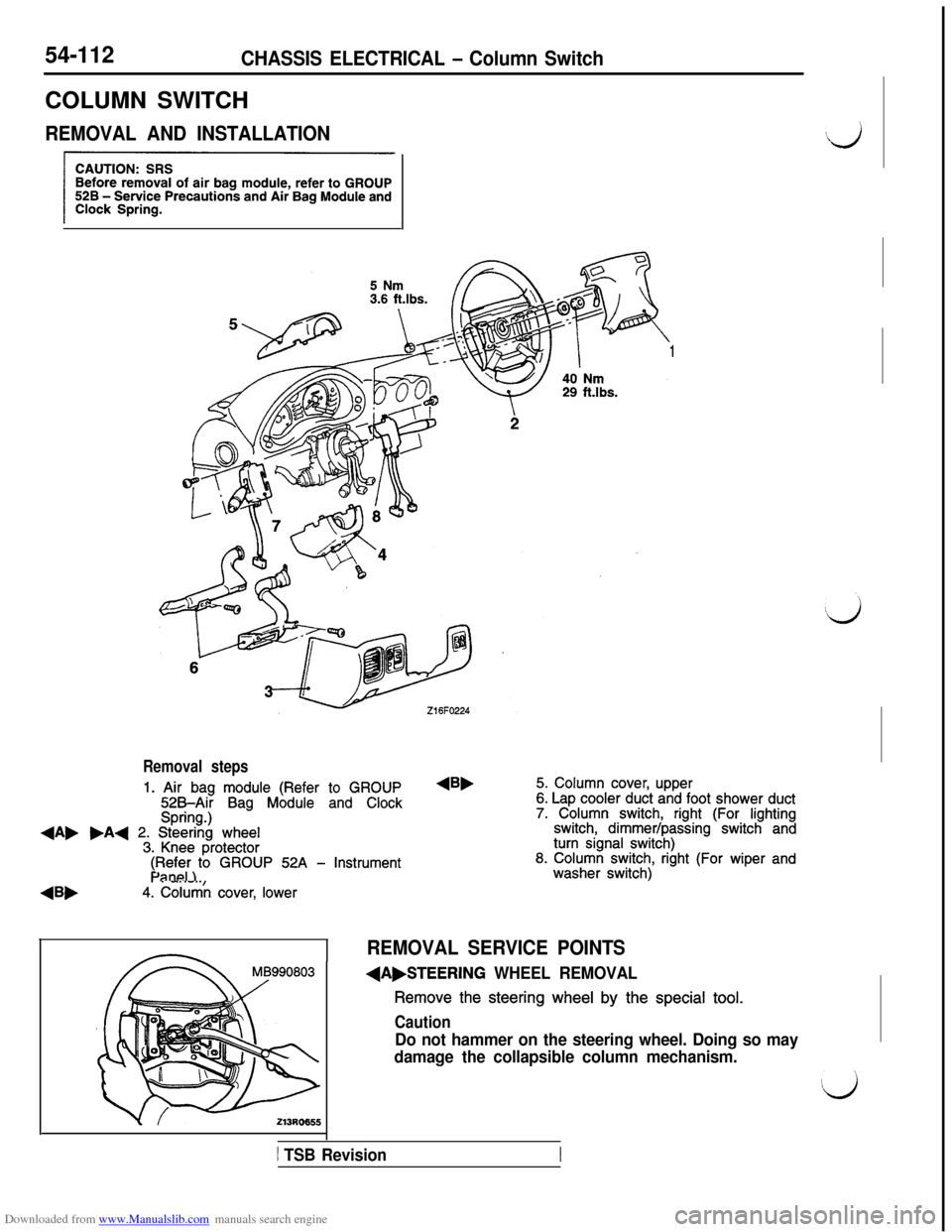
Downloaded from www.Manualslib.com manuals search engine 54-112CHASSIS ELECTRICAL - Column SwitchCOLUMN SWITCH
REMOVAL AND INSTALLATION
1
Removal steps
1. Air bag module (Refer to GROUP525Air Bag Module and ClockSpring.)+A, .A+ 2. Steering wheel3. Knee protector
4Bb
$F$i;)to GROUP 52A - Instrument
4. Column cover, lower
4B,5. Column cover, upper6. Lap cooler duct and foot shower duct7. Column switch, right (For lightingswitch, dimmer/passing switch andturn signal switch)8. Column switch, right (For wiper andwasher switch)
REMOVAL SERVICE POINTS
(A,STEERING WHEEL REMOVAL
Remove the steering wheel by the special tool.
Caution
Do not hammer on the steering wheel. Doing so may
damage the collapsible column mechanism.
1 TSB Revision
Page 609 of 738
Downloaded from www.Manualslib.com manuals search engine L
L
CHASSIS ELECTRICAL - Column Switch54-113
Front of vehicles
219FOlZ:
Mating mark-! !kU19FOOE
-
16FO237
16FO1:900002398
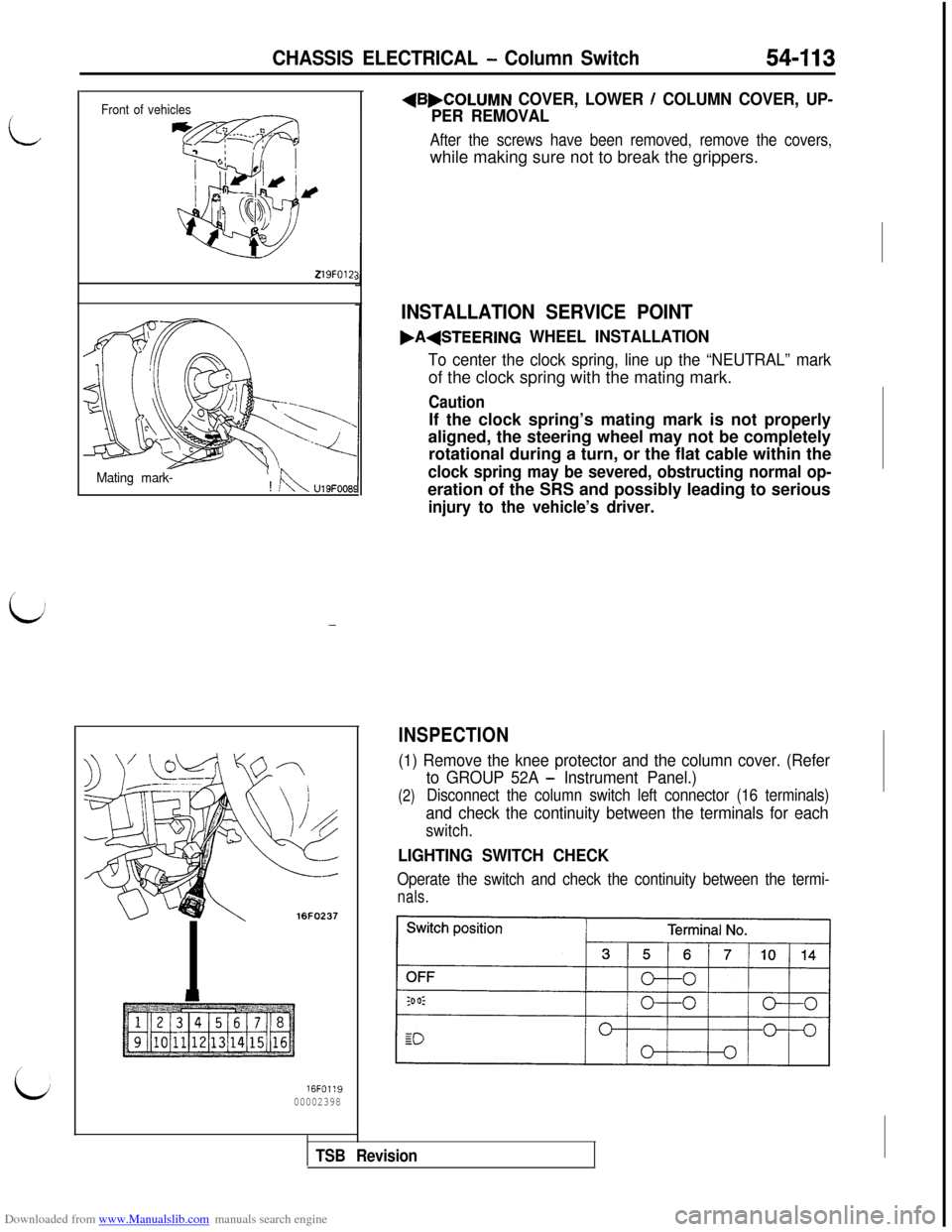
+B,COLUMN COVER, LOWER / COLUMN COVER, UP-
PER REMOVAL
After the screws have been removed, remove the covers,while making sure not to break the grippers.
INSTALLATION SERVICE POINT
.A(STEERING WHEEL INSTALLATION
To center the clock spring, line up the “NEUTRAL” markof the clock spring with the mating mark.
CautionIf the clock spring’s mating mark is not properly
aligned, the steering wheel may not be completely
rotational during a turn, or the flat cable within the
clock spring may be severed, obstructing normal op-eration of the SRS and possibly leading to serious
injury to the vehicle’s driver.
INSPECTION
(1) Remove the knee protector and the column cover. (Refer
(2)
to GROUP 52A - Instrument Panel.)
Disconnect the column switch left connector (16 terminals)
and check the continuity between the terminals for each
switch.
LIGHTING SWITCH CHECK
Operate the switch and check the continuity between the termi-
nals.
TSB Revision