high beam MITSUBISHI 380 2005 User Guide
[x] Cancel search | Manufacturer: MITSUBISHI, Model Year: 2005, Model line: 380, Model: MITSUBISHI 380 2005Pages: 1500, PDF Size: 47.87 MB
Page 259 of 1500
SYMPTOM PROCEDURES
SIMPLIFIED WIRING SYSTEM (SWS)54B-259
Headlamp automatic-shutdown function
Even if the lighting switch (taillamps switch or headlamp switch)
is ON, the headlamps (including the taillamps) will automati-
cally go off in the following conditions to prevent the battery
from discharging as a result of forgetting to turn off lamps.
If the ignition key is turned from "ON" to "LOCK" (OFF) or
"ACC" position with the lighting switch turned ON, and this
state continues for three minutes, the headlamps will automati-
cally be turned off. If the driver's seat door is opened during
these three minutes, the headlamps will go off one second
later.
NOTE: The headlamp automatic-shutoff function can be cus-
tomized on vehicles equipped with a multi center display (mid-
dle grade type). Refer to P.54B-486.
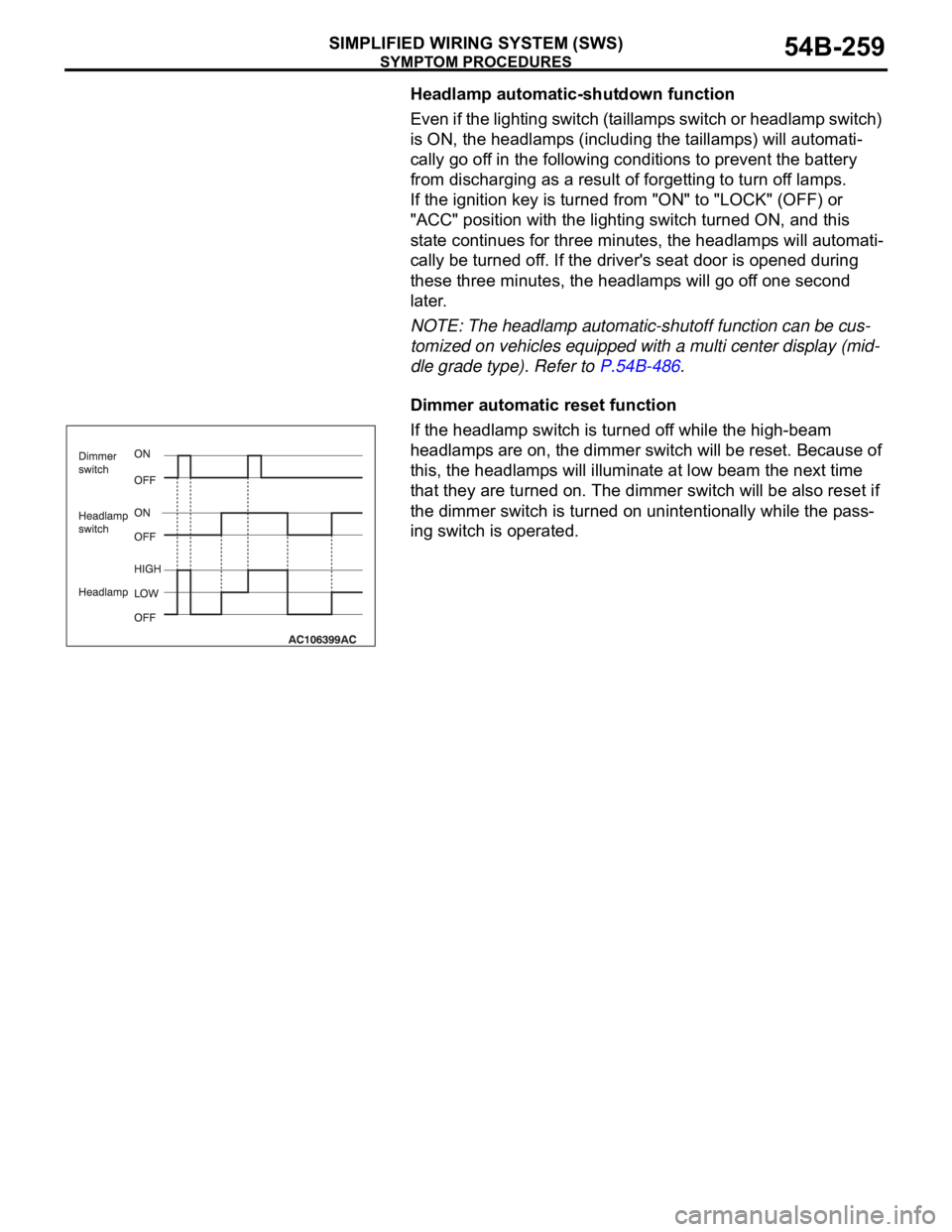
Dimmer automatic reset function
If the headlamp switch is turned off while the high-beam
headlamps are on, the dimmer switch will be reset. Because of
this, the headlamps will illuminate at low beam the next time
that they are turned on. The dimmer switch will be also reset if
the dimmer switch is turned on unintentionally while the pass-
ing switch is operated.
Page 268 of 1500
SYMPTOM PROCEDURES
SIMPLIFIED WIRING SYSTEM (SWS)54B-268
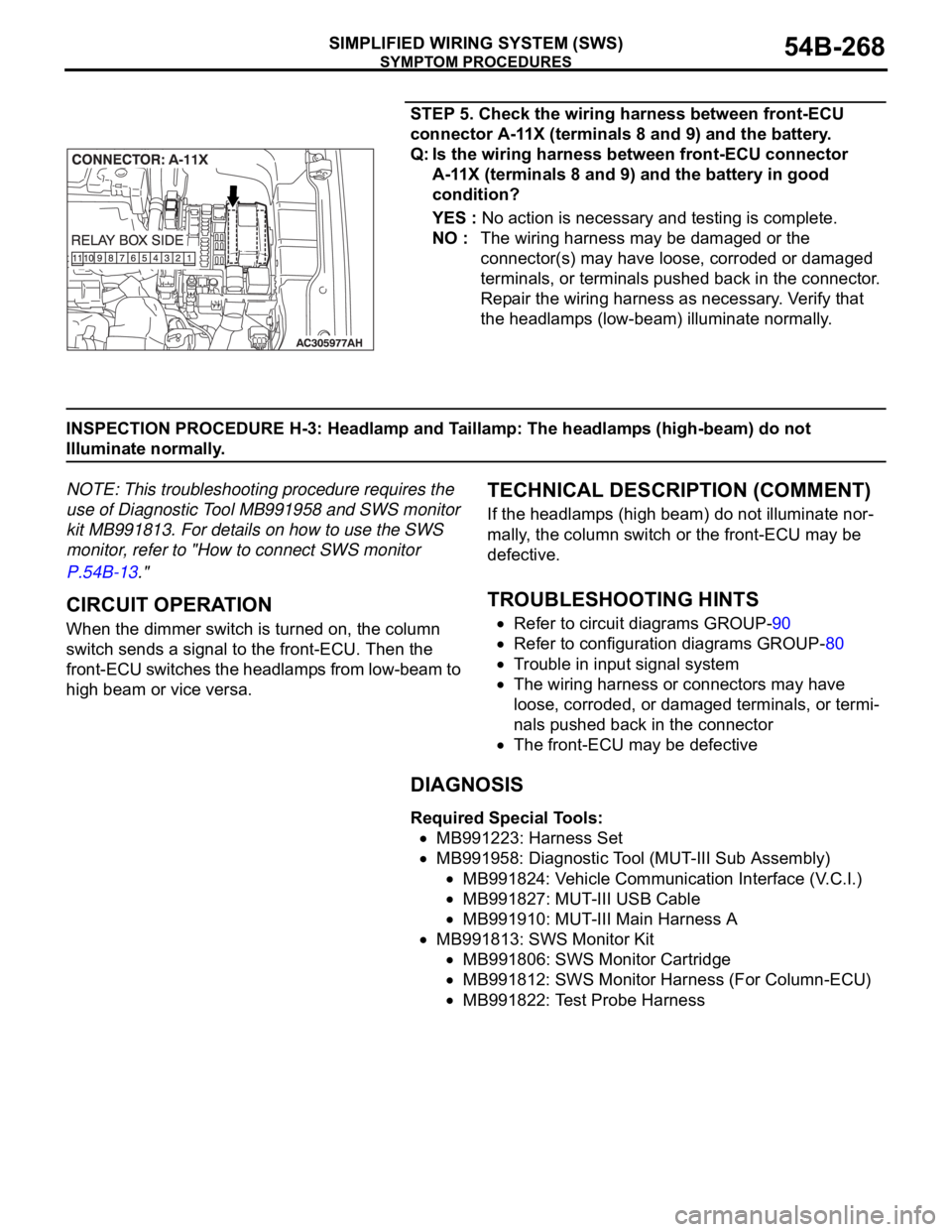
STEP 5. Check the wiring harness between front-ECU
connector A-11X (terminals 8 and 9) and the battery.
Q: Is the wiring harness between front-ECU connector
A-11X (terminals 8 and 9) and the battery in good
condition?
YES : No action is necessary and testing is complete.
NO : The wiring harness may be damaged or the
connector(s) may have loose, corroded or damaged
terminals, or terminals pushed back in the connector.
Repair the wiring harness as necessary. Verify that
the headlamps (low-beam) illuminate normally.
INSPECTION PROCEDURE H-3: Headlamp and Taillamp: The headlamps (high-beam) do not
Illuminate normally.
NOTE: This troubleshooting procedure requires the
use of Diagnostic Tool MB991958 and SWS monitor
kit MB991813. For details on how to use the SWS
monitor, refer to "How to connect SWS monitor
P.54B-13."
.
CIRCUIT OPERATION
When the dimmer switch is turned on, the column
switch sends a signal to the front-ECU. Then the
front-ECU switches the headlamps from low-beam to
high beam or vice versa.
.
TECHNICAL DESCRIPTION (COMMENT)
If the headlamps (high beam) do not illuminate nor-
mally, the column switch or the front-ECU may be
defective.
.
TROUBLESHOOTING HINTS
Refer to circuit diagrams GROUP-90
Refer to configuration diagrams GROUP-80
Trouble in input signal system
The wiring harness or connectors may have
loose, corroded, or damaged terminals, or termi-
nals pushed back in the connector
The front-ECU may be defective
DIAGNOSIS
Required Special Tools:
MB991223: Harness Set
MB991958: Diagnostic Tool (MUT-III Sub Assembly)
MB991824: Vehicle Communication Interface (V.C.I.)
MB991827: MUT-III USB Cable
MB991910: MUT-III Main Harness A
MB991813: SWS Monitor Kit
MB991806: SWS Monitor Cartridge
MB991812: SWS Monitor Harness (For Column-ECU)
MB991822: Test Probe Harness
Page 270 of 1500
SYMPTOM PROCEDURES
SIMPLIFIED WIRING SYSTEM (SWS)54B-270
STEP 2. Check the input signal by using "FUNCTION
DIAG." menu of the SWS monitor.
Check the input signals from the following switches:
Ignition switch: ON
Lighting switch: HEAD
Dimmer switch: ON
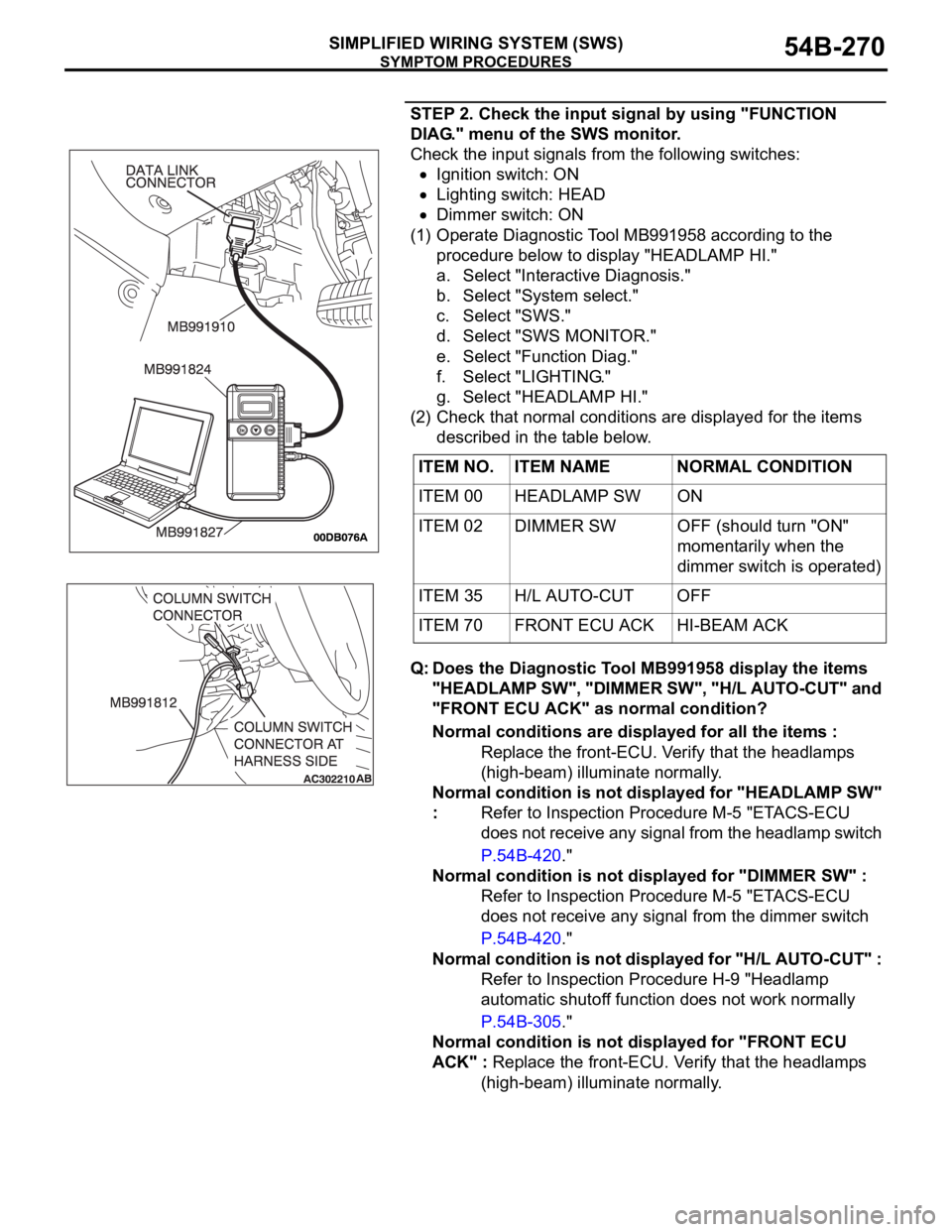
(1) Operate Diagnostic Tool MB991958 according to the
procedure below to display "HEADLAMP HI."
a. Select "Interactive Diagnosis."
b. Select "System select."
c. Select "SWS."
d. Select "SWS MONITOR."
e. Select "Function Diag."
f. Select "LIGHTING."
g. Select "HEADLAMP HI."
(2) Check that normal conditions are displayed for the items
described in the table below.
Q: Does the Diagnostic Tool MB991958 display the items
"HEADLAMP SW", "DIMMER SW", "H/L AUTO-CUT" and
"FRONT ECU ACK" as normal condition?
Normal conditions are displayed for all the items :
Replace the front-ECU. Verify that the headlamps
(high-beam) illuminate normally.
Normal condition is not displayed for "HEADLAMP SW"
: Refer to Inspection Procedure M-5 "ETACS-ECU
does not receive any signal from the headlamp switch
P.54B-420."
Normal condition is not displayed for "DIMMER SW" :
Refer to Inspection Procedure M-5 "ETACS-ECU
does not receive any signal from the dimmer switch
P.54B-420."
Normal condition is not displayed for "H/L AUTO-CUT" :
Refer to Inspection Procedure H-9 "Headlamp
automatic shutoff function does not work normally
P.54B-305."
Normal condition is not displayed for "FRONT ECU
ACK" : Replace the front-ECU. Verify that the headlamps
(high-beam) illuminate normally. ITEM NO. ITEM NAME NORMAL CONDITION
ITEM 00 HEADLAMP SW ON
ITEM 02 DIMMER SW OFF (should turn "ON"
momentarily when the
dimmer switch is operated)
ITEM 35 H/L AUTO-CUT OFF
ITEM 70 FRONT ECU ACK HI-BEAM ACK
Page 271 of 1500
SYMPTOM PROCEDURES
SIMPLIFIED WIRING SYSTEM (SWS)54B-271
INSPECTION PROCEDURE H-4: Headlamp and Taillamp: When the passing switch is turned "ON," the
headlamps (low-beam or high-beam) do not illuminate.
NOTE: This troubleshooting procedure requires the
use of Diagnostic Tool MB991958 and SWS monitor
kit MB991813. For details on how to use the SWS
monitor, refer to "How to connect SWS monitor
P.54B-13."
.
TECHNICAL DESCRIPTION (COMMENT)
If both of the headlamps (low-beam and high-beam)
do not illuminate, the input circuit from the passing
switch or the front-ECU may be defective.
.
TROUBLESHOOTING HINTS
Refer to circuit diagrams GROUP-90
Refer to configuration diagrams GROUP-80
Trouble in input signal system
The wiring harness or connectors may have
loose, corroded, or damaged terminals, or termi-
nals pushed back in the connector
The front-ECU may be defective
DIAGNOSIS
Required Special Tools:
MB991223: Harness Set
MB991958: Diagnostic Tool (MUT-III Sub Assembly)
MB991824: Vehicle Communication Interface (V.C.I.)
MB991827: MUT-III USB Cable
MB991910: MUT-III Main Harness A
MB991813: SWS Monitor Kit
MB991806: SWS Monitor Cartridge
MB991812: SWS Monitor Harness (For Column-ECU)
MB991822: Test Probe Harness
STEP 1. Check the headlamps.
Q: Do the headlamps (low-beam and high-beam) illuminate
normally?
The headlamps illuminate normally. : Go to Step 2.
Headlamps (low-beam) do not illuminate normally :
Refer to Inspection Procedure H-2 "The headlamps
(low-beam) do not illuminate normally P.54B-264.
Headlamps (high-beam) do not illuminate normally :
Refer to Inspection Procedure H-3 "The headlamps
(high-beam) do not illuminate normally P.54B-268.
Page 272 of 1500
SYMPTOM PROCEDURES
SIMPLIFIED WIRING SYSTEM (SWS)54B-272
STEP 2. Check the input signal by using "DATA LIST"
menu of the SWS monitor.
Turn the passing switch to the "ON" position before checking
input signals from the passing switch.
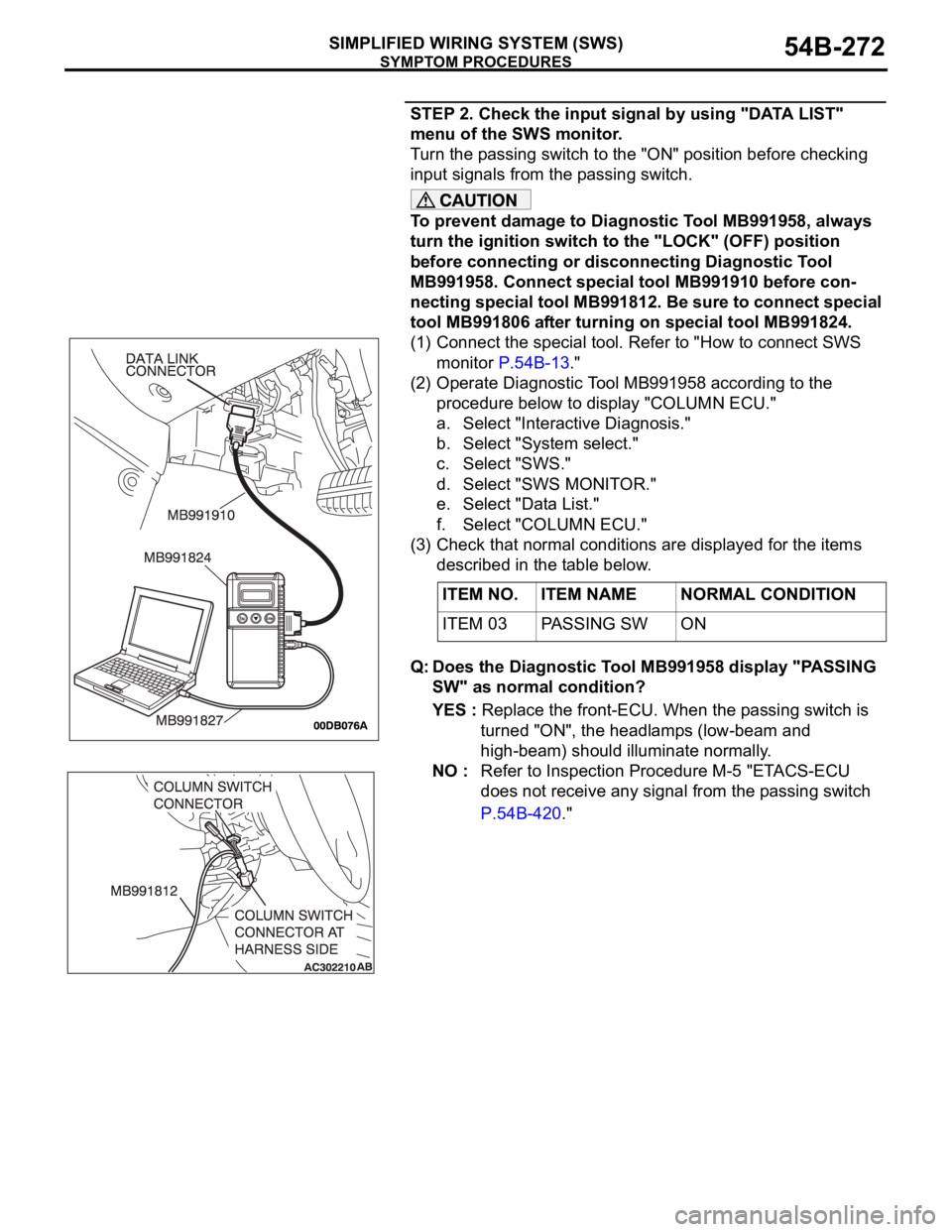
To prevent damage to Diagnostic Tool MB991958, always
turn the ignition switch to the "LOCK" (OFF) position
before connecting or disconnecting Diagnostic Tool
MB991958. Connect special tool MB991910 before con-
necting special tool MB991812. Be sure to connect special
tool MB991806 after turning on special tool MB991824.
(1) Connect the special tool. Refer to "How to connect SWS
monitor P.54B-13."
(2) Operate Diagnostic Tool MB991958 according to the
procedure below to display "COLUMN ECU."
a. Select "Interactive Diagnosis."
b. Select "System select."
c. Select "SWS."
d. Select "SWS MONITOR."
e. Select "Data List."
f. Select "COLUMN ECU."
(3) Check that normal conditions are displayed for the items
described in the table below.
Q: Does the Diagnostic Tool MB991958 display "PASSING
SW" as normal condition?
YES : Replace the front-ECU. When the passing switch is
turned "ON", the headlamps (low-beam and
high-beam) should illuminate normally.
NO : Refer to Inspection Procedure M-5 "ETACS-ECU
does not receive any signal from the passing switch
P.54B-420." ITEM NO. ITEM NAME NORMAL CONDITION
ITEM 03 PASSING SW ON
Page 273 of 1500
SYMPTOM PROCEDURES
SIMPLIFIED WIRING SYSTEM (SWS)54B-273
INSPECTION PROCEDURE H-5: Headlamp and Taillamp: Headlamps do not illuminate when the
lighting switch is at "TAIL," and "PASSING" position, but illuminate at low-beam when the switch is at
"HEAD" position. At this position, the headlamps cannot be changed to high beam by operating the
dimmer switch.
NOTE: This troubleshooting procedure requires the
use of Diagnostic Tool MB991958 and SWS monitor
kit MB991813. For details on how to use the SWS
monitor, refer to "How to connect SWS monitor
P.54B-13."
.
TECHNICAL DESCRIPTION (COMMENT)
If the headlamps illuminate at low-beam regardless
of the lighting switch positions, the headlamp opera-
tion is in fail-safe mode.
.
TROUBLESHOOTING HINTS
Refer to circuit diagrams GROUP-90
Refer to configuration diagrams GROUP-80
The wiring harness or connectors may have
loose, corroded, or damaged terminals, or termi-
nals pushed back in the connector
The front-ECU may be defective
DIAGNOSIS
Required Special Tools:
MB991223: Harness Set
MB991958: Diagnostic Tool (MUT-III Sub Assembly)
MB991824: Vehicle Communication Interface (V.C.I.)
MB991827: MUT-III USB Cable
MB991910: MUT-III Main Harness A
MB991813: SWS Monitor Kit
MB991806: SWS Monitor Cartridge
MB991812: SWS Monitor Harness (For Column-ECU)
MB991822: Test Probe Harness
Page 291 of 1500
SYMPTOM PROCEDURES
SIMPLIFIED WIRING SYSTEM (SWS)54B-291
DIAGNOSIS
Required Special Tool:
MB991223: Harness Set
STEP 1. Check the headlamp operation.
Q: Which of the headlamps does not illuminate?
LH (low beam) : Go to Step 2.
RH (low beam) : Go to Step 6.
LH (only low-beam) : Go to Step 10.
RH (only low-beam) : Go to Step 13.
LH (only high beam) : Go to Step 16.
RH (only high beam) : Go to Step 21.
Low beam only (both RH and LH) : Refer to Inspection
Procedure H-2 "The headlamps (low-beam) do not
illuminate normally P.54B-264."
High beam only (both RH and LH) : Refer to Inspection
Procedure H-3 "The headlamps (high-beam) do not
illuminate normally P.54B-268."
High beam indicator lamp : Refer to Inspection Procedure
H-8 "The high-beam indicator lamp does not
illuminate P.54B-301."
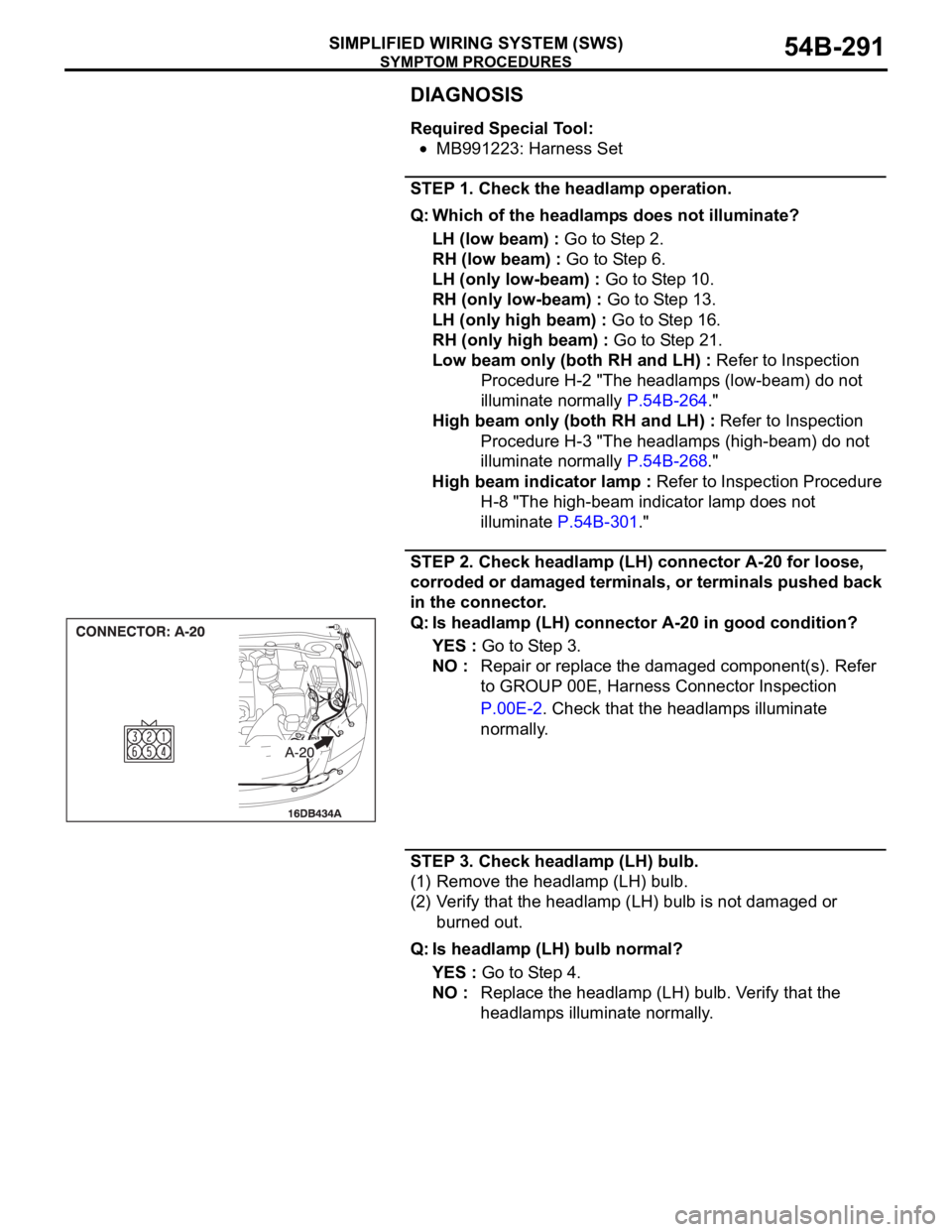
STEP 2. Check headlamp (LH) connector A-20 for loose,
corroded or damaged terminals, or terminals pushed back
in the connector.
Q: Is headlamp (LH) connector A-20 in good condition?
YES : Go to Step 3.
NO : Repair or replace the damaged component(s). Refer
to GROUP 00E, Harness Connector Inspection
P.00E-2. Check that the headlamps illuminate
normally.
STEP 3. Check headlamp (LH) bulb.
(1) Remove the headlamp (LH) bulb.
(2) Verify that the headlamp (LH) bulb is not damaged or
burned out.
Q: Is headlamp (LH) bulb normal?
YES : Go to Step 4.
NO : Replace the headlamp (LH) bulb. Verify that the
headlamps illuminate normally.
Page 301 of 1500
SYMPTOM PROCEDURES
SIMPLIFIED WIRING SYSTEM (SWS)54B-301
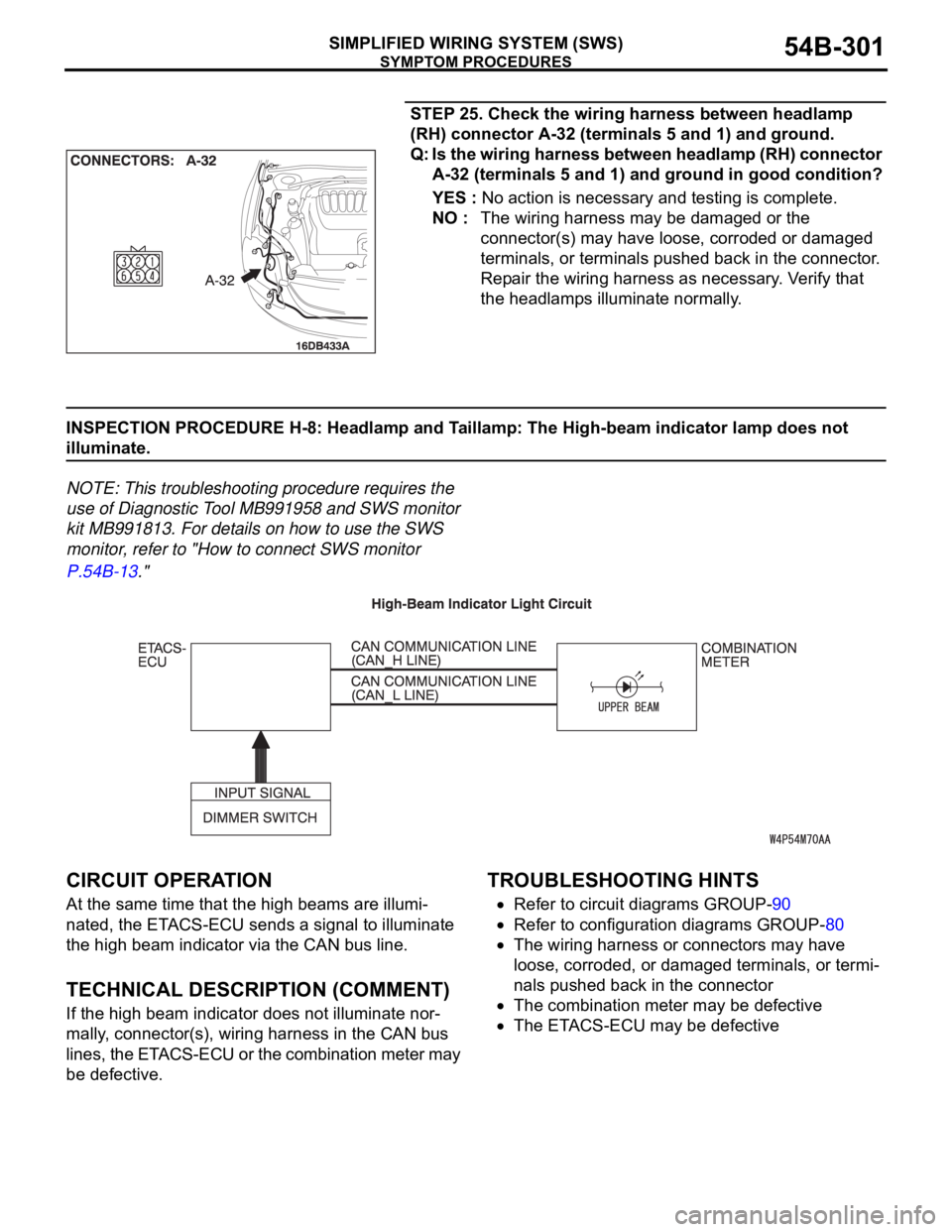
STEP 25. Check the wiring harness between headlamp
(RH) connector A-32 (terminals 5 and 1) and ground.
Q: Is the wiring harness between headlamp (RH) connector
A-32 (terminals 5 and 1) and ground in good condition?
YES : No action is necessary and testing is complete.
NO : The wiring harness may be damaged or the
connector(s) may have loose, corroded or damaged
terminals, or terminals pushed back in the connector.
Repair the wiring harness as necessary. Verify that
the headlamps illuminate normally.
INSPECTION PROCEDURE H-8: Headlamp and Taillamp: The High-beam indicator lamp does not
illuminate.
NOTE: This troubleshooting procedure requires the
use of Diagnostic Tool MB991958 and SWS monitor
kit MB991813. For details on how to use the SWS
monitor, refer to "How to connect SWS monitor
P.54B-13."
.
CIRCUIT OPERATION
At the same time that the high beams are illumi-
nated, the ETACS-ECU sends a signal to illuminate
the high beam indicator via the CAN bus line.
.
TECHNICAL DESCRIPTION (COMMENT)
If the high beam indicator does not illuminate nor-
mally, connector(s), wiring harness in the CAN bus
lines, the ETACS-ECU or the combination meter may
be defective.
.
TROUBLESHOOTING HINTS
Refer to circuit diagrams GROUP-90
Refer to configuration diagrams GROUP-80
The wiring harness or connectors may have
loose, corroded, or damaged terminals, or termi-
nals pushed back in the connector
The combination meter may be defective
The ETACS-ECU may be defective
.
Page 304 of 1500
SYMPTOM PROCEDURES
SIMPLIFIED WIRING SYSTEM (SWS)54B-304
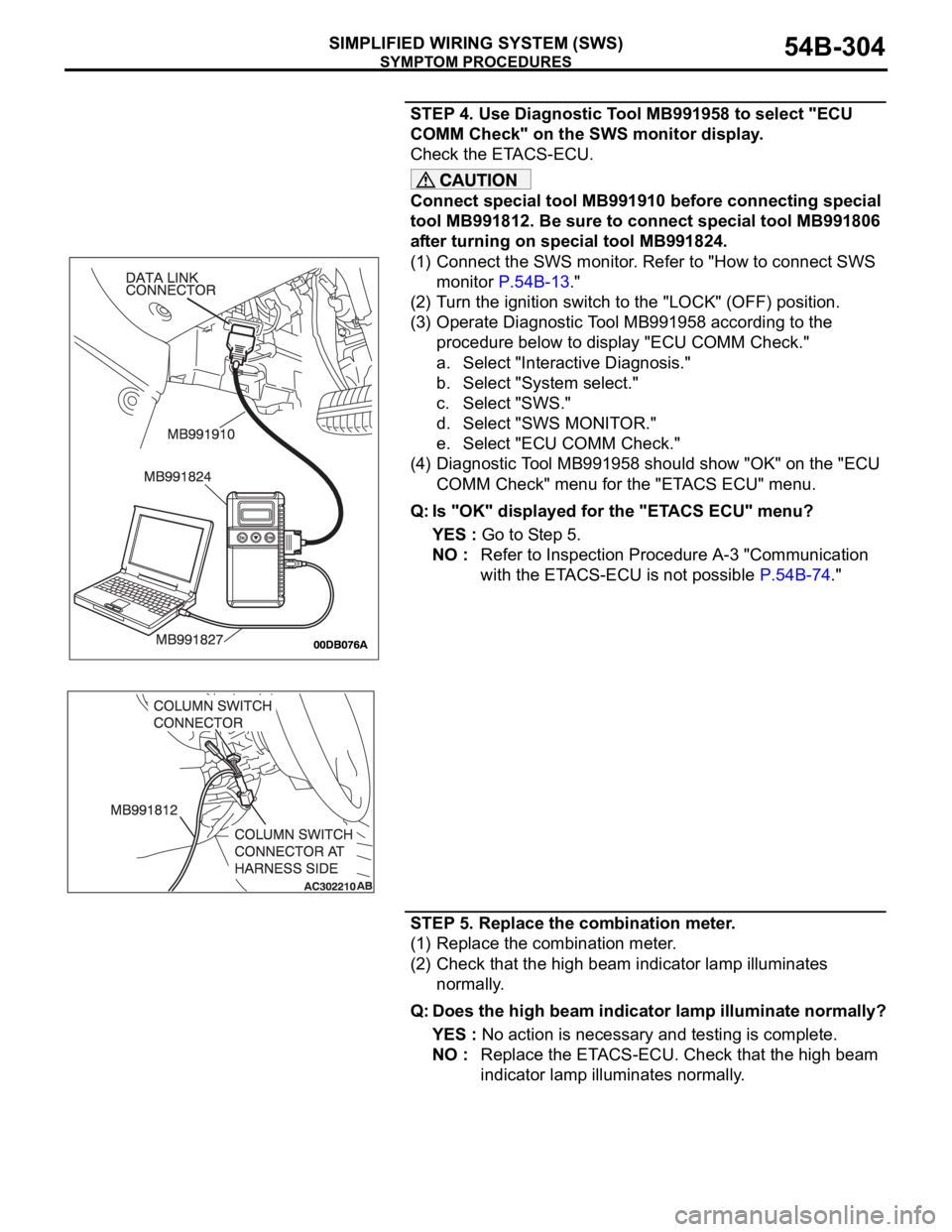
STEP 4. Use Diagnostic Tool MB991958 to select "ECU
COMM Check" on the SWS monitor display.
Check the ETACS-ECU.
Connect special tool MB991910 before connecting special
tool MB991812. Be sure to connect special tool MB991806
after turning on special tool MB991824.
(1) Connect the SWS monitor. Refer to "How to connect SWS
monitor P.54B-13."
(2) Turn the ignition switch to the "LOCK" (OFF) position.
(3) Operate Diagnostic Tool MB991958 according to the
procedure below to display "ECU COMM Check."
a. Select "Interactive Diagnosis."
b. Select "System select."
c. Select "SWS."
d. Select "SWS MONITOR."
e. Select "ECU COMM Check."
(4) Diagnostic Tool MB991958 should show "OK" on the "ECU
COMM Check" menu for the "ETACS ECU" menu.
Q: Is "OK" displayed for the "ETACS ECU" menu?
YES : Go to Step 5.
NO : Refer to Inspection Procedure A-3 "Communication
with the ETACS-ECU is not possible P.54B-74."
STEP 5. Replace the combination meter.
(1) Replace the combination meter.
(2) Check that the high beam indicator lamp illuminates
normally.
Q: Does the high beam indicator lamp illuminate normally?
YES : No action is necessary and testing is complete.
NO : Replace the ETACS-ECU. Check that the high beam
indicator lamp illuminates normally.
Page 339 of 1500
SYMPTOM PROCEDURES
SIMPLIFIED WIRING SYSTEM (SWS)54B-339
FOG LAMP
GENERAL DESCRIPTION CONCERNING THE FOG LAMPSM1549021400216
Refer to circuit diagrams GROUP-90
Refer to configuration diagrams GROUP-80The following ECUs affect the functions and control
of the fog lamps.
Fog lamp
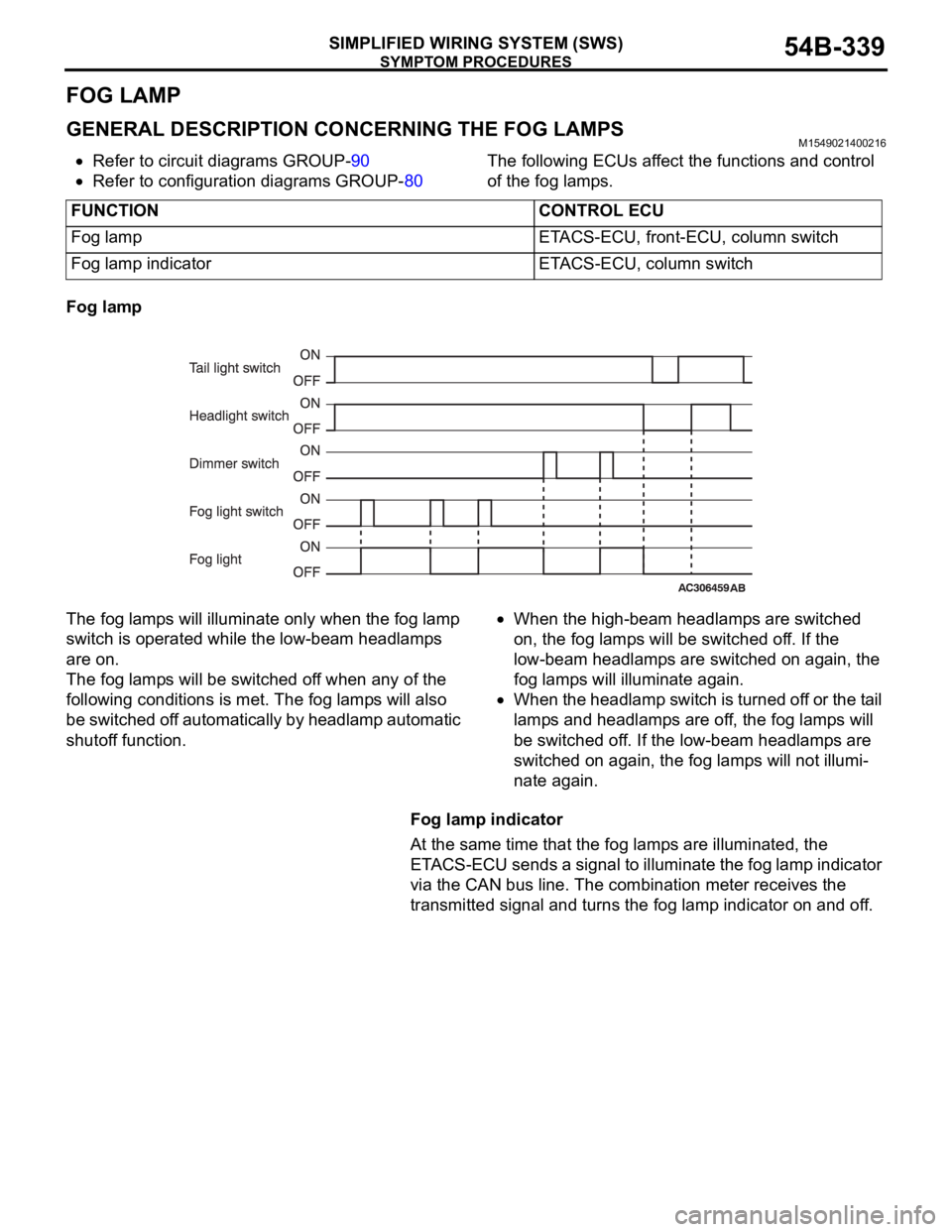
The fog lamps will illuminate only when the fog lamp
switch is operated while the low-beam headlamps
are on.
The fog lamps will be switched off when any of the
following conditions is met. The fog lamps will also
be switched off automatically by headlamp automatic
shutoff function.
When the high-beam headlamps are switched
on, the fog lamps will be switched off. If the
low-beam headlamps are switched on again, the
fog lamps will illuminate again.
When the headlamp switch is turned off or the tail
lamps and headlamps are off, the fog lamps will
be switched off. If the low-beam headlamps are
switched on again, the fog lamps will not illumi-
nate again.
Fog lamp indicator
At the same time that the fog lamps are illuminated, the
ETACS-ECU sends a signal to illuminate the fog lamp indicator
via the CAN bus line. The combination meter receives the
transmitted signal and turns the fog lamp indicator on and off. FUNCTION CONTROL ECU
Fog lamp ETACS-ECU, front-ECU, column switch
Fog lamp indicator ETACS-ECU, column switch