transmission MITSUBISHI 380 2005 Service Manual
[x] Cancel search | Manufacturer: MITSUBISHI, Model Year: 2005, Model line: 380, Model: MITSUBISHI 380 2005Pages: 1500, PDF Size: 47.87 MB
Page 1465 of 1500
GENERAL DESCRIPTION
AUTOMATIC TRANSMISSION23A-6
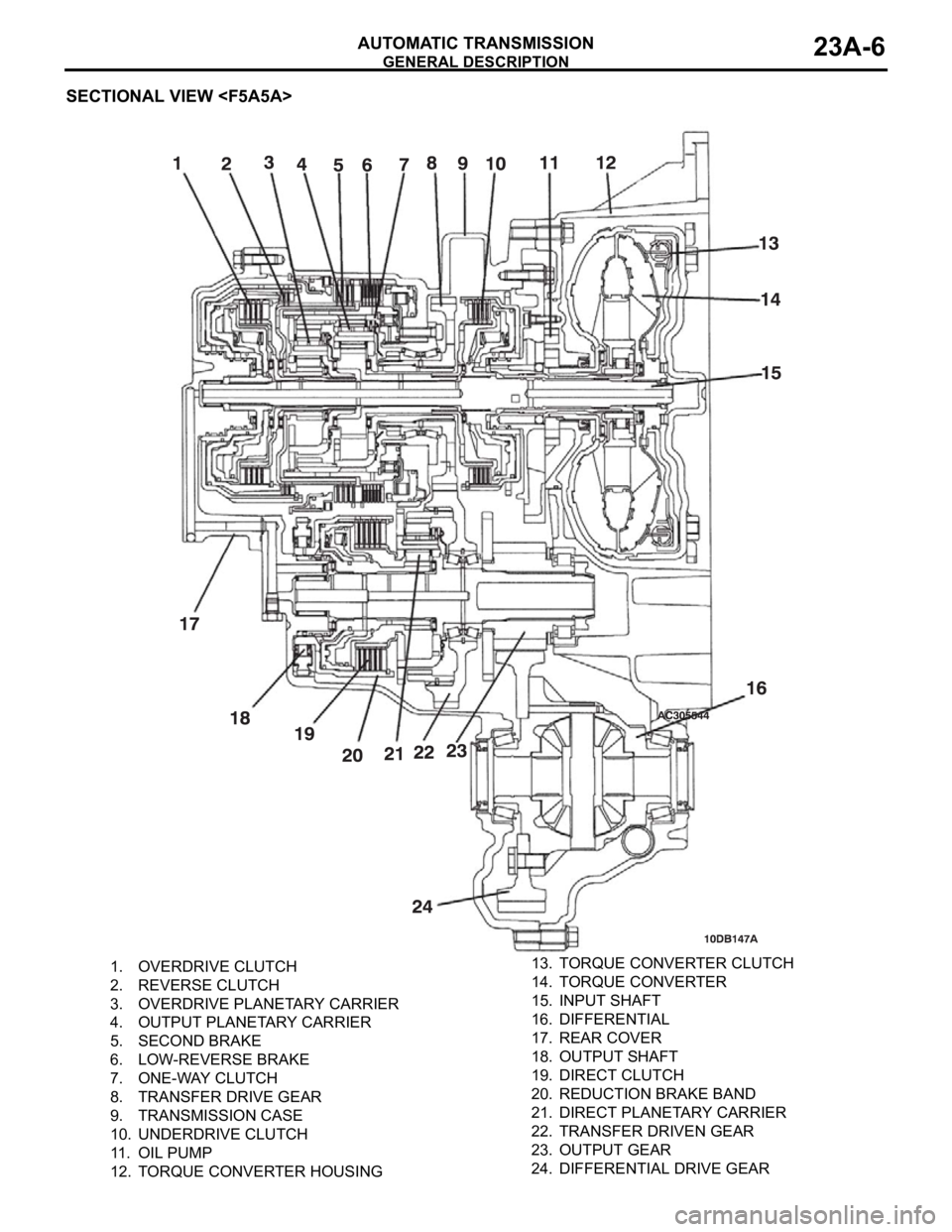
SECTIONAL VIEW
1. OVERDRIVE CLUTCH
2. REVERSE CLUTCH
3. OVERDRIVE PLANETARY CARRIER
4. OUTPUT PLANETARY CARRIER
5. SECOND BRAKE
6. LOW-REVERSE BRAKE
7. ONE-WAY CLUTCH
8. TRANSFER DRIVE GEAR
9. TRANSMISSION CASE
10. UNDERDRIVE CLUTCH
11. OIL PUMP
12. TORQUE CONVERTER HOUSING13. TORQUE CONVERTER CLUTCH
14. TORQUE CONVERTER
15. INPUT SHAFT
16. DIFFERENTIAL
17. REAR COVER
18. OUTPUT SHAFT
19. DIRECT CLUTCH
20. REDUCTION BRAKE BAND
21. DIRECT PLANETARY CARRIER
22. TRANSFER DRIVEN GEAR
23. OUTPUT GEAR
24. DIFFERENTIAL DRIVE GEAR
Page 1466 of 1500
GENERAL DESCRIPTION
AUTOMATIC TRANSMISSION23A-7
ELECTRONICALLY-CONTROLLED SYSTEM
.
INVECS-II
When in drive ("D" range), the new automatic transmission
employs an innovative shift schedule to provide a high level
of comfort and "easy driving style" that matches all driving
conditions as well as the driver's driving style.
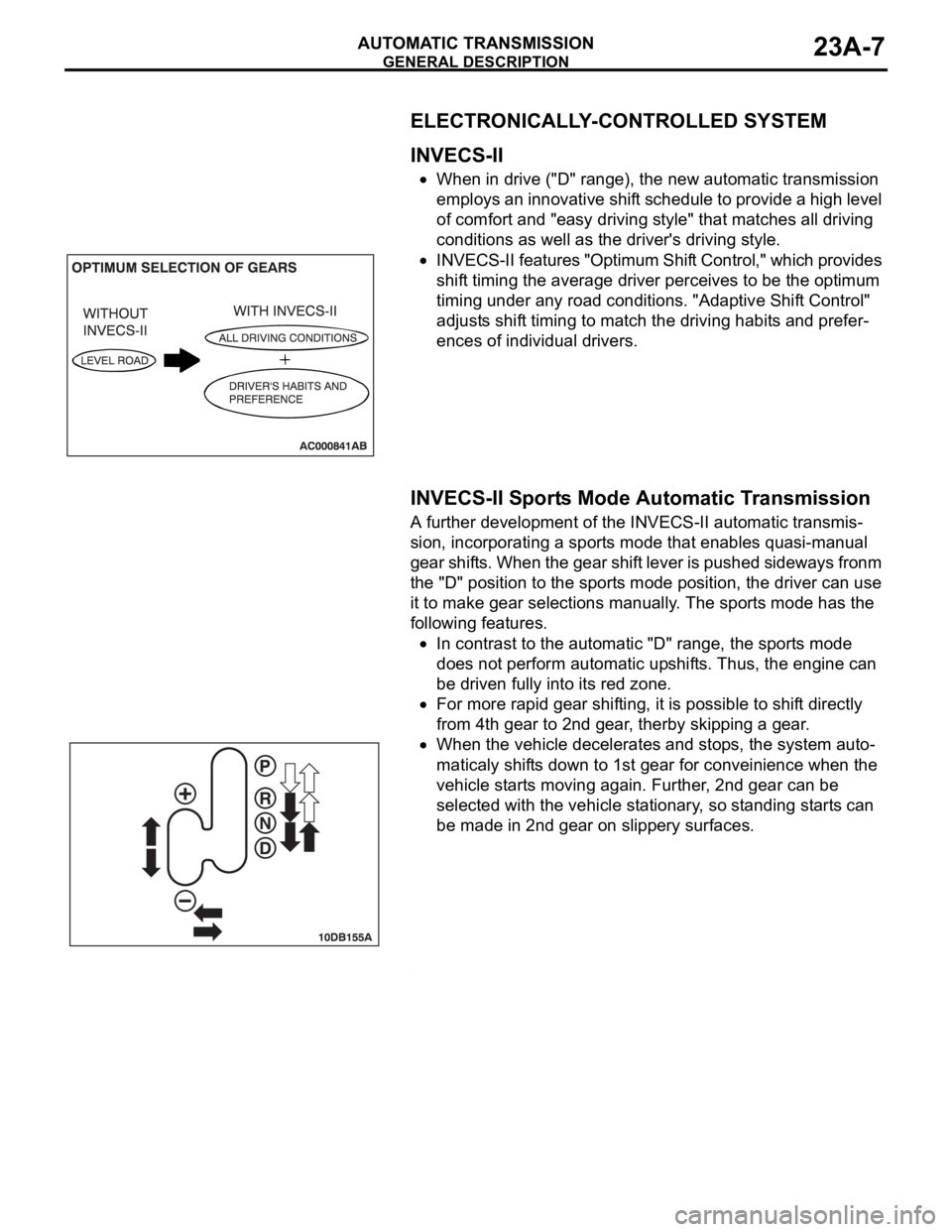
INVECS-II features "Optimum Shift Control," which provides
shift timing the average driver perceives to be the optimum
timing under any road conditions. "Adaptive Shift Control"
adjusts shift timing to match the driving habits and prefer-
ences of individual drivers.
.
INVECS-II Sports Mode Automatic Transmission
A further development of the INVECS-II automatic transmis-
sion, incorporating a sports mode that enables quasi-manual
gear shifts. When the gear shift lever is pushed sideways fronm
the "D" position to the sports mode position, the driver can use
it to make gear selections manually. The sports mode has the
following features.
In contrast to the automatic "D" range, the sports mode
does not perform automatic upshifts. Thus, the engine can
be driven fully into its red zone.
For more rapid gear shifting, it is possible to shift directly
from 4th gear to 2nd gear, therby skipping a gear.
When the vehicle decelerates and stops, the system auto-
maticaly shifts down to 1st gear for conveinience when the
vehicle starts moving again. Further, 2nd gear can be
selected with the vehicle stationary, so standing starts can
be made in 2nd gear on slippery surfaces.
.
Page 1467 of 1500
GENERAL DESCRIPTION
AUTOMATIC TRANSMISSION23A-8
FEATURES
OPTIMUM SHIFT CONTROL
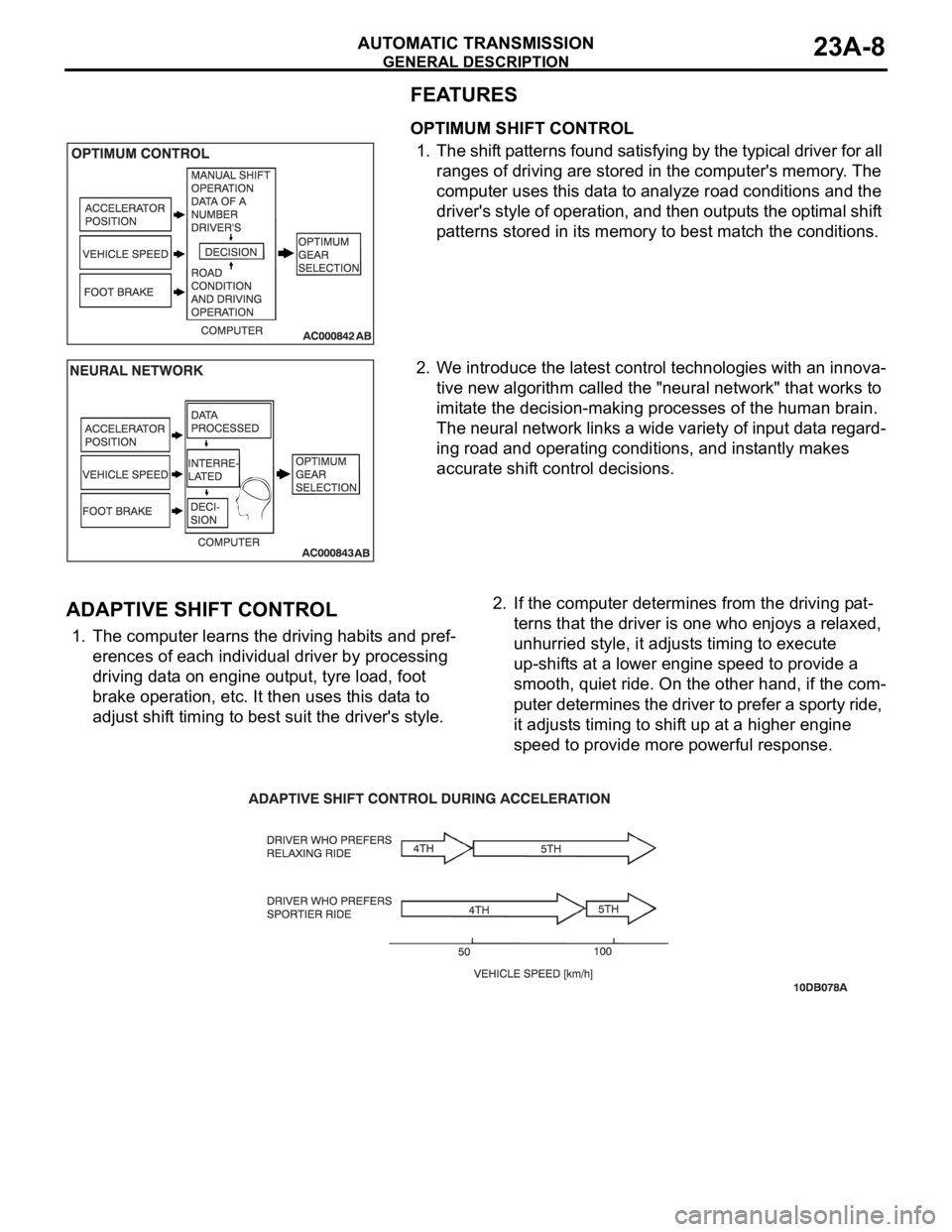
1. The shift patterns found satisfying by the typical driver for all
ranges of driving are stored in the computer's memory. The
computer uses this data to analyze road conditions and the
driver's style of operation, and then outputs the optimal shift
patterns stored in its memory to best match the conditions.
2. We introduce the latest control technologies with an innova-
tive new algorithm called the "neural network" that works to
imitate the decision-making processes of the human brain.
The neural network links a wide variety of input data regard-
ing road and operating conditions, and instantly makes
accurate shift control decisions.
.
ADAPTIVE SHIFT CONTROL
1. The computer learns the driving habits and pref-
erences of each individual driver by processing
driving data on engine output, tyre load, foot
brake operation, etc. It then uses this data to
adjust shift timing to best suit the driver's style.2. If the computer determines from the driving pat-
terns that the driver is one who enjoys a relaxed,
unhurried style, it adjusts timing to execute
up-shifts at a lower engine speed to provide a
smooth, quiet ride. On the other hand, if the com-
puter determines the driver to prefer a sporty ride,
it adjusts timing to shift up at a higher engine
speed to provide more powerful response.
.
Page 1468 of 1500
GENERAL DESCRIPTION
AUTOMATIC TRANSMISSION23A-9
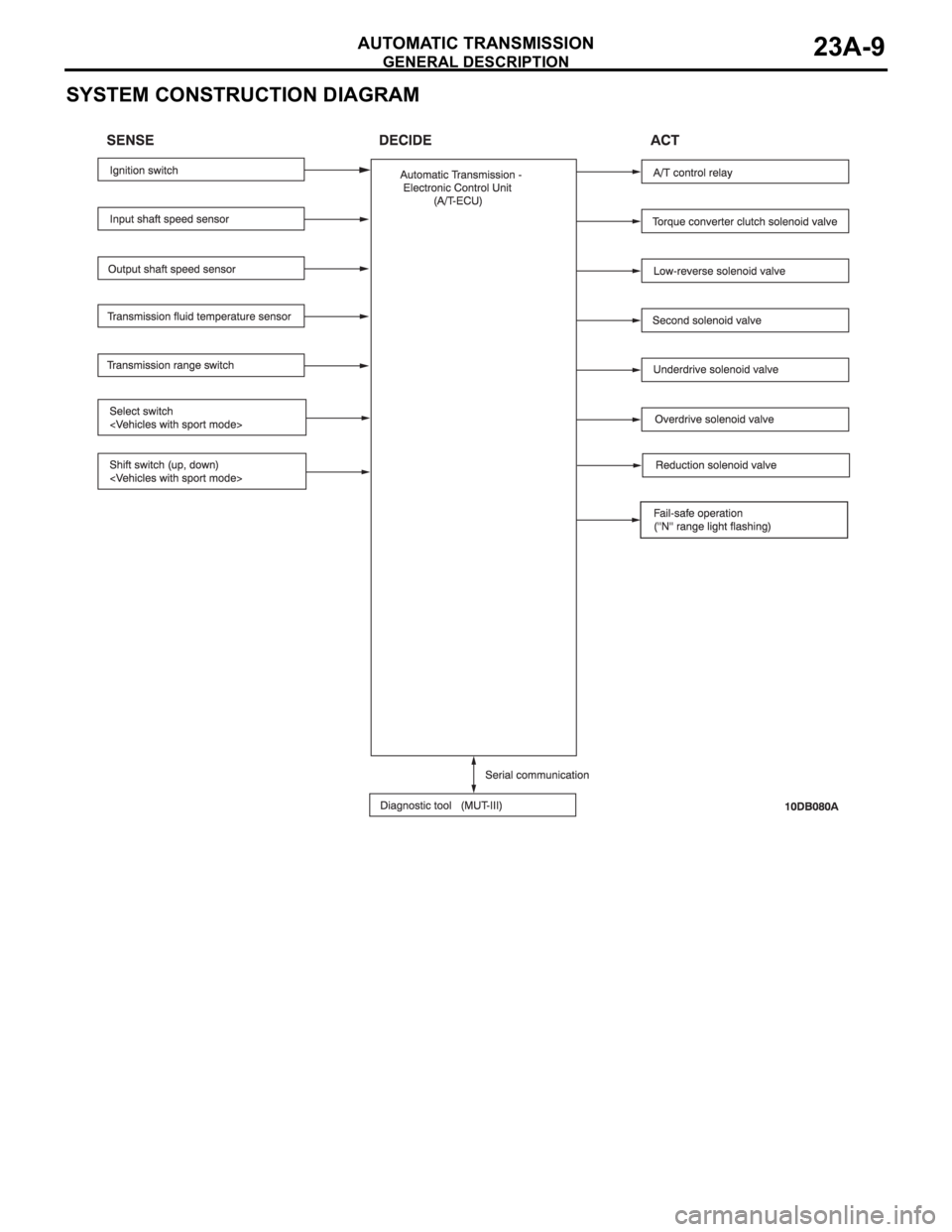
SYSTEM CONSTRUCTION DIAGRAM
Page 1469 of 1500
GENERAL DESCRIPTION
AUTOMATIC TRANSMISSION23A-10
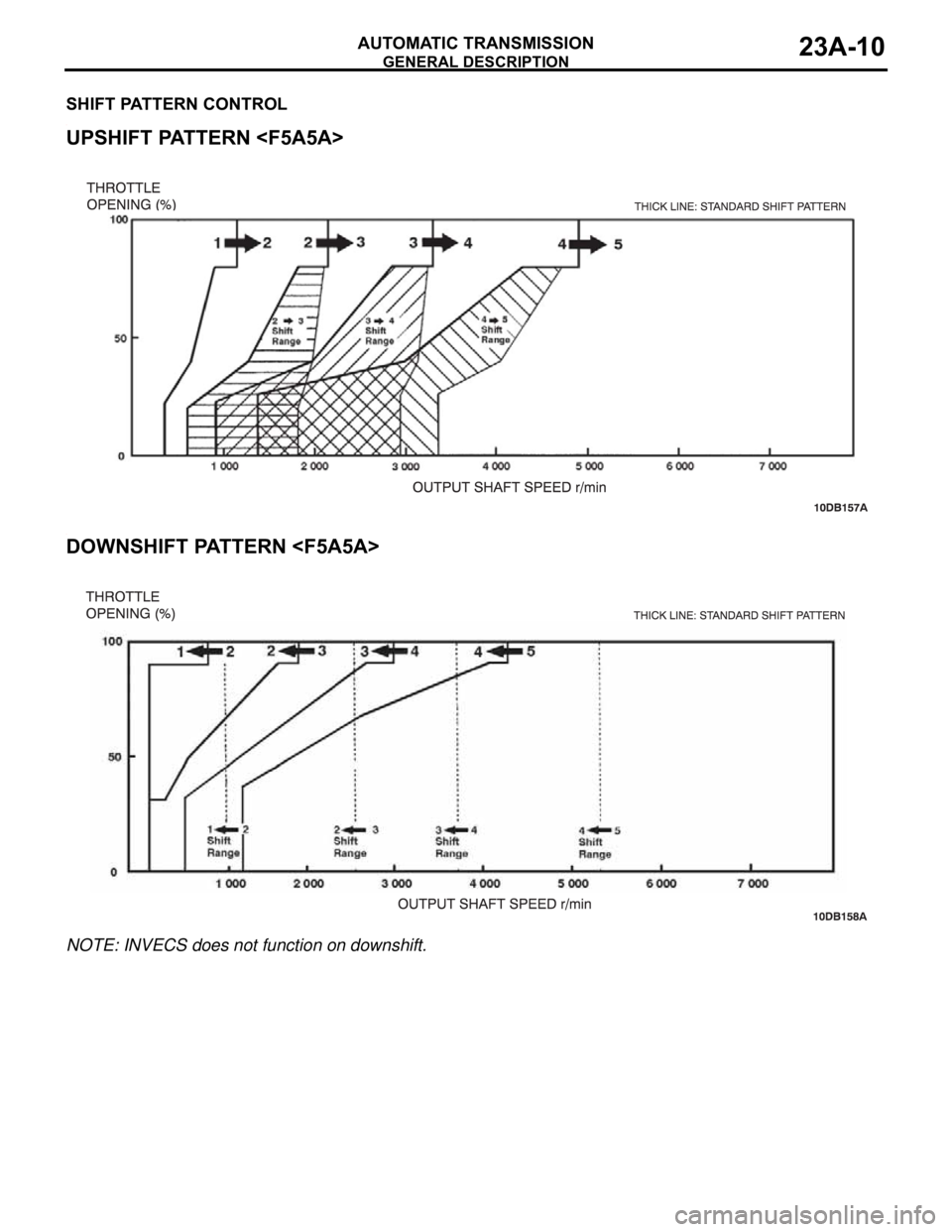
SHIFT PATTERN CONTROL.
UPSHIFT PATTERN
.
DOWNSHIFT PATTERN
NOTE: INVECS does not function on downshift.
Page 1470 of 1500
GENERAL DESCRIPTION
AUTOMATIC TRANSMISSION23A-11
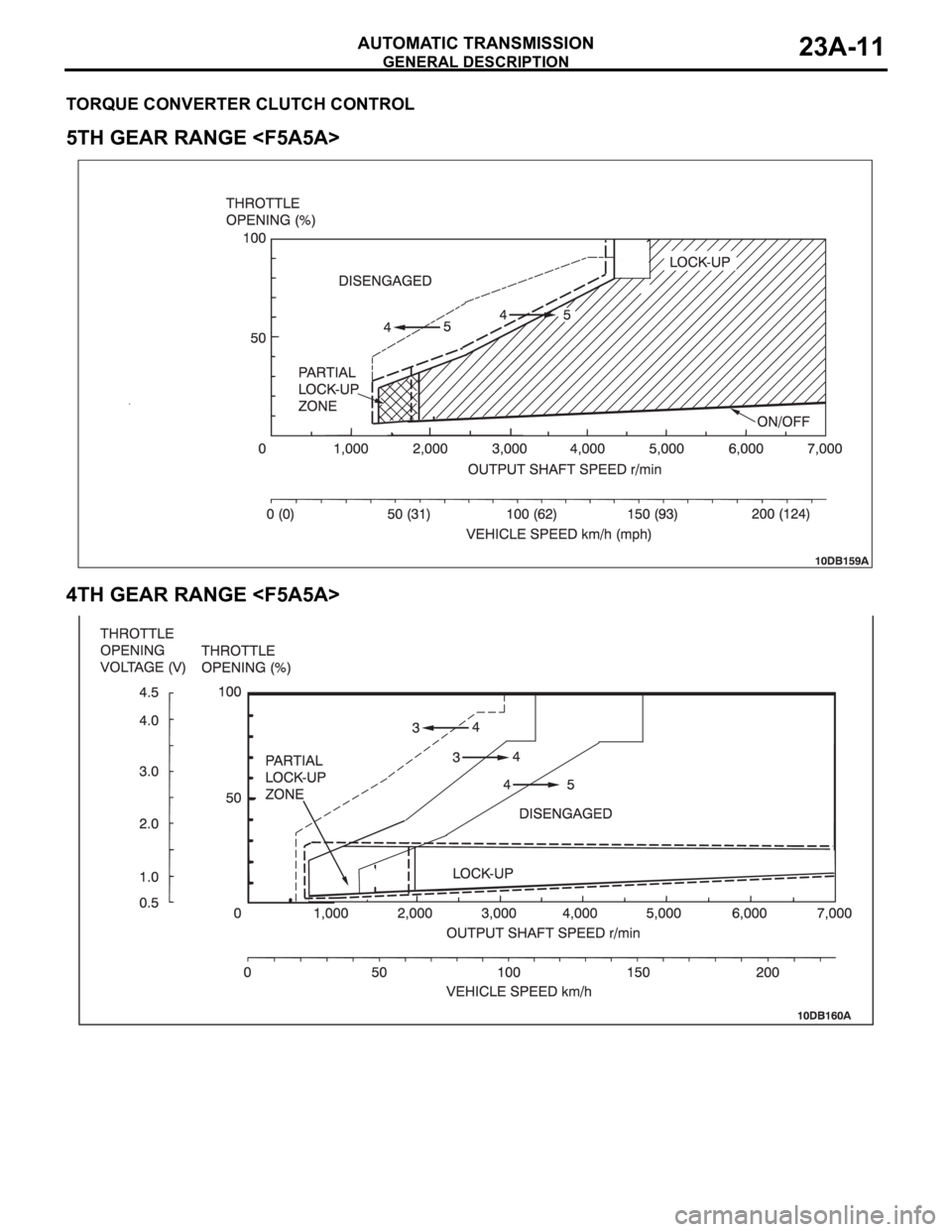
TORQUE CONVERTER CLUTCH CONTROL.
5TH GEAR RANGE
.
4TH GEAR RANGE
Page 1471 of 1500
AUTOMATIC TRANSMISSION DIAGNOSIS
AUTOMATIC TRANSMISSION23A-12
AUTOMATIC TRANSMISSION DIAGNOSIS
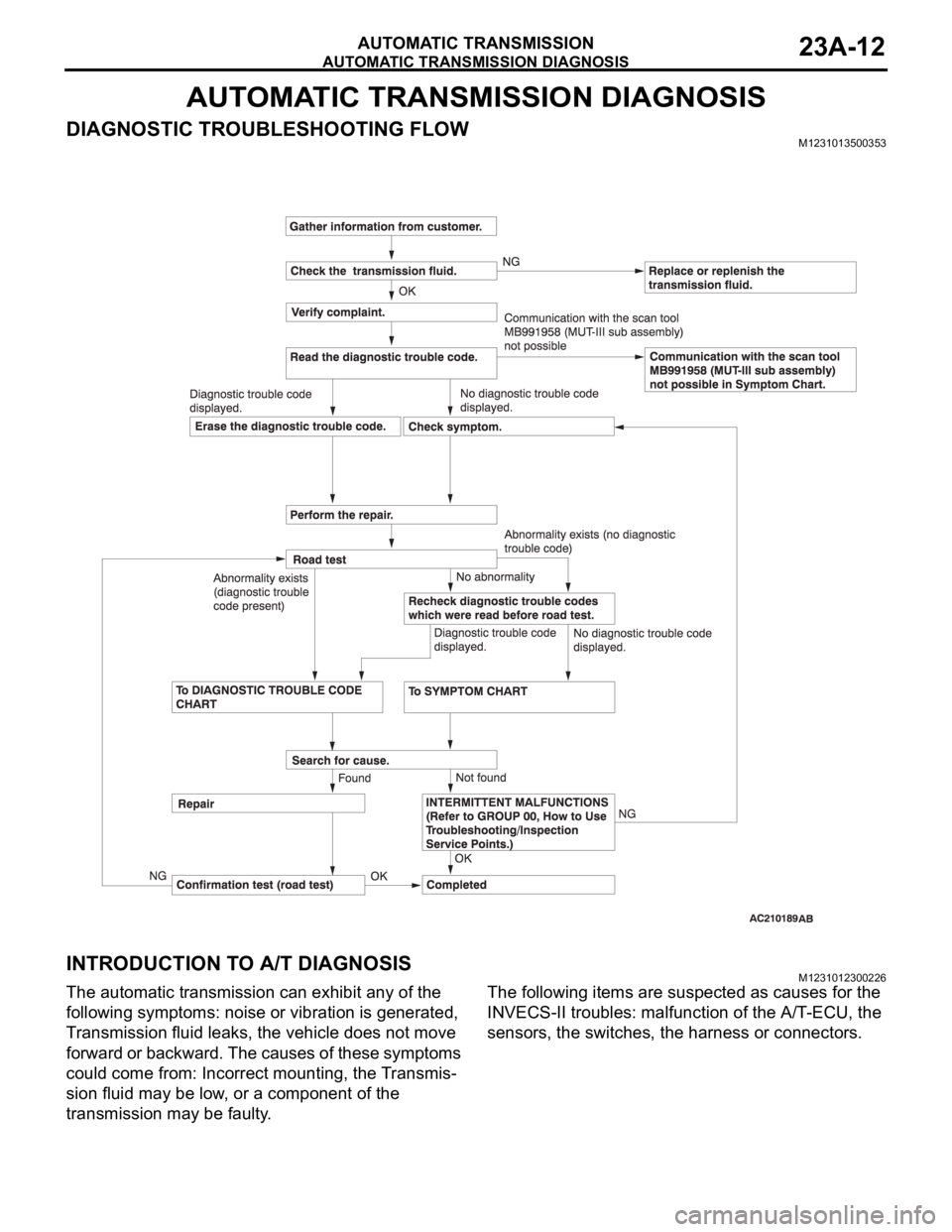
DIAGNOSTIC TROUBLESHOOTING FLOWM1231013500353
INTRODUCTION TO A/T DIAGNOSISM1231012300226
The automatic transmission can exhibit any of the
following symptoms: noise or vibration is generated,
Transmission fluid leaks, the vehicle does not move
forward or backward. The causes of these symptoms
could come from: Incorrect mounting, the Transmis-
sion fluid may be low, or a component of the
transmission may be faulty. The following items are suspected as causes for the
INVECS-II troubles: malfunction of the A/T-ECU, the
sensors, the switches, the harness or connectors.
Page 1472 of 1500
AUTOMATIC TRANSMISSION DIAGNOSIS
AUTOMATIC TRANSMISSION23A-13
A/T DIAGNOSTIC TROUBLESHOOTING STRATEGYM1231007600339
Use these steps to plan your diagnostic strategy. If
you follow them carefully, you will find most A/T mal-
functions.
1. Gather as much information as possible about the
complaint from the customer.
2. Verify that the condition described by the
customer exists.
3. Check the vehicle for any A/T Diagnostic Trouble
Codes (DTCs).
4. If you can not verify the condition and there are no
DTCs, the malfunction is intermittent. For
information on how to cope with intermittent
malfunctions, refer to GROUP 00, How to Use
Troubleshooting/Inspection Service Points
How
to Cope with Intermittent Malfunction P.00-14.
5. If you can verify the condition but there are no
DTCs, or the system can not communicate with
diagnostic tool, refer to the Symptom Chart
P.23A-35.6. If there is a DTC, record the number of the code,
then erase the code from memory using
diagnostic tool.
7. Reconfirm the symptom with a Road Test.
8. If a DTC is set again, go to the Inspection Chart
for Diagnostic Trouble Codes.
9. If a DTC is not set again, the malfunction is
intermittent. For information on how to cope with
intermittent malfunctions, refer to GROUP 00,
How to Use Troubleshooting/Inspection Service
Points
How to Cope with Intermittent
Malfunction P.00-14.
10.After repairs are completed, conduct a Road Test
duplicating the complaint conditions to confirm the
malfunction has been eliminated.
DIAGNOSTIC FUNCTIONM1231022500135
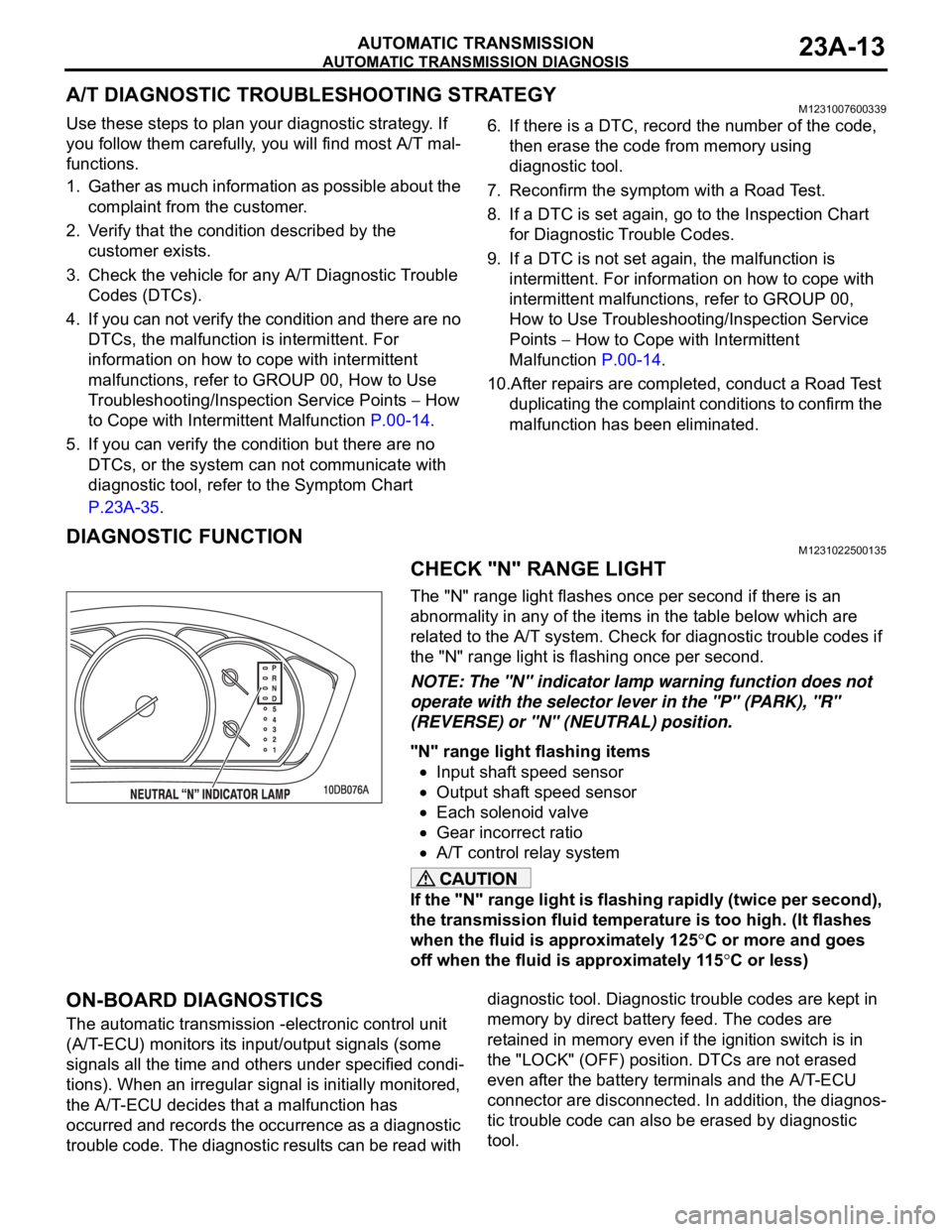
CHECK "N" RANGE LIGHT
The "N" range light flashes once per second if there is an
abnormality in any of the items in the table below which are
related to the A/T system. Check for diagnostic trouble codes if
the "N" range light is flashing once per second.
NOTE: The "N" indicator lamp warning function does not
operate with the selector lever in the "P" (PARK), "R"
(REVERSE) or "N" (NEUTRAL) position.
"N" range light flashing items
Input shaft speed sensor
Output shaft speed sensor
Each solenoid valve
Gear incorrect ratio
A/T control relay system
If the "N" range light is flashing rapidly (twice per second),
the transmission fluid temperature is too high. (It flashes
when the fluid is approximately 125
C or more and goes
off when the fluid is approximately 115
C or less)
ON-BOARD DIAGNOSTICS
The automatic transmission -electronic control unit
(A/T-ECU) monitors its input/output signals (some
signals all the time and others under specified condi-
tions). When an irregular signal is initially monitored,
the A/T-ECU decides that a malfunction has
occurred and records the occurrence as a diagnostic
trouble code. The diagnostic results can be read with diagnostic tool. Diagnostic trouble codes are kept in
memory by direct battery feed. The codes are
retained in memory even if the ignition switch is in
the "LOCK" (OFF) position. DTCs are not erased
even after the battery terminals and the A/T-ECU
connector are disconnected. In addition, the diagnos-
tic trouble code can also be erased by diagnostic
tool.
Page 1473 of 1500
AUTOMATIC TRANSMISSION DIAGNOSIS
AUTOMATIC TRANSMISSION23A-14
NOTE: If a sensor is disconnected when the ignition
switch is in the "ON" position, a diagnostic trouble
code is stored in memory. In this case, erase the
DTC using diagnostic tool.The diagnostic items are displayed in numeric order.
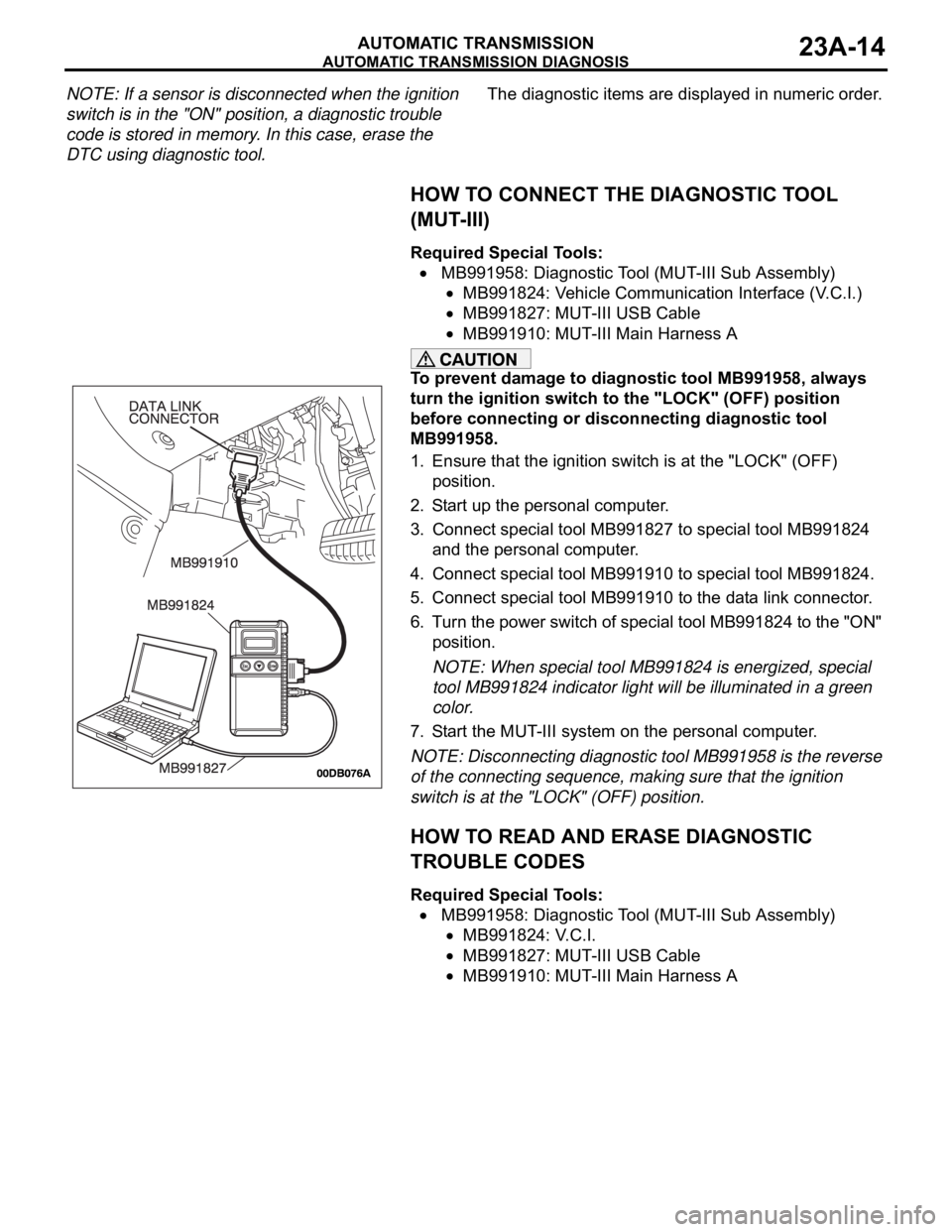
HOW TO CONNECT THE DIAGNOSTIC TOOL
(MUT-III)
Required Special Tools:
MB991958: Diagnostic Tool (MUT-III Sub Assembly)
MB991824: Vehicle Communication Interface (V.C.I.)
MB991827: MUT-III USB Cable
MB991910: MUT-III Main Harness A
To prevent damage to diagnostic tool MB991958, always
turn the ignition switch to the "LOCK" (OFF) position
before connecting or disconnecting diagnostic tool
MB991958.
1. Ensure that the ignition switch is at the "LOCK" (OFF)
position.
2. Start up the personal computer.
3. Connect special tool MB991827 to special tool MB991824
and the personal computer.
4. Connect special tool MB991910 to special tool MB991824.
5. Connect special tool MB991910 to the data link connector.
6. Turn the power switch of special tool MB991824 to the "ON"
position.
NOTE: When special tool MB991824 is energized, special
tool MB991824 indicator light will be illuminated in a green
color.
7. Start the MUT-III system on the personal computer.
NOTE: Disconnecting diagnostic tool MB991958 is the reverse
of the connecting sequence, making sure that the ignition
switch is at the "LOCK" (OFF) position.
HOW TO READ AND ERASE DIAGNOSTIC
TROUBLE CODES
Required Special Tools:
MB991958: Diagnostic Tool (MUT-III Sub Assembly)
MB991824: V.C.I.
MB991827: MUT-III USB Cable
MB991910: MUT-III Main Harness A
Page 1474 of 1500
AUTOMATIC TRANSMISSION DIAGNOSIS
AUTOMATIC TRANSMISSION23A-15
To prevent damage to diagnostic tool MB991958, always
turn the ignition switch to the "LOCK" (OFF) position
before connecting or disconnecting diagnostic tool
MB991958.
NOTE: If the battery voltage is low, diagnostic trouble codes
will not be set. Check the battery if diagnostic tool
MB991958 does not display.
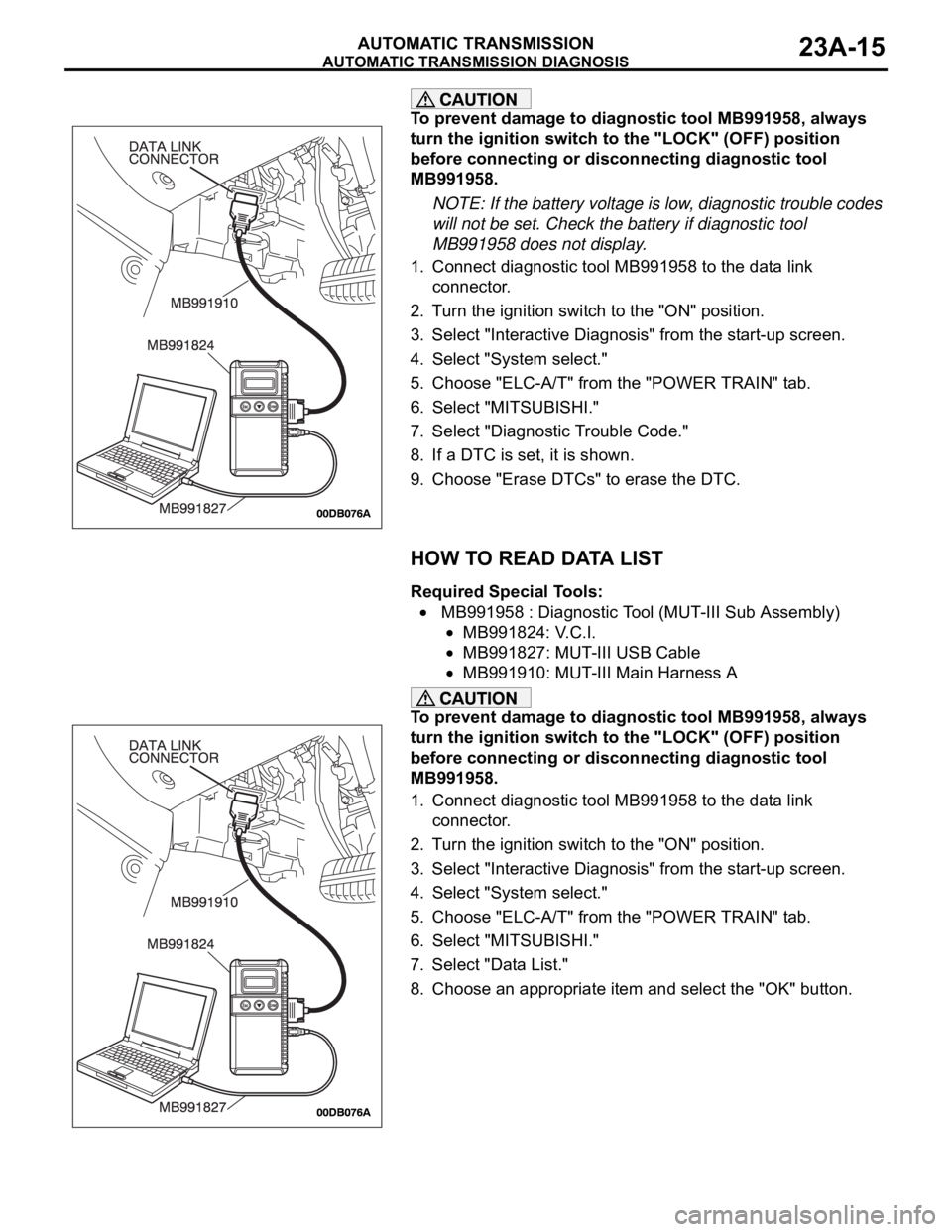
1. Connect diagnostic tool MB991958 to the data link
connector.
2. Turn the ignition switch to the "ON" position.
3. Select "Interactive Diagnosis" from the start-up screen.
4. Select "System select."
5. Choose "ELC-A/T" from the "POWER TRAIN" tab.
6. Select "MITSUBISHI."
7. Select "Diagnostic Trouble Code."
8. If a DTC is set, it is shown.
9. Choose "Erase DTCs" to erase the DTC.
HOW TO READ DATA LIST
Required Special Tools:
MB991958 : Diagnostic Tool (MUT-III Sub Assembly)
MB991824: V.C.I.
MB991827: MUT-III USB Cable
MB991910: MUT-III Main Harness A
To prevent damage to diagnostic tool MB991958, always
turn the ignition switch to the "LOCK" (OFF) position
before connecting or disconnecting diagnostic tool
MB991958.
1. Connect diagnostic tool MB991958 to the data link
connector.
2. Turn the ignition switch to the "ON" position.
3. Select "Interactive Diagnosis" from the start-up screen.
4. Select "System select."
5. Choose "ELC-A/T" from the "POWER TRAIN" tab.
6. Select "MITSUBISHI."
7. Select "Data List."
8. Choose an appropriate item and select the "OK" button.