ESP MITSUBISHI ASX 2009 1.G User Guide
[x] Cancel search | Manufacturer: MITSUBISHI, Model Year: 2009, Model line: ASX, Model: MITSUBISHI ASX 2009 1.GPages: 368, PDF Size: 8.13 MB
Page 87 of 368
Deployment of front airbags and driv-
er’s knee airbag
E00407501644
The front airbags and driver’s knee airbag ARE
DESIGNED TO DEPLOY when…
The
front airbags and driver’s knee airbag are de-
signed to deploy when the vehicle suffers a moder-
ate to severe frontal impact. Examples of some typ-
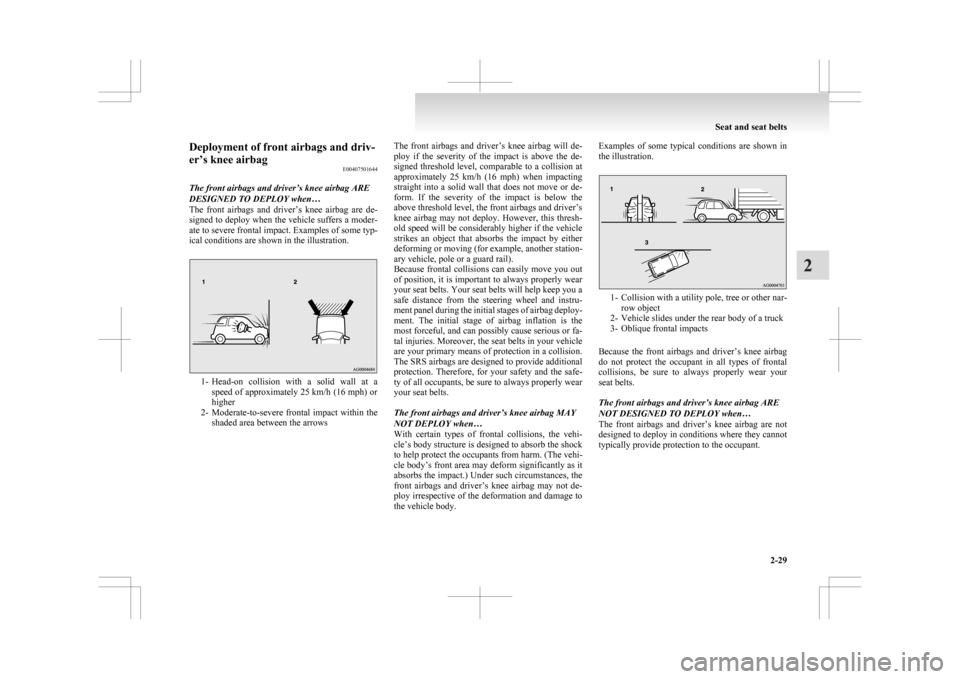
ical conditions are shown in the illustration. 1- Head-on
collision with a solid wall at a
speed of approximately 25 km/h (16 mph) or
higher
2- Moderate-to-severe frontal impact within the shaded area between the arrows The front airbags and driver’s knee airbag will de-
ploy
if the severity of the impact is above the de-
signed threshold level, comparable to a collision at
approximately 25 km/h (16 mph) when impacting
straight into a solid wall that does not move or de-
form. If the severity of the impact is below the
above threshold level, the front airbags and driver’s
knee airbag may not deploy. However, this thresh-
old speed will be considerably higher if the vehicle
strikes an object that absorbs the impact by either
deforming or moving (for example, another station-
ary vehicle, pole or a guard rail).
Because frontal collisions can easily move you out
of position, it is important to always properly wear
your seat belts. Your seat belts will help keep you a
safe distance from the steering wheel and instru-
ment panel during the initial stages of airbag deploy-
ment. The initial stage of airbag inflation is the
most forceful, and can possibly cause serious or fa-
tal injuries. Moreover, the seat belts in your vehicle
are your primary means of protection in a collision.
The SRS airbags are designed to provide additional
protection. Therefore, for your safety and the safe-
ty of all occupants, be sure to always properly wear
your seat belts.
The front airbags and driver’s knee airbag MAY
NOT DEPLOY when…
With certain types of frontal collisions, the vehi-
cle’s body structure is designed to absorb the shock
to help protect the occupants from harm. (The vehi-
cle body’s front area may deform significantly as it
absorbs the impact.) Under such circumstances, the
front airbags and driver’s knee airbag may not de-
ploy irrespective of the deformation and damage to
the vehicle body. Examples of some typical conditions are shown in
the illustration.
1- Collision
with a utility pole, tree or other nar-
row object
2- Vehicle slides under the rear body of a truck
3- Oblique frontal impacts
Because the front airbags and driver’s knee airbag
do not protect the occupant in all types of frontal
collisions, be sure to always properly wear your
seat belts.
The front airbags and driver’s knee airbag ARE
NOT DESIGNED TO DEPLOY when…
The front airbags and driver’s knee airbag are not
designed to deploy in conditions where they cannot
typically provide protection to the occupant. Seat and seat belts
2-29 2
Page 90 of 368
Deployment of side airbags and cur-
tain airbags
E00407701415
The side airbags and curtain airbags ARE DE-
SIGNED TO DEPLOY when…
The
side airbags and curtain airbags are designed
to deploy when the vehicle suffers a moderate-to-
severe side impact to the middle of the passenger
compartment.
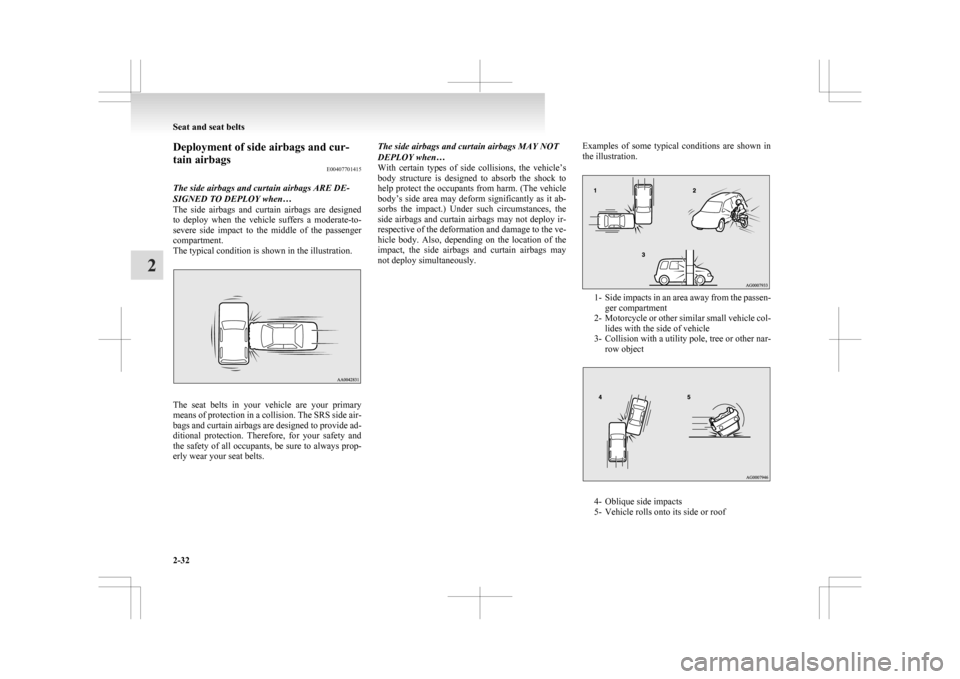
The typical condition is shown in the illustration. The seat belts in your vehicle are your primary
means
of protection in a collision. The SRS side air-
bags and curtain airbags are designed to provide ad-
ditional protection. Therefore, for your safety and
the safety of all occupants, be sure to always prop-
erly wear your seat belts. The side airbags and curtain airbags MAY NOT
DEPLOY when…
With
certain types of side collisions, the vehicle’s
body structure is designed to absorb the shock to
help protect the occupants from harm. (The vehicle
body’s side area may deform significantly as it ab-
sorbs the impact.) Under such circumstances, the
side airbags and curtain airbags may not deploy ir-
respective of the deformation and damage to the ve-
hicle body. Also, depending on the location of the
impact, the side airbags and curtain airbags may
not deploy simultaneously. Examples of some typical conditions are shown in
the illustration. 1- Side
impacts in an area away from the passen-
ger compartment
2- Motorcycle or other similar small vehicle col- lides with the side of vehicle
3- Collision with a utility pole, tree or other nar- row object 4- Oblique side impacts
5-
Vehicle rolls onto its side or roof Seat and seat belts
2-32
2
Page 110 of 368
2. This informs you that a periodic inspection is
due. We recommend you to consult a
MITSUBISHI MOTORS Authorized Service
Point.
At that time, when the ignition switch is
switched from the “LOCK” position to the
“ON” position or the operation mode is
changed from OFF to ON, the warning dis-
play is displayed for a few seconds on the in-
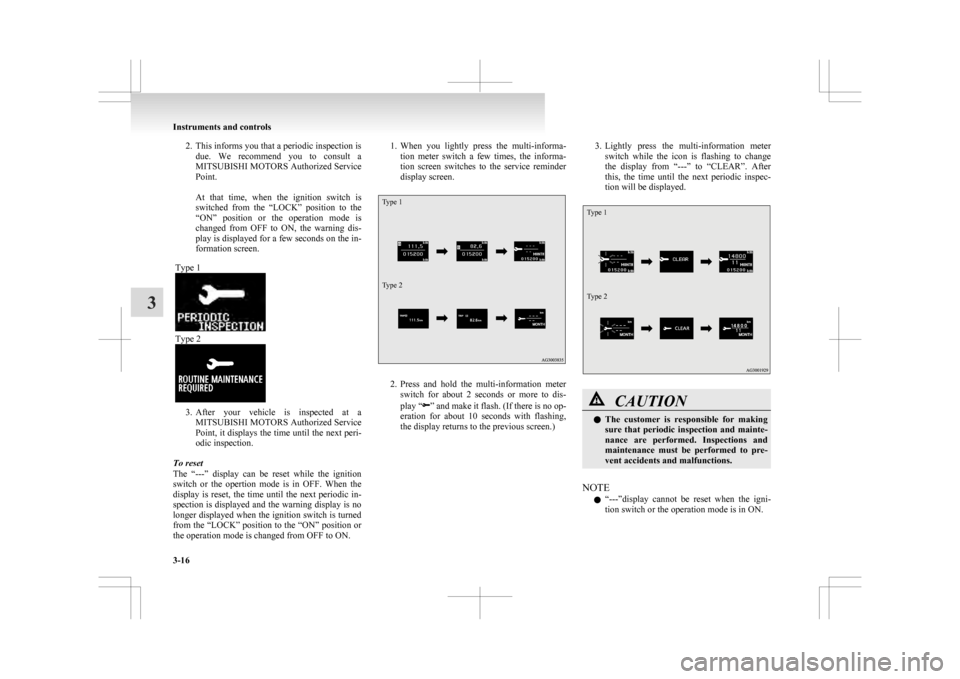
formation screen.
Type 1 Type 2
3. After
your vehicle is inspected at a
MITSUBISHI MOTORS Authorized Service
Point, it displays the time until the next peri-
odic inspection.
To reset
The “---” display can be reset while the ignition
switch or the opertion mode is in OFF. When the
display is reset, the time until the next periodic in-
spection is displayed and the warning display is no
longer displayed when the ignition switch is turned
from the “LOCK” position to the “ON” position or
the operation mode is changed from OFF to ON. 1. When
you lightly press the multi-informa-
tion meter switch a few times, the informa-
tion screen switches to the service reminder
display screen.
Type 1
Type 2 2. Press
and hold the multi-information meter
switch for about 2 seconds or more to dis-
play “ ”
and make it flash. (If there is no op-
eration for about 10 seconds with flashing,
the display returns to the previous screen.) 3. Lightly
press the multi-information meter
switch while the icon is flashing to change
the display from “---” to “CLEAR”. After
this, the time until the next periodic inspec-
tion will be displayed.
Type 1
Type 2 CAUTION
l
The
customer is responsible for making
sure that periodic inspection and mainte-
nance are performed. Inspections and
maintenance must be performed to pre-
vent accidents and malfunctions.
NOTE l “---”display
cannot be reset when the igni-
tion switch or the operation mode is in ON. Instruments and controls
3-16
3
Page 136 of 368
CAUTION
l
If the lamp illuminates while
the engine is running, avoid
driving at high speeds and have
the system inspected by a
MITSUBISHI MOTORS Au-
thorized Service Point as soon
as possible.
Accelerator pedal and brake
pedal response may be negative-
ly influenced under these condi-
tions.
NOTE l The
engine electronic control mod-
ule accommodating the onboard di-
agnostic system has various fault
data (especially about the exhaust
emission) stored. Charge warning lamp
E00502701192
This
lamp illuminates when the ignition
switch is turned “ON” or the operation
mode is put in ON, and goes off after the
engine has started.
A warning is also displayed on the multi-
information display. CAUTION
l
If
it illuminates while the en-
gine is running, there is a prob-
lem in the charging system. Im-
mediately park your vehicle in
a safe place and we recommend
you to have it checked. Information screen display
E00524600051
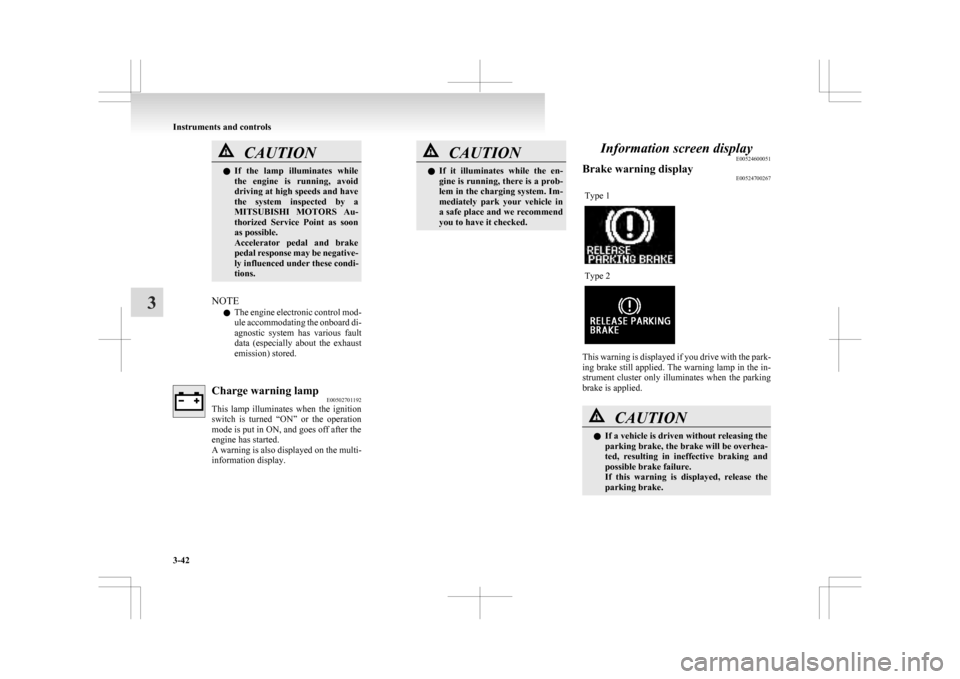
Brake warning display E00524700267
Type 1 Type 2
This warning is displayed if you drive with the park-
ing
brake still applied. The warning lamp in the in-
strument cluster only illuminates when the parking
brake is applied. CAUTION
l
If a vehicle is driven without releasing the
parking
brake, the brake will be overhea-
ted, resulting in ineffective braking and
possible brake failure.
If this warning is displayed, release the
parking brake. Instruments and controls
3-42
3
Page 147 of 368
If the blades are frozen to the windscreen or rear
window,
do not operate the wipers until the ice has
melted and the blades are freed, otherwise the wip-
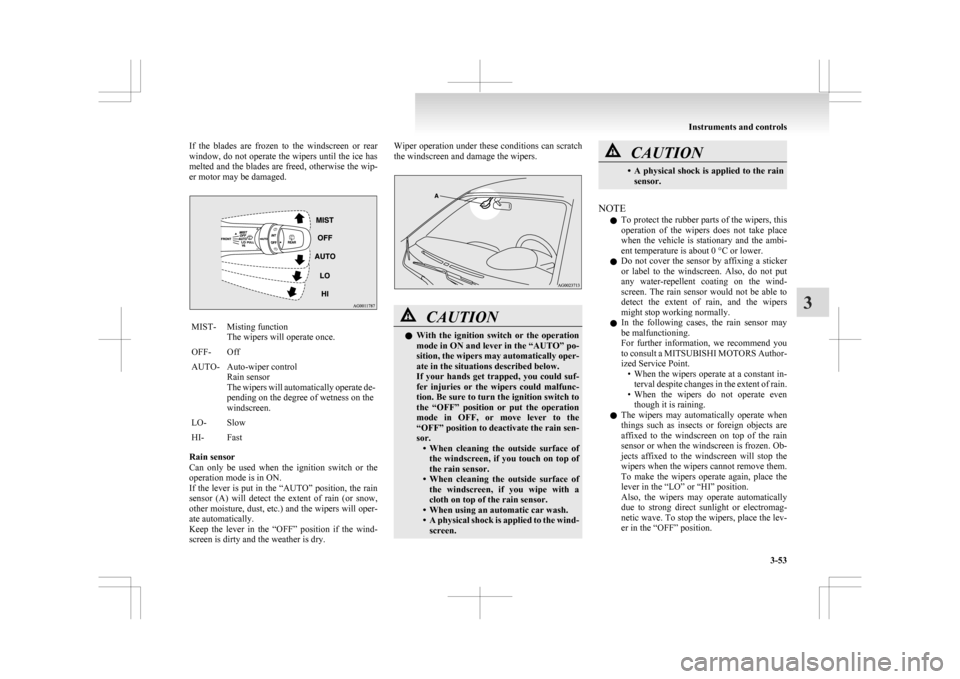
er motor may be damaged. MIST- Misting function
The wipers will operate once.
OFF- Off
AUTO- Auto-wiper control Rain sensor
The
wipers will automatically operate de-
pending on the degree of wetness on the
windscreen.
LO- Slow
HI- Fast
Rain sensor
Can
only be used when the ignition switch or the
operation mode is in ON.
If the lever is put in the “AUTO” position, the rain
sensor (A) will detect the extent of rain (or snow,
other moisture, dust, etc.) and the wipers will oper-
ate automatically.
Keep the lever in the “OFF” position if the wind-
screen is dirty and the weather is dry. Wiper operation under these conditions can scratch
the windscreen and damage the wipers.
CAUTION
l
With
the ignition switch or the operation
mode in ON and lever in the “AUTO” po-
sition, the wipers may automatically oper-
ate in the situations described below.
If your hands get trapped, you could suf-
fer injuries or the wipers could malfunc-
tion. Be sure to turn the ignition switch to
the “OFF” position or put the operation
mode in OFF, or move lever to the
“OFF” position to deactivate the rain sen-
sor. • When cleaning the outside surface ofthe windscreen, if you touch on top of
the rain sensor.
• When cleaning the outside surface of the windscreen, if you wipe with a
cloth on top of the rain sensor.
• When using an automatic car wash.
• A physical shock is applied to the wind- screen. CAUTION
• A
physical shock is applied to the rain
sensor.
NOTE l To
protect the rubber parts of the wipers, this
operation of the wipers does not take place
when the vehicle is stationary and the ambi-
ent temperature is about 0 °C or lower.
l Do not cover the sensor by affixing a sticker
or label to the windscreen. Also, do not put
any water-repellent coating on the wind-
screen. The rain sensor would not be able to
detect the extent of rain, and the wipers
might stop working normally.
l In the following cases, the rain sensor may
be malfunctioning.
For further information, we recommend you
to consult a MITSUBISHI MOTORS Author-
ized Service Point.
• When the wipers operate at a constant in-terval despite changes in the extent of rain.
• When the wipers do not operate even though it is raining.
l The wipers may automatically operate when
things such as insects or foreign objects are
affixed to the windscreen on top of the rain
sensor or when the windscreen is frozen. Ob-
jects affixed to the windscreen will stop the
wipers when the wipers cannot remove them.
To make the wipers operate again, place the
lever in the “LO” or “HI” position.
Also, the wipers may operate automatically
due to strong direct sunlight or electromag-
netic wave. To stop the wipers, place the lev-
er in the “OFF” position. Instruments and controls
3-53 3
Page 154 of 368
Economical driving
E00600101076
For
economical driving, there are some technical re-
quirements that have to be met. The prerequisite
for low fuel consumption is a properly adjusted en-
gine. In order to achieve longer life of the vehicle
and the most economical operation, we recommend
you to have the vehicle checked at regular intervals
in accordance with the service standards.
Fuel economy and generation of exhaust gas and
noise are highly influenced by personal driving hab-
its as well as the particular operating conditions.
The following points should be observed in order
to minimize wear of brakes, tyres and engine as
well as to reduce environmental pollution.
Starting the engine
Avoid sudden acceleration and sudden starts, as
they will increase fuel consumption.
Shifting
Shift only at an appropriate speed and engine
speed. Always use the highest shift position possible.
Selecting the 4WD drive mode (4WD
vehicles)
The drive mode-selector should be set to “2WD”
when driving on normal roads and express ways to
obtain best possible fuel economy.
City traffic
Frequent starting and stopping increases the aver-
age fuel consumption. Use roads with smooth traf-
fic flow whenever possible. When driving on con-
gested roads, avoid use of a low shift position at
high engine speeds. Idling
The
vehicle consumes fuel even during idling.
Avoid extended idling whenever possible.
Speed
At higher vehicle speed, more fuel is consumed.
Avoid driving at full speed. Even a slight release of
the accelerator pedal will save a significant amount
of fuel.
Tyre inflation pressure
Check the tyre inflation pressures at regular inter-
vals. Low tyre inflation pressure increases road re-
sistance and fuel consumption. In addition, low
tyre pressures adversely affect tyre wear and driv-
ing stability.
Cargo loads
Do not drive with unnecessary articles in the lug-
gage compartment. Especially during city driving
where frequent starting and stopping is necessary,
the increased weight of the vehicle will greatly af-
fect fuel consumption. Also avoid driving with un-
necessary luggage or carriers, etc., on the roof; the
increased air resistance will increase fuel consump-
tion.
Cold engine starting
Starting of a cold engine consumes more fuel.
Unnecessary fuel consumption is also caused by
keeping a hot engine running. After the engine is
started, commence driving as soon as possible.
Air conditioning
The use of the air conditioning will increase the
fuel consumption. Driving, alcohol and drugs
E00600200070
Driving
after drinking alcohol is one of the most fre-
quent causes of accidents.
Your driving ability can be seriously impaired even
with blood alcohol levels far below the legal mini-
mum. If you have been drinking, don’t drive. Ride
with a designated non-drinking driver, call a cab or
a friend, or use public transportation.
Drinking coffee or taking a cold shower will not
make you sober.
Similarly, prescription and nonprescription drugs af-
fect your alertness, perception and reaction time.
Consult with your doctor or pharmacist before driv-
ing while under the influence of any of these medi-
cations. WARNING
l NEVER DRINK AND DRIVE.
Your
perceptions are less accurate, your
reflexes are slower and your judgment is
impaired. Starting and driving
4-02
4
Page 179 of 368
Sports mode display
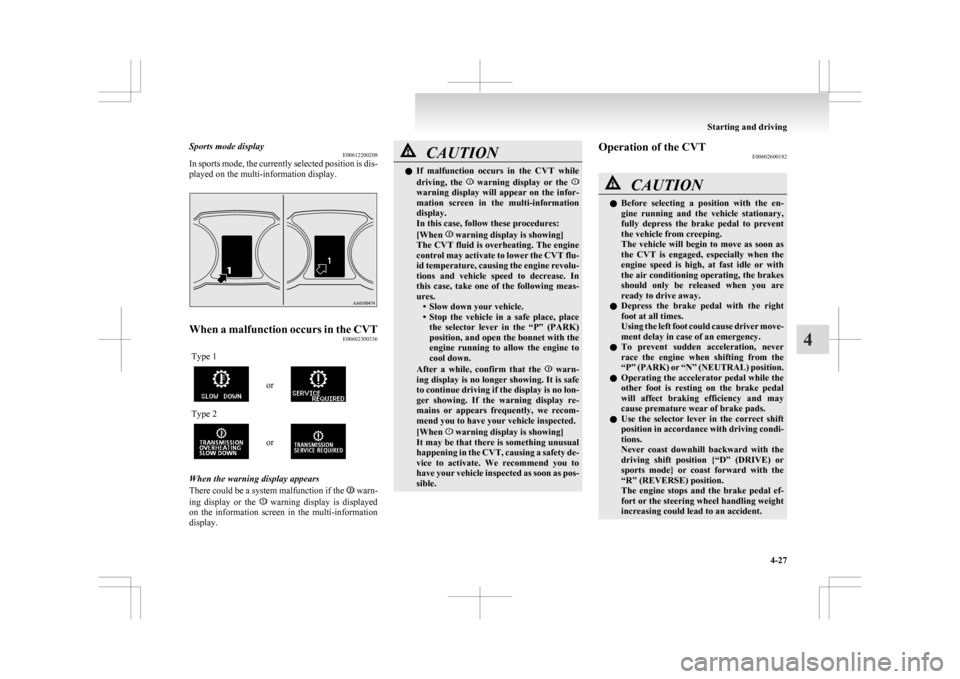
E00612200208
In
sports mode, the currently selected position is dis-
played on the multi-information display. When a malfunction occurs in the CVT
E00602300336
Type 1 or
Type 2
or
When the warning display appears
There
could be a system malfunction if the warn-
ing
display or the warning display is displayed
on
the information screen in the multi-information
display. CAUTION
l
If
malfunction occurs in the CVT while
driving, the warning display or the
warning display will appear on the infor-
mation
screen in the multi-information
display.
In this case, follow these procedures:
[When warning display is showing]
The
CVT fluid is overheating. The engine
control may activate to lower the CVT flu-
id temperature, causing the engine revolu-
tions and vehicle speed to decrease. In
this case, take one of the following meas-
ures. • Slow down your vehicle.
• Stop the vehicle in a safe place, placethe selector lever in the “P” (PARK)
position, and open the bonnet with the
engine running to allow the engine to
cool down.
After a while, confirm that the warn-
ing
display is no longer showing. It is safe
to continue driving if the display is no lon-
ger showing. If the warning display re-
mains or appears frequently, we recom-
mend you to have your vehicle inspected.
[When warning display is showing]
It
may be that there is something unusual
happening in the CVT, causing a safety de-
vice to activate. We recommend you to
have your vehicle inspected as soon as pos-
sible. Operation of the CVT
E00602600182 CAUTION
l
Before
selecting a position with the en-
gine running and the vehicle stationary,
fully depress the brake pedal to prevent
the vehicle from creeping.
The vehicle will begin to move as soon as
the CVT is engaged, especially when the
engine speed is high, at fast idle or with
the air conditioning operating, the brakes
should only be released when you are
ready to drive away.
l Depress the brake pedal with the right
foot at all times.
Using the left foot could cause driver move-
ment delay in case of an emergency.
l To prevent sudden acceleration, never
race the engine when shifting from the
“P” (PARK) or “N” (NEUTRAL) position.
l Operating the accelerator pedal while the
other foot is resting on the brake pedal
will affect braking efficiency and may
cause premature wear of brake pads.
l Use the selector lever in the correct shift
position in accordance with driving condi-
tions.
Never coast downhill backward with the
driving shift position {“D” (DRIVE) or
sports mode} or coast forward with the
“R” (REVERSE) position.
The engine stops and the brake pedal ef-
fort or the steering wheel handling weight
increasing could lead to an accident. Starting and driving
4-27 4
Page 183 of 368
4-wheel drive operation
E00606600887
Your
vehicle has been designed primarily for use
on paved roads.
But its unique 4-wheel drive system allows you to
occasionally travel on unpaved roads, to camp-
grounds, picnic sites, and similar locations.
Not only does this ensure better handling on dry,
paved roads but also permits better traction when
driving on slippery, wet or snow-covered roads and
when moving out of mud.
But it is not suitable for heavy off road use or tow-
ing in rough conditions.
It is particularly important to note that 4-wheel
drive may not give sufficient hill climbing ability
and engine braking on steep slopes. You should try
to avoid driving on steep slopes.
Also, you must exercise caution when driving on
sand and mud and when driving through water be-
cause sufficient traction may not be available in cer-
tain circumstances.
Please avoid driving the vehicle through areas
where the tyres may get stuck in deep sand or mud. WARNING
l Do
not over-rely on the 4-wheel drive ve-
hicles. Even 4-wheel drive vehicles have
limits to the system and ability to main-
tain control and traction. Reckless driv-
ing may lead to accidents. Always drive
carefully, taking account of the road con-
ditions.
l Improperly operating this vehicle on or
off-paved roads can cause an accident or
rollover in which you and your passen-
gers could be seriously injured or killed. WARNING
• Follow
all instructions and guidelines in the owner’s manual.
• Keep your speed low and do not drive faster than conditions allow you to.
NOTE l Driving
on rough roads can be hard on a ve-
hicle. Before you leave paved roads, be sure
all scheduled maintenance and service has
been done, and that you have inspected your
vehicle. Pay special attention to the condi-
tion of the tyres, and check the tyre pressures.
l MITSUBISHI MOTORS is not responsible
to the operator for any damage or injury
caused or liability incurred by improper and
negligent operation of a vehicle. All techni-
ques of vehicle operation depend on the skill
and experience of the operator and other par-
ticipating parties. Any deviation from the rec-
ommended operating instructions above is at
their own risk.
l Note that the stopping distance required of a
4-wheel drive vehicle differs very little from
that of a 2-wheel drive vehicle. When driv-
ing on a snow-covered road or a slippery,
muddy surface, make sure that you keep a suf-
ficient distance between your vehicle and the
one ahead of you.
l The driving posture should be more upright;
adjust the seat to a good position for easy
steering and pedal operation. Be sure to wear
the seat belt. l
After
driving on rough roads, check each
part of the vehicle and wash it thoroughly
with water. Refer to the “Inspection and main-
tenance following rough road operation” sec-
tion and “Maintenance” section. CAUTION
l
Setting
the drive mode-selector to “4WD
LOCK” to drive on dry paved road will
increase fuel consumption, with possible
noise generation.
Turning sharp corners
When
turning a sharp corner in “4WD LOCK” po-
sition at low speed, a slight difference in steering
may be experienced similar to as if the brakes were
applied. This is called tight corner braking and re-
sults from each of the 4 tyres being at a different
distance from the corner. The phenomenon is typi-
cal of 4-wheel drive vehicles. If this occurs, either
straighten out the steering wheel, or change to
“2WD” or “4WD AUTO” mode.
On snowy or icy roads
Set the drive mode-selector to “4WD AUTO” or
“4WD LOCK” in accordance with the road condi-
tions, and then gradually depress the accelerator ped-
al for a smooth start.
NOTE
l The use of snow tyres is recommended.
l Maintain a safe distance between vehicles,
avoid sudden braking, and use engine brak-
ing (downshifting). Starting and driving
4-31 4
Page 186 of 368
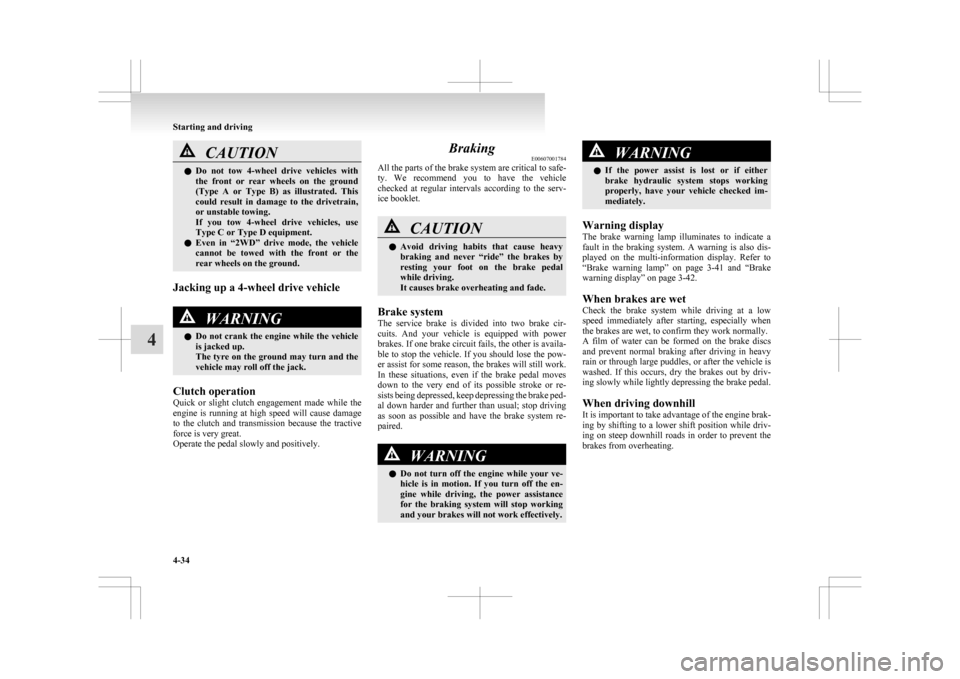
CAUTION
l
Do not tow 4-wheel drive vehicles with
the front or rear wheels on the ground
(Type A or Type B) as illustrated. This
could result in damage to the drivetrain,
or unstable towing.
If you tow 4-wheel drive vehicles, use
Type C or Type D equipment.
l Even in “2WD” drive mode, the vehicle
cannot be towed with the front or the
rear wheels on the ground.
Jacking up a 4-wheel drive vehicle WARNING
l Do
not crank the engine while the vehicle
is jacked up.
The tyre on the ground may turn and the
vehicle may roll off the jack.
Clutch operation
Quick
or slight clutch engagement made while the
engine is running at high speed will cause damage
to the clutch and transmission because the tractive
force is very great.
Operate the pedal slowly and positively. Braking
E00607001784
All
the parts of the brake system are critical to safe-
ty. We recommend you to have the vehicle
checked at regular intervals according to the serv-
ice booklet. CAUTION
l
Avoid
driving habits that cause heavy
braking and never “ride” the brakes by
resting your foot on the brake pedal
while driving.
It causes brake overheating and fade.
Brake system
The
service brake is divided into two brake cir-
cuits. And your vehicle is equipped with power
brakes. If one brake circuit fails, the other is availa-
ble to stop the vehicle. If you should lose the pow-
er assist for some reason, the brakes will still work.
In these situations, even if the brake pedal moves
down to the very end of its possible stroke or re-
sists being depressed, keep depressing the brake ped-
al down harder and further than usual; stop driving
as soon as possible and have the brake system re-
paired. WARNING
l Do
not turn off the engine while your ve-
hicle is in motion. If you turn off the en-
gine while driving, the power assistance
for the braking system will stop working
and your brakes will not work effectively. WARNING
l If
the power assist is lost or if either
brake hydraulic system stops working
properly, have your vehicle checked im-
mediately.
Warning display
The
brake warning lamp illuminates to indicate a
fault in the braking system. A warning is also dis-
played on the multi-information display. Refer to
“Brake warning lamp” on page 3-41 and “Brake
warning display” on page 3-42.
When brakes are wet
Check the brake system while driving at a low
speed immediately after starting, especially when
the brakes are wet, to confirm they work normally.
A film of water can be formed on the brake discs
and prevent normal braking after driving in heavy
rain or through large puddles, or after the vehicle is
washed. If this occurs, dry the brakes out by driv-
ing slowly while lightly depressing the brake pedal.
When driving downhill
It is important to take advantage of the engine brak-
ing by shifting to a lower shift position while driv-
ing on steep downhill roads in order to prevent the
brakes from overheating. Starting and driving
4-34
4
Page 190 of 368
Anti-lock brake system (ABS)
E00607101046
The
anti-lock brake system (ABS) helps prevent
the wheels from locking up when braking. This
helps maintain vehicle drivability and steering
wheel handling.
Driving hints
l Always keep a safe distance from the vehicle
in front of you. Even if your vehicle is equip-
ped with ABS, leave a greater braking dis-
tance when:
• Driving on gravel or snow-covered roads.
• Driving with tyre chains installed.
• Driving on uneven road surfaces.
l Operation of ABS is not restricted to situa-
tions where brakes are applied suddenly.
This system may also prevent the wheels
from locking when you drive over manholes,
steel roadwork plates, road markings, or any
uneven road surface.
l When the ABS is activated, you may feel the
brake pedal pulsation and the vibrations of
the vehicle body and steering wheel. It may
also feel as if the pedal resists being pressed.
In this situation, simply hold the brake ped-
al down firmly. Do not pump the brake,
which will result in reduced braking per-
formance.
l An operation noise is emitted from the en-
gine compartment or you can feel a shock
from the brake pedal when start driving im-
mediately after starting the engine. These are
normal sounds or operations that the ABS
makes when performing a self-check. It does
not indicate a malfunction. l
The ABS can be used after the vehicle has
reached a speed over approximately 10 km/h
(6 mph). It stops working when the vehicle
slows below approximately 5 km/h (3 mph). CAUTION
l
The
ABS cannot prevent accidents. It is
your responsibility to take safety precau-
tions and to drive carefully.
l To prevent failure of the ABS, be sure all
4 wheels and tyres are the same size and
the same type.
l Do not install any aftermarket limited-
slip differential (LSD) on your vehicle.
The ABS may stop functioning properly. ABS warning lamp/display
E00607201135
Warning lamp Warning display type 1
Warning display type 2
If there is a malfunction in the system, the ABS
warning
lamp will come on and the warning dis-
play will appear on the information screen in the
multi-information display.
Under normal conditions, the ABS warning lamp
only comes on when the ignition switch is turned
to the “ON” position or the operation mode is put
in ON and goes off a few seconds later. CAUTION
l
Any
of the following indicates that the
ABS is not functioning and only the stand- Starting and driving
4-38
4