USB MITSUBISHI ASX 2009 1.G User Guide
[x] Cancel search | Manufacturer: MITSUBISHI, Model Year: 2009, Model line: ASX, Model: MITSUBISHI ASX 2009 1.GPages: 368, PDF Size: 8.13 MB
Page 244 of 368

Error codes (iPod)
E00763500060
If an error code appears in the display, take action in accordance with the table below. Error display Item Repair
NO SONG There are no playable music files. Record music files in the iPod.
VER ERROR (Blink) The iPod or its software cannot be recognized. Connect a supported iPod.
USB BUS PWR (Blink) An overcurrent or other power-supply error has occurred. Remove the iPod.
Have
the vehicle inspected at a MITSUBISHI MOTORS
Authorized Service Point.
CONNECT RETRY (Blink) If the iPod indicator illuminates, the iPod cannot be authen-
ticated.
Reconnect the iPod.
If the iPod indicator goes out, it shows the USB communi-
cation error. Reconnect the iPod correctly.
If
this error is displayed again, have the vehicle inspected at
a MITSUBISHI MOTORS Authorized Service Point. For pleasant driving
5-36
5
Page 245 of 368

Error codes (USB memory device)
E00763600061
If an error code appears in the display, take action in accordance with the table below. Error display Item Repair
U NO SONG There are no playable music files. Record music files in the format supported by the USB mem-
ory device.
U FILE ERROR (Blink) The file cannot be played. The file is protected by copyrights, etc. An error is dis-
played
for several seconds, and then the next playable file
is played automatically.
UNSUPPORTED DEVICE (Blink) The USB memory device cannot be recognized. Remove the USB memory device.
UNSUPPORTED FORMAT (Blink) The USB memory device format cannot be recognized. Remove the USB memory device.
USB BUS PWR (Blink) An overcurrent or other power-supply error has occurred. Remove the USB memory device.
Have
the vehicle inspected at a MITSUBISHI MOTORS
Authorized Service Point.
U LSI ERROR (Blink) Internal device errors Have the vehicle inspected at a MITSUBISHI MOTORS
Authorized Service Point.
U CONNECT RETRY (Blink) USB communication error Reconnect the USB memory device correctly.
If
this error is displayed again, have the vehicle inspected at
a MITSUBISHI MOTORS Authorized Service Point. For pleasant driving
5-37 5
Page 249 of 368

NOTE
l If
the battery cables are disconnected during
repairs or for any other reason, reset the
clock to the correct time after they are recon-
nected.
l The digital clock does not have a second dis-
play. When the “minute” display is adjusted
and reset to zero, the clock begins at zero sec-
onds for the selected minute. Link System*
E00764500012
The
Link System takes overall control of the devi-
ces connected via the USB input terminal or the
Bluetooth ®
2.0 interface allowing the connected de-
vices to be operated by using the switches in the ve-
hicle or voice commands.
See the following section for details on how to op-
erate.
Refer to “Bluetooth ®
2.0 interface” on page 5-41.
Refer to “USB input terminal” on page 5-57.
Refer to “To play tracks from USB device” on
page 5-22.
Refer to “To play tracks from a Bluetooth ®
device”
on page 5-30.
Refer to “To use the external audio input function”
on page .
Bluetooth ®
is a registered trademark of BLUE-
TOOTH SIG, INC.
Link System End User Licence Agree-
ment E00764600013
You have acquired a device that includes software
licensed
by MITSUBISHI MOTORS CORPORA-
TION from JOHNSON CONTROLS Inc (the auto-
motive experience business unit), and their subse-
quent 3 rd
party suppliers. For a complete list of
these 3 rd
party products and their end user licence
agreements, please go to the following website.
http://www.jciblueconnect.com/faq.taf Bluetooth
®
2.0 interface*
E00726000370
The Bluetooth ®
2.0 interface allows for making/re-
ceiving hands-free calls in the vehicle using a Blue-
tooth ®
compatible cellular phone based on the wire-
less communication technology commonly known
as Bluetooth ®
. It also allows the user to play mu-
sic, saved in a Bluetooth ®
music player, from the
vehicle’s speakers.
The system is equipped with a voice recognition
function, which allows you to make hands-free
calls by simple switch operations and voice com-
mand operations using a defined voice tree.
The Bluetooth ®
2.0 interface can be used when the
ignition switch or the operation mode is in ON or
ACC.
Before you can use the Bluetooth ®
2.0 interface,
you must pair the Bluetooth ®
device and Blue-
tooth ®
2.0 interface. Refer to “Connecting the Blue-
tooth® 2.0 interface and Bluetooth® device” on
page 5-46.
Bluetooth ®
is a registered trademark of BLUE-
TOOTH SIG, INC. For pleasant driving
5-41 5
Page 265 of 368
USB input terminal*
E00761900015
You
can connect your USB memory device or
iPod* to play music files stored in the USB memo-
ry device or iPod.
The following explains how to connect and remove
a USB memory device or iPod.
Refer to the following sections for details on how
to play music files:
Refer to “To play from a USB memory device” on
page 5-27.
*: “iPod” is a registered trademark of Apple Inc. in
the United States and other countries.
How to connect a USB memory device E00762000084
1. Park
your vehicle in a safe place and turn the
ignition switch to the “LOCK” position or
put the operation mode in OFF.
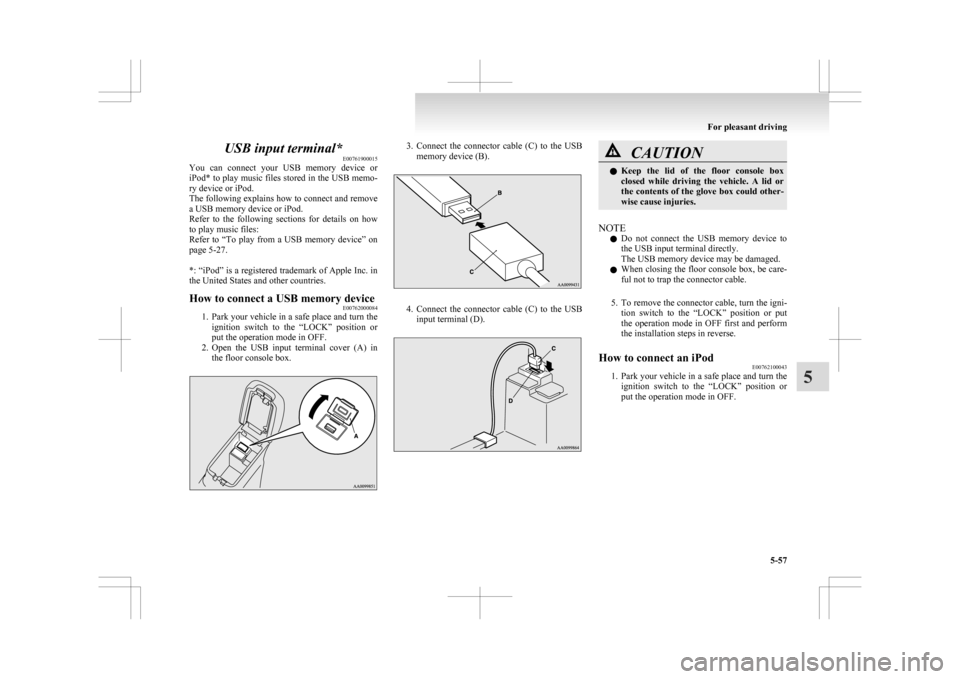
2. Open the USB input terminal cover (A) in the floor console box. 3. Connect
the connector cable (C) to the USB
memory device (B). 4. Connect
the connector cable (C) to the USB
input terminal (D). CAUTION
l
Keep
the lid of the floor console box
closed while driving the vehicle. A lid or
the contents of the glove box could other-
wise cause injuries.
NOTE l Do
not connect the USB memory device to
the USB input terminal directly.
The USB memory device may be damaged.
l When closing the floor console box, be care-
ful not to trap the connector cable.
5. To remove the connector cable, turn the igni- tion switch to the “LOCK” position or put
the operation mode in OFF first and perform
the installation steps in reverse.
How to connect an iPod E00762100043
1. Park
your vehicle in a safe place and turn the
ignition switch to the “LOCK” position or
put the operation mode in OFF. For pleasant driving
5-57 5
Page 266 of 368
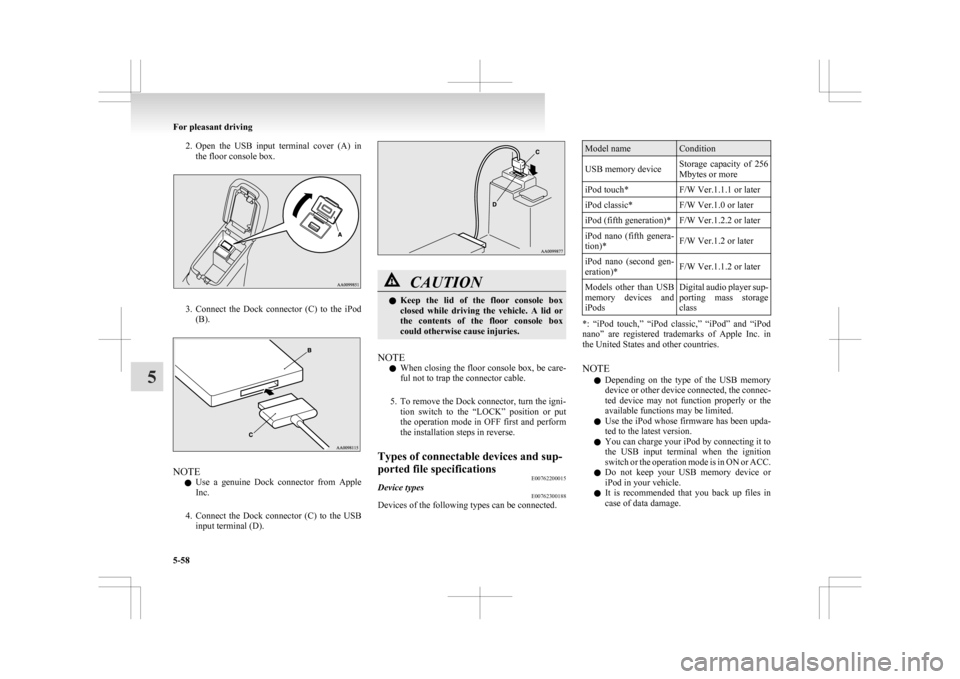
2. Open the USB input terminal cover (A) in
the floor console box. 3. Connect
the Dock connector (C) to the iPod
(B). NOTE
l Use
a genuine Dock connector from Apple
Inc.
4. Connect the Dock connector (C) to the USB input terminal (D). CAUTION
l
Keep
the lid of the floor console box
closed while driving the vehicle. A lid or
the contents of the floor console box
could otherwise cause injuries.
NOTE l When
closing the floor console box, be care-
ful not to trap the connector cable.
5. To remove the Dock connector, turn the igni- tion switch to the “LOCK” position or put
the operation mode in OFF first and perform
the installation steps in reverse.
Types of connectable devices and sup-
ported file specifications E00762200015
Device types E00762300188
Devices of the following types can be connected. Model name Condition
USB memory device Storage capacity of 256
Mbytes or more
iPod touch* F/W Ver.1.1.1 or later
iPod classic* F/W Ver.1.0 or later
iPod (fifth generation)* F/W Ver.1.2.2 or later
iPod nano (fifth genera-
tion)* F/W Ver.1.2 or later
iPod nano (second gen-
eration)* F/W Ver.1.1.2 or later
Models other than USB
memory
devices and
iPods Digital audio player sup-
porting
mass storage
class *: “iPod touch,” “iPod classic,” “iPod” and “iPod
nano”
are registered trademarks of Apple Inc. in
the United States and other countries.
NOTE
l Depending on the type of the USB memory
device or other device connected, the connec-
ted device may not function properly or the
available functions may be limited.
l Use the iPod whose firmware has been upda-
ted to the latest version.
l You can charge your iPod by connecting it to
the USB input terminal when the ignition
switch or the operation mode is in ON or ACC.
l Do not keep your USB memory device or
iPod in your vehicle.
l It is recommended that you back up files in
case of data damage. For pleasant driving
5-58
5
Page 267 of 368
l
Do not connect to the USB input terminal
any device (hard disk, card reader, memory
reader, etc.) other than the connectable devi-
ces specified in the previous section.
The device and/or data may be damaged. If
any of these devices was connected by mis-
take, remove it after turning the ignition
switch to the “LOCK” position or putting the
operation mode in OFF.
File specifications E00762400017
You can play music files of the following specifica-
tions
that are saved in a USB memory device or oth-
er device supporting mass storage class. Item Condition
File format MP3, WMA, AAC,
WAV
Maximum number of
levels
(including the
root) Level 8
Number of folders 700
Number of files 65,535 Sun visors
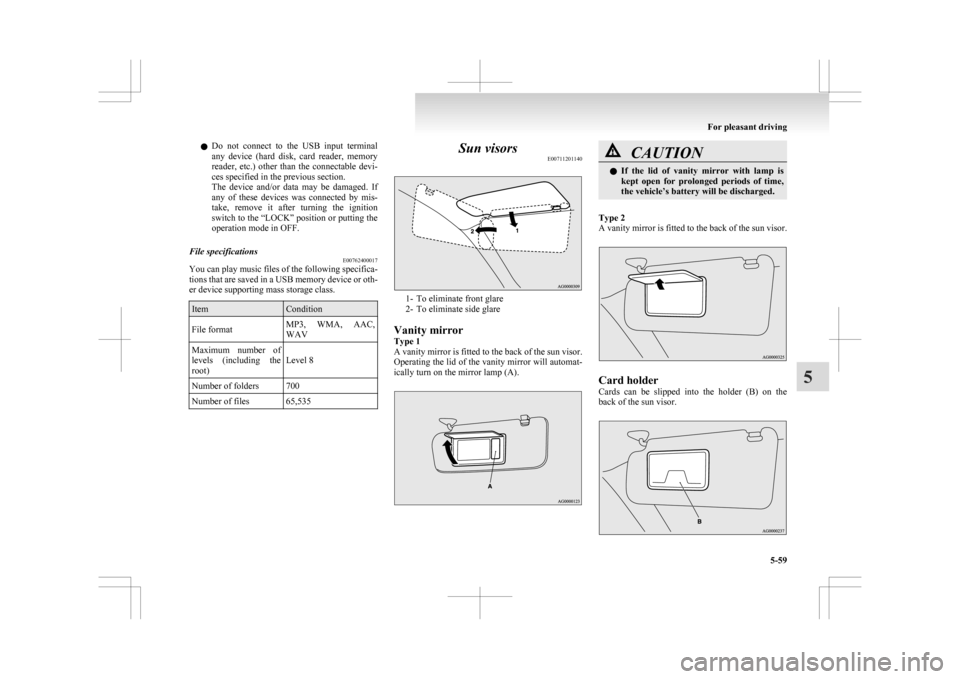
E00711201140 1- To eliminate front glare
2-
To eliminate side glare
Vanity mirror
Type 1
A vanity mirror is fitted to the back of the sun visor.
Operating the lid of the vanity mirror will automat-
ically turn on the mirror lamp (A). CAUTION
l
If
the lid of vanity mirror with lamp is
kept open for prolonged periods of time,
the vehicle’s battery will be discharged.
Type 2
A
vanity mirror is fitted to the back of the sun visor. Card holder
Cards
can be slipped into the holder (B) on the
back of the sun visor. For pleasant driving
5-59 5
Page 360 of 368

T
Tachometer 3-02
Tail lamps
Bulb capacity
8-24
Replacement 8-31
Tailgate 1-26
Tank capacity 03
Tissue holder 5-67
Tools 6-06 Storage 6-06
Towing 6-19
Trailer towing 4-54
Transfer oil 9-14
Transmission Automatic transmission 4-24
Manual transmission 4-21
Turbocharger operation 4-16
Turn-signal indication lamps 3-40
Turn/Lane-change signals 3-49
Twin Clutch SST (Sport Shift Transmission) Fluid 9-14
Tyres 8-11 How to change a tyre 6-12
Inflation pressures 8-12
Rotation 8-13
Size (tyre and wheel) 9-12
Snow tyres 8-14
Tread wear indicators 8-13
Tyre chains 8-14
Tyre repair kit 6-07
UUSB input terminal 5-57
USB input terminal device
How to connect a USB memory device
5-57
How to connect an iPod 5-57 Used engine oils safety instructions and disposal in-
formation 05
V Vanity mirror lamp
Bulb capacity
8-24
Vehicle care precautions 7-02
Vehicle dimensions 9-04
Vehicle identification number plate 9-02
Vehicle information code plate 9-02
Vehicle labeling 9-02
Vehicle performance 9-06
Vehicle weight 9-07
Ventilators 5-02
W Warning lamps 3-41
Washer
Fluid 8-07,9-14
Switch 3-55,3-56
Washing 7-03
Waxing 7-04
Weatherstripping
8-17
Weight 9-07
Wheel Covers 6-18
Specification 9-12
Wiper Rear window 3-55
Windscreen 3-51
Wiper blades 8-15 Alphabetical index
4