light MITSUBISHI ASX 2009 1.G User Guide
[x] Cancel search | Manufacturer: MITSUBISHI, Model Year: 2009, Model line: ASX, Model: MITSUBISHI ASX 2009 1.GPages: 368, PDF Size: 8.13 MB
Page 67 of 368
CAUTION
l
Be careful not to catch your hands or feet
when arranging the seat. Personal injury
could result.
Folding the rear seatbacks forward E00403500492
The passenger and luggage compartments can be
joined
by folding the seatback forward. This is use-
ful for carrying long objects.
The seatbacks can be folded with the rear seat re-
lease button.
NOTE
l The seatbacks can be folded one side at a time.
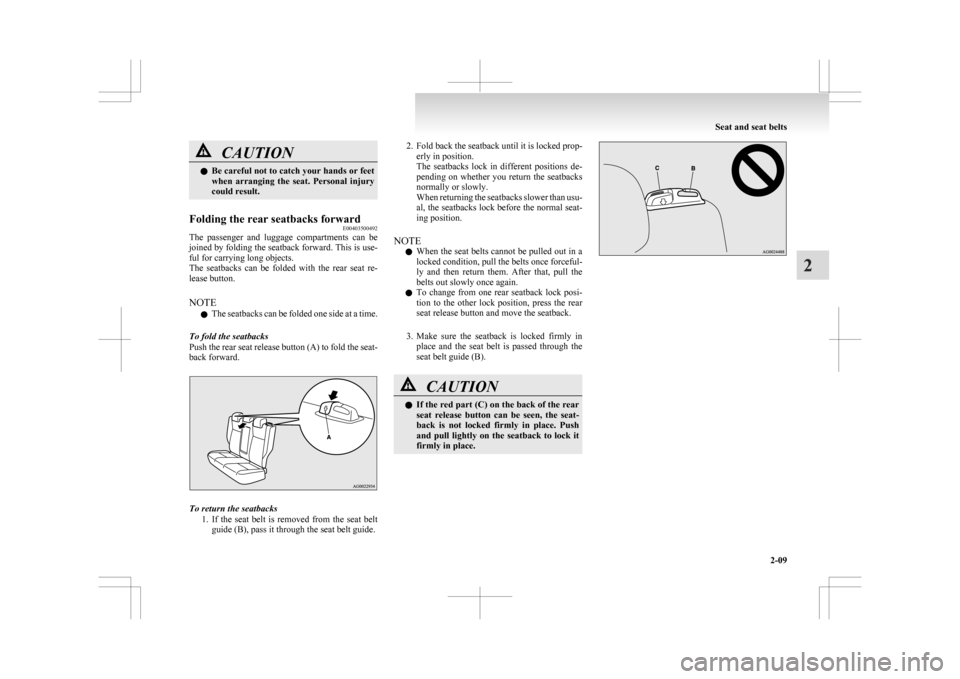
To fold the seatbacks
Push the rear seat release button (A) to fold the seat-
back forward. To return the seatbacks
1. If
the seat belt is removed from the seat belt
guide (B), pass it through the seat belt guide. 2. Fold
back the seatback until it is locked prop-
erly in position.
The seatbacks lock in different positions de-
pending on whether you return the seatbacks
normally or slowly.
When returning the seatbacks slower than usu-
al, the seatbacks lock before the normal seat-
ing position.
NOTE l When the seat belts cannot be pulled out in a
locked condition, pull the belts once forceful-
ly and then return them. After that, pull the
belts out slowly once again.
l To change from one rear seatback lock posi-
tion to the other lock position, press the rear
seat release button and move the seatback.
3. Make sure the seatback is locked firmly in place and the seat belt is passed through the
seat belt guide (B). CAUTION
l
If
the red part (C) on the back of the rear
seat release button can be seen, the seat-
back is not locked firmly in place. Push
and pull lightly on the seatback to lock it
firmly in place. Seat and seat belts
2-09 2
Page 69 of 368
WARNING
l The seat belts must not be twisted when
worn.
3. Pull
the belt slightly to adjust slackness as de- sired.
To unfasten
Hold the latch plate and push the button on the buck-
le. NOTE
l As
the belt retracts automatically, keep hold-
ing the latch plate while retracting so that the
belt stows slowly. Failure to do this could
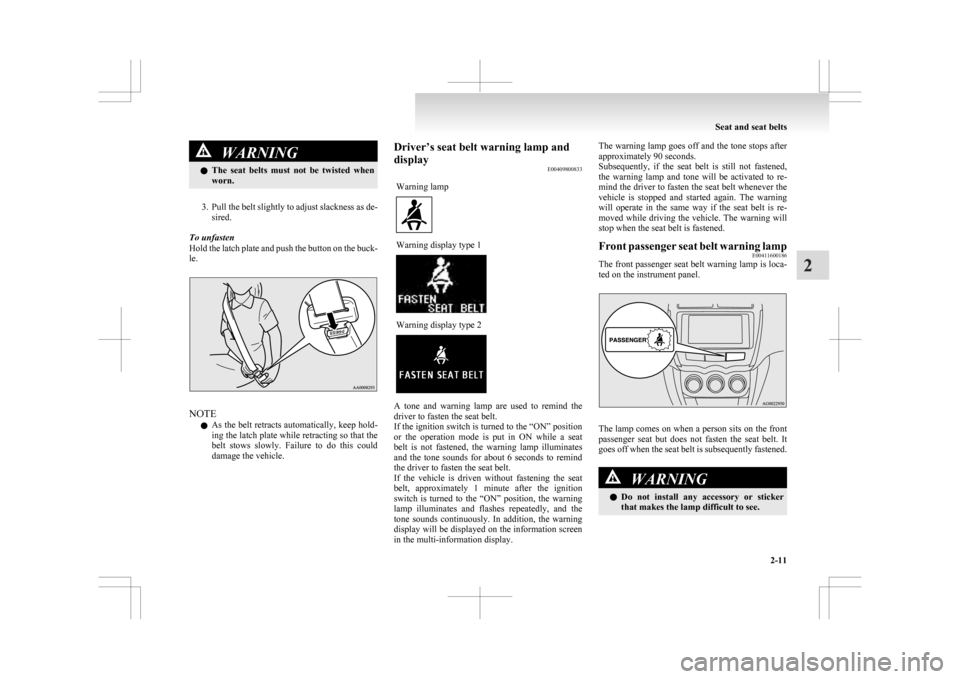
damage the vehicle. Driver’s seat belt warning lamp and
display
E00409800833
Warning lamp Warning display type 1
Warning display type 2
A tone and warning lamp are used to remind the
driver to fasten the seat belt.
If
the ignition switch is turned to the “ON” position
or the operation mode is put in ON while a seat
belt is not fastened, the warning lamp illuminates
and the tone sounds for about 6 seconds to remind
the driver to fasten the seat belt.
If the vehicle is driven without fastening the seat
belt, approximately 1 minute after the ignition
switch is turned to the “ON” position, the warning
lamp illuminates and flashes repeatedly, and the
tone sounds continuously. In addition, the warning
display will be displayed on the information screen
in the multi-information display. The warning lamp goes off and the tone stops after
approximately 90 seconds.
Subsequently,
if the seat belt is still not fastened,
the warning lamp and tone will be activated to re-
mind the driver to fasten the seat belt whenever the
vehicle is stopped and started again. The warning
will operate in the same way if the seat belt is re-
moved while driving the vehicle. The warning will
stop when the seat belt is fastened.
Front passenger seat belt warning lamp E00411600186
The front passenger seat belt warning lamp is loca-
ted on the instrument panel. The lamp comes on when a person sits on the front
passenger
seat but does not fasten the seat belt. It
goes off when the seat belt is subsequently fastened. WARNING
l Do
not install any accessory or sticker
that makes the lamp difficult to see. Seat and seat belts
2-11 2
Page 99 of 368
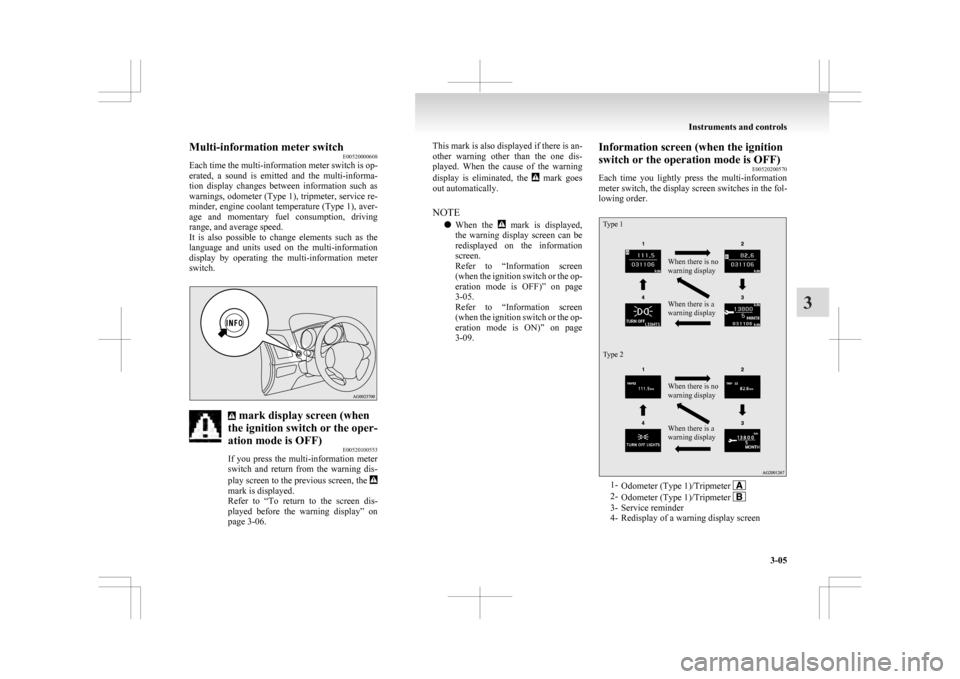
Multi-information meter switch
E00520000608
Each
time the multi-information meter switch is op-
erated, a sound is emitted and the multi-informa-
tion display changes between information such as
warnings, odometer (Type 1), tripmeter, service re-
minder, engine coolant temperature (Type 1), aver-
age and momentary fuel consumption, driving
range, and average speed.
It is also possible to change elements such as the
language and units used on the multi-information
display by operating the multi-information meter
switch. mark display screen (when
the ignition switch or the oper-
ation mode is OFF) E00520100553
If
you press the multi-information meter
switch and return from the warning dis-
play screen to the previous screen, the mark is displayed.
Refer
to “To return to the screen dis-
played before the warning display” on
page 3-06. This mark is also displayed if there is an-
other
warning other than the one dis-
played. When the cause of the warning
display is eliminated, the mark goes
out automatically.
NOTE
l When
the mark is displayed,
the
warning display screen can be
redisplayed on the information
screen.
Refer to “Information screen
(when the ignition switch or the op-
eration mode is OFF)” on page
3-05.
Refer to “Information screen
(when the ignition switch or the op-
eration mode is ON)” on page
3-09. Information screen (when the ignition
switch or the operation mode is OFF)
E00520200570
Each
time you lightly press the multi-information
meter switch, the display screen switches in the fol-
lowing order.
Type 1
Type 2 When there is no
warning display
When there is a
warning display
When there is no
warning display
When there is a
warning display
1-
Odometer (Type 1)/Tripmeter 2-
Odometer (Type 1)/Tripmeter 3- Service reminder
4-
Redisplay of a warning display screen Instruments and controls
3-05 3
Page 100 of 368
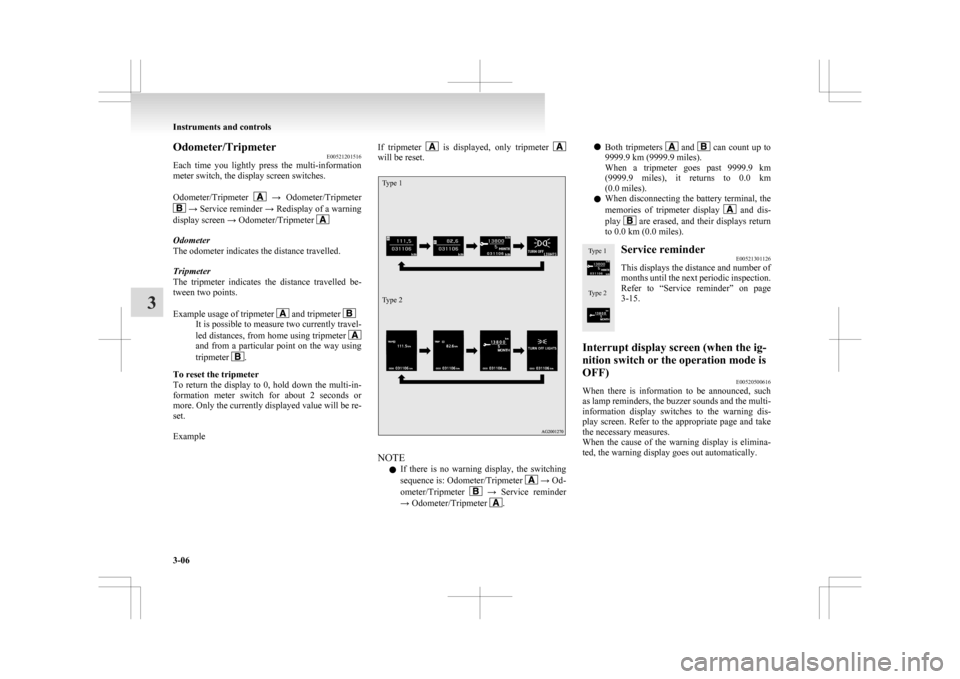
Odometer/Tripmeter
E00521201516
Each
time you lightly press the multi-information
meter switch, the display screen switches.
Odometer/Tripmeter →
Odometer/Tripmeter
→ Service reminder → Redisplay of a warning
display screen → Odometer/Tripmeter Odometer
The odometer indicates the distance travelled.
Tripmeter
The
tripmeter indicates the distance travelled be-
tween two points.
Example usage of tripmeter and tripmeter
It is possible to measure two currently travel-
led
distances, from home using tripmeter and from a particular point on the way using
tripmeter
.
To reset the tripmeter
To
return the display to 0, hold down the multi-in-
formation meter switch for about 2 seconds or
more. Only the currently displayed value will be re-
set.
Example If tripmeter is displayed, only tripmeter
will be reset.
Type 1
Type 2
NOTE
l If
there is no warning display, the switching
sequence is: Odometer/Tripmeter → Od-
ometer/Tripmeter →
Service reminder
→ Odometer/Tripmeter .l
Both
tripmeters and can count up to
9999.9 km (9999.9 miles).
When
a tripmeter goes past 9999.9 km
(9999.9 miles), it returns to 0.0 km
(0.0 miles).
l When disconnecting the battery terminal, the
memories of tripmeter display and dis-
play are erased, and their displays return
to 0.0 km (0.0 miles).
Type 1
Type 2 Service reminder
E00521301126
This displays the distance and number of
months
until the next periodic inspection.
Refer to “Service reminder” on page
3-15.
Interrupt display screen (when the ig-
nition switch or the operation mode is
OFF) E00520500616
When there is information to be announced, such
as
lamp reminders, the buzzer sounds and the multi-
information display switches to the warning dis-
play screen. Refer to the appropriate page and take
the necessary measures.
When the cause of the warning display is elimina-
ted, the warning display goes out automatically. Instruments and controls
3-06
3
Page 101 of 368
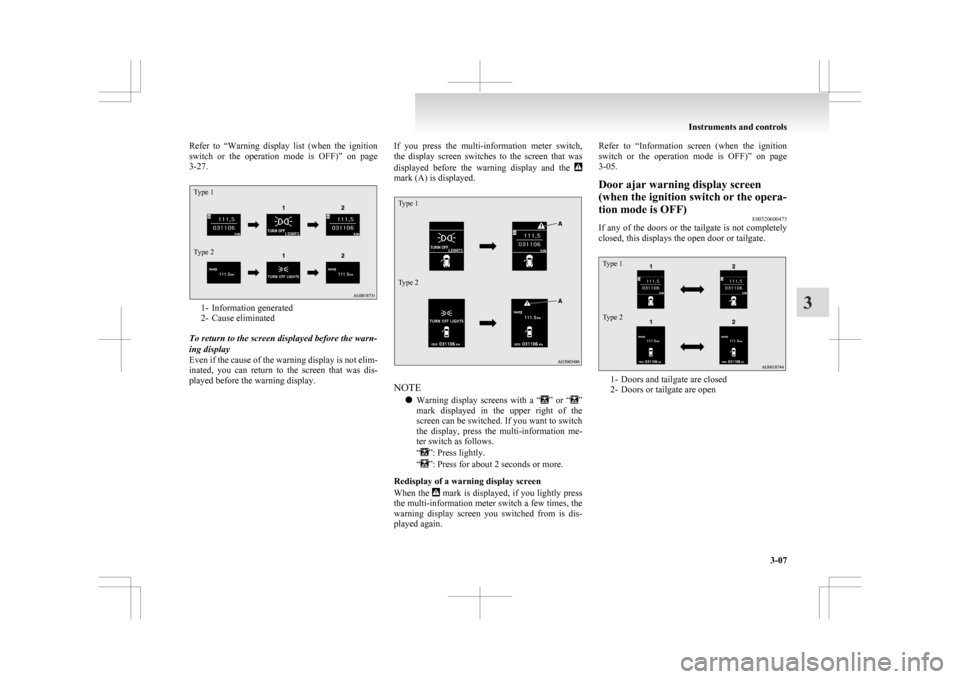
Refer to “Warning
display list (when the ignition
switch or the operation mode is OFF)” on page
3-27.
Type 1
Type 2 1- Information generated
2-
Cause eliminated
To return to the screen displayed before the warn-
ing display
Even if the cause of the warning display is not elim-
inated, you can return to the screen that was dis-
played before the warning display. If you press the multi-information meter switch,
the
display screen switches to the screen that was
displayed before the warning display and the mark (A) is displayed.
Type 1
Type 2
NOTE
l Warning
display screens with a “ ”
or “ ”
mark
displayed in the upper right of the
screen can be switched. If you want to switch
the display, press the multi-information me-
ter switch as follows.
“ ”: Press lightly.
“ ”: Press for about 2 seconds or more.
Redisplay of a warning display screen
When
the mark is displayed, if you lightly press
the
multi-information meter switch a few times, the
warning display screen you switched from is dis-
played again. Refer to “Information
screen (when the ignition
switch or the operation mode is OFF)” on page
3-05.
Door ajar warning display screen
(when the ignition switch or the opera-
tion mode is OFF) E00520600473
If any of the doors or the tailgate is not completely
closed, this displays the open door or tailgate.
Type 1
Type 2 1- Doors and tailgate are closed
2-
Doors or tailgate are open Instruments and controls
3-07 3
Page 103 of 368
If you select “4WD LOCK” mode with the drive
mode
selector, “4WD LOCK” is displayed; if you
select “4WD AUTO” mode, “4WD” is displayed.
Nothing is displayed when 2WD mode is selected.
Refer to “Drive mode selector” on page 4-29. mark display screen (when
the ignition switch or the oper-
ation mode is ON) E00520900333
This
is displayed when you press the mul-
ti-information meter switch and switch
the warning display screen.
This mark is also displayed if there is an-
other warning other than the one dis-
played.
When the cause of the warning display
is eliminated, the mark goes out auto-
matically.
NOTE
l When
the mark is displayed,
the
warning display screen can be
redisplayed on the information
screen.
Refer to “Information screen
(when the ignition switch or the op-
eration mode is OFF)” on page
3-05.
Refer to “Information screen
(when the ignition switch or the op-
eration mode is ON)” on page
3-09. Active Stability Control (ASC)
OFF display screen*
E00521000373
This
is displayed when the Active Stabil-
ity Control (ASC) is turned off with the
ASC OFF switch.
If there is a fault with the ASC, the ASC
OFF display is shown.
Refer to ““ASC OFF” switch” on page
4-41. Information screen (when the ignition
switch or the operation mode is ON)
E00521100576
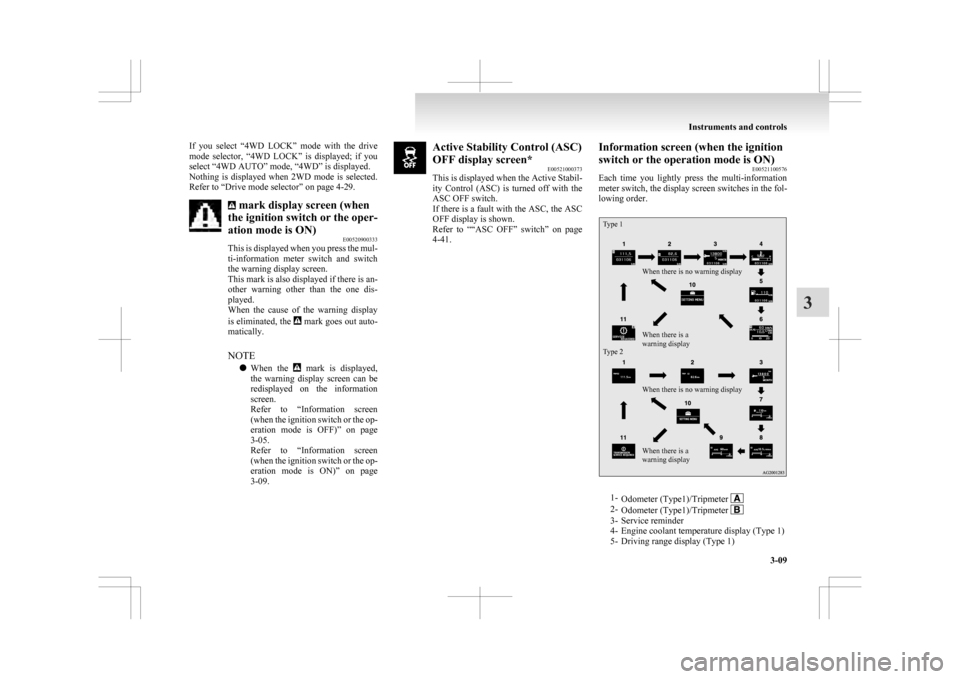
Each
time you lightly press the multi-information
meter switch, the display screen switches in the fol-
lowing order.
Type 1
Type 2 When there is no warning display
When there is no warning display
When there is a
warning display When there is a
warning display
1-
Odometer (Type1)/Tripmeter 2-
Odometer (Type1)/Tripmeter 3- Service reminder
4-
Engine coolant temperature display (Type 1)
5- Driving range display (Type 1) Instruments and controls
3-09 3
Page 108 of 368
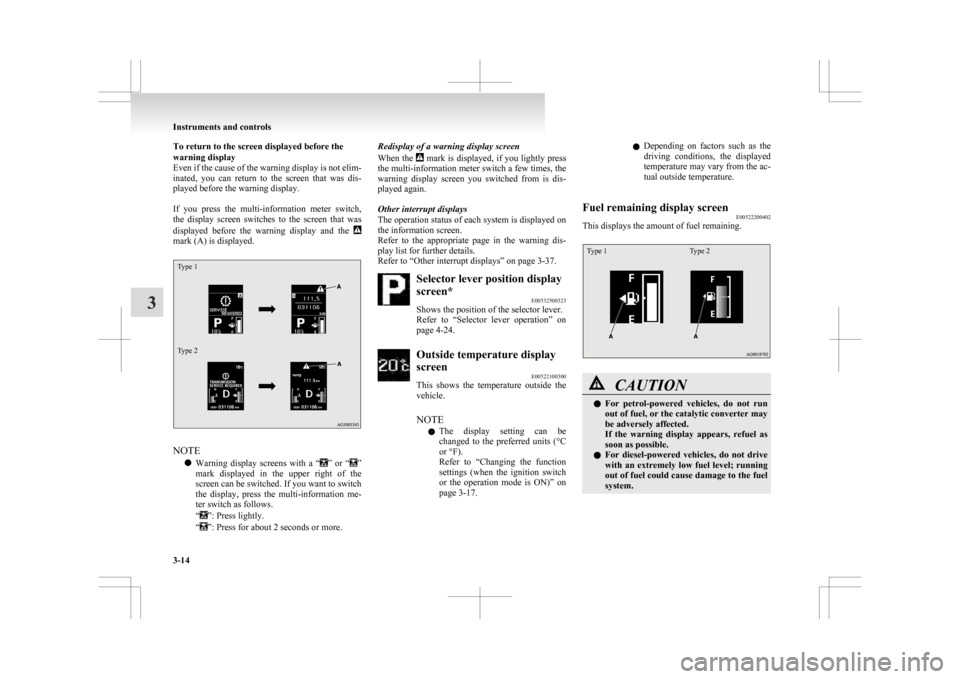
To return to the screen displayed before the
warning display
Even
if the cause of the warning display is not elim-
inated, you can return to the screen that was dis-
played before the warning display.
If you press the multi-information meter switch,
the display screen switches to the screen that was
displayed before the warning display and the mark (A) is displayed.
Type 1
Type 2
NOTE
l Warning
display screens with a “ ”
or “ ”
mark
displayed in the upper right of the
screen can be switched. If you want to switch
the display, press the multi-information me-
ter switch as follows.
“ ”: Press lightly.
“ ”: Press for about 2 seconds or more. Redisplay of a warning display screen
When
the mark is displayed, if you lightly press
the
multi-information meter switch a few times, the
warning display screen you switched from is dis-
played again.
Other interrupt displays
The operation status of each system is displayed on
the information screen.
Refer to the appropriate page in the warning dis-
play list for further details.
Refer to “Other interrupt displays” on page 3-37. Selector lever position display
screen*
E00532500323
Shows the position of the selector lever.
Refer
to “Selector lever operation” on
page 4-24. Outside temperature display
screen
E00522100300
This
shows the temperature outside the
vehicle.
NOTE
l The display setting can be
changed to the preferred units (°C
or °F).
Refer to “Changing the function
settings (when the ignition switch
or the operation mode is ON)” on
page 3-17. l
Depending
on factors such as the
driving conditions, the displayed
temperature may vary from the ac-
tual outside temperature.
Fuel remaining display screen E00522200402
This displays the amount of fuel remaining.
Type 1 Type 2 CAUTION
l
For
petrol-powered vehicles, do not run
out of fuel, or the catalytic converter may
be adversely affected.
If the warning display appears, refuel as
soon as possible.
l For diesel-powered vehicles, do not drive
with an extremely low fuel level; running
out of fuel could cause damage to the fuel
system. Instruments and controls
3-14
3
Page 110 of 368
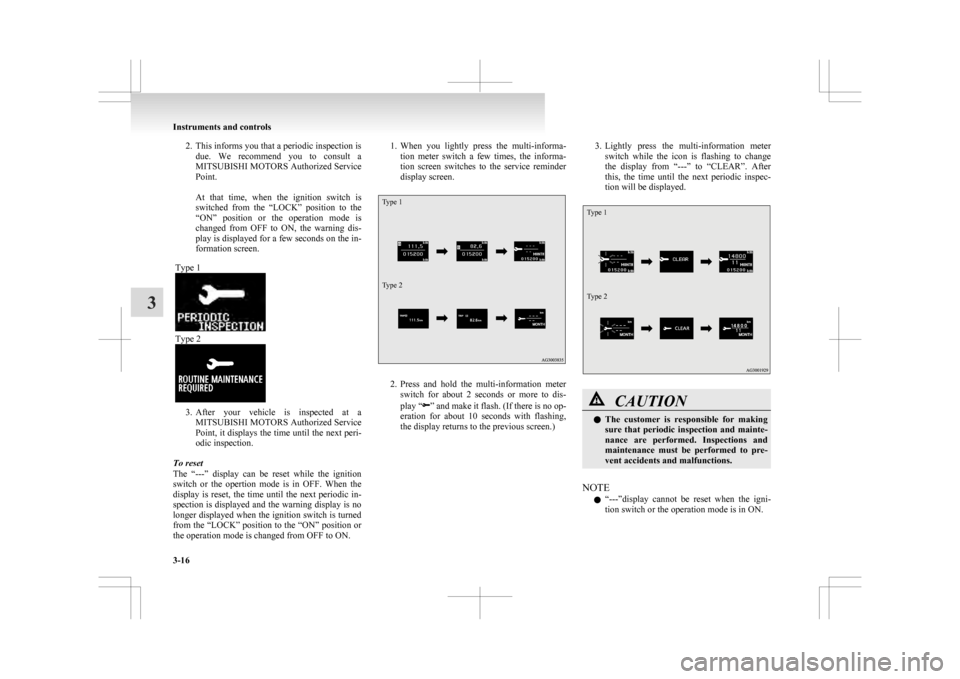
2. This informs you that a periodic inspection is
due. We recommend you to consult a
MITSUBISHI MOTORS Authorized Service
Point.
At that time, when the ignition switch is
switched from the “LOCK” position to the
“ON” position or the operation mode is
changed from OFF to ON, the warning dis-
play is displayed for a few seconds on the in-
formation screen.
Type 1 Type 2
3. After
your vehicle is inspected at a
MITSUBISHI MOTORS Authorized Service
Point, it displays the time until the next peri-
odic inspection.
To reset
The “---” display can be reset while the ignition
switch or the opertion mode is in OFF. When the
display is reset, the time until the next periodic in-
spection is displayed and the warning display is no
longer displayed when the ignition switch is turned
from the “LOCK” position to the “ON” position or
the operation mode is changed from OFF to ON. 1. When
you lightly press the multi-informa-
tion meter switch a few times, the informa-
tion screen switches to the service reminder
display screen.
Type 1
Type 2 2. Press
and hold the multi-information meter
switch for about 2 seconds or more to dis-
play “ ”
and make it flash. (If there is no op-
eration for about 10 seconds with flashing,
the display returns to the previous screen.) 3. Lightly
press the multi-information meter
switch while the icon is flashing to change
the display from “---” to “CLEAR”. After
this, the time until the next periodic inspec-
tion will be displayed.
Type 1
Type 2 CAUTION
l
The
customer is responsible for making
sure that periodic inspection and mainte-
nance are performed. Inspections and
maintenance must be performed to pre-
vent accidents and malfunctions.
NOTE l “---”display
cannot be reset when the igni-
tion switch or the operation mode is in ON. Instruments and controls
3-16
3
Page 111 of 368
l
When “---” is displayed, after a certain dis-
tance and a certain period of time, the dis-
play is reset and the time until the next peri-
odic inspection is displayed.
l If you accidentally reset the display, we rec-
ommend you to consult a MITSUBISHI
MOTORS Authorized Service Point.
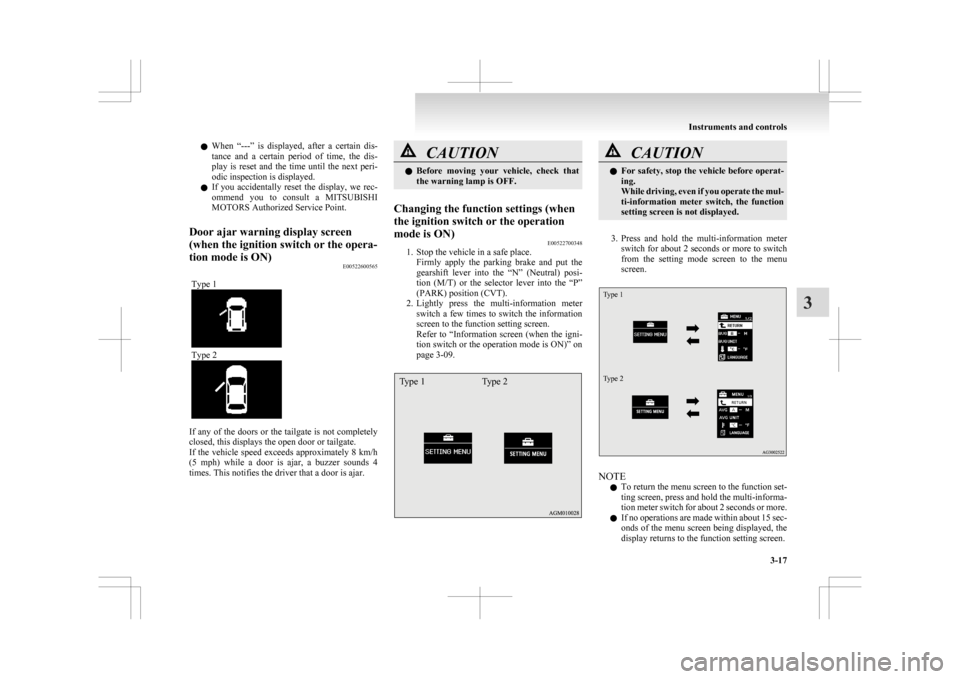
Door ajar warning display screen
(when the ignition switch or the opera-
tion mode is ON) E00522600565
Type 1 Type 2
If any of the doors or the tailgate is not completely
closed, this displays the open door or tailgate.
If
the vehicle speed exceeds approximately 8 km/h
(5 mph) while a door is ajar, a buzzer sounds 4
times. This notifies the driver that a door is ajar. CAUTION
l
Before
moving your vehicle, check that
the warning lamp is OFF.
Changing the function settings (when
the ignition switch or the operation
mode is ON) E00522700348
1. Stop the vehicle in a safe place.
Firmly
apply the parking brake and put the
gearshift lever into the “N” (Neutral) posi-
tion (M/T) or the selector lever into the “P”
(PARK) position (CVT).
2. Lightly press the multi-information meter switch a few times to switch the information
screen to the function setting screen.
Refer to “Information screen (when the igni-
tion switch or the operation mode is ON)” on
page 3-09.
Type 1 Type 2 CAUTION
l
For
safety, stop the vehicle before operat-
ing.
While driving, even if you operate the mul-
ti-information meter switch, the function
setting screen is not displayed.
3. Press
and hold the multi-information meter switch for about 2 seconds or more to switch
from the setting mode screen to the menu
screen.
Type 1
Type 2 NOTE
l To
return the menu screen to the function set-
ting screen, press and hold the multi-informa-
tion meter switch for about 2 seconds or more.
l If no operations are made within about 15 sec-
onds of the menu screen being displayed, the
display returns to the function setting screen. Instruments and controls
3-17 3
Page 112 of 368
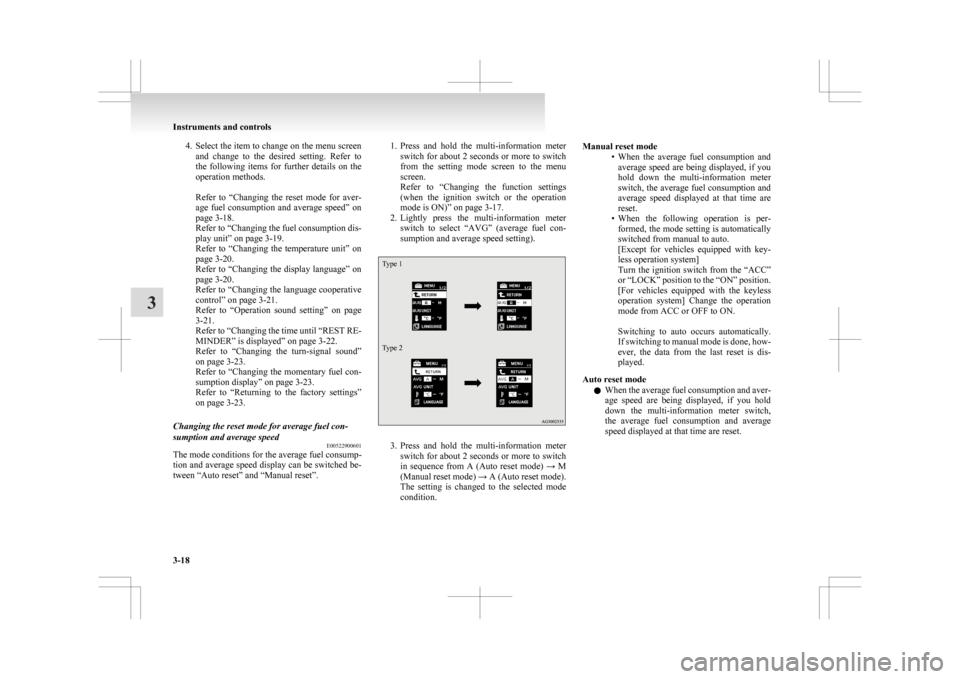
4. Select the item to change on the menu screen
and change to the desired setting. Refer to
the following items for further details on the
operation methods.
Refer to “Changing the reset mode for aver-
age fuel consumption and average speed” on
page 3-18.
Refer to “Changing the fuel consumption dis-
play unit” on page 3-19.
Refer to “Changing the temperature unit” on
page 3-20.
Refer to “Changing the display language” on
page 3-20.
Refer to “Changing the language cooperative
control” on page 3-21.
Refer to “Operation sound setting” on page
3-21.
Refer to “Changing the time until “REST RE-
MINDER” is displayed” on page 3-22.
Refer to “Changing the turn-signal sound”
on page 3-23.
Refer to “Changing the momentary fuel con-
sumption display” on page 3-23.
Refer to “Returning to the factory settings”
on page 3-23.
Changing the reset mode for average fuel con-
sumption and average speed E00522900601
The mode conditions for the average fuel consump-
tion
and average speed display can be switched be-
tween “Auto reset” and “Manual reset”. 1. Press
and hold the multi-information meter
switch for about 2 seconds or more to switch
from the setting mode screen to the menu
screen.
Refer to “Changing the function settings
(when the ignition switch or the operation
mode is ON)” on page 3-17.
2. Lightly press the multi-information meter switch to select “AVG” (average fuel con-
sumption and average speed setting).
Type 1
Type 2 3. Press
and hold the multi-information meter
switch for about 2 seconds or more to switch
in sequence from A (Auto reset mode) → M
(Manual reset mode) → A (Auto reset mode).
The setting is changed to the selected mode
condition. Manual reset mode
• When
the average fuel consumption and
average speed are being displayed, if you
hold down the multi-information meter
switch, the average fuel consumption and
average speed displayed at that time are
reset.
• When the following operation is per- formed, the mode setting is automatically
switched from manual to auto.
[Except for vehicles equipped with key-
less operation system]
Turn the ignition switch from the “ACC”
or “LOCK” position to the “ON” position.
[For vehicles equipped with the keyless
operation system] Change the operation
mode from ACC or OFF to ON.
Switching to auto occurs automatically.
If switching to manual mode is done, how-
ever, the data from the last reset is dis-
played.
Auto reset mode l When the average fuel consumption and aver-
age speed are being displayed, if you hold
down the multi-information meter switch,
the average fuel consumption and average
speed displayed at that time are reset. Instruments and controls
3-18
3