service MITSUBISHI ASX 2009 1.G User Guide
[x] Cancel search | Manufacturer: MITSUBISHI, Model Year: 2009, Model line: ASX, Model: MITSUBISHI ASX 2009 1.GPages: 368, PDF Size: 8.13 MB
Page 35 of 368
NOTE
l It is possible to modify functions as follows:
• The
time until the power cuts out can be
changed to approximately 60 minutes.
• The ACC power auto-cutout function can be deactivated.
For details, consult a MITSUBISHI
MOTORS Authorized Service Point.
On vehicles equipped with MITSUBISHI
Multi-Communication System (MMCS),
screen operations can be used to make the ad-
justment.
Refer to the separate owner’s manual for de-
tails.
Warning activation E00305900486
In order to prevent vehicle theft or the accidental op-
eration
of the keyless operation system, the buzzer
and the display on the information screen in the mul-
ti-information display are used to alert the driver.
If a warning is activated, always check the vehicle
and the keyless operation key. The warning is also
displayed if there is a fault in the keyless operation
system.
If any of the following warnings are activated,
please contact a MITSUBISHI MOTORS Author-
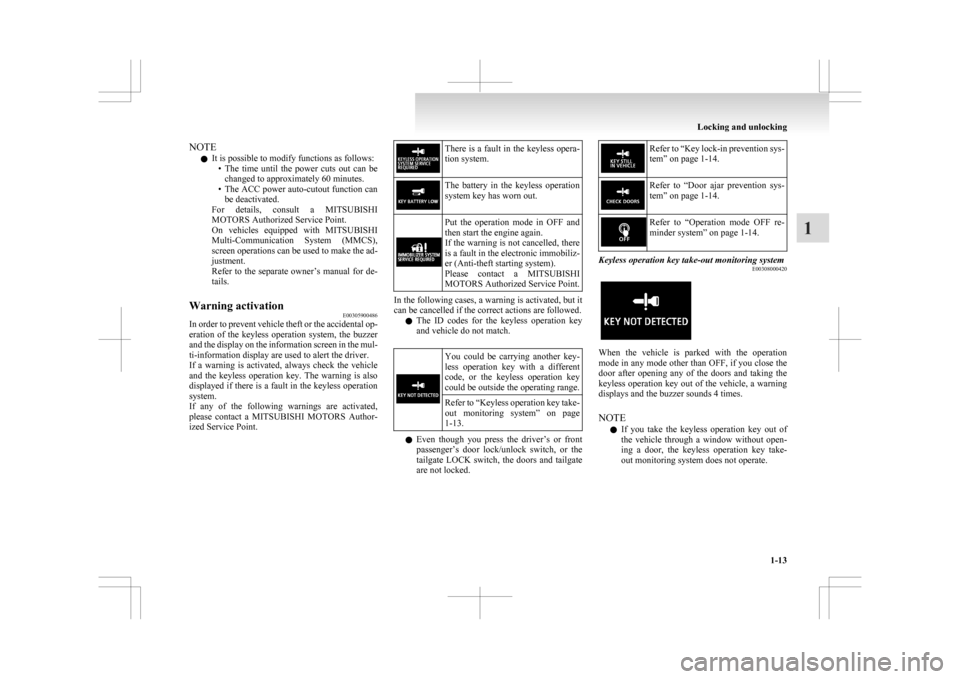
ized Service Point. There is a fault in the keyless opera-
tion system.
The battery in the keyless operation
system key has worn out.
Put the operation mode in OFF and
then start the engine again.
If
the warning is not cancelled, there
is a fault in the electronic immobiliz-
er (Anti-theft starting system).
Please contact a MITSUBISHI
MOTORS Authorized Service Point. In the following cases, a warning is activated, but it
can be cancelled if the correct actions are followed.
l The
ID codes for the keyless operation key
and vehicle do not match. You could be carrying another key-
less
operation key with a different
code, or the keyless operation key
could be outside the operating range.
Refer to “Keyless
operation key take-
out monitoring system” on page
1-13. l
Even
though you press the driver’s or front
passenger’s door lock/unlock switch, or the
tailgate LOCK switch, the doors and tailgate
are not locked. Refer to “Key
lock-in prevention sys-
tem” on page 1-14. Refer to “Door
ajar prevention sys-
tem” on page 1-14. Refer to “Operation
mode OFF re-
minder system” on page 1-14. Keyless operation key take-out monitoring system
E00308000420 When the vehicle is parked with the operation
mode
in any mode other than OFF, if you close the
door after opening any of the doors and taking the
keyless operation key out of the vehicle, a warning
displays and the buzzer sounds 4 times.
NOTE
l If you take the keyless operation key out of
the vehicle through a window without open-
ing a door, the keyless operation key take-
out monitoring system does not operate. Locking and unlocking
1-13 1
Page 36 of 368
l
It is possible to change the setting to make
the keyless operation key take-out monitor-
ing system operate if you take the keyless op-
eration key out from the vehicle through a
window without opening a door. For further
information, please contact your
MITSUBISHI MOTORS Authorized Service
Point.
l Even if you have the keyless operation key
within the engine start operating range, if the
keyless operation key and vehicle ID codes
cannot be matched, for example due to the
ambient environment or electromagnetic con-
ditions, the warning may be activated.
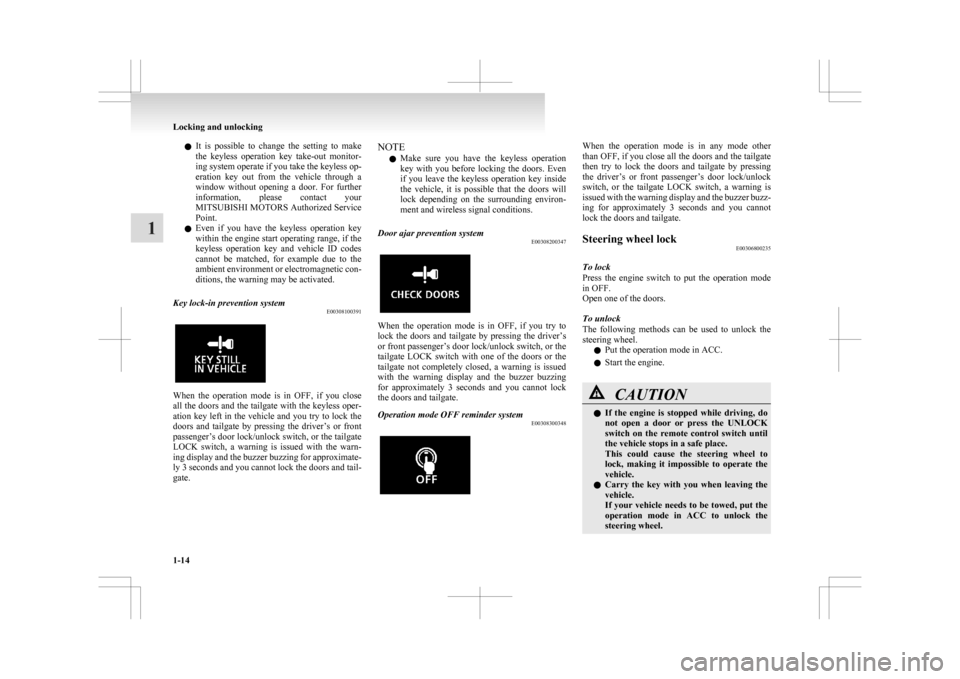
Key lock-in prevention system E00308100391When the operation mode is in OFF, if you close
all
the doors and the tailgate with the keyless oper-
ation key left in the vehicle and you try to lock the
doors and tailgate by pressing the driver’s or front
passenger’s door lock/unlock switch, or the tailgate
LOCK switch, a warning is issued with the warn-
ing display and the buzzer buzzing for approximate-
ly 3 seconds and you cannot lock the doors and tail-
gate. NOTE
l Make
sure you have the keyless operation
key with you before locking the doors. Even
if you leave the keyless operation key inside
the vehicle, it is possible that the doors will
lock depending on the surrounding environ-
ment and wireless signal conditions.
Door ajar prevention system E00308200347 When the operation mode is in OFF, if you try to
lock
the doors and tailgate by pressing the driver’s
or front passenger’s door lock/unlock switch, or the
tailgate LOCK switch with one of the doors or the
tailgate not completely closed, a warning is issued
with the warning display and the buzzer buzzing
for approximately 3 seconds and you cannot lock
the doors and tailgate.
Operation mode OFF reminder system E00308300348 When the operation mode is in any mode other
than
OFF, if you close all the doors and the tailgate
then try to lock the doors and tailgate by pressing
the driver’s or front passenger’s door lock/unlock
switch, or the tailgate LOCK switch, a warning is
issued with the warning display and the buzzer buzz-
ing for approximately 3 seconds and you cannot
lock the doors and tailgate.
Steering wheel lock E00306800235
To lock
Press
the engine switch to put the operation mode
in OFF.
Open one of the doors.
To unlock
The following methods can be used to unlock the
steering wheel.
l Put the operation mode in ACC.
l Start the engine. CAUTION
l
If
the engine is stopped while driving, do
not open a door or press the UNLOCK
switch on the remote control switch until
the vehicle stops in a safe place.
This could cause the steering wheel to
lock, making it impossible to operate the
vehicle.
l Carry the key with you when leaving the
vehicle.
If your vehicle needs to be towed, put the
operation mode in ACC to unlock the
steering wheel. Locking and unlocking
1-14
1
Page 41 of 368

l
It is possible to modify functions as follows:
For
further information, please contact your
MITSUBISHI MOTORS Authorized Service
Point.
On vehicles equipped with MITSUBISHI
Multi-Communication System (MMCS),
screen operations can be used to make the ad-
justment. Refer to the separate owner’s man-
ual for details. • The time from pressing the UNLOCKswitch (2) to the moment of automatic
locking can be changed.
• The confirmation function (flashing of the turn-signal lamps) can be set to oper-
ate only when the doors and backdoor are
locked or only when the doors and back-
door are unlocked.
• The confirmation function (this indicates locking or unlocking of the doors and tail-
gate with the flash of the turn-signal
lamps) can be deactivated.
• The number of times the turn-signal lamps are flashed by the confirmation
function can be changed.
Operation of the Dead Lock System
In a vehicle that has a Dead Lock System, it is pos-
sible to set the Dead Lock System using the remote
controller.
(Refer to “Dead Lock System” on page 1-23.)
Operation of the outside rear-view mirrors (Vehi-
cles equipped with mirror retractor switch) E00311200110
To fold
Within
30 seconds of locking the doors and tailgate
using the LOCK switch (1), press the LOCK
switch twice rapidly to fold the outside rear-view
mirrors. To extend
Within
30 seconds of unlocking the doors and tail-
gate using the UNLOCK switch (2), press the UN-
LOCK switch twice rapidly to return the outside
rear-view mirrors to their extended positions.
The outside rear-view mirrors are not initially set
to
work as described above. If you want them to
work as described above, you need to set them so
that they do not retract/extend when the doors and
tailgate are locked/unlocked using the keyless en-
try system or keyless operation system.
Refer to “Starting and driving: Outside rear-view
mirrors” on page 4-09.
For details, please consult a MITSUBISHI
MOTORS Authorized Service Point.
In a vehicle equipped with the MITSUBISHI Mul-
ti-Communication System (MMCS), it is possible
to change the setting by means of screen operations.
Refer to the separate owner’s manual for details. NOTE
l For
vehicles equipped with the mirror retrac-
tor switch, the outside rear-view mirrors auto-
matically retract or extend when all the doors
and tailgate are locked or unlocked using the
remote control switches of the keyless entry
system.
Refer to “Starting and driving: Outside rear-
view mirrors” on page 4-09.
l The keyless entry system does not operate
when one of the doors or the tailgate is open. l
The
remote control switch will operate with-
in approximately 4 m from the vehicle. How-
ever, the operating range of the remote con-
trol switch may change if the vehicle is loca-
ted near a power station, or radio/TV broad-
casting station.
l If either of the following problems occurs,
the battery may be exhausted.
• The remote control switch is operated atthe correct distance from the vehicle, but
the doors and tailgate are not locked/un-
locked in response.
• The indication lamp (3) is dim or does not come on.
For further information, please contact
your MITSUBISHI MOTORS Author-
ized Service Point.
If you replace the battery yourself, refer
to “Procedure for replacing the remote
control switch battery” on page 1-20.
l If your remote control switch is lost or dam-
aged, please contact your MITSUBISHI
MOTORS Authorized Service Point for a re-
placement remote control switch.
l If you wish to add a remote control switch,
please contact your MITSUBISHI MOTORS
Authorized Service Point. A maximum of 4
remote control switches are available for
your vehicle.
Setting of door and tailgate unlock function (Ex-
cept for vehicles equipped with a Dead Lock Sys-
tem) E00310400199
The door and tailgate unlock function can be set to
the following two conditions. Locking and unlocking
1-19 1
Page 44 of 368
Operation mode ON reminder system*
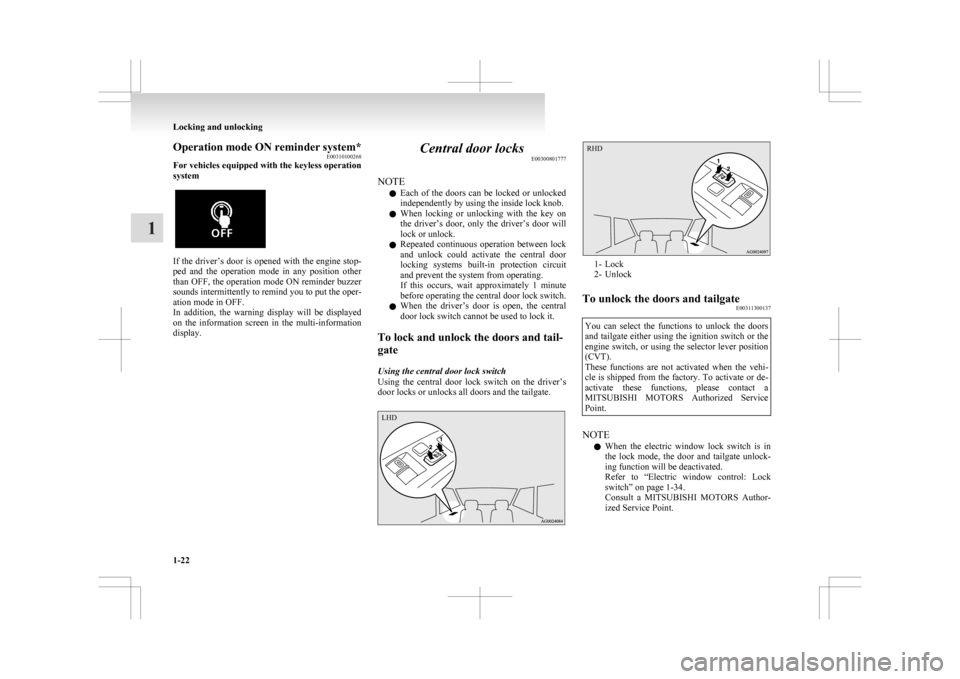
E00310100268
For vehicles equipped with the keyless operation
system If the driver’s door is opened with the engine stop-
ped
and the operation mode in any position other
than OFF, the operation mode ON reminder buzzer
sounds intermittently to remind you to put the oper-
ation mode in OFF.
In addition, the warning display will be displayed
on the information screen in the multi-information
display. Central door locks
E00300801777
NOTE l Each
of the doors can be locked or unlocked
independently by using the inside lock knob.
l When locking or unlocking with the key on
the driver’s door, only the driver’s door will
lock or unlock.
l Repeated continuous operation between lock
and unlock could activate the central door
locking systems built-in protection circuit
and prevent the system from operating.
If this occurs, wait approximately 1 minute
before operating the central door lock switch.
l When the driver’s door is open, the central
door lock switch cannot be used to lock it.
To lock and unlock the doors and tail-
gate
Using the central door lock switch
Using the central door lock switch on the driver’s
door locks or unlocks all doors and the tailgate. 1- Lock
2-
Unlock
To unlock the doors and tailgate E00311300137
You can select the functions to unlock the doors
and
tailgate either using the ignition switch or the
engine switch, or using the selector lever position
(CVT).
These functions are not activated when the vehi-
cle is shipped from the factory. To activate or de-
activate these functions, please contact a
MITSUBISHI MOTORS Authorized Service
Point. NOTE
l When
the electric window lock switch is in
the lock mode, the door and tailgate unlock-
ing function will be deactivated.
Refer to “Electric window control: Lock
switch” on page 1-34.
Consult a MITSUBISHI MOTORS Author-
ized Service Point. Locking and unlocking
1-22
1 LHD RHD
Page 47 of 368
driver’s door. If you wish to subsequently un-
lock
all other doors, perform the following op-
eration. • Except for vehicles equipped with the key-less operation system, turn the ignition
switch to the “ON” or “ACC” position.
• For vehicles equipped with the keyless op- eration system, put the operation mode in
ON or ACC.
l It is possible to adjust the time between press-
ing the UNLOCK switch (D) on the remote
control switch or the driver’s or front passen-
ger’s door lock/unlock switch (E) and auto-
matic locking. For details, please contact a
MITSUBISHI MOTORS Authorized Service
Point.
On vehicles equipped with MITSUBISHI
Multi-Communication System (MMCS),
screen operations can be used to make the ad-
justment. Refer to the separate owner’s man-
ual for details.
l It is possible to lock the doors and tailgate
and set the Dead Lock System at the same
time with a single push of the LOCK switch
(A) on the remote control switch, the driver’s
or front passenger’s door lock/unlock switch
(B), or the tailgate LOCK switch (C). For de-
tails, please contact a MITSUBISHI
MOTORS Authorized Service Point.
Testing the system E00305400104
Open all of the door windows, then set the Dead
Lock
System. (Refer to “Setting the system” on
page 1-23.)
After setting the Dead Lock System, reach into the
vehicle through a window and confirm that you can-
not unlock the doors using the lock knobs. NOTE
l If
you need advice on how to set the Dead
Lock System, please contact a MITSUBISHI
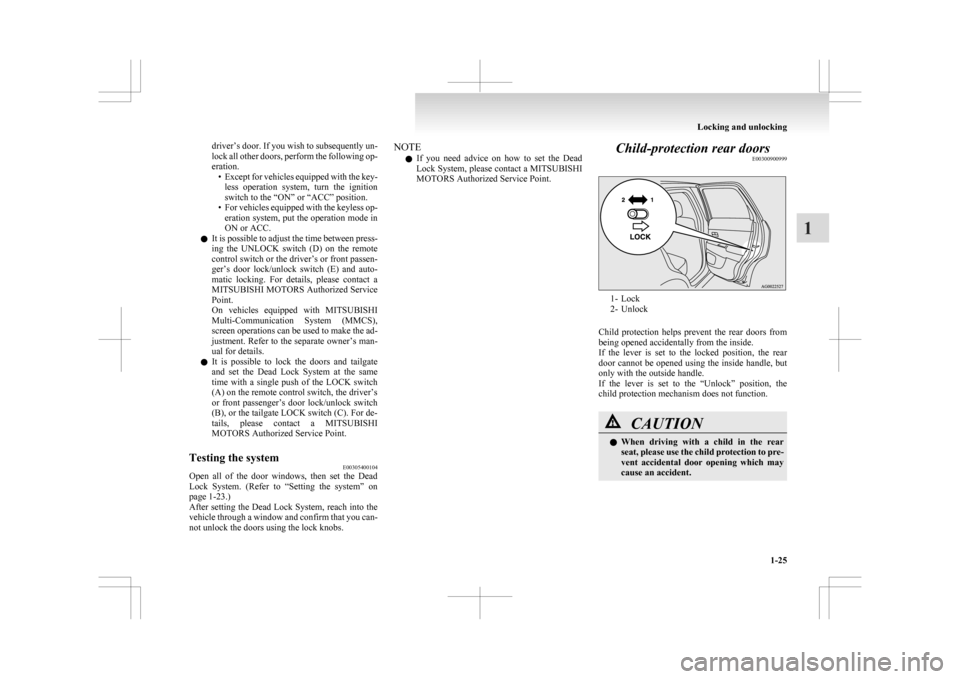
MOTORS Authorized Service Point. Child-protection rear doors
E00300900999 1- Lock
2-
Unlock
Child protection helps prevent the rear doors from
being opened accidentally from the inside.
If the lever is set to the locked position, the rear
door cannot be opened using the inside handle, but
only with the outside handle.
If the lever is set to the “Unlock” position, the
child protection mechanism does not function. CAUTION
l
When
driving with a child in the rear
seat, please use the child protection to pre-
vent accidental door opening which may
cause an accident. Locking and unlocking
1-25 1
Page 50 of 368
Security alarm system*
E00301500569
The
security alarm system is for alerting the sur-
rounding area of suspicious behaviour to prevent un-
lawful entry into the vehicle by operating an alarm
if a door, the tailgate or the bonnet is opened when
the vehicle has not been unlocked using the keyless
entry system or the keyless operation function.
Also, the alarm will be activated if any of the fol-
lowing occur.
l Attempt an unlawful moving of the vehicle.
(the vehicle inclination detection function)
l Detect a motion in the vehicle. (the interior
intrusion detection function)
l Disconnect the battery terminal.
The security alarm system is set to “active”.
When making changes to the settings, please fol-
low the procedure listed in the section titled “Chang-
ing the security alarm settings” on page 1-29.
On vehicles equipped with MITSUBISHI Multi-
Communication System (MMCS), screen opera-
tions can be used to make the adjustment. Refer to
the separate owner’s manual for details. CAUTION
l
Do
not modify or add parts to the securi-
ty alarm system.
Doing so could cause the security alarm
to malfunction. NOTE
l The
alarm system will not be activated if the
doors and the tailgate have been locked using
a key, the inside lock knob or the central
door lock switch (instead of the keyless entry
system or the keyless operation function).
l If the turn-signal lamps do not blink after the
locking and unlocking operation using the
keyless entry system or the keyless operation
function, the security alarm system may be
malfunctioning.
Have the vehicle inspected at a
MITSUBISHI MOTORS Authorized Service
Point.
If the confirmation function (blinking of the
turn-signal lamps by locking and unlocking
the doors and the tailgate) is deactivated, the
turn-signal lamps do not blink after the lock-
ing and unlocking operation.
For information on the confirmation func-
tion, refer to “Keyless entry system” on pa-
ges 1-04, 1-18 and “To operate using the key-
less operation function” on page 1-09.
l The security alarm system could be activated
in the following situations.
• Using a car wash
• Taking the vehicle on a ferry
• Parking in an automated car park
• Leaving someone or a pet in the vehicle
• Leaving a window open
• Leaving an unstable object such as a stuf-fed toy or accessory in the vehicle
• Suffering a continuous impact or vibra- tion by hail, thunder, etc.
According to the situations, deactivate the ve-
hicle inclination detection function and the in-
terior intrusion detection function. Refer to “To
deactivate the vehicle inclina-
tion detection function and the interior intru-
sion detection function” on page 1-31.
l The sensitivity of the interior intrusion detec-
tion function can be adjusted. For details,
please contact a MITSUBISHI MOTORS Au-
thorized Service Point.
The security alarm has four modes:
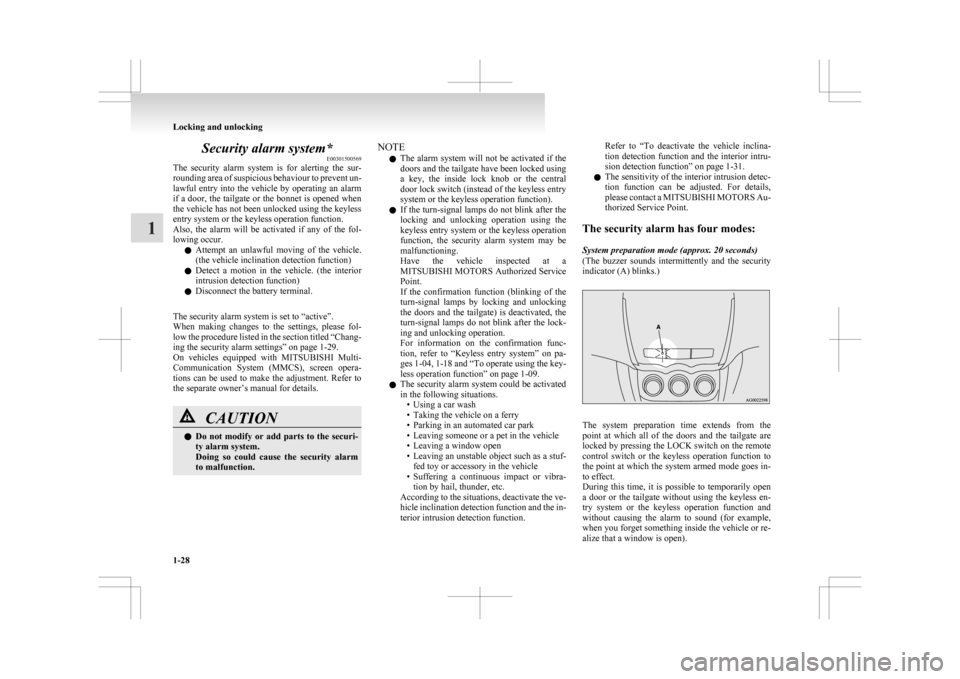
System preparation mode (approx. 20 seconds)
(The buzzer sounds intermittently and the security
indicator (A) blinks.) The system preparation time extends from the
point
at which all of the doors and the tailgate are
locked by pressing the LOCK switch on the remote
control switch or the keyless operation function to
the point at which the system armed mode goes in-
to effect.
During this time, it is possible to temporarily open
a door or the tailgate without using the keyless en-
try system or the keyless operation function and
without causing the alarm to sound (for example,
when you forget something inside the vehicle or re-
alize that a window is open). Locking and unlocking
1-28
1
Page 52 of 368
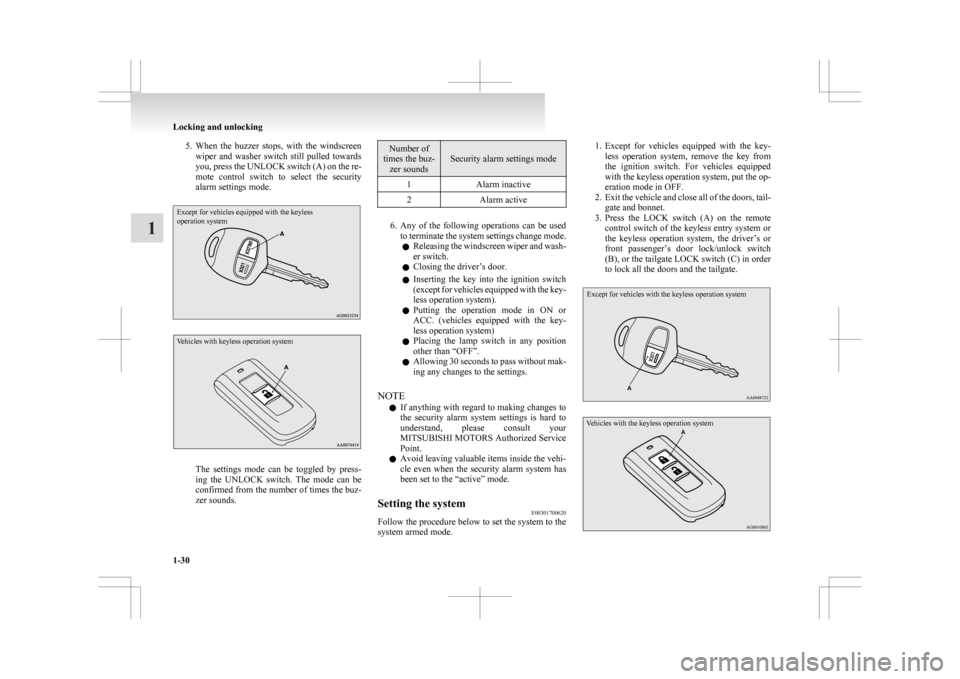
5. When the buzzer stops, with the windscreen
wiper and washer switch still pulled towards
you, press the UNLOCK switch (A) on the re-
mote control switch to select the security
alarm settings mode.
Except for vehicles equipped with the keyless
operation system
Vehicles with keyless operation system The settings mode can be toggled by press-
ing
the UNLOCK switch. The mode can be
confirmed from the number of times the buz-
zer sounds. Number of
times the buz- zer sounds Security alarm settings mode
1 Alarm inactive
2 Alarm active 6. Any
of the following operations can be used
to terminate the system settings change mode.
l Releasing the windscreen wiper and wash-
er switch.
l Closing the driver’s door.
l Inserting the key into the ignition switch
(except for vehicles equipped with the key-
less operation system).
l Putting the operation mode in ON or
ACC. (vehicles equipped with the key-
less operation system)
l Placing the lamp switch in any position
other than “OFF”.
l Allowing 30 seconds to pass without mak-
ing any changes to the settings.
NOTE l If anything with regard to making changes to
the security alarm system settings is hard to
understand, please consult your
MITSUBISHI MOTORS Authorized Service
Point.
l Avoid leaving valuable items inside the vehi-
cle even when the security alarm system has
been set to the “active” mode.
Setting the system E00301700620
Follow the procedure below to set the system to the
system armed mode. 1. Except
for vehicles equipped with the key-
less operation system, remove the key from
the ignition switch. For vehicles equipped
with the keyless operation system, put the op-
eration mode in OFF.
2. Exit the vehicle and close all of the doors, tail- gate and bonnet.
3. Press the LOCK switch (A) on the remote control switch of the keyless entry system or
the keyless operation system, the driver’s or
front passenger’s door lock/unlock switch
(B), or the tailgate LOCK switch (C) in order
to lock all the doors and the tailgate.
Except for vehicles with the keyless operation system
Vehicles with the keyless operation system Locking and unlocking
1-30
1
Page 54 of 368
The buzzer will sound twice and the function will
be activated.
NOTE
l The
function will be activated again if the fol-
lowing operation is performed. • If the doors and the tailgate are unlockedusing the keyless entry system or the key-
less operation function.
• If the ignition switch is turned to the “ON” or “ACC” position (except for ve-
hicles equipped with the keyless opera-
tion system).
• If the operation mode is put in ON or ACC (vehicles with the keyless operation
system).
Cancelling the system E00301800490
The following methods can be used to cancel the
system
when it is in the system preparation mode
or the system armed mode.
l Pressing the UNLOCK switch on the remote
control switch. l
Turning
the ignition switch to the “ON” posi-
tion (except for vehicles equipped with the
keyless operation system).
l Putting the operation mode in ON (vehicles
equipped with the keyless operation system).
l Opening any one of the doors or the tailgate,
or inserting the key into the ignition switch
(except for vehicles equipped with the key-
less operation system) when the system is in
the system preparation mode.
l Holding the keyless operation key and press-
ing the driver’s or front passenger’s door lock/
unlock switch, or the tailgate OPEN switch
to unlock the doors and the tailgate (vehicles
equipped with the keyless operation system).
NOTE l If the bonnet is opened during the system prep-
aration mode, the system preparation condi-
tion is suspended.
The system returns to the system preparation
mode when the bonnet is closed.
l If the battery terminals are disconnected
while the system is in the system preparation
mode, the memory will be erased.
l It is possible to register up to 8 remote con-
trol switches for the keyless entry system
and 4 remote control switches for the keyless
operation system.
As long as they are registered, any of the re-
mote control switches, other than the one
used to activate the system, can be used to
cancel the system.
If you want to register additional remote con-
trol switches, please contact a MITSUBISHI
MOTORS Authorized Service Point. l
The activation distance for the keyless entry
system is approximately 4 m.
If it is not possible to lock or unlock the vehi-
cle by pressing the switch at the correct dis-
tance or the security alarm system cannot be
set or cancelled using the switch, the battery
may need to be replaced.
Replace the battery at a MITSUBISHI
MOTORS Authorized Service Point.
l If the UNLOCK switch on the remote con-
trol switch, or the driver’s or front passen-
ger’s door lock/unlock switch is pressed and
no door or the tailgate is opened within 30
seconds, the doors and the tailgate will auto-
matically relock. In this case as well, the sys-
tem preparation mode will go into effect.
l The time between pressing the UNLOCK
switch on the remote control switch, or the
driver’s or front passenger’s door lock/un-
lock switch and automatic locking can be ad-
justed. Consult a MITSUBISHI MOTORS
Authorized Service Point.
On vehicles equipped with MITSUBISHI
Multi-Communication System (MMCS),
screen operations can be used to make the ad-
justment. Refer to the separate owner’s man-
ual for details.
Alarm activation E00301900635
When the system is in the system armed mode, the
alarm
will be activated as follows if the vehicle is
unlocked or if any of the doors, tailgate or bonnet
is opened using a method other than the keyless en-
try system or the keyless operation function. Locking and unlocking
1-32
1
Page 72 of 368
Pregnant women restraint
E00405600077WARNING
l Seat belts work for everyone, including
pregnant women. Pregnant women
should use the available seat belts. This
will reduce the likelihood of injury to
both the woman and the unborn child.
The lap belt should be worn across the
thighs and as snug against the hips as pos-
sible, but not across the waist. Consult
your doctor if you have any additional
questions or concerns. Seat belt pretensioner system and
force limiter system E00405700166
The
driver’s seat and front passenger’s seat each
have a seat belt equipped with a pretensioner system.
Pretensioner system E00405801135
When the ignition switch or the operation mode is
under
the following conditions, if there is a frontal
impact or a side impact (vehicles equipped with
SRS side airbags and SRS curtain airbags) severe
enough to injure the driver and/or front passenger,
the pretensioner system will retract their respective
seat belts instantaneously, thus maximizing the seat
belt’s effectiveness.
[Except for vehicles equipped with keyless opera-
tion system]
The ignition switch is in the “ON” or “START” po-
sition.
[Vehicles equipped with keyless operation system]
The operation mode is in ON. WARNING
l To
obtain the best results from your pre-
tensioner seat belt, make sure you have ad-
justed your seat correctly and wear your
seat belt properly. CAUTION
l
Installation
of audio equipment or re-
pairs in the vicinity of the pretensioner
seat belts or floor console must be per-
formed in line with MITSUBISHI
MOTORS guidelines. It is important to
do so because the work could affect the
pretensioner systems.
l If you need to scrap the vehicle, please con-
sult a MITSUBISHI MOTORS Author-
ized Service Point.
It is important to do so because unexpec-
ted activation of the pretensioner seat
belts could cause injuries.
NOTE l The
pretensioner seat belts will be activated
if the vehicle suffers a severe frontal impact
or a severe side impact (vehicles equipped
with SRS side airbags and SRS curtain air-
bags), even if the seat belts are not worn.
l The pretensioner seat belts are designed to
work only once. After the pretensioner seat
belts have been activated, we recommend
you have it replaced by a MITSUBISHI
MOTORS Authorized Service Point.
SRS warning E00405900243
The same warning lamp/display is shared by the
SRS airbags and the pretensioner seat belts.
Refer
to “SRS warning lamp/display” on page
2-34. Seat and seat belts
2-14
2
Page 77 of 368
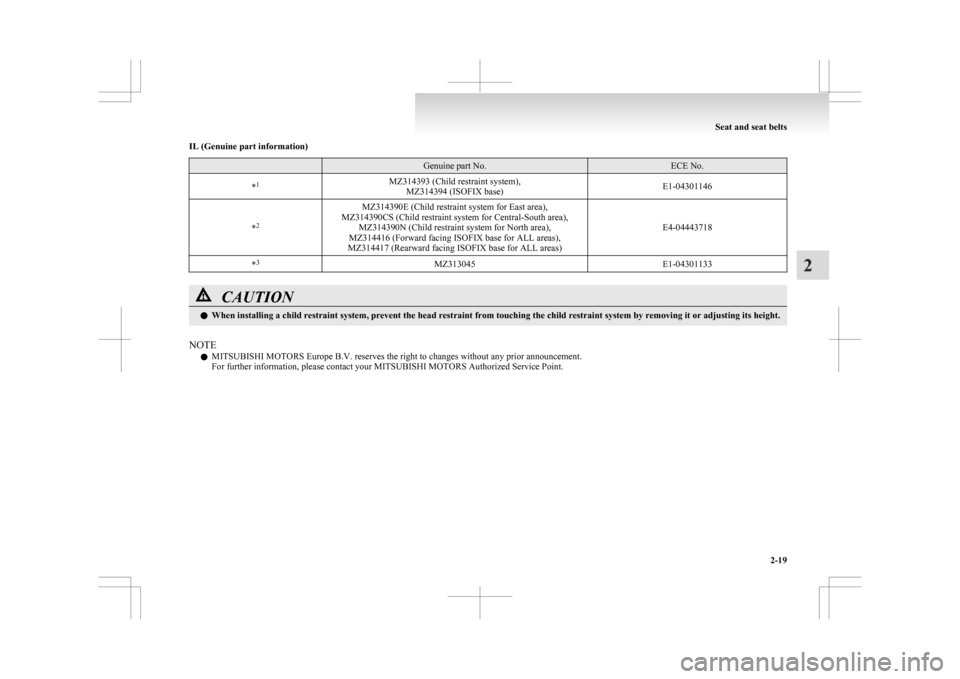
IL (Genuine part information)
Genuine part No. ECE No.
* 1
MZ314393 (Child restraint system),
MZ314394 (ISOFIX base) E1-04301146
* 2 MZ314390E (Child restraint system for East area),
MZ314390CS (Child restraint system for Central-South area), MZ314390N (Child restraint system for North area),
MZ314416 (Forward facing ISOFIX base for ALL areas),
MZ314417 (Rearward facing ISOFIX base for ALL areas) E4-04443718
* 3
MZ313045 E1-04301133CAUTION
l
When installing a child restraint system, prevent the head restraint from touching the child restraint system by removing it or adjusting its height.
NOTE l MITSUBISHI MOTORS
Europe B.V. reserves the right to changes without any prior announcement.
For further information, please contact your MITSUBISHI MOTORS Authorized Service Point. Seat and seat belts
2-19 2