service MITSUBISHI ASX 2009 1.G Owner's Manual
[x] Cancel search | Manufacturer: MITSUBISHI, Model Year: 2009, Model line: ASX, Model: MITSUBISHI ASX 2009 1.GPages: 368, PDF Size: 8.13 MB
Page 79 of 368
CAUTION
l
When installing a child restraint system, prevent the head restraint from touching the child restraint system by removing it or adjusting its height.
NOTE l There is no applicable
MITSUBISHI MOTORS Genuine Parts to the Mass Group “0-Up to 10 kg”.
MITSUBISHI MOTORS Europe B.V. reserves the right to changes without any prior announcement.
For further information, please contact your MITSUBISHI MOTORS Authorized Service Point. Seat and seat belts
2-21 2
Page 82 of 368
WARNING
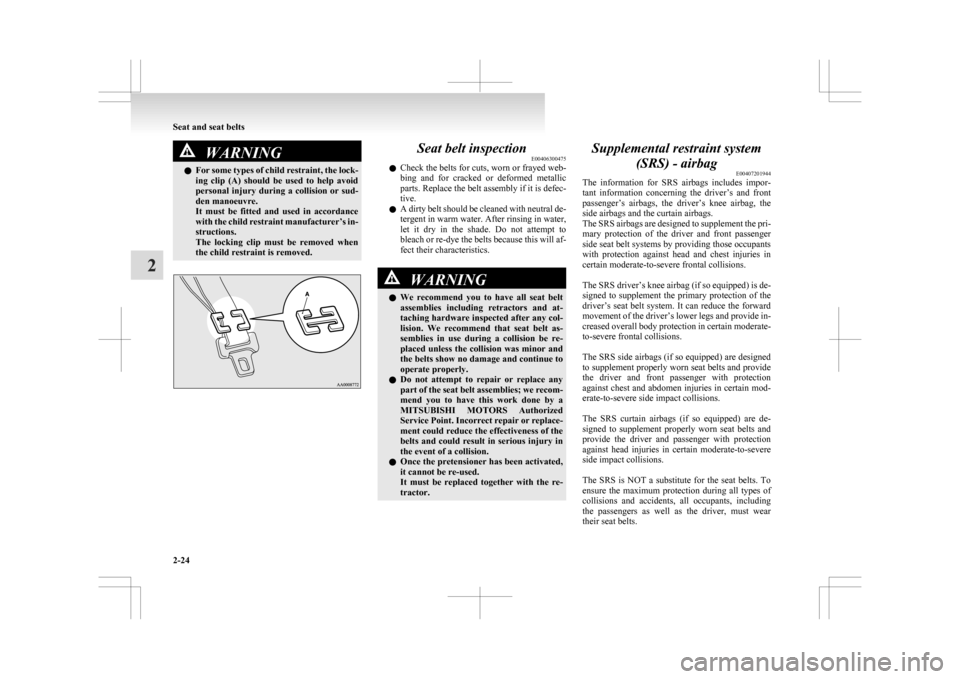
l For some types of child restraint, the lock-
ing clip (A) should be used to help avoid
personal injury during a collision or sud-
den manoeuvre.
It must be fitted and used in accordance
with the child restraint manufacturer’s in-
structions.
The locking clip must be removed when
the child restraint is removed. Seat belt inspection
E00406300475
l Check
the belts for cuts, worn or frayed web-
bing and for cracked or deformed metallic
parts. Replace the belt assembly if it is defec-
tive.
l A dirty belt should be cleaned with neutral de-
tergent in warm water. After rinsing in water,
let it dry in the shade. Do not attempt to
bleach or re-dye the belts because this will af-
fect their characteristics. WARNING
l We
recommend you to have all seat belt
assemblies including retractors and at-
taching hardware inspected after any col-
lision. We recommend that seat belt as-
semblies in use during a collision be re-
placed unless the collision was minor and
the belts show no damage and continue to
operate properly.
l Do not attempt to repair or replace any
part of the seat belt assemblies; we recom-
mend you to have this work done by a
MITSUBISHI MOTORS Authorized
Service Point. Incorrect repair or replace-
ment could reduce the effectiveness of the
belts and could result in serious injury in
the event of a collision.
l Once the pretensioner has been activated,
it cannot be re-used.
It must be replaced together with the re-
tractor. Supplemental restraint system
(SRS) - airbag E00407201944
The
information for SRS airbags includes impor-
tant information concerning the driver’s and front
passenger’s airbags, the driver’s knee airbag, the
side airbags and the curtain airbags.
The SRS airbags are designed to supplement the pri-
mary protection of the driver and front passenger
side seat belt systems by providing those occupants
with protection against head and chest injuries in
certain moderate-to-severe frontal collisions.
The SRS driver’s knee airbag (if so equipped) is de-
signed to supplement the primary protection of the
driver’s seat belt system. It can reduce the forward
movement of the driver’s lower legs and provide in-
creased overall body protection in certain moderate-
to-severe frontal collisions.
The SRS side airbags (if so equipped) are designed
to supplement properly worn seat belts and provide
the driver and front passenger with protection
against chest and abdomen injuries in certain mod-
erate-to-severe side impact collisions.
The SRS curtain airbags (if so equipped) are de-
signed to supplement properly worn seat belts and
provide the driver and passenger with protection
against head injuries in certain moderate-to-severe
side impact collisions.
The SRS is NOT a substitute for the seat belts. To
ensure the maximum protection during all types of
collisions and accidents, all occupants, including
the passengers as well as the driver, must wear
their seat belts. Seat and seat belts
2-24
2
Page 86 of 368
WARNING
• Do not turn OFF the front passen- ger’s airbag ON-OFF switch except
when a child restraint system is fitted
to the front passenger seat.
• If the indicator does not come on when the front passenger’s airbag ON-
OFF switch is turned OFF, do not fit a
child restraint system to the front pas-
senger seat. We recommend you to
have the system inspected by a
MITSUBISHI MOTORS Authorized
Service Point.
• If the indication lamp remains on when the front passenger’s airbag ON-
OFF switch is turned ON, do not al-
low anyone to sit on the front passen-
ger seat. We recommend you to have
the system inspected by a
MITSUBISHI MOTORS Authorized
Service Point.
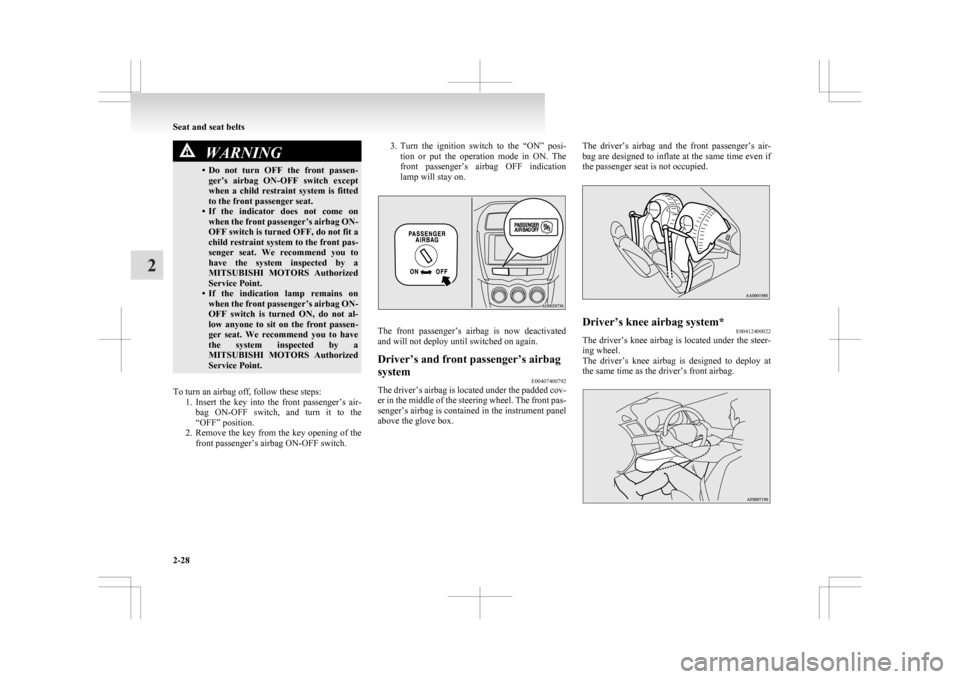
To turn an airbag off, follow these steps: 1. Insert
the key into the front passenger’s air-
bag ON-OFF switch, and turn it to the
“OFF” position.
2. Remove the key from the key opening of the front passenger’s airbag ON-OFF switch. 3. Turn
the ignition switch to the “ON” posi-
tion or put the operation mode in ON. The
front passenger’s airbag OFF indication
lamp will stay on. The front passenger’s airbag is now deactivated
and will not deploy until switched on again.
Driver’s and front passenger’s airbag
system
E00407400792
The driver’s airbag is located under the padded cov-
er
in the middle of the steering wheel. The front pas-
senger’s airbag is contained in the instrument panel
above the glove box. The driver’s airbag and the front passenger’s air-
bag
are designed to inflate at the same time even if
the passenger seat is not occupied. Driver’s knee airbag system*
E00412400022
The driver’s knee airbag is located under the steer-
ing wheel.
The
driver’s knee airbag is designed to deploy at
the same time as the driver’s front airbag. Seat and seat belts
2-28
2
Page 89 of 368
WARNING
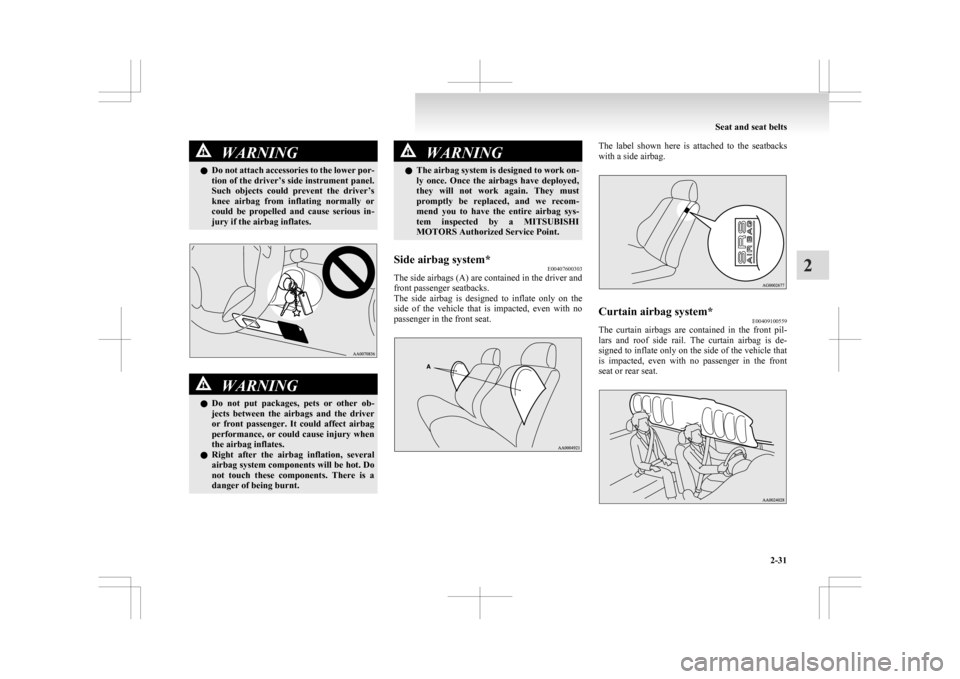
l Do not attach accessories to the lower por-
tion of the driver’s side instrument panel.
Such objects could prevent the driver’s
knee airbag from inflating normally or
could be propelled and cause serious in-
jury if the airbag inflates. WARNING
l Do
not put packages, pets or other ob-
jects between the airbags and the driver
or front passenger. It could affect airbag
performance, or could cause injury when
the airbag inflates.
l Right after the airbag inflation, several
airbag system components will be hot. Do
not touch these components. There is a
danger of being burnt. WARNING
l The
airbag system is designed to work on-
ly once. Once the airbags have deployed,
they will not work again. They must
promptly be replaced, and we recom-
mend you to have the entire airbag sys-
tem inspected by a MITSUBISHI
MOTORS Authorized Service Point.
Side airbag system* E00407600303
The side airbags (A) are contained in the driver and
front passenger seatbacks.
The
side airbag is designed to inflate only on the
side of the vehicle that is impacted, even with no
passenger in the front seat. The label shown here is attached to the seatbacks
with a side airbag.
Curtain airbag system*
E00409100559
The curtain airbags are contained in the front pil-
lars
and roof side rail. The curtain airbag is de-
signed to inflate only on the side of the vehicle that
is impacted, even with no passenger in the front
seat or rear seat. Seat and seat belts
2-31 2
Page 92 of 368
WARNING
l Do not put a hanger or any heavy or poin-
ted object on the coat hook. If the curtain
airbag was activated, any such item could
be propelled away with great force and
could prevent the curtain airbag from in-
flating correctly. Hang clothes directly on
the coat hook (without using a hanger).
Make sure there are no heavy or sharp ob-
jects in the pockets of clothes that you
hang on the coat hook.
l Never install a rearward facing child re-
straint in the front passenger seat. A for-
ward facing child restraint should be
used in the rear seat whenever possible. If
a forward facing child restraint must be
used in the front passenger seat, adjust
the seat to the most rearward position,
and ensure that the child stays in the
child restraint and away from the door.
l Do not allow a child to lean against or
close to the front door even if the child is
seated in a child restraint system.
The child’s head should also not be
leaned against or be close to the area
where the side airbags and curtain air-
bags are located. It is dangerous if the
side airbags and curtain airbags inflate.
Failure to follow all of these instructions
could lead to serious or fatal injury to the
child.
l We recommend work around and on the
side airbags and curtain airbags system
to be done by a MITSUBISHI MOTORS
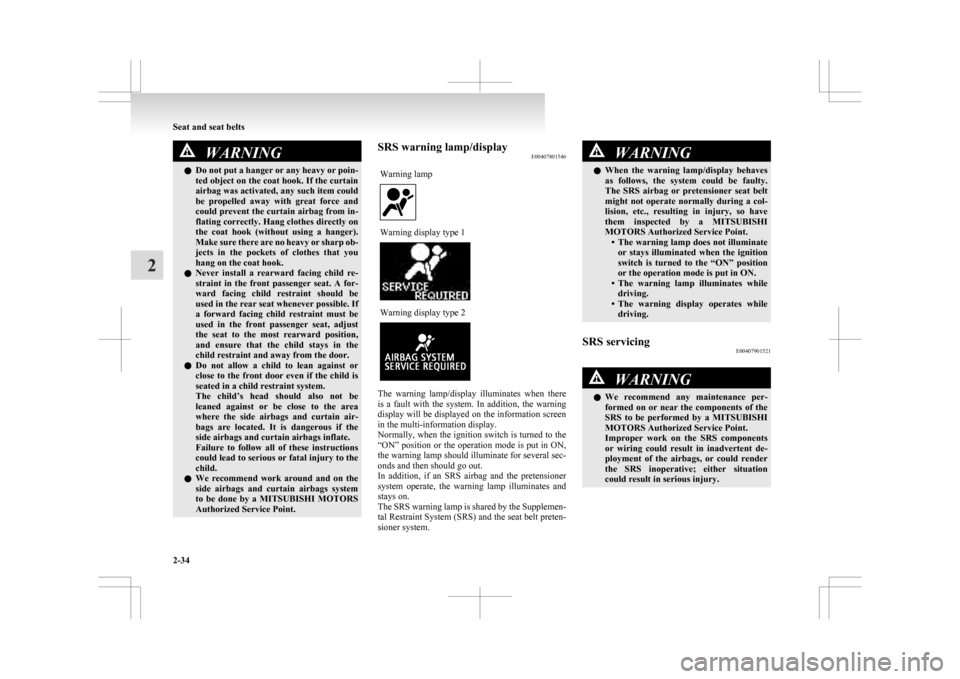
Authorized Service Point. SRS warning lamp/display
E00407801546
Warning lamp Warning display type 1
Warning display type 2
The warning lamp/display illuminates when there
is
a fault with the system. In addition, the warning
display will be displayed on the information screen
in the multi-information display.
Normally, when the ignition switch is turned to the
“ON” position or the operation mode is put in ON,
the warning lamp should illuminate for several sec-
onds and then should go out.
In addition, if an SRS airbag and the pretensioner
system operate, the warning lamp illuminates and
stays on.
The SRS warning lamp is shared by the Supplemen-
tal Restraint System (SRS) and the seat belt preten-
sioner system. WARNING
l When
the warning lamp/display behaves
as follows, the system could be faulty.
The SRS airbag or pretensioner seat belt
might not operate normally during a col-
lision, etc., resulting in injury, so have
them inspected by a MITSUBISHI
MOTORS Authorized Service Point. • The warning lamp does not illuminateor stays illuminated when the ignition
switch is turned to the “ON” position
or the operation mode is put in ON.
• The warning lamp illuminates while driving.
• The warning display operates while driving.
SRS servicing E00407901521 WARNING
l We
recommend any maintenance per-
formed on or near the components of the
SRS to be performed by a MITSUBISHI
MOTORS Authorized Service Point.
Improper work on the SRS components
or wiring could result in inadvertent de-
ployment of the airbags, or could render
the SRS inoperative; either situation
could result in serious injury. Seat and seat belts
2-34
2
Page 93 of 368
WARNING
l Do not modify your steering wheel, seat
belt retractor or any other SRS compo-
nents. For example, replacement of the
steering wheel, or modifications to the
front bumper or body structure can ad-
versely affect SRS performance and lead
to possible injury.
l If your vehicle has sustained any damage,
we recommend you to have the SRS in-
spected to ensure it is in proper working
order.
l On vehicles with the side airbags, do not
modify your front seats, centre pillar and
centre console.
It can adversely affect SRS performance
and lead to possible injury.
If you found any tear, scratch, crack or
damage to the seat fabric near the side air-
bag, the portion of the front and rear pil-
lars and roof side rail, you should have
the SRS inspected by a MITSUBISHI
MOTORS Authorized Service Point.
NOTE l When
you transfer ownership of the vehicle
to some other person, we urge you to alert
the new owner that it is equipped with the
SRS and refer the new owner to the applica-
ble section in this owner’s manual.
l If your vehicle has to be scrapped, do this in
line with local legislation and contact a
MITSUBISHI MOTORS Authorized Service
Point to safely dismantle the airbag system. Seat and seat belts
2-35 2
Page 97 of 368
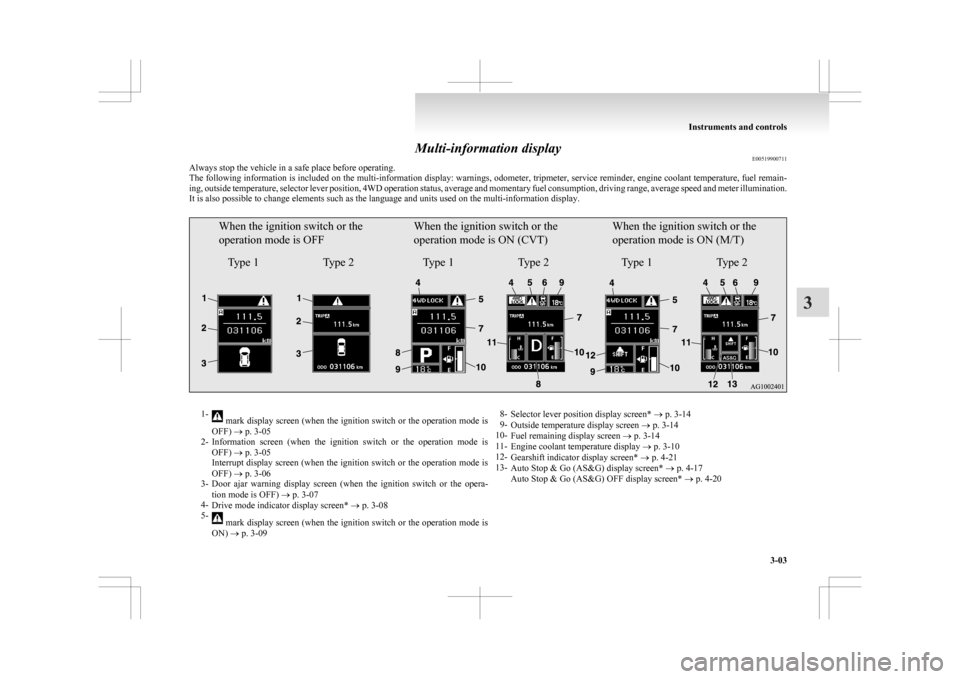
Multi-information display
E00519900711
Always stop the vehicle in a safe place before operating.
The
following information is included on the multi-information display: warnings, odometer, tripmeter, service reminder, engine coolant temperature, fuel remain-
ing, outside temperature, selector lever position, 4WD operation status, average and momentary fuel consumption, driving range, average speed and meter illumination.
It is also possible to change elements such as the language and units used on the multi-information display.
When the ignition switch or the
operation mode is OFF
Type 1 Type 2When the ignition switch or the
operation mode is ON (CVT)
Type 1 Type 2When the ignition switch or the
operation mode is ON (M/T)
Type 1 Type 21-
mark display screen (when the ignition switch or the operation mode is
OFF) ® p. 3-05
2- Information
screen (when the ignition switch or the operation mode is
OFF) ® p. 3-05
Interrupt display screen (when the ignition switch or the operation mode is
OFF) ® p. 3-06
3- Door ajar warning display screen (when the ignition switch or the opera-
tion mode is OFF) ® p. 3-07
4- Drive mode indicator display screen* ® p. 3-08
5- mark display screen (when the ignition switch or the operation mode is
ON) ® p. 3-09 8-
Selector lever position display screen* ® p. 3-14
9- Outside temperature display screen ® p. 3-14
10- Fuel remaining display screen ® p. 3-14
11- Engine coolant temperature display ® p. 3-10
12- Gearshift indicator display screen* ® p. 4-21
13- Auto Stop & Go (AS&G) display screen* ® p. 4-17
Auto Stop & Go (AS&G) OFF display screen* ® p. 4-20 Instruments and controls
3-03 3
Page 99 of 368
Multi-information meter switch
E00520000608
Each
time the multi-information meter switch is op-
erated, a sound is emitted and the multi-informa-
tion display changes between information such as
warnings, odometer (Type 1), tripmeter, service re-
minder, engine coolant temperature (Type 1), aver-
age and momentary fuel consumption, driving
range, and average speed.
It is also possible to change elements such as the
language and units used on the multi-information
display by operating the multi-information meter
switch. mark display screen (when
the ignition switch or the oper-
ation mode is OFF) E00520100553
If
you press the multi-information meter
switch and return from the warning dis-
play screen to the previous screen, the mark is displayed.
Refer
to “To return to the screen dis-
played before the warning display” on
page 3-06. This mark is also displayed if there is an-
other
warning other than the one dis-
played. When the cause of the warning
display is eliminated, the mark goes
out automatically.
NOTE
l When
the mark is displayed,
the
warning display screen can be
redisplayed on the information
screen.
Refer to “Information screen
(when the ignition switch or the op-
eration mode is OFF)” on page
3-05.
Refer to “Information screen
(when the ignition switch or the op-
eration mode is ON)” on page
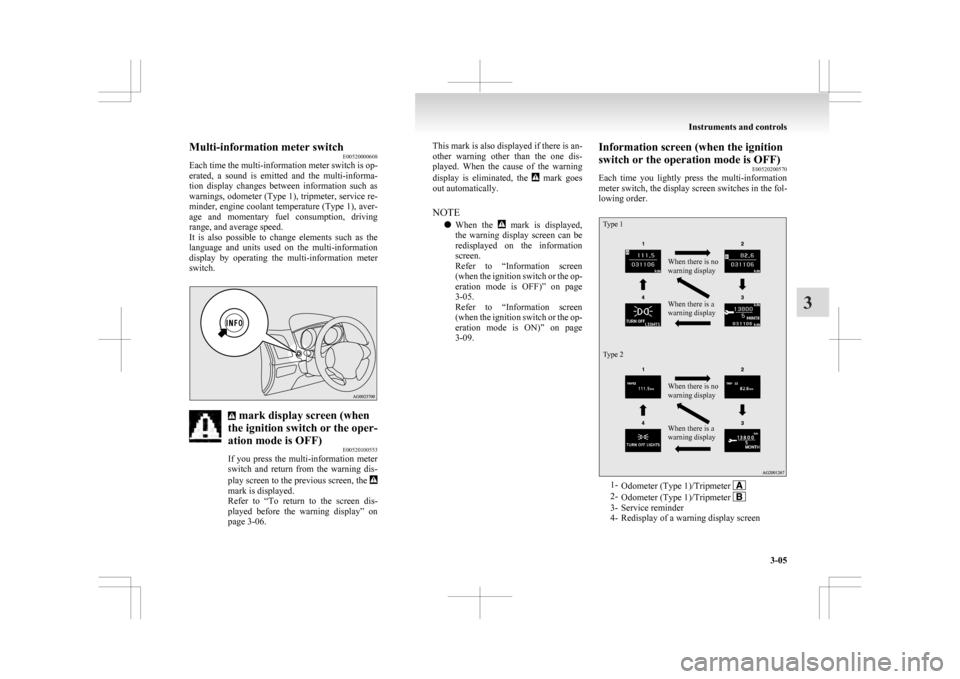
3-09. Information screen (when the ignition
switch or the operation mode is OFF)
E00520200570
Each
time you lightly press the multi-information
meter switch, the display screen switches in the fol-
lowing order.
Type 1
Type 2 When there is no
warning display
When there is a
warning display
When there is no
warning display
When there is a
warning display
1-
Odometer (Type 1)/Tripmeter 2-
Odometer (Type 1)/Tripmeter 3- Service reminder
4-
Redisplay of a warning display screen Instruments and controls
3-05 3
Page 100 of 368
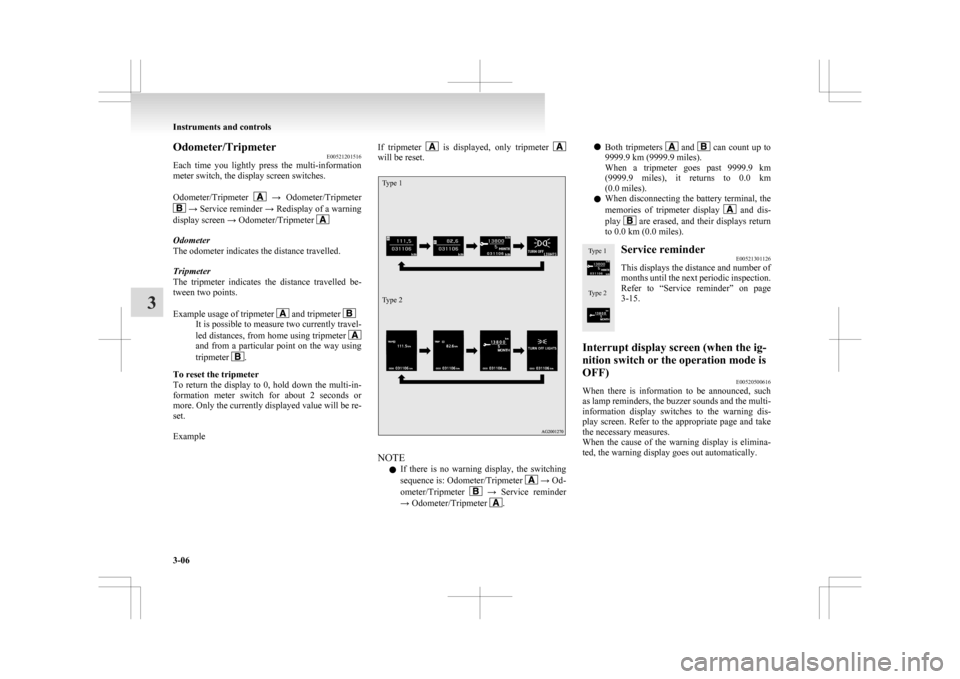
Odometer/Tripmeter
E00521201516
Each
time you lightly press the multi-information
meter switch, the display screen switches.
Odometer/Tripmeter →
Odometer/Tripmeter
→ Service reminder → Redisplay of a warning
display screen → Odometer/Tripmeter Odometer
The odometer indicates the distance travelled.
Tripmeter
The
tripmeter indicates the distance travelled be-
tween two points.
Example usage of tripmeter and tripmeter
It is possible to measure two currently travel-
led
distances, from home using tripmeter and from a particular point on the way using
tripmeter
.
To reset the tripmeter
To
return the display to 0, hold down the multi-in-
formation meter switch for about 2 seconds or
more. Only the currently displayed value will be re-
set.
Example If tripmeter is displayed, only tripmeter
will be reset.
Type 1
Type 2
NOTE
l If
there is no warning display, the switching
sequence is: Odometer/Tripmeter → Od-
ometer/Tripmeter →
Service reminder
→ Odometer/Tripmeter .l
Both
tripmeters and can count up to
9999.9 km (9999.9 miles).
When
a tripmeter goes past 9999.9 km
(9999.9 miles), it returns to 0.0 km
(0.0 miles).
l When disconnecting the battery terminal, the
memories of tripmeter display and dis-
play are erased, and their displays return
to 0.0 km (0.0 miles).
Type 1
Type 2 Service reminder
E00521301126
This displays the distance and number of
months
until the next periodic inspection.
Refer to “Service reminder” on page
3-15.
Interrupt display screen (when the ig-
nition switch or the operation mode is
OFF) E00520500616
When there is information to be announced, such
as
lamp reminders, the buzzer sounds and the multi-
information display switches to the warning dis-
play screen. Refer to the appropriate page and take
the necessary measures.
When the cause of the warning display is elimina-
ted, the warning display goes out automatically. Instruments and controls
3-06
3
Page 102 of 368
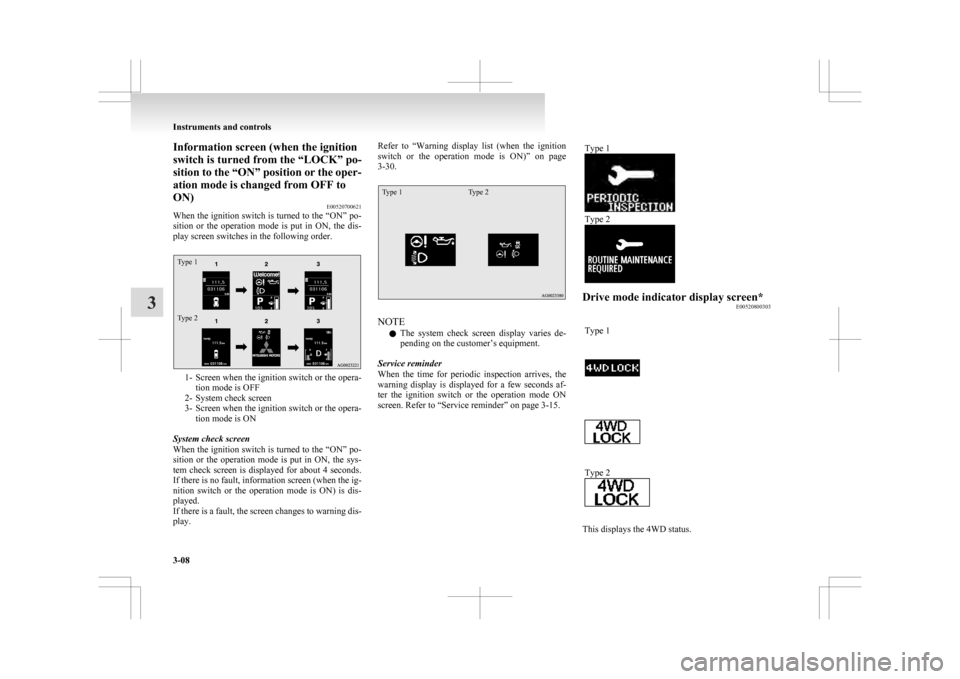
Information screen (when the ignition
switch is turned from the “LOCK” po-
sition
to the “ON” position or the oper-
ation mode is changed from OFF to
ON) E00520700621
When the ignition switch is turned to the “ON” po-
sition or the operation mode is put in ON, the dis-
play screen switches in the following order.
Type 1
Type 2 1- Screen when the ignition switch or the opera-
tion mode is OFF
2-
System check screen
3- Screen when the ignition switch or the opera- tion mode is ON
System check screen
When the ignition switch is turned to the “ON” po-
sition or the operation mode is put in ON, the sys-
tem check screen is displayed for about 4 seconds.
If there is no fault, information screen (when the ig-
nition switch or the operation mode is ON) is dis-
played.
If there is a fault, the screen changes to warning dis-
play. Refer to “Warning
display list (when the ignition
switch or the operation mode is ON)” on page
3-30.
Type 1 Type 2 NOTE
l The
system check screen display varies de-
pending on the customer’s equipment.
Service reminder
When the time for periodic inspection arrives, the
warning display is displayed for a few seconds af-
ter the ignition switch or the operation mode ON
screen. Refer to “Service reminder” on page 3-15. Type 1 Type 2
Drive mode indicator display screen*
E00520800303
Type 1 Type 2
This displays the 4WD status.Instruments and controls
3-08
3