lock MITSUBISHI ASX 2009 1.G Workshop Manual
[x] Cancel search | Manufacturer: MITSUBISHI, Model Year: 2009, Model line: ASX, Model: MITSUBISHI ASX 2009 1.GPages: 368, PDF Size: 8.13 MB
Page 68 of 368
Seat belts
E00404800636
To
protect you and your passengers in the event of
an accident, it is most important that the seat belts
be worn correctly while driving.
The front seat belts have a pretensioner system.
These belts are used the same way as a convention-
al seat belt.
Refer to “Seat belt pretensioner system and force
limiter system” on page 2-14. WARNING
l Always
place the shoulder belt over your
shoulder and across your chest. Never
put it behind you or under your arm.
l One seat belt should be used by only one
person. Doing otherwise can be dangerous.
l The seat belt will provide its wearer with
maximum protection if the recliner seat-
back is placed in fully upright position.
When the seatback is reclined, there is
greater risk that the passenger will slide
under the belt, especially in a forward im-
pact accident, and may be injured by the
belt or by striking the instrument panel
or seatbacks.
l Seat belts should always be worn by ev-
ery adult who drives or rides in this vehi-
cle, and by all children who are tall
enough to wear seat belts properly.
Other children should always use proper
child restraint systems.
l Remove any twists when using the belt. WARNING
l No
modifications or additions should be
made by the user which will either pre-
vent the seat belt adjusting devices from
operating to remove slack, or prevent the
seat belt assembly from being adjusted to
remove slack.
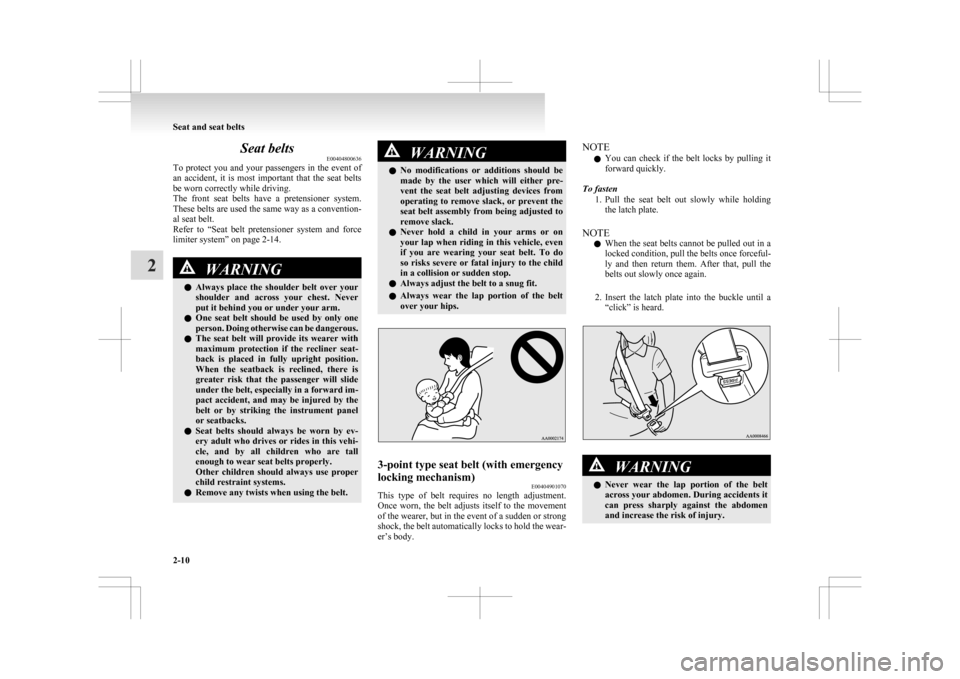
l Never hold a child in your arms or on
your lap when riding in this vehicle, even
if you are wearing your seat belt. To do
so risks severe or fatal injury to the child
in a collision or sudden stop.
l Always adjust the belt to a snug fit.
l Always wear the lap portion of the belt
over your hips. 3-point type seat belt (with emergency
locking mechanism)
E00404901070
This type of belt requires no length adjustment.
Once
worn, the belt adjusts itself to the movement
of the wearer, but in the event of a sudden or strong
shock, the belt automatically locks to hold the wear-
er’s body. NOTE
l You
can check if the belt locks by pulling it
forward quickly.
To fasten 1. Pull the seat belt out slowly while holdingthe latch plate.
NOTE l When the seat belts cannot be pulled out in a
locked condition, pull the belts once forceful-
ly and then return them. After that, pull the
belts out slowly once again.
2. Insert the latch plate into the buckle until a “click” is heard. WARNING
l Never
wear the lap portion of the belt
across your abdomen. During accidents it
can press sharply against the abdomen
and increase the risk of injury. Seat and seat belts
2-10
2
Page 70 of 368
Adjustable seat belt anchor (front
seats)
E00405000329
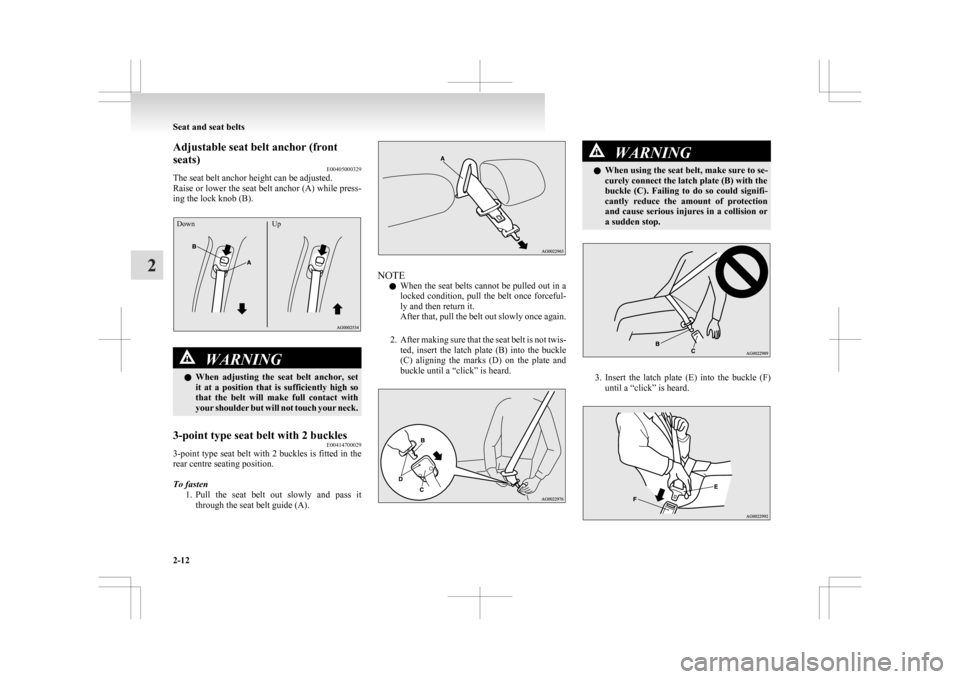
The seat belt anchor height can be adjusted.
Raise
or lower the seat belt anchor (A) while press-
ing the lock knob (B).
Down UpWARNING
l When
adjusting the seat belt anchor, set
it at a position that is sufficiently high so
that the belt will make full contact with
your shoulder but will not touch your neck.
3-point type seat belt with 2 buckles E00414700029
3-point type seat belt with 2 buckles is fitted in the
rear centre seating position.
To fasten
1. Pull
the seat belt out slowly and pass it
through the seat belt guide (A). NOTE
l When
the seat belts cannot be pulled out in a
locked condition, pull the belt once forceful-
ly and then return it.
After that, pull the belt out slowly once again.
2. After making sure that the seat belt is not twis- ted, insert the latch plate (B) into the buckle
(C) aligning the marks (D) on the plate and
buckle until a “click” is heard. WARNING
l When using the seat belt, make sure to se-
curely connect the latch plate (B) with the
buckle
(C). Failing to do so could signifi-
cantly reduce the amount of protection
and cause serious injures in a collision or
a sudden stop. 3. Insert
the latch plate (E) into the buckle (F)
until a “click” is heard. Seat and seat belts
2-12
2
Page 81 of 368
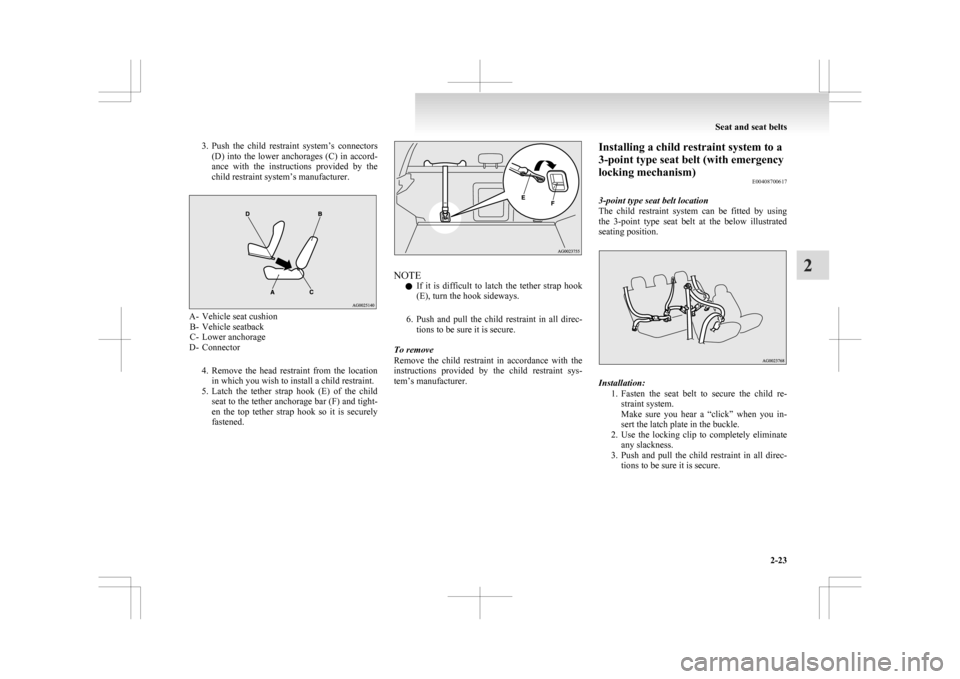
3. Push the child restraint system’s connectors
(D) into the lower anchorages (C) in accord-
ance with the instructions provided by the
child restraint system’s manufacturer. A- Vehicle seat cushion
B-
Vehicle seatback
C- Lower anchorage
D- Connector
4. Remove the head restraint from the locationin which you wish to install a child restraint.
5. Latch the tether strap hook (E) of the child seat to the tether anchorage bar (F) and tight-
en the top tether strap hook so it is securely
fastened. NOTE
l If
it is difficult to latch the tether strap hook
(E), turn the hook sideways.
6. Push and pull the child restraint in all direc- tions to be sure it is secure.
To remove
Remove the child restraint in accordance with the
instructions provided by the child restraint sys-
tem’s manufacturer. Installing a child restraint system to a
3-point type seat belt (with emergency
locking mechanism)
E00408700617
3-point type seat belt location
The
child restraint system can be fitted by using
the 3-point type seat belt at the below illustrated
seating position. Installation:
1. Fasten
the seat belt to secure the child re-
straint system.
Make sure you hear a “click” when you in-
sert the latch plate in the buckle.
2. Use the locking clip to completely eliminate any slackness.
3. Push and pull the child restraint in all direc- tions to be sure it is secure. Seat and seat belts
2-23 2
Page 82 of 368
WARNING
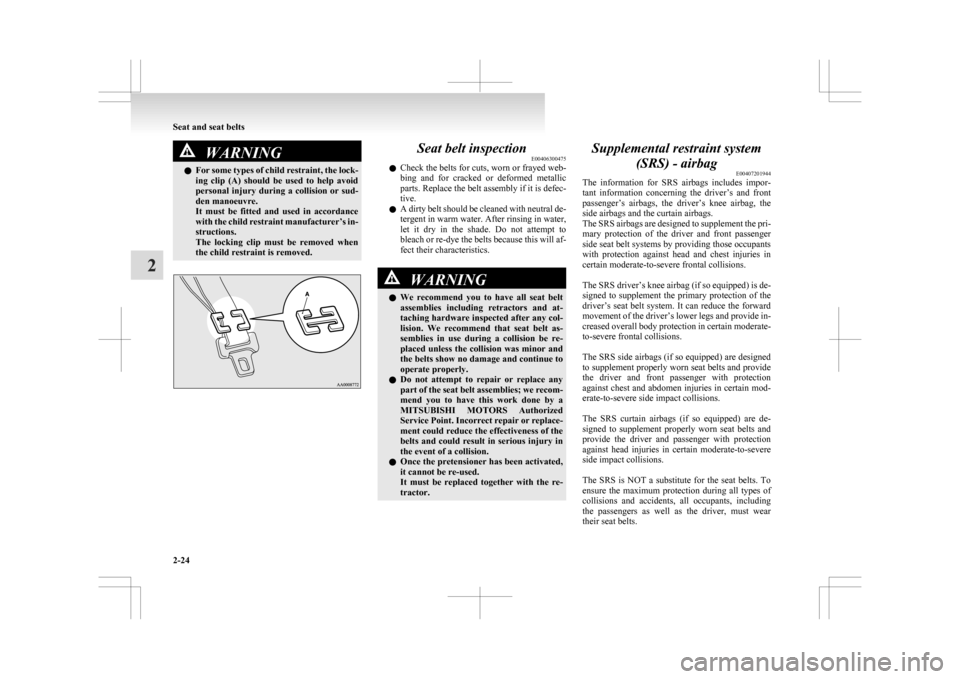
l For some types of child restraint, the lock-
ing clip (A) should be used to help avoid
personal injury during a collision or sud-
den manoeuvre.
It must be fitted and used in accordance
with the child restraint manufacturer’s in-
structions.
The locking clip must be removed when
the child restraint is removed. Seat belt inspection
E00406300475
l Check
the belts for cuts, worn or frayed web-
bing and for cracked or deformed metallic
parts. Replace the belt assembly if it is defec-
tive.
l A dirty belt should be cleaned with neutral de-
tergent in warm water. After rinsing in water,
let it dry in the shade. Do not attempt to
bleach or re-dye the belts because this will af-
fect their characteristics. WARNING
l We
recommend you to have all seat belt
assemblies including retractors and at-
taching hardware inspected after any col-
lision. We recommend that seat belt as-
semblies in use during a collision be re-
placed unless the collision was minor and
the belts show no damage and continue to
operate properly.
l Do not attempt to repair or replace any
part of the seat belt assemblies; we recom-
mend you to have this work done by a
MITSUBISHI MOTORS Authorized
Service Point. Incorrect repair or replace-
ment could reduce the effectiveness of the
belts and could result in serious injury in
the event of a collision.
l Once the pretensioner has been activated,
it cannot be re-used.
It must be replaced together with the re-
tractor. Supplemental restraint system
(SRS) - airbag E00407201944
The
information for SRS airbags includes impor-
tant information concerning the driver’s and front
passenger’s airbags, the driver’s knee airbag, the
side airbags and the curtain airbags.
The SRS airbags are designed to supplement the pri-
mary protection of the driver and front passenger
side seat belt systems by providing those occupants
with protection against head and chest injuries in
certain moderate-to-severe frontal collisions.
The SRS driver’s knee airbag (if so equipped) is de-
signed to supplement the primary protection of the
driver’s seat belt system. It can reduce the forward
movement of the driver’s lower legs and provide in-
creased overall body protection in certain moderate-
to-severe frontal collisions.
The SRS side airbags (if so equipped) are designed
to supplement properly worn seat belts and provide
the driver and front passenger with protection
against chest and abdomen injuries in certain mod-
erate-to-severe side impact collisions.
The SRS curtain airbags (if so equipped) are de-
signed to supplement properly worn seat belts and
provide the driver and passenger with protection
against head injuries in certain moderate-to-severe
side impact collisions.
The SRS is NOT a substitute for the seat belts. To
ensure the maximum protection during all types of
collisions and accidents, all occupants, including
the passengers as well as the driver, must wear
their seat belts. Seat and seat belts
2-24
2
Page 85 of 368
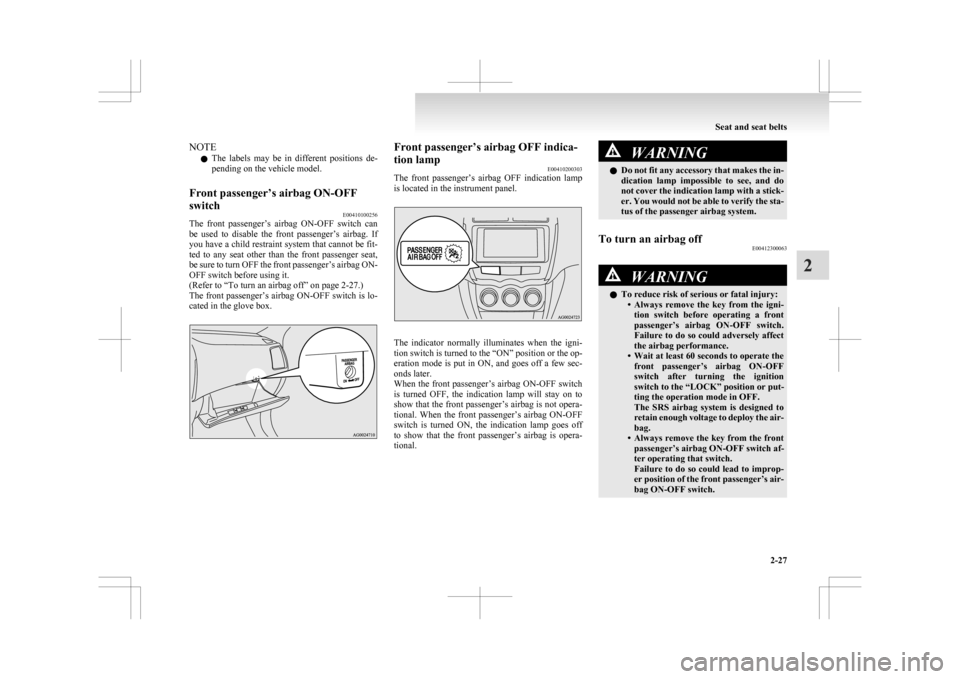
NOTE
l The
labels may be in different positions de-
pending on the vehicle model.
Front passenger’s airbag ON-OFF
switch E00410100256
The front passenger’s airbag ON-OFF switch can
be
used to disable the front passenger’s airbag. If
you have a child restraint system that cannot be fit-
ted to any seat other than the front passenger seat,
be sure to turn OFF the front passenger’s airbag ON-
OFF switch before using it.
(Refer to “To turn an airbag off” on page 2-27.)
The front passenger’s airbag ON-OFF switch is lo-
cated in the glove box. Front passenger’s airbag OFF indica-
tion lamp
E00410200303
The
front passenger’s airbag OFF indication lamp
is located in the instrument panel. The indicator normally illuminates when the igni-
tion
switch is turned to the “ON” position or the op-
eration mode is put in ON, and goes off a few sec-
onds later.
When the front passenger’s airbag ON-OFF switch
is turned OFF, the indication lamp will stay on to
show that the front passenger’s airbag is not opera-
tional. When the front passenger’s airbag ON-OFF
switch is turned ON, the indication lamp goes off
to show that the front passenger’s airbag is opera-
tional. WARNING
l Do
not fit any accessory that makes the in-
dication lamp impossible to see, and do
not cover the indication lamp with a stick-
er. You would not be able to verify the sta-
tus of the passenger airbag system.
To turn an airbag off E00412300063 WARNING
l To reduce risk of serious or fatal injury:
• Always
remove the key from the igni-
tion switch before operating a front
passenger’s airbag ON-OFF switch.
Failure to do so could adversely affect
the airbag performance.
• Wait at least 60 seconds to operate the front passenger’s airbag ON-OFF
switch after turning the ignition
switch to the “LOCK” position or put-
ting the operation mode in OFF.
The SRS airbag system is designed to
retain enough voltage to deploy the air-
bag.
• Always remove the key from the front passenger’s airbag ON-OFF switch af-
ter operating that switch.
Failure to do so could lead to improp-
er position of the front passenger’s air-
bag ON-OFF switch. Seat and seat belts
2-27 2
Page 98 of 368

6-
Active Stability Control (ASC) OFF display screen* ® p. 3-09
7- Information screen (when the ignition switch or the operation mode is
ON) ® p. 3-09
Interrupt display screen (when the ignition switch or the operation mode is
ON) ® p. 3-13
NOTE l The fuel units, temperature units, display language, and other settings can be changed.
Refer to “Changing the function settings (when the ignition switch or the operation mode is ON)” on page
3-17.
l The display screen is different depending on whether the ignition switch or the operation mode is OFF or ON.
Refer to “Information screen (when the ignition switch or the operation mode is OFF)” on page
3-05.
Refer to “Warning display list (when the ignition switch or the operation mode is OFF)” on page 3-27.
Refer to “Information screen (when the ignition switch is turned from the “LOCK” position to the “ON” position or the operation mode is changed from OFF
to ON)” on page 3-08.
Refer to “Information screen (when the ignition switch or the operation mode is ON)” on page 3-09.
Refer to “Warning display list (when the ignition switch or the operation mode is ON)” on page 3-30.Instruments and controls
3-04
3
Page 102 of 368
Information screen (when the ignition
switch is turned from the “LOCK” po-
sition
to the “ON” position or the oper-
ation mode is changed from OFF to
ON) E00520700621
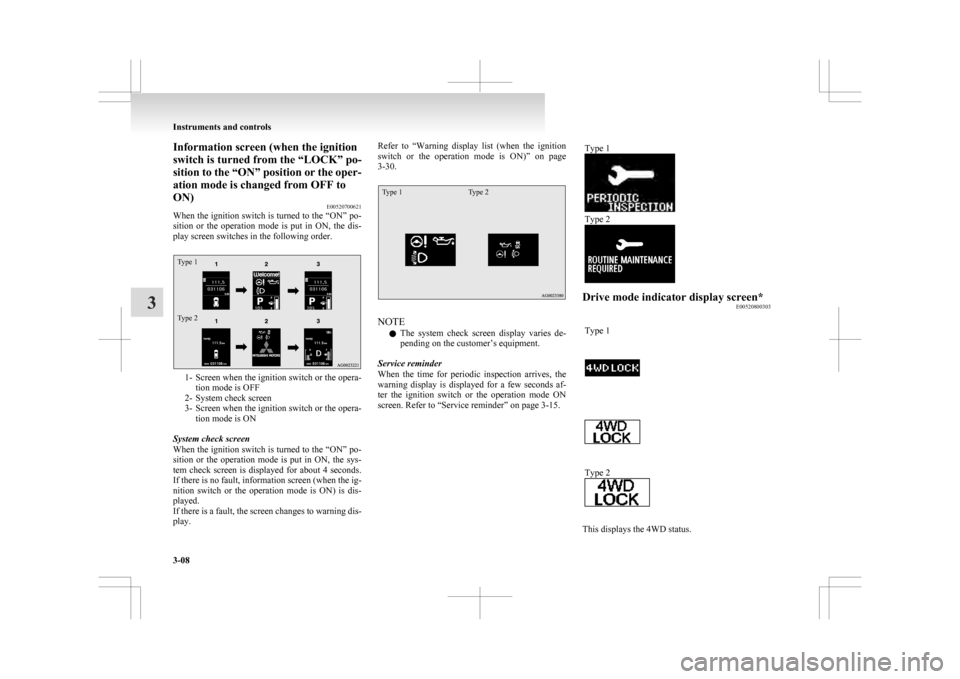
When the ignition switch is turned to the “ON” po-
sition or the operation mode is put in ON, the dis-
play screen switches in the following order.
Type 1
Type 2 1- Screen when the ignition switch or the opera-
tion mode is OFF
2-
System check screen
3- Screen when the ignition switch or the opera- tion mode is ON
System check screen
When the ignition switch is turned to the “ON” po-
sition or the operation mode is put in ON, the sys-
tem check screen is displayed for about 4 seconds.
If there is no fault, information screen (when the ig-
nition switch or the operation mode is ON) is dis-
played.
If there is a fault, the screen changes to warning dis-
play. Refer to “Warning
display list (when the ignition
switch or the operation mode is ON)” on page
3-30.
Type 1 Type 2 NOTE
l The
system check screen display varies de-
pending on the customer’s equipment.
Service reminder
When the time for periodic inspection arrives, the
warning display is displayed for a few seconds af-
ter the ignition switch or the operation mode ON
screen. Refer to “Service reminder” on page 3-15. Type 1 Type 2
Drive mode indicator display screen*
E00520800303
Type 1 Type 2
This displays the 4WD status.Instruments and controls
3-08
3
Page 103 of 368
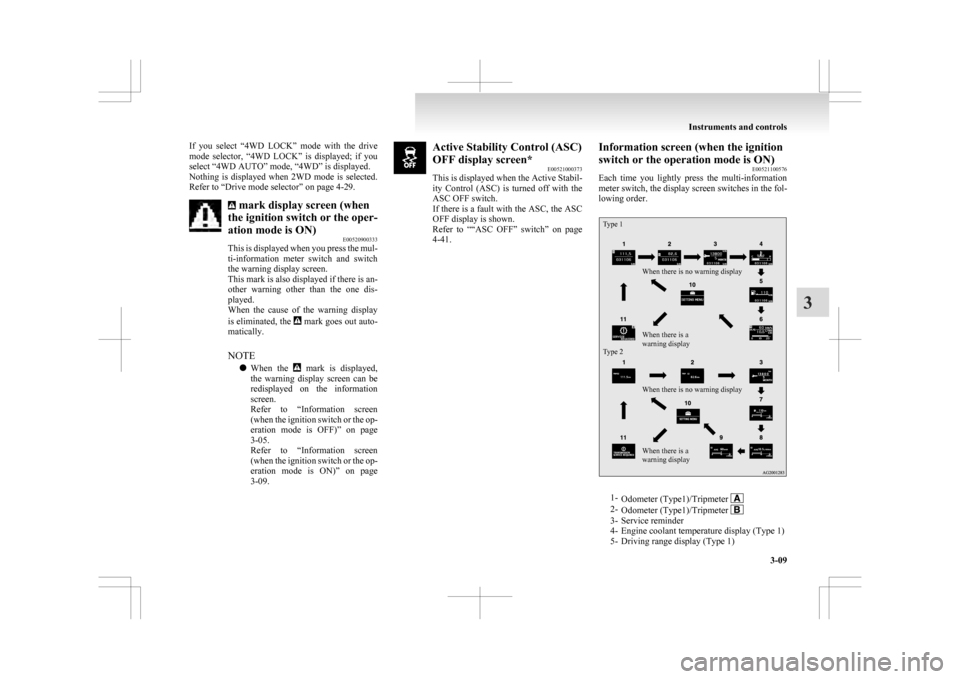
If you select “4WD LOCK” mode with the drive
mode
selector, “4WD LOCK” is displayed; if you
select “4WD AUTO” mode, “4WD” is displayed.
Nothing is displayed when 2WD mode is selected.
Refer to “Drive mode selector” on page 4-29. mark display screen (when
the ignition switch or the oper-
ation mode is ON) E00520900333
This
is displayed when you press the mul-
ti-information meter switch and switch
the warning display screen.
This mark is also displayed if there is an-
other warning other than the one dis-
played.
When the cause of the warning display
is eliminated, the mark goes out auto-
matically.
NOTE
l When
the mark is displayed,
the
warning display screen can be
redisplayed on the information
screen.
Refer to “Information screen
(when the ignition switch or the op-
eration mode is OFF)” on page
3-05.
Refer to “Information screen
(when the ignition switch or the op-
eration mode is ON)” on page
3-09. Active Stability Control (ASC)
OFF display screen*
E00521000373
This
is displayed when the Active Stabil-
ity Control (ASC) is turned off with the
ASC OFF switch.
If there is a fault with the ASC, the ASC
OFF display is shown.
Refer to ““ASC OFF” switch” on page
4-41. Information screen (when the ignition
switch or the operation mode is ON)
E00521100576
Each
time you lightly press the multi-information
meter switch, the display screen switches in the fol-
lowing order.
Type 1
Type 2 When there is no warning display
When there is no warning display
When there is a
warning display When there is a
warning display
1-
Odometer (Type1)/Tripmeter 2-
Odometer (Type1)/Tripmeter 3- Service reminder
4-
Engine coolant temperature display (Type 1)
5- Driving range display (Type 1) Instruments and controls
3-09 3
Page 105 of 368
Refuel as soon as possible.Type 1
Type 2NOTE
l The
driving range is determined based on the
fuel consumption data. This may vary depend-
ing on the driving conditions and habits.
Treat the distance displayed as just a rough
guideline.
l When you refuel, the driving range display is
updated.
However, if you only add a small amount of
fuel, the correct value will not be displayed.
Fill with a full tank whenever possible.
l On rare occasions, the value displayed for
the driving range may change if you are
parked on an extremely steep incline. This is
due to the movement of fuel in the tank and
does not indicate a malfunction. l
The
display setting can be changed to the pre-
ferred units (km or miles). Refer to “Chang-
ing the function settings (when the ignition
switch or the operation mode is ON)” on
page 3-17.
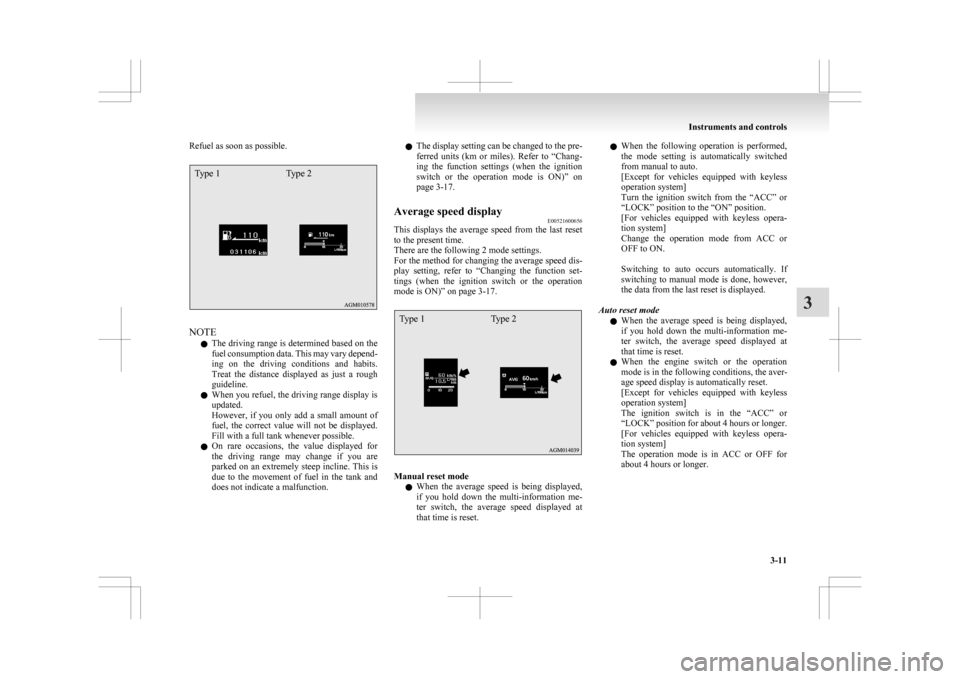
Average speed display E00521600656
This displays the average speed from the last reset
to the present time.
There are the following 2 mode settings.
For
the method for changing the average speed dis-
play setting, refer to “Changing the function set-
tings (when the ignition switch or the operation
mode is ON)” on page 3-17.
Type 1 Type 2 Manual reset mode
l When
the average speed is being displayed,
if you hold down the multi-information me-
ter switch, the average speed displayed at
that time is reset. l
When
the following operation is performed,
the mode setting is automatically switched
from manual to auto.
[Except for vehicles equipped with keyless
operation system]
Turn the ignition switch from the “ACC” or
“LOCK” position to the “ON” position.
[For vehicles equipped with keyless opera-
tion system]
Change the operation mode from ACC or
OFF to ON.
Switching to auto occurs automatically. If
switching to manual mode is done, however,
the data from the last reset is displayed.
Auto reset mode l When the average speed is being displayed,
if you hold down the multi-information me-
ter switch, the average speed displayed at
that time is reset.
l When the engine switch or the operation
mode is in the following conditions, the aver-
age speed display is automatically reset.
[Except for vehicles equipped with keyless
operation system]
The ignition switch is in the “ACC” or
“LOCK” position for about 4 hours or longer.
[For vehicles equipped with keyless opera-
tion system]
The operation mode is in ACC or OFF for
about 4 hours or longer. Instruments and controls
3-11 3
Page 106 of 368
NOTE
l The
average speed display and the average
fuel consumption display can be reset individ-
ually for the auto reset mode and manual re-
set mode.
l “---” is displayed when the average speed can-
not be measured.
l The initial (default) setting is “Auto reset
mode”.
l The display setting can be changed to the pre-
ferred units (km/h or mph).
Refer to “Changing the function settings
(when the ignition switch or the operation
mode is ON)” on page 3-17.
l The memory of the auto reset mode or man-
ual reset mode for the average speed display
is erased if the battery is disconnected.
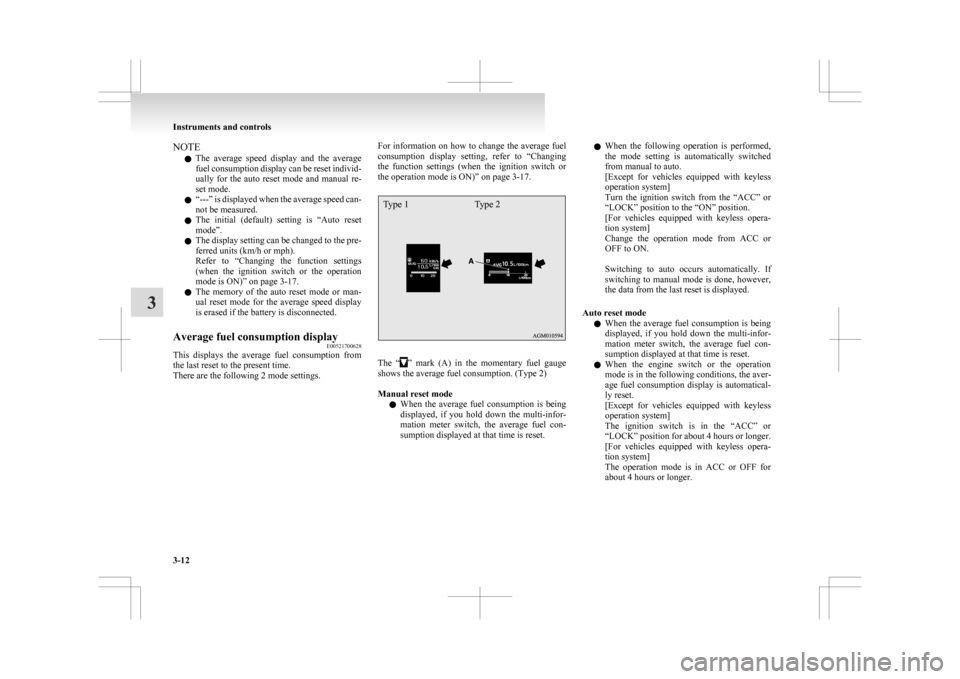
Average fuel consumption display E00521700628
This displays the average fuel consumption from
the last reset to the present time.
There are the following 2 mode settings. For information on how to change the average fuel
consumption
display setting, refer to “Changing
the function settings (when the ignition switch or
the operation mode is ON)” on page 3-17.
Type 1 Type 2 The “ ”
mark (A) in the momentary fuel gauge
shows the average fuel consumption. (Type 2)
Manual reset mode
l When the average fuel consumption is being
displayed, if you hold down the multi-infor-
mation meter switch, the average fuel con-
sumption displayed at that time is reset. l
When
the following operation is performed,
the mode setting is automatically switched
from manual to auto.
[Except for vehicles equipped with keyless
operation system]
Turn the ignition switch from the “ACC” or
“LOCK” position to the “ON” position.
[For vehicles equipped with keyless opera-
tion system]
Change the operation mode from ACC or
OFF to ON.
Switching to auto occurs automatically. If
switching to manual mode is done, however,
the data from the last reset is displayed.
Auto reset mode l When the average fuel consumption is being
displayed, if you hold down the multi-infor-
mation meter switch, the average fuel con-
sumption displayed at that time is reset.
l When the engine switch or the operation
mode is in the following conditions, the aver-
age fuel consumption display is automatical-
ly reset.
[Except for vehicles equipped with keyless
operation system]
The ignition switch is in the “ACC” or
“LOCK” position for about 4 hours or longer.
[For vehicles equipped with keyless opera-
tion system]
The operation mode is in ACC or OFF for
about 4 hours or longer. Instruments and controls
3-12
3