warning MITSUBISHI ASX 2009 1.G Workshop Manual
[x] Cancel search | Manufacturer: MITSUBISHI, Model Year: 2009, Model line: ASX, Model: MITSUBISHI ASX 2009 1.GPages: 368, PDF Size: 8.13 MB
Page 108 of 368
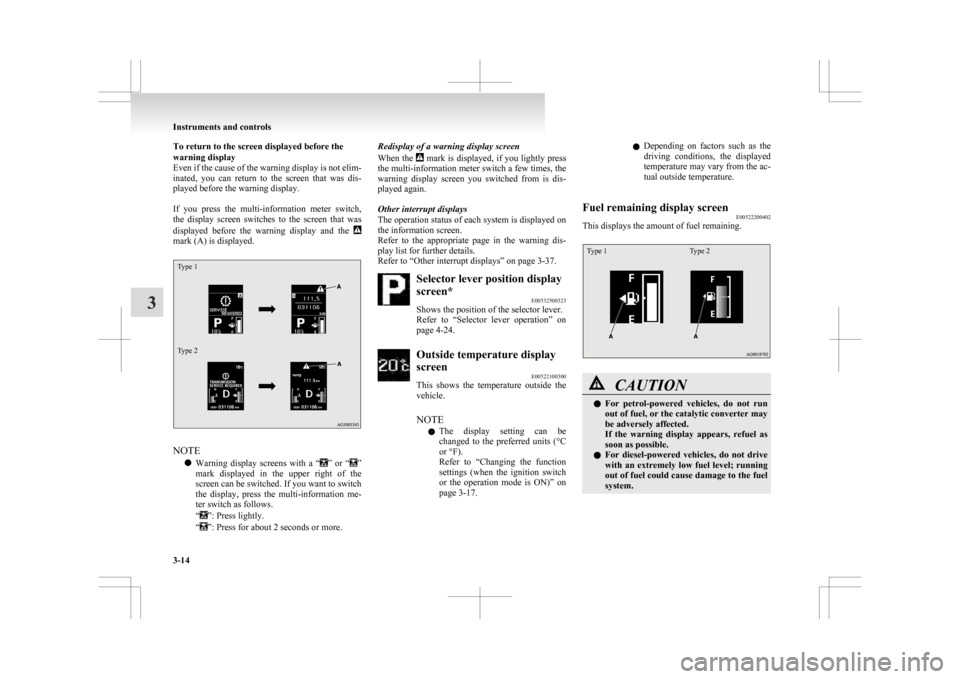
To return to the screen displayed before the
warning display
Even
if the cause of the warning display is not elim-
inated, you can return to the screen that was dis-
played before the warning display.
If you press the multi-information meter switch,
the display screen switches to the screen that was
displayed before the warning display and the mark (A) is displayed.
Type 1
Type 2
NOTE
l Warning
display screens with a “ ”
or “ ”
mark
displayed in the upper right of the
screen can be switched. If you want to switch
the display, press the multi-information me-
ter switch as follows.
“ ”: Press lightly.
“ ”: Press for about 2 seconds or more. Redisplay of a warning display screen
When
the mark is displayed, if you lightly press
the
multi-information meter switch a few times, the
warning display screen you switched from is dis-
played again.
Other interrupt displays
The operation status of each system is displayed on
the information screen.
Refer to the appropriate page in the warning dis-
play list for further details.
Refer to “Other interrupt displays” on page 3-37. Selector lever position display
screen*
E00532500323
Shows the position of the selector lever.
Refer
to “Selector lever operation” on
page 4-24. Outside temperature display
screen
E00522100300
This
shows the temperature outside the
vehicle.
NOTE
l The display setting can be
changed to the preferred units (°C
or °F).
Refer to “Changing the function
settings (when the ignition switch
or the operation mode is ON)” on
page 3-17. l
Depending
on factors such as the
driving conditions, the displayed
temperature may vary from the ac-
tual outside temperature.
Fuel remaining display screen E00522200402
This displays the amount of fuel remaining.
Type 1 Type 2 CAUTION
l
For
petrol-powered vehicles, do not run
out of fuel, or the catalytic converter may
be adversely affected.
If the warning display appears, refuel as
soon as possible.
l For diesel-powered vehicles, do not drive
with an extremely low fuel level; running
out of fuel could cause damage to the fuel
system. Instruments and controls
3-14
3
Page 109 of 368
NOTE
l It
may take several seconds to stabilise the
display after refilling the tank.
l If fuel is added with the ignition switch or
the operation mode is in ON, the fuel gauge
may incorrectly indicate the fuel level.
Fuel lid mark E00522300070
The arrow (A) indicates that the fuel tank filler is
located on the left side of the body.
Fuel remaining warning display E00522400491
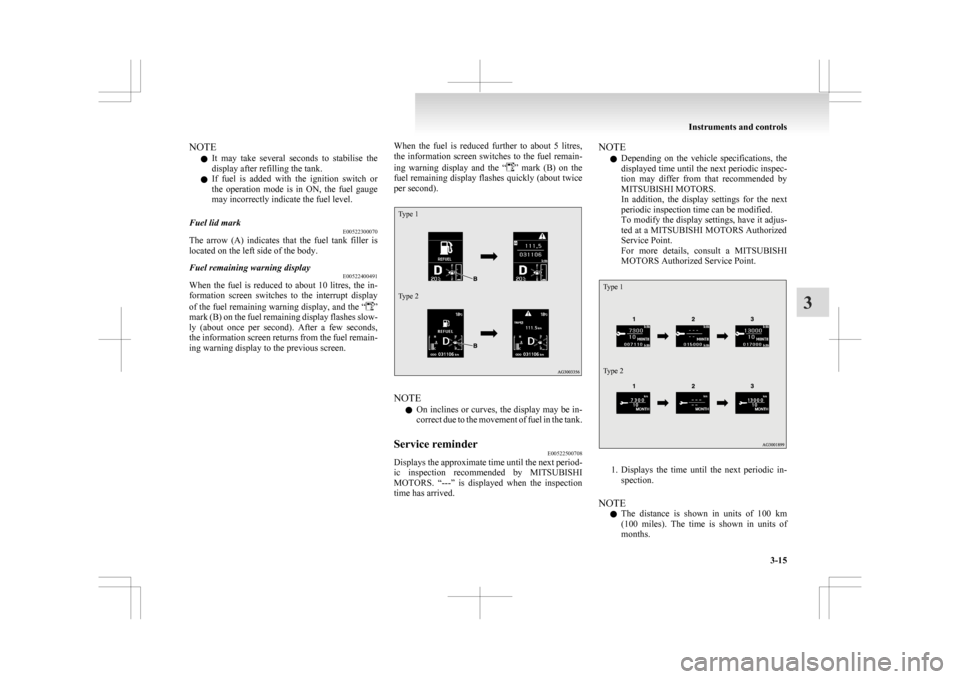
When the fuel is reduced to about 10 litres, the in-
formation
screen switches to the interrupt display
of the fuel remaining warning display, and the “ ”
mark
(B) on the fuel remaining display flashes slow-
ly (about once per second). After a few seconds,
the information screen returns from the fuel remain-
ing warning display to the previous screen. When the fuel is reduced further to about 5 litres,
the
information screen switches to the fuel remain-
ing warning display and the “ ”
mark (B) on the
fuel remaining display flashes quickly (about twice
per second).
Type 1
Type 2 NOTE
l On
inclines or curves, the display may be in-
correct due to the movement of fuel in the tank.
Service reminder E00522500708
Displays the approximate time until the next period-
ic
inspection recommended by MITSUBISHI
MOTORS. “---” is displayed when the inspection
time has arrived. NOTE
l Depending
on the vehicle specifications, the
displayed time until the next periodic inspec-
tion may differ from that recommended by
MITSUBISHI MOTORS.
In addition, the display settings for the next
periodic inspection time can be modified.
To modify the display settings, have it adjus-
ted at a MITSUBISHI MOTORS Authorized
Service Point.
For more details, consult a MITSUBISHI
MOTORS Authorized Service Point.
Type 1
Type 2 1. Displays
the time until the next periodic in-
spection.
NOTE l The distance is shown in units of 100 km
(100 miles). The time is shown in units of
months. Instruments and controls
3-15 3
Page 110 of 368
2. This informs you that a periodic inspection is
due. We recommend you to consult a
MITSUBISHI MOTORS Authorized Service
Point.
At that time, when the ignition switch is
switched from the “LOCK” position to the
“ON” position or the operation mode is
changed from OFF to ON, the warning dis-
play is displayed for a few seconds on the in-
formation screen.
Type 1 Type 2
3. After
your vehicle is inspected at a
MITSUBISHI MOTORS Authorized Service
Point, it displays the time until the next peri-
odic inspection.
To reset
The “---” display can be reset while the ignition
switch or the opertion mode is in OFF. When the
display is reset, the time until the next periodic in-
spection is displayed and the warning display is no
longer displayed when the ignition switch is turned
from the “LOCK” position to the “ON” position or
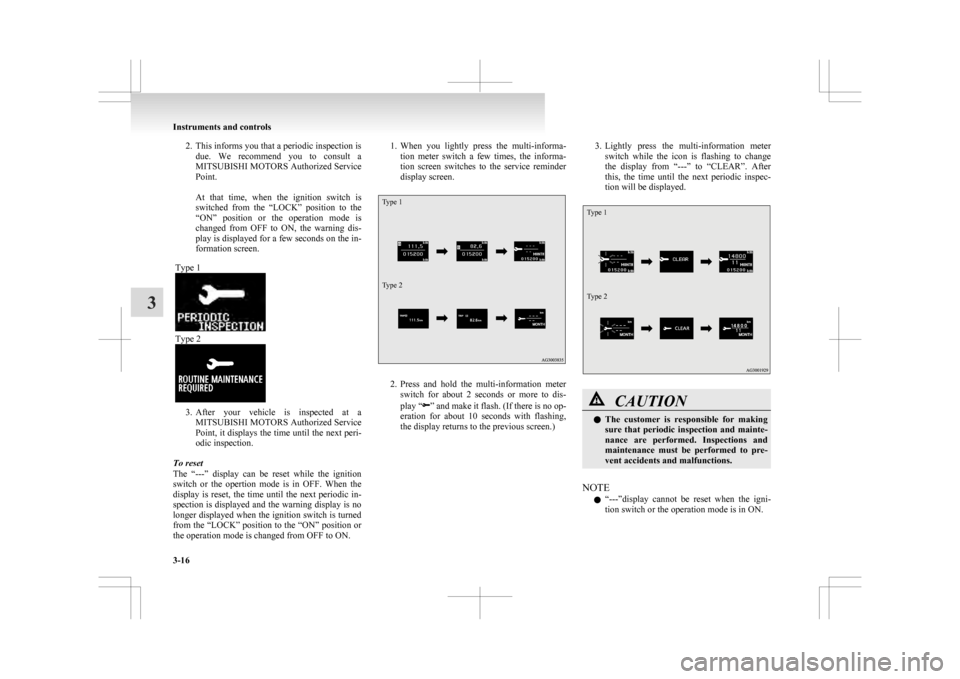
the operation mode is changed from OFF to ON. 1. When
you lightly press the multi-informa-
tion meter switch a few times, the informa-
tion screen switches to the service reminder
display screen.
Type 1
Type 2 2. Press
and hold the multi-information meter
switch for about 2 seconds or more to dis-
play “ ”
and make it flash. (If there is no op-
eration for about 10 seconds with flashing,
the display returns to the previous screen.) 3. Lightly
press the multi-information meter
switch while the icon is flashing to change
the display from “---” to “CLEAR”. After
this, the time until the next periodic inspec-
tion will be displayed.
Type 1
Type 2 CAUTION
l
The
customer is responsible for making
sure that periodic inspection and mainte-
nance are performed. Inspections and
maintenance must be performed to pre-
vent accidents and malfunctions.
NOTE l “---”display
cannot be reset when the igni-
tion switch or the operation mode is in ON. Instruments and controls
3-16
3
Page 111 of 368
l
When “---” is displayed, after a certain dis-
tance and a certain period of time, the dis-
play is reset and the time until the next peri-
odic inspection is displayed.
l If you accidentally reset the display, we rec-
ommend you to consult a MITSUBISHI
MOTORS Authorized Service Point.
Door ajar warning display screen
(when the ignition switch or the opera-
tion mode is ON) E00522600565
Type 1 Type 2
If any of the doors or the tailgate is not completely
closed, this displays the open door or tailgate.
If
the vehicle speed exceeds approximately 8 km/h
(5 mph) while a door is ajar, a buzzer sounds 4
times. This notifies the driver that a door is ajar. CAUTION
l
Before
moving your vehicle, check that
the warning lamp is OFF.
Changing the function settings (when
the ignition switch or the operation
mode is ON) E00522700348
1. Stop the vehicle in a safe place.
Firmly
apply the parking brake and put the
gearshift lever into the “N” (Neutral) posi-
tion (M/T) or the selector lever into the “P”
(PARK) position (CVT).
2. Lightly press the multi-information meter switch a few times to switch the information
screen to the function setting screen.
Refer to “Information screen (when the igni-
tion switch or the operation mode is ON)” on
page 3-09.
Type 1 Type 2 CAUTION
l
For
safety, stop the vehicle before operat-
ing.
While driving, even if you operate the mul-
ti-information meter switch, the function
setting screen is not displayed.
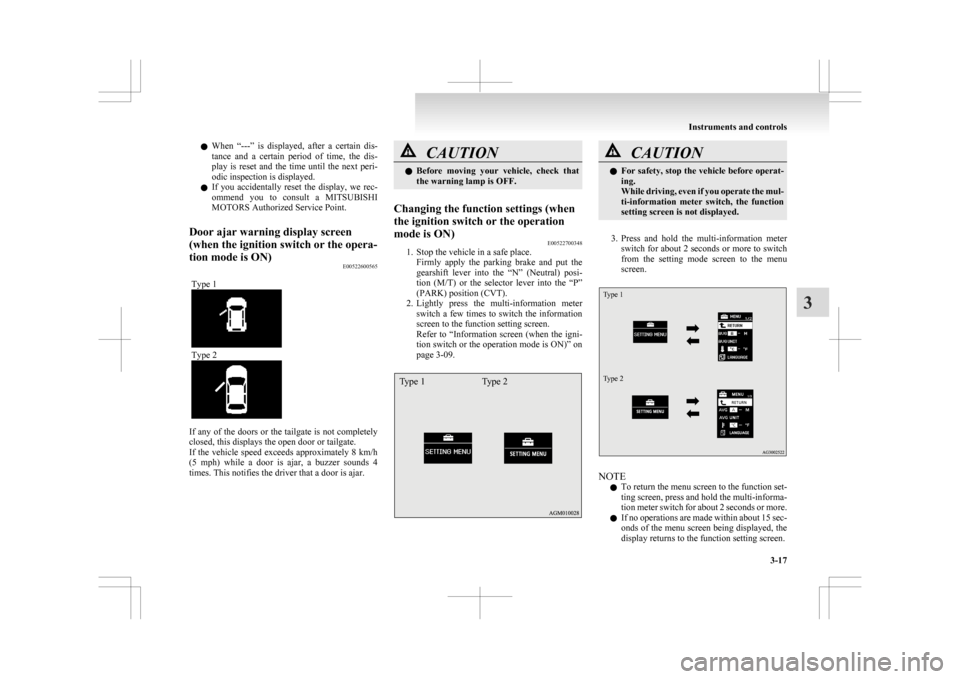
3. Press
and hold the multi-information meter switch for about 2 seconds or more to switch
from the setting mode screen to the menu
screen.
Type 1
Type 2 NOTE
l To
return the menu screen to the function set-
ting screen, press and hold the multi-informa-
tion meter switch for about 2 seconds or more.
l If no operations are made within about 15 sec-
onds of the menu screen being displayed, the
display returns to the function setting screen. Instruments and controls
3-17 3
Page 115 of 368
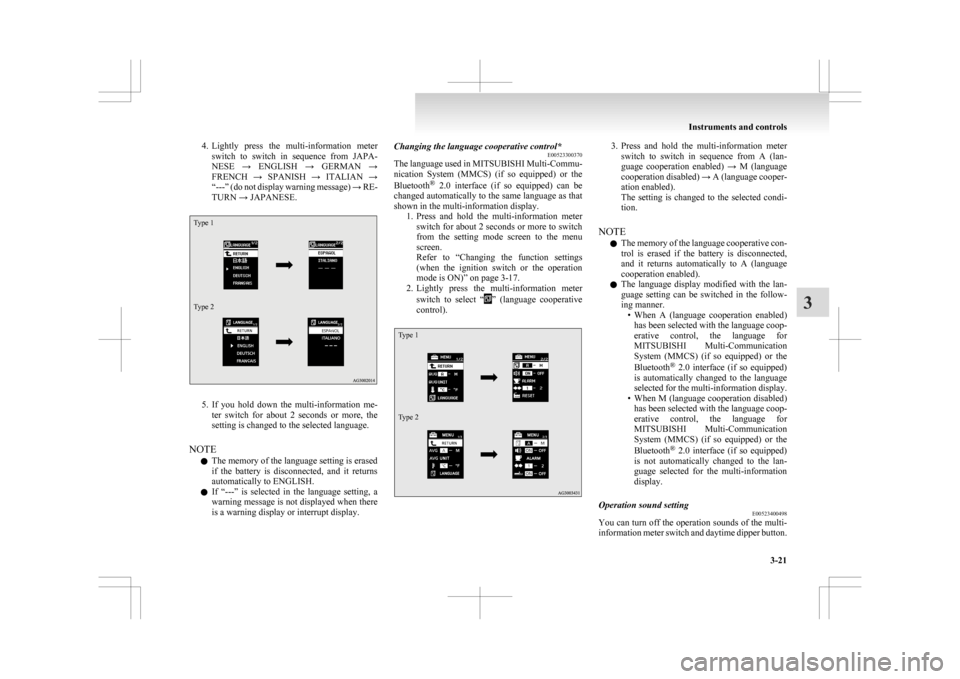
4. Lightly press the multi-information meter
switch to switch in sequence from JAPA-
NESE → ENGLISH → GERMAN →
FRENCH → SPANISH → ITALIAN →
“---” (do not display warning message) → RE-
TURN → JAPANESE.
Type 1
Type 2 5. If
you hold down the multi-information me-
ter switch for about 2 seconds or more, the
setting is changed to the selected language.
NOTE l The memory of the language setting is erased
if the battery is disconnected, and it returns
automatically to ENGLISH.
l If “---” is selected in the language setting, a
warning message is not displayed when there
is a warning display or interrupt display. Changing the language cooperative control*
E00523300370
The
language used in MITSUBISHI Multi-Commu-
nication System (MMCS) (if so equipped) or the
Bluetooth ®
2.0 interface (if so equipped) can be
changed automatically to the same language as that
shown in the multi-information display. 1. Press and hold the multi-information meterswitch for about 2 seconds or more to switch
from the setting mode screen to the menu
screen.
Refer to “Changing the function settings
(when the ignition switch or the operation
mode is ON)” on page 3-17.
2. Lightly press the multi-information meter
switch to select “ ”
(language cooperative
control).
Type 1
Type 2 3. Press
and hold the multi-information meter
switch to switch in sequence from A (lan-
guage cooperation enabled) → M (language
cooperation disabled) → A (language cooper-
ation enabled).
The setting is changed to the selected condi-
tion.
NOTE l The memory of the language cooperative con-
trol is erased if the battery is disconnected,
and it returns automatically to A (language
cooperation enabled).
l The language display modified with the lan-
guage setting can be switched in the follow-
ing manner.
• When A (language cooperation enabled)has been selected with the language coop-
erative control, the language for
MITSUBISHI Multi-Communication
System (MMCS) (if so equipped) or the
Bluetooth ®
2.0 interface (if so equipped)
is automatically changed to the language
selected for the multi-information display.
• When M (language cooperation disabled) has been selected with the language coop-
erative control, the language for
MITSUBISHI Multi-Communication
System (MMCS) (if so equipped) or the
Bluetooth ®
2.0 interface (if so equipped)
is not automatically changed to the lan-
guage selected for the multi-information
display.
Operation sound setting E00523400498
You can turn off the operation sounds of the multi-
information
meter switch and daytime dipper button. Instruments and controls
3-21 3
Page 116 of 368
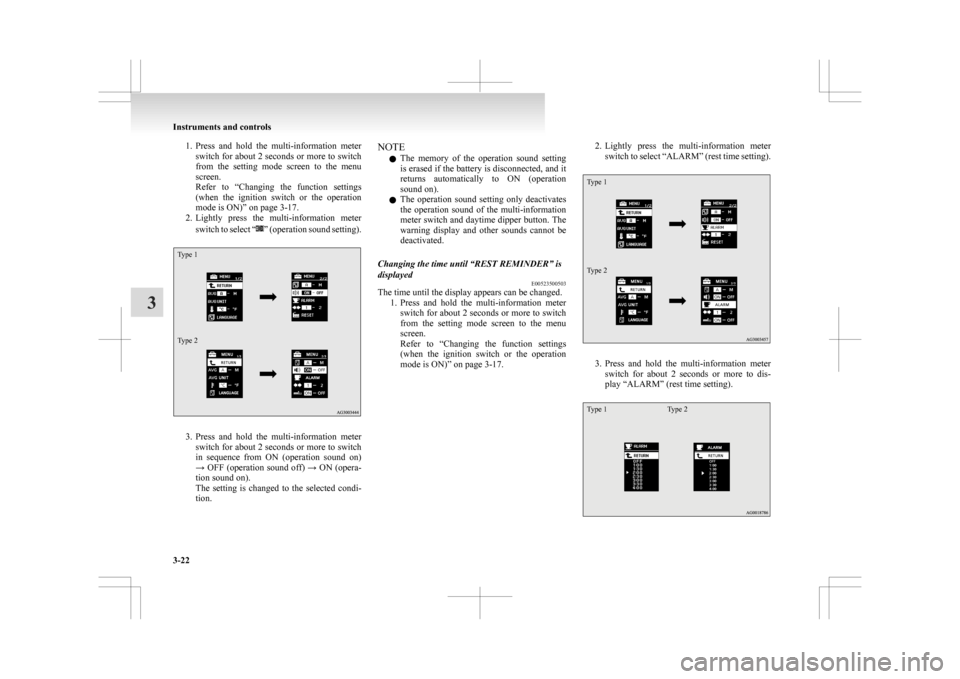
1. Press and hold the multi-information meter
switch for about 2 seconds or more to switch
from the setting mode screen to the menu
screen.
Refer to “Changing the function settings
(when the ignition switch or the operation
mode is ON)” on page 3-17.
2. Lightly press the multi-information meter
switch to select “ ”
(operation sound setting).
Type 1
Type 2
3. Press
and hold the multi-information meter
switch for about 2 seconds or more to switch
in sequence from ON (operation sound on)
→ OFF (operation sound off) → ON (opera-
tion sound on).
The setting is changed to the selected condi-
tion. NOTE
l The
memory of the operation sound setting
is erased if the battery is disconnected, and it
returns automatically to ON (operation
sound on).
l The operation sound setting only deactivates
the operation sound of the multi-information
meter switch and daytime dipper button. The
warning display and other sounds cannot be
deactivated.
Changing the time until “REST REMINDER” is
displayed E00523500503
The time until the display appears can be changed.
1. Press
and hold the multi-information meter
switch for about 2 seconds or more to switch
from the setting mode screen to the menu
screen.
Refer to “Changing the function settings
(when the ignition switch or the operation
mode is ON)” on page 3-17. 2. Lightly
press the multi-information meter
switch to select “ALARM” (rest time setting).
Type 1
Type 2 3. Press
and hold the multi-information meter
switch for about 2 seconds or more to dis-
play “ALARM” (rest time setting).
Type 1 Type 2Instruments and controls
3-22
3
Page 119 of 368
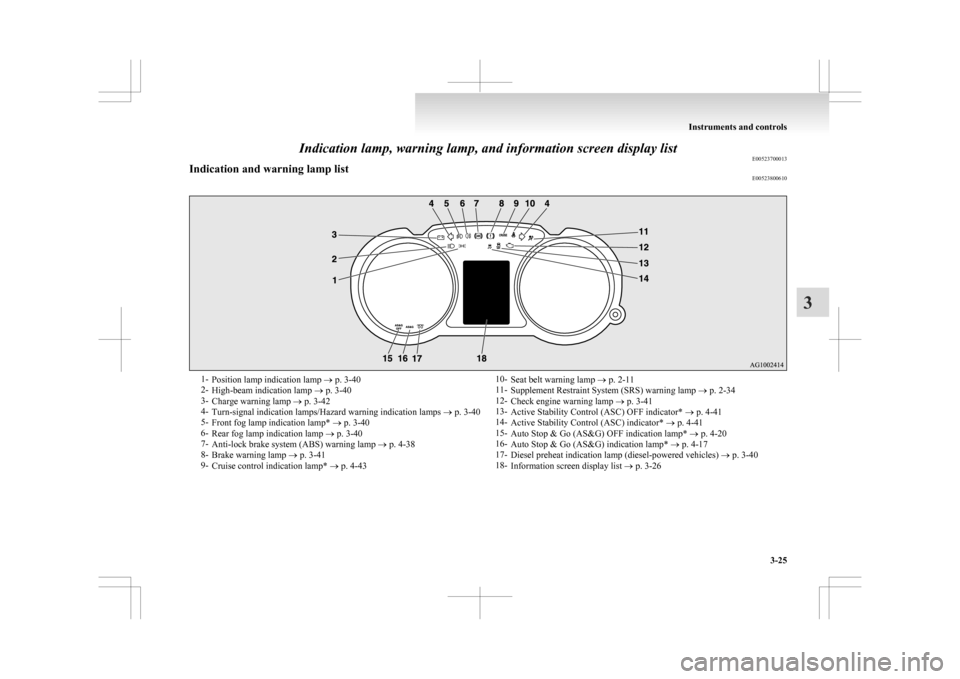
Indication lamp, warning lamp, and information screen display list
E00523700013
Indication and warning lamp list E005238006101-
Position lamp indication lamp ® p. 3-40
2- High-beam indication lamp ® p. 3-40
3- Charge warning lamp ® p. 3-42
4- Turn-signal indication lamps/Hazard warning indication lamps ® p. 3-40
5- Front fog lamp indication lamp* ® p. 3-40
6- Rear fog lamp indication lamp ® p. 3-40
7- Anti-lock brake system (ABS) warning lamp ® p. 4-38
8- Brake warning lamp ® p. 3-41
9- Cruise control indication lamp* ® p. 4-43 10-
Seat belt warning lamp ® p. 2-11
11- Supplement Restraint System (SRS) warning lamp ® p. 2-34
12- Check engine warning lamp ® p. 3-41
13- Active Stability Control (ASC) OFF indicator* ® p. 4-41
14- Active Stability Control (ASC) indicator* ® p. 4-41
15- Auto Stop & Go (AS&G) OFF indication lamp* ® p. 4-20
16- Auto Stop & Go (AS&G) indication lamp* ® p. 4-17
17- Diesel preheat indication lamp (diesel-powered vehicles) ® p. 3-40
18- Information screen display list ® p. 3-26 Instruments and controls
3-25 3
Page 120 of 368
Information screen display list
E00523900233
When
there is information to be announced, such as lamp reminders, a sound is emitted and the screen switches to the displays shown below. Refer to the appropri-
ate page and take the necessary measures.
When the cause of the warning display is eliminated, the warning display goes out automatically.
Refer to “Warning display list (when the ignition switch or the operation mode is OFF)” on page 3-27.
Refer to “Warning display list (when the ignition switch or the operation mode is ON)” on page 3-30.
Refer to “Other interrupt displays” on page 3-37.
NOTE
l A warning may be displayed on the information screen and the buzzer may sound in the following rare cases.
This is caused by the system picking up interference such as noise or strong electromagnetic waves, and is not a functional problem.
• An extremely strong electromagnetic wave is received from a source such as an illegal radio set, a spark from a wire, or a radar station.
• Abnormal voltage or a static electricity discharge is generated by the operation of installed electrical equipment (including after-market parts).
If the warning display appears many times, we recommend you to consult a MITSUBISHI MOTORS Authorized Service Point.Instruments and controls
3-26
3
Page 121 of 368
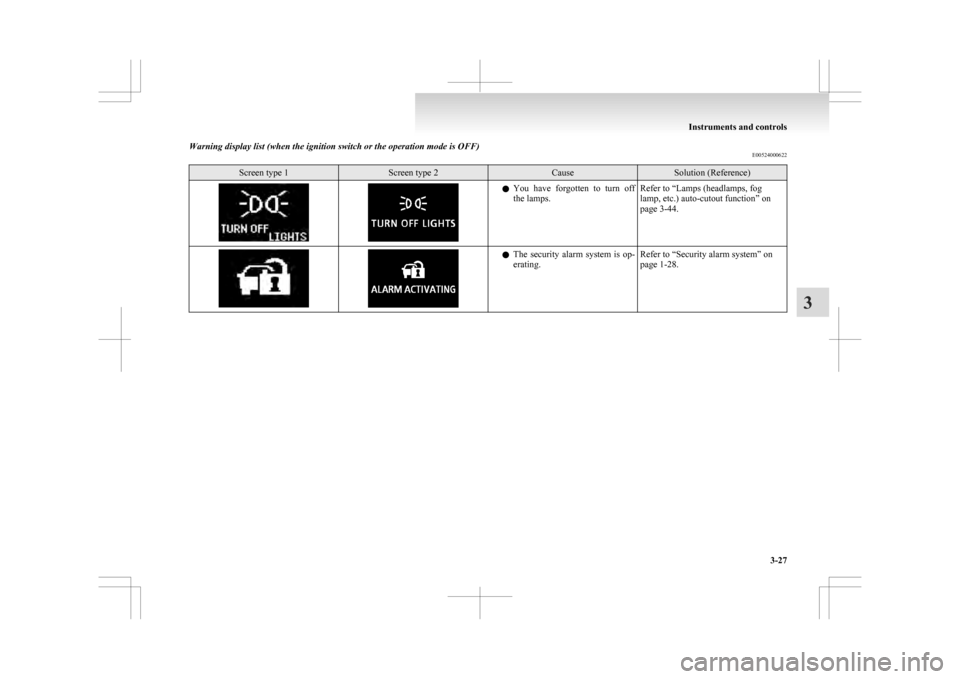
Warning display list (when the ignition switch or the operation mode is OFF)
E00524000622Screen type 1 Screen type 2 Cause Solution (Reference)
l
You have forgotten to turn off
the lamps. Refer to “Lamps (headlamps, fog
lamp, etc.) auto-cutout function” on
page 3-44. l
The
security alarm system is op-
erating. Refer to “Security alarm system” on
page 1-28. Instruments and controls
3-27 3
Page 124 of 368
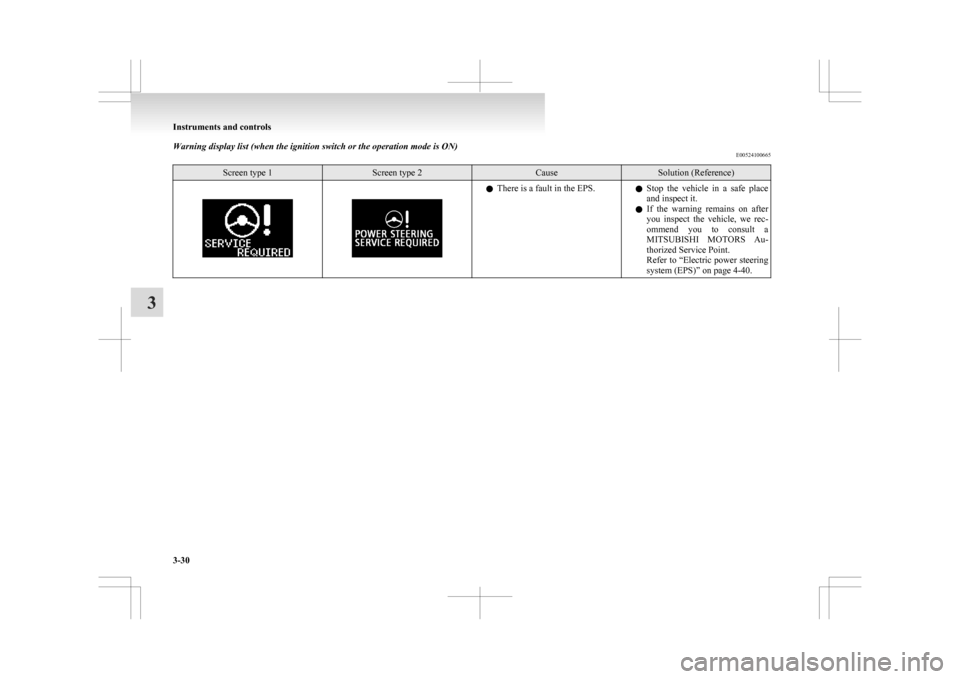
Warning display list (when the ignition switch or the operation mode is ON)
E00524100665Screen type 1 Screen type 2 Cause Solution (Reference)
l
There is a fault in the EPS.
lStop the vehicle in a safe place
and inspect it.
l If the warning remains on after
you inspect the vehicle, we rec-
ommend you to consult a
MITSUBISHI MOTORS Au-
thorized Service Point.
Refer to “Electric power steering
system (EPS)” on page 4-40. Instruments and controls
3-30
3