ignition MITSUBISHI ASX 2009 1.G Manual Online
[x] Cancel search | Manufacturer: MITSUBISHI, Model Year: 2009, Model line: ASX, Model: MITSUBISHI ASX 2009 1.GPages: 368, PDF Size: 8.13 MB
Page 191 of 368
CAUTION
ard brake system is working. (The stand-
ard
brake system is functioning normal-
ly.) If this happens, we recommend you to
have your vehicle inspected as soon as pos-
sible. • When the ignition switch is turned tothe “ON” position or the operation
mode is put in ON, the warning lamp
does not come on or it remains on and
does not go off.
• The warning lamp comes on while driv- ing
• The warning display appears while driving
If the warning lamp/display illuminate
while driving E00607301295
If only the ABS warning lamp/display illuminate
Avoid
hard braking and high-speed driving. Stop
the vehicle in a safe place.
Restart the engine and check to see whether the
lamp goes out after a few minutes driving; if it then
remains off during driving, there is no problem.
However, if the warning lamp/display do not disap-
pear, or if they come on again when the vehicle is
driven, we recommend you to have the vehicle
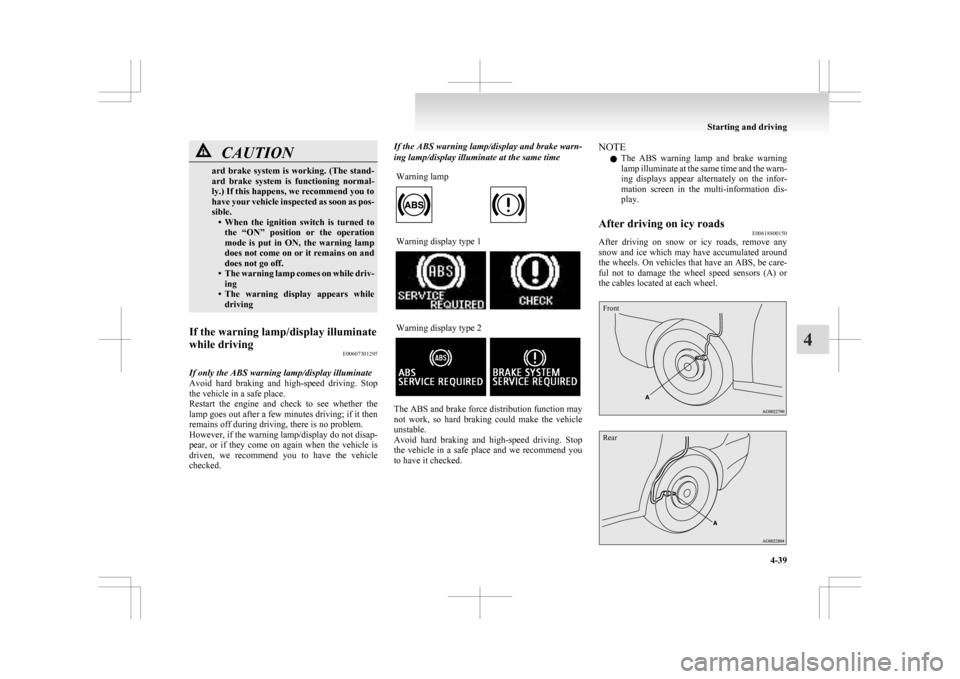
checked. If the ABS warning lamp/display and brake warn-
ing lamp/display illuminate at the same time
Warning lamp Warning display type 1
Warning display type 2
The ABS and brake force distribution function may
not
work, so hard braking could make the vehicle
unstable.
Avoid hard braking and high-speed driving. Stop
the vehicle in a safe place and we recommend you
to have it checked. NOTE
l The
ABS warning lamp and brake warning
lamp illuminate at the same time and the warn-
ing displays appear alternately on the infor-
mation screen in the multi-information dis-
play.
After driving on icy roads E00618800150
After driving on snow or icy roads, remove any
snow
and ice which may have accumulated around
the wheels. On vehicles that have an ABS, be care-
ful not to damage the wheel speed sensors (A) or
the cables located at each wheel.
Front
Rear Starting and driving
4-39 4
Page 193 of 368
NOTE
l An
operation noise may be emitted from the
engine compartment in the following situa-
tions. The sound is associated with checking
the operations of the ASC. At this time, you
may feel a shock from the brake pedal if you
depress it. These do not indicate a malfunc-
tion. • When the ignition switch is turned to the“ON” position or the operation mode is
put in ON.
• When the vehicle is driven for a while af- ter the engine is turned on.
l When the ASC is activated, you may feel a
vibration in the vehicle body or hear a whin-
ing sound from the engine compartment.
This indicates that the system is operating nor-
mally. It does not indicate a malfunction.
l When the anti-lock brake system warning
lamp is illuminated, the ASC is not active.
Traction control function E00619000087
On slippery surfaces, the traction control function
prevents
the drive wheels from spinning excessive,
thus helping the vehicle to start moving from a stop-
ped condition. It also provides sufficient driving
force and steering performance as the vehicle turns
while pressing the acceleration pedal. CAUTION
l
When
driving a vehicle on a snowy or icy
road, be sure to install snow tyres and
drive the vehicle at moderate speeds. Stability control function
E00619100017
The
stability control function is designed to help
the driver maintain control of the vehicle on slip-
pery roads or during rapid steering manoeuvres. It
works by controlling the engine output and brake
on each wheel.
NOTE
l The stability control function operates at
speeds of about 15 km/h (9 mph) or higher.
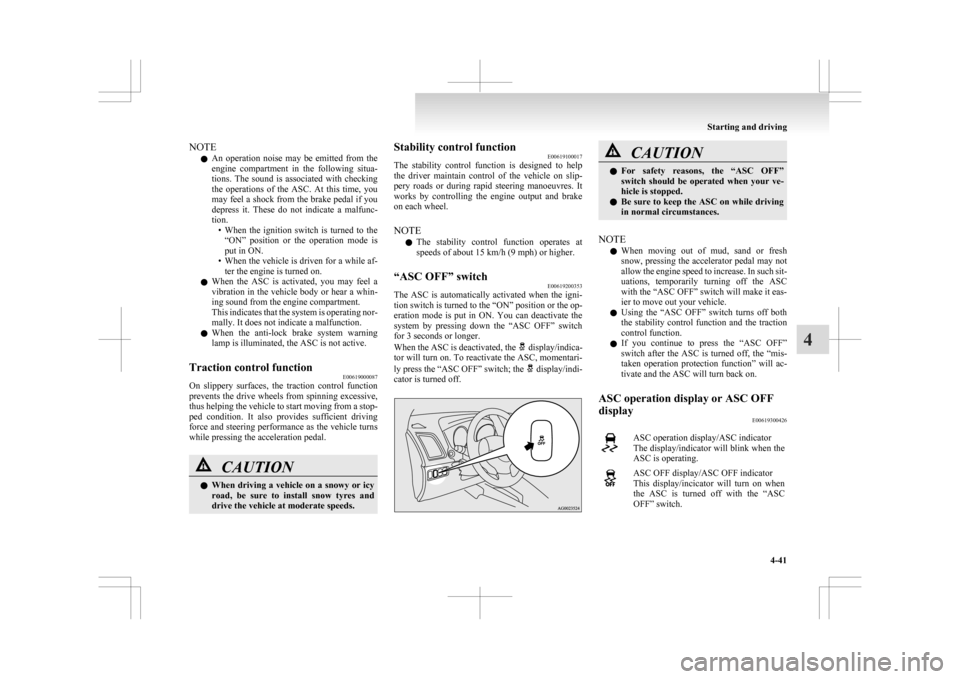
“ASC OFF” switch E00619200353
The ASC is automatically activated when the igni-
tion
switch is turned to the “ON” position or the op-
eration mode is put in ON. You can deactivate the
system by pressing down the “ASC OFF” switch
for 3 seconds or longer.
When the ASC is deactivated, the display/indica-
tor
will turn on. To reactivate the ASC, momentari-
ly press the “ASC OFF” switch; the display/indi-
cator is turned off. CAUTION
l
For
safety reasons, the “ASC OFF”
switch should be operated when your ve-
hicle is stopped.
l Be sure to keep the ASC on while driving
in normal circumstances.
NOTE l When
moving out of mud, sand or fresh
snow, pressing the accelerator pedal may not
allow the engine speed to increase. In such sit-
uations, temporarily turning off the ASC
with the “ASC OFF” switch will make it eas-
ier to move out your vehicle.
l Using the “ASC OFF” switch turns off both
the stability control function and the traction
control function.
l If you continue to press the “ASC OFF”
switch after the ASC is turned off, the “mis-
taken operation protection function” will ac-
tivate and the ASC will turn back on.
ASC operation display or ASC OFF
display E00619300426 ASC operation display/ASC indicator
The
display/indicator will blink when the
ASC is operating. ASC OFF display/ASC OFF indicator
This
display/incicator will turn on when
the ASC is turned off with the “ASC
OFF” switch. Starting and driving
4-41 4
Page 194 of 368
NOTE
l The
combination of items shown on the dis-
play varies depending on the vehicle model. CAUTION
l
When display/indicator blinks, ASC is
operating,
which means that the road is
slippery or that your vehicle’s wheels are
beginning to slip. If this happens, drive
slower with less accelerator input.
l If the temperature in the braking system
continues to increase due to continuous
brake control on a slippery road surface,
the display/indicator will blink. To pre-
vent
the brake system from overheating,
the brake control of the traction control
function will be temporarily suspended.
The engine control of the traction control
function and normal brake operation will
not be affected. Park your vehicle in a
safe place. When the temperature in the
braking system has come down, the dis-
play/indicator
will be turned off and the
traction control function will start operat-
ing again.
NOTE l The display/indicator may turn on when
you
start the engine. This means that the bat-
tery voltage momentarily dropped when the
engine was started. It does not indicate a mal-
function, provided that the display goes out
immediately. l
When
a compact spare tyre has been put on
your vehicle, the gripping ability of the tyre
will be lower, making it more likely that the display/indicator will blink.
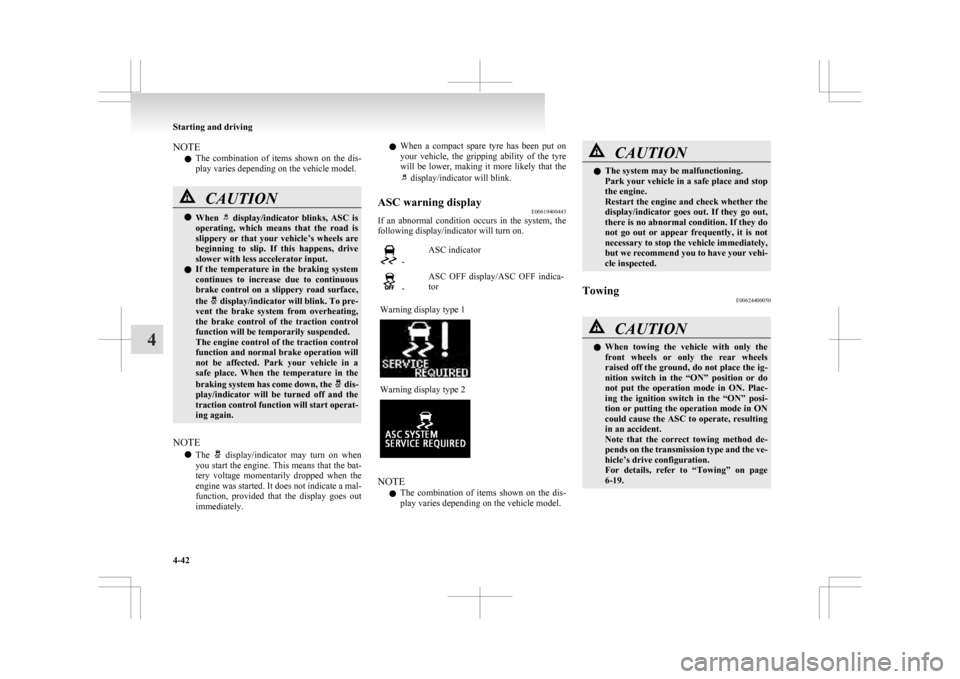
ASC warning display E00619400443
If an abnormal condition occurs in the system, the
following display/indicator will turn on. -
ASC indicator -
ASC OFF display/ASC OFF indica-
tor
Warning display type 1 Warning display type 2
NOTE
l The
combination of items shown on the dis-
play varies depending on the vehicle model. CAUTION
l
The system may be malfunctioning.
Park
your vehicle in a safe place and stop
the engine.
Restart the engine and check whether the
display/indicator goes out. If they go out,
there is no abnormal condition. If they do
not go out or appear frequently, it is not
necessary to stop the vehicle immediately,
but we recommend you to have your vehi-
cle inspected.
Towing E00624400050 CAUTION
l
When
towing the vehicle with only the
front wheels or only the rear wheels
raised off the ground, do not place the ig-
nition switch in the “ON” position or do
not put the operation mode in ON. Plac-
ing the ignition switch in the “ON” posi-
tion or putting the operation mode in ON
could cause the ASC to operate, resulting
in an accident.
Note that the correct towing method de-
pends on the transmission type and the ve-
hicle’s drive configuration.
For details, refer to “Towing” on page
6-19. Starting and driving
4-42
4
Page 195 of 368
Cruise control*
E00609101008
Cruise
control is an automatic speed control system
that keeps a set speed. It can be activated at about
40 km/h (25 mph) or more. CAUTION
l
When
you do not wish to drive at a set
speed, turn off the cruise control for safety.
l Do not use cruise control when driving
conditions will not allow you to stay at
the same speed, such as in heavy traffic
or on roads that are winding, icy, snow-
covered, wet, slippery, on a steep down-
hill slope.
l On vehicles with M/T, do not move the
gearshift lever to the “N” (Neutral) posi-
tion while driving at a set speed without
depressing the clutch pedal. The engine
will run too fast and might be damaged.
NOTE l Cruise
control may not be able to keep your
speed on uphills or downhills.
l Your speed may decrease on a steep uphill.
You may use the accelerator pedal if you
want to stay at your set speed.
l Your speed may increase to more than the
set speed on a steep downhill. You must use
the brake to control your speed. As a result,
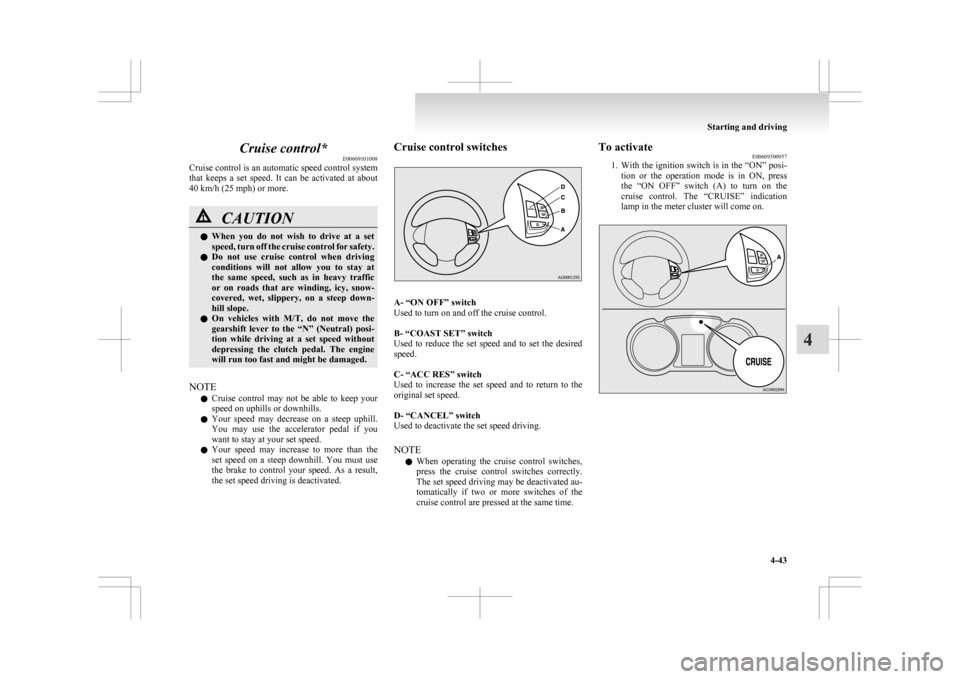
the set speed driving is deactivated. Cruise control switches
A- “ON OFF” switch
Used to turn on and off the cruise control.
B- “COAST SET” switch
Used
to reduce the set speed and to set the desired
speed.
C- “ACC RES” switch
Used to increase the set speed and to return to the
original set speed.
D- “CANCEL” switch
Used to deactivate the set speed driving.
NOTE
l When operating the cruise control switches,
press the cruise control switches correctly.
The set speed driving may be deactivated au-
tomatically if two or more switches of the
cruise control are pressed at the same time. To activate
E00609300957
1. With
the ignition switch is in the “ON” posi-
tion or the operation mode is in ON, press
the “ON OFF” switch (A) to turn on the
cruise control. The “CRUISE” indication
lamp in the meter cluster will come on. Starting and driving
4-43 4
Page 196 of 368
NOTE
l If
the cruise control is on when the following
operation is performed, cruise control will be
on automatically the next time you start the
engine. The “CRUISE” indication lamp will
also be on.
[Except vehicles equipped with keyless oper-
ation system]
Turn the ignition switch to the “LOCK” or
“ACC” position.
[Vehicles equipped with keyless operation
system]
Put the operation mode in OFF or ACC.
l If the battery voltage is insufficient, the mem-
ory data for the cruise control may be erased.
As a result, the “CRUISE” indication lamp
may not come on when you restart the engine.
If this happens, press the “ON OFF” switch
once again to turn on the cruise control.
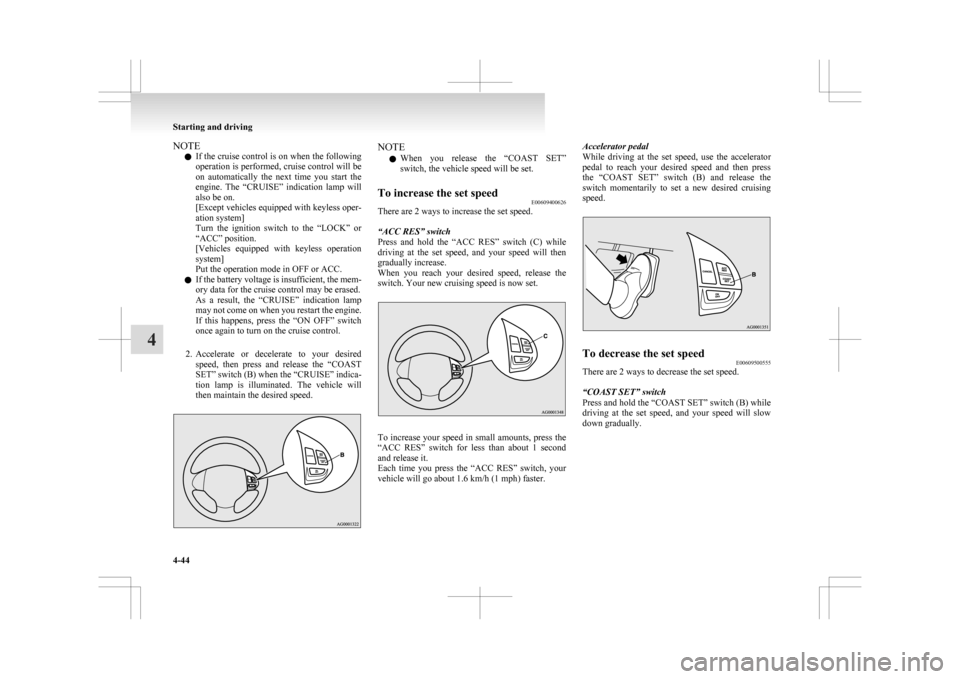
2. Accelerate or decelerate to your desired speed, then press and release the “COAST
SET” switch (B) when the “CRUISE” indica-
tion lamp is illuminated. The vehicle will
then maintain the desired speed. NOTE
l When
you release the “COAST SET”
switch, the vehicle speed will be set.
To increase the set speed E00609400626
There are 2 ways to increase the set speed.
“ACC RES” switch
Press
and hold the “ACC RES” switch (C) while
driving at the set speed, and your speed will then
gradually increase.
When you reach your desired speed, release the
switch. Your new cruising speed is now set. To increase your speed in small amounts, press the
“ACC
RES” switch for less than about 1 second
and release it.
Each time you press the “ACC RES” switch, your
vehicle will go about 1.6 km/h (1 mph) faster. Accelerator pedal
While
driving at the set speed, use the accelerator
pedal to reach your desired speed and then press
the “COAST SET” switch (B) and release the
switch momentarily to set a new desired cruising
speed. To decrease the set speed
E00609500555
There are 2 ways to decrease the set speed.
“COAST SET” switch
Press and hold the “COAST SET” switch (B) while
driving
at the set speed, and your speed will slow
down gradually. Starting and driving
4-44
4
Page 199 of 368
![MITSUBISHI ASX 2009 1.G Manual Online l
[Except vehicles equipped with keyless oper-
ation system]
Turn the ignition switch to the “LOCK” or
“ACC” position.
Put the operation mode in OFF or ACC.
l “CRUISE” indication l](/img/19/7566/w960_7566-198.png "MITSUBISHI ASX 2009 1.G Manual Online l
[Except vehicles equipped with keyless oper-
ation system]
Turn the ignition switch to the “LOCK” or
“ACC” position.
Put the operation mode in OFF or ACC.
l “CRUISE” indication l")
l
[Except vehicles equipped with keyless oper-
ation system]
Turn the ignition switch to the “LOCK” or
“ACC” position.
Put the operation mode in OFF or ACC.
l “CRUISE” indication lamp is turned OFF. Reversing sensor system*
E00615500215
This
system operates when you are backing the ve-
hicle. It uses corner and back sensors to detect an
obstacle and sounds a buzzer to inform you of the
approximate distance to the obstacle. CAUTION
l
The reversing sensor system assists you in
determining the approximate distance be-
tween
the vehicle and an obstacle located
behind the vehicle. It has limitations in
terms of detectable areas and objects,
and may not properly detect some ob-
jects. Therefore, do not place excessive
confidence in the reversing sensor system
and operate the vehicle as carefully as
you would do with a vehicle not equipped
with this system.
l Make sure to check the surroundings
with your own eyes to ensure safety. Do
not operate the vehicle by relying on the
reversing sensor system alone.
Obstacle detection areas E00615600346
The detection areas of the corner and back sensors
are
limited to those shown in the illustration. More-
over, the sensors are unable to detect low or thin ob-
jects or objects near the rear bumper. Thus, make
sure to check the surroundings as you operate the
vehicle in a safe manner. Corner and back sensor locations
There
are two corner sensors (A) at the corners of
the rear bumper, and two back sensors (B) in the
centre of the rear bumper. Reversing sensor system detection areas
Depending
on whether the vehicle is equipped with
a towing bar, you can change the reversing sensor
system between the standard mode and the towing
bar mode. The towing bar mode changes the sys-
tem to exclude the area in which the towing bar is
mounted from the detection areas. Starting and driving
4-47 4
Page 201 of 368
NOTE
l The
buzzer may sound lower than the normal
warning sound when the reversing sensor sys-
tem is receiving ultrasonic noise from other
sources, but this is not a malfunction. The buz-
zer will stop sounding and the system will re-
turn to normal operation after the noise is no
longer received.
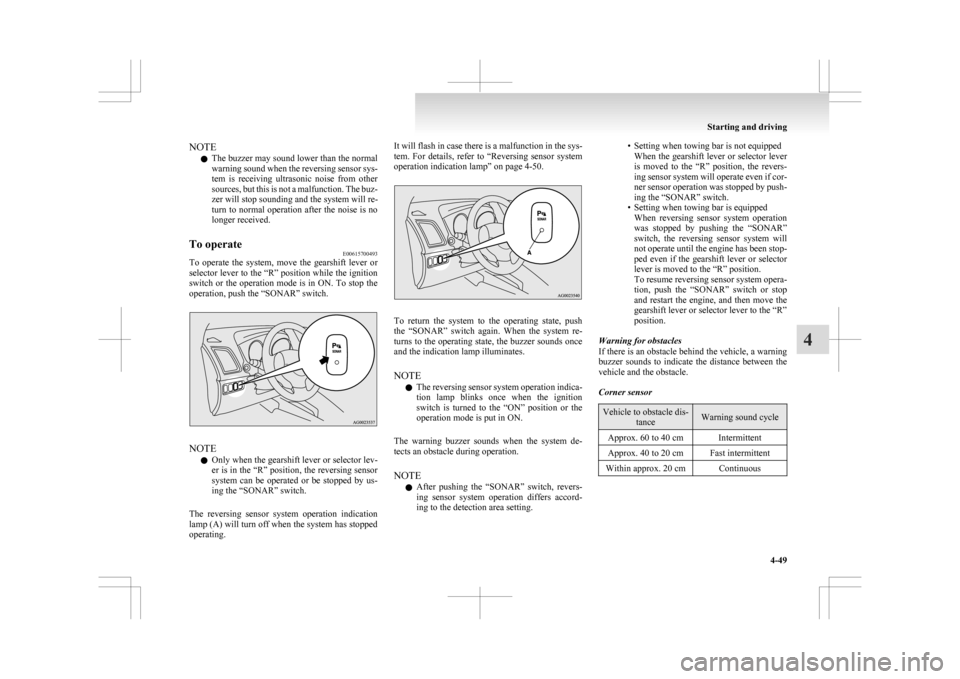
To operate E00615700493
To operate the system, move the gearshift lever or
selector
lever to the “R” position while the ignition
switch or the operation mode is in ON. To stop the
operation, push the “SONAR” switch. NOTE
l Only
when the gearshift lever or selector lev-
er is in the “R” position, the reversing sensor
system can be operated or be stopped by us-
ing the “SONAR” switch.
The reversing sensor system operation indication
lamp (A) will turn off when the system has stopped
operating. It will flash in case there is a malfunction in the sys-
tem.
For details, refer to “Reversing sensor system
operation indication lamp” on page 4-50. To return the system to the operating state, push
the
“SONAR” switch again. When the system re-
turns to the operating state, the buzzer sounds once
and the indication lamp illuminates.
NOTE
l The reversing sensor system operation indica-
tion lamp blinks once when the ignition
switch is turned to the “ON” position or the
operation mode is put in ON.
The warning buzzer sounds when the system de-
tects an obstacle during operation.
NOTE l After pushing the “SONAR” switch, revers-
ing sensor system operation differs accord-
ing to the detection area setting. • Setting when towing bar is not equipped
When
the gearshift lever or selector lever
is moved to the “R” position, the revers-
ing sensor system will operate even if cor-
ner sensor operation was stopped by push-
ing the “SONAR” switch.
• Setting when towing bar is equipped When reversing sensor system operation
was stopped by pushing the “SONAR”
switch, the reversing sensor system will
not operate until the engine has been stop-
ped even if the gearshift lever or selector
lever is moved to the “R” position.
To resume reversing sensor system opera-
tion, push the “SONAR” switch or stop
and restart the engine, and then move the
gearshift lever or selector lever to the “R”
position.
Warning for obstacles
If there is an obstacle behind the vehicle, a warning
buzzer sounds to indicate the distance between the
vehicle and the obstacle.
Corner sensor Vehicle to obstacle dis-
tance Warning sound cycle
Approx. 60 to 40 cm Intermittent
Approx. 40 to 20 cm Fast intermittent
Within approx. 20 cm Continuous Starting and driving
4-49 4
Page 203 of 368
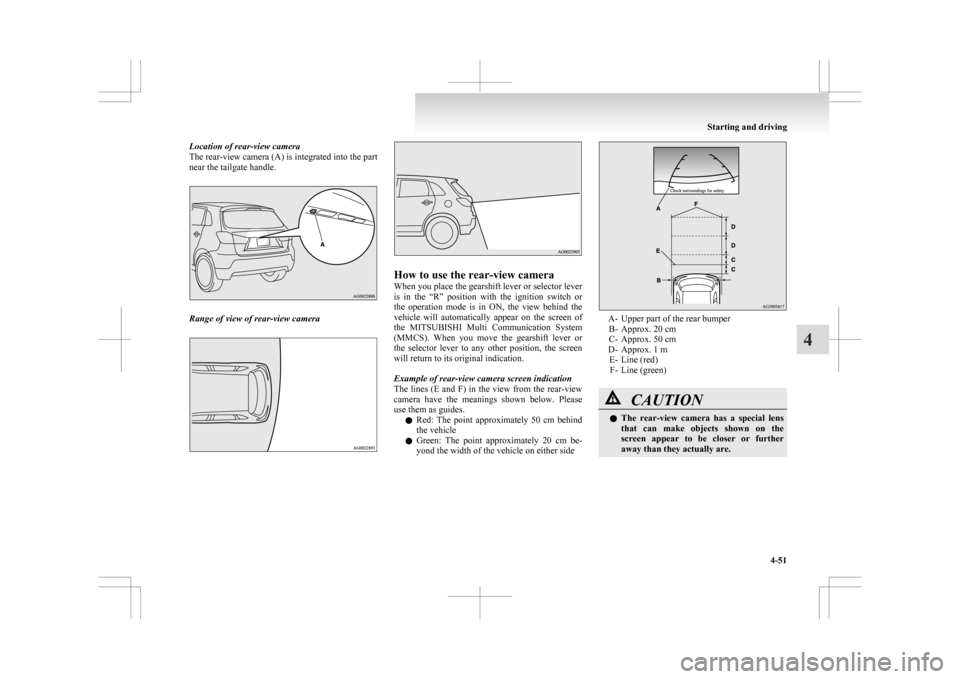
Location of rear-view camera
The rear-view camera (A) is integrated into the part
near the tailgate handle.
Range of view of rear-view camera How to use the rear-view camera
When you place the gearshift lever or selector lever
is
in the “R” position with the ignition switch or
the operation mode is in ON, the view behind the
vehicle will automatically appear on the screen of
the MITSUBISHI Multi Communication System
(MMCS). When you move the gearshift lever or
the selector lever to any other position, the screen
will return to its original indication.
Example of rear-view camera screen indication
The lines (E and F) in the view from the rear-view
camera have the meanings shown below. Please
use them as guides.
l Red: The point approximately 50 cm behind
the vehicle
l Green: The point approximately 20 cm be-
yond the width of the vehicle on either side A- Upper part of the rear bumper
B-
Approx. 20 cm
C- Approx. 50 cm
D- Approx. 1 m E- Line (red)F- Line (green) CAUTION
l
The
rear-view camera has a special lens
that can make objects shown on the
screen appear to be closer or further
away than they actually are. Starting and driving
4-51 4
Page 218 of 368
Air purifier
E00708400561
An
air filter has been incorporated into the air con-
ditioning so that pollen and dust are cleaned from
the air.
Replace the air filter periodically as its ability to
clean the air will be reduced as it collects pollen
and dirt. For the maintenance interval, refer to the
“SERVICE BOOKLET”.
NOTE
l Operation in certain conditions such as driv-
ing on a dusty road and frequent use of the
air conditioning can lead to reduction of serv-
ice life of the filter. When you feel that the
air flow is lower than normal or when the
windscreen or windows start to fog up easily,
replace the air filter.
We recommend you to have it checked. Audio system*
E00708502090
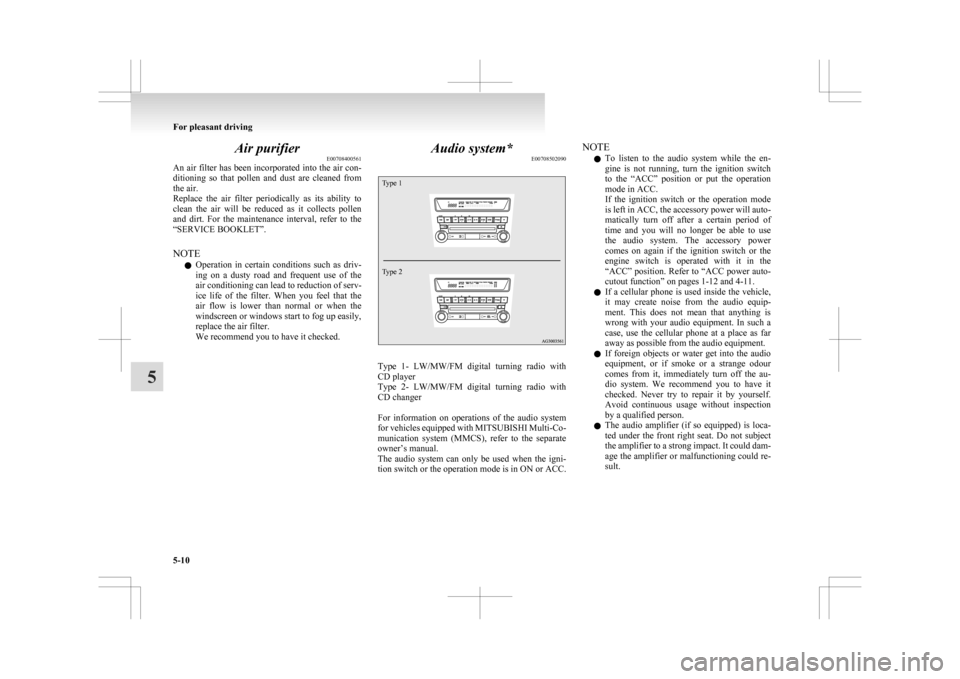
Type 1
Type 2 Type 1- LW/MW/FM digital turning radio with
CD player
Type
2- LW/MW/FM digital turning radio with
CD changer
For information on operations of the audio system
for vehicles equipped with MITSUBISHI Multi-Co-
munication system (MMCS), refer to the separate
owner’s manual.
The audio system can only be used when the igni-
tion switch or the operation mode is in ON or ACC. NOTE
l To
listen to the audio system while the en-
gine is not running, turn the ignition switch
to the “ACC” position or put the operation
mode in ACC.
If the ignition switch or the operation mode
is left in ACC, the accessory power will auto-
matically turn off after a certain period of
time and you will no longer be able to use
the audio system. The accessory power
comes on again if the ignition switch or the
engine switch is operated with it in the
“ACC” position. Refer to “ACC power auto-
cutout function” on pages 1-12 and 4-11.
l If a cellular phone is used inside the vehicle,
it may create noise from the audio equip-
ment. This does not mean that anything is
wrong with your audio equipment. In such a
case, use the cellular phone at a place as far
away as possible from the audio equipment.
l If foreign objects or water get into the audio
equipment, or if smoke or a strange odour
comes from it, immediately turn off the au-
dio system. We recommend you to have it
checked. Never try to repair it by yourself.
Avoid continuous usage without inspection
by a qualified person.
l The audio amplifier (if so equipped) is loca-
ted under the front right seat. Do not subject
the amplifier to a strong impact. It could dam-
age the amplifier or malfunctioning could re-
sult. For pleasant driving
5-10
5
Page 224 of 368
The traffic information program standby function
is
turned on (with the TP indicator shown on the dis-
play) and after about 45 seconds since the RDS in-
dicator turns off due to weak signal or the tuning
station is changed over from a TP station to a sta-
tion which does not broadcast traffic information,
the sound will beep 5 times and seeks out a TP sta-
tion in all frequencies automatically.
The TP search function can be turned ON and OFF.
Refer to “Function setup mode” on page 5-16.
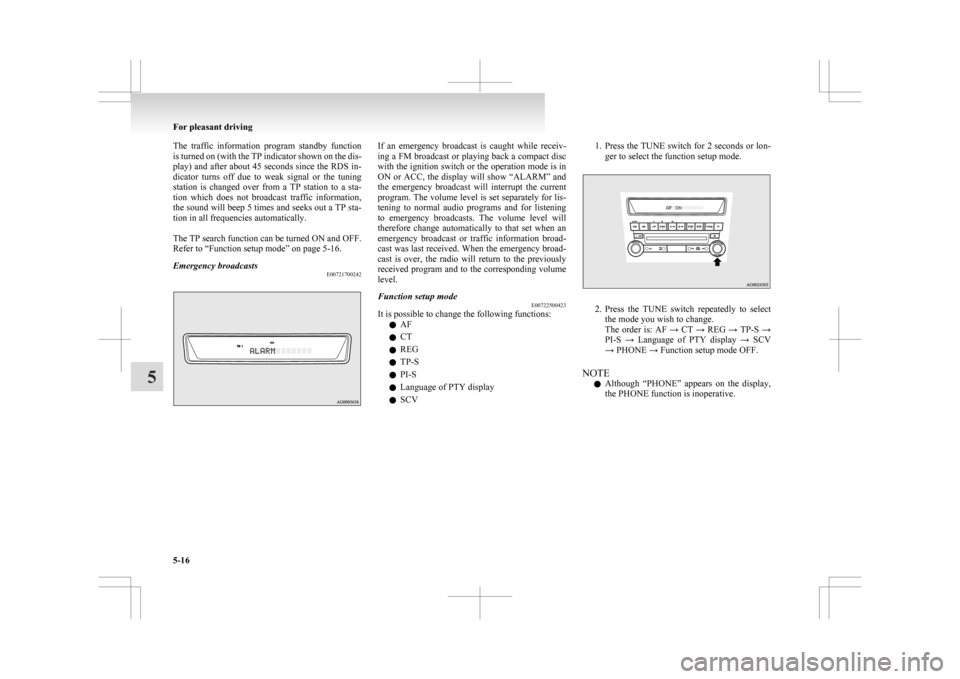
Emergency broadcasts E00721700242 If an emergency broadcast is caught while receiv-
ing
a FM broadcast or playing back a compact disc
with the ignition switch or the operation mode is in
ON or ACC, the display will show “ALARM” and
the emergency broadcast will interrupt the current
program. The volume level is set separately for lis-
tening to normal audio programs and for listening
to emergency broadcasts. The volume level will
therefore change automatically to that set when an
emergency broadcast or traffic information broad-
cast was last received. When the emergency broad-
cast is over, the radio will return to the previously
received program and to the corresponding volume
level.
Function setup mode E00722500423
It is possible to change the following functions:
l AF
l CT
l REG
l TP-S
l PI-S
l Language of PTY display
l SCV 1. Press the TUNE switch for 2 seconds or lon-
ger to select the function setup mode. 2. Press
the TUNE switch repeatedly to select
the mode you wish to change.
The order is: AF → CT → REG → TP-S →
PI-S → Language of PTY display → SCV
→ PHONE → Function setup mode OFF.
NOTE l Although “PHONE” appears on the display,
the PHONE function is inoperative. For pleasant driving
5-16
5