warning light MITSUBISHI ASX 2012 (in English) User Guide
[x] Cancel search | Manufacturer: MITSUBISHI, Model Year: 2012, Model line: ASX, Model: MITSUBISHI ASX 2012Pages: 378, PDF Size: 18.2 MB
Page 109 of 378
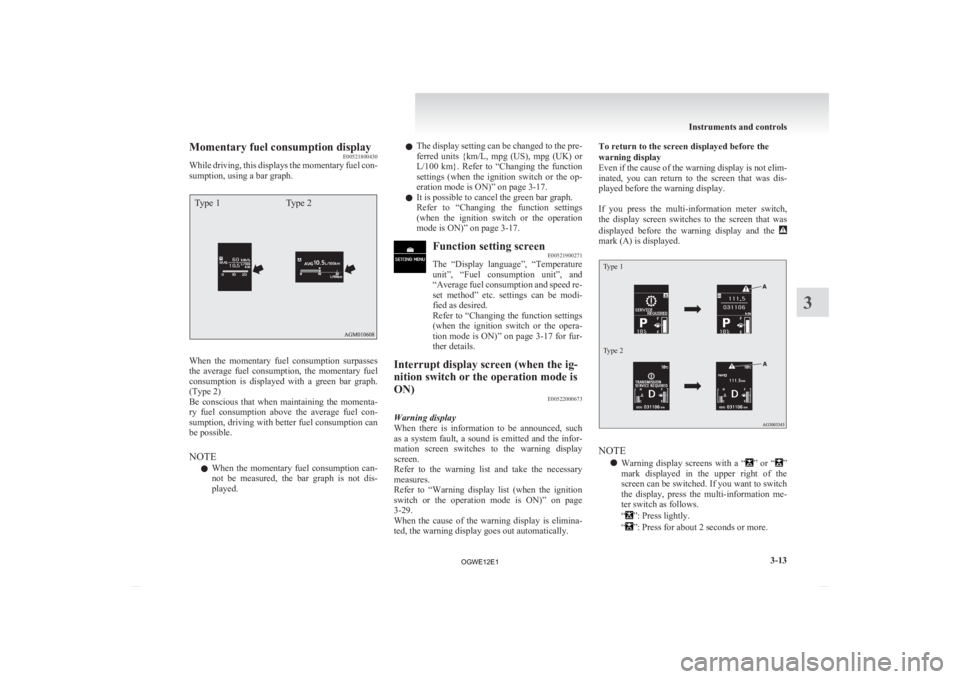
Momentary fuel consumption display
E00521800430
While
driving, this displays the momentary fuel con-
sumption, using a bar graph.
Type 1 Type 2When the momentary fuel consumption surpasses
the
average fuel consumption, the momentary fuel
consumption is displayed with a green bar graph.
(Type 2)
Be conscious that when maintaining the momenta-
ry fuel consumption above the average fuel con-
sumption, driving with better fuel consumption can
be possible.
NOTE
l When the momentary fuel consumption can-
not be measured, the bar graph is not dis-
played. l
The
display setting can be changed to the pre-
ferred units {km/L, mpg (US), mpg (UK) or
L/100 km}. Refer to “Changing the function
settings (when the ignition switch or the op-
eration mode is ON)” on page 3-17.
l It is possible to cancel the green bar graph.
Refer to “Changing the function settings
(when the ignition switch or the operation
mode is ON)” on page 3-17. Function setting screen
E00521900271
The
“Display language”, “Temperature
unit”, “Fuel consumption unit”, and
“Average fuel consumption and speed re-
set method” etc. settings can be modi-
fied as desired.
Refer to “Changing the function settings
(when the ignition switch or the opera-
tion mode is ON)” on page 3-17 for fur-
ther details.
Interrupt display screen (when the ig-
nition switch or the operation mode is
ON) E00522000673
Warning display
When
there is information to be announced, such
as a system fault, a sound is emitted and the infor-
mation screen switches to the warning display
screen.
Refer to the warning list and take the necessary
measures.
Refer to “Warning display list (when the ignition
switch or the operation mode is ON)” on page
3-29.
When the cause of the warning display is elimina-
ted, the warning display goes out automatically. To return to the screen displayed before the
warning display
Even
if the cause of the warning display is not elim-
inated, you can return to the screen that was dis-
played before the warning display.
If you press the multi-information meter switch,
the display screen switches to the screen that was
displayed before the warning display and the mark (A) is displayed.
Type 1
Type 2
NOTE
l Warning
display screens with a “ ”
or “ ”
mark
displayed in the upper right of the
screen can be switched. If you want to switch
the display, press the multi-information me-
ter switch as follows.
“ ”: Press lightly.
“ ”: Press for about 2 seconds or more. Instruments and controls
3-13 3
OGWE12E1
Page 110 of 378
Redisplay of a warning display screen
When
the mark is displayed, if you lightly press
the
multi-information meter switch a few times, the
warning display screen you switched from is dis-
played again.
Other interrupt displays
The operation status of each system is displayed on
the information screen.
Refer to the appropriate page in the warning dis-
play list for further details.
Refer to “Other interrupt displays” on page 3-36. Selector lever position display
screen*
E00532500323
Shows the position of the selector lever.
Refer
to “Selector lever operation” on
page 4-25. Outside temperature display
screen
E00522100300
This
shows the temperature outside the
vehicle.
NOTE
l The display setting can be
changed to the preferred units (°C
or °F).
Refer to “Changing the function
settings (when the ignition switch
or the operation mode is ON)” on
page 3-17. l
Depending
on factors such as the
driving conditions, the displayed
temperature may vary from the ac-
tual outside temperature.
Fuel remaining display screen E00522200402
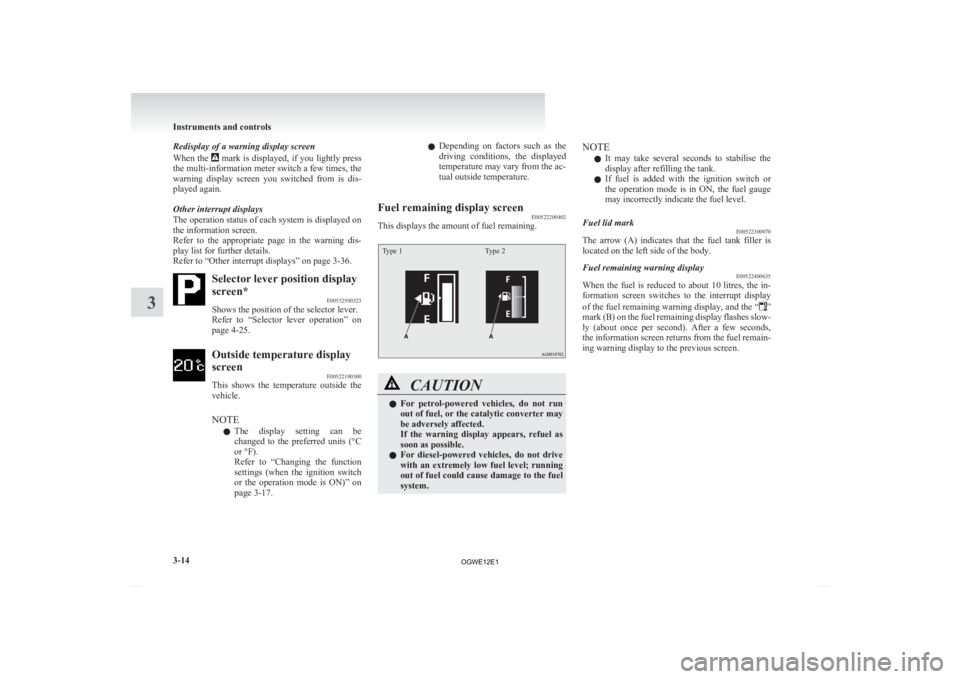
This displays the amount of fuel remaining.
Type 1 Type 2 CAUTION
l
For
petrol-powered vehicles, do not run
out of fuel, or the catalytic converter may
be adversely affected.
If the warning display appears, refuel as
soon as possible.
l For diesel-powered vehicles, do not drive
with an extremely low fuel level; running
out of fuel could cause damage to the fuel
system. NOTE
l It
may take several seconds to stabilise the
display after refilling the tank.
l If fuel is added with the ignition switch or
the operation mode is in ON, the fuel gauge
may incorrectly indicate the fuel level.
Fuel lid mark E00522300070
The arrow (A) indicates that the fuel tank filler is
located on the left side of the body.
Fuel remaining warning display E00522400635
When the fuel is reduced to about 10 litres, the in-
formation
screen switches to the interrupt display
of the fuel remaining warning display, and the “ ”
mark
(B) on the fuel remaining display flashes slow-
ly (about once per second). After a few seconds,
the information screen returns from the fuel remain-
ing warning display to the previous screen. Instruments and controls
3-14
3
OGWE12E1
Page 112 of 378
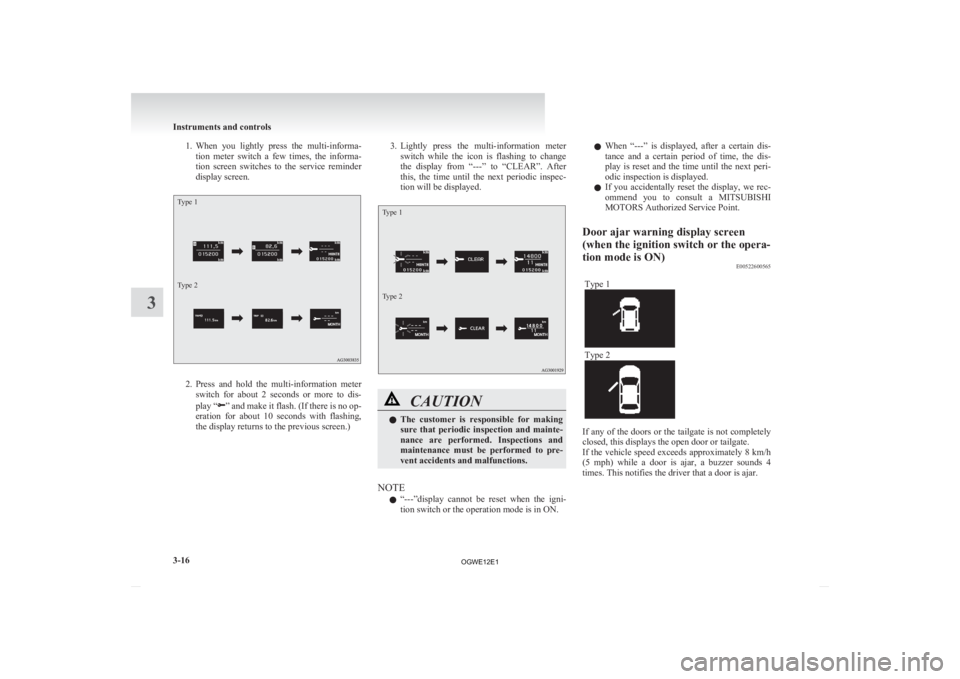
1. When you lightly press the multi-informa-
tion meter switch a few times, the informa-
tion screen switches to the service reminder
display screen.
Type 1
Type 2 2. Press
and hold the multi-information meter
switch for about 2 seconds or more to dis-
play “ ”
and make it flash. (If there is no op-
eration for about 10 seconds with flashing,
the display returns to the previous screen.) 3. Lightly
press the multi-information meter
switch while the icon is flashing to change
the display from “---” to “CLEAR”. After
this, the time until the next periodic inspec-
tion will be displayed.
Type 1
Type 2 CAUTION
l
The
customer is responsible for making
sure that periodic inspection and mainte-
nance are performed. Inspections and
maintenance must be performed to pre-
vent accidents and malfunctions.
NOTE l “---”display
cannot be reset when the igni-
tion switch or the operation mode is in ON. l
When
“---” is displayed, after a certain dis-
tance and a certain period of time, the dis-
play is reset and the time until the next peri-
odic inspection is displayed.
l If you accidentally reset the display, we rec-
ommend you to consult a MITSUBISHI
MOTORS Authorized Service Point.
Door ajar warning display screen
(when the ignition switch or the opera-
tion mode is ON) E00522600565
Type 1 Type 2
If any of the doors or the tailgate is not completely
closed, this displays the open door or tailgate.
If
the vehicle speed exceeds approximately 8 km/h
(5 mph) while a door is ajar, a buzzer sounds 4
times. This notifies the driver that a door is ajar. Instruments and controls
3-16
3
OGWE12E1
Page 113 of 378
CAUTION
l
Before moving your vehicle, check that
the warning lamp is OFF.
Changing the function settings (when
the ignition switch or the operation
mode is ON) E00522700348
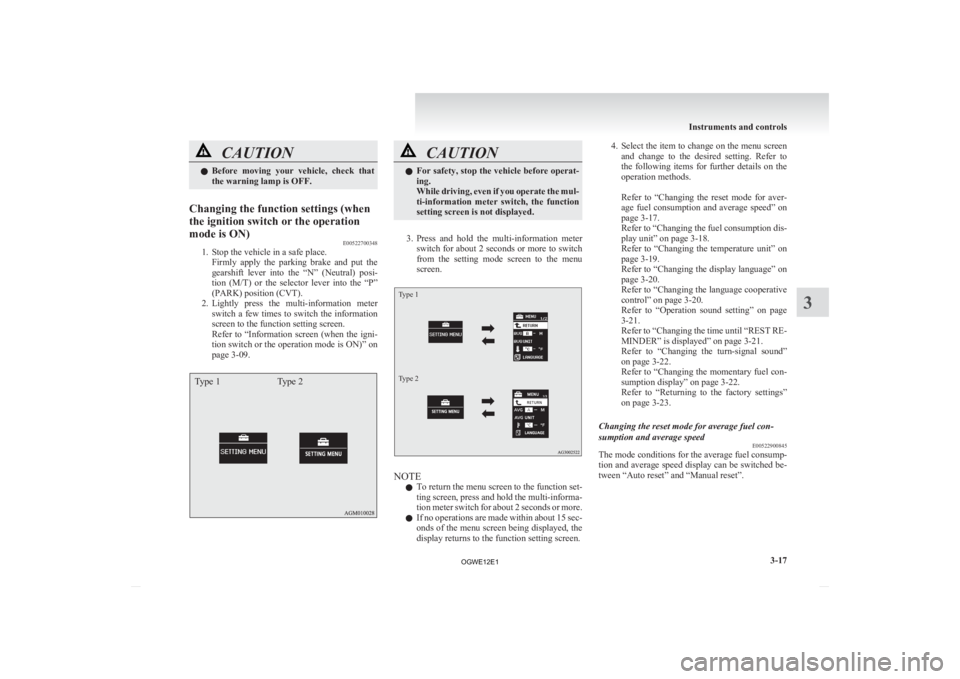
1. Stop the vehicle in a safe place.
Firmly
apply the parking brake and put the
gearshift lever into the “N” (Neutral) posi-
tion (M/T) or the selector lever into the “P”
(PARK) position (CVT).
2. Lightly press the multi-information meter switch a few times to switch the information
screen to the function setting screen.
Refer to “Information screen (when the igni-
tion switch or the operation mode is ON)” on
page 3-09.
Type 1 Type 2 CAUTION
l
For
safety, stop the vehicle before operat-
ing.
While driving, even if you operate the mul-
ti-information meter switch, the function
setting screen is not displayed.
3. Press
and hold the multi-information meter switch for about 2 seconds or more to switch
from the setting mode screen to the menu
screen.
Type 1
Type 2 NOTE
l To
return the menu screen to the function set-
ting screen, press and hold the multi-informa-
tion meter switch for about 2 seconds or more.
l If no operations are made within about 15 sec-
onds of the menu screen being displayed, the
display returns to the function setting screen. 4. Select
the item to change on the menu screen
and change to the desired setting. Refer to
the following items for further details on the
operation methods.
Refer to “Changing the reset mode for aver-
age fuel consumption and average speed” on
page 3-17.
Refer to “Changing the fuel consumption dis-
play unit” on page 3-18.
Refer to “Changing the temperature unit” on
page 3-19.
Refer to “Changing the display language” on
page 3-20.
Refer to “Changing the language cooperative
control” on page 3-20.
Refer to “Operation sound setting” on page
3-21.
Refer to “Changing the time until “REST RE-
MINDER” is displayed” on page 3-21.
Refer to “Changing the turn-signal sound”
on page 3-22.
Refer to “Changing the momentary fuel con-
sumption display” on page 3-22.
Refer to “Returning to the factory settings”
on page 3-23.
Changing the reset mode for average fuel con-
sumption and average speed E00522900845
The mode conditions for the average fuel consump-
tion
and average speed display can be switched be-
tween “Auto reset” and “Manual reset”. Instruments and controls
3-17 3
OGWE12E1
Page 116 of 378
3. Press and hold the multi-information meter
switch for about 2 seconds or more to switch
in sequence from °C → °F → °C.
The setting is changed to the selected temper-
ature unit.
NOTE l If the battery is disconnected, the unit setting
is erased from memory and is automatically
set to °C.
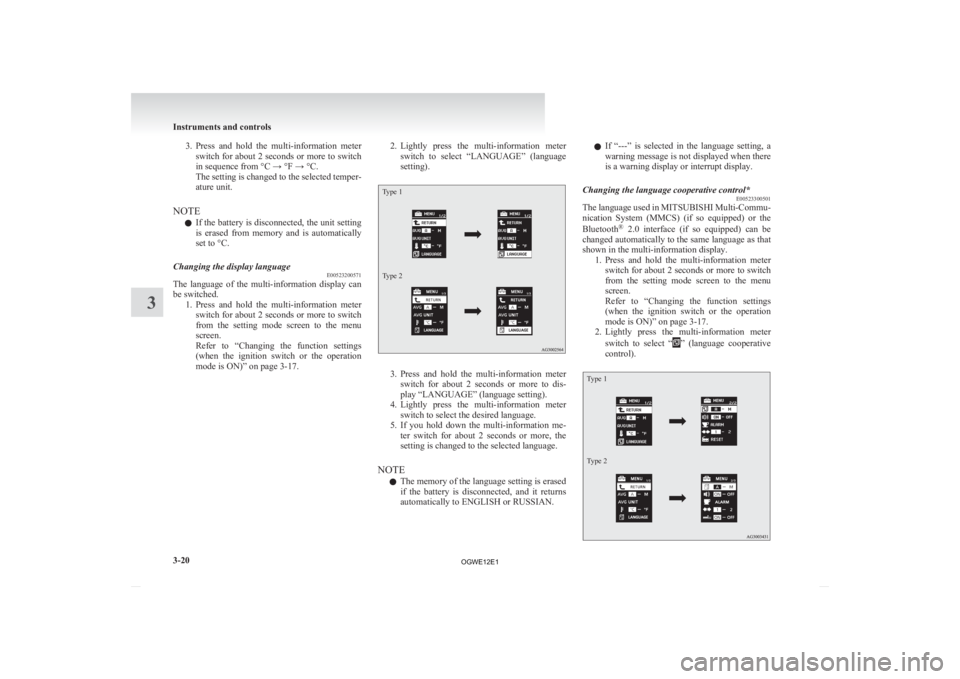
Changing the display language E00523200571
The language of the multi-information display can
be switched.
1. Press
and hold the multi-information meter
switch for about 2 seconds or more to switch
from the setting mode screen to the menu
screen.
Refer to “Changing the function settings
(when the ignition switch or the operation
mode is ON)” on page 3-17. 2. Lightly
press the multi-information meter
switch to select “LANGUAGE” (language
setting).
Type 1
Type 2 3. Press
and hold the multi-information meter
switch for about 2 seconds or more to dis-
play “LANGUAGE” (language setting).
4. Lightly press the multi-information meter switch to select the desired language.
5. If you hold down the multi-information me- ter switch for about 2 seconds or more, the
setting is changed to the selected language.
NOTE l The memory of the language setting is erased
if the battery is disconnected, and it returns
automatically to ENGLISH or RUSSIAN. l
If
“---” is selected in the language setting, a
warning message is not displayed when there
is a warning display or interrupt display.
Changing the language cooperative control* E00523300501
The language used in MITSUBISHI Multi-Commu-
nication
System (MMCS) (if so equipped) or the
Bluetooth ®
2.0 interface (if so equipped) can be
changed automatically to the same language as that
shown in the multi-information display. 1. Press and hold the multi-information meterswitch for about 2 seconds or more to switch
from the setting mode screen to the menu
screen.
Refer to “Changing the function settings
(when the ignition switch or the operation
mode is ON)” on page 3-17.
2. Lightly press the multi-information meter
switch to select “ ”
(language cooperative
control).
Type 1
Type 2 Instruments and controls
3-20
3
OGWE12E1
Page 117 of 378
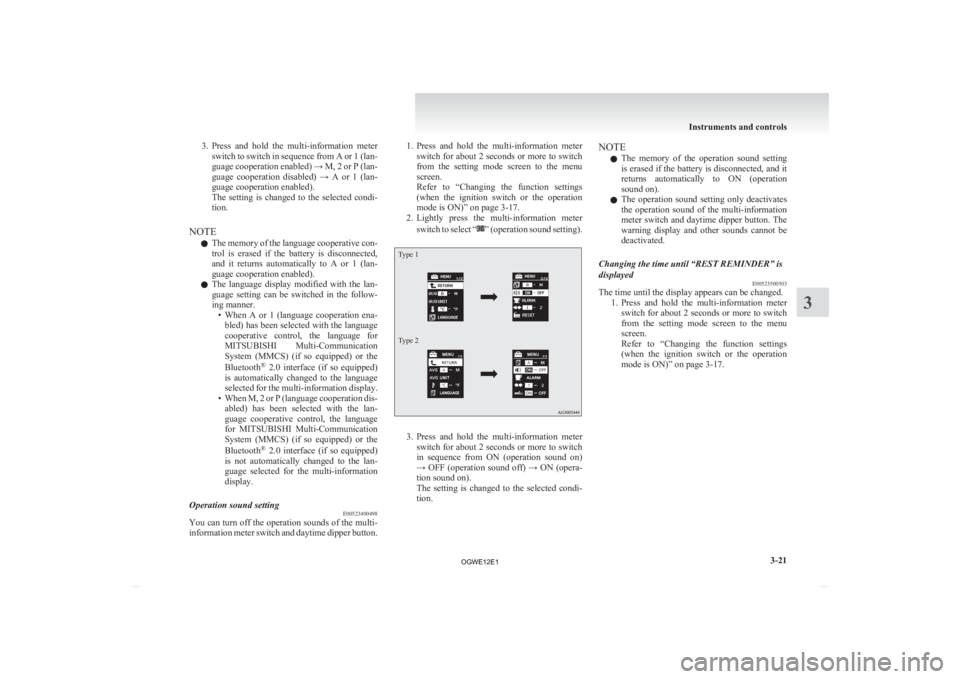
3. Press and hold the multi-information meter
switch to switch in sequence from A or 1 (lan-
guage cooperation enabled) → M, 2 or P (lan-
guage cooperation disabled) → A or 1 (lan-
guage cooperation enabled).
The setting is changed to the selected condi-
tion.
NOTE l The memory of the language cooperative con-
trol is erased if the battery is disconnected,
and it returns automatically to A or 1 (lan-
guage cooperation enabled).
l The language display modified with the lan-
guage setting can be switched in the follow-
ing manner.
• When A or 1 (language cooperation ena-bled) has been selected with the language
cooperative control, the language for
MITSUBISHI Multi-Communication
System (MMCS) (if so equipped) or the
Bluetooth ®
2.0 interface (if so equipped)
is automatically changed to the language
selected for the multi-information display.
• When M, 2 or P (language cooperation dis- abled) has been selected with the lan-
guage cooperative control, the language
for MITSUBISHI Multi-Communication
System (MMCS) (if so equipped) or the
Bluetooth ®
2.0 interface (if so equipped)
is not automatically changed to the lan-
guage selected for the multi-information
display.
Operation sound setting E00523400498
You can turn off the operation sounds of the multi-
information
meter switch and daytime dipper button. 1. Press
and hold the multi-information meter
switch for about 2 seconds or more to switch
from the setting mode screen to the menu
screen.
Refer to “Changing the function settings
(when the ignition switch or the operation
mode is ON)” on page 3-17.
2. Lightly press the multi-information meter
switch to select “ ”
(operation sound setting).
Type 1
Type 2
3. Press
and hold the multi-information meter
switch for about 2 seconds or more to switch
in sequence from ON (operation sound on)
→ OFF (operation sound off) → ON (opera-
tion sound on).
The setting is changed to the selected condi-
tion. NOTE
l The
memory of the operation sound setting
is erased if the battery is disconnected, and it
returns automatically to ON (operation
sound on).
l The operation sound setting only deactivates
the operation sound of the multi-information
meter switch and daytime dipper button. The
warning display and other sounds cannot be
deactivated.
Changing the time until “REST REMINDER” is
displayed E00523500503
The time until the display appears can be changed.
1. Press
and hold the multi-information meter
switch for about 2 seconds or more to switch
from the setting mode screen to the menu
screen.
Refer to “Changing the function settings
(when the ignition switch or the operation
mode is ON)” on page 3-17. Instruments and controls
3-21 3
OGWE12E1
Page 141 of 378
l
When the headlamps are turned off by the au-
tomatic on/off control with the ignition
switch in the “ON” position, the front fog
lamps (if so equipped) and rear fog lamps al-
so go off. When the headlamps are subse-
quently turned back on by the automatic on/
off control, the front fog lamps also come on
but the rear fog lamp stays off. If you wish to
turn the rear fog lamp back on, operate the
switch again.
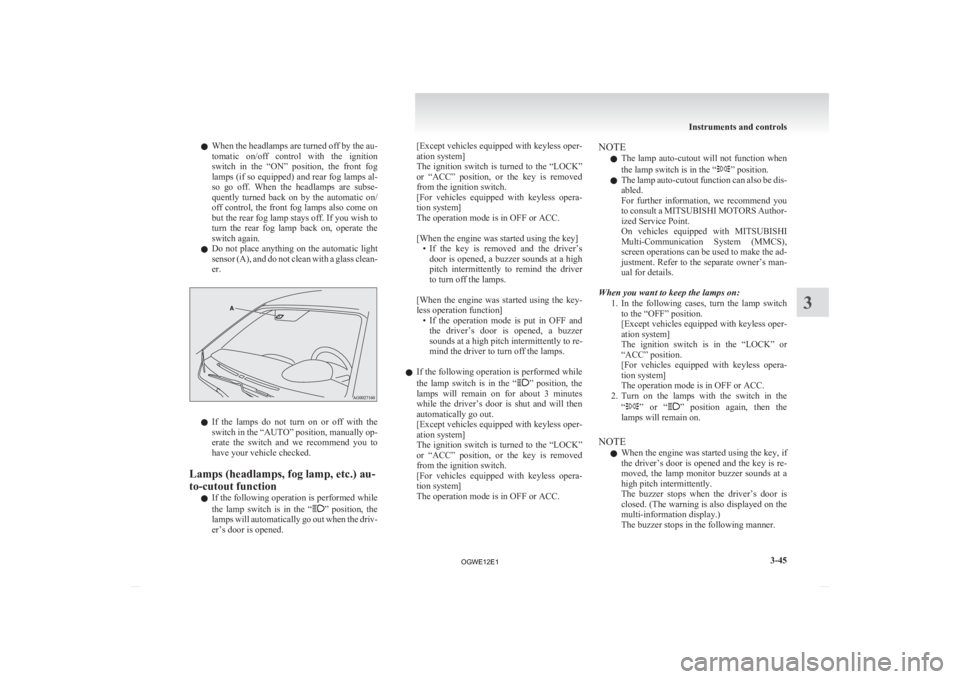
l Do not place anything on the automatic light
sensor (A), and do not clean with a glass clean-
er. l
If
the lamps do not turn on or off with the
switch in the “AUTO” position, manually op-
erate the switch and we recommend you to
have your vehicle checked.
Lamps (headlamps, fog lamp, etc.) au-
to-cutout function l If the following operation is performed while
the lamp switch is in the “ ”
position, the
lamps will automatically go out when the driv-
er’s door is opened. [Except
vehicles equipped with keyless oper-
ation system]
The ignition switch is turned to the “LOCK”
or “ACC” position, or the key is removed
from the ignition switch.
[For vehicles equipped with keyless opera-
tion system]
The operation mode is in OFF or ACC.
[When the engine was started using the key]
• If the key is removed and the driver’sdoor is opened, a buzzer sounds at a high
pitch intermittently to remind the driver
to turn off the lamps.
[When the engine was started using the key-
less operation function] • If the operation mode is put in OFF andthe driver’s door is opened, a buzzer
sounds at a high pitch intermittently to re-
mind the driver to turn off the lamps.
l If the following operation is performed while
the lamp switch is in the “ ”
position, the
lamps will remain on for about 3 minutes
while the driver’s door is shut and will then
automatically go out.
[Except vehicles equipped with keyless oper-
ation system]
The ignition switch is turned to the “LOCK”
or “ACC” position, or the key is removed
from the ignition switch.
[For vehicles equipped with keyless opera-
tion system]
The operation mode is in OFF or ACC. NOTE
l The
lamp auto-cutout will not function when
the lamp switch is in the “ ” position.
l The
lamp auto-cutout function can also be dis-
abled.
For further information, we recommend you
to consult a MITSUBISHI MOTORS Author-
ized Service Point.
On vehicles equipped with MITSUBISHI
Multi-Communication System (MMCS),
screen operations can be used to make the ad-
justment. Refer to the separate owner’s man-
ual for details.
When you want to keep the lamps on: 1. In the following cases, turn the lamp switchto the “OFF” position.
[Except vehicles equipped with keyless oper-
ation system]
The ignition switch is in the “LOCK” or
“ACC” position.
[For vehicles equipped with keyless opera-
tion system]
The operation mode is in OFF or ACC.
2. Turn on the lamps with the switch in the
“ ”
or “ ” position again, then the
lamps will remain on.
NOTE l When the engine was started using the key, if
the driver’s door is opened and the key is re-
moved, the lamp monitor buzzer sounds at a
high pitch intermittently.
The buzzer stops when the driver’s door is
closed. (The warning is also displayed on the
multi-information display.)
The buzzer stops in the following manner. Instruments and controls
3-45 3
OGWE12E1
Page 142 of 378
• Turn the lamp switch to the “OFF” posi-
tion.
• Close the driver’s door.
l When the engine was started using the key-
less operation function, if the driver’s door is
opened and the operation mode is put in
OFF, the lamp monitor buzzer sounds at a
high pitch intermittently.
The buzzer stops when the driver’s door is
closed. (The warning is also displayed on the
multi-information display.)
The buzzer stops in the following manner.
• Turn the lamp switch to the “OFF” posi-tion.
• Close the driver’s door.
Lamp monitor buzzer E00506100559
[When the engine was started using the key]
If
the driver’s door is opened when the key is in the
“LOCK” or “ACC” position or removed from the
ignition switch while the lamps are on, a buzzer
will sound to remind the driver to turn off the lamps.
[When the engine was started using the keyless op-
eration function]
If the driver’s door is opened when the operation
mode is in ACC or OFF with the lamps illumina-
ted, a buzzer will sound to remind the driver to turn
off the lamps.
In both cases, the buzzer will automatically stop if
the auto-cutoff function is activated, the lamp
switch is turned off, or the door is closed. Dipper (High/Low beam change)
E00506200329
When
the lamp switch is in the “ ”
position, the
beam changes from high to low (or low to high)
each time the lever is pulled fully (1). While the high-
beam is on, the high-beam indication lamp in the in-
strument cluster will also illuminate. Headlamp flasher
E00506300199
The high-beams flash when the lever is pulled slight-
ly (2), and will go off when it is released.
When
the high-beam is on, the high-beam indica-
tion lamp in the instrument cluster will illuminate.
NOTE
l The high-beams can also flash when the
lamp switch is OFF.
l If you turn the lamps off with the headlamps
set to high-beam, the headlamps are automat-
ically returned to their low-beam setting
when the lamp switch is next turned to the
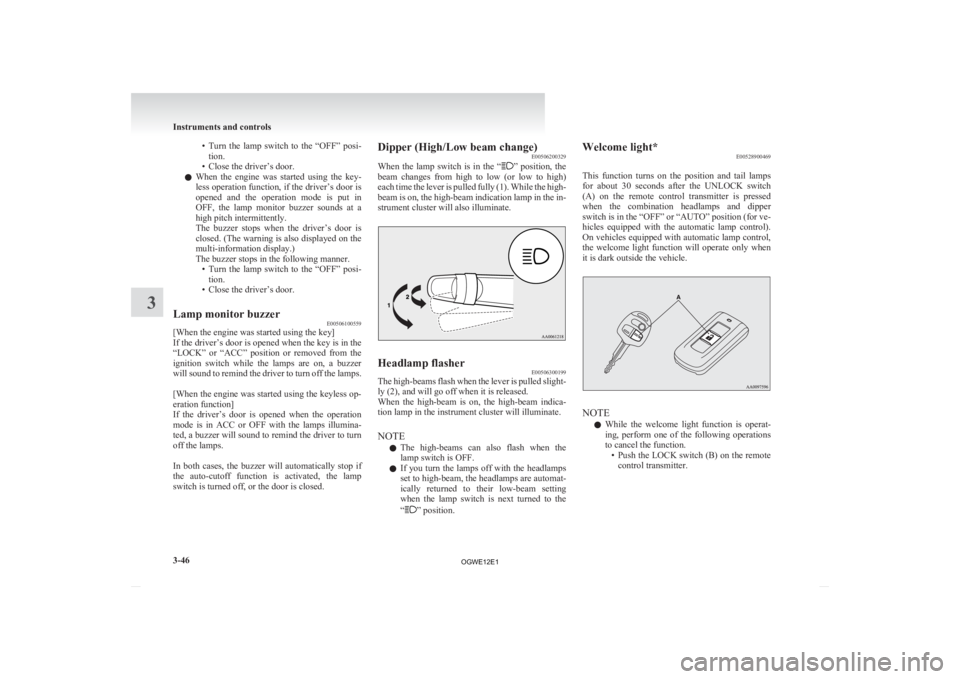
“ ” position.Welcome light*
E00528900469
This
function turns on the position and tail lamps
for about 30 seconds after the UNLOCK switch
(A) on the remote control transmitter is pressed
when the combination headlamps and dipper
switch is in the “OFF” or “AUTO” position (for ve-
hicles equipped with the automatic lamp control).
On vehicles equipped with automatic lamp control,
the welcome light function will operate only when
it is dark outside the vehicle. NOTE
l While
the welcome light function is operat-
ing, perform one of the following operations
to cancel the function. • Push the LOCK switch (B) on the remotecontrol transmitter. Instruments and controls
3-46
3
OGWE12E1
Page 145 of 378
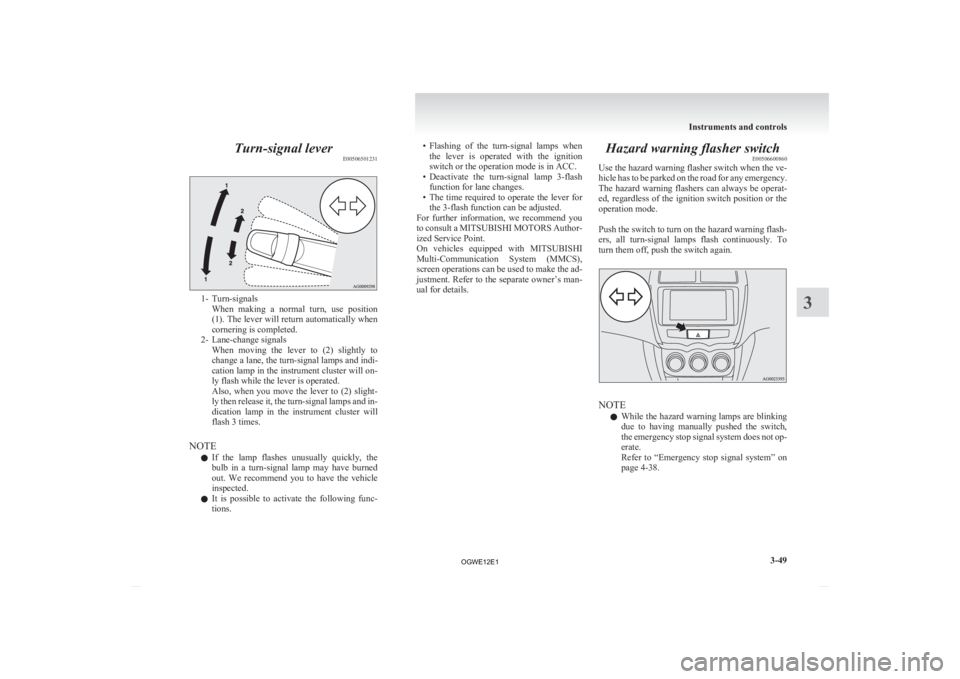
Turn-signal lever
E005065012311- Turn-signals
When making a normal turn, use position
(1). The lever will return automatically when
cornering is completed.
2- Lane-change signals When moving the lever to (2) slightly to
change a lane, the turn-signal lamps and indi-
cation lamp in the instrument cluster will on-
ly flash while the lever is operated.
Also, when you move the lever to (2) slight-
ly then release it, the turn-signal lamps and in-
dication lamp in the instrument cluster will
flash 3 times.
NOTE l If the lamp flashes unusually quickly, the
bulb in a turn-signal lamp may have burned
out. We recommend you to have the vehicle
inspected.
l It is possible to activate the following func-
tions. • Flashing
of the turn-signal lamps when
the lever is operated with the ignition
switch or the operation mode is in ACC.
• Deactivate the turn-signal lamp 3-flash function for lane changes.
• The time required to operate the lever for the 3-flash function can be adjusted.
For further information, we recommend you
to consult a MITSUBISHI MOTORS Author-
ized Service Point.
On vehicles equipped with MITSUBISHI
Multi-Communication System (MMCS),
screen operations can be used to make the ad-
justment. Refer to the separate owner’s man-
ual for details. Hazard warning flasher switch
E00506600860
Use
the hazard warning flasher switch when the ve-
hicle has to be parked on the road for any emergency.
The hazard warning flashers can always be operat-
ed, regardless of the ignition switch position or the
operation mode.
Push the switch to turn on the hazard warning flash-
ers, all turn-signal lamps flash continuously. To
turn them off, push the switch again. NOTE
l While
the hazard warning lamps are blinking
due to having manually pushed the switch,
the emergency stop signal system does not op-
erate.
Refer to “Emergency stop signal system” on
page 4-38. Instruments and controls
3-49 3
OGWE12E1
Page 156 of 378
Economical driving
E00600101076
For
economical driving, there are some technical re-
quirements that have to be met. The prerequisite
for low fuel consumption is a properly adjusted en-
gine. In order to achieve longer life of the vehicle
and the most economical operation, we recommend
you to have the vehicle checked at regular intervals
in accordance with the service standards.
Fuel economy and generation of exhaust gas and
noise are highly influenced by personal driving hab-
its as well as the particular operating conditions.
The following points should be observed in order
to minimize wear of brakes, tyres and engine as
well as to reduce environmental pollution.
Starting the engine
Avoid sudden acceleration and sudden starts, as
they will increase fuel consumption.
Shifting
Shift only at an appropriate speed and engine
speed. Always use the highest shift position possible.
Selecting the 4WD drive mode (4WD
vehicles)
The drive mode-selector should be set to “2WD”
when driving on normal roads and express ways to
obtain best possible fuel economy.
City traffic
Frequent starting and stopping increases the aver-
age fuel consumption. Use roads with smooth traf-
fic flow whenever possible. When driving on con-
gested roads, avoid use of a low shift position at
high engine speeds. Idling
The
vehicle consumes fuel even during idling.
Avoid extended idling whenever possible.
Speed
At higher vehicle speed, more fuel is consumed.
Avoid driving at full speed. Even a slight release of
the accelerator pedal will save a significant amount
of fuel.
Tyre inflation pressure
Check the tyre inflation pressures at regular inter-
vals. Low tyre inflation pressure increases road re-
sistance and fuel consumption. In addition, low
tyre pressures adversely affect tyre wear and driv-
ing stability.
Cargo loads
Do not drive with unnecessary articles in the lug-
gage compartment. Especially during city driving
where frequent starting and stopping is necessary,
the increased weight of the vehicle will greatly af-
fect fuel consumption. Also avoid driving with un-
necessary luggage or carriers, etc., on the roof; the
increased air resistance will increase fuel consump-
tion.
Cold engine starting
Starting of a cold engine consumes more fuel.
Unnecessary fuel consumption is also caused by
keeping a hot engine running. After the engine is
started, commence driving as soon as possible.
Air conditioning
The use of the air conditioning will increase the
fuel consumption. Driving, alcohol and drugs
E00600200070
Driving
after drinking alcohol is one of the most fre-
quent causes of accidents.
Your driving ability can be seriously impaired even
with blood alcohol levels far below the legal mini-
mum. If you have been drinking, don’t drive. Ride
with a designated non-drinking driver, call a cab or
a friend, or use public transportation.
Drinking coffee or taking a cold shower will not
make you sober.
Similarly, prescription and nonprescription drugs af-
fect your alertness, perception and reaction time.
Consult with your doctor or pharmacist before driv-
ing while under the influence of any of these medi-
cations. WARNING
l NEVER DRINK AND DRIVE.
Your
perceptions are less accurate, your
reflexes are slower and your judgment is
impaired. Starting and driving
4-02
4
OGWE12E1