wheel MITSUBISHI ASX 2012 (in English) Owner's Guide
[x] Cancel search | Manufacturer: MITSUBISHI, Model Year: 2012, Model line: ASX, Model: MITSUBISHI ASX 2012Pages: 378, PDF Size: 18.2 MB
Page 162 of 378
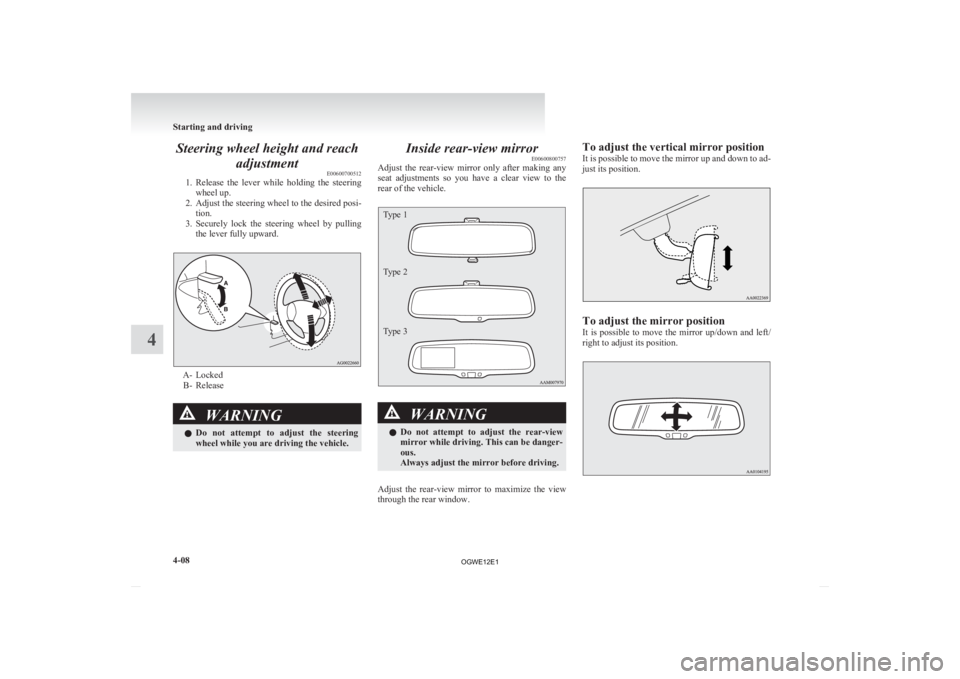
Steering wheel height and reach
adjustment E00600700512
1. Release
the lever while holding the steering
wheel up.
2. Adjust the steering wheel to the desired posi- tion.
3. Securely lock the steering wheel by pulling the lever fully upward. A- Locked
B-
Release WARNING
l Do
not attempt to adjust the steering
wheel while you are driving the vehicle. Inside rear-view mirror
E00600800757
Adjust
the rear-view mirror only after making any
seat adjustments so you have a clear view to the
rear of the vehicle.
Type 1
Type 2
Type 3 WARNING
l Do
not attempt to adjust the rear-view
mirror while driving. This can be danger-
ous.
Always adjust the mirror before driving.
Adjust the rear-view mirror to maximize the view
through the rear window. To adjust the vertical mirror position
It
is possible to move the mirror up and down to ad-
just its position. To adjust the mirror position
It
is possible to move the mirror up/down and left/
right to adjust its position. Starting and driving
4-08
4
OGWE12E1
Page 166 of 378
NOTE
l Functions
can be modified as stated below.
Consult a MITSUBISHI MOTORS Author-
ized Service Point.
On vehicles equipped with MITSUBISHI
Multi-Communication System (MMCS),
screen operations can be used to make the ad-
justment. Refer to the separate owner’s man-
ual for details. • Automatically extend when the followingoperation is performed.
[Except for vehicles equipped with key-
less operation system]
Turn the ignition switch to the “ON” or
“ACC” position.
[Vehicles equipped with keyless opera-
tion system]
Put the operation mode in ON or ACC.
• Automatically retract when the driver’s door is opened after turning the ignition
switch to the “LOCK” position or putting
the operation mode in OFF.
• Automatically extend when the vehicle speed reaches 30 km/h (19 mph).
• Deactivate the automatic extension func- tion.
Heated mirror E00601200497
To demist or defrost the outside rear-view mirrors,
press the rear window demister switch.
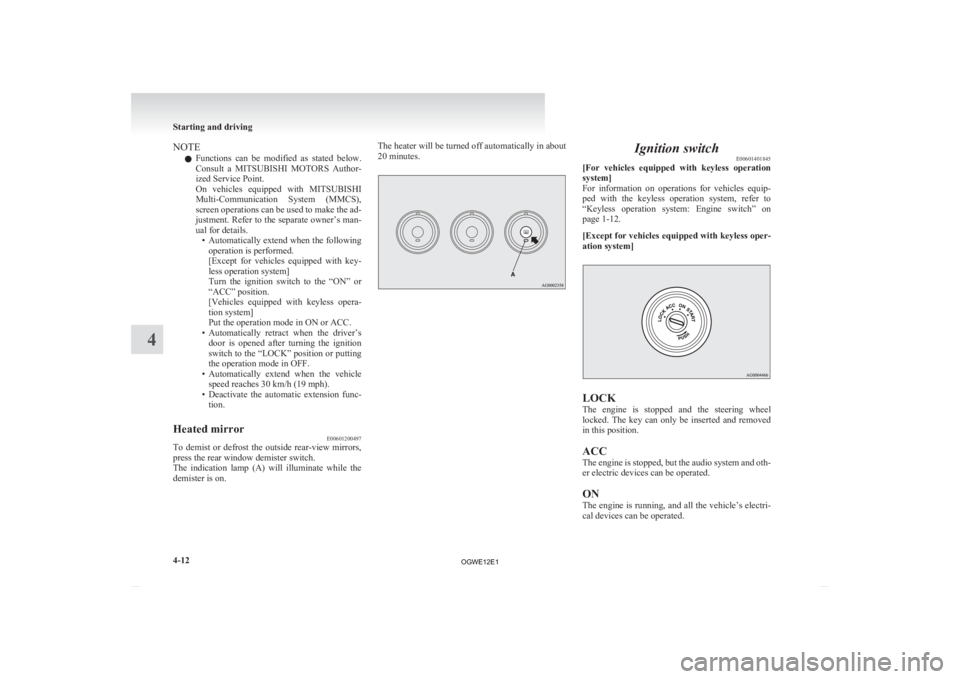
The
indication lamp (A) will illuminate while the
demister is on. The heater will be turned off automatically in about
20 minutes. Ignition switch
E00601401845
[For
vehicles equipped with keyless operation
system]
For information on operations for vehicles equip-
ped with the keyless operation system, refer to
“Keyless operation system: Engine switch” on
page 1-12.
[Except for vehicles equipped with keyless oper-
ation system] LOCK
The
engine is stopped and the steering wheel
locked. The key can only be inserted and removed
in this position.
ACC
The engine is stopped, but the audio system and oth-
er electric devices can be operated.
ON
The engine is running, and all the vehicle’s electri-
cal devices can be operated. Starting and driving
4-12
4
OGWE12E1
Page 167 of 378
START
The
starter motor operates. After the engine has star-
ted, release the key and it will automatically return
to the “ON” position.
NOTE
l Your vehicle is equipped with an electronic
immobilizer.
To start the engine, the ID code transmitted
by the transponder inside the key must match
the code registered in the immobilizer com-
puter.
Refer to “Electronic immobilizer (Anti-theft
starting system)” on page 1-03.
ACC power auto-cutout function E00620300165
After about 30 minutes has elapsed with the igni-
tion
switch in the “ACC” position, the function au-
tomatically cuts out the power for the audio system
and other electric devices that can be operated with
that position.
When the ignition switch is turned from the “ACC”
position, the power is supplied again to those devi-
ces.
NOTE
l It is possible to modify functions as follows:
• The time until the power cuts out can bechanged to about 60 minutes. • The
ACC power auto-cutout function can
be deactivated.
For details, we recommend you to con-
sult a MITSUBISHI MOTORS Author-
ized Service Point.
On vehicles equipped with MITSUBISHI
Multi-Communication System (MMCS),
screen operations can be used to make
the adjustment.
Refer to the separate owner’s manual for
details.
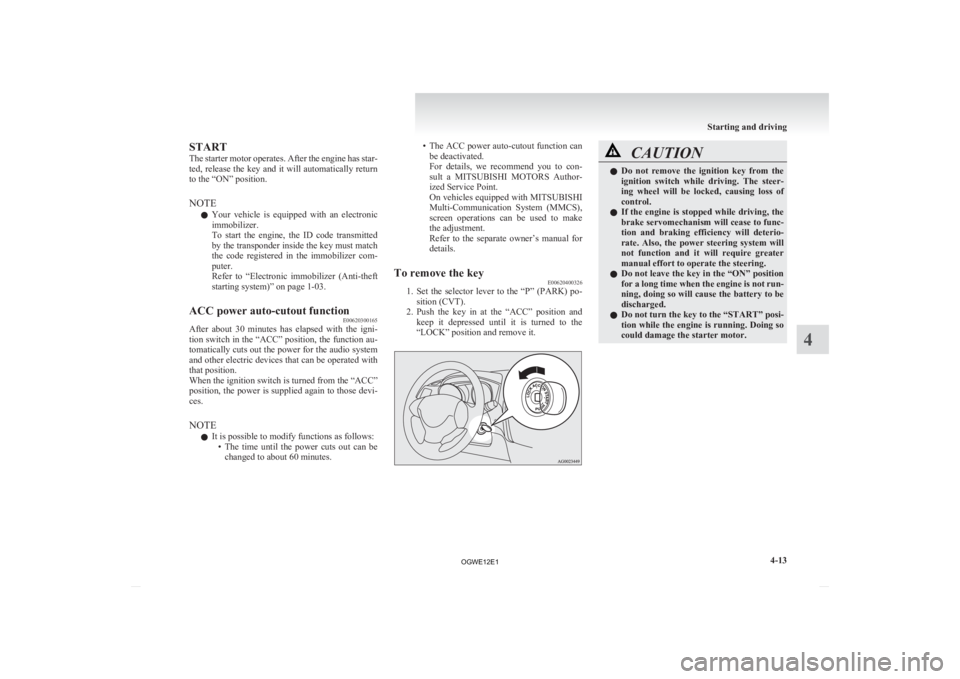
To remove the key E00620400326
1. Set
the selector lever to the “P” (PARK) po-
sition (CVT).
2. Push the key in at the “ACC” position and keep it depressed until it is turned to the
“LOCK” position and remove it. CAUTION
l
Do
not remove the ignition key from the
ignition switch while driving. The steer-
ing wheel will be locked, causing loss of
control.
l If the engine is stopped while driving, the
brake servomechanism will cease to func-
tion and braking efficiency will deterio-
rate. Also, the power steering system will
not function and it will require greater
manual effort to operate the steering.
l Do not leave the key in the “ON” position
for a long time when the engine is not run-
ning, doing so will cause the battery to be
discharged.
l Do not turn the key to the “START” posi-
tion while the engine is running. Doing so
could damage the starter motor. Starting and driving
4-13 4
OGWE12E1
Page 168 of 378
![MITSUBISHI ASX 2012 (in English) Owners Guide Steering wheel lock
E00601500676
[For
vehicles equipped with keyless operation
system]
For information on operations for vehicles equip-
ped with the keyless operation system, refer](/img/19/34862/w960_34862-167.png "MITSUBISHI ASX 2012 (in English) Owners Guide Steering wheel lock
E00601500676
[For
vehicles equipped with keyless operation
system]
For information on operations for vehicles equip-
ped with the keyless operation system, refer")
Steering wheel lock
E00601500676
[For
vehicles equipped with keyless operation
system]
For information on operations for vehicles equip-
ped with the keyless operation system, refer to
“Keyless operation system: Steering wheel lock”
on page 1-15.
[Except for vehicles equipped with keyless oper-
ation system]
To lock
Remove the key at the “LOCK” position.
Turn the steering wheel until it is locked.
To unlock
Turn the key to the “ACC” position while moving
the steering wheel slightly right and left. CAUTION
l
Remove the key when leaving the vehicle.
In some countries, it is prohibited to leave
the key in the vehicle when parked. Starting
E00620600214
Tips for starting l Do
not operate the starter motor continuous-
ly longer than 10 seconds; doing so could
run down the battery. If the engine does not
start, turn the ignition switch back to
“LOCK”, wait a few seconds, and then try
again. Trying repeatedly with the starter mo-
tor still turning will damage the starter mech-
anism.
l [For diesel-powered vehicles]
While the vehicle is stationary with the
clutch pedal fully depressed, the engine revo-
lutions do not rise to over 3,000 rpm in order
to protect the engine even if the accelerator
pedal is depressed. WARNING
l Never
run the engine in a closed or poor-
ly ventilated area any longer than is nee-
ded to move your vehicle in or out of the
area. Carbon monoxide gases are odour-
less and can be fatal. CAUTION
l
Never
attempt to start the engine by push-
ing or pulling the vehicle.
l Do not run the engine at high rpm or
drive the vehicle at high speed until the en-
gine has had a chance to warm up. Starting and driving
4-14
4
OGWE12E1
Page 169 of 378
CAUTION
l
Release the ignition key as soon as the en-
gine starts to avoid damaging the starter
motor.
Starting the engine (petrol-powered ve-
hicles) E00620700303
[For
vehicles equipped with keyless operation
system]
For information on operations for vehicles equip-
ped with the keyless operation system, refer to
“Keyless operation system: Starting” on page 1-16.
[Except vehicles equipped with keyless opera-
tion system]
The starting procedure is as follows:
1. Insert the ignition key and fasten the seat belt.
2. Make sure the parking brake is applied.
3. Depress and hold the brake pedal.
4. Fully depress the clutch pedal (M/T).
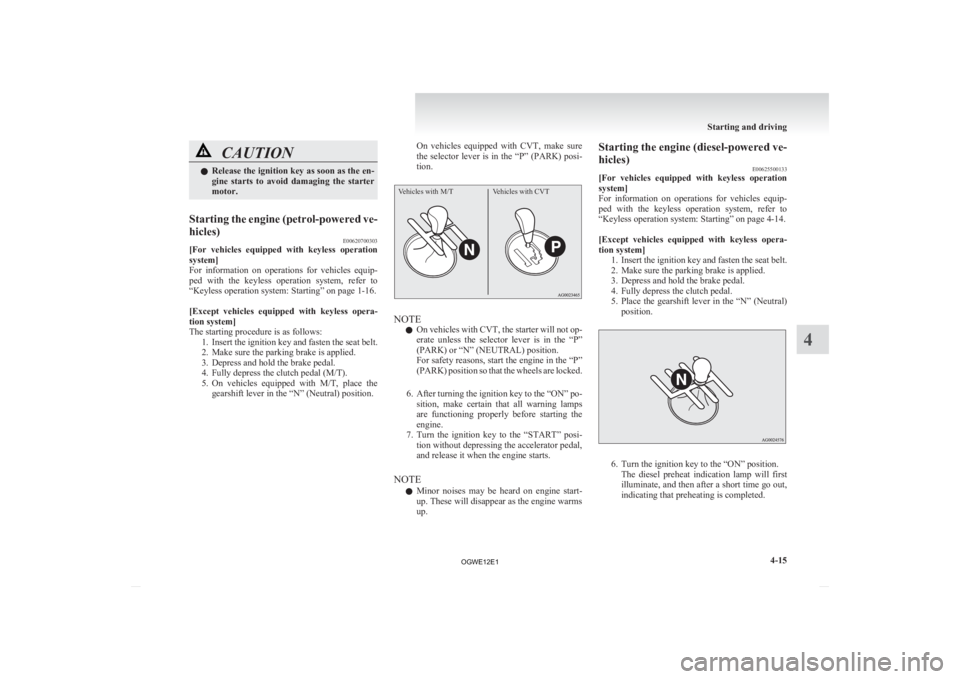
5. On vehicles equipped with M/T, place thegearshift lever in the “N” (Neutral) position. On vehicles equipped with CVT, make sure
the
selector lever is in the “P” (PARK) posi-
tion.
Vehicles with M/T Vehicles with CVT NOTE
l On
vehicles with CVT, the starter will not op-
erate unless the selector lever is in the “P”
(PARK) or “N” (NEUTRAL) position.
For safety reasons, start the engine in the “P”
(PARK) position so that the wheels are locked.
6. After turning the ignition key to the “ON” po- sition, make certain that all warning lamps
are functioning properly before starting the
engine.
7. Turn the ignition key to the “START” posi- tion without depressing the accelerator pedal,
and release it when the engine starts.
NOTE l Minor noises may be heard on engine start-
up. These will disappear as the engine warms
up. Starting the engine (diesel-powered ve-
hicles)
E00625500133
[For
vehicles equipped with keyless operation
system]
For information on operations for vehicles equip-
ped with the keyless operation system, refer to
“Keyless operation system: Starting” on page 4-14.
[Except vehicles equipped with keyless opera-
tion system] 1. Insert the ignition key and fasten the seat belt.
2. Make sure the parking brake is applied.
3. Depress and hold the brake pedal.
4. Fully depress the clutch pedal.
5. Place the gearshift lever in the “N” (Neutral)position. 6. Turn the ignition key to the “ON” position.
The
diesel preheat indication lamp will first
illuminate, and then after a short time go out,
indicating that preheating is completed. Starting and driving
4-15 4
OGWE12E1
Page 173 of 378
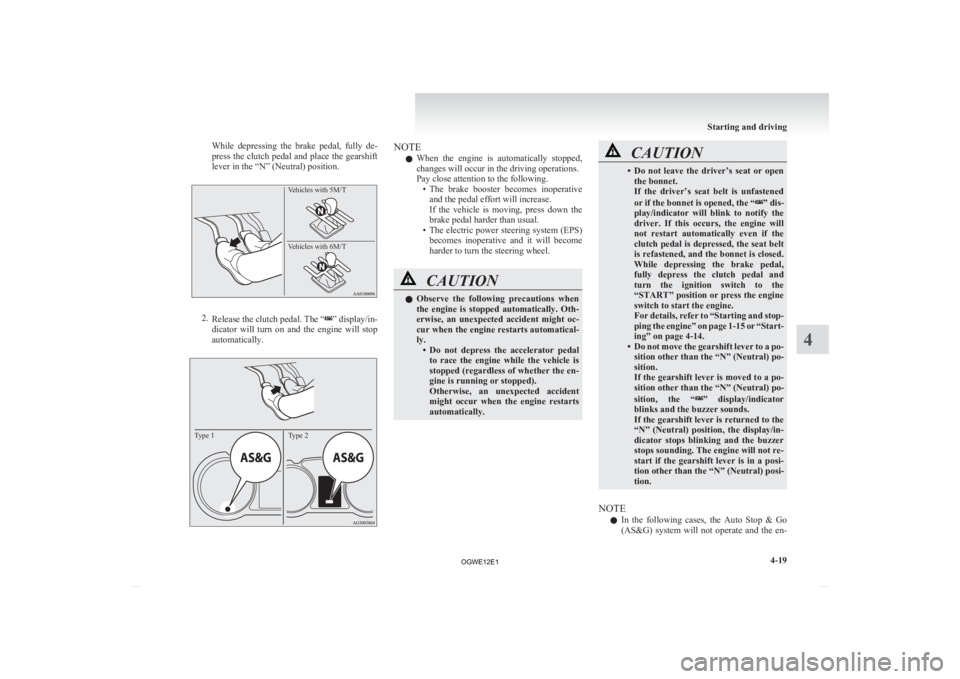
While depressing the brake pedal, fully de-
press
the clutch pedal and place the gearshift
lever in the “N” (Neutral) position.
Vehicles with 5M/T
Vehicles with 6M/T 2.
Release
the clutch pedal. The “ ” display/in-
dicator
will turn on and the engine will stop
automatically.
Type 1Type 2 NOTE
l When
the engine is automatically stopped,
changes will occur in the driving operations.
Pay close attention to the following. • The brake booster becomes inoperativeand the pedal effort will increase.
If the vehicle is moving, press down the
brake pedal harder than usual.
• The electric power steering system (EPS) becomes inoperative and it will become
harder to turn the steering wheel. CAUTION
l
Observe
the following precautions when
the engine is stopped automatically. Oth-
erwise, an unexpected accident might oc-
cur when the engine restarts automatical-
ly. • Do not depress the accelerator pedalto race the engine while the vehicle is
stopped (regardless of whether the en-
gine is running or stopped).
Otherwise, an unexpected accident
might occur when the engine restarts
automatically. CAUTION
• Do
not leave the driver’s seat or open
the bonnet.
If the driver’s seat belt is unfastened
or if the bonnet is opened, the “ ” dis-
play/indicator
will blink to notify the
driver. If this occurs, the engine will
not restart automatically even if the
clutch pedal is depressed, the seat belt
is refastened, and the bonnet is closed.
While depressing the brake pedal,
fully depress the clutch pedal and
turn the ignition switch to the
“START” position or press the engine
switch to start the engine.
For details, refer to “Starting and stop-
ping the engine” on page 1-15 or “Start-
ing” on page 4-14.
• Do not move the gearshift lever to a po- sition other than the “N” (Neutral) po-
sition.
If the gearshift lever is moved to a po-
sition other than the “N” (Neutral) po-
sition, the “ ”
display/indicator
blinks and the buzzer sounds.
If the gearshift lever is returned to the
“N” (Neutral) position, the display/in-
dicator stops blinking and the buzzer
stops sounding. The engine will not re-
start if the gearshift lever is in a posi-
tion other than the “N” (Neutral) posi-
tion.
NOTE l In
the following cases, the Auto Stop & Go
(AS&G) system will not operate and the en- Starting and driving
4-19 4
OGWE12E1
Page 181 of 378
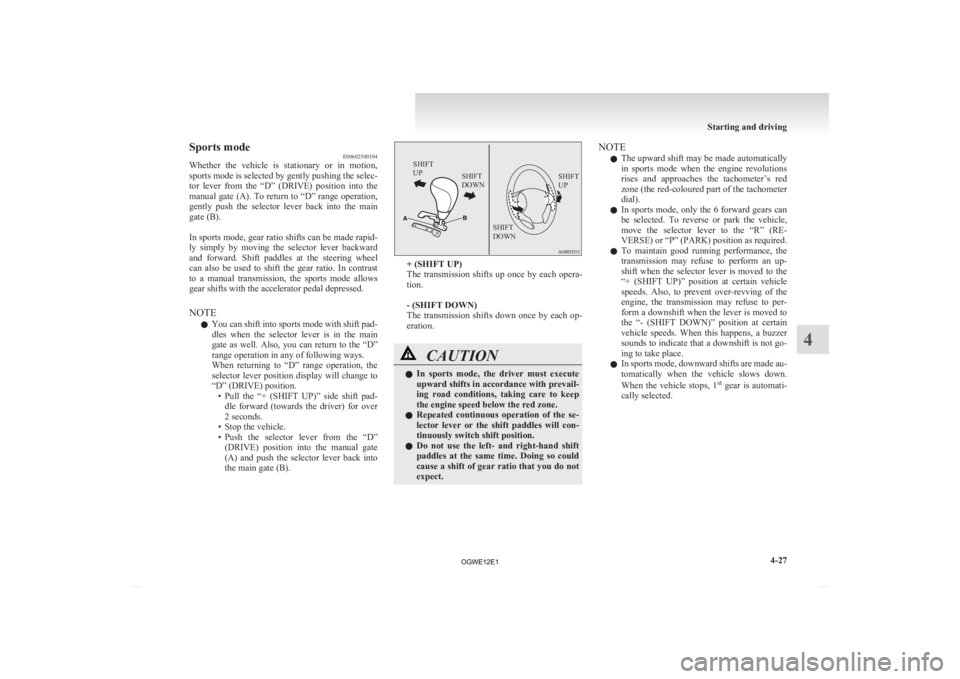
Sports mode
E00602500194
Whether
the vehicle is stationary or in motion,
sports mode is selected by gently pushing the selec-
tor lever from the “D” (DRIVE) position into the
manual gate (A). To return to “D” range operation,
gently push the selector lever back into the main
gate (B).
In sports mode, gear ratio shifts can be made rapid-
ly simply by moving the selector lever backward
and forward. Shift paddles at the steering wheel
can also be used to shift the gear ratio. In contrast
to a manual transmission, the sports mode allows
gear shifts with the accelerator pedal depressed.
NOTE
l You can shift into sports mode with shift pad-
dles when the selector lever is in the main
gate as well. Also, you can return to the “D”
range operation in any of following ways.
When returning to “D” range operation, the
selector lever position display will change to
“D” (DRIVE) position.
• Pull the “+ (SHIFT UP)” side shift pad-dle forward (towards the driver) for over
2 seconds.
• Stop the vehicle.
• Push the selector lever from the “D” (DRIVE) position into the manual gate
(A) and push the selector lever back into
the main gate (B).
SHIFT
UP SHIFT
DOWN SHIFT
UP
SHIFT
DOWN + (SHIFT UP)
The
transmission shifts up once by each opera-
tion.
- (SHIFT DOWN)
The transmission shifts down once by each op-
eration. CAUTION
l
In
sports mode, the driver must execute
upward shifts in accordance with prevail-
ing road conditions, taking care to keep
the engine speed below the red zone.
l Repeated continuous operation of the se-
lector lever or the shift paddles will con-
tinuously switch shift position.
l Do not use the left- and right-hand shift
paddles at the same time. Doing so could
cause a shift of gear ratio that you do not
expect. NOTE
l The
upward shift may be made automatically
in sports mode when the engine revolutions
rises and approaches the tachometer’s red
zone (the red-coloured part of the tachometer
dial).
l In sports mode, only the 6 forward gears can
be selected. To reverse or park the vehicle,
move the selector lever to the “R” (RE-
VERSE) or “P” (PARK) position as required.
l To maintain good running performance, the
transmission may refuse to perform an up-
shift when the selector lever is moved to the
“+ (SHIFT UP)” position at certain vehicle
speeds. Also, to prevent over-revving of the
engine, the transmission may refuse to per-
form a downshift when the lever is moved to
the “- (SHIFT DOWN)” position at certain
vehicle speeds. When this happens, a buzzer
sounds to indicate that a downshift is not go-
ing to take place.
l In sports mode, downward shifts are made au-
tomatically when the vehicle slows down.
When the vehicle stops, 1 st
gear is automati-
cally selected. Starting and driving
4-27 4
OGWE12E1
Page 182 of 378
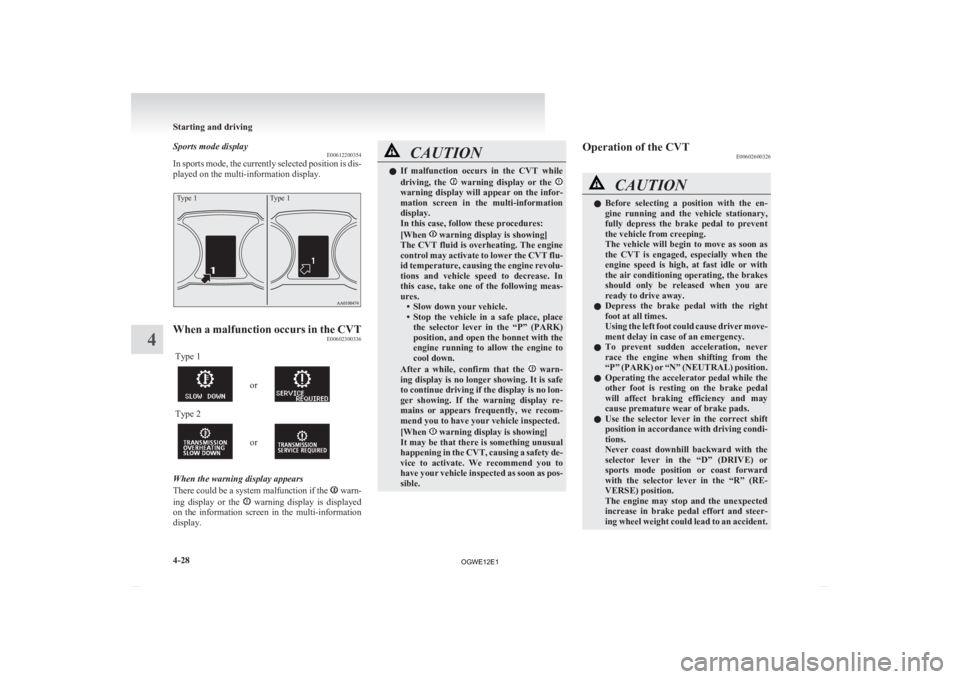
Sports mode display
E00612200354
In
sports mode, the currently selected position is dis-
played on the multi-information display.
Type 1 Type 1When a malfunction occurs in the CVT
E00602300336
Type 1 or
Type 2
or
When the warning display appears
There
could be a system malfunction if the warn-
ing
display or the warning display is displayed
on
the information screen in the multi-information
display. CAUTION
l
If
malfunction occurs in the CVT while
driving, the warning display or the
warning display will appear on the infor-
mation
screen in the multi-information
display.
In this case, follow these procedures:
[When warning display is showing]
The
CVT fluid is overheating. The engine
control may activate to lower the CVT flu-
id temperature, causing the engine revolu-
tions and vehicle speed to decrease. In
this case, take one of the following meas-
ures. • Slow down your vehicle.
• Stop the vehicle in a safe place, placethe selector lever in the “P” (PARK)
position, and open the bonnet with the
engine running to allow the engine to
cool down.
After a while, confirm that the warn-
ing
display is no longer showing. It is safe
to continue driving if the display is no lon-
ger showing. If the warning display re-
mains or appears frequently, we recom-
mend you to have your vehicle inspected.
[When warning display is showing]
It
may be that there is something unusual
happening in the CVT, causing a safety de-
vice to activate. We recommend you to
have your vehicle inspected as soon as pos-
sible. Operation of the CVT
E00602600326 CAUTION
l
Before
selecting a position with the en-
gine running and the vehicle stationary,
fully depress the brake pedal to prevent
the vehicle from creeping.
The vehicle will begin to move as soon as
the CVT is engaged, especially when the
engine speed is high, at fast idle or with
the air conditioning operating, the brakes
should only be released when you are
ready to drive away.
l Depress the brake pedal with the right
foot at all times.
Using the left foot could cause driver move-
ment delay in case of an emergency.
l To prevent sudden acceleration, never
race the engine when shifting from the
“P” (PARK) or “N” (NEUTRAL) position.
l Operating the accelerator pedal while the
other foot is resting on the brake pedal
will affect braking efficiency and may
cause premature wear of brake pads.
l Use the selector lever in the correct shift
position in accordance with driving condi-
tions.
Never coast downhill backward with the
selector lever in the “D” (DRIVE) or
sports mode position or coast forward
with the selector lever in the “R” (RE-
VERSE) position.
The engine may stop and the unexpected
increase in brake pedal effort and steer-
ing wheel weight could lead to an accident. Starting and driving
4-28
4
OGWE12E1
Page 184 of 378
Electronically controlled 4WD
system* E00604900307
The
electronically controlled 4WD system is a 4-
wheel drive system that allows one of three drive
modes to be selected with a dial, in accordance
with the driving conditions.
The following drive modes are available. Drive mode Function
2WD This mode is for economical
driving on normal dry roads
and motorway.
Driving in front-wheel drive.
4WD AUTO The default mode.
This mode is for automatical-
ly controlling the distribution
of driving torque to all four
wheels according to the driv-
ing conditions.
4WD LOCK This mode is for driving in
slippery conditions such as
on snow-covered roads or
sand.
The large amount of driving
torque that is applied to the
rear tyres enables getting out
of slippery areas and power-
ful driving is possible across
all ranges.4-wheel drive operation requires special driving
skills.
Carefully
read the “4-wheel drive operation” on
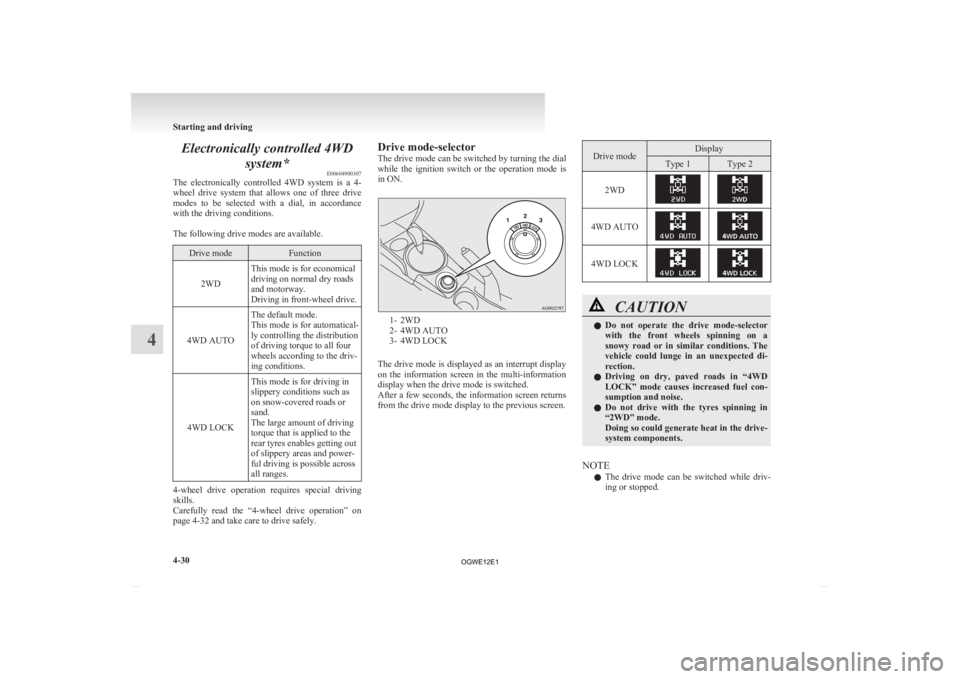
page 4-32 and take care to drive safely. Drive mode-selector
The
drive mode can be switched by turning the dial
while the ignition switch or the operation mode is
in ON. 1- 2WD
2-
4WD AUTO
3- 4WD LOCK
The drive mode is displayed as an interrupt display
on the information screen in the multi-information
display when the drive mode is switched.
After a few seconds, the information screen returns
from the drive mode display to the previous screen. Drive mode Display
Type 1 Type 2
2WD 4WD AUTO
4WD LOCK
CAUTION
l
Do not operate the drive mode-selector
with the front wheels spinning on a
snowy road or in similar conditions. The
vehicle could lunge in an unexpected di-
rection.
l Driving on dry, paved roads in “4WD
LOCK” mode causes increased fuel con-
sumption and noise.
l Do not drive with the tyres spinning in
“2WD” mode.
Doing so could generate heat in the drive-
system components.
NOTE l The
drive mode can be switched while driv-
ing or stopped. Starting and driving
4-30
4
OGWE12E1
Page 185 of 378
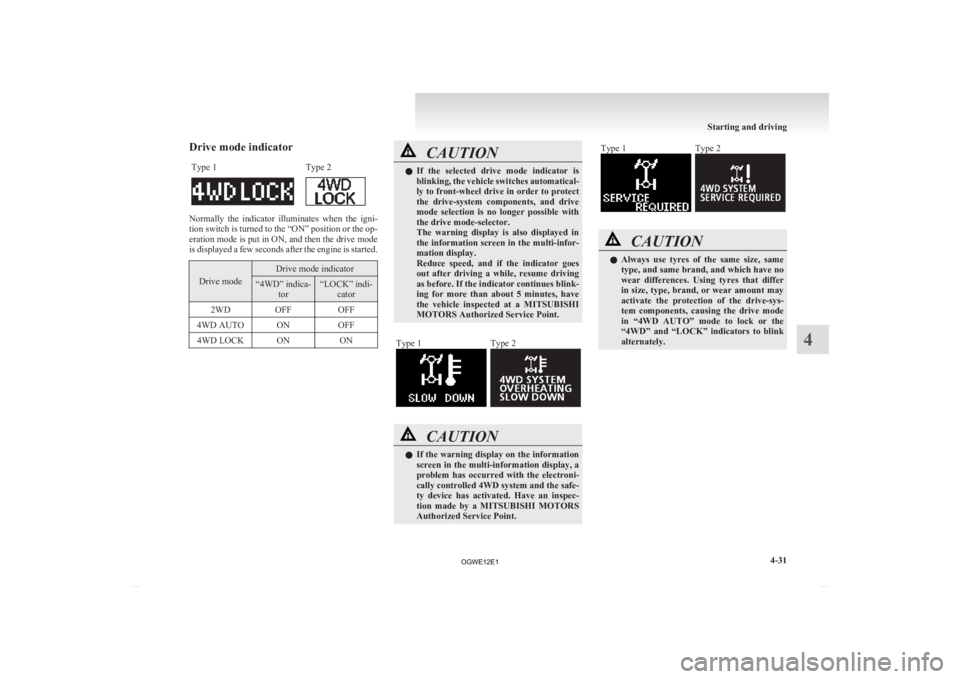
Drive mode indicator
Type 1 Type 2 Normally the indicator illuminates when the igni-
tion
switch is turned to the “ON” position or the op-
eration mode is put in ON, and then the drive mode
is displayed a few seconds after the engine is started. Drive mode Drive mode indicator
“4WD” indica-
tor “LOCK” indi-
cator
2WD OFF OFF
4WD AUTO ON OFF
4WD LOCK ON ON CAUTION
l
If
the selected drive mode indicator is
blinking, the vehicle switches automatical-
ly to front-wheel drive in order to protect
the drive-system components, and drive
mode selection is no longer possible with
the drive mode-selector.
The warning display is also displayed in
the information screen in the multi-infor-
mation display.
Reduce speed, and if the indicator goes
out after driving a while, resume driving
as before. If the indicator continues blink-
ing for more than about 5 minutes, have
the vehicle inspected at a MITSUBISHI
MOTORS Authorized Service Point.
Type 1 Type 2
CAUTION
l
If
the warning display on the information
screen in the multi-information display, a
problem has occurred with the electroni-
cally controlled 4WD system and the safe-
ty device has activated. Have an inspec-
tion made by a MITSUBISHI MOTORS
Authorized Service Point. Type 1 Type 2
CAUTION
l
Always
use tyres of the same size, same
type, and same brand, and which have no
wear differences. Using tyres that differ
in size, type, brand, or wear amount may
activate the protection of the drive-sys-
tem components, causing the drive mode
in “4WD AUTO” mode to lock or the
“4WD” and “LOCK” indicators to blink
alternately. Starting and driving
4-31 4
OGWE12E1