wheel MITSUBISHI ASX 2012 (in English) Service Manual
[x] Cancel search | Manufacturer: MITSUBISHI, Model Year: 2012, Model line: ASX, Model: MITSUBISHI ASX 2012Pages: 378, PDF Size: 18.2 MB
Page 198 of 378
CAUTION
l
The system may be malfunctioning.
Park
your vehicle in a safe place and stop
the engine.
Restart the engine and check whether the
display/indicator goes out. If they go out,
there is no abnormal condition. If they do
not go out or appear frequently, it is not
necessary to stop the vehicle immediately,
but we recommend you to have your vehi-
cle inspected.
Towing E00624400050CAUTION
l
When
towing the vehicle with only the
front wheels or only the rear wheels
raised off the ground, do not place the ig-
nition switch in the “ON” position or do
not put the operation mode in ON. Plac-
ing the ignition switch in the “ON” posi-
tion or putting the operation mode in ON
could cause the ASC to operate, resulting
in an accident.
Note that the correct towing method de-
pends on the transmission type and the ve-
hicle’s drive configuration.
For details, refer to “Towing” on page
6-18. Cruise control*
E00609101008
Cruise
control is an automatic speed control system
that keeps a set speed. It can be activated at about
40 km/h (25 mph) or more. CAUTION
l
When
you do not wish to drive at a set
speed, turn off the cruise control for safety.
l Do not use cruise control when driving
conditions will not allow you to stay at
the same speed, such as in heavy traffic
or on roads that are winding, icy, snow-
covered, wet, slippery, on a steep down-
hill slope.
l On vehicles with M/T, do not move the
gearshift lever to the “N” (Neutral) posi-
tion while driving at a set speed without
depressing the clutch pedal. The engine
will run too fast and might be damaged.
NOTE l Cruise
control may not be able to keep your
speed on uphills or downhills.
l Your speed may decrease on a steep uphill.
You may use the accelerator pedal if you
want to stay at your set speed.
l Your speed may increase to more than the
set speed on a steep downhill. You must use
the brake to control your speed. As a result,
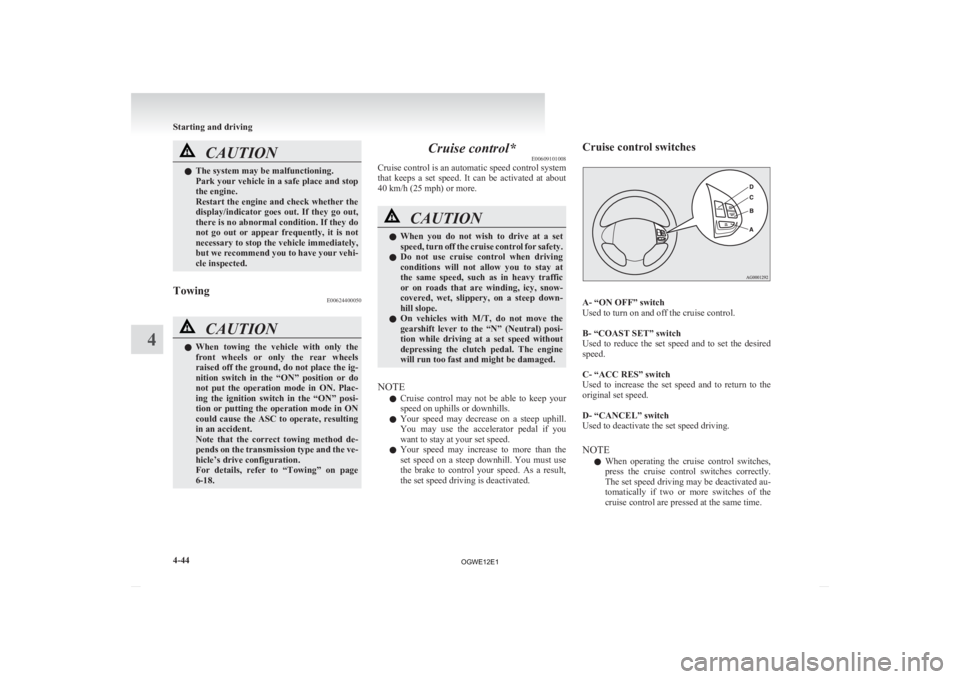
the set speed driving is deactivated. Cruise control switches
A- “ON OFF” switch
Used to turn on and off the cruise control.
B- “COAST SET” switch
Used
to reduce the set speed and to set the desired
speed.
C- “ACC RES” switch
Used to increase the set speed and to return to the
original set speed.
D- “CANCEL” switch
Used to deactivate the set speed driving.
NOTE
l When operating the cruise control switches,
press the cruise control switches correctly.
The set speed driving may be deactivated au-
tomatically if two or more switches of the
cruise control are pressed at the same time. Starting and driving
4-44
4
OGWE12E1
Page 213 of 378
Ventilators
.................................................................................... 5-02
Heater/Air conditioning ................................................................ 5-03
Important operation tips for the air conditioning
..........................5-09
Air purifier.................................................................................... 5-10
Audio system*.............................................................................. 5-10
To play tracks from USB device* ................................................5-22
To play tracks from a Bluetooth ®
device (vehicles with
Bluetooth ®
2.0 interface)..........................................................5-30
To use the external audio input function* ....................................5-32
Steering wheel audio remote control switches* ...........................5-33
Error codes.................................................................................... 5-35
Error codes (iPod)......................................................................... 5-36
Error codes (USB memory device) ..............................................5-37
Handling of compact discs ........................................................... 5-38
Antenna......................................................................................... 5-39
Digital clock* ............................................................................... 5-39
Link System* ................................................................................ 5-41
Bluetooth ®
2.0 interface* ............................................................. 5-41
USB input terminal* ..................................................................... 5-57
Sun visors..................................................................................... 5-59
Ashtray*........................................................................................5-60
Cigarette lighter* .......................................................................... 5-60
Accessory socket.......................................................................... 5-61
Interior lamps ................................................................................ 5-62
Storage spaces...............................................................................5-65
Cup holder.................................................................................... 5-68
Bottle holder ................................................................................. 5-69
Rear shelf panel* .......................................................................... 5-69
Assist grips................................................................................... 5-70
Coat hook*.................................................................................... 5-70 Luggage hooks..............................................................................
5-70For pleasant driving
5
OGWE12E1
Page 245 of 378
NOTE
l The
connected audio equipment cannot be op-
erated with the vehicle’s audio system.
l For information on how to connect and oper-
ate the audio equipment, refer to the owner’s
manual for the equipment. Steering wheel audio remote
control switches* E00710000795
The
remote control switch is located on the left
side of the steering wheel.
It can be used when the ignition switch or the oper-
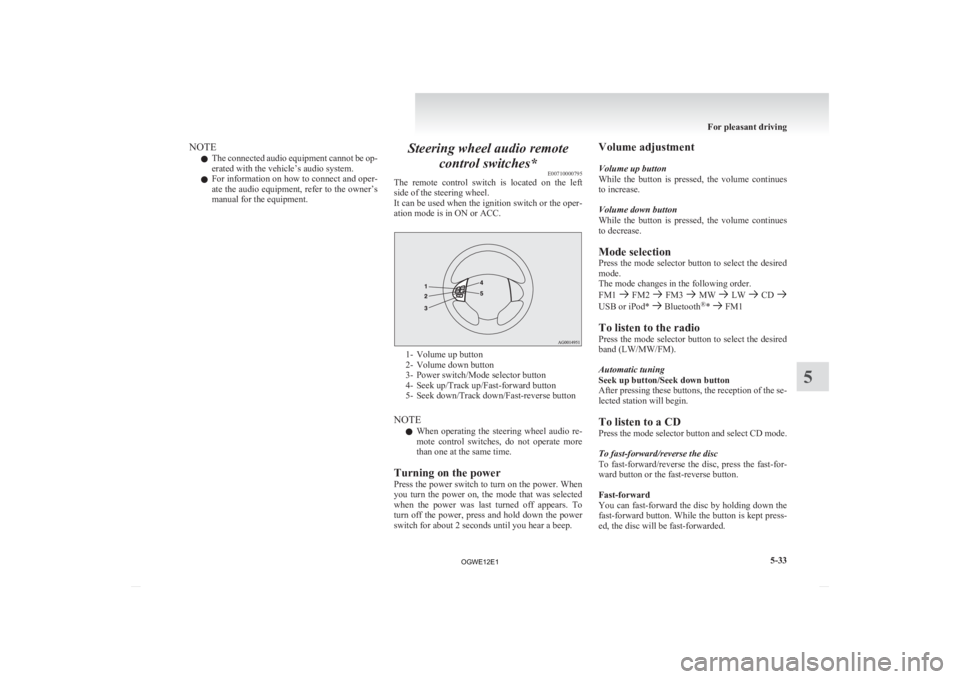
ation mode is in ON or ACC. 1- Volume up button
2-
Volume down button
3- Power switch/Mode selector button
4- Seek up/Track up/Fast-forward button
5- Seek down/Track down/Fast-reverse button
NOTE l When operating the steering wheel audio re-
mote control switches, do not operate more
than one at the same time.
Turning on the power
Press the power switch to turn on the power. When
you turn the power on, the mode that was selected
when the power was last turned off appears. To
turn off the power, press and hold down the power
switch for about 2 seconds until you hear a beep. Volume adjustment
Volume up button
While
the button is pressed, the volume continues
to increase.
Volume down button
While the button is pressed, the volume continues
to decrease.
Mode selection
Press the mode selector button to select the desired
mode.
The mode changes in the following order.
FM1 FM2 FM3 MW LW CD
USB or iPod* Bluetooth
®
* FM1
To listen to the radio
Press
the mode selector button to select the desired
band (LW/MW/FM).
Automatic tuning
Seek up button/Seek down button
After pressing these buttons, the reception of the se-
lected station will begin.
To listen to a CD
Press the mode selector button and select CD mode.
To fast-forward/reverse the disc
To fast-forward/reverse the disc, press the fast-for-
ward button or the fast-reverse button.
Fast-forward
You can fast-forward the disc by holding down the
fast-forward button. While the button is kept press-
ed, the disc will be fast-forwarded.
For pleasant driving
5-33 5
OGWE12E1
Page 262 of 378
l
If the name you selected has matching data
in the mobile phone book but no telephone
number is registered under the selected loca-
tion, the voice guide will say “{home/work/
mobile/other} not found for
you like to try again?”
Answer “Yes,” and the system will return to
Step 3.
Answer “No,” and the call will be cancelled.
Start over again from Step 1.
6. The voice guide will say “Calling
telephone number.
NOTE l When the confirmation function is on, the sys-
tem will ask if the name and location of the
receiver are correct.
If the name is correct, answer “Yes.”
If you want to change the name or location to
call, answer “No.” The system will return to
Step 3.
Redialing
You can redial the last number called, based on the
history of dialed calls in the paired cellular phone.
Use the following procedure to redial. 1. Press the SPEECH button.
2. Say “Redial.”
SEND function E00761300035
During a call, press the SPEECH button to enter
voice
recognition mode, then say “
SEND” to generate DTMF tones. For example, if during a call you need to simulate
the
press of a phone button as a response to an auto-
mated system, press the SPEECH button and speak
“1 2 3 4 pound SEND” and the 1234# will be sent
on your cellular phone.
Receiving calls E00761600025
If an incoming phone call is received while the ig-
nition
switch or the operation mode is in ON or
ACC, the audio system will be automatically
turned on and switched to the incoming call, even
when the audio system was originally off.
The voice guide announcement for the incoming
call will be output from the front passenger’s seat
speaker.
If the CD player or radio was playing when the in-
coming call was received, the audio system will
mute the sound from the CD player or radio and out-
put only the incoming call.
To receive the call, press the PICK-UP button on
the steering wheel control switch.
When the call is over, the audio system will return
to its previous state.
MUTE function E00760300054
At any time during a call, you can mute the vehicle
microphone.
Pressing
the SPEECH button and then saying
“Mute” during a call will turn ON the MUTE func-
tion and mute the microphone.
Saying “Mute off” in the same way will turn off
the MUTE function and cancel the mute on the mi-
crophone. Switching between hands-free mode and private
mode
E00761400036
The
Bluetooth ®
2.0 interface can switch between
Hands-free mode (Hands-free calls) and private
mode (calls using cellular phone).
If you press the SPEECH button and say “Transfer
call” during a Hands-free call, you can stop the
Hands-free mode and talk in private mode.
To return to Hands-free mode, press the SPEECH
button again and say “Transfer call”.
Phone book function E00763700020
The Bluetooth ®
2.0 interface has 2 types of unique
phone books that are different from the phone book
stored in the cellular phone. They are the vehicle
phone book and the mobile phone book.
These phone books are used to register telephone
numbers and to make calls to desired numbers via
the voice recognition function.
NOTE
l Disconnecting the battery cable will not de-
lete information registered in the phone book.
Vehicle phone book E00763800050
This phone book is used when making calls with
the voice recognition function.
Up
to 32 names can be registered in the vehicle
phone book per language.
Also, each entry has 4 locations associated with:
home, work, mobile and other. You can register
one telephone number for each location.
You can register a desired name as a name for any
phone book entry registered in the vehicle phone
book. For pleasant driving
5-50
5
OGWE12E1
Page 284 of 378
If the vehicle breaks down
E00800101108
If
the vehicle breaks down on the road, move it to
the shoulder and turn on the hazard warning flash-
ers and set up a warning triangle, flashing lamp, etc.
Refer to “Hazard warning flasher switch” on page
3-49.
If the engine stops/fails
Vehicle operation and control are affected if the en-
gine stops.
Before moving the vehicle to a safe area, be aware
of the following:
l The brake booster becomes inoperative and
the pedal effort will increase. Press down the
brake pedal harder than usual.
l Since the power steering system is no longer
operative, the steering wheel feels heavy
when turning it. Emergency starting
E00800502503
If
the engine cannot be started because the battery
is weak or dead, the battery from another vehicle
can be used with jumper cables to start the engine. WARNING
l To
start the engine using jumper cables
connected to another vehicle, perform the
correct procedures according to the in-
struction below. Incorrect procedures
could result in a fire or explosion or dam-
age to the vehicles. CAUTION
l
Do
not attempt to start the engine by pull-
ing or pushing the vehicle.
It could damage your vehicle.
l Always wear protective eye goggles when
working near the battery.
l Keep the battery out of the reach of chil-
dren.
1. Get
the vehicles close enough so the jumper cables can reach, but be sure the vehicles
aren’t touching each other. CAUTION
l
Check
the other vehicle. It must have a 12-
volt battery.
If the other system isn’t 12-volt, shorting
can damage both vehicles. 2. Turn
off all lamps, heater and other electrical
loads.
3. Set the parking brake firmly on each vehicle. Put an A/T, CVT in “P” (PARK) or a M/T in
“N” (Neutral).
4. Turn the ignition switch to the “LOCK” posi- tion or put the operation mode in OFF. WARNING
l Perform
step 4 on both vehicles before-
hand.
Make sure that the cables or your clothes
cannot be caught by the fan or drive belt.
Personal injury could result.
5. Make
sure battery electrolyte is at the proper level.
Refer to “Battery” on page 8-08. WARNING
l If
electrolyte fluid is not visible, or ap-
pears to be frozen, Do Not Attempt Jump
Starting!
A battery might rupture or explode if the
temperature is below the freezing point
or if it is not filled to the proper level.
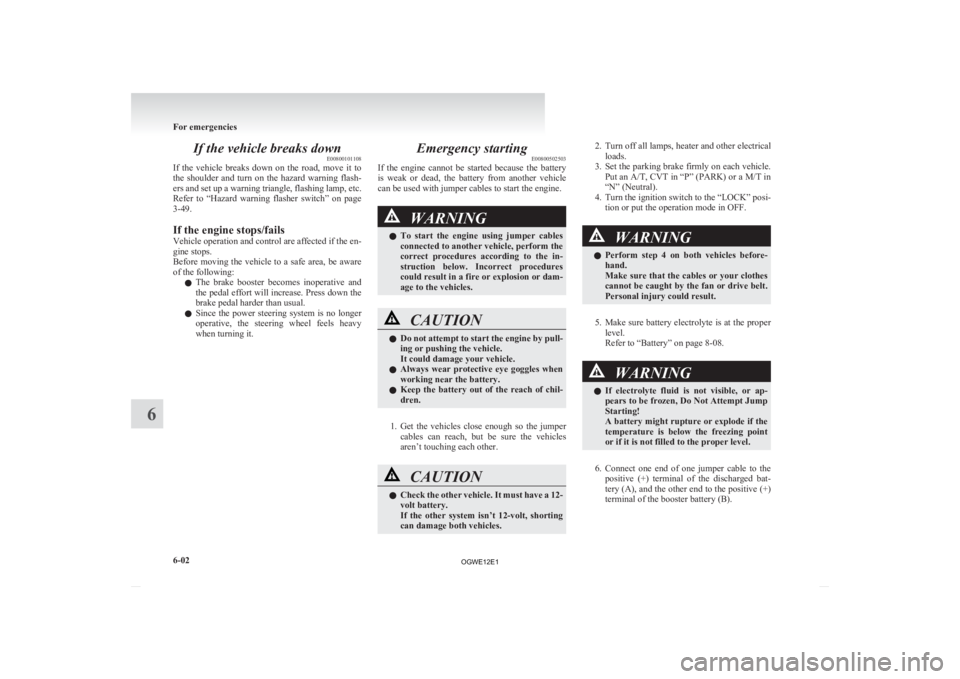
6. Connect
one end of one jumper cable to the positive (+) terminal of the discharged bat-
tery (A), and the other end to the positive (+)
terminal of the booster battery (B).
For emergencies
6-02
6
OGWE12E1
Page 287 of 378
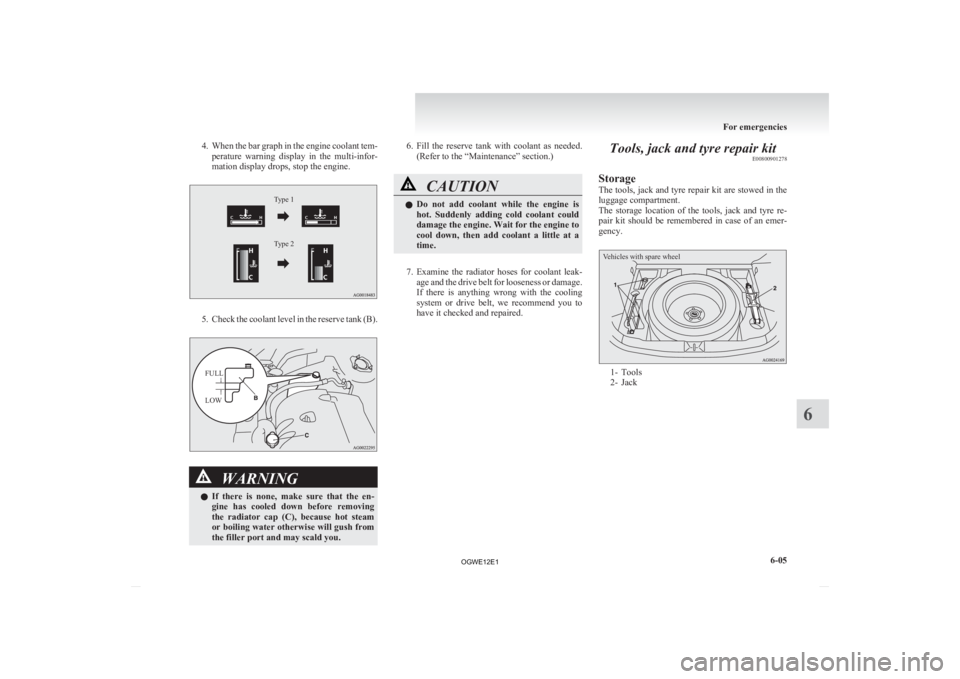
4. When the bar graph in the engine coolant tem-
perature warning display in the multi-infor-
mation display drops, stop the engine.
Type 1
Type 2
Type 1
Type 2 5. Check
the coolant level in the reserve tank (B).
FULL
LOW
WARNING
l If
there is none, make sure that the en-
gine has cooled down before removing
the radiator cap (C), because hot steam
or boiling water otherwise will gush from
the filler port and may scald you. 6. Fill
the reserve tank with coolant as needed.
(Refer to the “Maintenance” section.) CAUTION
l
Do
not add coolant while the engine is
hot. Suddenly adding cold coolant could
damage the engine. Wait for the engine to
cool down, then add coolant a little at a
time.
7. Examine
the radiator hoses for coolant leak- age and the drive belt for looseness or damage.
If there is anything wrong with the cooling
system or drive belt, we recommend you to
have it checked and repaired. Tools, jack and tyre repair kit
E00800901278
Storage
The
tools, jack and tyre repair kit are stowed in the
luggage compartment.
The storage location of the tools, jack and tyre re-
pair kit should be remembered in case of an emer-
gency.
Vehicles with spare wheel 1- Tools
2-
Jack For emergencies
6-05 6
OGWE12E1
Page 288 of 378
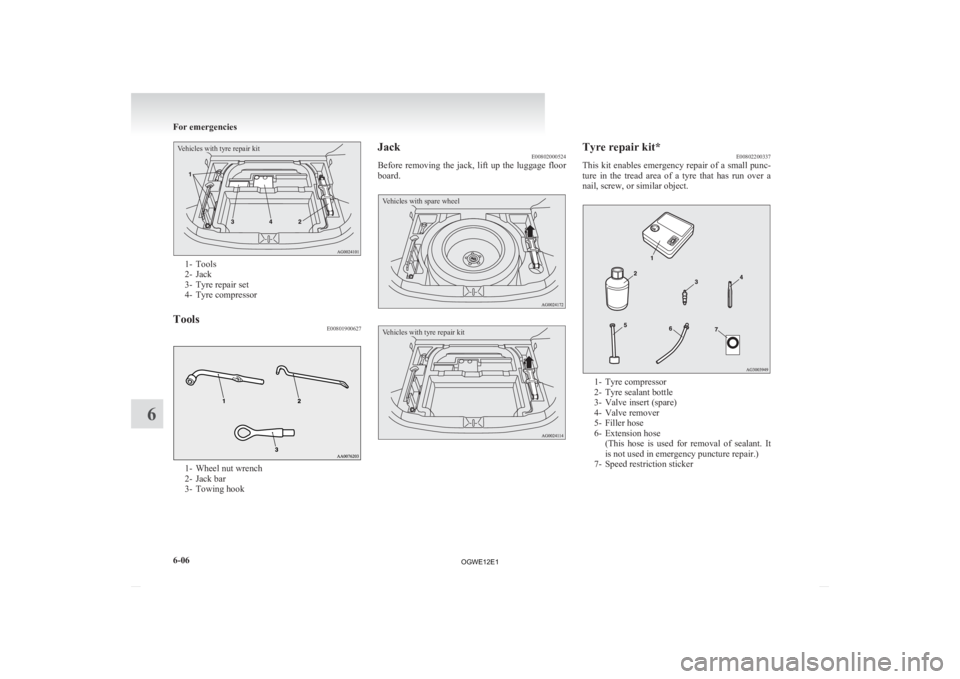
Vehicles with tyre repair kit1- Tools
2-
Jack
3- Tyre repair set
4- Tyre compressor
Tools E008019006271- Wheel nut wrench
2-
Jack bar
3- Towing hook Jack
E00802000524
Before
removing the jack, lift up the luggage floor
board.
Vehicles with spare wheel
Vehicles with tyre repair kit Tyre repair kit*
E00802200337
This
kit enables emergency repair of a small punc-
ture in the tread area of a tyre that has run over a
nail, screw, or similar object. 1- Tyre compressor
2-
Tyre sealant bottle
3- Valve insert (spare)
4- Valve remover
5- Filler hose
6- Extension hose (This hose is used for removal of sealant. It
is not used in emergency puncture repair.)
7- Speed restriction sticker For emergencies
6-06
6
OGWE12E1
Page 289 of 378
CAUTION
l
The tyre sealant can cause health damage
if swallowed. If you accidentally swallow
it, drink as much water as possible and im-
mediately consult a doctor.
l If the tyre sealant gets in your eyes or on
your skin, rinse with lots of water. If you
still sense an abnormality, consult a doc-
tor.
l Consult a doctor immediately if any aller-
gic reactions occur.
l Do not allow children to touch the tyre
sealant.
l Do not breathe in the vapours of tyre seal-
ant.
NOTE l The
tyre sealant cannot be used in any of the
situations listed below. If any of these situa-
tions occurs, please contact a MITSUBISHI
MOTORS Authorized Service Point or anoth-
er specialist. • The tyre sealant’s expiry date has passed.(The expiry date is shown on the bottle la-
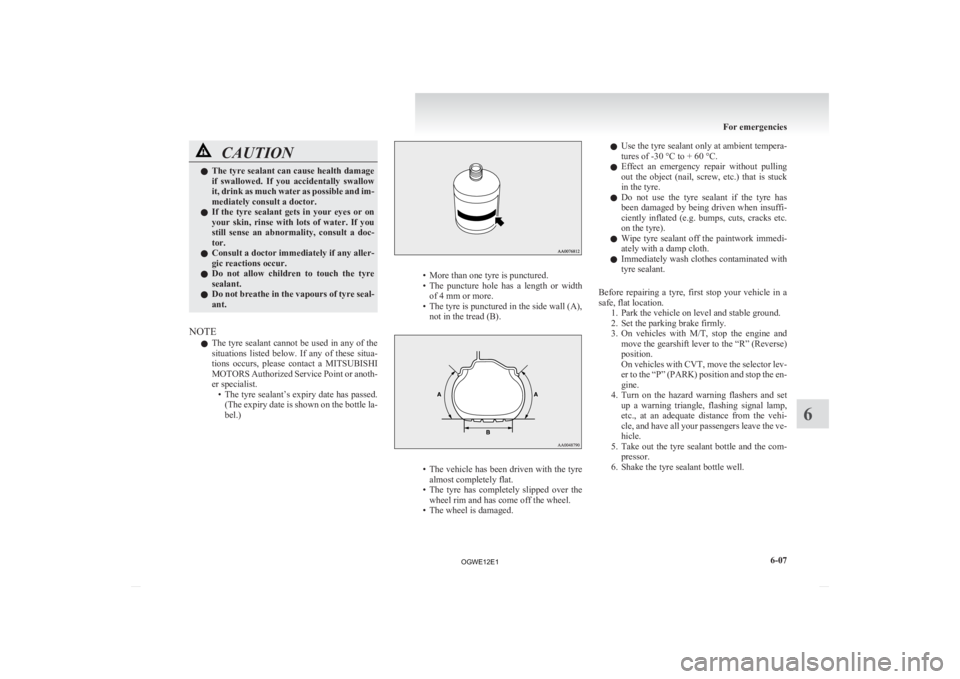
bel.) • More than one tyre is punctured.
• The
puncture hole has a length or width
of 4 mm or more.
• The tyre is punctured in the side wall (A), not in the tread (B). • The
vehicle has been driven with the tyre
almost completely flat.
• The tyre has completely slipped over the wheel rim and has come off the wheel.
• The wheel is damaged. l
Use
the tyre sealant only at ambient tempera-
tures of -30 °C to + 60 °C.
l Effect an emergency repair without pulling
out the object (nail, screw, etc.) that is stuck
in the tyre.
l Do not use the tyre sealant if the tyre has
been damaged by being driven when insuffi-
ciently inflated (e.g. bumps, cuts, cracks etc.
on the tyre).
l Wipe tyre sealant off the paintwork immedi-
ately with a damp cloth.
l Immediately wash clothes contaminated with
tyre sealant.
Before repairing a tyre, first stop your vehicle in a
safe, flat location. 1. Park the vehicle on level and stable ground.
2. Set the parking brake firmly.
3. On vehicles with M/T, stop the engine andmove the gearshift lever to the “R” (Reverse)
position.
On vehicles with CVT, move the selector lev-
er to the “P” (PARK) position and stop the en-
gine.
4. Turn on the hazard warning flashers and set up a warning triangle, flashing signal lamp,
etc., at an adequate distance from the vehi-
cle, and have all your passengers leave the ve-
hicle.
5. Take out the tyre sealant bottle and the com- pressor.
6. Shake the tyre sealant bottle well. For emergencies
6-07 6
OGWE12E1
Page 292 of 378
CAUTION
l
Any sand or dust sucked into the compres-
sor could make the compressor break
down. Do not place the compressor direct-
ly on any sandy or dusty surface when us-
ing it.
l Do not disassemble or modify the com-
pressor. Also, do not subject the air pres-
sure gauge to shock. It could malfunction.
15. Check
and adjust the tyre pressure with refer- ence to the air pressure gauge on the compres-
sor. If you overinflate the tyre, release air by
loosening the hose’s end fitting. (Refer to
“Tyre inflation pressures” on page 8-12.)
If there is a gap between the tyre and wheel
because the tyre has moved inward from the
wheel rim, press the periphery of the tyre to-
wards the wheel to close the gap before run-
ning the compressor. (With no gaps, the tyre
pressure will rise.) CAUTION
l
Be
careful not to get your fingers trapped
between the tyre and wheel as the tyre in-
flates.
l The surface of the compressor will get
hot while the compressor is running. Do
not keep the compressor running continu-
ously for more than 10 minutes. After us-
ing the compressor, wait for the compres-
sor to cool before using it again. CAUTION
l
If
the compressor becomes sluggish or
hot while operating, it is overheating. Im-
mediately place the switch in the OFF po-
sition and let the compressor cool down
for at least 30 minutes.
NOTE l If
the tyre pressure does not rise to the speci-
fied level within 10 minutes, the tyre may be
so severely damaged that the tyre sealant can-
not be used to effect an emergency repair.
Please contact a MITSUBISHI MOTORS Au-
thorized Service Point or another specialist
in this event.
16. Turn OFF the compressor switch, then pull the power cord plug out of the socket.
NOTE l Simply putting sealant and air into the tyre us-
ing the tyre repair kit does not seal the punc-
ture hole. Air will leak through the puncture
hole until the emergency repair procedure is
completed (through step 19 of these instruc-
tions).
17. When you have inflated the tyre to the speci- fied pressure, stow the compressor, bottle,
and other items in the vehicle and promptly
start driving the vehicle so that the tyre seal-
ant can spread evenly in the tyre. Drive with
great care. Do not exceed a speed of 80 km/h
(50 mph). Observe local speed limits. CAUTION
l
If
you sense any abnormality while driv-
ing, stop the vehicle and contact a
MITSUBISHI MOTORS Authorized
Service Point or another specialist. Other-
wise the tyre pressure may drop before
the emergency repair procedure is com-
pleted, rendering the vehicle unsafe.
NOTE l Driving
faster than 80 km/h (50 mph) can
make the vehicle vibrate.
18. After driving for 10 minutes or 5 km (3 miles), check the tyre pressure using the
air pressure gauge on the compressor.
(Refer to “Tyre inflation pressures” on page
8-12.)
If the tyre pressure is not sufficient, inflate
the tyre to the specified pressure again and
drive the vehicle carefully without exceeding
a speed of 80 km/h (50 mph). CAUTION
l
If
the tyre pressure is lower than the min-
imum permitted pressure (1.3 bar
{130 kPa}), the tyre cannot successfully
be repaired with the tyre sealant. Do not
drive the vehicle any further. Contact a
MITSUBISHI MOTORS Authorized
Service Point or another specialist.
19. After
driving for 10 minutes or 5 km (3 miles), check the tyre pressure using the
air pressure gauge on the compressor. (Refer For emergencies
6-10
6
OGWE12E1
Page 293 of 378
to “Tyre inflation pressures” on page 8-12.)
If the tyre pressure has apparently not drop-
ped, the emergency repair procedure is com-
plete. You must still not exceed a speed of
80 km/h (50 mph). Observe local speed limits.
NOTE l If the tyre pressure has dropped below the
specified level when you check it at the end
of the repair procedure, do not drive the vehi-
cle any further. Contact a MITSUBISHI
MOTORS Authorized Service Point or anoth-
er specialist.
l In cold conditions (when the ambient temper-
ature is 0 °C or lower), the time and driving
distance necessary until completion of the re-
pair can be longer than in warmer conditions,
meaning that the tyre pressure can drop be-
low the specified level even when you have
inflated the tyre a second time and subsequent-
ly driven the vehicle. If this happens, inflate
the tyre to the specified pressure once more,
drive for about 10 minutes or 5 km (3 miles),
then check the tyre pressure again. If the tyre
pressure has again dropped below the speci-
fied level, stop driving the vehicle and con-
tact a MITSUBISHI MOTORS Authorized
Service Point or another specialist.
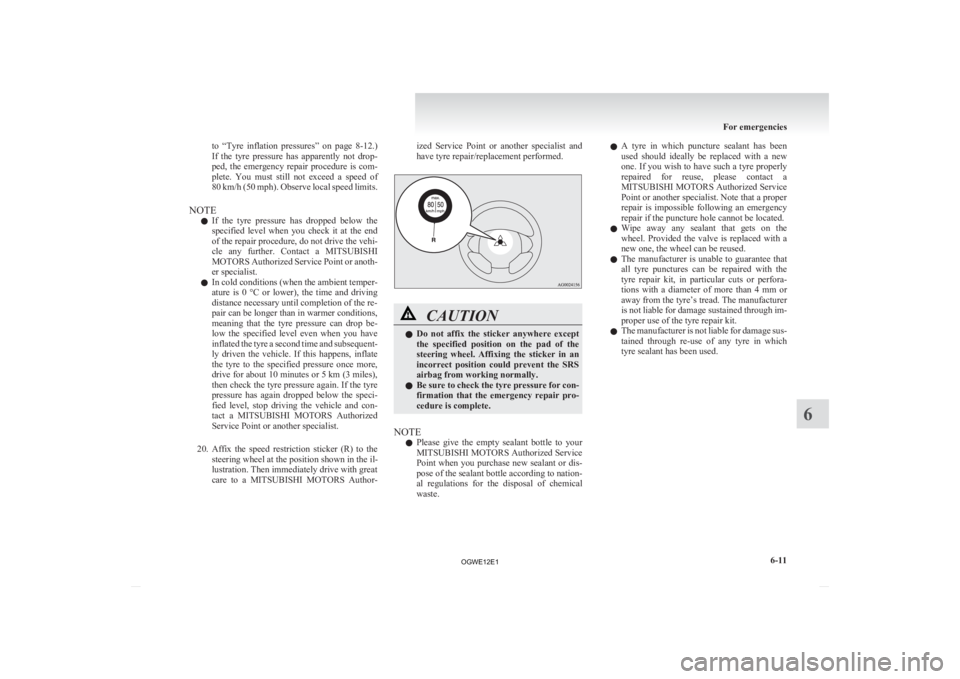
20. Affix the speed restriction sticker (R) to the steering wheel at the position shown in the il-
lustration. Then immediately drive with great
care to a MITSUBISHI MOTORS Author- ized Service Point or another specialist and
have tyre repair/replacement performed.
CAUTION
l
Do
not affix the sticker anywhere except
the specified position on the pad of the
steering wheel. Affixing the sticker in an
incorrect position could prevent the SRS
airbag from working normally.
l Be sure to check the tyre pressure for con-
firmation that the emergency repair pro-
cedure is complete.
NOTE l Please
give the empty sealant bottle to your
MITSUBISHI MOTORS Authorized Service
Point when you purchase new sealant or dis-
pose of the sealant bottle according to nation-
al regulations for the disposal of chemical
waste. l
A
tyre in which puncture sealant has been
used should ideally be replaced with a new
one. If you wish to have such a tyre properly
repaired for reuse, please contact a
MITSUBISHI MOTORS Authorized Service
Point or another specialist. Note that a proper
repair is impossible following an emergency
repair if the puncture hole cannot be located.
l Wipe away any sealant that gets on the
wheel. Provided the valve is replaced with a
new one, the wheel can be reused.
l The manufacturer is unable to guarantee that
all tyre punctures can be repaired with the
tyre repair kit, in particular cuts or perfora-
tions with a diameter of more than 4 mm or
away from the tyre’s tread. The manufacturer
is not liable for damage sustained through im-
proper use of the tyre repair kit.
l The manufacturer is not liable for damage sus-
tained through re-use of any tyre in which
tyre sealant has been used. For emergencies
6-11 6
OGWE12E1