Drive mode MITSUBISHI ASX 2012 (in English) Manual PDF
[x] Cancel search | Manufacturer: MITSUBISHI, Model Year: 2012, Model line: ASX, Model: MITSUBISHI ASX 2012Pages: 378, PDF Size: 18.2 MB
Page 196 of 378
Active stability control (ASC)*
E00616700331
The
Active Stability Control (ASC) takes overall
control of the anti-lock brake system, traction con-
trol function and stability control function to help
maintain the vehicle’s control and traction. Please
read this section in conjunction with the page on
the anti-lock brake system, traction control func-
tion and stability control function.
Anti-lock brake system (ABS) ® p. 4-39
Traction control function ® p. 4-42
Stability control function ® p. 4-42CAUTION
l
Do
not over-rely on the ASC. Even the
ASC cannot prevent the natural laws of
physics from acting on the vehicle.
This system, like any other system, has
limits and cannot help you to maintain
traction and control of the vehicle in all
circumstances. Reckless driving may lead
to accidents. It is the driver’s responsibil-
ity to drive carefully. This means taking
into account the traffic, road and environ-
mental conditions.
l Be sure to use the same specified type and
size of tyre on all 4 wheels. Otherwise, the
ASC may not work properly.
l Do not install any aftermarket limited-
slip differential (LSD) on your vehicle.
The ASC may stop functioning properly. NOTE
l An
operation noise may be emitted from the
engine compartment in the following situa-
tions. The sound is associated with checking
the operations of the ASC. At this time, you
may feel a shock from the brake pedal if you
depress it. These do not indicate a malfunc-
tion. • When the ignition switch is turned to the“ON” position or the operation mode is
put in ON.
• When the vehicle is driven for a while af- ter the engine is turned on.
l When the ASC is activated, you may feel a
vibration in the vehicle body or hear a whin-
ing sound from the engine compartment.
This indicates that the system is operating nor-
mally. It does not indicate a malfunction.
l When the anti-lock brake system warning
lamp is illuminated, the ASC is not active.
Traction control function E00619000087
On slippery surfaces, the traction control function
prevents
the drive wheels from spinning excessive,
thus helping the vehicle to start moving from a stop-
ped condition. It also provides sufficient driving
force and steering performance as the vehicle turns
while pressing the acceleration pedal. CAUTION
l
When
driving a vehicle on a snowy or icy
road, be sure to install snow tyres and
drive the vehicle at moderate speeds. Stability control function
E00619100017
The
stability control function is designed to help
the driver maintain control of the vehicle on slip-
pery roads or during rapid steering manoeuvres. It
works by controlling the engine output and brake
on each wheel.
NOTE
l The stability control function operates at
speeds of about 15 km/h (9 mph) or higher.
“ASC OFF” switch E00619200353
The ASC is automatically activated when the igni-
tion
switch is turned to the “ON” position or the op-
eration mode is put in ON. You can deactivate the
system by pressing down the “ASC OFF” switch
for 3 seconds or longer.
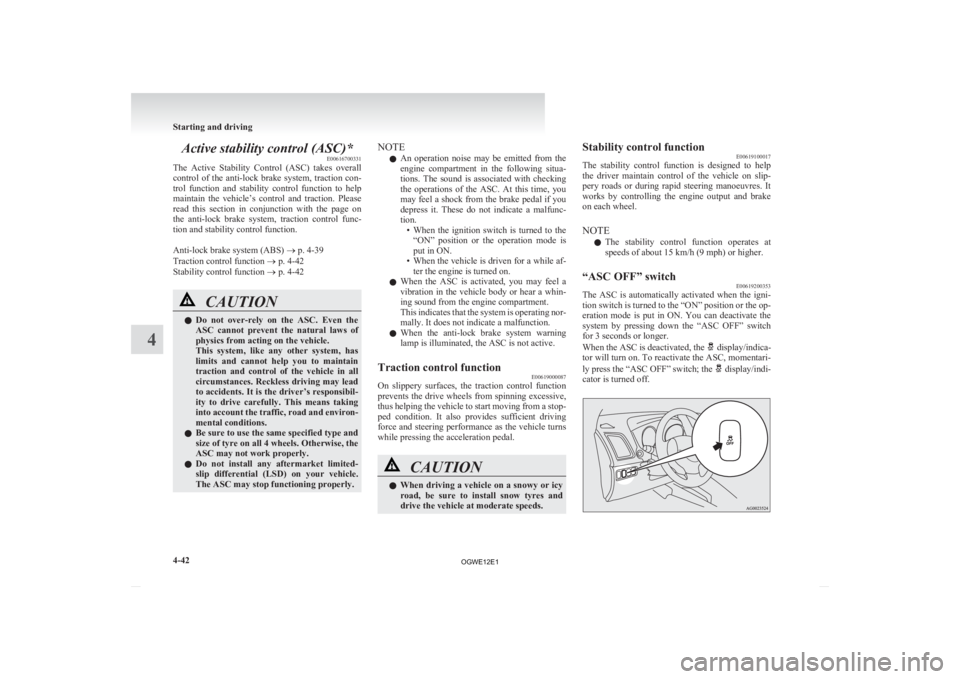
When the ASC is deactivated, the display/indica-
tor
will turn on. To reactivate the ASC, momentari-
ly press the “ASC OFF” switch; the display/indi-
cator is turned off. Starting and driving
4-42
4
OGWE12E1
Page 197 of 378
CAUTION
l
For safety reasons, the “ASC OFF”
switch should be operated when your ve-
hicle is stopped.
l Be sure to keep the ASC on while driving
in normal circumstances.
NOTE l When
moving out of mud, sand or fresh
snow, pressing the accelerator pedal may not
allow the engine speed to increase. In such sit-
uations, temporarily turning off the ASC
with the “ASC OFF” switch will make it eas-
ier to move out your vehicle.
l Using the “ASC OFF” switch turns off both
the stability control function and the traction
control function.
l If you continue to press the “ASC OFF”
switch after the ASC is turned off, the “mis-
taken operation protection function” will ac-
tivate and the ASC will turn back on.
ASC operation display or ASC OFF
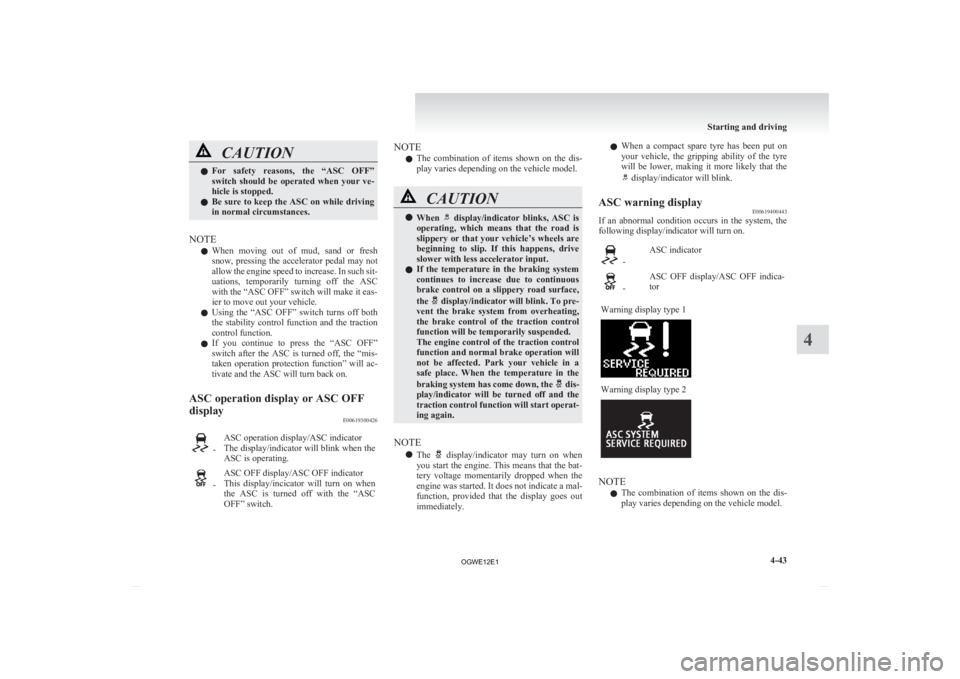
display E00619300426 -
ASC operation display/ASC indicator
The
display/indicator will blink when the
ASC is operating. -
ASC OFF display/ASC OFF indicator
This
display/incicator will turn on when
the ASC is turned off with the “ASC
OFF” switch. NOTE
l The
combination of items shown on the dis-
play varies depending on the vehicle model. CAUTION
l
When display/indicator blinks, ASC is
operating,
which means that the road is
slippery or that your vehicle’s wheels are
beginning to slip. If this happens, drive
slower with less accelerator input.
l If the temperature in the braking system
continues to increase due to continuous
brake control on a slippery road surface,
the display/indicator will blink. To pre-
vent
the brake system from overheating,
the brake control of the traction control
function will be temporarily suspended.
The engine control of the traction control
function and normal brake operation will
not be affected. Park your vehicle in a
safe place. When the temperature in the
braking system has come down, the dis-
play/indicator
will be turned off and the
traction control function will start operat-
ing again.
NOTE l The display/indicator may turn on when
you
start the engine. This means that the bat-
tery voltage momentarily dropped when the
engine was started. It does not indicate a mal-
function, provided that the display goes out
immediately. l
When
a compact spare tyre has been put on
your vehicle, the gripping ability of the tyre
will be lower, making it more likely that the display/indicator will blink.
ASC warning display E00619400443
If an abnormal condition occurs in the system, the
following display/indicator will turn on. -
ASC indicator -
ASC OFF display/ASC OFF indica-
tor
Warning display type 1 Warning display type 2
NOTE
l The
combination of items shown on the dis-
play varies depending on the vehicle model. Starting and driving
4-43 4
OGWE12E1
Page 198 of 378
CAUTION
l
The system may be malfunctioning.
Park
your vehicle in a safe place and stop
the engine.
Restart the engine and check whether the
display/indicator goes out. If they go out,
there is no abnormal condition. If they do
not go out or appear frequently, it is not
necessary to stop the vehicle immediately,
but we recommend you to have your vehi-
cle inspected.
Towing E00624400050CAUTION
l
When
towing the vehicle with only the
front wheels or only the rear wheels
raised off the ground, do not place the ig-
nition switch in the “ON” position or do
not put the operation mode in ON. Plac-
ing the ignition switch in the “ON” posi-
tion or putting the operation mode in ON
could cause the ASC to operate, resulting
in an accident.
Note that the correct towing method de-
pends on the transmission type and the ve-
hicle’s drive configuration.
For details, refer to “Towing” on page
6-18. Cruise control*
E00609101008
Cruise
control is an automatic speed control system
that keeps a set speed. It can be activated at about
40 km/h (25 mph) or more. CAUTION
l
When
you do not wish to drive at a set
speed, turn off the cruise control for safety.
l Do not use cruise control when driving
conditions will not allow you to stay at
the same speed, such as in heavy traffic
or on roads that are winding, icy, snow-
covered, wet, slippery, on a steep down-
hill slope.
l On vehicles with M/T, do not move the
gearshift lever to the “N” (Neutral) posi-
tion while driving at a set speed without
depressing the clutch pedal. The engine
will run too fast and might be damaged.
NOTE l Cruise
control may not be able to keep your
speed on uphills or downhills.
l Your speed may decrease on a steep uphill.
You may use the accelerator pedal if you
want to stay at your set speed.
l Your speed may increase to more than the
set speed on a steep downhill. You must use
the brake to control your speed. As a result,
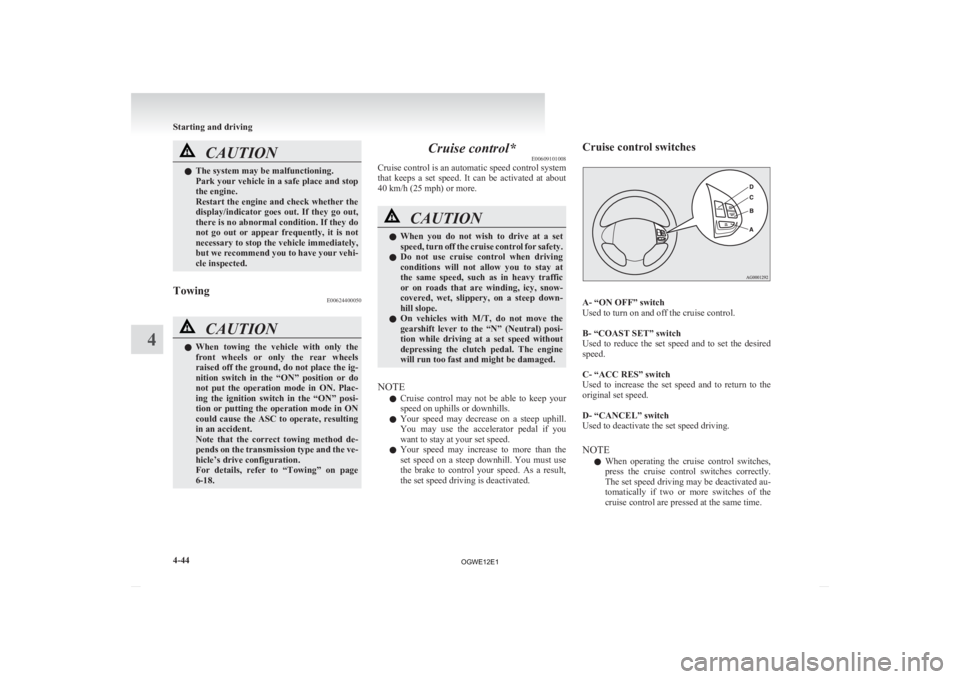
the set speed driving is deactivated. Cruise control switches
A- “ON OFF” switch
Used to turn on and off the cruise control.
B- “COAST SET” switch
Used
to reduce the set speed and to set the desired
speed.
C- “ACC RES” switch
Used to increase the set speed and to return to the
original set speed.
D- “CANCEL” switch
Used to deactivate the set speed driving.
NOTE
l When operating the cruise control switches,
press the cruise control switches correctly.
The set speed driving may be deactivated au-
tomatically if two or more switches of the
cruise control are pressed at the same time. Starting and driving
4-44
4
OGWE12E1
Page 204 of 378
CAUTION
l
The reversing sensor system may not op-
erate properly under the following condi-
tions: • The sensors or surroundings are cov-ered with ice, snow, or mud.
• The sensors are frozen.
• The system receives ultrasonic noise from other sources (the horns of other
vehicles, motorcycle engines, brakes,
radios, pouring rain, splashing water,
tyre chains, etc.).
• The sensors are extremely hot or cold (while the vehicle is parked for a long
period of time under a blazing sun or
in cold weather).
• The vehicle tilts significantly.
• The vehicle is driven on a rough road (with a bumpy, gravel, hilly, or grassy
surface).
• The vehicle is too close to an obstacle.
• The sensors or surroundings have been wiped by hand, or stickers or ac-
cessories have been attached.
l The reversing sensor system may not prop-
erly detect the following:
• Objects that are thin, such as wirenets or ropes.
• Objects that absorb sound waves, such as snow.
• Objects that are shaped with a sharp angle.
• Objects with a smooth surface, such as glass.
• Objects that are low, such as kerb- stones. NOTE
l The
buzzer may sound lower than the normal
warning sound when the reversing sensor sys-
tem is receiving ultrasonic noise from other
sources, but this is not a malfunction. The buz-
zer will stop sounding and the system will re-
turn to normal operation after the noise is no
longer received.
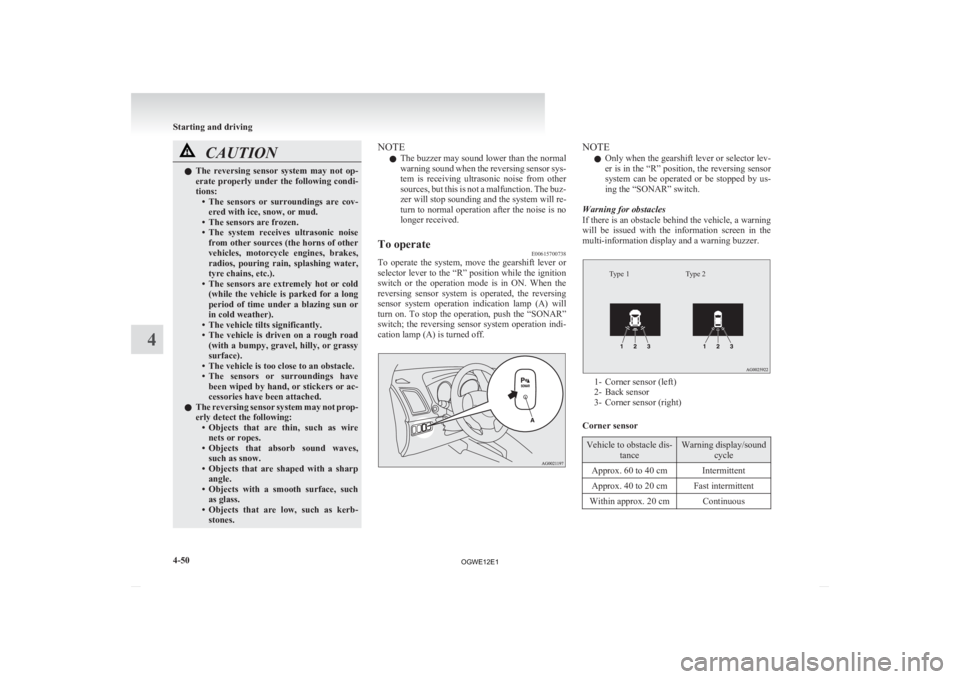
To operate E00615700738
To operate the system, move the gearshift lever or
selector
lever to the “R” position while the ignition
switch or the operation mode is in ON. When the
reversing sensor system is operated, the reversing
sensor system operation indication lamp (A) will
turn on. To stop the operation, push the “SONAR”
switch; the reversing sensor system operation indi-
cation lamp (A) is turned off. NOTE
l Only
when the gearshift lever or selector lev-
er is in the “R” position, the reversing sensor
system can be operated or be stopped by us-
ing the “SONAR” switch.
Warning for obstacles
If there is an obstacle behind the vehicle, a warning
will be issued with the information screen in the
multi-information display and a warning buzzer.
Type 2
Type 1 1- Corner sensor (left)
2-
Back sensor
3- Corner sensor (right)
Corner sensor Vehicle to obstacle dis-
tance Warning display/sound
cycle
Approx. 60 to 40 cm Intermittent
Approx. 40 to 20 cm Fast intermittent
Within approx. 20 cm Continuous Starting and driving
4-50
4
OGWE12E1
Page 206 of 378
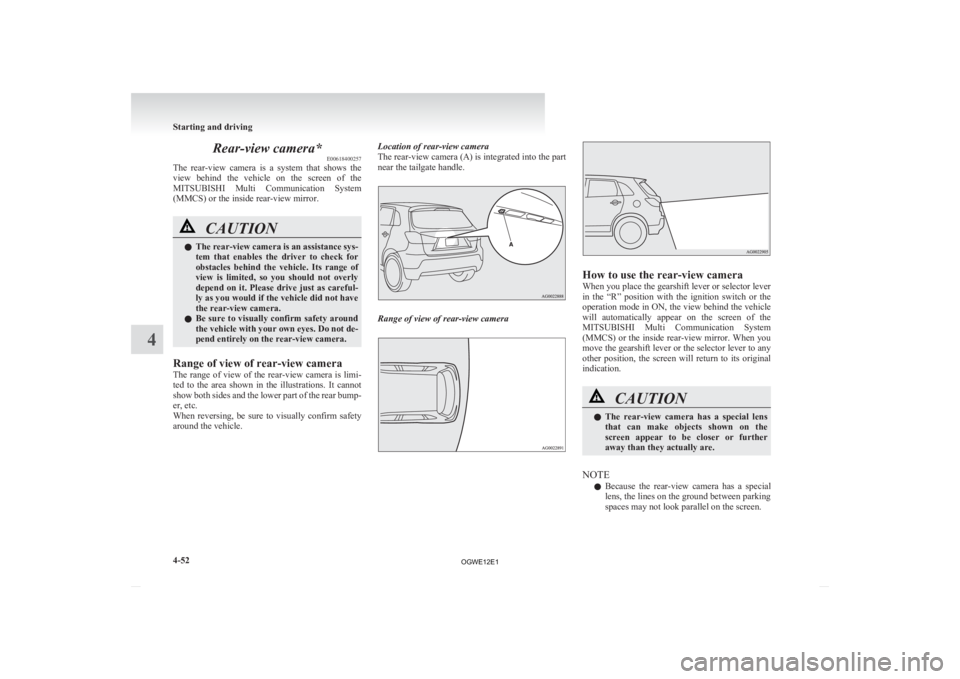
Rear-view camera*
E00618400257
The
rear-view camera is a system that shows the
view behind the vehicle on the screen of the
MITSUBISHI Multi Communication System
(MMCS) or the inside rear-view mirror. CAUTION
l
The
rear-view camera is an assistance sys-
tem that enables the driver to check for
obstacles behind the vehicle. Its range of
view is limited, so you should not overly
depend on it. Please drive just as careful-
ly as you would if the vehicle did not have
the rear-view camera.
l Be sure to visually confirm safety around
the vehicle with your own eyes. Do not de-
pend entirely on the rear-view camera.
Range of view of rear-view camera
The
range of view of the rear-view camera is limi-
ted to the area shown in the illustrations. It cannot
show both sides and the lower part of the rear bump-
er, etc.
When reversing, be sure to visually confirm safety
around the vehicle. Location of rear-view camera
The rear-view camera (A) is integrated into the part
near the tailgate handle.
Range of view of rear-view camera How to use the rear-view camera
When you place the gearshift lever or selector lever
in
the “R” position with the ignition switch or the
operation mode in ON, the view behind the vehicle
will automatically appear on the screen of the
MITSUBISHI Multi Communication System
(MMCS) or the inside rear-view mirror. When you
move the gearshift lever or the selector lever to any
other position, the screen will return to its original
indication. CAUTION
l
The
rear-view camera has a special lens
that can make objects shown on the
screen appear to be closer or further
away than they actually are.
NOTE l Because
the rear-view camera has a special
lens, the lines on the ground between parking
spaces may not look parallel on the screen. Starting and driving
4-52
4
OGWE12E1
Page 211 of 378
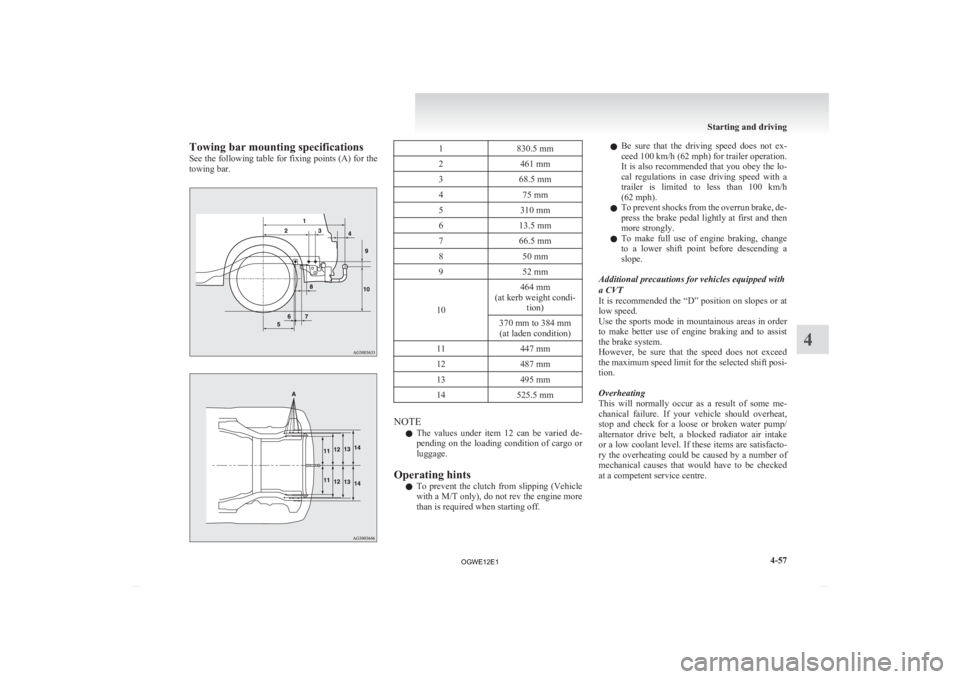
Towing bar mounting specifications
See
the following table for fixing points (A) for the
towing bar. 1
830.5 mm
2 461 mm
3 68.5 mm
4 75 mm
5 310 mm
6 13.5 mm
7 66.5 mm
8 50 mm
9 52 mm
10 464 mm
(at kerb weight condi- tion)
370 mm to 384 mm (at laden condition)
11 447 mm
12 487 mm
13 495 mm
14 525.5 mm NOTE
l The
values under item 12 can be varied de-
pending on the loading condition of cargo or
luggage.
Operating hints l To prevent the clutch from slipping (Vehicle
with a M/T only), do not rev the engine more
than is required when starting off. l
Be
sure that the driving speed does not ex-
ceed 100 km/h (62 mph) for trailer operation.
It is also recommended that you obey the lo-
cal regulations in case driving speed with a
trailer is limited to less than 100 km/h
(62 mph).
l To prevent shocks from the overrun brake, de-
press the brake pedal lightly at first and then
more strongly.
l To make full use of engine braking, change
to a lower shift point before descending a
slope.
Additional precautions for vehicles equipped with
a CVT
It is recommended the “D” position on slopes or at
low speed.
Use the sports mode in mountainous areas in order
to make better use of engine braking and to assist
the brake system.
However, be sure that the speed does not exceed
the maximum speed limit for the selected shift posi-
tion.
Overheating
This will normally occur as a result of some me-
chanical failure. If your vehicle should overheat,
stop and check for a loose or broken water pump/
alternator drive belt, a blocked radiator air intake
or a low coolant level. If these items are satisfacto-
ry the overheating could be caused by a number of
mechanical causes that would have to be checked
at a competent service centre. Starting and driving
4-57 4
OGWE12E1
Page 224 of 378
Sound field
type Details
NORMAL This sound field produces a
sound effect where the vocals
are in the front and the instru-
ments surround the listener.
STAGE This sound field produces a
sound effect where the vocals
are right in front of the driver, as
on a stage.
LIVE This sound field produces a
sound
effect similar to a live ven-
ue, where the listener is wrapped
in sound from all directions.
HALL This sound field produces a
sound effect similar to a concert
hall
with reverberating acoustics. BASS (Bass tone control)
Turn
the SOUND switch to select the desired bass
tone.
MID (Midrange tone control)
Turn the SOUND switch to select the desired mid-
dle tone.
TREBLE (Treble tone control)
Turn the SOUND switch to select the desired treble
tone.
FADER (Front/Rear balance control)
Turn the SOUND switch to balance volume from
the front and rear speakers.
BALANCE (Left/Right balance control)
Turn the SOUND switch to balance volume from
the left and right speakers. NOTE
l When set to 0, it will beep.
l When
SUB PUNCH, TYPE or FIELD is
changed, the sound will cut out briefly, but
this does not indicate a malfunction.
l The audio control mode will shut off if either
the radio or CD is operated, or if no adjust-
ment is made within about 10 seconds.
SCV (Speed Compensated Volume)
function E00726800482
SCV function is a feature that automatically adjusts
the
VOLUME, BASS, MID, and TREBLE settings
in accordance with the vehicle speed.
The SCV function can be turned ON and OFF.
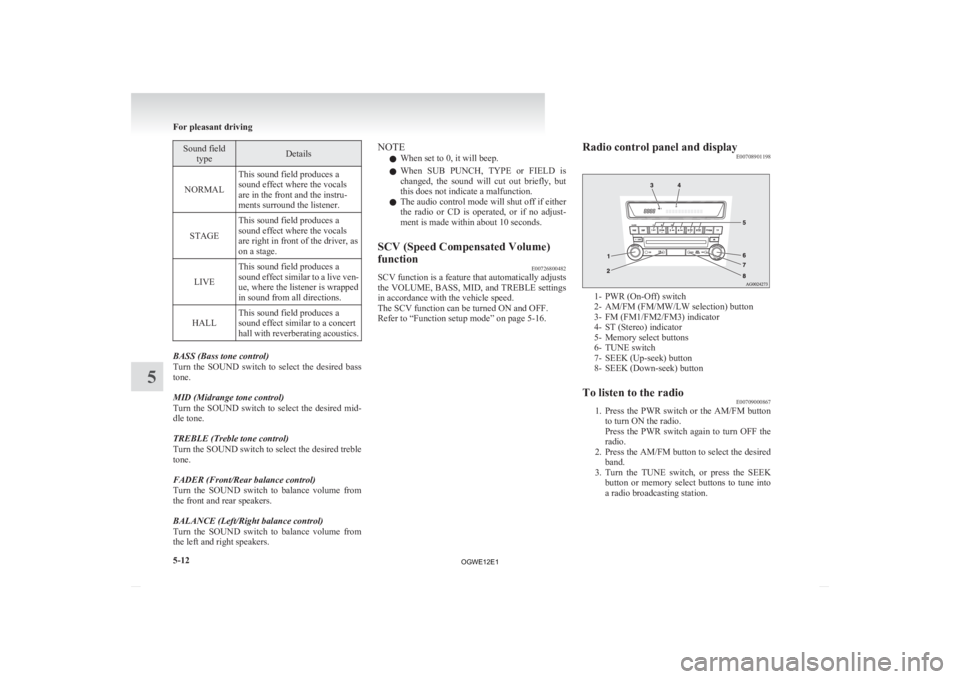
Refer to “Function setup mode” on page 5-16. Radio control panel and display
E00708901198 1- PWR (On-Off) switch
2-
AM/FM (FM/MW/LW selection) button
3- FM (FM1/FM2/FM3) indicator
4- ST (Stereo) indicator
5- Memory select buttons
6- TUNE switch
7- SEEK (Up-seek) button
8- SEEK (Down-seek) button
To listen to the radio E00709000867
1. Press
the PWR switch or the AM/FM button
to turn ON the radio.
Press the PWR switch again to turn OFF the
radio.
2. Press the AM/FM button to select the desired band.
3. Turn the TUNE switch, or press the SEEK button or memory select buttons to tune into
a radio broadcasting station. For pleasant driving
5-12
5
OGWE12E1
Page 231 of 378
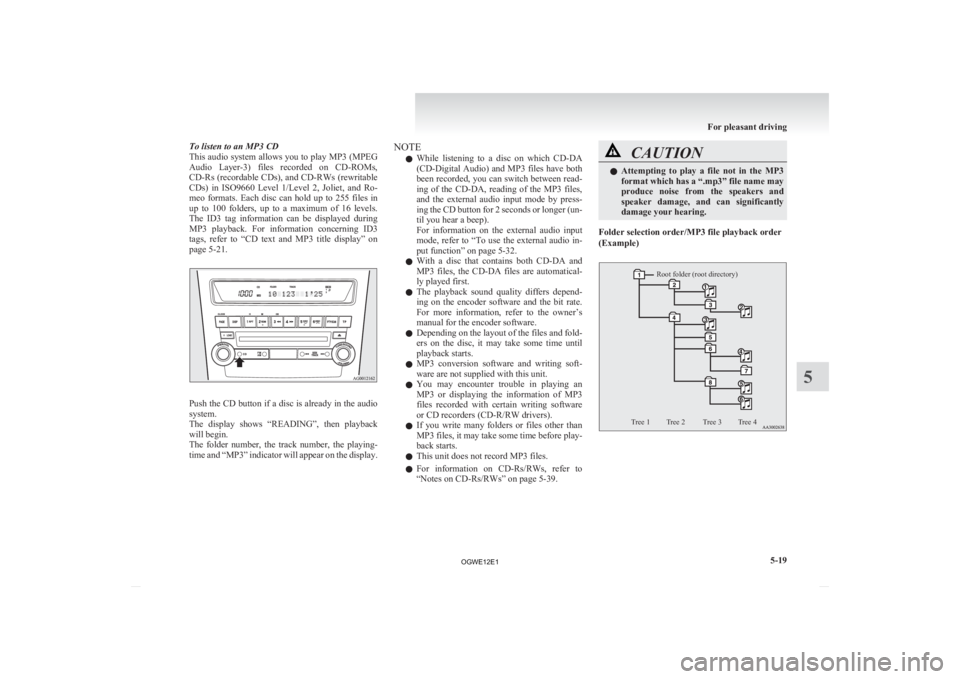
To listen to an MP3 CD
This
audio system allows you to play MP3 (MPEG
Audio Layer-3) files recorded on CD-ROMs,
CD-Rs (recordable CDs), and CD-RWs (rewritable
CDs) in ISO9660 Level 1/Level 2, Joliet, and Ro-
meo formats. Each disc can hold up to 255 files in
up to 100 folders, up to a maximum of 16 levels.
The ID3 tag information can be displayed during
MP3 playback. For information concerning ID3
tags, refer to “CD text and MP3 title display” on
page 5-21. Push the CD button if a disc is already in the audio
system.
The
display shows “READING”, then playback
will begin.
The folder number, the track number, the playing-
time and “MP3” indicator will appear on the display. NOTE
l While
listening to a disc on which CD-DA
(CD-Digital Audio) and MP3 files have both
been recorded, you can switch between read-
ing of the CD-DA, reading of the MP3 files,
and the external audio input mode by press-
ing the CD button for 2 seconds or longer (un-
til you hear a beep).
For information on the external audio input
mode, refer to “To use the external audio in-
put function” on page 5-32.
l With a disc that contains both CD-DA and
MP3 files, the CD-DA files are automatical-
ly played first.
l The playback sound quality differs depend-
ing on the encoder software and the bit rate.
For more information, refer to the owner’s
manual for the encoder software.
l Depending on the layout of the files and fold-
ers on the disc, it may take some time until
playback starts.
l MP3 conversion software and writing soft-
ware are not supplied with this unit.
l You may encounter trouble in playing an
MP3 or displaying the information of MP3
files recorded with certain writing software
or CD recorders (CD-R/RW drivers).
l If you write many folders or files other than
MP3 files, it may take some time before play-
back starts.
l This unit does not record MP3 files.
l For information on CD-Rs/RWs, refer to
“Notes on CD-Rs/RWs” on page 5-39. CAUTION
l
Attempting
to play a file not in the MP3
format which has a “.mp3” file name may
produce noise from the speakers and
speaker damage, and can significantly
damage your hearing.
Folder selection order/MP3 file playback order
(Example)
Root folder (root directory)
Tree 1 Tree 2 Tree 3 Tree 4 For pleasant driving
5-19 5
OGWE12E1
Page 251 of 378
Notes on CD-Rs/RWs
E00725100055
l You
may have trouble playing back some
CD-R/RW discs recorded on CD recorders
(CD-R/RW drives), either due to their record-
ing characteristics or dirt, fingerprints,
scratches, etc. on the disc surface.
l CD-R/RW discs are less resistant to high tem-
peratures and high humidity than ordinary mu-
sic CDs and can therefore be damaged and
rendered unplayable if left inside your vehi-
cle for a long time.
l Depending on the combination of the writing
software, the CD recorder (CD-R/RW drive),
and the disc used to create a CD-R/RW, the
disc might not play successfully.
l This player cannot play the CD-R/RW discs
if the session is not closed.
l This player cannot play CD-R/RW discs
which contain other than CD-DA or MP3 da-
ta (Video CD, etc.).
l Be sure to observe the handling instructions
for the CD-R/RW disc. WARNING
l Operating
the CD player in a manner oth-
er than specifically instructed herein may
result in hazardous radiation exposure.
Do not remove the cover and attempt to
repair the CD player by yourself. There
are no user serviceable parts inside. If the
CD player is not working correctly, it is
recommended that you have it inspected. Antenna
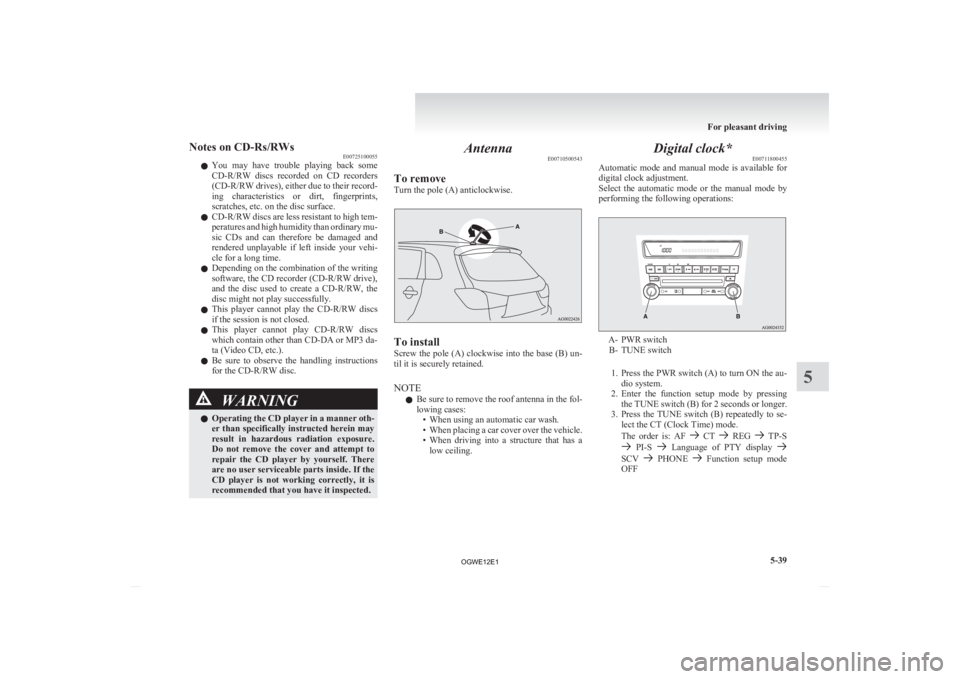
E00710500543
To remove
Turn the pole (A) anticlockwise. To install
Screw
the pole (A) clockwise into the base (B) un-
til it is securely retained.
NOTE
l Be sure to remove the roof antenna in the fol-
lowing cases:
• When using an automatic car wash.
• When placing a car cover over the vehicle.
• When driving into a structure that has alow ceiling. Digital clock*
E00711800455
Automatic
mode and manual mode is available for
digital clock adjustment.
Select the automatic mode or the manual mode by
performing the following operations: A- PWR switch
B-
TUNE switch
1. Press the PWR switch (A) to turn ON the au- dio system.
2. Enter the function setup mode by pressing the TUNE switch (B) for 2 seconds or longer.
3. Press the TUNE switch (B) repeatedly to se- lect the CT (Clock Time) mode.
The order is: AF CT REG TP-S
PI-S Language of PTY display
SCV PHONE Function setup mode
OFF For pleasant driving
5-39 5
OGWE12E1
Page 257 of 378
5. When the disabling of the password is
completed, the voice guide will say “Pass-
word is disabled” and the system will re-
turn to the main menu.
Speaker enrollment function E00727400238
The Bluetooth ®
2.0 interface can use the speaker en-
rollment function to create a voice model for one
person per language.
This makes it easier for the Bluetooth ®
2.0 inter-
face to recognise voice commands said by you.
You can turn a voice model registered with the
speaker enrollment function on and off whenever
you want.
Speaker enrollment E00727500200
It takes about 2 to 3 minutes to complete the speak-
er enrollment process.
To
ensure the best results, run through the process
while in the driver’s seat, in an environment that is
as quiet as possible (when there is no rain or strong
winds and the vehicle windows are closed). Please
turn off your phone while in speaker enrollment to
prevent interruption of the process.
Use the following procedure for speaker enrollment. 1. Stop your vehicle in a safe area, put the gear-shift lever in the “N” (Neutral) position
(M/T), or the selector lever in the “P”
(PARK) position (CVT), and pull the park-
ing brake lever.
NOTE l Speaker enrollment is not possible unless the
vehicle is parked. Make sure you park the ve-
hicle in a safe area before attempting speaker
enrollment. 2. Press the SPEECH button.
3.
Say “Voice training”.
4. The voice guide will say “This operation must be performed in a quiet environment
while the vehicle is stopped. See the owner’s
manual for the list of required training phra-
ses. Press and release the SPEECH button
when you are ready to begin. Press the HANG-
UP button to cancel at any time”.
Press the SPEECH button to start the speaker
enrollment process.
NOTE l If you do not start the speaker enrollment proc-
ess within 3 minutes of pressing the
SPEECH button, the speaker enrollment func-
tion will time out.
The voice guide will say “Speaker Enroll-
ment has timed out”. The system will then
beep and the voice recognition mode will be
deactivated.
5. The voice guide will prompt for phrase 1. Re- peat the corresponding phrase listed in table
“Enrollment commands” on page 5-56.
The system will register your voice and then
move on to the registration of the next com-
mand. Continue the process until all phrases
have been registered.
NOTE l To repeat the most recent voice training com-
mand, press and release the SPEECH button.
l If you press the HANG-UP button anytime
during the process, the system will beep and
stop the speaker enrollment process. 6. When all enrollment commands have been
read out, the voice guide will say “Speaker
enrollment is complete”.
The system will then end the speaker enroll-
ment process and return to the main menu.
NOTE l Completing the speaker enrollment process
will turn on the voice model automatically.
l The commands “Help” and “Cancel” will not
work in this mode.
Enabling and disabling the voice model and re-
training E00727600100
You can turn a voice model registered with the
speaker
enrollment function on and off whenever
you want.
You can also retrain the system.
Use the following procedure to perform these ac-
tions. 1. Press the SPEECH button.
2. Say “Voice training”.
3. If you have completed a speaker enrollmentprocess once already, the voice guide will
say either “Enrollment is enabled. Would
you like to disable or retrain?” or “Enroll-
ment is disabled. Would you like to enable
or retrain?”
4. When enrollment is “enabled”, the voice mod- el is on; when enrollment is “disabled”, the
voice model is off. Say the command that
fits your needs.
Say “Retrain” to start the speaker enrollment
process and recreate a new voice model. (Re-
fer to “Speaker enrollment” on page 5-45.) For pleasant driving
5-45 5
OGWE12E1