ECU MITSUBISHI ASX 2014 (in English) Owner's Guide
[x] Cancel search | Manufacturer: MITSUBISHI, Model Year: 2014, Model line: ASX, Model: MITSUBISHI ASX 2014Pages: 418, PDF Size: 14.02 MB
Page 200 of 418
“D” DRIVE
This position is used for most city and high-way driving. The transmission will automati-
cally and continuously change its gear radio depending on road and driving conditions.
CAUTIONl To prevent transmission damage, never shift
into the “D” (DRIVE) position from the “R” (REVERSE) position while the vehicle is inmotion.Sports mode
E00602500194
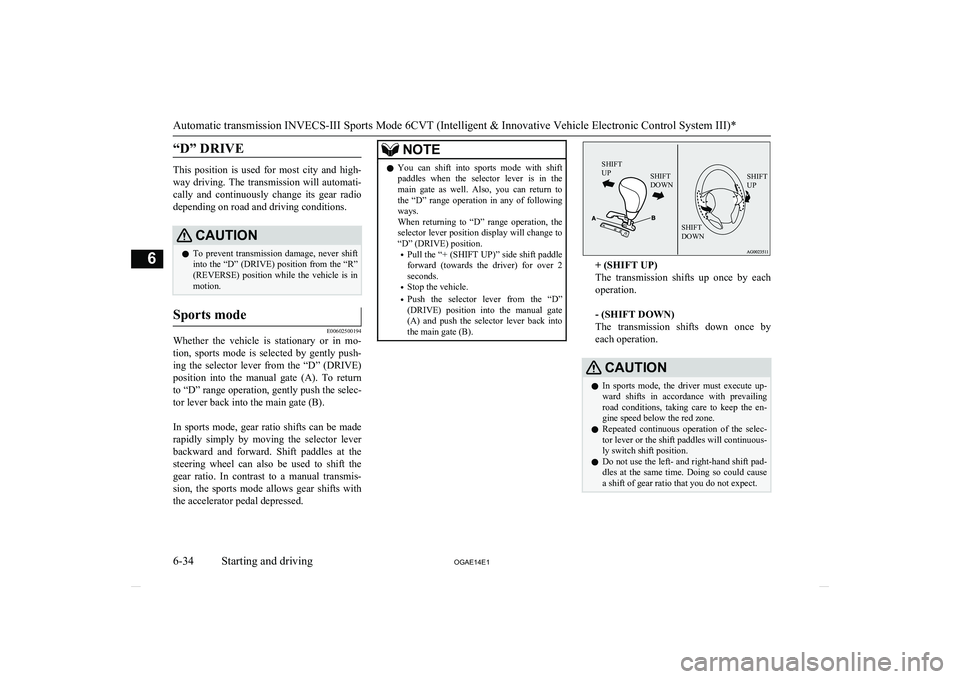
Whether the vehicle is stationary or in mo-
tion, sports mode is selected by gently push-ing the selector lever from the “D” (DRIVE)
position into the manual gate (A). To return to “D” range operation, gently push the selec-tor lever back into the main gate (B).
In sports mode, gear ratio shifts can be made
rapidly simply by moving the selector lever backward and forward. Shift paddles at thesteering wheel can also be used to shift the
gear ratio. In contrast to a manual transmis- sion, the sports mode allows gear shifts with
the accelerator pedal depressed.
NOTEl You can shift into sports mode with shift
paddles when the selector lever is in the main gate as well. Also, you can return to
the “D” range operation in any of following ways.
When returning to “D” range operation, the selector lever position display will change to
“D” (DRIVE) position.
• Pull the “+ (SHIFT UP)” side shift paddle
forward (towards the driver) for over 2 seconds.
• Stop the vehicle.
• Push the selector lever from the “D”
(DRIVE) position into the manual gate
(A) and push the selector lever back into
the main gate (B).SHIFT
UPSHIFT
DOWNSHIFT
UPSHIFT
DOWN
+ (SHIFT UP)
The transmission shifts up once by each operation.
- (SHIFT DOWN)
The transmission shifts down once by
each operation.
CAUTIONl In sports mode, the driver must execute up-
ward shifts in accordance with prevailingroad conditions, taking care to keep the en-
gine speed below the red zone.
l Repeated continuous operation of the selec-
tor lever or the shift paddles will continuous- ly switch shift position.
l Do not use the left- and right-hand shift pad-
dles at the same time. Doing so could cause a shift of gear ratio that you do not expect.
Automatic transmission INVECS-III Sports Mode 6CVT (Intelligent & Innovative Vehicle Electronic Control System III)*
6-34 OGAE14E1Starting and driving6
Page 209 of 418
Jacking up a 4-wheel drive ve-hicleWARNINGl Do not crank the engine while the vehicle
is jacked up.
The tyre on the ground may turn and the vehicle may roll off the jack.
Clutch operation
Quick or slight clutch engagement made
while the engine is running at high speed will
cause damage to the clutch and transmission because the tractive force is very great.
Operate the pedal slowly and positively.
Braking
E00607001784
All the parts of the brake system are critical
to safety. We recommend you to have the ve- hicle checked at regular intervals according
to the service booklet.
CAUTIONl Avoid driving habits that cause heavy brak-
ing and never “ride” the brakes by resting
your foot on the brake pedal while driving.
It causes brake overheating and fade.Brake system
The service brake is divided into two brake
circuits. And your vehicle is equipped with
power brakes. If one brake circuit fails, the other is available to stop the vehicle. If you
should lose the power assist for some reason, the brakes will still work. In these situations,
even if the brake pedal moves down to the very end of its possible stroke or resists being
depressed, keep depressing the brake pedal
down harder and further than usual; stop
driving as soon as possible and have the brake system repaired.
WARNINGl Do not turn off the engine while your ve-
hicle is in motion. If you turn off the en- gine while driving, the power assistance
for the braking system will stop working and your brakes will not work effectively.
l If the power assist is lost or if either brake
hydraulic system stops working properly,
have your vehicle checked immediately.
Warning display
The brake warning lamp illuminates to indi-
cate a fault in the braking system. A warning
is also displayed on the multi-information display. Refer to “Brake warning lamp” on page 5-44 and “Brake warning display” on
page 5-45.
When brakes are wet
Check the brake system while driving at a
low speed immediately after starting, espe- cially when the brakes are wet, to confirmthey work normally.
A film of water can be formed on the brake
discs and prevent normal braking after driv-
ing in heavy rain or through large puddles, or after the vehicle is washed. If this occurs, dry
the brakes out by driving slowly while lightly depressing the brake pedal.
When driving downhill
It is important to take advantage of the en-
gine braking by shifting to a lower shift posi- tion while driving on steep downhill roads in order to prevent the brakes from overheating.
WARNINGl Do not leave any objects near the brake
pedal or let a floor mat slide under it; do- ing so could prevent the full pedal stroke
that would be necessary in an emergency. Make sure that the pedal can be operatedfreely at all times. Make sure the floor mat is securely held in place.
Braking
6-43
OGAE14E1Starting and driving6
Page 231 of 418
Roof carrier mounting brack-ets*
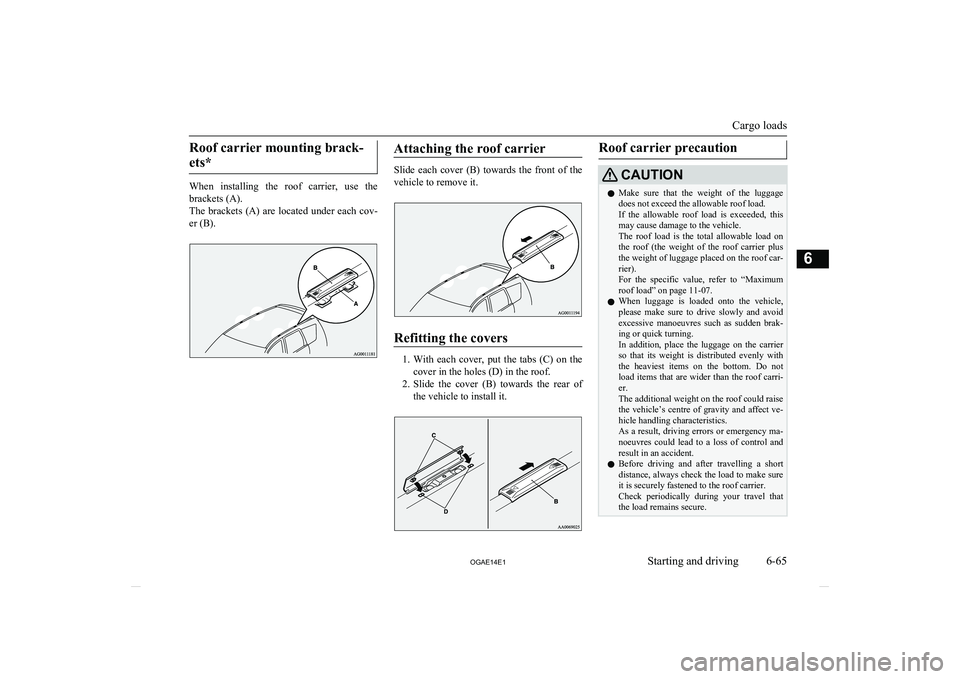
When installing the roof carrier, use the brackets (A).
The brackets (A) are located under each cov-
er (B).
Attaching the roof carrier
Slide each cover (B) towards the front of the
vehicle to remove it.
Refitting the covers
1. With each cover, put the tabs (C) on the
cover in the holes (D) in the roof.
2. Slide the cover (B) towards the rear of
the vehicle to install it.
Roof carrier precautionCAUTIONl Make sure that the weight of the luggage
does not exceed the allowable roof load.
If the allowable roof load is exceeded, this may cause damage to the vehicle.
The roof load is the total allowable load on
the roof (the weight of the roof carrier plus
the weight of luggage placed on the roof car- rier).
For the specific value, refer to “Maximum
roof load” on page 11-07.
l When luggage is loaded onto the vehicle,
please make sure to drive slowly and avoid excessive manoeuvres such as sudden brak-ing or quick turning.
In addition, place the luggage on the carrier
so that its weight is distributed evenly with the heaviest items on the bottom. Do not
load items that are wider than the roof carri-
er.
The additional weight on the roof could raise the vehicle’s centre of gravity and affect ve-
hicle handling characteristics.
As a result, driving errors or emergency ma- noeuvres could lead to a loss of control and
result in an accident.
l Before driving and after travelling a short
distance, always check the load to make sure
it is securely fastened to the roof carrier. Check periodically during your travel that
the load remains secure.
Cargo loads
6-65
OGAE14E1Starting and driving6
Page 250 of 418
TypeSize
Maxi-mumplay- back time
Comments
CD-DA12
cm74 mi-
nutes—CD-TEXT12
cm74 mi-
nutes—CD-R/RW12
cm—•Disc containing
MP3 files
Discs That May Not Be Played
Back
l Playback of discs other than those de-
scribed in “Types of Disc That Can Be
Played Back” is not guaranteed.
l 8 cm discs may not be used.
lDo not insert irregularly-shaped discs
(for example, heartshaped), as these may
result in malfunction. Additionally, discs that have transparent portions may notbe played back.
l Discs that have not been finalized cannot
be played back.
l Even if recorded using the correct for-
mat on a recorder or computer, applica- tion software settings and environments;
disc peculiarities, damage, or marking;
or dirt or condensation on the lens inside the product may render the disc unplaya-
ble.
l Depending on the disc, some functions
may not be used, or the disc may not
play back.
l Do not use discs with cracks or warps.
l If the disc has stickers affixed, remains
from removed stickers, or affixed adhe- sive, then do not use the disc.
l Discs that have decorative labels or
stickers may not be used.
Nonstandard CDs
This product will play back audio CDs, how-
ever please be aware of the following points regarding CD standards.
l Ensure that you use discs with
on
the label surface.
l Playback of other than standard CDs is
not guaranteed. Even if the audio can be played back, the audio quality cannot be
guaranteed.
l When playing back other than standard
CDs, the following may occur. • There may be noise during playback.
• There may be jumping in the audio.
• The disc may not be recognized.
• The first track may not be played
back.
• It may take longer than usual until
start of playback of tracks.
• Playback may start from within the
track.
• Some parts may not be played back.
• Tracks may freeze during playback.
• Tracks may be displayed erroneously.Audio Files (MP3/WMA/
AAC) E00736100026
This product can play back MP3/WMA/AAC
format audio files recorded on CD-ROM, CD-R/RW, and USB devices.
Audio Files (MP3/WMA/AAC)
7-16 OGAE14E1For pleasant driving7
Page 280 of 418
SymptomsCauseResponseThere is no sound, even if
the disc is inserted.Damage to or dirt on the disc means that its data cannot be read.Check the disc. Additionally, if using CD-R/RW discs,
their characteristics may render them unable to be
played.
Antenna
E00710500543
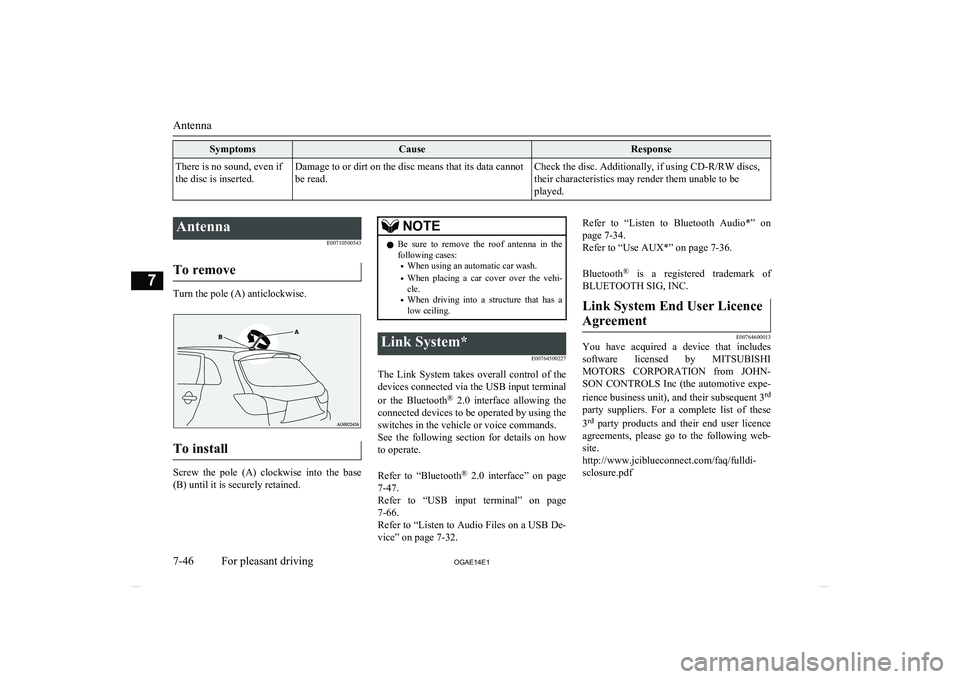
To remove
Turn the pole (A) anticlockwise.
To install
Screw the pole (A) clockwise into the base (B) until it is securely retained.
NOTEl Be sure to remove the roof antenna in the
following cases:
• When using an automatic car wash.
• When placing a car cover over the vehi-
cle.
• When driving into a structure that has a
low ceiling.Link System*
E00764500227
The Link System takes overall control of thedevices connected via the USB input terminal
or the Bluetooth ®
2.0 interface allowing the
connected devices to be operated by using the
switches in the vehicle or voice commands.
See the following section for details on how
to operate.
Refer to “Bluetooth ®
2.0 interface” on page
7-47.
Refer to “USB input terminal” on page
7-66.
Refer to “Listen to Audio Files on a USB De-
vice” on page 7-32.
Refer to “Listen to Bluetooth Audio*” on
page 7-34.
Refer to “Use AUX*” on page 7-36.
Bluetooth ®
is a registered trademark of
BLUETOOTH SIG, INC.Link System End User Licence
Agreement
E00764600013
You have acquired a device that includes software licensed by MITSUBISHI
MOTORS CORPORATION from JOHN-
SON CONTROLS Inc (the automotive expe-
rience business unit), and their subsequent 3 rd
party suppliers. For a complete list of these
3 rd
party products and their end user licence
agreements, please go to the following web-
site.
http://www.jciblueconnect.com/faq/fulldi- sclosure.pdf
Antenna
7-46 OGAE14E1For pleasant driving7
Page 284 of 418
Confirmation function setting
E00760400013
The Bluetooth ®
2.0 interface is equipped
with a confirmation function.
With the confirmation function activated, you are given more opportunities than normal to
confirm a command when making various
settings to Bluetooth ®
2.0 interface. This al-
lows you to decrease the possibility that a
setting is accidentally changed.
The confirmation function can be turned on
or off by following the steps below. 1. Press the SPEECH button.
2. Say “Setup”.
3. Say “Confirmation prompts”.
4. The voice guide will say “Confirmation
prompts are
Answer “Yes” to change the setting or
answer “No” to keep the current setting.
5. The voice guide will say “Confirmation
prompts are
Security function
E00760500043
It is possible to use a password as a security function by setting a password of your choice
for the Bluetooth ®
2.0 interface.
When the security function is turned on, it is
necessary to make a voice input of a 4-digit password in order to use all functions of the
Bluetooth ®
2.0 interface, except for recep-
tion.
Setting the password
Use the following procedure to turn on the security function by setting a password. 1. Press the SPEECH button.
2. Say “Setup”.
3. Say “Password.”
4. The voice guide will say “Password is
disabled. Would you like to enable it?”
Answer “Yes.”
Answer “No” to cancel the setting of the
password and return to the main menu.
5. The voice guide will say “Please say a 4-
digit password. Remember this pass-
word. It will be required to use this sys- tem”.
Say a 4-digit number which you want to
set as a password.
6. For confirmation purposes, the voice
guide will say “Password <4-digit pass-
word>. Is this correct?” Answer “Yes.”
Answer “No” to return to the password input in Step 5.
7. When the registration of the password is
completed, the voice guide will say
“Password is enabled” and the system will return to the main menu.
NOTEl Password will be required to access the sys-
tem after the next ignition cycle.
l It is required for a little time after engine
stop that the entered password is actually re-corded in the system.
If the ignition switch or the operation mode
is made to ACC or ON or the engine is star- ted immediately after engine stop, there is a case when the entered password is not recor-ded in the system. At this time, please try to
enter the password again.
Entering the password
If a password has been set and the security
function is enabled, the voice guide will say “Hands-free system is locked. State the pass-word to continue” when the SPEECH button
is pressed to enter voice recognition mode.
Say the 4-digit password number to enter the
password.
If the entered password is wrong, the voice
guide will say “<4- digit password>, Incor-
rect password. Please try again”. Enter the correct password.
NOTEl You can re-enter the password as many
times as you want.
Bluetooth ®
2.0 interface*
7-50 OGAE14E1For pleasant driving7
Page 285 of 418
NOTElIf you have forgotten your password, say
“Cancel” to quit the voice input mode andthen check with a MITSUBISHI MOTORS
Authorized Service Point.
Disabling the password
Use the following procedure to turn off the
security function by disabling the password.
NOTEl System must be unlocked to disable the
password.
1
. Press the SPEECH button.
2 . Say “Setup”.
3 . Say “Password.”
4 . The voice guide will say “Password
is enabled. Would you like to disableit?” Answer “Yes.”
Answer “No” to cancel the disabling of the password and return to the
main menu.
5 . When the disabling of the password
is completed, the voice guide will say
“Password is disabled” and the sys-
tem will return to the main menu.Speaker enrollment function
E00727400238
The Bluetooth ®
2.0 interface can use the
speaker enrollment function to create a voice model for one person per language.
This makes it easier for the Bluetooth ®
2.0
interface to recognise voice commands said by you.
You can turn a voice model registered with
the speaker enrollment function on and off
whenever you want.
Speaker enrollment
E00727500301
It takes about 2 to 3 minutes to complete the speaker enrollment process.
To ensure the best results, run through the
process while in the driver’s seat, in an envi- ronment that is as quiet as possible (whenthere is no rain or strong winds and the vehi-cle windows are closed). Please turn off your
phone while in speaker enrollment to prevent
interruption of the process.
Use the following procedure for speaker en- rollment. 1. Stop your vehicle in a safe area, put the
gearshift lever in the “N” (Neutral) posi-
tion ( M/T), or the selector lever in the
“P” (PARK) position ( A/T or CVT), and
pull the parking brake lever.
NOTEl Speaker enrollment is not possible unless the
vehicle is parked. Make sure you park the
vehicle in a safe area before attempting speaker enrollment.
2. Press the SPEECH button.
3. Say “Voice training”.
4. The voice guide will say “This operation
must be performed in a quiet environ- ment while the vehicle is stopped. See
the owner’s manual for the list of re- quired training phrases. Press and re-
lease the SPEECH button when you are ready to begin. Press the HANG-UP but-
ton to cancel at any time”.
Press the SPEECH button to start the
speaker enrollment process.
NOTEl If you do not start the speaker enrollment
process within 3 minutes of pressing the SPEECH button, the speaker enrollment function will time out.
The voice guide will say “Speaker Enroll-
ment has timed out”. The system will then beep and the voice recognition mode will be
deactivated.
5. The voice guide will prompt for phrase
1. Repeat the corresponding phrase lis-
Bluetooth ®
2.0 interface*
7-51
OGAE14E1For pleasant driving7
Page 297 of 418
NOTElYou can call, edit or delete a name that is
being read out.
Press the SPEECH button and say “Call” to call the name, “Edit name” to edit it, or “De-
lete” to delete it.
The system will beep and then execute your command.
l If you press the SPEECH button and say
“Continue” or “Previous” while the list isbeing read, the system will advance or re- wind the list. Say “Continue” to proceed to the next entry or “Previous” to return to the
previous entry.Deleting a telephone number
E00740000068
1. Press the SPEECH button.
2. Say “Phone book.”
3. The voice guide will say “Select one of
the following: new entry, edit number,
edit name, list names, delete, erase all, or
import contact.” Say “Delete.”
4. The voice guide will say “Please say the
name of the entry you would like to de-
lete, or say list names.” Say the name of the phone book entry in which the tele-
phone number you want to delete is reg-
istered.
NOTEl Say “List names,” and the names registered
in the phone book will be read out in order.
Refer to “Vehicle phone book: Listening to the list of registered names” on page 7-62.
5. If only one telephone number is regis-
tered in the selected phone book entry, the voice guide will say “Deleting
If multiple telephone numbers are regis- tered in the selected phone book entry,
the voice guide will say “Would you like to delete [home], [work], [mobile], [oth-
er], or all?”
Select the location to delete, and the voice guide will say “Deleting
NOTEl To delete the telephone numbers from all lo-
cations, say “All.”
6. The system will ask if you really want to
delete the selected telephone number(s)
to go ahead with the deletion, answer
“Yes.”
Answer “No,” the system will cancel de- leting the telephone number(s) and thenreturn to Step 4.
7. When the deletion of the telephone num-
ber is completed, the voice guide will
say “
menu.
If all locations are deleted, the system will say “
leted” and the name will be removed from the phone book. If numbers still re-
main under the entry, the name will re- tain the other associated numbers.Erasing the phone book
E00740100069
You can delete all registered information from the vehicle phone book. 1. Press the SPEECH button.
2. Say “Phone book.”
3. The voice guide will say “Select one of
the following: new entry, edit number,
edit name, list names, delete, erase all, or
import contact.” Say “Erase all.”
4. For confirmation purposes, the voice
guide will ask “Are you sure you want toerase everything from your hands-free system phone book?” Answer “Yes.”
Answer “No” to cancel the deletion of
all registered information in the phone
book and return to the main menu.
Bluetooth ®
2.0 interface*
7-63
OGAE14E1For pleasant driving7
Page 304 of 418
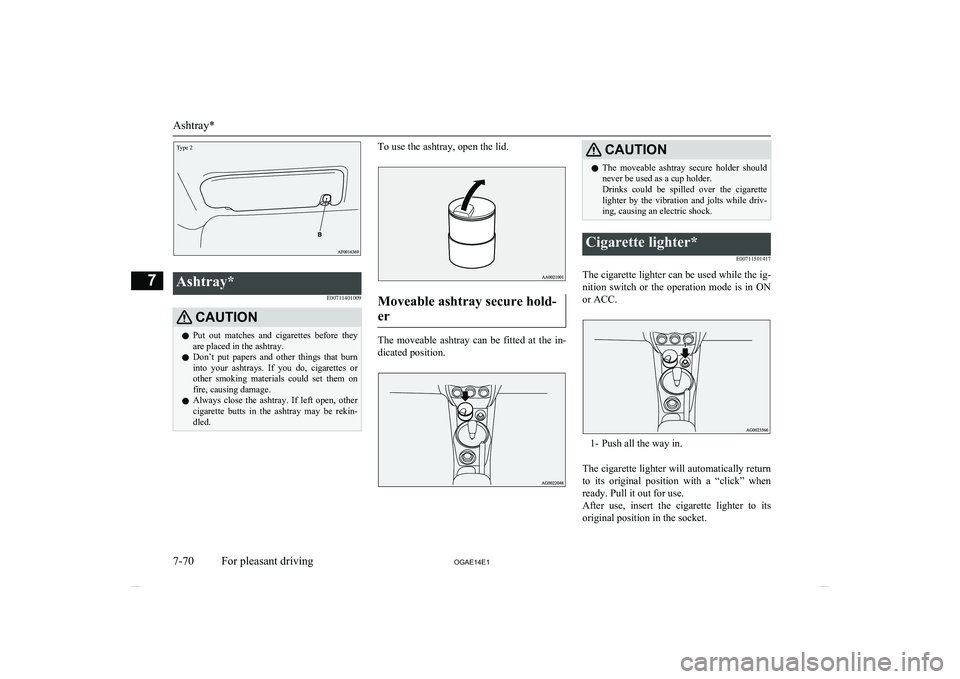
Ashtray*E00711401009CAUTIONlPut out matches and cigarettes before they
are placed in the ashtray.
l Don’t put papers and other things that burn
into your ashtrays. If you do, cigarettes or
other smoking materials could set them on fire, causing damage.
l Always close the ashtray. If left open, other
cigarette butts in the ashtray may be rekin-
dled.To use the ashtray, open the lid.
Moveable ashtray secure hold-
er
The moveable ashtray can be fitted at the in- dicated position.
CAUTIONl The moveable ashtray secure holder should
never be used as a cup holder.
Drinks could be spilled over the cigarette lighter by the vibration and jolts while driv-
ing, causing an electric shock.Cigarette lighter*
E00711501417
The cigarette lighter can be used while the ig-nition switch or the operation mode is in ON or ACC.
1- Push all the way in.
The cigarette lighter will automatically return to its original position with a “click” when ready. Pull it out for use.
After use, insert the cigarette lighter to its
original position in the socket.
Ashtray*
7-70 OGAE14E1For pleasant driving7Type 2
Page 313 of 418
Refer to “Armrest” on page 4-06.Bottle holderE00718200328CAUTIONlDo not drink beverages while driving. This
is distracting and could cause an accident.
l Drinks could be spilled by the vibration and
jolts while driving. If the spilt drink is very
hot, you could be burnt.There are bottle holders located on the front
doors.NOTEl Tightly close the cap on drink bottles before
storing them.
l Some bottles may be too big or the wrong
shape to fit in the holder.Rear shelf panel*
E00715400114CAUTIONlDo not place luggage or other items on the
rear shelf panel. Any items on the rear shelf
panel would obstruct your rearward view, and they could fly forward and cause inju-
ries or other mishap in the event of hard
braking.To install
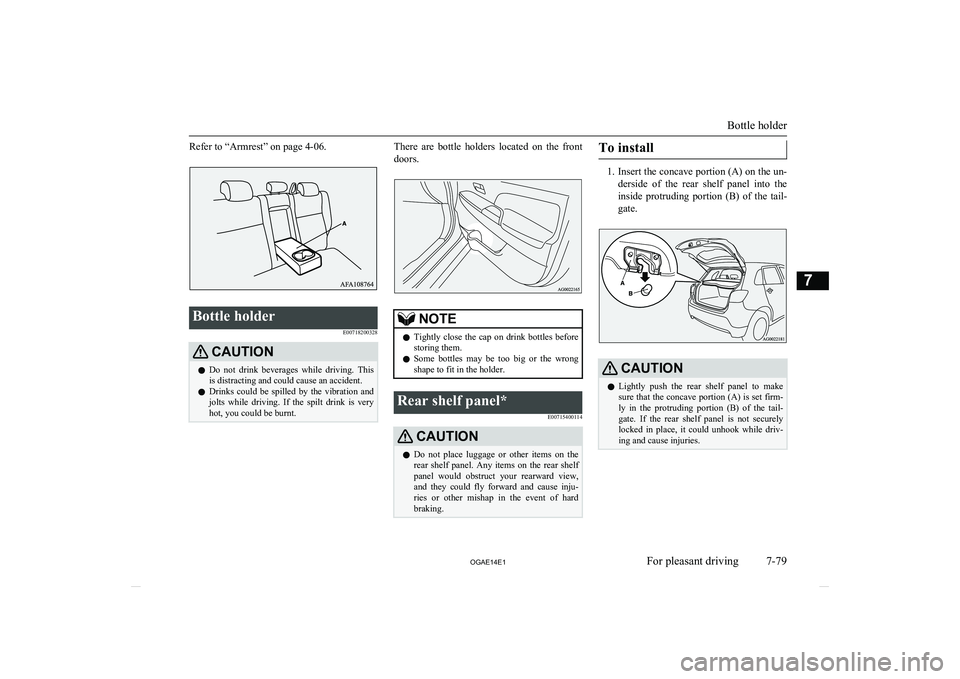
1. Insert the concave portion (A) on the un-
derside of the rear shelf panel into the inside protruding portion (B) of the tail-
gate.
CAUTIONl Lightly push the rear shelf panel to make
sure that the concave portion (A) is set firm-ly in the protruding portion (B) of the tail- gate. If the rear shelf panel is not securely
locked in place, it could unhook while driv- ing and cause injuries.
Bottle holder
7-79
OGAE14E1For pleasant driving7