change wheel MITSUBISHI ASX 2015 Owner's Manual (in English)
[x] Cancel search | Manufacturer: MITSUBISHI, Model Year: 2015, Model line: ASX, Model: MITSUBISHI ASX 2015Pages: 452, PDF Size: 20.1 MB
Page 38 of 452
NOTElWhen operating the engine switch, press the
switch all the way in. If the switch is not fully pressed, the engine may not start or theoperation mode may not change. If the en-
gine switch is pressed correctly, there is no need to hold the engine switch down.
Operation mode of the engine
switch and its function
OFF
The indication lamp on the engine switch
turns off. The operation mode cannot be put
in OFF when the selector lever is in any posi- tion other than the “P” (PARK) position ( A/T
or CVT).
ACC
The audio system and other electric devices can be operated.
The indication lamp on the engine switch il-
luminates orange.
ON
All electric devices can be operated. The indication lamp on the engine switch il-
luminates green.
The indication lamp turns off when the en-
gine is running.
NOTEl Your vehicle is equipped with an electronic
immobilizer. To start the engine, the ID codetransmitted by the transponder inside the key must match the code registered in the immo-bilizer computer.
(Refer to “Electronic immobilizer (Anti-theft
starting system)” on page 3-13.)Changing the operation mode
E00312200133
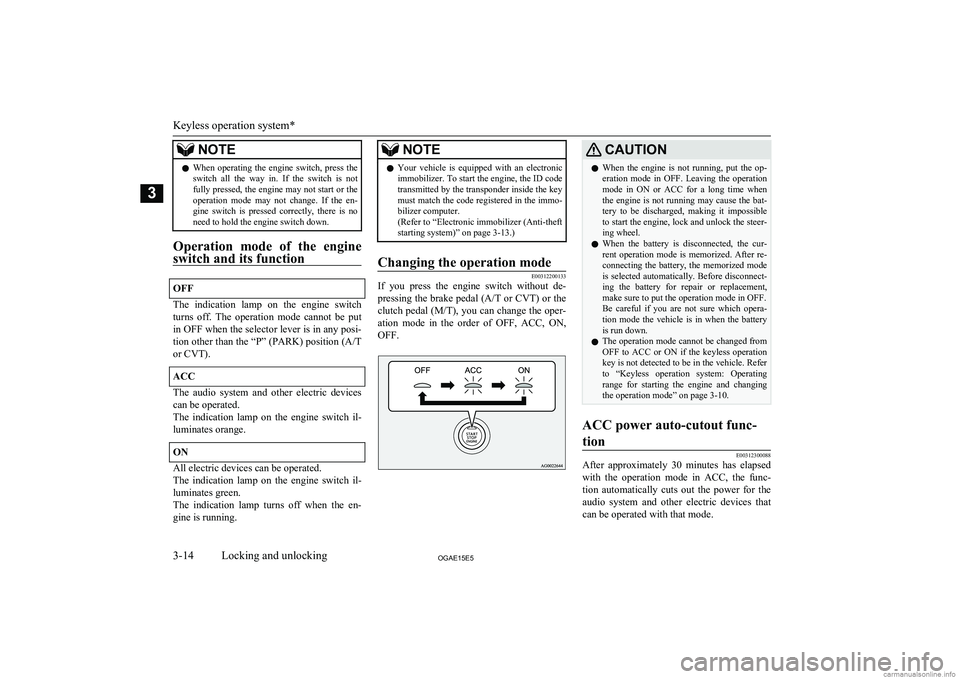
If you press the engine switch without de-
pressing the brake pedal ( A/T or CVT ) or the
clutch pedal ( M/T), you can change the oper-
ation mode in the order of OFF, ACC, ON, OFF.
CAUTIONl When the engine is not running, put the op-
eration mode in OFF. Leaving the operation mode in ON or ACC for a long time when
the engine is not running may cause the bat- tery to be discharged, making it impossible
to start the engine, lock and unlock the steer- ing wheel.
l When the battery is disconnected, the cur-
rent operation mode is memorized. After re- connecting the battery, the memorized modeis selected automatically. Before disconnect-
ing the battery for repair or replacement,
make sure to put the operation mode in OFF.
Be careful if you are not sure which opera- tion mode the vehicle is in when the battery
is run down.
l The operation mode cannot be changed from
OFF to ACC or ON if the keyless operation
key is not detected to be in the vehicle. Refer
to “Keyless operation system: Operating
range for starting the engine and changing the operation mode” on page 3-10.ACC power auto-cutout func-
tion
E00312300088
After approximately 30 minutes has elapsed
with the operation mode in ACC, the func- tion automatically cuts out the power for the
audio system and other electric devices that
can be operated with that mode.
Keyless operation system*
3-14OGAE15E5Locking and unlocking3
Page 181 of 452
ON
The engine is running, and all the vehicle’selectrical devices can be operated.
START
The starter motor operates. After the engine has started, release the key and it will auto-
matically return to the “ON” position.
NOTEl Your vehicle is equipped with an electronic
immobilizer.
To start the engine, the ID code transmitted
by the transponder inside the key must match the code registered in the immobilizer
computer.
Refer to “Electronic immobilizer (Anti-theft
starting system)” on page 3-03.ACC power auto-cutout func-
tion
E00620300224
After about 30 minutes has elapsed with the ignition switch in the “ACC” position, the
function automatically cuts out the power for
the audio system and other electric devices that can be operated with that position.
When the ignition switch is turned from the
“ACC” position, the power is supplied again to those devices.
NOTEl It is possible to modify functions as follows:
• The time until the power cuts out can be
changed to approximately 60 minutes.
• The ACC power auto-cutout function can
be deactivated.
For details, we recommend you to consult
a MITSUBISHI MOTORS Authorized
Service Point.To remove the key
E00620400528
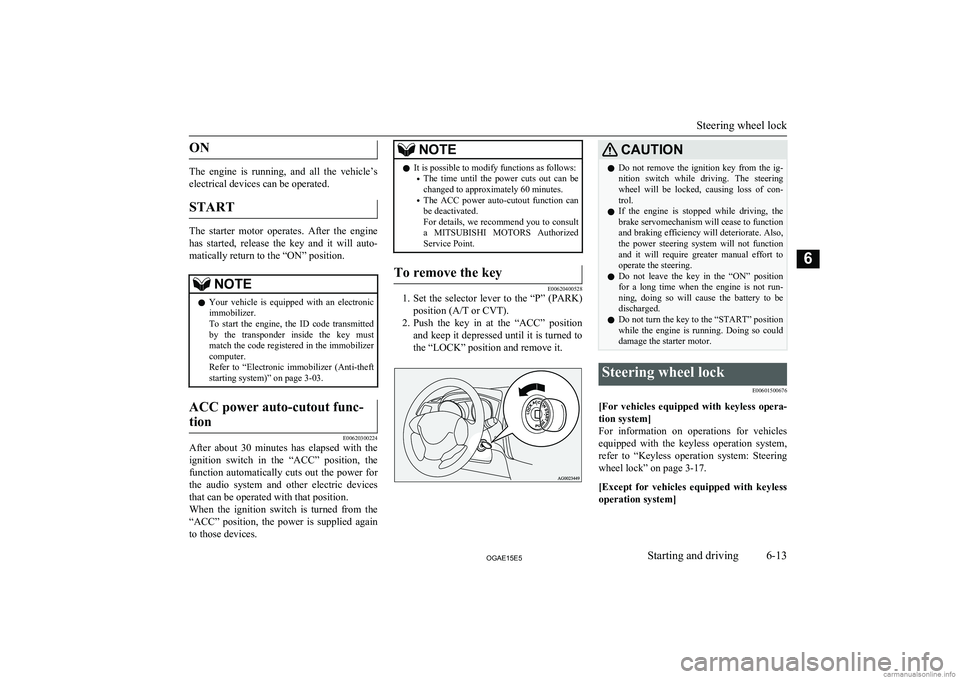
1. Set the selector lever to the “P” (PARK)
position (A/T or CVT).
2. Push the key in at the “ACC” position
and keep it depressed until it is turned tothe “LOCK” position and remove it.
CAUTIONl Do not remove the ignition key from the ig-
nition switch while driving. The steeringwheel will be locked, causing loss of con-
trol.
l If the engine is stopped while driving, the
brake servomechanism will cease to function and braking efficiency will deteriorate. Also,
the power steering system will not function
and it will require greater manual effort to
operate the steering.
l Do not leave the key in the “ON” position
for a long time when the engine is not run-
ning, doing so will cause the battery to be discharged.
l Do not turn the key to the “START” position
while the engine is running. Doing so could damage the starter motor.Steering wheel lock
E00601500676
[For vehicles equipped with keyless opera-tion system]
For information on operations for vehicles equipped with the keyless operation system,
refer to “Keyless operation system: Steering
wheel lock” on page 3-17.
[Except for vehicles equipped with keyless operation system]
Steering wheel lock
6-13OGAE15E5Starting and driving6
Page 188 of 452
NOTElWhen the engine is automatically stopped,
changes will occur in the driving operations.
Pay close attention to the following.
• The brake booster becomes inoperative
and the pedal effort will increase. If the
vehicle is moving, press down the brake pedal harder than usual.
• The electric power steering system (EPS)
becomes inoperative and it will become
harder to turn the steering wheel.CAUTIONl Observe the following precautions when the
engine is stopped automatically. Otherwise,
an unexpected accident might occur when the engine restarts automatically.
• Do not depress the accelerator pedal to
race the engine while the vehicle is stop-
ped (regardless of whether the engine is running or stopped).
Otherwise, an unexpected accident might
occur when the engine restarts automati- cally.
• When the engine is automatically stopped,
do not attempt to exit the vehicle.
Because the engine restarts automatically when the driver’s seat belt is unfastened
or the driver’s door is opened, an unex- pected accident might occur when the ve-
hicle starts moving.CAUTION• Do not move the gearshift lever to a posi-
tion other than the “N” (Neutral) position.
If the gearshift lever is moved to a posi-
tion other than the “N” (Neutral) position,
the “
” display/indicator blinks and the
buzzer sounds.
If the gearshift lever is returned to the “N”
(Neutral) position, the display/indicator
stops blinking and the buzzer stops sound- ing. The engine will not restart if the gear-
shift lever is in a position other than the “N” (Neutral) position.
NOTEl In the following cases, the Auto Stop & Go
(AS&G) system will not operate and the en- gine will not stop automatically even if thevehicle is stopped.
• Driver’s seat belt is not fastened.
• Driver’s door is open.
• Bonnet is open.
• After the engine restarts automatically,
the vehicle speed has not exceeded ap-
proximately 5 km/h (3 mph).
• Brake booster vacuum pressure is low be-
cause the brake pedal is depressed repeat- edly or depressed harder than usual.
• After the ignition switch is turned from
the “ON” position to the “START” posi- tion, approximately 30 seconds or more
have not elapsed.NOTE• After the engine restarts automatically
and the vehicle stops again within 10 sec- onds.
• After presing the engine switch to start
the engine from the operation mode is in ON, approximately 30 seconds or morehave not elapsed.
• Engine coolant temperature is low.
• Ambient temperature is lower than ap-
proximately 3 °C.
• Air conditioning is operating and passen-
ger compartment has not sufficiently cooled.
• Mode selection dial is set to the demister
position.
Refer to “Demisting of the windscreen
and door windows: For quick demisting”
on page 7-09.
• When the air conditioning is operated in
AUTO mode where the temperature con-
trol dial is set to the max. hot or the max. cool position (for vehicles with automatic
air conditioning).
• Electric power consumption is high, such
as when the rear window demister or oth- er electrical components are operating or
the blower speed is set to a high setting.
• Battery voltage or battery performance is
low.
• Check engine warning lamp is illuminated
or the “
” display/indicator is blinking.
Auto Stop & Go (AS&G) system*
6-20OGAE15E5Starting and driving6
Page 197 of 452
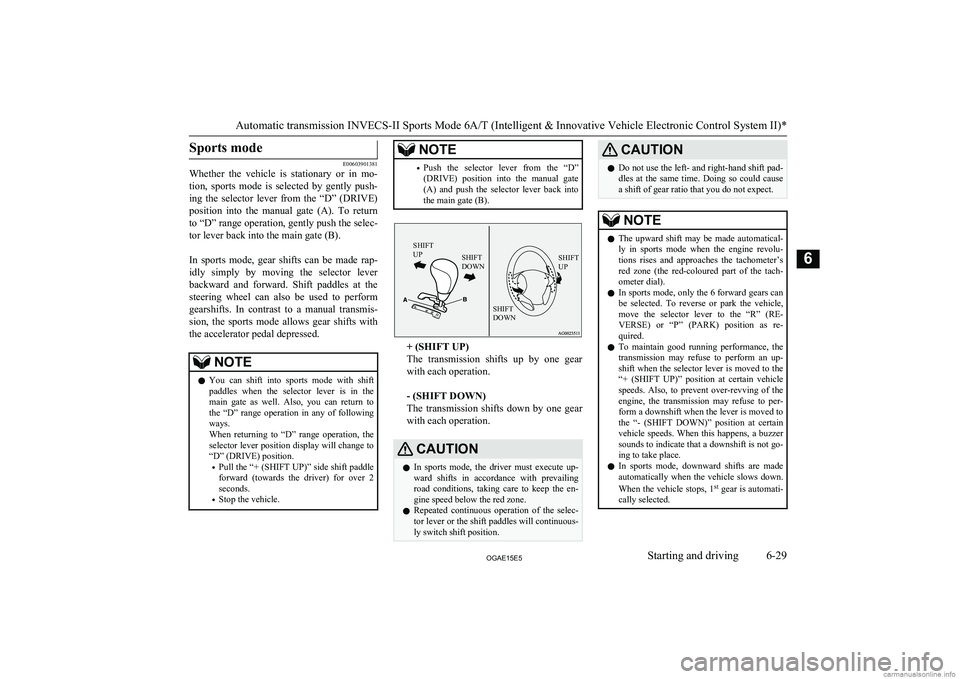
Sports mode
E00603901381
Whether the vehicle is stationary or in mo-
tion, sports mode is selected by gently push-
ing the selector lever from the “D” (DRIVE) position into the manual gate (A). To return
to “D” range operation, gently push the selec- tor lever back into the main gate (B).
In sports mode, gear shifts can be made rap- idly simply by moving the selector leverbackward and forward. Shift paddles at the steering wheel can also be used to perform
gearshifts. In contrast to a manual transmis- sion, the sports mode allows gear shifts with
the accelerator pedal depressed.
NOTEl You can shift into sports mode with shift
paddles when the selector lever is in the main gate as well. Also, you can return to
the “D” range operation in any of following ways.
When returning to “D” range operation, the selector lever position display will change to
“D” (DRIVE) position.
• Pull the “+ (SHIFT UP)” side shift paddle
forward (towards the driver) for over 2 seconds.
• Stop the vehicle.NOTE•Push the selector lever from the “D”
(DRIVE) position into the manual gate
(A) and push the selector lever back into the main gate (B).SHIFT
UPSHIFT
DOWNSHIFT
UPSHIFT
DOWN
+ (SHIFT UP)
The transmission shifts up by one gear
with each operation.
- (SHIFT DOWN)
The transmission shifts down by one gear
with each operation.
CAUTIONl In sports mode, the driver must execute up-
ward shifts in accordance with prevailingroad conditions, taking care to keep the en-
gine speed below the red zone.
l Repeated continuous operation of the selec-
tor lever or the shift paddles will continuous- ly switch shift position.CAUTIONl Do not use the left- and right-hand shift pad-
dles at the same time. Doing so could cause
a shift of gear ratio that you do not expect.NOTEl The upward shift may be made automatical-
ly in sports mode when the engine revolu-
tions rises and approaches the tachometer’s
red zone (the red-coloured part of the tach- ometer dial).
l In sports mode, only the
6 forward gears can
be selected. To reverse or park the vehicle, move the selector lever to the “R” (RE-
VERSE) or “P” (PARK) position as re- quired.
l To maintain good running performance, the
transmission may refuse to perform an up- shift when the selector lever is moved to the“+ (SHIFT UP)” position at certain vehicle
speeds. Also, to prevent over-revving of the engine, the transmission may refuse to per-
form a downshift when the lever is moved to
the “- (SHIFT DOWN)” position at certain vehicle speeds. When this happens, a buzzer
sounds to indicate that a downshift is not go-
ing to take place.
l In sports mode, downward shifts are made
automatically when the vehicle slows down.
When the vehicle stops, 1 st
gear is automati-
cally selected.
Automatic transmission INVECS-II Sports Mode 6A/T (Intelligent & Innovative Vehicle Electronic Control System II)*
6-29OGAE15E5Starting and driving6
Page 204 of 452
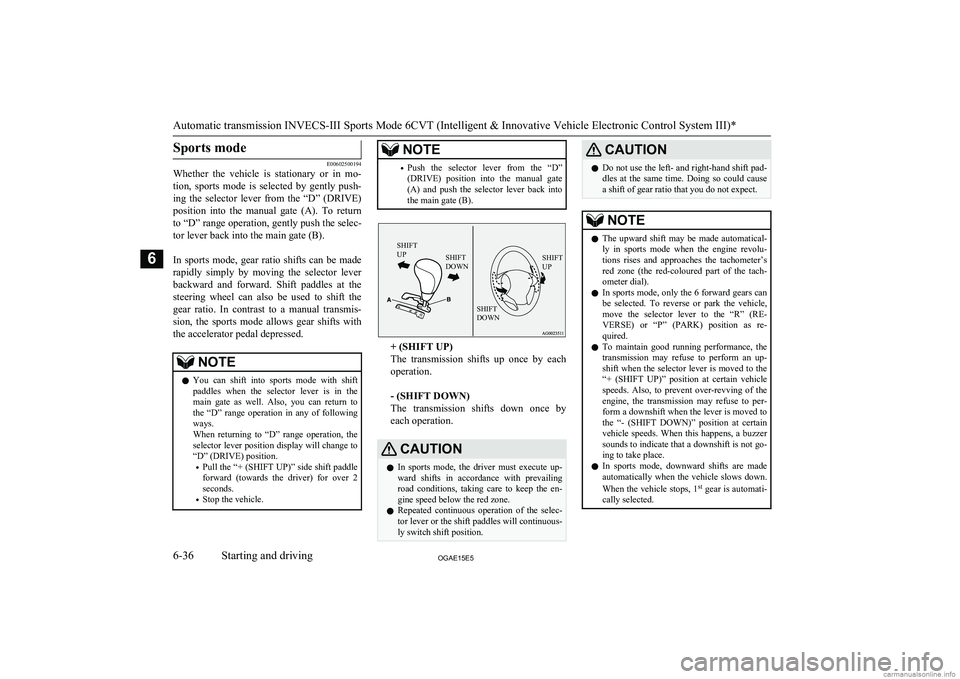
Sports mode
E00602500194
Whether the vehicle is stationary or in mo-
tion, sports mode is selected by gently push-
ing the selector lever from the “D” (DRIVE) position into the manual gate (A). To return
to “D” range operation, gently push the selec- tor lever back into the main gate (B).
In sports mode, gear ratio shifts can be made rapidly simply by moving the selector leverbackward and forward. Shift paddles at the
steering wheel can also be used to shift the gear ratio. In contrast to a manual transmis-
sion, the sports mode allows gear shifts with the accelerator pedal depressed.
NOTEl You can shift into sports mode with shift
paddles when the selector lever is in the main gate as well. Also, you can return to
the “D” range operation in any of following ways.
When returning to “D” range operation, the selector lever position display will change to
“D” (DRIVE) position.
• Pull the “+ (SHIFT UP)” side shift paddle
forward (towards the driver) for over 2 seconds.
• Stop the vehicle.NOTE•Push the selector lever from the “D”
(DRIVE) position into the manual gate
(A) and push the selector lever back into the main gate (B).SHIFT
UPSHIFT
DOWNSHIFT
UPSHIFT
DOWN
+ (SHIFT UP)
The transmission shifts up once by each operation.
- (SHIFT DOWN)
The transmission shifts down once by
each operation.
CAUTIONl In sports mode, the driver must execute up-
ward shifts in accordance with prevailingroad conditions, taking care to keep the en-
gine speed below the red zone.
l Repeated continuous operation of the selec-
tor lever or the shift paddles will continuous- ly switch shift position.CAUTIONl Do not use the left- and right-hand shift pad-
dles at the same time. Doing so could cause
a shift of gear ratio that you do not expect.NOTEl The upward shift may be made automatical-
ly in sports mode when the engine revolu-
tions rises and approaches the tachometer’s
red zone (the red-coloured part of the tach- ometer dial).
l In sports mode, only the 6 forward gears can
be selected. To reverse or park the vehicle, move the selector lever to the “R” (RE-
VERSE) or “P” (PARK) position as re- quired.
l To maintain good running performance, the
transmission may refuse to perform an up- shift when the selector lever is moved to the“+ (SHIFT UP)” position at certain vehicle
speeds. Also, to prevent over-revving of the engine, the transmission may refuse to per-
form a downshift when the lever is moved to
the “- (SHIFT DOWN)” position at certain vehicle speeds. When this happens, a buzzer
sounds to indicate that a downshift is not go-
ing to take place.
l In sports mode, downward shifts are made
automatically when the vehicle slows down.
When the vehicle stops, 1 st
gear is automati-
cally selected.
Automatic transmission INVECS-III Sports Mode 6CVT (Intelligent & Innovative Vehicle Electronic Control System III)*
6-36OGAE15E5Starting and driving6
Page 207 of 452
When the CVT makes no speedchange
E00603100139
If the transmission does not change speeds
while driving, or your vehicle does not pick up enough speed when starting on an uphillslope, it may be that there is something un-
usual happening in the transmission, causing a safety device to activate.
We recommend you to have your vehicle checked as soon as possible.
Electronically controlled
4WD system* E00604901405
The electronically controlled 4WD system isa 4-wheel drive system that allows one of
three drive modes to be selected with a switch, in accordance with the driving condi-tions.
The following drive modes are available.
Drive modeFunction
2WD
This mode is for econom-
ical driving on normal dry
roads and motorway.
Driving in front-wheel
drive.Drive modeFunction
4WD AUTO
The default mode.
This mode is for automat-
ically controlling the dis-
tribution of driving torque
to all four wheels accord-
ing to the driving condi-
tions.
4WD LOCK
This mode is for driving
in slippery conditions
such as on snow-covered
roads or sand.
The large amount of driv-
ing torque that is applied
to the rear tyres enables
getting out of slippery
areas and powerful driv-
ing is possible across all
ranges.
4-wheel drive operation requires special driv- ing skills.
Carefully read the “4-wheel drive operation”
on page 6-41 and take care to drive safely.
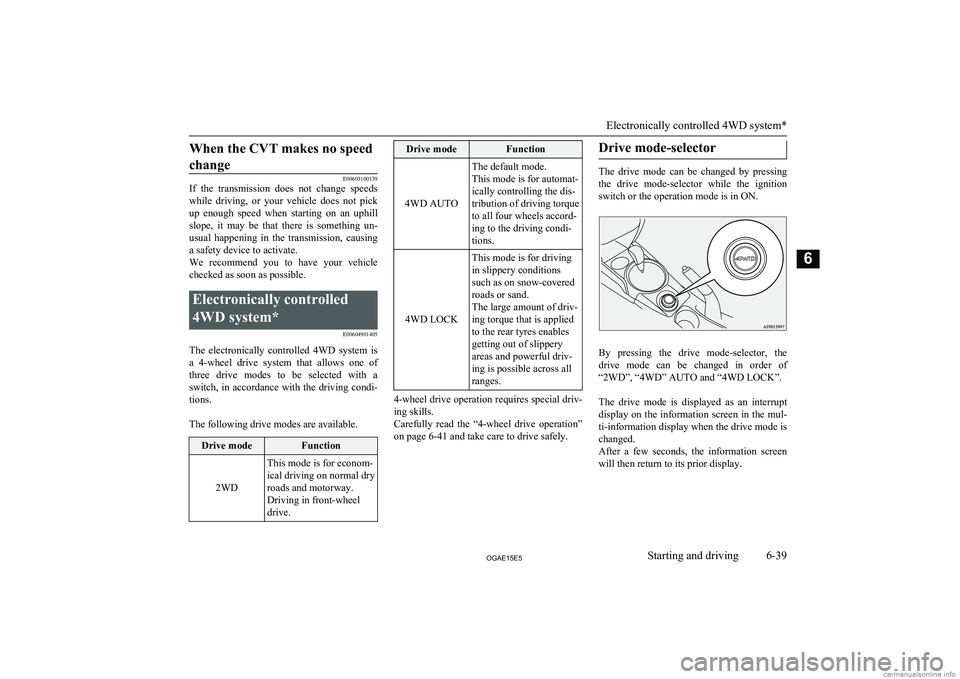
Drive mode-selector
The drive mode can be changed by pressing
the drive mode-selector while the ignition switch or the operation mode is in ON.
By pressing the drive mode-selector, the
drive mode can be changed in order of “2WD”, “4WD” AUTO and “4WD LOCK”.
The drive mode is displayed as an interrupt
display on the information screen in the mul- ti-information display when the drive mode is
changed.
After a few seconds, the information screen
will then return to its prior display.
Electronically controlled 4WD system*
6-39OGAE15E5Starting and driving6
Page 210 of 452
NOTElThe driving posture should be more upright;
adjust the seat to a good position for easy
steering and pedal operation. Be sure to wear
the seat belt.
l After driving on rough roads, check each
part of the vehicle and wash it thoroughlywith water. Refer to the “Inspection andmaintenance following rough road opera-
tion” section and “Maintenance” section.CAUTIONl Setting the drive mode-selector to “4WD
LOCK” to drive on dry paved road will in-
crease fuel consumption, with possible noise generation.
Turning sharp corners
When turning a sharp corner in “4WD
LOCK” position at low speed, a slight differ- ence in steering may be experienced similar
to as if the brakes were applied. This is called tight corner braking and results from each of
the 4 tyres being at a different distance from
the corner. The phenomenon is typical of 4- wheel drive vehicles. If this occurs, either
straighten out the steering wheel, or change to “2WD” or “4WD AUTO” mode.
On snowy or icy roads
Set the drive mode-selector to “4WD AUTO”
or “4WD LOCK” in accordance with the road conditions, and then gradually depress the accelerator pedal for a smooth start.
NOTEl The use of snow tyres is recommended.
l Maintain a safe distance between vehicles,
avoid sudden braking, and use engine brak- ing (downshifting).CAUTIONl Avoid sudden braking, sudden acceleration
and sharp turning. Skidding occurs and con-
trol of the vehicle could be lost.
Driving on sandy or muddy
roads
Set the drive mode-selector to “4WD LOCK”
and then gradually depress the accelerator pedal for a smooth start. Keep the pressure on
the accelerator pedal as constant as possible,
and drive at low speed.
CAUTIONl Do not force the vehicle or drive recklessly
on sandy surfaces. In comparison with nor-
mal road surfaces, the engine and other
drive-system components are put under ex- cessive strain when driving on such a sur-
face. This could lead to accidents.
l If the engine coolant temperature display
flashes on the information screen in the mul-
ti-information display or the engine power
drops suddenly while the vehicle is being driven, park your vehicle immediately in asafe place.
Refer to “Engine overheating” on page
8-04 for details and take the required meas-
ures.
WARNINGl When attempting to rock your vehicle out
of a stuck position, be sure that the area
around the vehicle is clear of people and physical objects. The rocking motion may
cause the vehicle to suddenly launch for- ward or backward, causing injury or damage to nearby people or objects.NOTEl Avoid sudden braking, sudden acceleration
and sharp turning; such operations could re-
sult in the vehicle becoming stuck.
4-wheel drive operation
6-42OGAE15E5Starting and driving6
Page 211 of 452
NOTElIf the vehicle becomes stuck in sandy or
muddy roads, it can often be moved with a
rocking motion. Move the gearshift lever al-
ternately between the 1 st
and “R” (Reverse)
positions ( M/T), the “D” (DRIVE) and “R”
(REVERSE) positions ( A/T or CVT), while
pressing lightly on the accelerator pedal.
l Driving on rough roads can cause rust on the
vehicle; wash the vehicle thoroughly as soon as possible after such use.
Climbing/descending sharp
grades
Your vehicle may not provide sufficient hill
climbing ability and engine braking on steep slopes. Avoid driving on steep slopes even
though the vehicle is a 4-wheel drive vehicle.
Driving through water
E00618900106
If the electrical circuits become wet, further
operation of the vehicle will be impossible;
therefore, avoid driving through water unless absolutely necessary. If driving through wa-ter is unavoidable, use the following proce-
dure:
Check the depth of the water and the terrain before attempting to drive through it. Driveslowly to avoid creating excessive water
splashing.
CAUTIONl Never drive through water that is deep
enough to cover wheel hubs, axles or ex-
haust pipe. Do not change the gearshift lever position ( M/T) or the selector lever position
(A/T or CVT) while driving through water.
Frequent driving through water can adverse-
ly affect the life span of the vehicle; we rec- ommend you to take the necessary measuresto prepare, inspect, and repair the vehicle.
l After driving through water, apply the
brakes to be sure they are functioning prop- erly. If the brakes are wet and not function-
ing properly, dry them out by driving slowly
while lightly depressing the brake pedal. In- spect each part of the vehicle carefully.Inspection and maintenance
following rough roadoperation E00606700338
After operating the vehicle in rough road
conditions, be sure to perform the following inspection and maintenance procedures:
l Check that the vehicle has not been dam-
aged by rocks, gravel, etc.
l Carefully wash the vehicle with water.
Drive the vehicle slowly while lightly
depressing the brake pedal in order to dry out the brakes. If the brakes still do
not function properly, we recommend you to have the brakes checked as soon
as possible.
l Remove the insects, dried grass, etc.
clogging the radiator core.
l After driving through water, check the
engine, transmission and differential oil. If the oil or grease is milky or cloudy be-
cause of water contamination, it must be
replaced with new oil or grease.
l Check the inside of the vehicle. If water
entry is found, dry the carpet etc.
l Inspect the headlamps, If the headlamp
bulb is flooded with water, we recom- mend you to have it drained.Cautions on handling of 4-
wheel drive vehicles E00606800818
Tyres and wheels
Since the driving torque can be applied to the
4 wheels, the driving performance of the ve- hicle when operating in 4-wheel drive is
greatly affected by the condition of the tyres.
Inspection and maintenance following rough road operation
6-43OGAE15E5Starting and driving6
Page 227 of 452
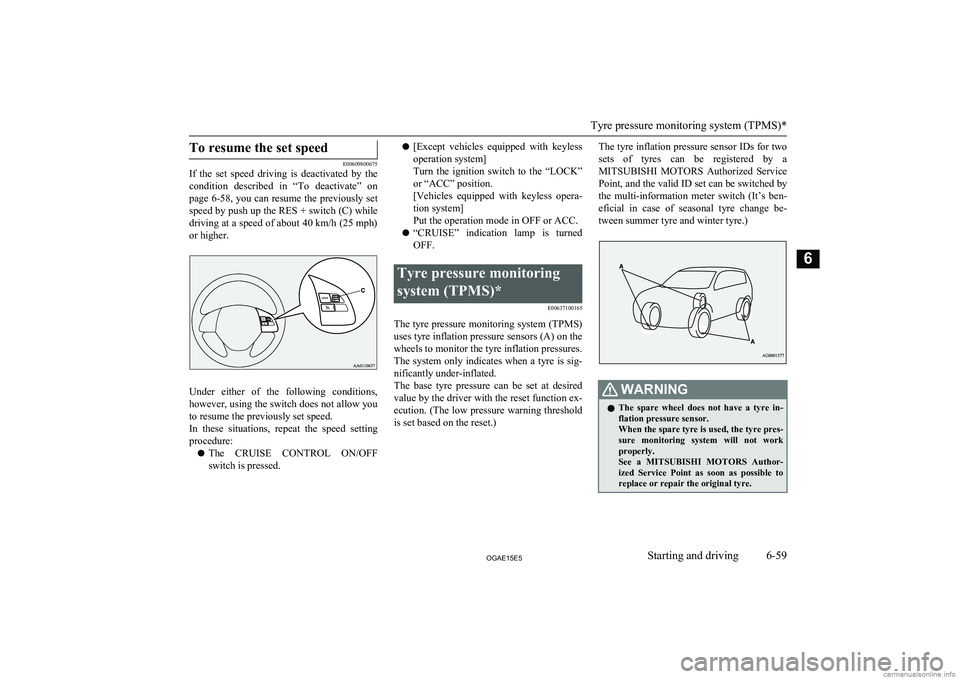
To resume the set speed
E00609800675
If the set speed driving is deactivated by the
condition described in “To deactivate” on
page 6-58, you can resume the previously set
speed by push up the RES + switch (C) while
driving at a speed of about 40 km/h (25 mph)
or higher.
Under either of the following conditions, however, using the switch does not allow you
to resume the previously set speed.
In these situations, repeat the speed setting procedure:
l The CRUISE CONTROL ON/OFF
switch is pressed.
l [Except vehicles equipped with keyless
operation system]
Turn the ignition switch to the “LOCK”
or “ACC” position.
[Vehicles equipped with keyless opera- tion system]
Put the operation mode in OFF or ACC.
l “CRUISE” indication lamp is turned
OFF.Tyre pressure monitoring
system (TPMS)* E00637100165
The tyre pressure monitoring system (TPMS)
uses tyre inflation pressure sensors (A) on the wheels to monitor the tyre inflation pressures.
The system only indicates when a tyre is sig-
nificantly under-inflated.
The base tyre pressure can be set at desired value by the driver with the reset function ex-
ecution. (The low pressure warning threshold is set based on the reset.)
The tyre inflation pressure sensor IDs for two
sets of tyres can be registered by aMITSUBISHI MOTORS Authorized Service
Point, and the valid ID set can be switched by the multi-information meter switch (It’s ben-
eficial in case of seasonal tyre change be- tween summer tyre and winter tyre.)WARNINGl The spare wheel does not have a tyre in-
flation pressure sensor.
When the spare tyre is used, the tyre pres- sure monitoring system will not work
properly.
See a MITSUBISHI MOTORS Author-
ized Service Point as soon as possible to replace or repair the original tyre.
Tyre pressure monitoring system (TPMS)*
6-59OGAE15E5Starting and driving6
Page 303 of 452
SEND function
E00761300035
During a call, press the SPEECH button to
enter voice recognition mode, then say “
For example, if during a call you need to sim-
ulate the press of a phone button as a re- sponse to an automated system, press theSPEECH button and speak “1 2 3 4 pound SEND” and the 1234# will be sent on your
cellular phone.
Receiving calls
E00761600025
If an incoming phone call is received while the ignition switch or the operation mode isin ON or ACC, the audio system will be au-
tomatically turned on and switched to the in-
coming call, even when the audio system was originally off.
The voice guide announcement for the in-
coming call will be output from the front pas- senger’s seat speaker.
If the CD player or radio was playing when
the incoming call was received, the audio system will mute the sound from the CD
player or radio and output only the incoming call.
To receive the call, press the PICK-UP but- ton on the steering wheel control switch.
When the call is over, the audio system will return to its previous state.
MUTE function
E00760300054
At any time during a call, you can mute the
vehicle microphone.
Pressing the SPEECH button and then saying
“Mute” during a call will turn ON the MUTE
function and mute the microphone.
Saying “Mute off” in the same way will turn off the MUTE function and cancel the muteon the microphone.
Switching between hands-free
mode and private mode
E00761400036
The Bluetooth ®
2.0 interface can switch be-
tween Hands-free mode (Hands-free calls) and private mode (calls using cellular phone).If you press the SPEECH button and say “Transfer call” during a Hands-free call, you
can stop the Hands-free mode and talk in pri-
vate mode.
To return to Hands-free mode, press the SPEECH button again and say “Transfer
call”.
Phone book function
E00763700020
The Bluetooth ®
2.0 interface has 2 types of
unique phone books that are different from
the phone book stored in the cellular phone. They are the vehicle phone book and the mo-
bile phone book.
These phone books are used to register tele-
phone numbers and to make calls to desired
numbers via the voice recognition function.NOTEl Disconnecting the battery cable will not de-
lete information registered in the phone
book.Vehicle phone book
E00763801318
This phone book is used when making calls
with the voice recognition function.
Up to 32 names can be registered in the vehi-
cle phone book per language.
Also, each entry has 4 locations associated with: home, work, mobile and other. You can
register one telephone number for each loca- tion.
You can register a desired name as a name
for any phone book entry registered in the ve- hicle phone book.
Names and telephone numbers can be
changed later on.
The vehicle phone book can be used with all paired cellular phones.
Bluetooth ®
2.0 interface*
7-61OGAE15E5For pleasant driving7