ECO mode MITSUBISHI ASX 2018 (in English) Service Manual
[x] Cancel search | Manufacturer: MITSUBISHI, Model Year: 2018, Model line: ASX, Model: MITSUBISHI ASX 2018Pages: 514, PDF Size: 34.89 MB
Page 129 of 514
3.Press and hold the multi-information
meter switch for about 2 seconds or more to display “LANGUAGE” (lan-
guage setting).
4. Lightly press the multi-information me-
ter switch to select the desired language.
5. If you hold down the multi-information
meter switch for about 2 seconds or more, the setting is changed to the selec- ted language.NOTEl The memory of the language setting is
erased if the battery is disconnected, and it returns automatically to ENGLISH or RUS-
SIAN.
l If “---” is selected in the language setting, a
warning message is not displayed when there is a warning display or interrupt dis-
play.Operation sound setting
E00523401714
You can turn off the operation sounds of the
multi-information meter switch and daytime
dipper button. 1. Press and hold the multi-information
meter switch for about 2 seconds or more to switch from the setting mode screen to the menu screen.
Refer to “Changing the function settings
(when the ignition switch or the opera- tion mode is ON)” on page 5-19.
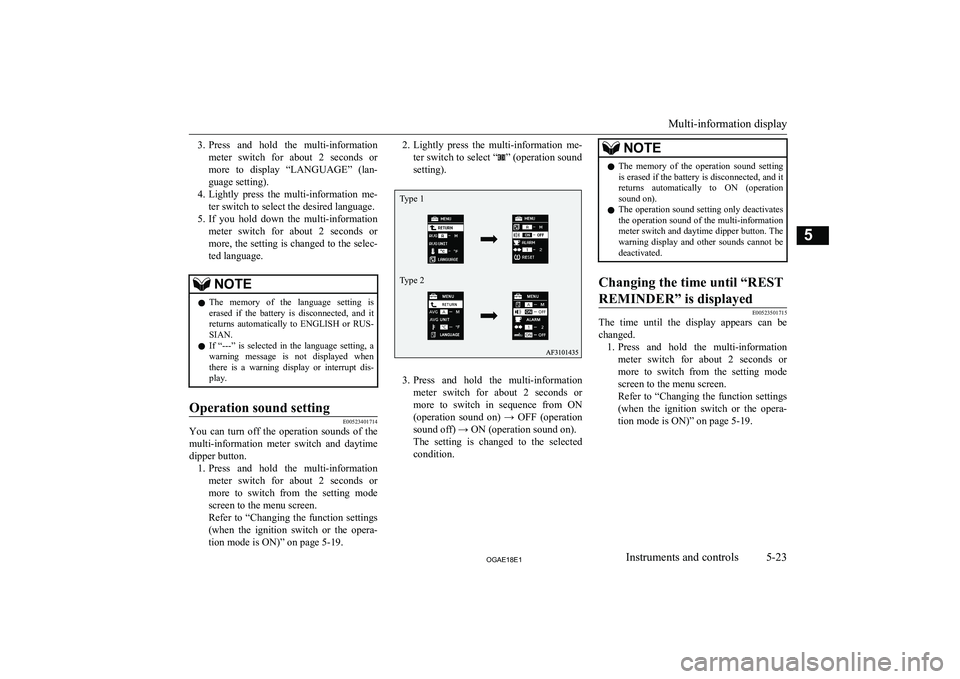
2. Lightly press the multi-information me-
ter switch to select “
” (operation sound
setting).
3. Press and hold the multi-information
meter switch for about 2 seconds or more to switch in sequence from ON(operation sound on) → OFF (operation
sound off) → ON (operation sound on).
The setting is changed to the selected condition.
NOTEl The memory of the operation sound setting
is erased if the battery is disconnected, and it returns automatically to ON (operationsound on).
l The operation sound setting only deactivates
the operation sound of the multi-information meter switch and daytime dipper button. The
warning display and other sounds cannot be deactivated.Changing the time until “REST
REMINDER” is displayed
E00523501715
The time until the display appears can be changed. 1. Press and hold the multi-information
meter switch for about 2 seconds or more to switch from the setting mode
screen to the menu screen.
Refer to “Changing the function settings (when the ignition switch or the opera-
tion mode is ON)” on page 5-19.
Multi-information display
5-23OGAE18E1Instruments and controls5 Type 1
Type 2
Page 130 of 514
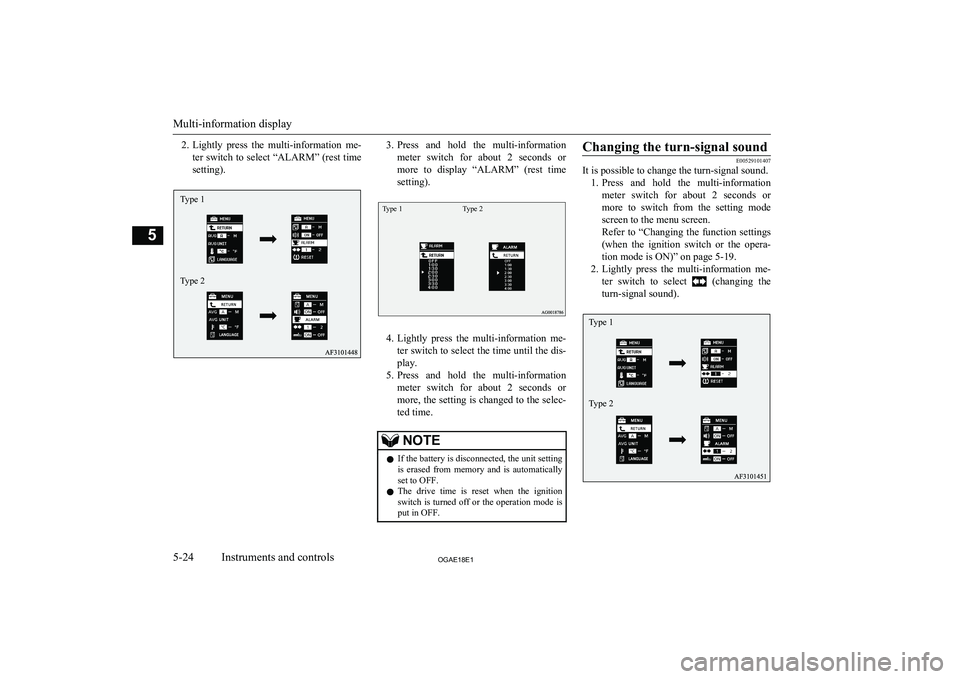
2.Lightly press the multi-information me-
ter switch to select “ALARM” (rest time
setting).3. Press and hold the multi-information
meter switch for about 2 seconds or more to display “ALARM” (rest time
setting).Type 1Type 2
4. Lightly press the multi-information me-
ter switch to select the time until the dis- play.
5. Press and hold the multi-information
meter switch for about 2 seconds or more, the setting is changed to the selec- ted time.
NOTEl If the battery is disconnected, the unit setting
is erased from memory and is automatically
set to OFF.
l The drive time is reset when the ignition
switch is turned off or the operation mode is
put in OFF.Changing the turn-signal sound
E00529101407
It is possible to change the turn-signal sound.
1. Press and hold the multi-information
meter switch for about 2 seconds or more to switch from the setting mode
screen to the menu screen.
Refer to “Changing the function settings (when the ignition switch or the opera- tion mode is ON)” on page 5-19.
2. Lightly press the multi-information me-
ter switch to select
(changing the
turn-signal sound).
Multi-information display
5-24OGAE18E1Instruments and controls5Type 1
Type 2 Type 1
Type 2
Page 131 of 514
3.Press and hold the multi-information
meter switch for about 2 seconds or more to switch in sequence from 1 (turn- signal sound 1) → 2 (turn-signal sound
2) → 1 (turn-signal sound 1).
The setting changes to the selected turn- signal sound.Changing the momentary fuel
consumption display (Type 2)
E00529200195
It is possible to change the bar graph setting of the momentary fuel consumption display. 1. Press and hold the multi-information
meter switch for about 2 seconds ormore to switch from the setting mode
screen to the menu screen.
Refer to “Changing the function settings (when the ignition switch or the opera-
tion mode is ON)” on page 5-19.
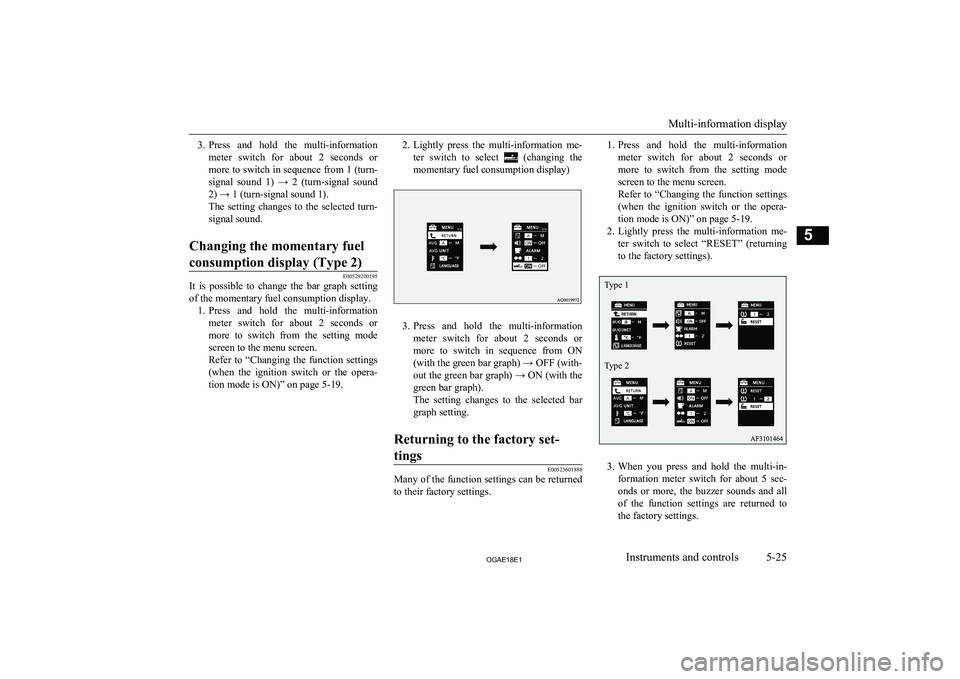
2. Lightly press the multi-information me-
ter switch to select
(changing the
momentary fuel consumption display)
3. Press and hold the multi-information
meter switch for about 2 seconds or more to switch in sequence from ON(with the green bar graph) → OFF (with-
out the green bar graph) → ON (with the green bar graph).
The setting changes to the selected bar
graph setting.
Returning to the factory set-
tings
E00523601888
Many of the function settings can be returned
to their factory settings.
1. Press and hold the multi-information
meter switch for about 2 seconds or more to switch from the setting mode
screen to the menu screen.
Refer to “Changing the function settings (when the ignition switch or the opera- tion mode is ON)” on page 5-19.
2. Lightly press the multi-information me-
ter switch to select “RESET” (returning to the factory settings).
3. When you press and hold the multi-in-
formation meter switch for about 5 sec-
onds or more, the buzzer sounds and all of the function settings are returned to
the factory settings.
Multi-information display
5-25OGAE18E1Instruments and controls5 Type 1
Type 2
Page 134 of 514
NOTElA warning may be displayed on the information screen and the buzzer may sound in the following rare cases.
This is caused by the system picking up interference such as noise or strong electromagnetic waves, and is not a functional problem.
• An extremely strong electromagnetic wave is received from a source such as an illegal radio set, a spark from a wire, or a radar station.
• Abnormal voltage or a static electricity discharge is generated by the operation of installed electrical equipment (including after-market parts).
If the warning display appears many times, we recommend you to consult a MITSUBISHI MOTORS Authorized Service Point.
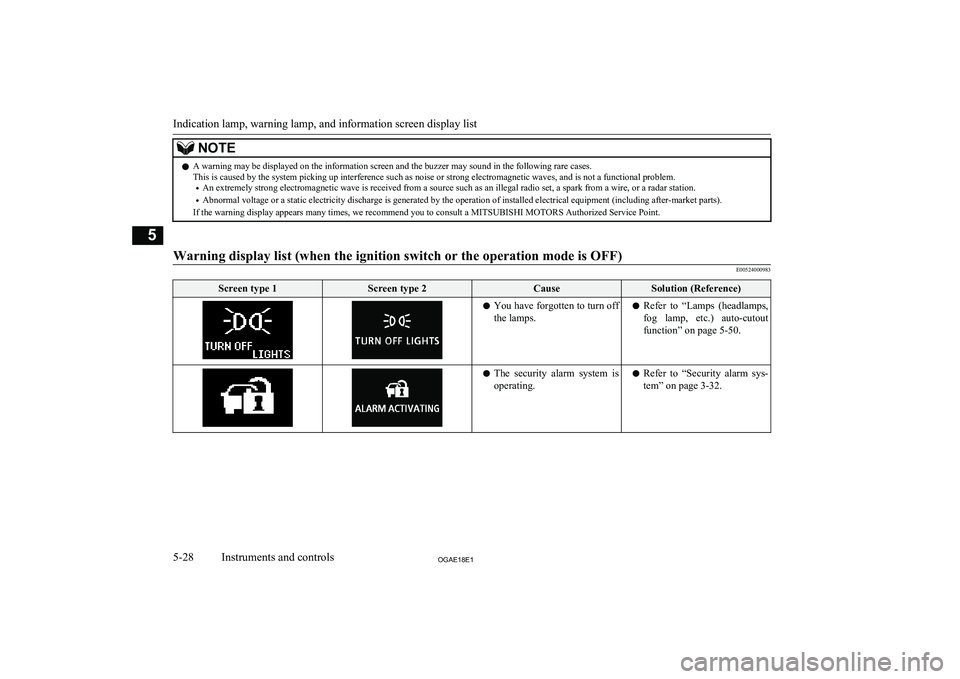
Warning display list (when the ignition switch or the operation mode is OFF)
E00524000983
Screen type 1Screen type 2CauseSolution (Reference)l You have forgotten to turn off
the lamps.l Refer to “Lamps (headlamps,
fog lamp, etc.) auto-cutout
function” on page 5-50.l The security alarm system is
operating.l Refer to “Security alarm sys-
tem” on page 3-32.
Indication lamp, warning lamp, and information screen display list
5-28OGAE18E1Instruments and controls5
Page 137 of 514
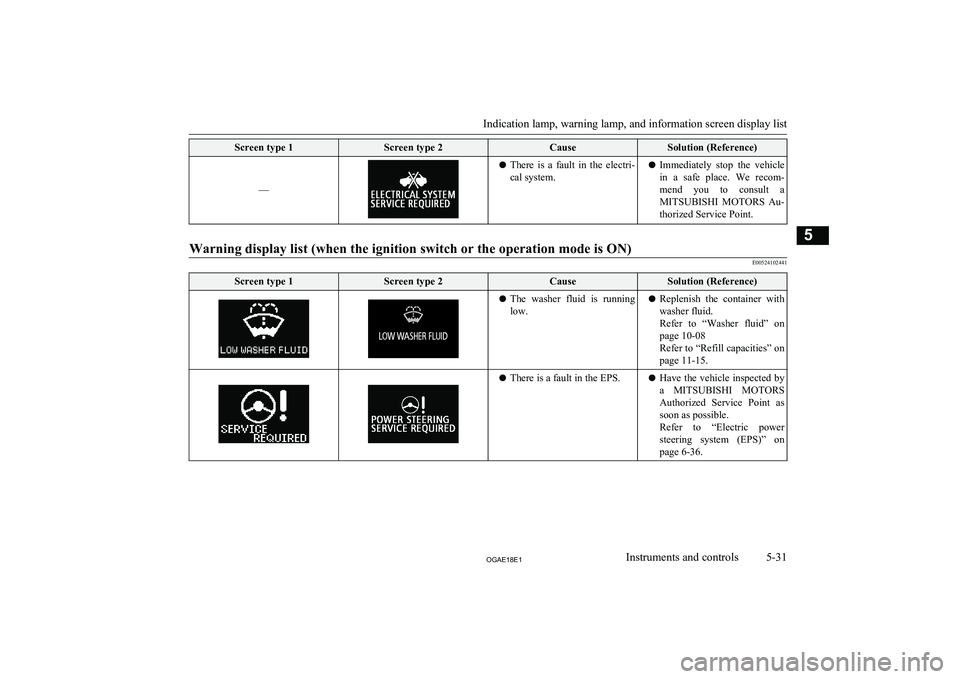
Screen type 1Screen type 2CauseSolution (Reference)
––
lThere is a fault in the electri-
cal system.l Immediately stop the vehicle
in a safe place. We recom-mend you to consult a MITSUBISHI MOTORS Au-
thorized Service Point.
Warning display list (when the ignition switch or the operation mode is ON)
E00524102441
Screen type 1Screen type 2CauseSolution (Reference)l The washer fluid is running
low.l Replenish the container with
washer fluid.
Refer to “Washer fluid” on
page 10-08
Refer to “Refill capacities” on page 11-15.l There is a fault in the EPS.l Have the vehicle inspected by
a MITSUBISHI MOTORS
Authorized Service Point as soon as possible.
Refer to “Electric power
steering system (EPS)” on
page 6-36.
Indication lamp, warning lamp, and information screen display list
5-31OGAE18E1Instruments and controls5
Page 139 of 514
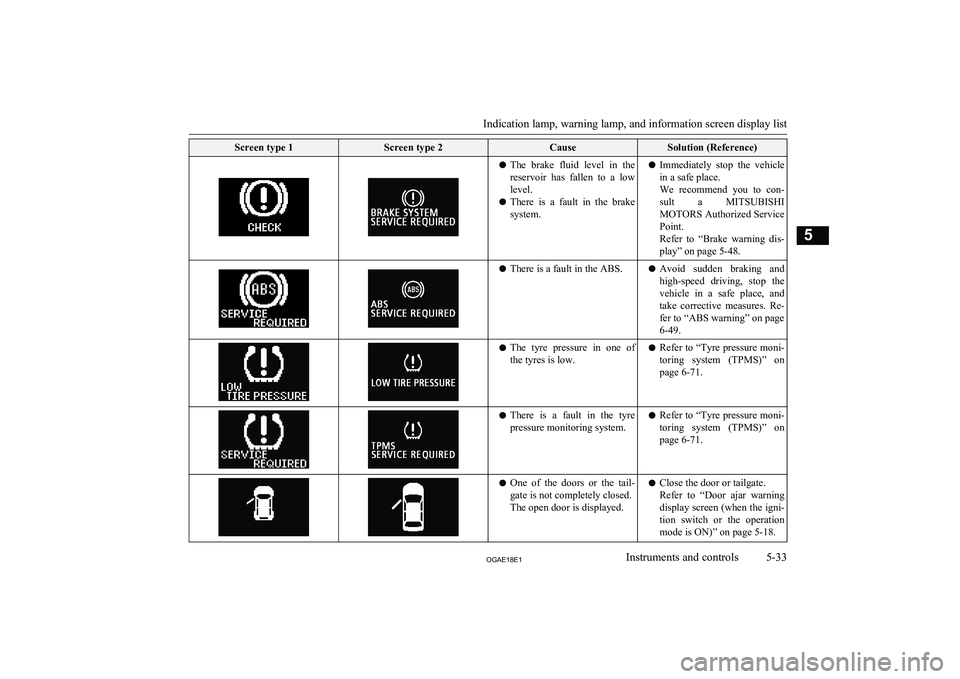
Screen type 1Screen type 2CauseSolution (Reference)lThe brake fluid level in the
reservoir has fallen to a low level.
l There is a fault in the brake
system.l Immediately stop the vehicle
in a safe place.
We recommend you to con-
sult a MITSUBISHI
MOTORS Authorized Service
Point.
Refer to “Brake warning dis-
play” on page 5-48.l There is a fault in the ABS.l Avoid sudden braking and
high-speed driving, stop the vehicle in a safe place, and take corrective measures. Re-fer to “ABS warning” on page
6-49.l The tyre pressure in one of
the tyres is low.l Refer to “Tyre pressure moni-
toring system (TPMS)” on
page 6-71.l There is a fault in the tyre
pressure monitoring system.l Refer to “Tyre pressure moni-
toring system (TPMS)” on
page 6-71.l One of the doors or the tail-
gate is not completely closed.
The open door is displayed.l Close the door or tailgate.
Refer to “Door ajar warning
display screen (when the igni- tion switch or the operation
mode is ON)” on page 5-18.
Indication lamp, warning lamp, and information screen display list
5-33OGAE18E1Instruments and controls5
Page 140 of 514
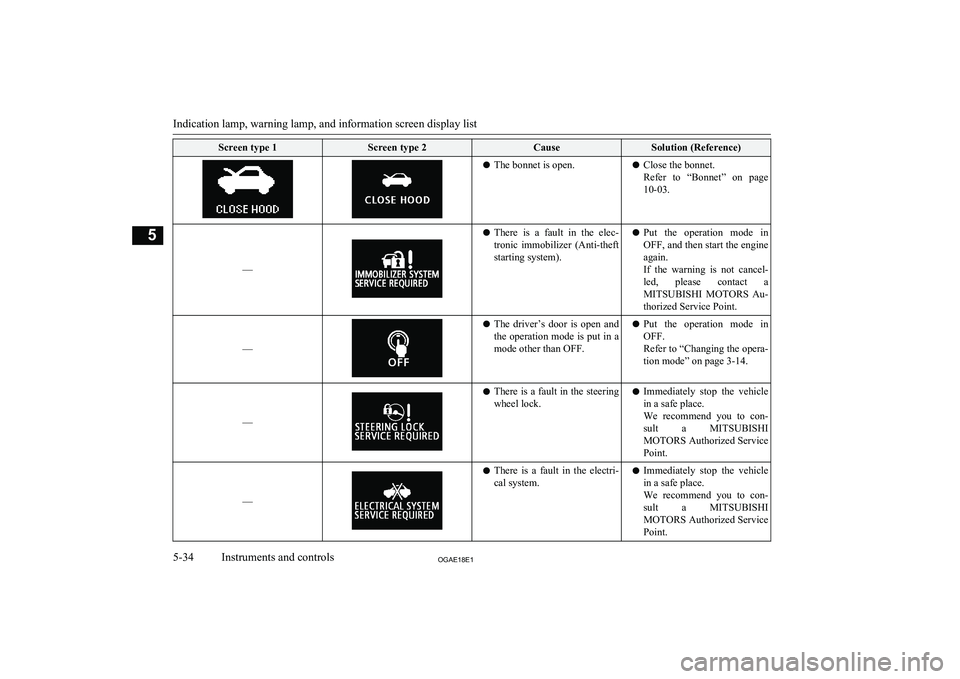
Screen type 1Screen type 2CauseSolution (Reference)lThe bonnet is open.lClose the bonnet.
Refer to “Bonnet” on page 10-03.
––
l There is a fault in the elec-
tronic immobilizer (Anti-theft
starting system).l Put the operation mode in
OFF, and then start the engine again.
If the warning is not cancel-
led, please contact a
MITSUBISHI MOTORS Au-
thorized Service Point.
––
l The driver’s door is open and
the operation mode is put in a
mode other than OFF.l Put the operation mode in
OFF.
Refer to “Changing the opera- tion mode” on page 3-14.
––
l There is a fault in the steering
wheel lock.l Immediately stop the vehicle
in a safe place.
We recommend you to con-
sult a MITSUBISHI
MOTORS Authorized Service
Point.
––
l There is a fault in the electri-
cal system.l Immediately stop the vehicle
in a safe place.
We recommend you to con-
sult a MITSUBISHI
MOTORS Authorized Service
Point.
Indication lamp, warning lamp, and information screen display list
5-34OGAE18E1Instruments and controls5
Page 141 of 514
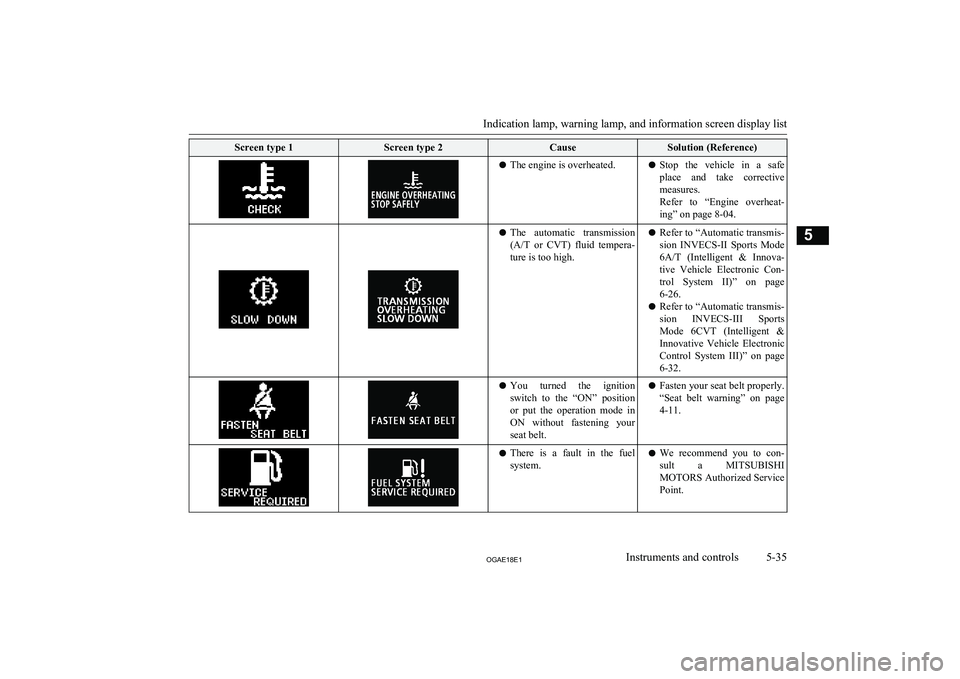
Screen type 1Screen type 2CauseSolution (Reference)lThe engine is overheated.lStop the vehicle in a safe
place and take corrective measures.
Refer to “Engine overheat-
ing” on page 8-04.l The automatic transmission
(A/T or CVT) fluid tempera-
ture is too high.l Refer to “Automatic transmis-
sion INVECS-II Sports Mode
6A/T (Intelligent & Innova-
tive Vehicle Electronic Con-
trol System II)” on page 6-26.
l Refer to “Automatic transmis-
sion INVECS-III Sports
Mode 6CVT (Intelligent & Innovative Vehicle Electronic
Control System III)” on page 6-32.l You turned the ignition
switch to the “ON” positionor put the operation mode in
ON without fastening your
seat belt.l Fasten your seat belt properly.
“Seat belt warning” on page
4-11.l There is a fault in the fuel
system.l We recommend you to con-
sult a MITSUBISHI
MOTORS Authorized Service
Point.
Indication lamp, warning lamp, and information screen display list
5-35OGAE18E1Instruments and controls5
Page 143 of 514
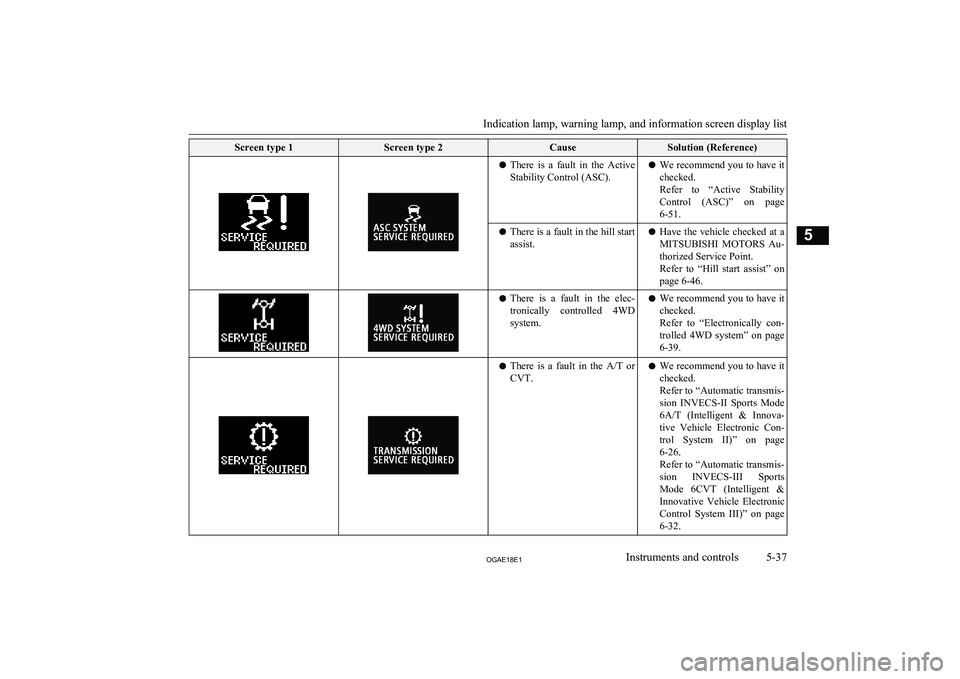
Screen type 1Screen type 2CauseSolution (Reference)lThere is a fault in the Active
Stability Control (ASC).l We recommend you to have it
checked.
Refer to “Active Stability Control (ASC)” on page
6-51.l There is a fault in the hill start
assist.l Have the vehicle checked at a
MITSUBISHI MOTORS Au-
thorized Service Point.
Refer to “Hill start assist” on page 6-46.l There is a fault in the elec-
tronically controlled 4WD
system.l We recommend you to have it
checked.
Refer to “Electronically con- trolled 4WD system” on page
6-39.l There is a fault in the
A/T or
CVT.l We recommend you to have it
checked.
Refer to “Automatic transmis-
sion INVECS-II Sports Mode
6A/T (Intelligent & Innova-
tive Vehicle Electronic Con- trol System II)” on page6-26.
Refer to “Automatic transmis-
sion INVECS-III Sports
Mode 6CVT (Intelligent & Innovative Vehicle Electronic
Control System III)” on page
6-32.
Indication lamp, warning lamp, and information screen display list
5-37OGAE18E1Instruments and controls5
Page 151 of 514
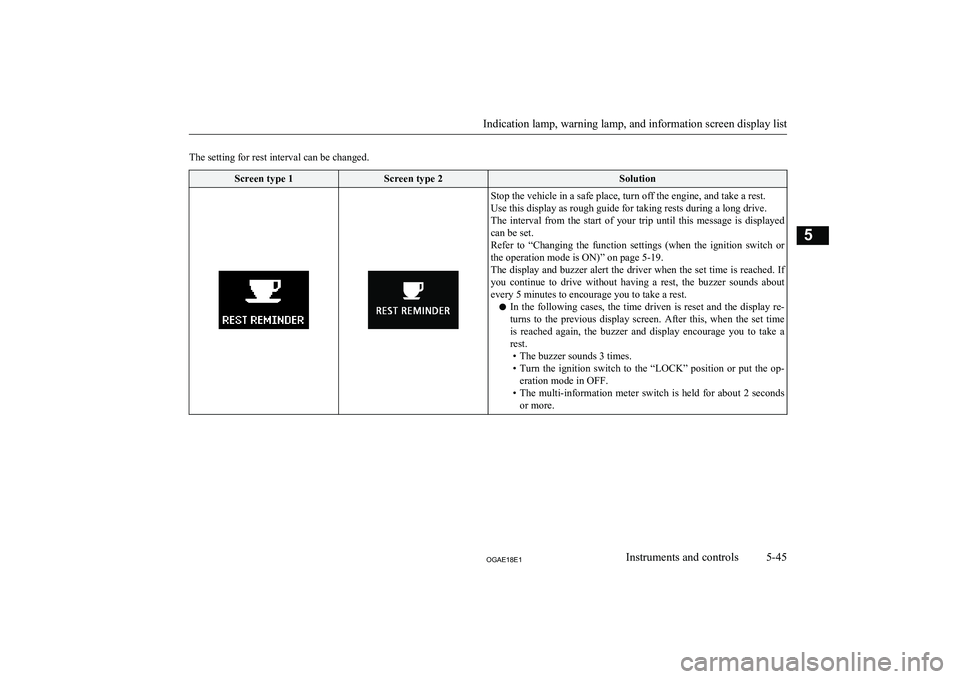
The setting for rest interval can be changed.Screen type 1Screen type 2SolutionStop the vehicle in a safe place, turn off the engine, and take a rest.
Use this display as rough guide for taking rests during a long drive.
The interval from the start of your trip until this message is displayed
can be set.
Refer to “Changing the function settings (when the ignition switch or the operation mode is ON)” on page 5-19.
The display and buzzer alert the driver when the set time is reached. If you continue to drive without having a rest, the buzzer sounds about every 5 minutes to encourage you to take a rest.
l In the following cases, the time driven is reset and the display re-
turns to the previous display screen. After this, when the set time
is reached again, the buzzer and display encourage you to take a rest.
• The buzzer sounds 3 times.
• Turn the ignition switch to the “LOCK” position or put the op-
eration mode in OFF.
• The multi-information meter switch is held for about 2 seconds
or more.
Indication lamp, warning lamp, and information screen display list
5-45OGAE18E1Instruments and controls5