light MITSUBISHI COLT 2008 (in English) Owner's Guide
[x] Cancel search | Manufacturer: MITSUBISHI, Model Year: 2008, Model line: COLT, Model: MITSUBISHI COLT 2008Pages: 450, PDF Size: 14.57 MB
Page 202 of 450
4-36 Starting and driving
4
When driving downhill
It is important to take advantage of engine braking by shifting
to a lower shift position while driving on steep downhill roads
in order to prevent the brakes from overheating.
Brake pads and linings
●With new brake pads or linings, avoid where possible sud-
den full application of the brakes for the first 200 km (120
miles) of driving.
● The disc brakes are fitted with a warning device which
emits a shrieking metallic sound while braking if the
brake pads have reached their limit.
If you hear this sound, have the brake pads replaced.
Anti-lock brake system (ABS)
E00607100791
Environmental conditions can ha ve an effect on braking. Dur-
ing sudden braking when there is snow, ice, oil, water etc. on
the road surface, a skid may occur. In this situation, steering
control and braking effectivenes s is reduced and the stopping
distance is increased. The vehicl e may also go into an uncon-
trolled spin.
The ABS helps prevent the wheel s from locking during brak-
ing, thus maintaining directional stability, ensuring controlla-
bility and providing optimum braking force.
Driving hints
● When using the anti-lock brak e system (sudden braking),
steering is slightly different from normal driving condi-
tions. Use the steering wheel carefully.
● Always maintain the same di stance from the vehicle in
front of you as you would for a vehicle not equipped with
ABS.
Compared with vehicles not fitted with ABS, your vehicle
may require a longer stopping distance in the following
cases:
• Driving on gravel or snow-covered roads.
• Driving with tyre chains installed.
• Driving on roads where the road surface is pitted or has
other differences in surface height.
• Driving on bumpy roads or other poor driving surfaces.
WARNING!
●Do not leave any objects ne ar the brake pedal or let
a floor mat slide under it; doing so could prevent the
full pedal stroke that woul d be necessary in an emer-
gency. Make sure that the pedal can be operated
freely at all times. Make sure the floor mat is
securely held in place.
WARNING!
● Driving with worn brake pads will make it harder to
stop, and can cause an accident.
Page 204 of 450
4-38 Starting and driving
4
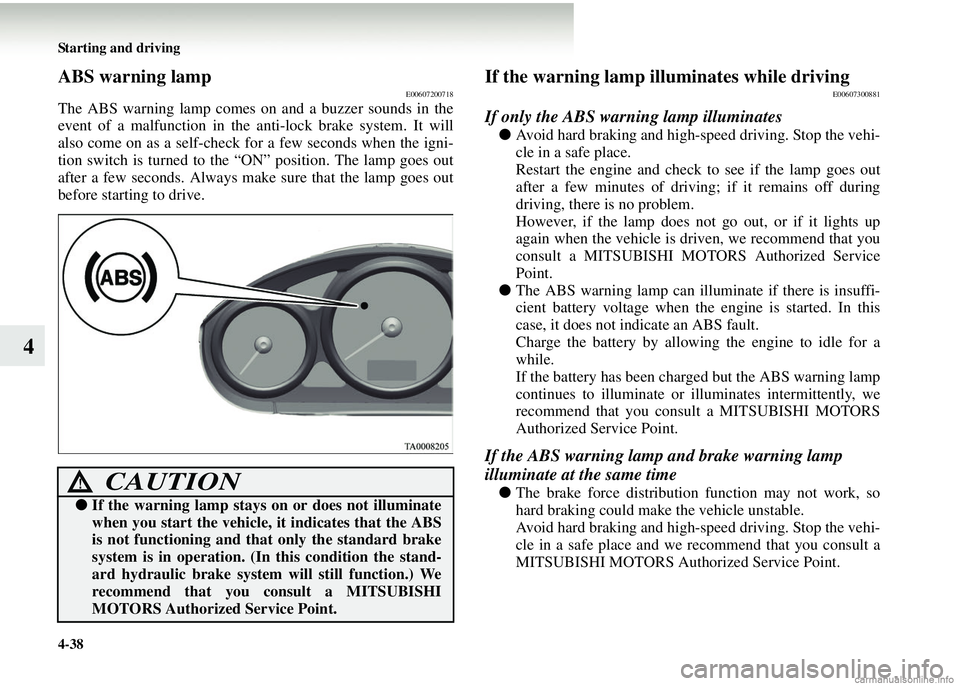
ABS warning lampE00607200718
The ABS warning lamp comes on and a buzzer sounds in the
event of a malfunction in the anti-lock brake system. It will
also come on as a self-check for a few seconds when the igni-
tion switch is turned to the “ON” position. The lamp goes out
after a few seconds. Always make sure that the lamp goes out
before starting to drive.
If the warning lamp illuminates while drivingE00607300881
If only the ABS warning lamp illuminates
● Avoid hard braking and high-speed driving. Stop the vehi-
cle in a safe place.
Restart the engine and check to see if the lamp goes out
after a few minutes of driving; if it remains off during
driving, there is no problem.
However, if the lamp does not go out, or if it lights up
again when the vehicle is dr iven, we recommend that you
consult a MITSUBISHI MOTORS Authorized Service
Point.
● The ABS warning lamp can illuminate if there is insuffi-
cient battery voltage when the engine is started. In this
case, it does not indicate an ABS fault.
Charge the battery by allowing the engine to idle for a
while.
If the battery has been charged but the ABS warning lamp
continues to illuminate or illuminates intermittently, we
recommend that you cons ult a MITSUBISHI MOTORS
Authorized Service Point.
If the ABS warning lamp and brake warning lamp
illuminate at the same time
● The brake force distribution function may not work, so
hard braking could make the vehicle unstable.
Avoid hard braking and high-speed driving. Stop the vehi-
cle in a safe place and we recommend that you consult a
MITSUBISHI MOTORS Authorized Service Point.CAUTION!
●If the warning lamp stays on or does not illuminate
when you start the vehicle, it indicates that the ABS
is not functioning and that only the standard brake
system is in operation. (I n this condition the stand-
ard hydraulic brake system will still function.) We
recommend that you consult a MITSUBISHI
MOTORS Authorized Service Point.
Page 215 of 450
Starting and driving4-49
4
Operating hints
●Do not let the clutch slip and do not increase the engine
speed more than necessary when starting.
● Be sure that the driving speed does not exceed the 100
km/h (62 mph) for trailer operation.
It is also recommended that you comply with the local
regulations if the driving speed with a trailer is limited to
less than 100 km/h (62 mph).
● To prevent shocks from an overrun brake, depress the
brake pedal lightly at first and then more strongly.
● To make full use of engine braking, change to a lower
gear before descending a slope.
● The body, brakes, clutch, and chassis will be under addi-
tional strain when towing a trailer.
● The heavier weight and high er rolling and air resistance
will increase fuel consumption.
Page 227 of 450
For pleasant driving5-11
5
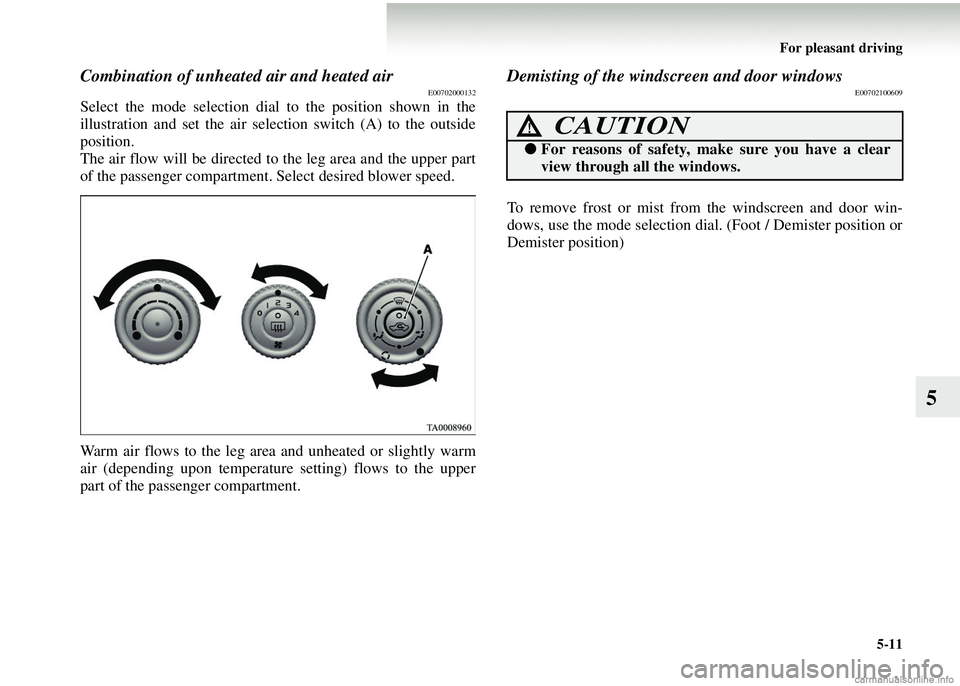
Combination of unheated air and heated airE00702000132
Select the mode selection dial to the position shown in the
illustration and set the air selection switch (A) to the outside
position.
The air flow will be directed to the leg area and the upper part
of the passenger compartment. Select desired blower speed.
Warm air flows to the leg area and unheated or slightly warm
air (depending upon temperature setting) flows to the upper
part of the passenger compartment.
Demisting of the windscreen and door windowsE00702100609
To remove frost or mist from the windscreen and door win-
dows, use the mode selection dial. (Foot / Demister position or
Demister position)
CAUTION!
● For reasons of safety, make sure you have a clear
view through all the windows.
Page 233 of 450
For pleasant driving5-17
5
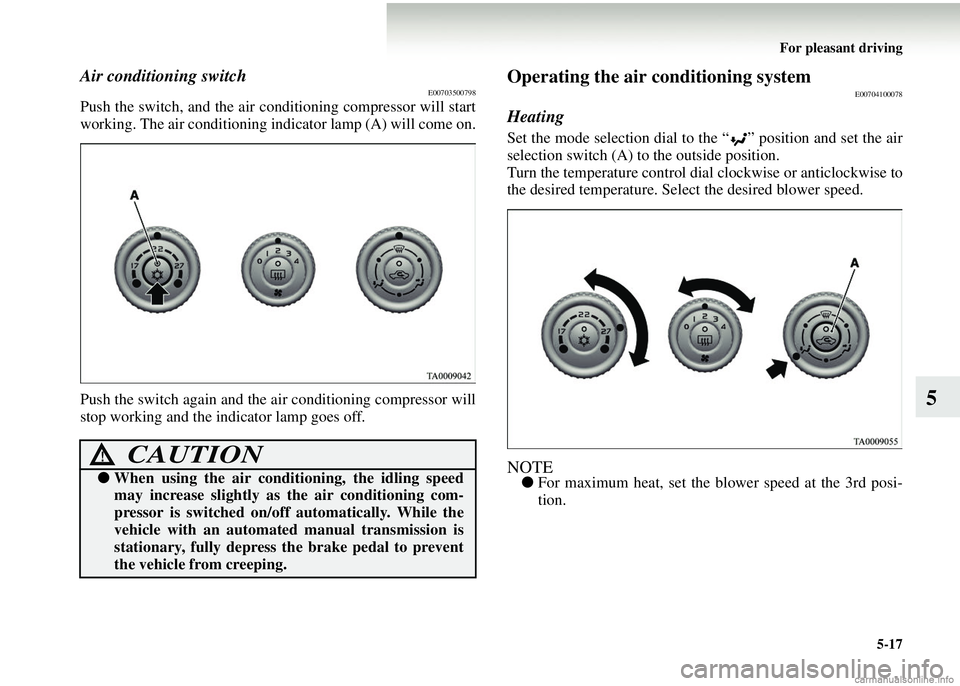
Air conditioning switchE00703500798
Push the switch, and the air conditioning compressor will start
working. The air conditioning indicator lamp (A) will come on.
Push the switch agai n and the air conditioning compressor will
stop working and the indicator lamp goes off.
Operating the air conditioning systemE00704100078
Heating
Set the mode selection dial to the “ ” position and set the air
selection switch (A) to the outside position.
Turn the temperature control dial clockwise or anticlockwise to
the desired temperature. Sel ect the desired blower speed.
NOTE●For maximum heat, set the bl ower speed at the 3rd posi-
tion.
CAUTION!
● When using the air conditi oning, the idling speed
may increase slightly as the air conditioning com-
pressor is switched on/off automatically. While the
vehicle with an automated manual transmission is
stationary, fully depress th e brake pedal to prevent
the vehicle from creeping.
Page 235 of 450
For pleasant driving5-19
5
NOTE●If the outside air is dusty or otherwise contaminated, or if
high cooling performance is desired, set air selection
switch to the recirculation position and the temperature
control dial all the way to the left.
Switch to the outside position periodically to increase
ventilation so that the windows do not become fogged up.
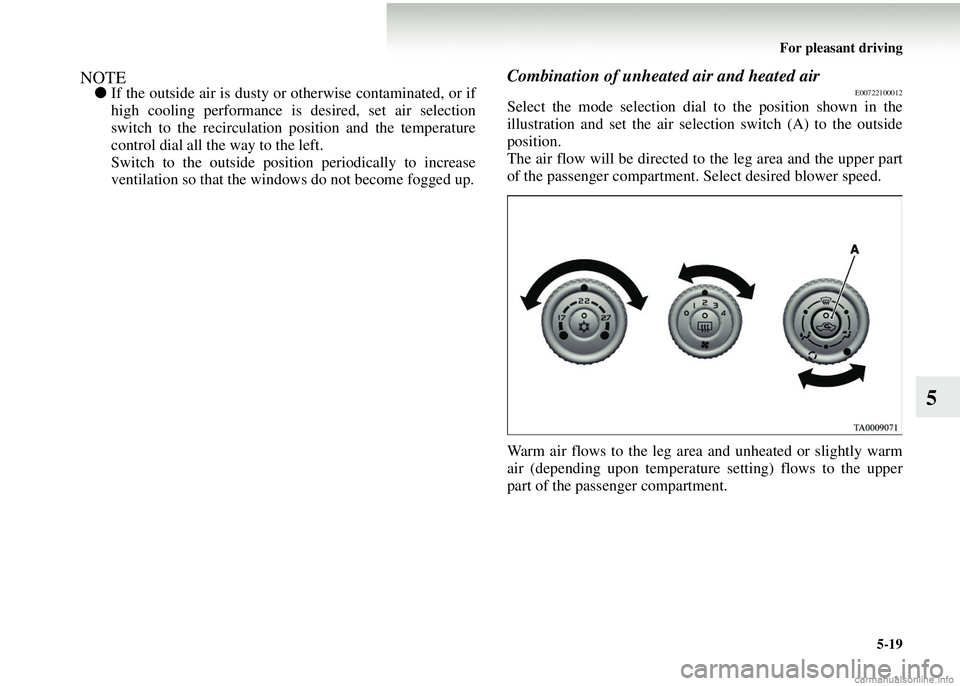
Combination of unheated air and heated airE00722100012
Select the mode selection dial to the position shown in the
illustration and set the air selection switch (A) to the outside
position.
The air flow will be directed to the leg area and the upper part
of the passenger compartment. Select desired blower speed.
Warm air flows to the leg area and unheated or slightly warm
air (depending upon temperature setting) flows to the upper
part of the passenger compartment.
Page 250 of 450
5-34 For pleasant driving
5
1. NEWS
2. AFFAIRS (Current affairs)
3. INFO (Information)
4. SPORT
5. EDUCATE (Education)
6. DRAMA
7. CULTURE
8. SCIENCE
9. VARIED
10. POP M (Pop music) 11. ROCK M (Rock music)
12. EASY M (Easy music)
13. LIGHT M (Light classics)
14. CLASSICS
15. OTHER M (Other music)
16. WEATHER (Weather information)
17. FINANCE
18. CHILDREN
19. SOCIAL
20. RELIGION
21. PHONE IN
22. TRAVEL
23. LEISURE
24. JAZZ
25. COUNTRY
26. NATION M (National music)
27. OLDIES
28. FOLK M (Folk music)
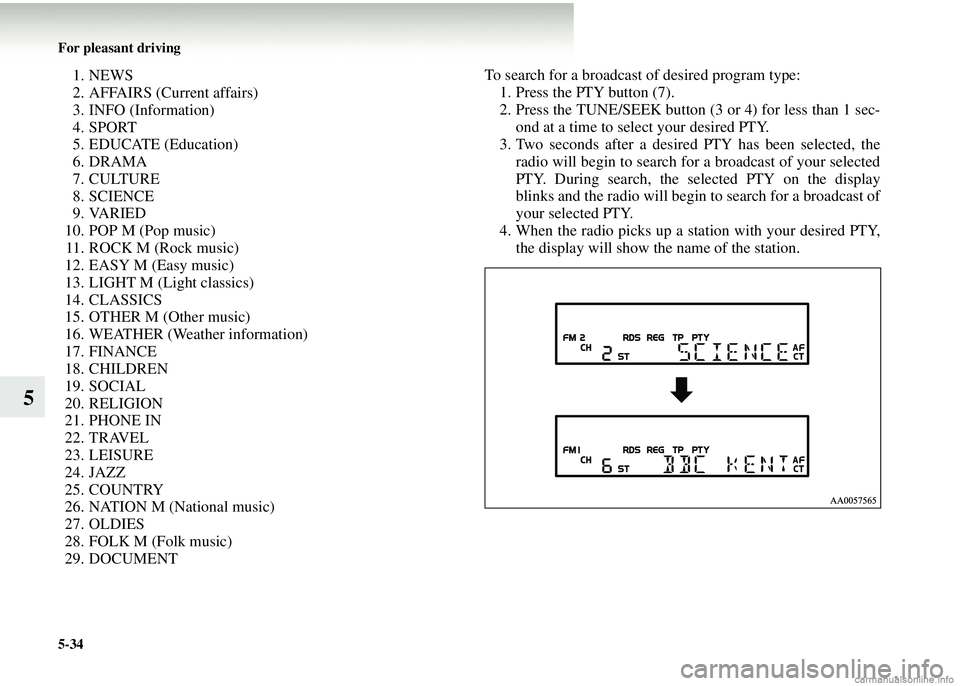
29. DOCUMENT To search for a broadcast of desired program type:
1. Press the PTY button (7).
2. Press the TUNE/SEEK button (3 or 4) for less than 1 sec- ond at a time to select your desired PTY.
3. Two seconds after a desired PTY has been selected, the radio will begin to search for a broadcast of your selected
PTY. During search, the selected PTY on the display
blinks and the radio will begin to search for a broadcast of
your selected PTY.
4. When the radio picks up a station with your desired PTY, the display will show the name of the station.
Page 259 of 450
For pleasant driving5-43
5
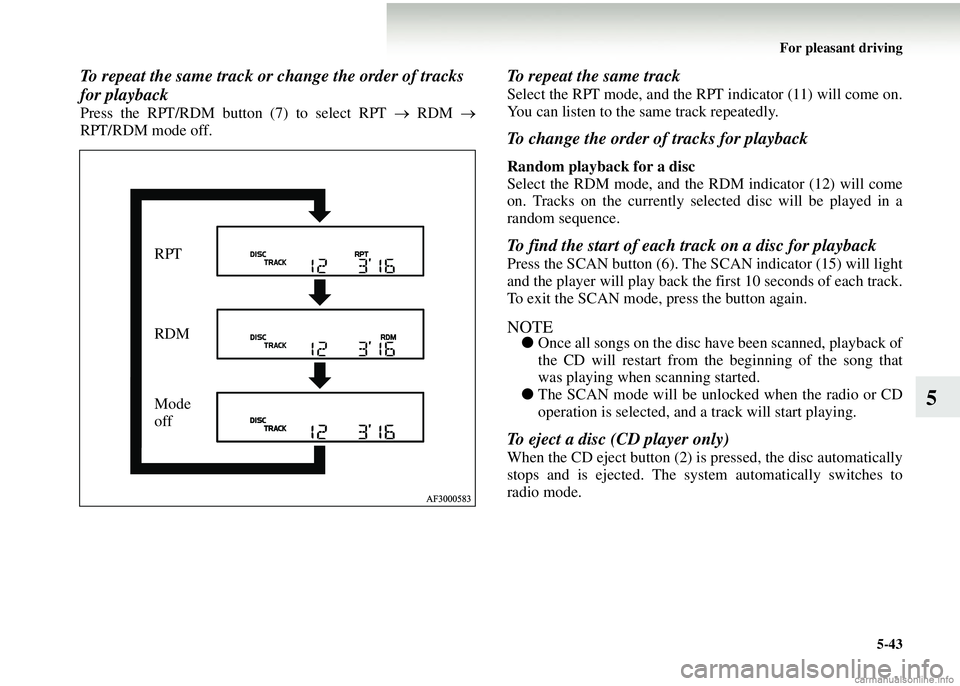
To repeat the same track or change the order of tracks
for playback
Press the RPT/RDM button (7) to select RPT → RDM →
RPT/RDM mode off.
To repeat the same track
Select the RPT mode, and the RPT indicator (11) will come on.
You can listen to the same track repeatedly.
To change the order of tracks for playback
Random playback for a disc
Select the RDM mode, and the RDM indicator (12) will come
on. Tracks on the currently select ed disc will be played in a
random sequence.
To find the start of each track on a disc for playback
Press the SCAN button (6). The SCAN indicator (15) will light
and the player will play back the first 10 seconds of each track.
To exit the SCAN mode, press the button again.
NOTE● Once all songs on the disc have been scanned, playback of
the CD will restart from the beginning of the song that
was playing when scanning started.
● The SCAN mode will be unlocked when the radio or CD
operation is selected, and a track will start playing.
To eject a disc (CD player only)
When the CD eject button (2) is pressed, the disc automatically
stops and is ejected. The syst em automatically switches to
radio mode.
RPT
RDM
Mode
off
Page 269 of 450
For pleasant driving5-53
5
To turn on the power
PWR ON button — 4
When the power is off, press this button to turn the power on.
To adjust the volume
Volume up button — 2
The volume will increase when this button is pressed.
Volume down button — 6
The volume will decrease when this button is pressed.
To listen to the audio system
Select the desired mode by lightly pressing the mode change
button (4).
The mode switches between the radio and CD with each push
of the button.
To listen to the radio
To select AM/FM mode
Mode change button — 4
Select the desired band by pressing this button.
The order is: FM1 → FM2 → FM3 → MW → LW → CD →
FM1.
Automatic radio tuning
Seek up button — 1/S eek down button — 5
After pressing these buttons, th e reception of the selected sta-
tion will begin.
To select the preset memory
Preset change button — 3
When the radio is on and this bu tton is pressed, the preset sta-
tion frequencies are sequentiall y selected each time the button
is pressed: 1, 2, 3, 4, 5, 6, 1, 2, etc.
To listen to a CD
To select a desired track
Track up button — 1
Press the button repeatedly until the desired track number
appears on the display. If you press the button for 1 second or
longer, the track number will keep rising as long as you keep
the button pressed. The currentl y playing track will continue
playing normally while you keep the button pressed; only the
indicated track number will change. When you release the but-
ton, the player will jump to the indicated track.
Track down button — 5
Press the button repeatedly until the desired track number
appears on the display.
To select a desired folder (MP3 CDs only)
Folder up button — 3
Press this button until the desired folder is reached.
Page 273 of 450

For pleasant driving5-57
5
●In the following circumstan ces, moisture can form on
discs and inside the audio system, preventing normal
operation. • When there is high humidity (for example, when it is raining).
• When the temperature suddenly rises, such as right after
the heater is turned on in cold weather.
In this case, wait until the moisture has had time to dry
out.
● When the CD player is subj ected to violent vibrations,
such as during off-road dr iving, the tracking may not
work.
● When storing compact discs, always store them in their
separate cases. Never place compact discs in direct sun-
light, or in any place where th e temperature or humidity is
high.
● Never touch the flat surface of the disc where there isn’t a
label. This will damage the disc surface and could affect
the sound quality. When handling a compact disc, always
hold it by the outer edge and the centre hole. ●
To clean a disc, use a soft, cl ean, dry cloth. Wipe directly
from the centre hole towards the outer edge. Do not wipe
in a circle. Never use any chemicals such as benzine, paint
thinner, a disc spray cleaner, or an anti-static agent on the
disc.
● Do not use a ball point pen, felt pen, pencil, etc. to write
on the label surface of the disc.