light MITSUBISHI COLT 2008 (in English) User Guide
[x] Cancel search | Manufacturer: MITSUBISHI, Model Year: 2008, Model line: COLT, Model: MITSUBISHI COLT 2008Pages: 450, PDF Size: 14.57 MB
Page 100 of 450
2-52 Seat and seat belts
2
The air bags will operate only when the ignition switch is in the
“ON” or “START” position.When the impact sensors detect
an impact of sufficient frontal
or side force, an automated circuit ignites materials in the infla-
tor to generate gas and inflate the air bags.
The deployment of the air bags produces a sudden, loud noise,
and releases some smoke and powder, but these conditions are
not injurious and do not indicate a fire in the vehicle. People
with respiratory problems may feel some temporary irritation
from chemicals used to produce the deployment; open the win-
dows after air bag deployment, if safe to do so.
The air bags deflate very rapidl y after deployment, so there is
little danger of obscured vision.
The time required from the sensors detecting an impact to
deflation of the air bags after deployment is shorter than a blink
of an eye.
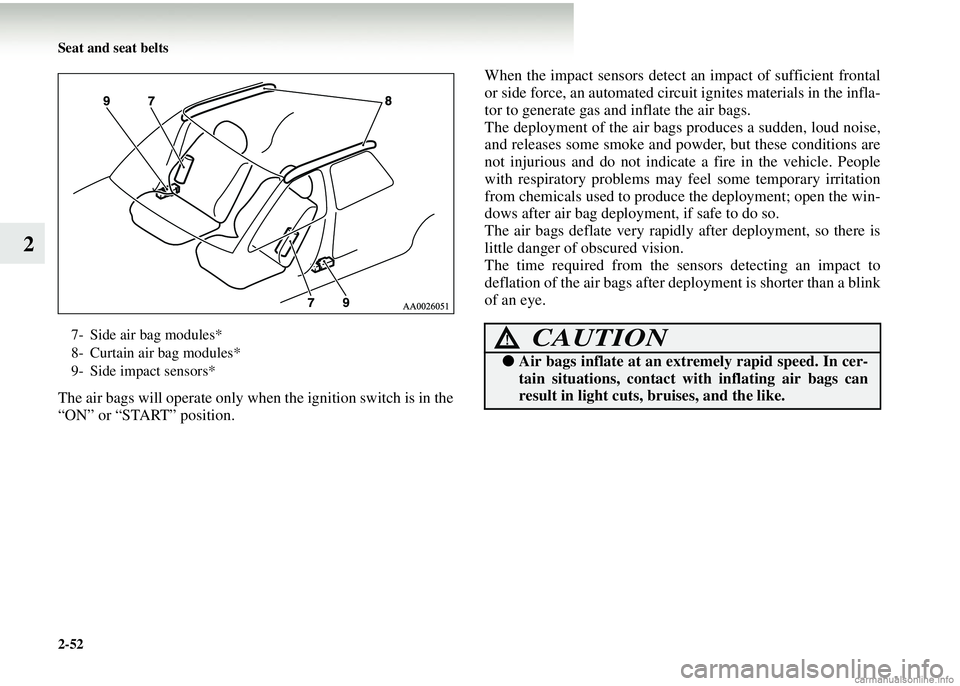
7- Side air bag modules*
8- Curtain air bag modules*
9- Side impact sensors*CAUTION!
● Air bags inflate at an ex tremely rapid speed. In cer-
tain situations, contact with inflating air bags can
result in light cuts, bruises, and the like.
Page 125 of 450
Instruments and controls3-5
3
Tripmeter
The tripmeter indicates the dist ance travelled during a particu-
lar trip or period.
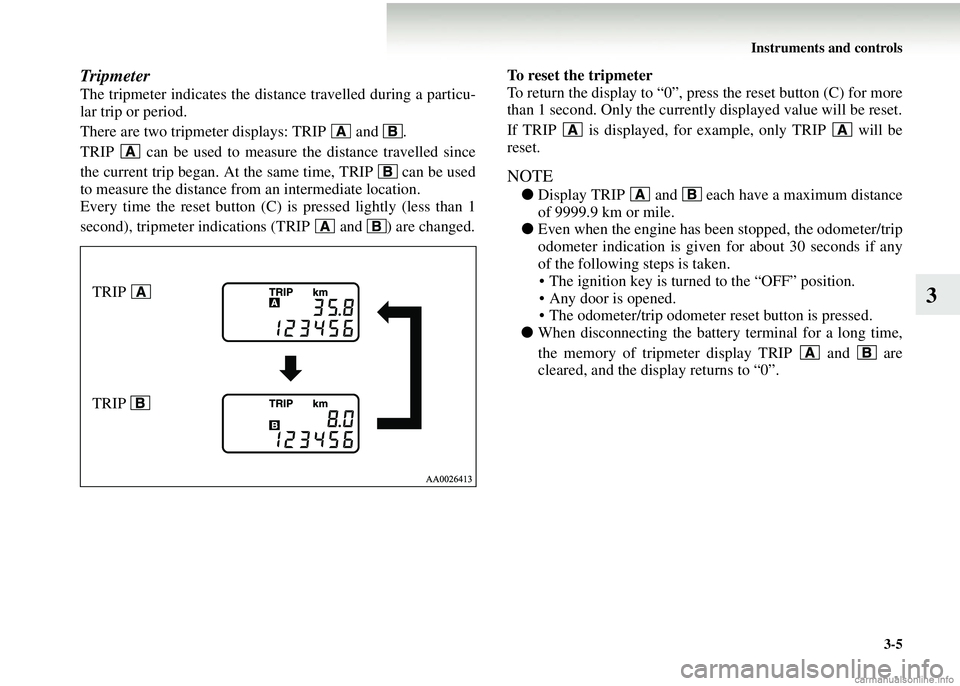
There are two tripmeter displays: TRIP and .
TRIP can be used to measur e the distance travelled since
the current trip began. At the same time, TRIP can be used
to measure the distance from an intermediate location.
Every time the reset button (C) is pressed lightly (less than 1
second), tripmeter indications (TRIP and ) are changed. To reset the tripmeter
To return the display to “0”, press the reset button (C) for more
than 1 second. Only the currently displayed value will be reset.
If TRIP is displayed, for example, only TRIP will be
reset.
NOTE
●
Display TRIP and each have a maximum distance
of 9999.9 km or mile.
● Even when the engine has been stopped, the odometer/trip
odometer indication is given for about 30 seconds if any
of the following steps is taken.
• The ignition key is turned to the “OFF” position.
• Any door is opened.
• The odometer/trip odometer reset button is pressed.
● When disconnecting the batter y terminal for a long time,
the memory of tripmeter display TRIP and are
cleared, and the display returns to “0”.
TRIP
TRIP
Page 141 of 450
Instruments and controls3-21
3
Change of driving information
(For vehicles with MITSUBISHI MOTORS genuine
audio)
E00509100055
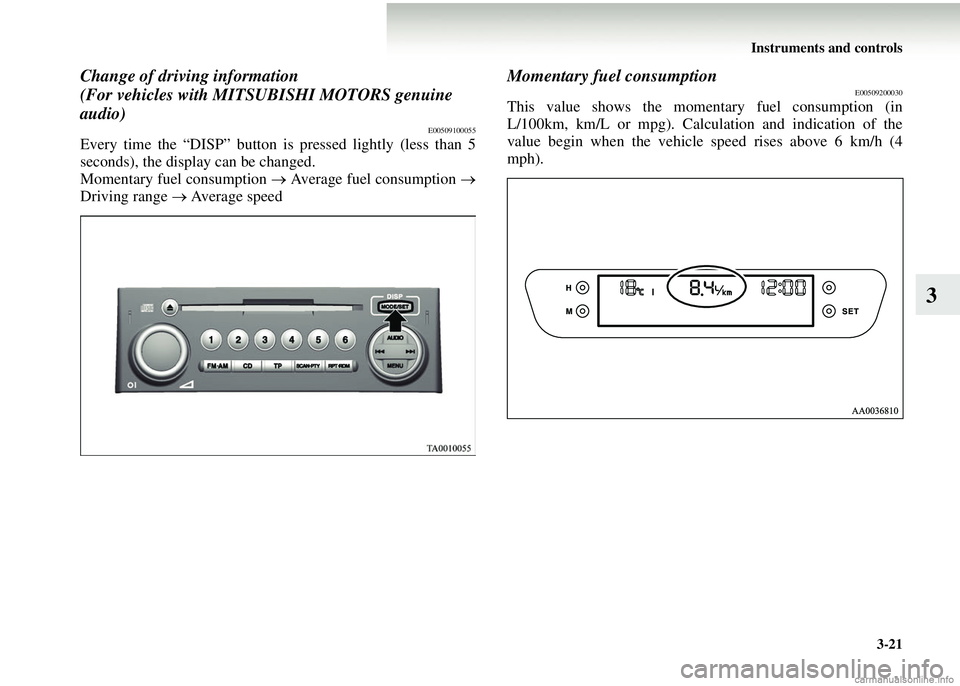
Every time the “DISP” button is pressed lightly (less than 5
seconds), the display can be changed.
Momentary fuel consumption → Average fuel consumption →
Driving range → Average speed
Momentary fuel consumptionE00509200030
This value shows the momentary fuel consumption (in
L/100km, km/L or mpg). Calculation and indication of the
value begin when the vehicle speed rises above 6 km/h (4
mph).
Page 152 of 450
3-32 Instruments and controls
3
Type 2
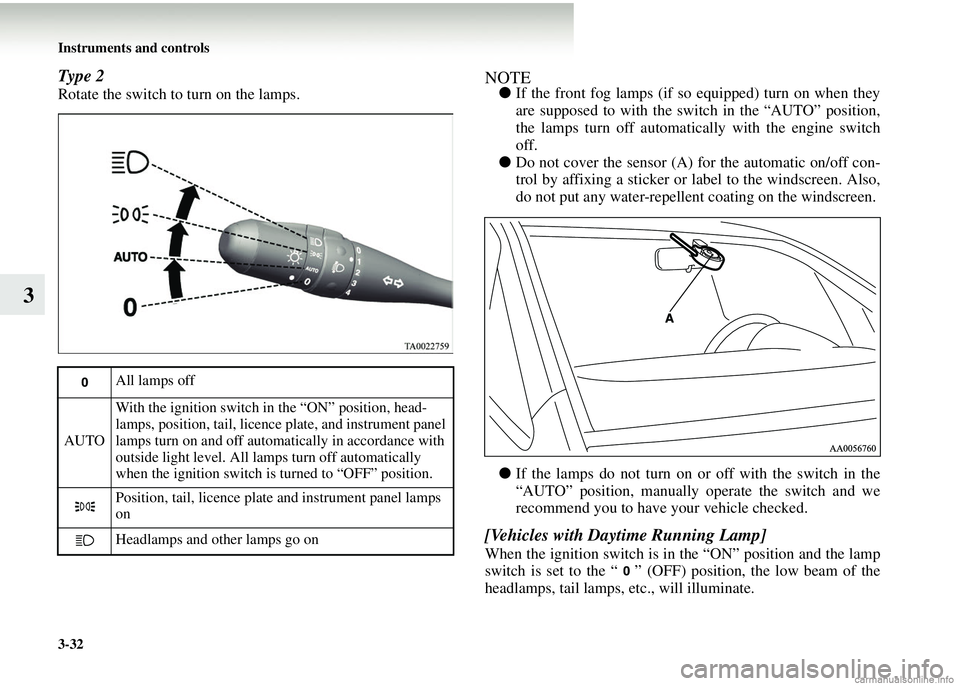
Rotate the switch to turn on the lamps.
NOTE●If the front fog lamps (if so equipped) turn on when they
are supposed to with the switch in the “AUTO” position,
the lamps turn off automatically with the engine switch
off.
● Do not cover the sensor (A) for the automatic on/off con-
trol by affixing a sticker or label to the windscreen. Also,
do not put any water-repellent coating on the windscreen.
● If the lamps do not turn on or off with the switch in the
“AUTO” position, manually operate the switch and we
recommend you to have your vehicle checked.
[Vehicles with Daytime Running Lamp]
When the ignition switch is in the “ON” position and the lamp
switch is set to the “ ” (OFF) position, the low beam of the
headlamps, tail lamps, etc., will illuminate.
All lamps off
AUTO With the ignition switch in the “ON” position, head-
lamps, position, tail, licence plate, and instrument panel
lamps turn on and off automatically in accordance with
outside light level. All lamps turn off automatically
when the ignition switch is turned to “OFF” position.
Position, tail, licence plate and instrument panel lamps
on
Headlamps and other lamps go on
Page 154 of 450
3-34 Instruments and controls
3
Headlamp flasherE00506300043
The high beams flash when the lever is pulled slightly to (2),
and will go off when it is released.
When the high beam is on, the high beam indicator lamp in the
instrument cluster will also illuminate.
NOTE● The high beams can also flash when the lamp switch is
OFF.
● If you turn the lamps off with the headlamps set to high-
beam illumination, the h eadlamps are automatically
returned to their low-beam setting when the lamp switch
is next turned to the “ ” position.
Headlamp levelling switch
E00506400581
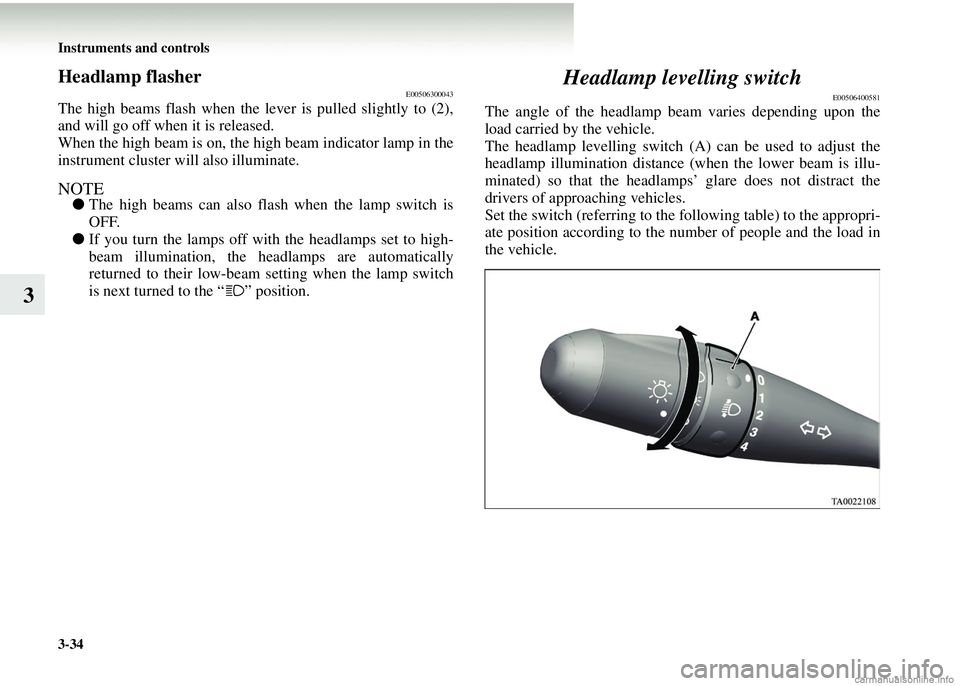
The angle of the headlamp b eam varies depending upon the
load carried by the vehicle.
The headlamp levelling switch (A) can be used to adjust the
headlamp illumination distance (when the lower beam is illu-
minated) so that the headlamps’ glare does not distract the
drivers of approaching vehicles.
Set the switch (referring to the following table) to the appropri-
ate position according to the numb er of people and the load in
the vehicle.
Page 156 of 450
3-36 Instruments and controls
3Turn-signal lever
E00506500537
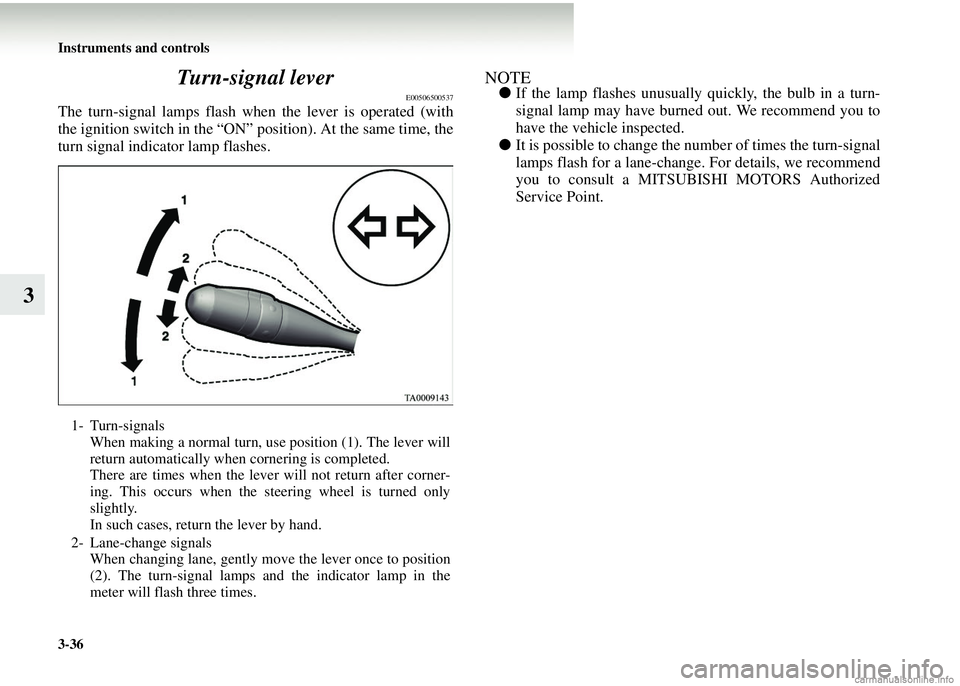
The turn-signal lamps flash when the lever is operated (with
the ignition switch in the “ON” position). At the same time, the
turn signal indicator lamp flashes.
NOTE●
If the lamp flashes unusually quickly, the bulb in a turn-
signal lamp may have burned out. We recommend you to
have the vehicle inspected.
● It is possible to change the number of times the turn-signal
lamps flash for a lane-change. For details, we recommend
you to consult a MITSUBISHI MOTORS Authorized
Service Point.
1- Turn-signals
When making a normal turn, use position (1). The lever will
return automatically when cornering is completed.
There are times when the lever will not return after corner-
ing. This occurs when the steering wheel is turned only
slightly.
In such cases, return the lever by hand.
2- Lane-change signals When changing lane, gently move the lever once to position
(2). The turn-signal lamps and the indicator lamp in the
meter will flash three times.
Page 168 of 450
4-2 Starting and driving
4Economical driving
E00600100763
For economical driving, there ar
e some technical requirements
that have to be met. The prerequisite for low fuel consumption
is a properly adjusted engine. In order to achieve longer life of
the vehicle and the most economical operation, we recommend
that you to have the vehicle checked at regular intervals in
accordance with the service standards.
Fuel economy and generation of exhaust gas and noise are
greatly influenced by personal driving habits as well as the par-
ticular operating conditions. The following points should be
observed in order to minimize w ear of brakes, tyres and engine
as well as to reduce environmental pollution.
Starting
Avoid rapid acceleration and sudden starts; such operation will
result in higher fuel consumption.
Shifting
Shift only at an appropriate speed and engine speed. Always
use the highest gear possible.
City traffic
Frequent starting and stopping increases the average fuel con-
sumption. Use roads with smooth traffic flow whenever possi-
ble. When driving on congested roads, avoid use of a low gear
at high engine speeds.
Idling
The vehicle consumes fuel even when idling. Avoid extended
idling whenever possible.
Speed
The higher the vehicle speed, the more fuel is consumed. Avoid
driving at full speed. Even a slight release of the accelerator
pedal will save a significant amount of fuel.
Tyre inflation pressure
Check the tyre inflation pressure s at regular intervals. Low tyre
inflation pressure increases ro ad resistance and fuel consump-
tion. In addition, low tyre pres sures adversely affect tyre wear
and driving stability.
Load
Do not drive with unnecessary articles in the luggage compart-
ment. Especially during city dr iving, where frequent starting
and stopping is necessary, the increased weight of the vehicle
will greatly affect fuel consum ption. Avoid driving with unnec-
essary luggage, etc., on the ro of; the increased air resistance
will increase fuel consumption.
Cold engine starting
Starting a cold engine consumes more fuel.
Unnecessary fuel consumption is also caused by keeping a hot
engine running. After the engine has started, commence driv-
ing as soon as possible.
Air conditioning*
The use of the air conditioning will increase fuel consumption.
Page 173 of 450
Starting and driving4-7
4
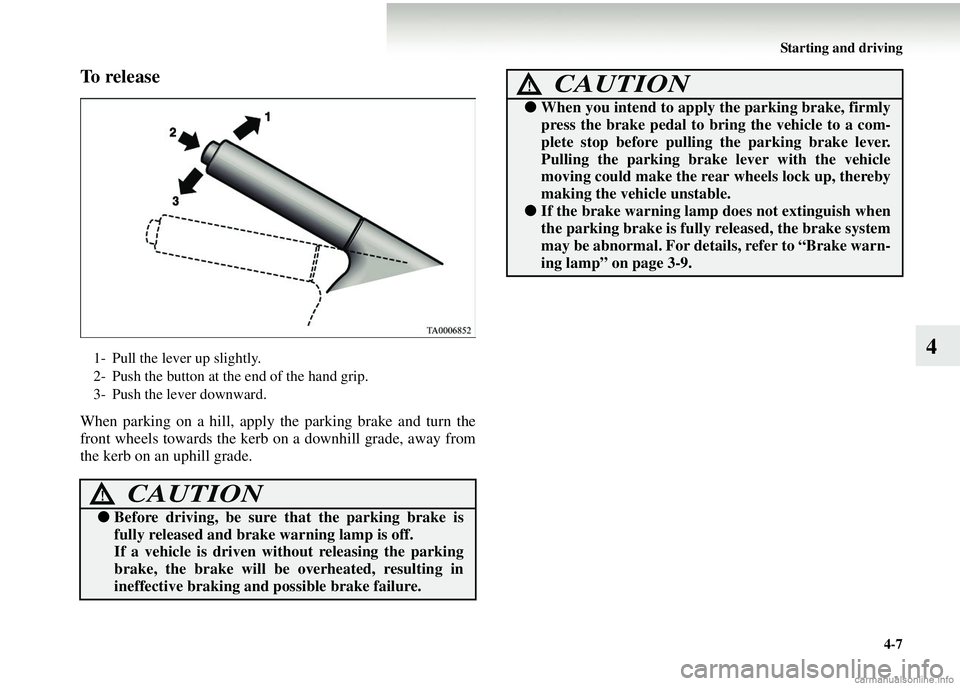
To r e l e a s e
When parking on a hill, apply the parking brake and turn the
front wheels towards the kerb on a downhill grade, away from
the kerb on an uphill grade.
1- Pull the lever up slightly.
2- Push the button at the end of the hand grip.
3- Push the lever downward.
CAUTION!
● Before driving, be sure that the parking brake is
fully released and brake warning lamp is off.
If a vehicle is driven wi thout releasing the parking
brake, the brake will be overheated, resulting in
ineffective brak ing and possible brake failure.
●When you intend to apply the parking brake, firmly
press the brake pedal to bring the vehicle to a com-
plete stop before pullin g the parking brake lever.
Pulling the parking brake lever with the vehicle
moving could make the rear wheels lock up, thereby
making the vehicle unstable.
● If the brake warning lamp does not extinguish when
the parking brake is fully released, the brake system
may be abnormal. For details, refer to “Brake warn-
ing lamp” on page 3-9.
CAUTION!
Page 181 of 450
Starting and driving4-15
4
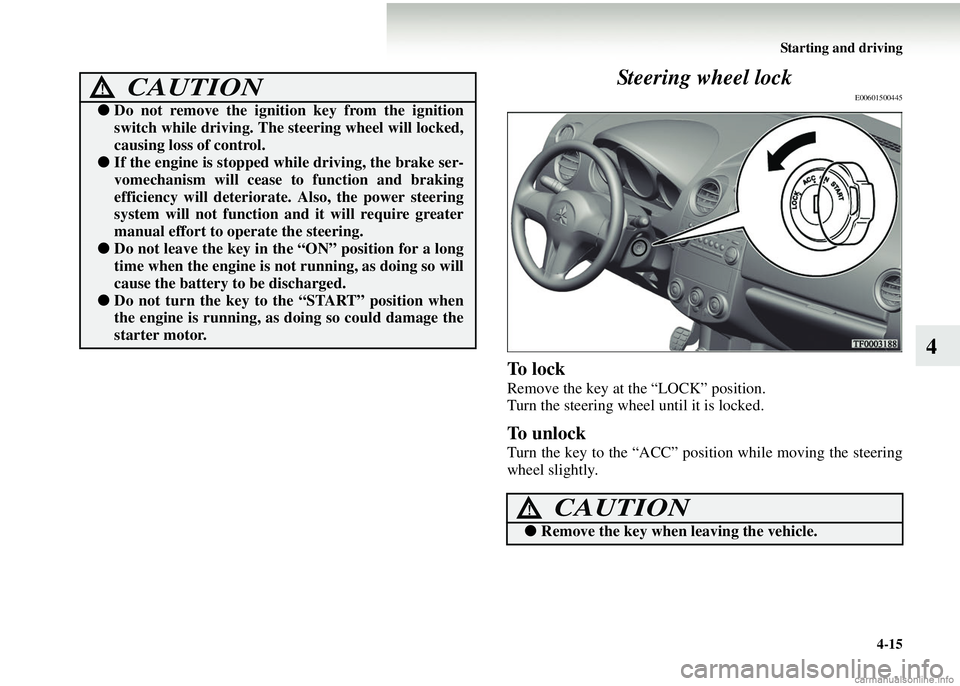
Steering wheel lock
E00601500445
To l o c k
Remove the key at the “LOCK” position.
Turn the steering wheel until it is locked.
To unlock
Turn the key to the “ACC” position while moving the steering
wheel slightly.
CAUTION!
●
Do not remove the ignition key from the ignition
switch while driving. The steering wheel will locked,
causing loss of control.
●If the engine is stopped while driving, the brake ser-
vomechanism will cease to function and braking
efficiency will deteriorat e. Also, the power steering
system will not function and it will require greater
manual effort to operate the steering.
● Do not leave the key in the “ON” position for a long
time when the engine is no t running, as doing so will
cause the battery to be discharged.
●Do not turn the key to the “START” position when
the engine is running, as doing so could damage the
starter motor.
CAUTION!
●Remove the key when leaving the vehicle.
Page 201 of 450
Starting and driving4-35
4
Braking
E00607000947
All parts of the brake system ar
e critical for safety. We recom-
mend that you have the vehicl e checked at regular intervals
according to the service booklet.
Brake system
The service brake is divided into two brake circuits so that if
one brake circuit fails, the othe r one is available to stop the
vehicle. In this situation, ev en if the brake pedal moves down
to the very end of its possible stroke, keep it pressed down
hard; stop driving as soon as possible and have the brake sys-
tem repaired.
Power brakes
Your vehicle is equipped with power brakes for more braking
force with less brake pedal effort.
Your brakes are designed to oper ate at full capacity, even if the
power assist is not being used.
If the power assist is not being used, the effort needed to press
the brake pedal is greater.
If you should loose the power assist for some reason, the
brakes will still work. If the power brake unit or either
of the two brake hydraulic sys-
tems stops working properly, the rest of the brake system will
still work, but the vehicle will not slow down as quickly.
You will know this has happened if you find you need to press
the brake down further or harder when slowing down or stop-
ping, or if the brake warning lamp comes on.
Wa r n i n g l a m p
The brake warning lamp will illuminate to indicate a fault in
the braking system. Read “Brake warning lamp” on page 3-9.
When brakes are wet
Check the brake system while dr iving at a low speed immedi-
ately after starting, especially wh en the brakes are wet, to con-
firm they work normally.
A film of water can be formed on the brake discs or brake
drums and prevent normal braki ng after driving in heavy rain
or through large puddles, or after the vehicle has been washed.
If this occurs, dry the brakes out by driving slowly while
lightly depressing the brake pedal.
CAUTION!
● Avoid driving habits that cause heavy braking and
never “ride” the brakes by resting your foot on the
brake pedal while driving.
This causes brake overheating and fade.WARNING!
● Never coast downhill with the engine OFF. Keep the
engine running whenever your vehicle is in motion.
If you turn off the engine while driving, the power
brake booster will stop working and your brakes
will not work as well.
● If the power assist is lost or if either brake hydraulic
system stops working properly, have your vehicle
checked immediately.