battery MITSUBISHI COLT 2009 10.G User Guide
[x] Cancel search | Manufacturer: MITSUBISHI, Model Year: 2009, Model line: COLT, Model: MITSUBISHI COLT 2009 10.GPages: 273, PDF Size: 17.28 MB
Page 91 of 273
Downloaded from www.Manualslib.com manuals search engine CAUTIONFurthermore, the vehicle
should be brought immediately
to a stop in a safe location and
we recommend you to have it
checked. •The brake warning lamp
does not illuminate when
the parking brake is applied
or does not turn off when
the parking brake is re-
leased.
• The ABS warning lamp and
brake warning lamp illumi-
nate at the same time.
For details, refer to “ABS
warning lamp” on page
4-28.
• The brake warning lamp re-
mains illuminated during
driving.
l The vehicle should be brought
to a halt in the following man-
ner when brake performance
has deteriorated. •Depress the brake pedal
harder than usual.
Even if the brake pedal
moves down to the very end
of its possible stroke, keep it
pressed down hard.CAUTION• Should the brakes fail, use
engine braking to reduce
your speed and pull the park-
ing brake lever.
Depress the brake pedal to
operate the stop lamp to
alert the vehicles behind you.Check engine warning lamp E00502601683
This lamp is a part of an onboard diag-
nostic system which monitors the emis-
sions, engine or automated manual trans-
mission control system/AS&G control
system.
If a problem is detected in one of these
systems, this lamp illuminates and a buz-
zer sounds.
Although your vehicle will usually be
drivable and not need towing, we recom-
mend you to have the system checked as
soon as possible.
This lamp will also illuminate for a few
seconds when the ignition switch is
turned to the “ON” position. If it does
not go off after a few seconds, we recom-
mend you to have the vehicle checked.CAUTIONl Prolonged driving with this
lamp on may cause further dam-
age to the emission control sys-
tem. It could also affect fuel
economy and drivability.
l If the lamp does not illuminate
when the ignition switch is
turned to the “ON” position,
we recommend you to have the
system checked.
l If the lamp illuminates while
the engine is running, avoid
driving at high speeds and we
recommend you to have the sys-
tem checked.
During vehicle operation with
the lamp illuminated, the vehi-
cle may not accelerate when
you depress the accelerator ped-
al.
NOTE
l The engine electronic control mod-
ule accommodating the onboard di-
agnostic system has various fault
data (especially about the exhaust
emission) stored.
This data will be erased if a bat-
tery cable is disconnected which
will make a rapid diagnosis diffi-
cult. Do not disconnect a battery
cable when the check engine warn-
ing lamp is ON.
Instruments and controls
3-18
3
Page 93 of 273
Downloaded from www.Manualslib.com manuals search engine CAUTIONlBefore moving your vehicle,
check that the warning lamp is
OFF.Combination headlamps and
dipper switch E00506000923
Headlamps
NOTE l Do not leave the headlamps and other lamps
on for a long time while the engine is station-
ary (not running). A rundown battery could
result.
l When it rains, or when the vehicle has been
washed, the inside of the lens sometimes be-
comes foggy. This is the same phenomenon
as when window glass mists up on a humid
day, and does not indicate a functional prob-
lem. When the lamp is switched on, the heat
will remove the fog. However, if water gath-
ers inside the lamp, we recommend you to
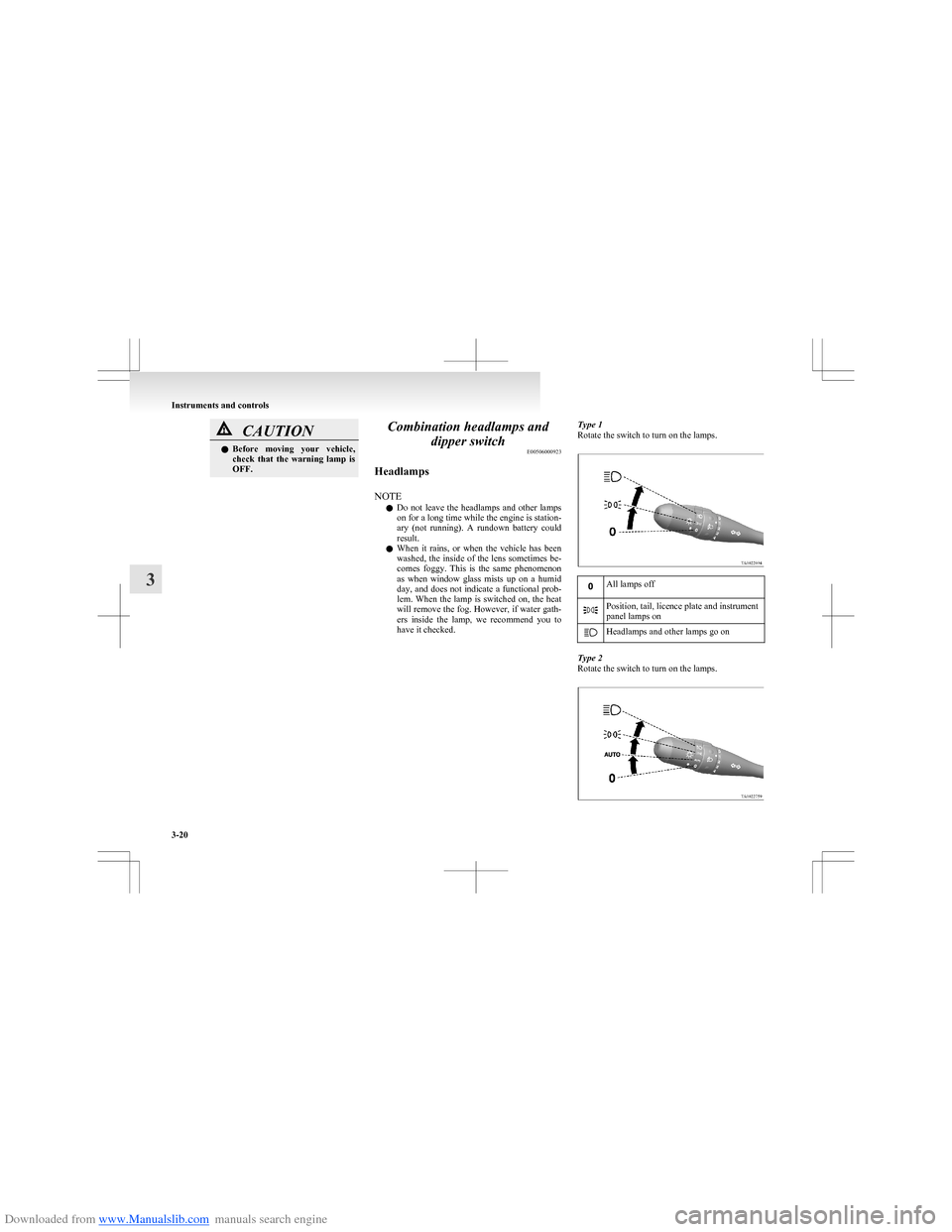
have it checked.Type 1
Rotate the switch to turn on the lamps.All lamps offPosition, tail, licence plate and instrument
panel lamps onHeadlamps and other lamps go on
Type 2
Rotate the switch to turn on the lamps.
Instruments and controls
3-20
3
Page 96 of 273
Downloaded from www.Manualslib.com manuals search engine Switch position 0-Driver only/Driver + 1 front
passengerSwitch position 2-5 passengers (including driver)Switch position 3-5 passengers (including driv-
er) + Full luggage loadingSwitch position 3-Driver + Full luggage loading
Vehicles with turbocharger
Vehicle condi- tionSwitch
position“0”“1”“2”“2”
: 1 person: Full luggage loading
Switch position 0-Driver only/Driver + 1 front
passengerSwitch position 1-5 passengers (including driver)Switch position 2-5 passengers (including driv-
er) + Full luggage loadingSwitch position 2-Driver + Full luggage loadingTurn-signal lever E00506501000
The turn-signal lamps flash when the lever is oper-
ated (with the ignition switch in the “ON” posi-
tion). At the same time, the turn signal indication
lamp flashes.
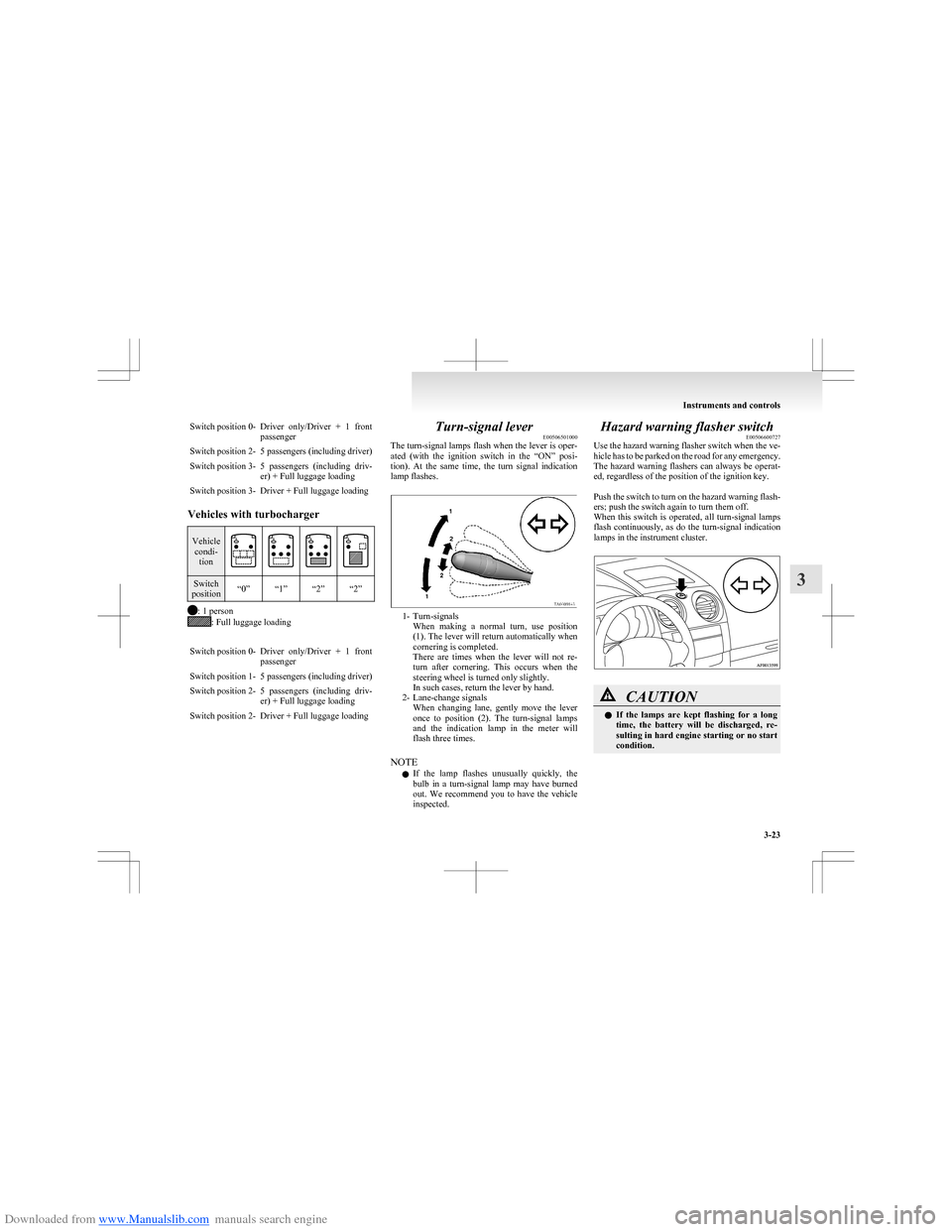
1- Turn-signals When making a normal turn, use position
(1). The lever will return automatically when
cornering is completed.
There are times when the lever will not re-
turn after cornering. This occurs when the
steering wheel is turned only slightly.
In such cases, return the lever by hand.
2- Lane-change signals When changing lane, gently move the lever
once to position (2). The turn-signal lamps
and the indication lamp in the meter will
flash three times.
NOTE l If the lamp flashes unusually quickly, the
bulb in a turn-signal lamp may have burned
out. We recommend you to have the vehicle
inspected.
Hazard warning flasher switch E00506600727
Use the hazard warning flasher switch when the ve-
hicle has to be parked on the road for any emergency.
The hazard warning flashers can always be operat-
ed, regardless of the position of the ignition key.
Push the switch to turn on the hazard warning flash-
ers; push the switch again to turn them off.
When this switch is operated, all turn-signal lamps
flash continuously, as do the turn-signal indication
lamps in the instrument cluster.CAUTIONl If the lamps are kept flashing for a long
time, the battery will be discharged, re-
sulting in hard engine starting or no start
condition.
Instruments and controls
3-23
3
Page 114 of 273
Downloaded from www.Manualslib.com manuals search engine CAUTIONlIf the engine is stopped while driving, the
brake servomechanism will cease to func-
tion and braking efficiency will deterio-
rate. Also, the power steering system will
not function and it will require greater
manual effort to operate the steering.
l Do not leave the key in the “ON” position
for a long time when the engine is not run-
ning, doing so will cause the battery to be
discharged.
l Do not turn the key to the “START” posi-
tion when the engine is running, doing so
could damage the starter motor.Steering wheel lock E00601500605
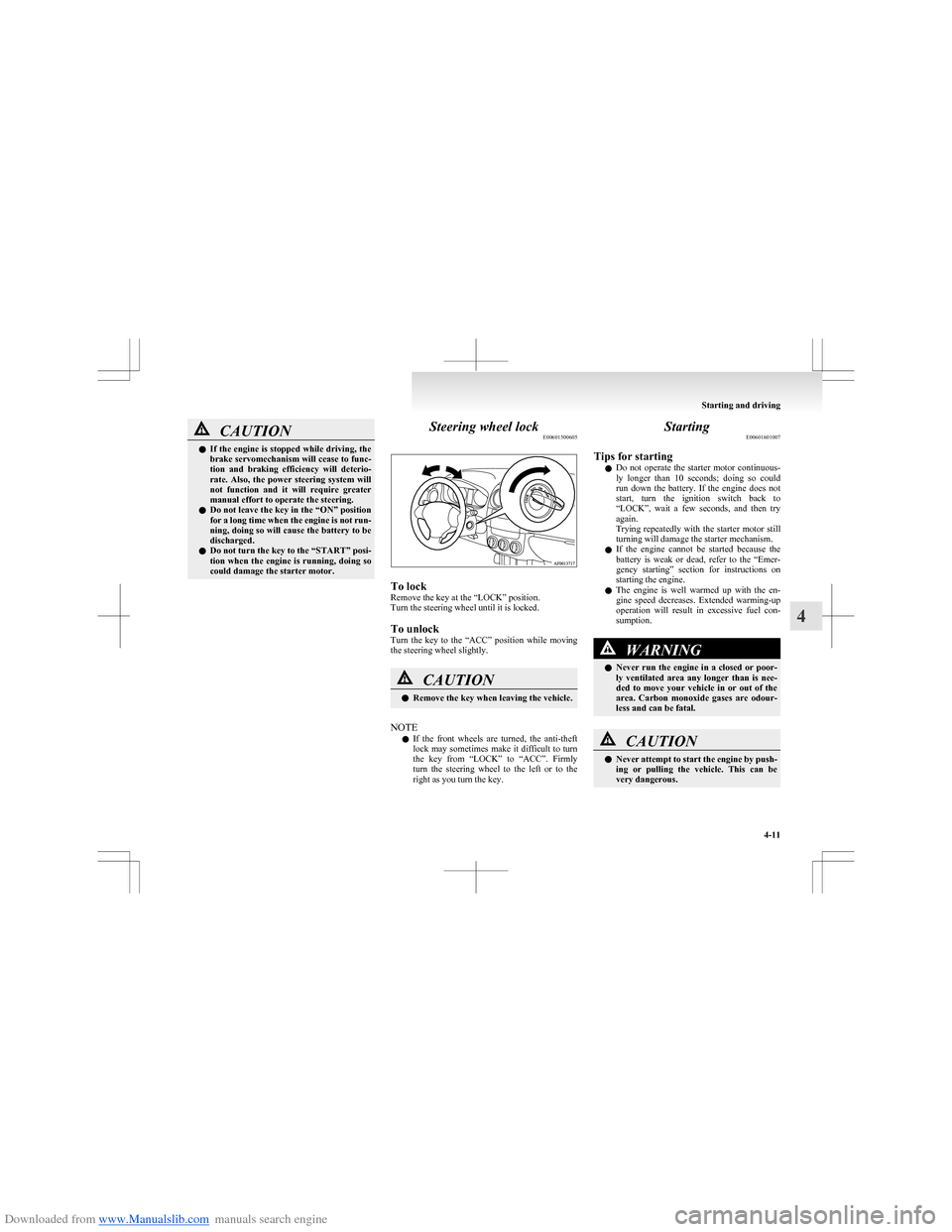
To lock
Remove the key at the “LOCK” position.
Turn the steering wheel until it is locked.
To unlock
Turn the key to the “ACC” position while moving
the steering wheel slightly.
CAUTIONl Remove the key when leaving the vehicle.
NOTE
l If the front wheels are turned, the anti-theft
lock may sometimes make it difficult to turn
the key from “LOCK” to “ACC”. Firmly
turn the steering wheel to the left or to the
right as you turn the key.
Starting E00601601007
Tips for starting l Do not operate the starter motor continuous-
ly longer than 10 seconds; doing so could
run down the battery. If the engine does not
start, turn the ignition switch back to
“LOCK”, wait a few seconds, and then try
again.
Trying repeatedly with the starter motor still
turning will damage the starter mechanism.
l If the engine cannot be started because the
battery is weak or dead, refer to the “Emer-
gency starting” section for instructions on
starting the engine.
l The engine is well warmed up with the en-
gine speed decreases. Extended warming-up
operation will result in excessive fuel con-
sumption.WARNINGl Never run the engine in a closed or poor-
ly ventilated area any longer than is nee-
ded to move your vehicle in or out of the
area. Carbon monoxide gases are odour-
less and can be fatal.CAUTIONl Never attempt to start the engine by push-
ing or pulling the vehicle. This can be
very dangerous.
Starting and driving
4-11
4
Page 117 of 273
Downloaded from www.Manualslib.com manuals search engine NOTEl Under normal conditions, the “
”
indication
lamp will also illuminate for a few seconds
when the ignition switch is turned to the
“ON” position.
l The brake booster becomes inoperative and
the pedal effort will increase when the en-
gine is stopped automatically.
If the vehicle is moving, press down the
brake pedal harder than usual.CAUTIONl Observe the following precautions when
the engine is stopped automatically. Oth-
erwise, an unexpected accident might oc-
cur when the engine restarts automatical-
ly. •Do not depress the accelerator pedal
to race the engine while the vehicle is
stopped (regardless of whether the en-
gine is running or stopped).
Otherwise, an unexpected accident
might occur when the engine restarts
automatically.CAUTION• Do not leave the driver’s seat or open
the bonnet.
If the driver’s seat belt is unfastened
or if the bonnet is opened, the “
” in-
dication lamp will blink to inform the
driver. If this occurs, the engine will
not restart automatically even if the
clutch pedal is depressed, the seat belt
is refastened, and the bonnet is closed.
While depressing the brake pedal,
fully depress the clutch pedal and
turn the ignition switch to the
“START” position to start the engine.
For details, refer to “Starting the en-
gine” on page 4-12.
• Do not move the gearshift lever to a po-
sition other than the “N” (Neutral) po-
sition.
If the gearshift lever is moved to a po-
sition other than the “N” (Neutral) po-
sition, the “
” indication lamp blinks
and the buzzer sounds.
If the gearshift lever is returned to the
“N” (Neutral) position, the lamp stops
blinking and the buzzer stops sound-
ing. The engine will not restart if the
gearshift lever is in a position other
than the “N” (Neutral) position.
NOTE
l In the following cases, the Auto Stop & Go
(AS&G) system will not operate and the en-
gine will not stop automatically even if the ve-
hicle is stopped. • Driver’s seat belt is not fastened
• Bonnet is open
• After the engine restarts automatically,
the vehicle speed has not exceeded ap-
proximately 5 km/h (3 mph)
• Brake booster vacuum pressure is low be- cause the brake pedal is depressed repeat-
edly or depressed harder than usual
• After the ignition switch is turned from
the “LOCK” position to the “START” po-
sition, approximately 3 minutes or more
have not elapsed
• After the ignition switch is turned from
the “ON” position to the “START” posi-
tion, approximately 30 seconds or more
have not elapsed.
• After the engine restarts automatically,
the vehicle stops again within 10 seconds
• Engine coolant temperature is low
• Ambient temperature is lower than ap-
proximately 3°C
• Air conditioner is operating and passen-
ger compartment has not sufficiently
cooled (for vehicles with automatic air
conditioning)
• Mode selection dial is set to the demister
position (for vehicles with automatic air
conditioning)
Refer to “For quick demisting” on page
5-10.
• Electric power consumption is high, such
as when the rear window demister or oth-
er electrical components are operating or
the blower speed is set to a high setting
• Battery voltage or battery performance is
low
• Check engine warning lamp is illumina-
ted or the “
” indication lamp is blinking
[For vehicles with automatic air conditioning]
Starting and driving
4-14
4
Page 132 of 273
Downloaded from www.Manualslib.com manuals search engine lThe ABS warning lamp can illuminate if the
battery voltage is insufficient when the en-
gine is started. In this case, it does not indi-
cate an ABS fault.
Charge the battery by allowing the engine to
idle for a while.
If the battery has been charged but the ABS
warning lamp continues to illuminate or illu-
minates intermittently, we recommend you
to consult a MITSUBISHI MOTORS Author-
ized Service Point.
If the ABS warning lamp and brake warning
lamp illuminate at the same time
l The brake force distribution function may
not work, so hard braking could make the ve-
hicle unstable.
Avoid hard braking and high-speed driving.
Stop the vehicle in a safe place and we rec-
ommend you to consult a MITSUBISHI
MOTORS Authorized Service Point.
NOTE l Immediately after the vehicle starts moving
after engine start up, a whining sound of a mo-
tor will be heard from the engine compart-
ment. If the brake pedal is depressed at that
moment, a brake pedal pulsating is felt.
This whining sound and pulsation are due to
the self-diagnosis operation of the ABS and
does not indicate a malfunction.
l After driving on snowy roads, remove any
snow and ice which may have become ad-
hered to the wheel areas.
When doing this, be careful not to damage
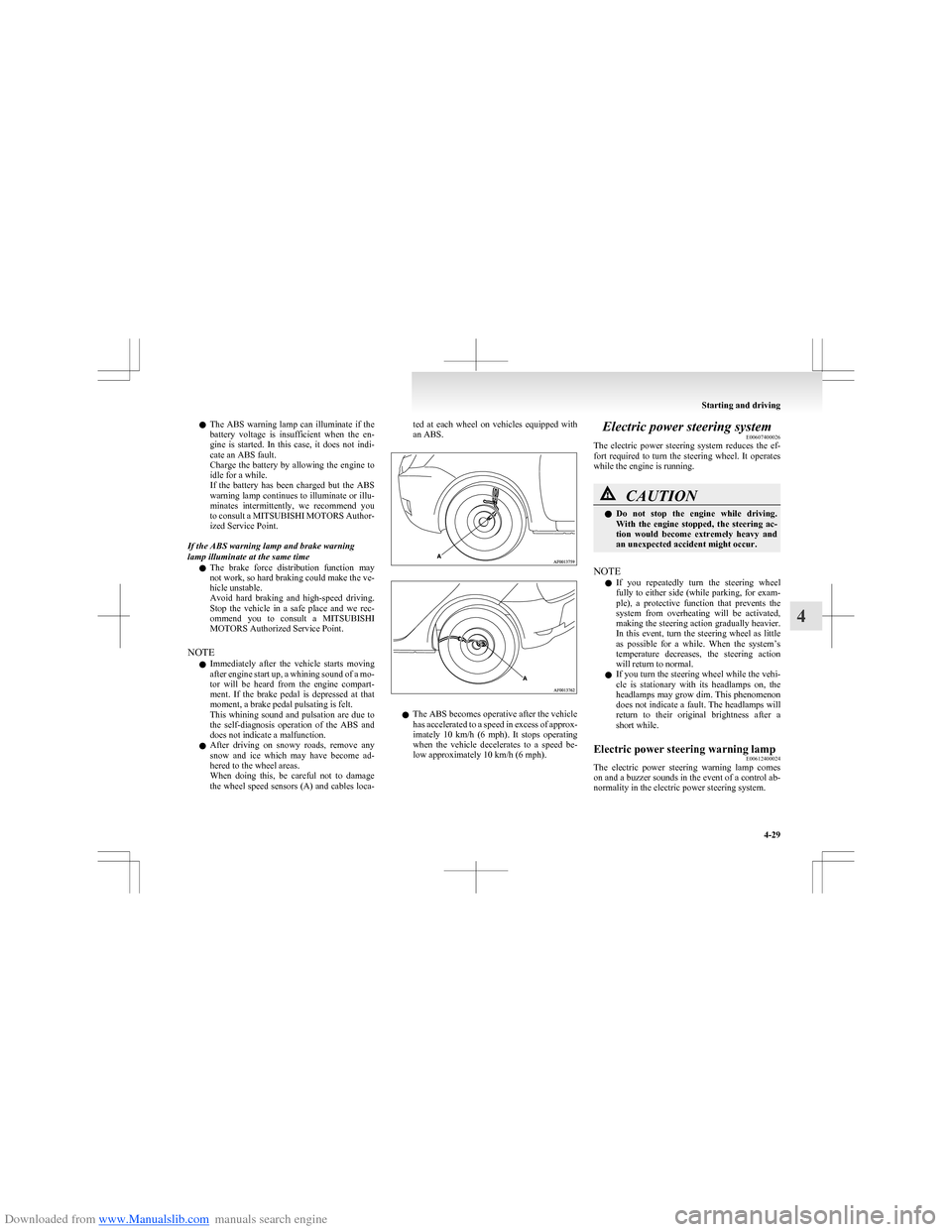
the wheel speed sensors (A) and cables loca-ted at each wheel on vehicles equipped with
an ABS.
l The ABS becomes operative after the vehicle
has accelerated to a speed in excess of approx-
imately 10 km/h (6 mph). It stops operating
when the vehicle decelerates to a speed be-
low approximately 10 km/h (6 mph).
Electric power steering system E00607400026
The electric power steering system reduces the ef-
fort required to turn the steering wheel. It operates
while the engine is running.CAUTIONl Do not stop the engine while driving.
With the engine stopped, the steering ac-
tion would become extremely heavy and
an unexpected accident might occur.
NOTE
l If you repeatedly turn the steering wheel
fully to either side (while parking, for exam-
ple), a protective function that prevents the
system from overheating will be activated,
making the steering action gradually heavier.
In this event, turn the steering wheel as little
as possible for a while. When the system’s
temperature decreases, the steering action
will return to normal.
l If you turn the steering wheel while the vehi-
cle is stationary with its headlamps on, the
headlamps may grow dim. This phenomenon
does not indicate a fault. The headlamps will
return to their original brightness after a
short while.
Electric power steering warning lamp E00612400024
The electric power steering warning lamp comes
on and a buzzer sounds in the event of a control ab-
normality in the electric power steering system.
Starting and driving
4-29
4
Page 135 of 273
Downloaded from www.Manualslib.com manuals search engine Cruise control*E00609100623
Cruise control is an automatic speed control system
that keeps a set speed. It can be activated at about
40 km/h (25 mph) or more.CAUTIONl When you do not wish to drive at a set
speed, turn off the cruise control for safety.
l Do not use cruise control when driving
conditions will not allow you to stay at
the same speed, such as in heavy traffic
or on roads that are winding, icy, snow-
covered, wet, slippery, on a steep down-
hill slope.
l On vehicles with M/T, do not move the
gearshift lever to the “N” (Neutral) posi-
tion while driving at a set speed without
depressing the clutch pedal. The engine
will run too fast and might be damaged.
NOTE
l Cruise control may not be able to keep your
speed on uphills or downhills.
l Your speed may decrease on a steep uphill.
You may use the accelerator pedal if you
want to stay at your set speed.
l Your speed may increase to more than the
set speed on a steep downhill. You have to
use the brake to control your speed. As a re-
sult, the set speed driving is deactivated.
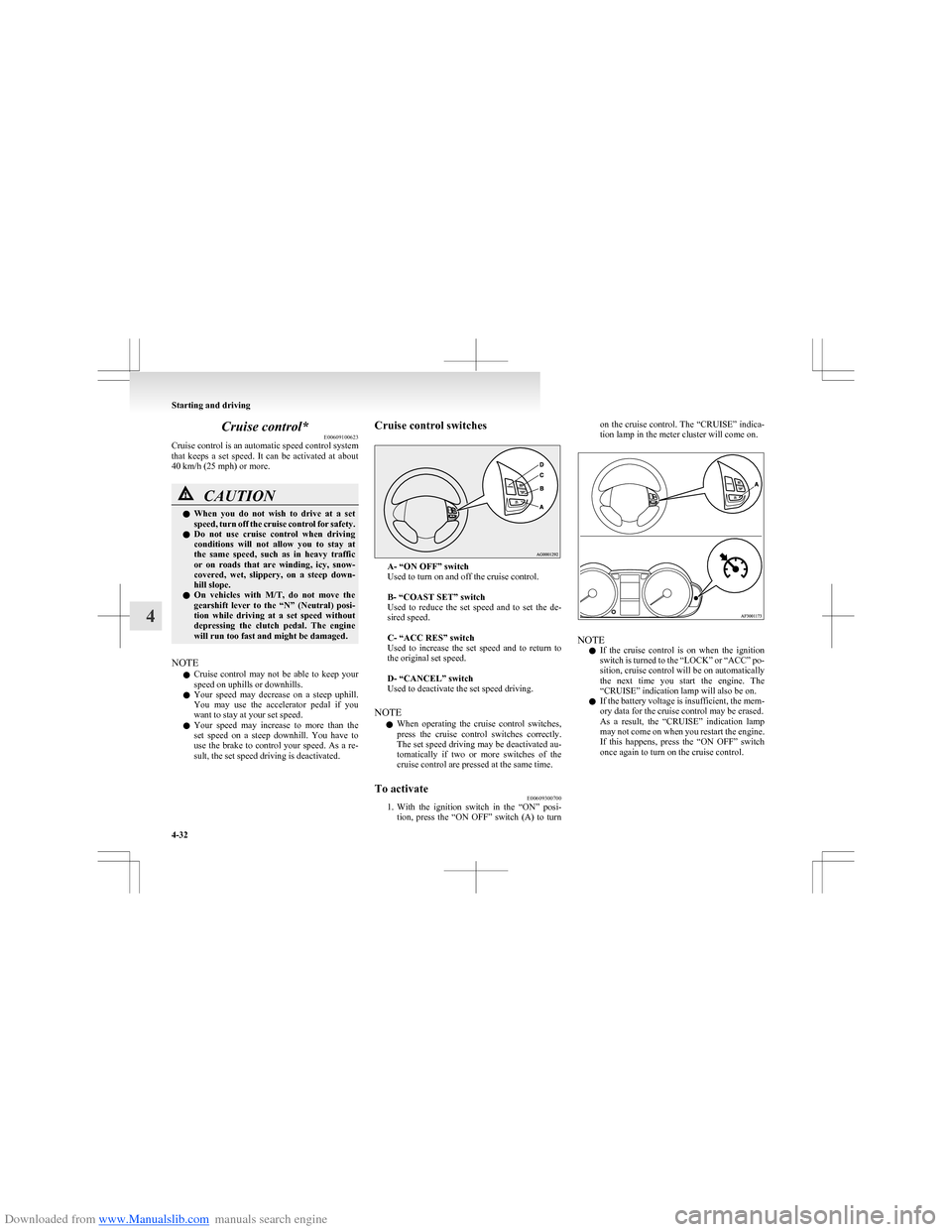
Cruise control switches
A- “ON OFF” switch
Used to turn on and off the cruise control.
B- “COAST SET” switch
Used to reduce the set speed and to set the de-
sired speed.
C- “ACC RES” switch
Used to increase the set speed and to return to
the original set speed.
D- “CANCEL” switch
Used to deactivate the set speed driving.
NOTE l When operating the cruise control switches,
press the cruise control switches correctly.
The set speed driving may be deactivated au-
tomatically if two or more switches of the
cruise control are pressed at the same time.
To activate E00609300700
1.With the ignition switch in the “ON” posi-
tion, press the “ON OFF” switch (A) to turn
on the cruise control. The “CRUISE” indica-
tion lamp in the meter cluster will come on.
NOTE
l If the cruise control is on when the ignition
switch is turned to the “LOCK” or “ACC” po-
sition, cruise control will be on automatically
the next time you start the engine. The
“CRUISE” indication lamp will also be on.
l If the battery voltage is insufficient, the mem-
ory data for the cruise control may be erased.
As a result, the “CRUISE” indication lamp
may not come on when you restart the engine.
If this happens, press the “ON OFF” switch
once again to turn on the cruise control.
Starting and driving
4-32
4
Page 157 of 273
Downloaded from www.Manualslib.com manuals search engine To listen to the radioE00709000711
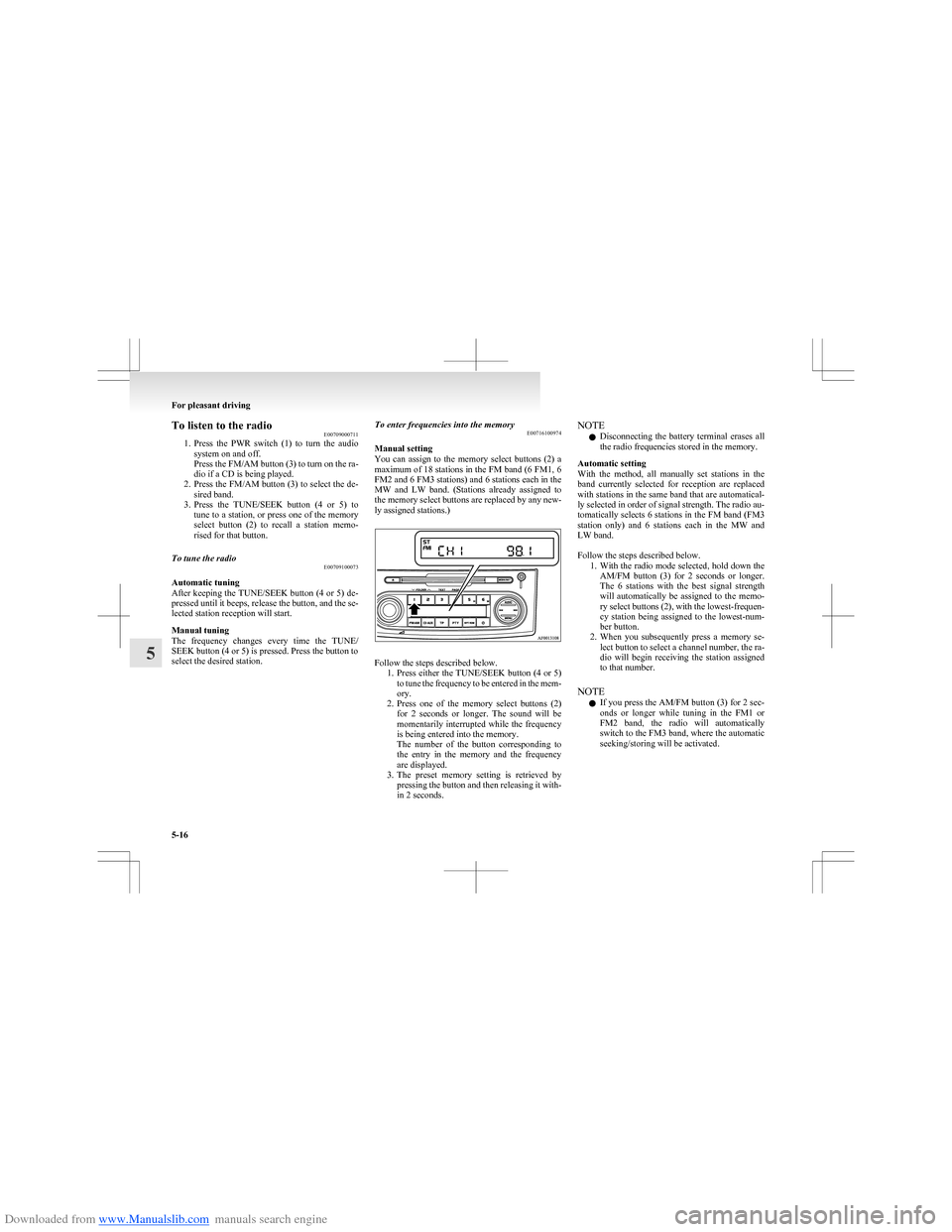
1. Press the PWR switch (1) to turn the audio
system on and off.
Press the FM/AM button (3) to turn on the ra-
dio if a CD is being played.
2. Press the FM/AM button (3) to select the de-
sired band.
3. Press the TUNE/SEEK button (4 or 5) to
tune to a station, or press one of the memory
select button (2) to recall a station memo-
rised for that button.To tune the radio E00709100073
Automatic tuning
After keeping the TUNE/SEEK button (4 or 5) de-
pressed until it beeps, release the button, and the se-
lected station reception will start.
Manual tuning
The frequency changes every time the TUNE/
SEEK button (4 or 5) is pressed. Press the button to
select the desired station.
To enter frequencies into the memory E00716100974
Manual setting
You can assign to the memory select buttons (2) a
maximum of 18 stations in the FM band (6 FM1, 6
FM2 and 6 FM3 stations) and 6 stations each in the
MW and LW band. (Stations already assigned to
the memory select buttons are replaced by any new-
ly assigned stations.)
Follow the steps described below. 1.Press either the TUNE/SEEK button (4 or 5)
to tune the frequency to be entered in the mem-
ory.
2. Press one of the memory select buttons (2)
for 2 seconds or longer. The sound will be
momentarily interrupted while the frequency
is being entered into the memory.
The number of the button corresponding to
the entry in the memory and the frequency
are displayed.
3. The preset memory setting is retrieved by
pressing the button and then releasing it with-
in 2 seconds.
NOTE
l Disconnecting the battery terminal erases all
the radio frequencies stored in the memory.
Automatic setting
With the method, all manually set stations in the
band currently selected for reception are replaced
with stations in the same band that are automatical-
ly selected in order of signal strength. The radio au-
tomatically selects 6 stations in the FM band (FM3
station only) and 6 stations each in the MW and
LW band.
Follow the steps described below. 1.With the radio mode selected, hold down the
AM/FM button (3) for 2 seconds or longer.
The 6 stations with the best signal strength
will automatically be assigned to the memo-
ry select buttons (2), with the lowest-frequen-
cy station being assigned to the lowest-num-
ber button.
2. When you subsequently press a memory se-
lect button to select a channel number, the ra-
dio will begin receiving the station assigned
to that number.
NOTE l If you press the AM/FM button (3) for 2 sec-
onds or longer while tuning in the FM1 or
FM2 band, the radio will automatically
switch to the FM3 band, where the automatic
seeking/storing will be activated.
For pleasant driving
5-16
5
Page 169 of 273
Downloaded from www.Manualslib.com manuals search engine 2. Press the AUX button (2).The display (3) will show “AUX” and then
the external audio input mode will be activa-
ted.
3. To deactivate the external audio input mode,
press the AUX button (2). To switch to anoth-
er mode.CAUTIONl Do not operate the connected audio equip-
ment while driving.
This could distract you and an accident
might occur.
NOTE
l The connected audio equipment cannot be op-
erated with the vehicle’s audio system.
l Depending on the connected audio equip-
ment, it may produce noise from the speakers.
l Use the connected audio equipment’s own
power source, such as its battery.
Noise may be produced from the speakers if
the connected audio equipment is used while
charging it using the accessory socket of the
vehicle.
l Do not activate the external audio input
mode when no audio equipment is connected.
Otherwise, noise may be produced from the
speakers.
l Connect audio equipment when the external
audio input mode is deactivated or lower the
vehicle’s speaker volume before connecting it.
Noise may be produced from the speakers if
audio equipment is connected after the exter-
nal audio input mode is activated.
l Compared to the CD player mode and radio
mode, the vehicle’s speaker volume will be
lower in the external audio input mode. There-
fore, be careful when switching from the ex-
ternal audio input mode to the CD player
mode or radio mode since the speaker vol-
ume will be higher.
l Do not use excessive force on the connection
cord. Otherwise, the cord and connectors
may be damaged.
l If the connection cord alone is left connected
to the auxiliary audio connector, noise may
be produced from the speakers.
l For information on how to connect and oper-
ate the commercially available audio equip-
ment, refer to the owner’s manual for the com-
mercially available audio equipment.Steering wheel audio remote
control switches* E00710000447
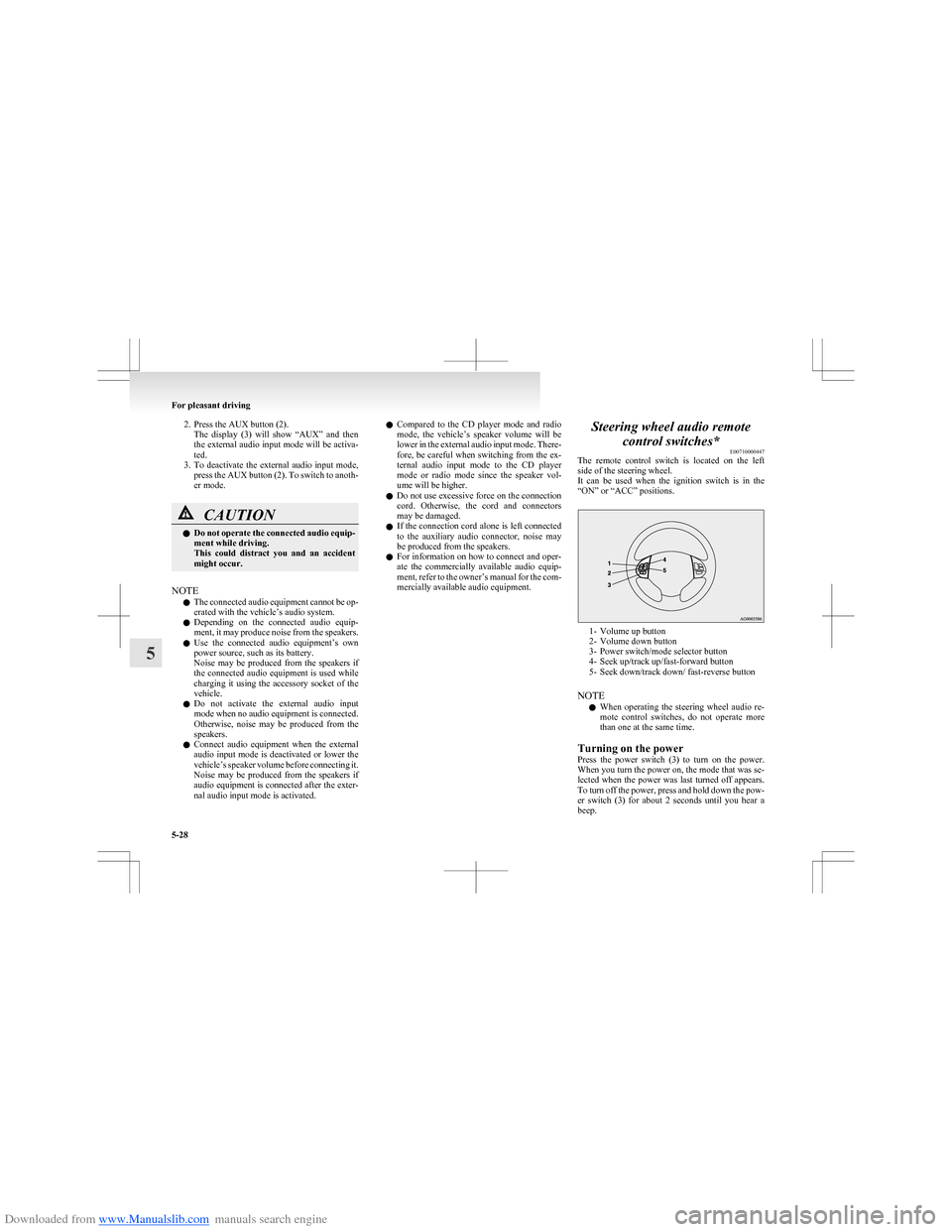
The remote control switch is located on the left
side of the steering wheel.
It can be used when the ignition switch is in the
“ON” or “ACC” positions.
1- Volume up button
2- Volume down button
3- Power switch/mode selector button
4- Seek up/track up/fast-forward button
5- Seek down/track down/ fast-reverse button
NOTE l When operating the steering wheel audio re-
mote control switches, do not operate more
than one at the same time.
Turning on the power
Press the power switch (3) to turn on the power.
When you turn the power on, the mode that was se-
lected when the power was last turned off appears.
To turn off the power, press and hold down the pow-
er switch (3) for about 2 seconds until you hear a
beep.
For pleasant driving
5-28
5
Page 177 of 273
Downloaded from www.Manualslib.com manuals search engine Automatic mode
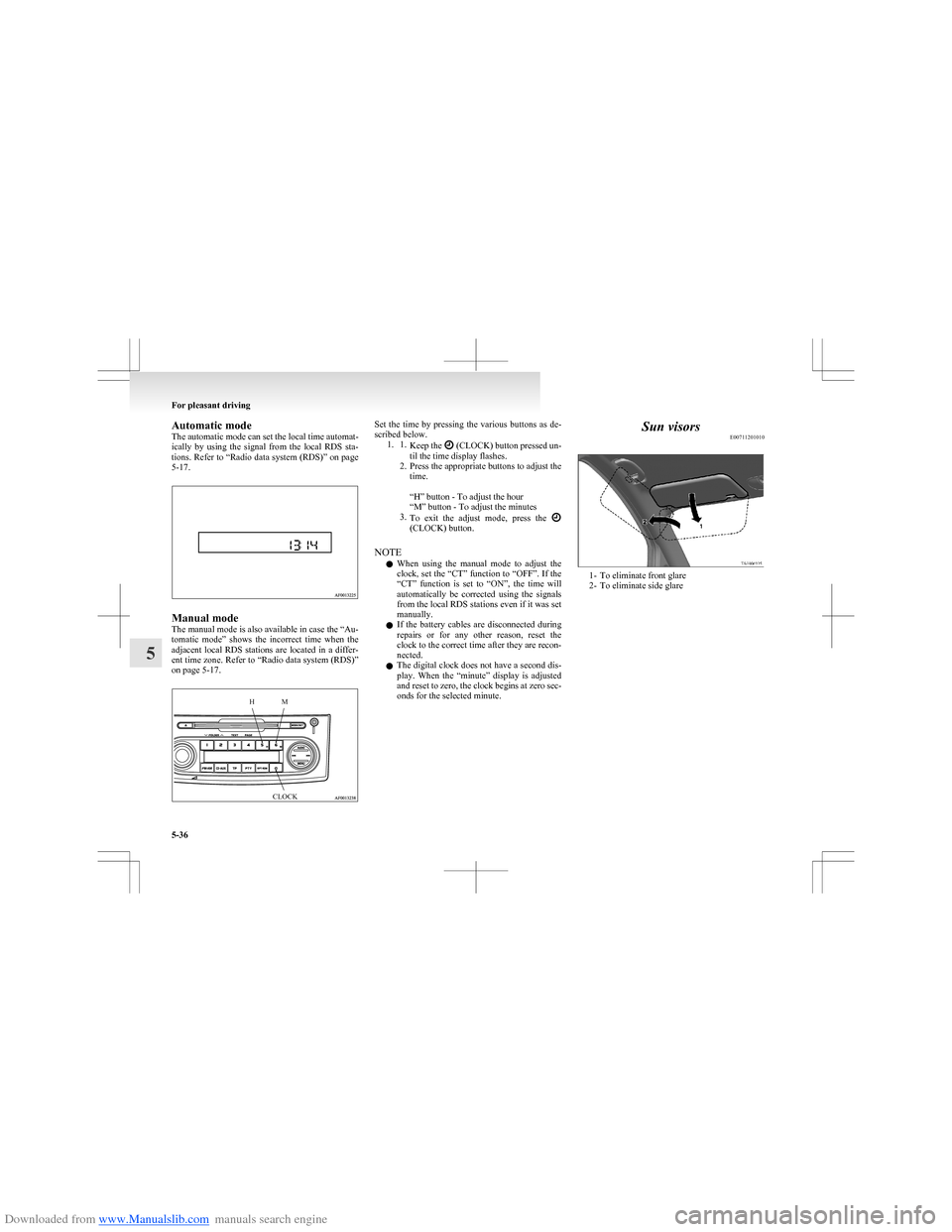
The automatic mode can set the local time automat-
ically by using the signal from the local RDS sta-
tions. Refer to “Radio data system (RDS)” on page
5-17.
Manual mode
The manual mode is also available in case the “Au-
tomatic mode” shows the incorrect time when the
adjacent local RDS stations are located in a differ-
ent time zone. Refer to “Radio data system (RDS)”
on page 5-17.
HMCLOCKSet the time by pressing the various buttons as de-
scribed below. 1. 1. Keep the
(CLOCK) button pressed un-
til the time display flashes.
2. Press the appropriate buttons to adjust the
time.
“H” button - To adjust the hour
“M” button - To adjust the minutes
3. To exit the adjust mode, press the
(CLOCK) button.
NOTE l When using the manual mode to adjust the
clock, set the “CT” function to “OFF”. If the
“CT” function is set to “ON”, the time will
automatically be corrected using the signals
from the local RDS stations even if it was set
manually.
l If the battery cables are disconnected during
repairs or for any other reason, reset the
clock to the correct time after they are recon-
nected.
l The digital clock does not have a second dis-
play. When the “minute” display is adjusted
and reset to zero, the clock begins at zero sec-
onds for the selected minute.
Sun visors E00711201010
1- To eliminate front glare
2- To eliminate side glare
For pleasant driving
5-36
5