fog MITSUBISHI COLT 2009 10.G User Guide
[x] Cancel search | Manufacturer: MITSUBISHI, Model Year: 2009, Model line: COLT, Model: MITSUBISHI COLT 2009 10.GPages: 273, PDF Size: 17.28 MB
Page 90 of 273
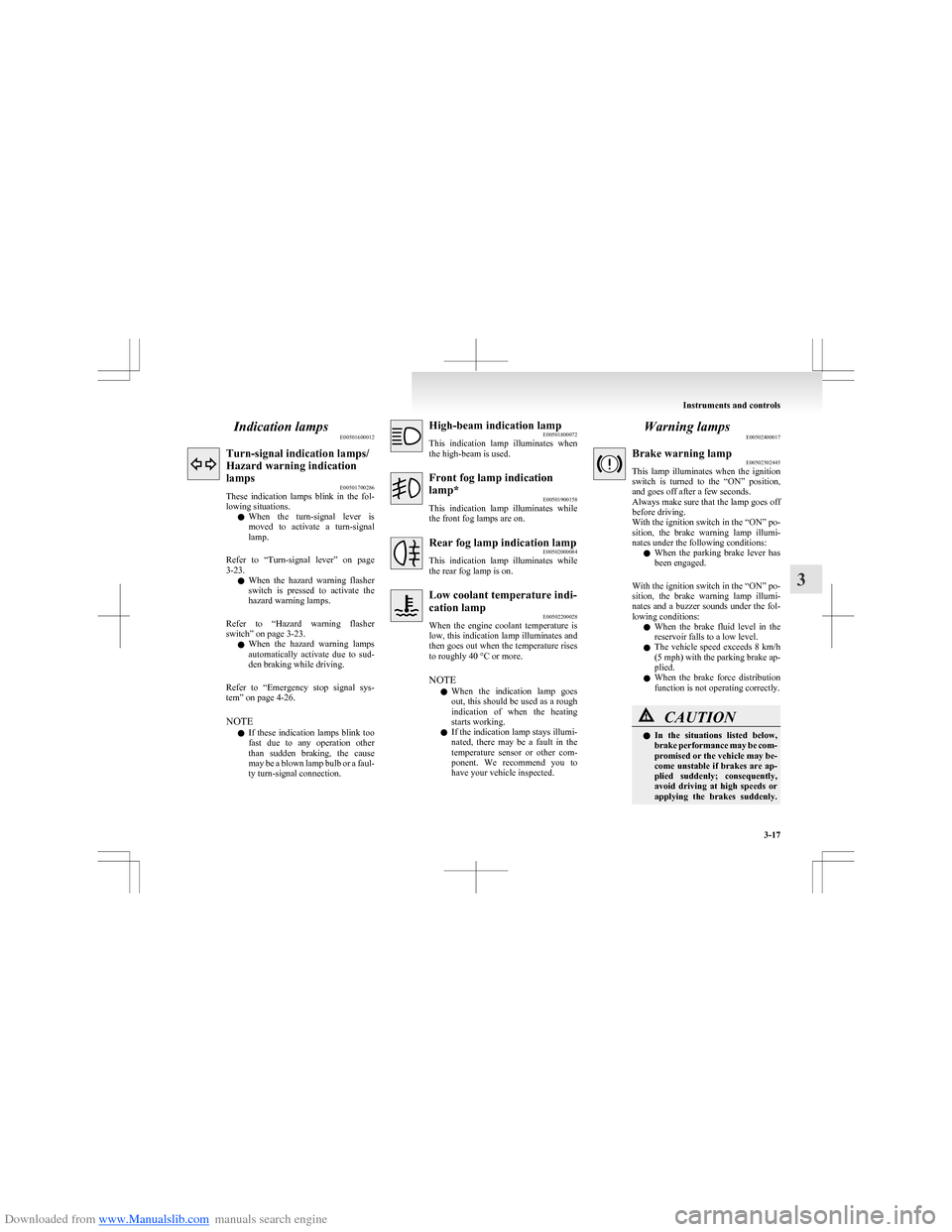
Downloaded from www.Manualslib.com manuals search engine Indication lampsE00501600012Turn-signal indication lamps/
Hazard warning indication
lamps E00501700286
These indication lamps blink in the fol-
lowing situations.
l When the turn-signal lever is
moved to activate a turn-signal
lamp.
Refer to “Turn-signal lever” on page
3-23.
l When the hazard warning flasher
switch is pressed to activate the
hazard warning lamps.
Refer to “Hazard warning flasher
switch” on page 3-23.
l When the hazard warning lamps
automatically activate due to sud-
den braking while driving.
Refer to “Emergency stop signal sys-
tem” on page 4-26.
NOTE l If these indication lamps blink too
fast due to any operation other
than sudden braking, the cause
may be a blown lamp bulb or a faul-
ty turn-signal connection.High-beam indication lamp E00501800072
This indication lamp illuminates when
the high-beam is used.Front fog lamp indication
lamp* E00501900158
This indication lamp illuminates while
the front fog lamps are on.Rear fog lamp indication lamp E00502000084
This indication lamp illuminates while
the rear fog lamp is on.Low coolant temperature indi-
cation lamp E00502200028
When the engine coolant temperature is
low, this indication lamp illuminates and
then goes out when the temperature rises
to roughly 40 °C or more.
NOTE l When the indication lamp goes
out, this should be used as a rough
indication of when the heating
starts working.
l If the indication lamp stays illumi-
nated, there may be a fault in the
temperature sensor or other com-
ponent. We recommend you to
have your vehicle inspected.Warning lamps E00502400017Brake warning lamp E00502502445
This lamp illuminates when the ignition
switch is turned to the “ON” position,
and goes off after a few seconds.
Always make sure that the lamp goes off
before driving.
With the ignition switch in the “ON” po-
sition, the brake warning lamp illumi-
nates under the following conditions:
l When the parking brake lever has
been engaged.
With the ignition switch in the “ON” po-
sition, the brake warning lamp illumi-
nates and a buzzer sounds under the fol-
lowing conditions:
l When the brake fluid level in the
reservoir falls to a low level.
l The vehicle speed exceeds 8 km/h
(5 mph) with the parking brake ap-
plied.
l When the brake force distribution
function is not operating correctly.CAUTIONl In the situations listed below,
brake performance may be com-
promised or the vehicle may be-
come unstable if brakes are ap-
plied suddenly; consequently,
avoid driving at high speeds or
applying the brakes suddenly.
Instruments and controls
3-17
3
Page 93 of 273
Downloaded from www.Manualslib.com manuals search engine CAUTIONlBefore moving your vehicle,
check that the warning lamp is
OFF.Combination headlamps and
dipper switch E00506000923
Headlamps
NOTE l Do not leave the headlamps and other lamps
on for a long time while the engine is station-
ary (not running). A rundown battery could
result.
l When it rains, or when the vehicle has been
washed, the inside of the lens sometimes be-
comes foggy. This is the same phenomenon
as when window glass mists up on a humid
day, and does not indicate a functional prob-
lem. When the lamp is switched on, the heat
will remove the fog. However, if water gath-
ers inside the lamp, we recommend you to
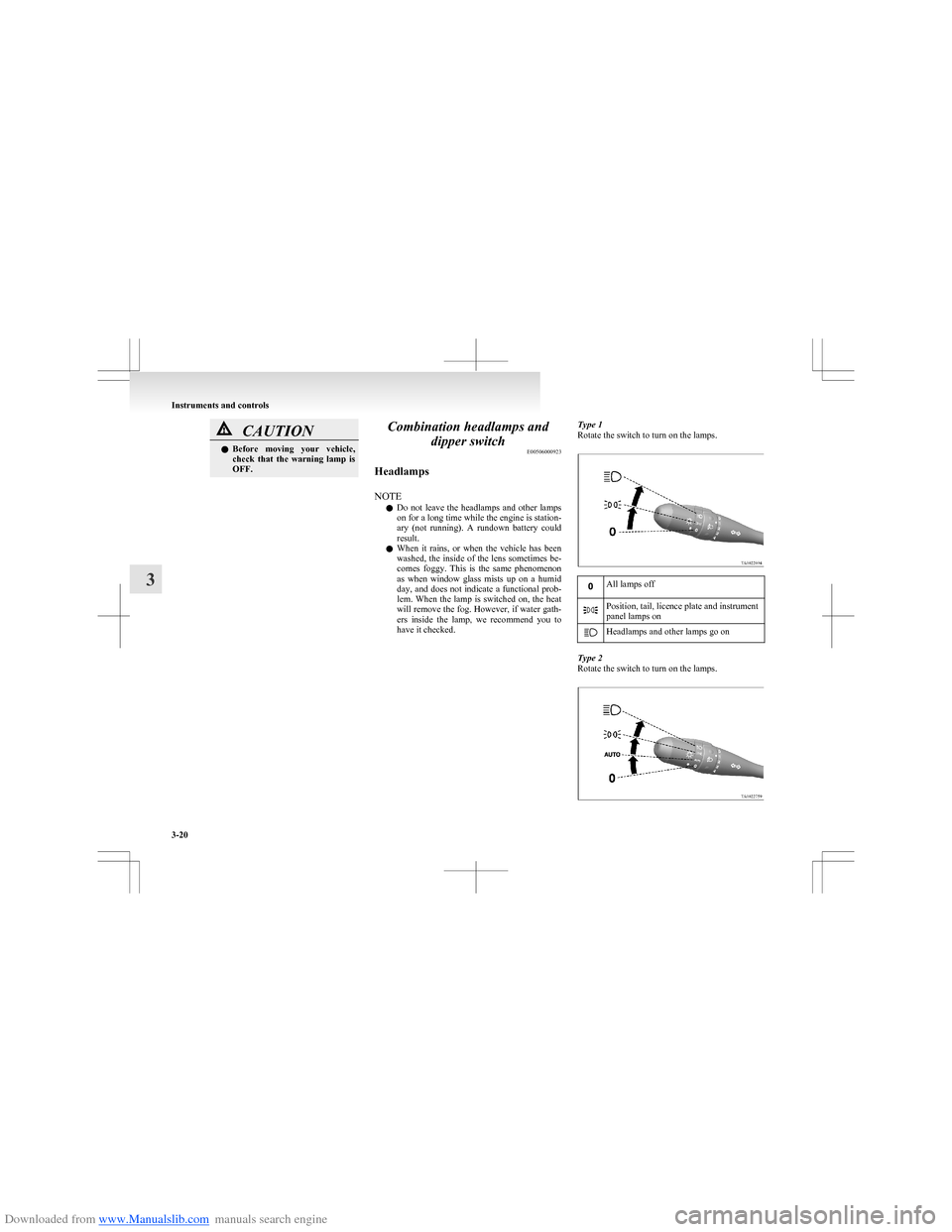
have it checked.Type 1
Rotate the switch to turn on the lamps.All lamps offPosition, tail, licence plate and instrument
panel lamps onHeadlamps and other lamps go on
Type 2
Rotate the switch to turn on the lamps.
Instruments and controls
3-20
3
Page 94 of 273
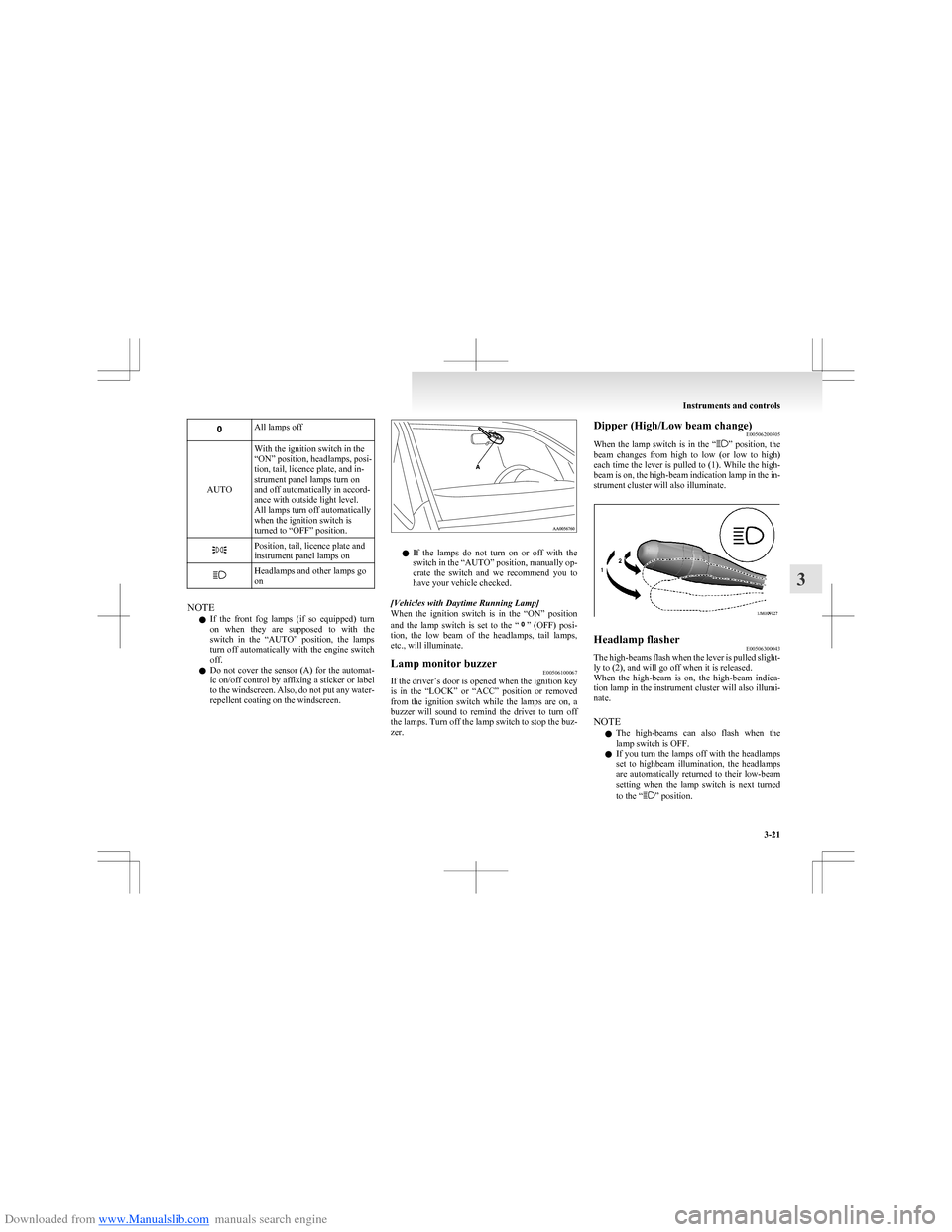
Downloaded from www.Manualslib.com manuals search engine All lamps off
AUTO
With the ignition switch in the
“ON” position, headlamps, posi-
tion, tail, licence plate, and in-
strument panel lamps turn on
and off automatically in accord-
ance with outside light level.
All lamps turn off automatically
when the ignition switch is
turned to “OFF” position.Position, tail, licence plate and
instrument panel lamps onHeadlamps and other lamps go
on
NOTE
l If the front fog lamps (if so equipped) turn
on when they are supposed to with the
switch in the “AUTO” position, the lamps
turn off automatically with the engine switch
off.
l Do not cover the sensor (A) for the automat-
ic on/off control by affixing a sticker or label
to the windscreen. Also, do not put any water-
repellent coating on the windscreen.
l If the lamps do not turn on or off with the
switch in the “AUTO” position, manually op-
erate the switch and we recommend you to
have your vehicle checked.
[Vehicles with Daytime Running Lamp]
When the ignition switch is in the “ON” position
and the lamp switch is set to the “
” (OFF) posi-
tion, the low beam of the headlamps, tail lamps,
etc., will illuminate.
Lamp monitor buzzer E00506100067
If the driver’s door is opened when the ignition key
is in the “LOCK” or “ACC” position or removed
from the ignition switch while the lamps are on, a
buzzer will sound to remind the driver to turn off
the lamps. Turn off the lamp switch to stop the buz-
zer.
Dipper (High/Low beam change) E00506200505
When the lamp switch is in the “
” position, the
beam changes from high to low (or low to high)
each time the lever is pulled to (1). While the high-
beam is on, the high-beam indication lamp in the in-
strument cluster will also illuminate.
Headlamp flasher E00506300043
The high-beams flash when the lever is pulled slight-
ly to (2), and will go off when it is released.
When the high-beam is on, the high-beam indica-
tion lamp in the instrument cluster will also illumi-
nate.
NOTE l The high-beams can also flash when the
lamp switch is OFF.
l If you turn the lamps off with the headlamps
set to highbeam illumination, the headlamps
are automatically returned to their low-beam
setting when the lamp switch is next turned
to the “
” position.
Instruments and controls
3-21
3
Page 97 of 273
Downloaded from www.Manualslib.com manuals search engine NOTEl While the hazard warning lamps are blinking
due to having manually pushed the switch,
the Emergency stop signal does not operate.
Refer to “Emergency stop signal system” on
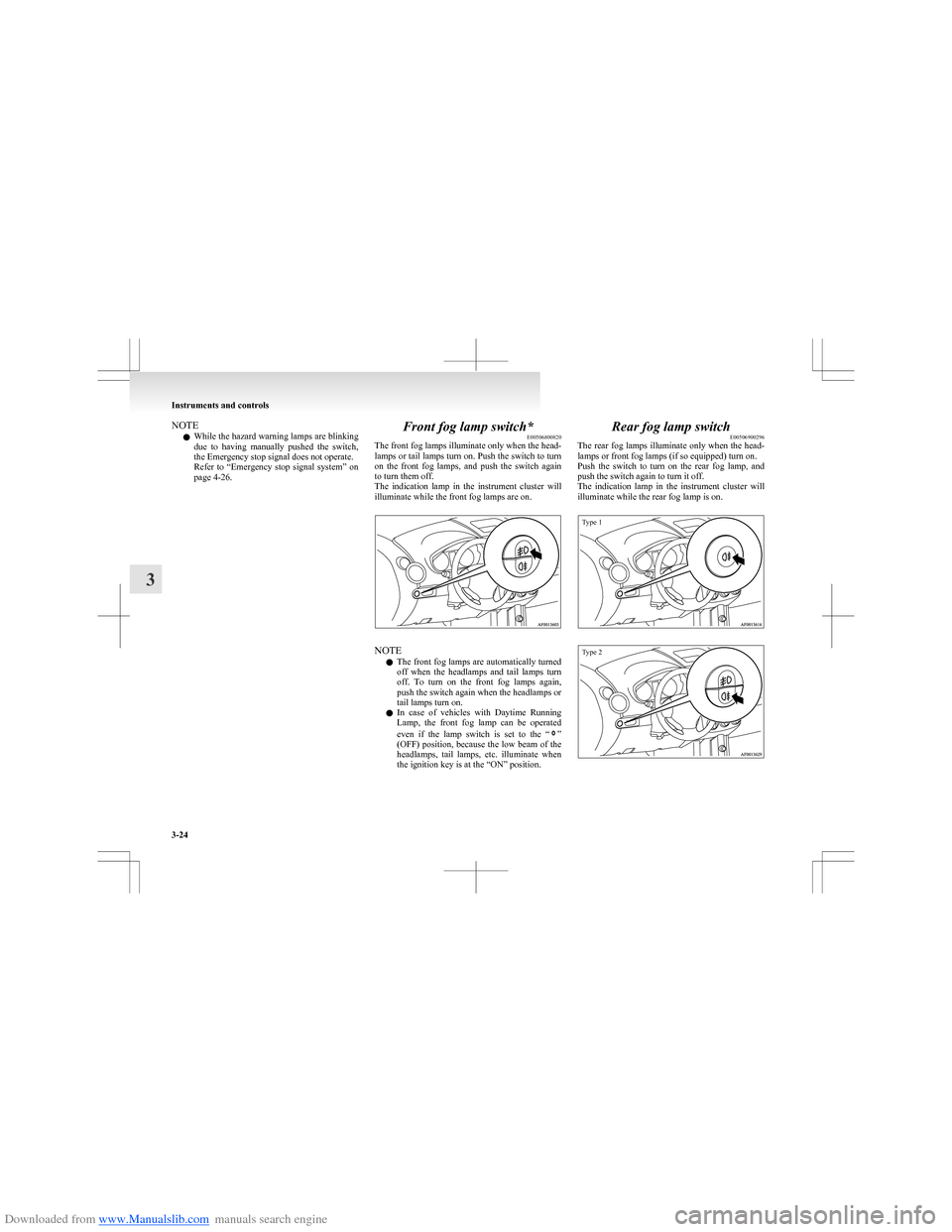
page 4-26.Front fog lamp switch* E00506800820
The front fog lamps illuminate only when the head-
lamps or tail lamps turn on. Push the switch to turn
on the front fog lamps, and push the switch again
to turn them off.
The indication lamp in the instrument cluster will
illuminate while the front fog lamps are on.
NOTE
l The front fog lamps are automatically turned
off when the headlamps and tail lamps turn
off. To turn on the front fog lamps again,
push the switch again when the headlamps or
tail lamps turn on.
l In case of vehicles with Daytime Running
Lamp, the front fog lamp can be operated
even if the lamp switch is set to the “
”
(OFF) position, because the low beam of the
headlamps, tail lamps, etc. illuminate when
the ignition key is at the “ON” position.
Rear fog lamp switch E00506900296
The rear fog lamps illuminate only when the head-
lamps or front fog lamps (if so equipped) turn on.
Push the switch to turn on the rear fog lamp, and
push the switch again to turn it off.
The indication lamp in the instrument cluster will
illuminate while the rear fog lamp is on.
Type 1Type 2
Instruments and controls
3-24
3
Page 98 of 273
Downloaded from www.Manualslib.com manuals search engine NOTEl The rear fog lamp is automatically turned off
when the headlamps and front fog lamps (if
so equipped) turned off. To turn on the rear
fog lamp again, push the switch again when
the headlamps or front fog lamps (if so equip-
ped) turn on.
l In case of vehicles with Daytime Running
Lamp, the rear fog lamp can be operated
even if the lamp switch is set to the “
”
(OFF) position, because the low beam of the
headlamps, tail lamps, etc. illuminate when
the ignition key is at the “ON” position.
Wiper and washer switch E00507101191CAUTIONlIf the washer is used in cold weather, the
washer fluid sprayed against the glass
may freeze, which may hinder visibility.
Warm the glass with the defroster or rear
window demister switch before using the
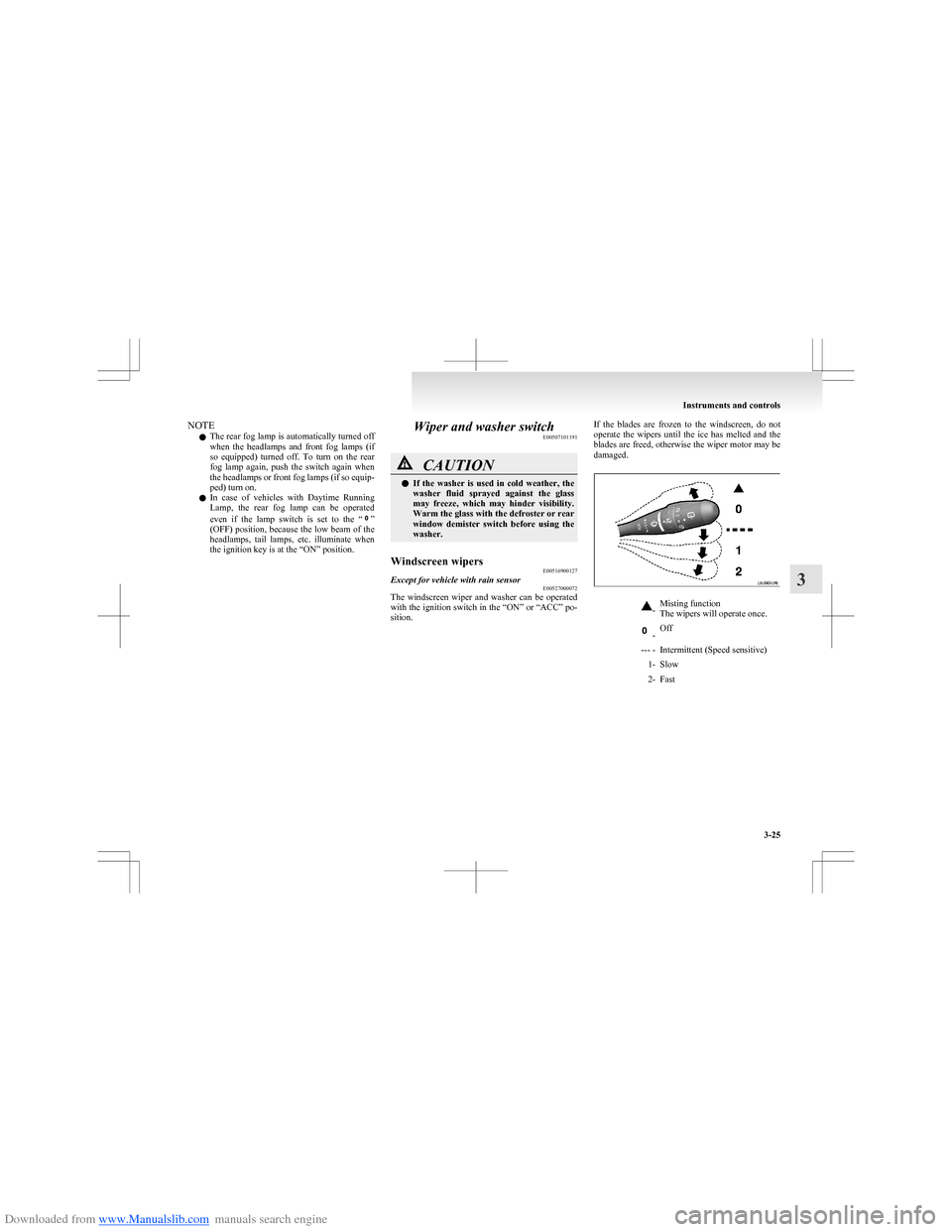
washer.Windscreen wipers E00516900127Except for vehicle with rain sensorE00527000072
The windscreen wiper and washer can be operated
with the ignition switch in the “ON” or “ACC” po-
sition.
If the blades are frozen to the windscreen, do not
operate the wipers until the ice has melted and the
blades are freed, otherwise the wiper motor may be
damaged.-Misting function
The wipers will operate once. -Off--- -Intermittent (Speed sensitive)1-Slow2-Fast
Instruments and controls
3-25
3
Page 146 of 273
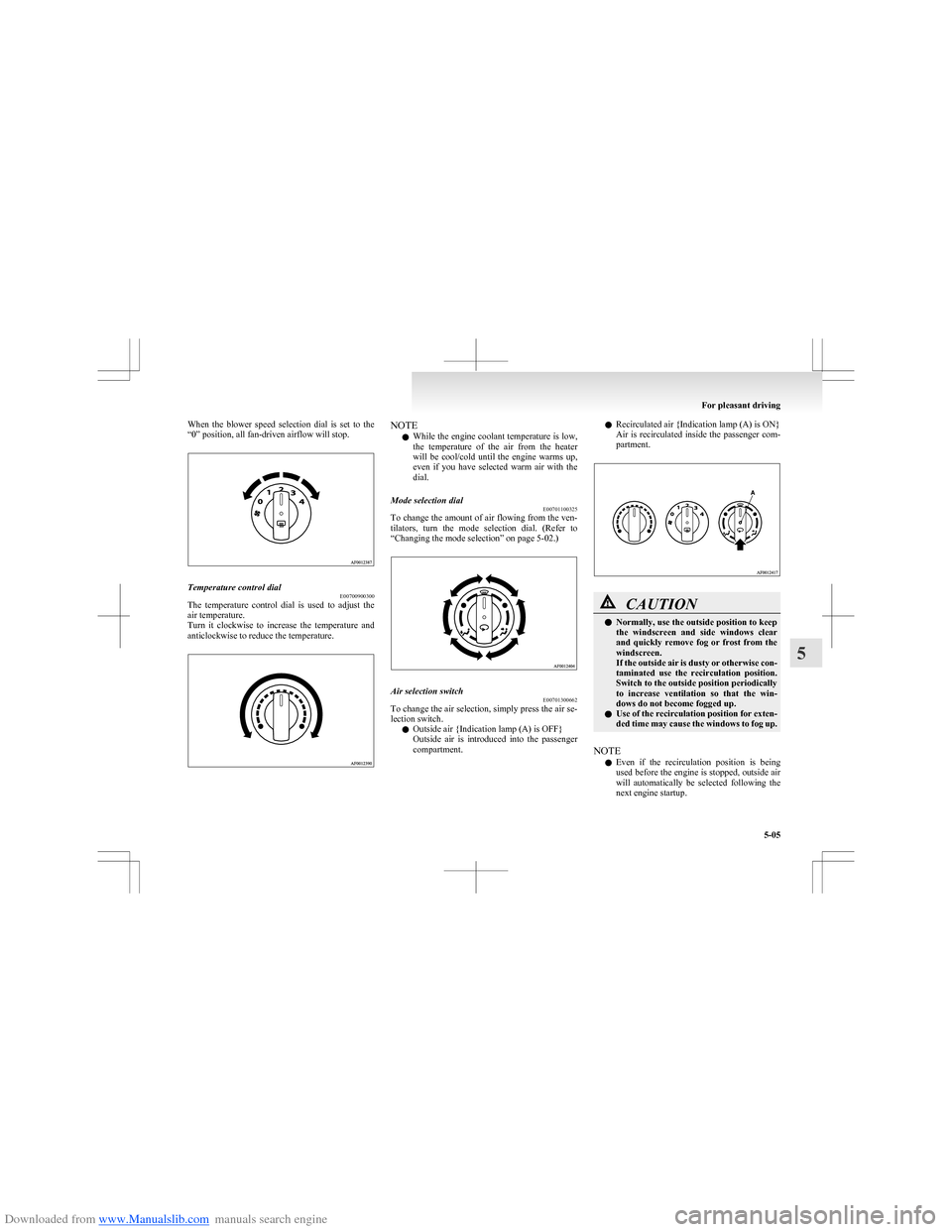
Downloaded from www.Manualslib.com manuals search engine When the blower speed selection dial is set to the
“0” position, all fan-driven airflow will stop.Temperature control dial E00700900300
The temperature control dial is used to adjust the
air temperature.
Turn it clockwise to increase the temperature and
anticlockwise to reduce the temperature.
NOTE
l While the engine coolant temperature is low,
the temperature of the air from the heater
will be cool/cold until the engine warms up,
even if you have selected warm air with the
dial.Mode selection dial E00701100325
To change the amount of air flowing from the ven-
tilators, turn the mode selection dial. (Refer to
“Changing the mode selection” on page 5-02.)
Air selection switch E00701300662
To change the air selection, simply press the air se-
lection switch.
l Outside air {Indication lamp (A) is OFF}
Outside air is introduced into the passenger
compartment.
l Recirculated air {Indication lamp (A) is ON}
Air is recirculated inside the passenger com-
partment.CAUTIONl Normally, use the outside position to keep
the windscreen and side windows clear
and quickly remove fog or frost from the
windscreen.
If the outside air is dusty or otherwise con-
taminated use the recirculation position.
Switch to the outside position periodically
to increase ventilation so that the win-
dows do not become fogged up.
l Use of the recirculation position for exten-
ded time may cause the windows to fog up.
NOTE
l Even if the recirculation position is being
used before the engine is stopped, outside air
will automatically be selected following the
next engine startup.
For pleasant driving
5-05
5
Page 150 of 273
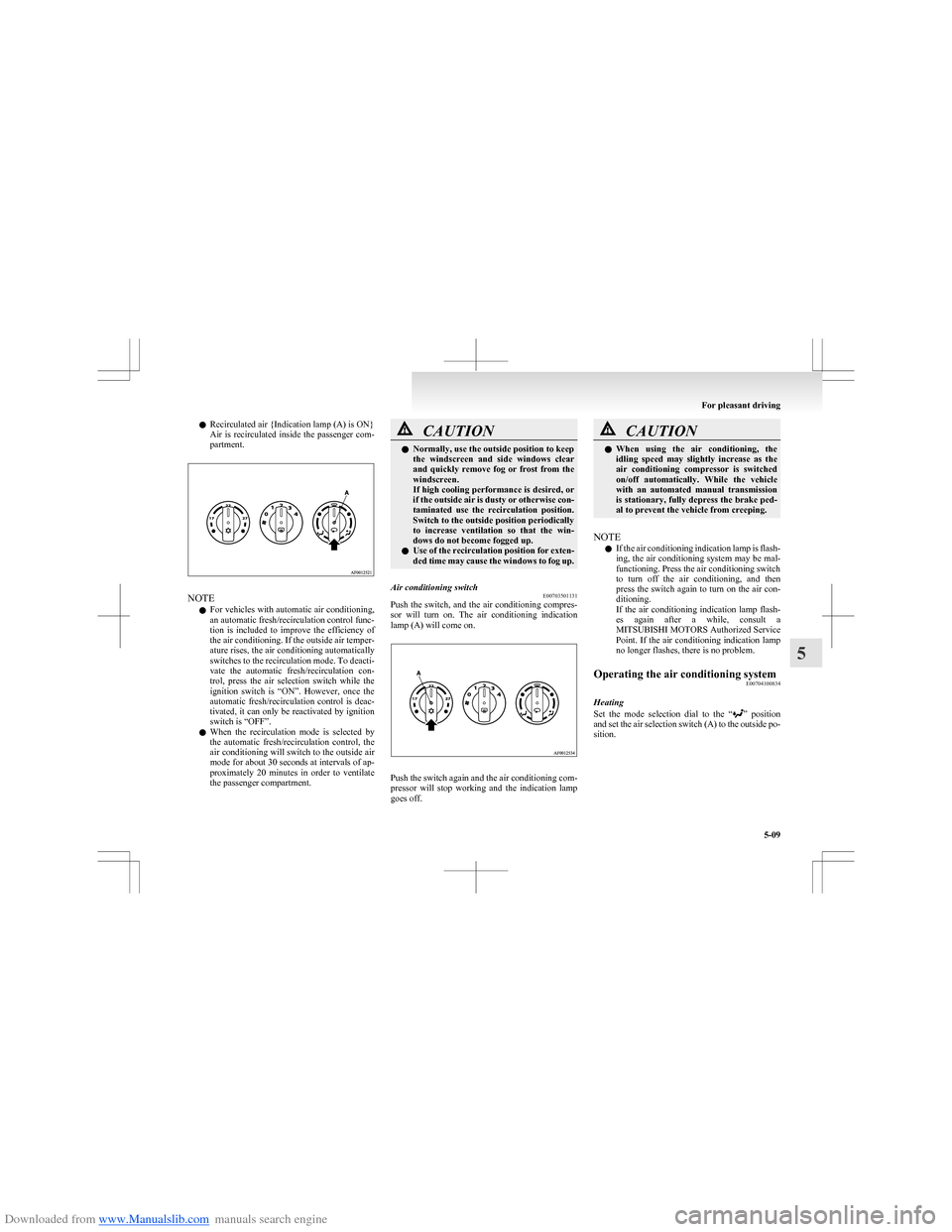
Downloaded from www.Manualslib.com manuals search engine lRecirculated air {Indication lamp (A) is ON}
Air is recirculated inside the passenger com-
partment.
NOTE
l For vehicles with automatic air conditioning,
an automatic fresh/recirculation control func-
tion is included to improve the efficiency of
the air conditioning. If the outside air temper-
ature rises, the air conditioning automatically
switches to the recirculation mode. To deacti-
vate the automatic fresh/recirculation con-
trol, press the air selection switch while the
ignition switch is “ON”. However, once the
automatic fresh/recirculation control is deac-
tivated, it can only be reactivated by ignition
switch is “OFF”.
l When the recirculation mode is selected by
the automatic fresh/recirculation control, the
air conditioning will switch to the outside air
mode for about 30 seconds at intervals of ap-
proximately 20 minutes in order to ventilate
the passenger compartment.
CAUTIONl Normally, use the outside position to keep
the windscreen and side windows clear
and quickly remove fog or frost from the
windscreen.
If high cooling performance is desired, or
if the outside air is dusty or otherwise con-
taminated use the recirculation position.
Switch to the outside position periodically
to increase ventilation so that the win-
dows do not become fogged up.
l Use of the recirculation position for exten-
ded time may cause the windows to fog up.Air conditioning switch E00703501131
Push the switch, and the air conditioning compres-
sor will turn on. The air conditioning indication
lamp (A) will come on.
Push the switch again and the air conditioning com-
pressor will stop working and the indication lamp
goes off.
CAUTIONl When using the air conditioning, the
idling speed may slightly increase as the
air conditioning compressor is switched
on/off automatically. While the vehicle
with an automated manual transmission
is stationary, fully depress the brake ped-
al to prevent the vehicle from creeping.
NOTE
l If the air conditioning indication lamp is flash-
ing, the air conditioning system may be mal-
functioning. Press the air conditioning switch
to turn off the air conditioning, and then
press the switch again to turn on the air con-
ditioning.
If the air conditioning indication lamp flash-
es again after a while, consult a
MITSUBISHI MOTORS Authorized Service
Point. If the air conditioning indication lamp
no longer flashes, there is no problem.
Operating the air conditioning system E00704100834
Heating
Set the mode selection dial to the “
” position
and set the air selection switch (A) to the outside po-
sition.
For pleasant driving
5-09
5
Page 151 of 273
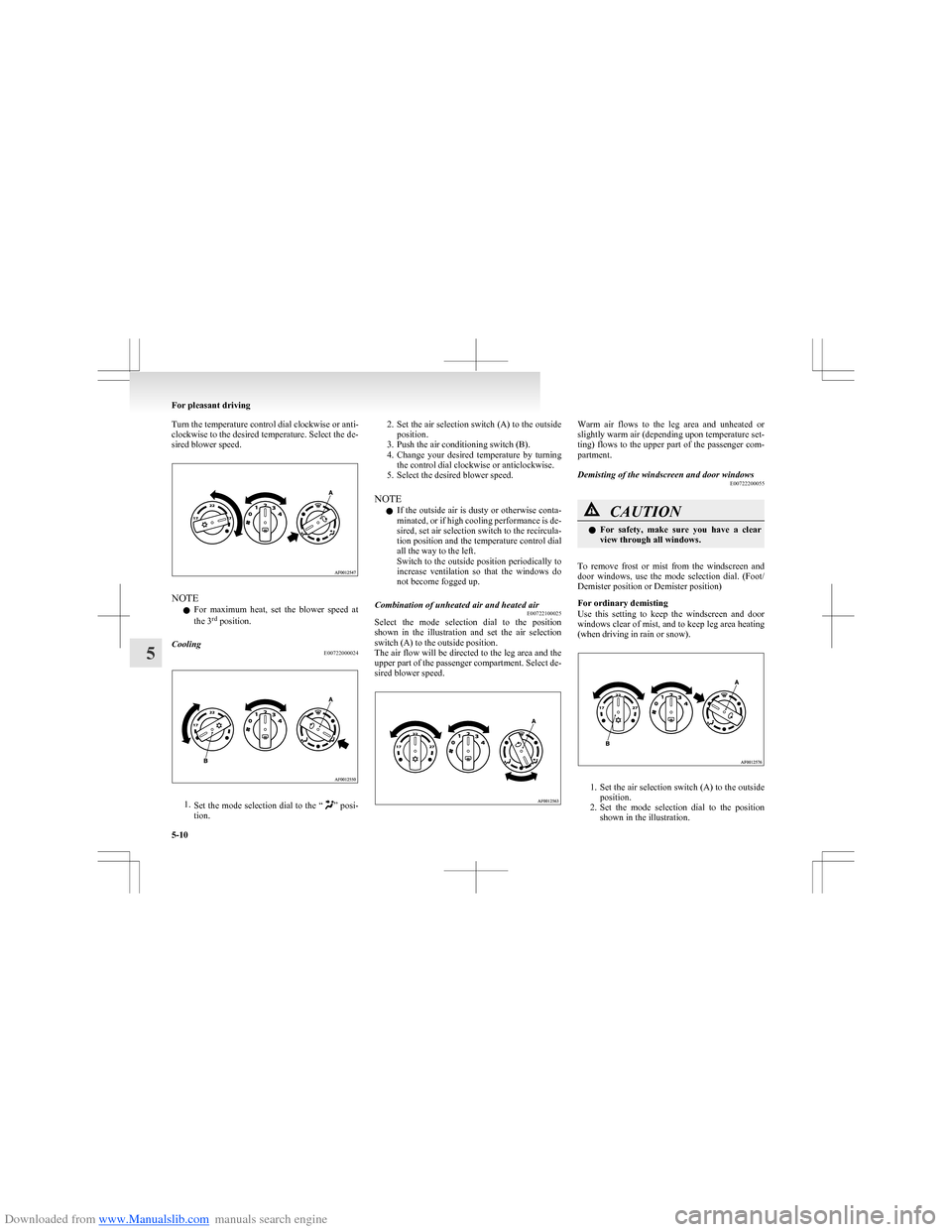
Downloaded from www.Manualslib.com manuals search engine Turn the temperature control dial clockwise or anti-
clockwise to the desired temperature. Select the de-
sired blower speed.
NOTE
l For maximum heat, set the blower speed at
the 3 rd
position.
Cooling
E00722000024
1.Set the mode selection dial to the “” posi-
tion.
2. Set the air selection switch (A) to the outside
position.
3. Push the air conditioning switch (B).
4. Change your desired temperature by turning
the control dial clockwise or anticlockwise.
5. Select the desired blower speed.
NOTE l If the outside air is dusty or otherwise conta-
minated, or if high cooling performance is de-
sired, set air selection switch to the recircula-
tion position and the temperature control dial
all the way to the left.
Switch to the outside position periodically to
increase ventilation so that the windows do
not become fogged up.Combination of unheated air and heated air E00722100025
Select the mode selection dial to the position
shown in the illustration and set the air selection
switch (A) to the outside position.
The air flow will be directed to the leg area and the
upper part of the passenger compartment. Select de-
sired blower speed.
Warm air flows to the leg area and unheated or
slightly warm air (depending upon temperature set-
ting) flows to the upper part of the passenger com-
partment.Demisting of the windscreen and door windows E00722200055CAUTIONlFor safety, make sure you have a clear
view through all windows.
To remove frost or mist from the windscreen and
door windows, use the mode selection dial. (Foot/
Demister position or Demister position)
For ordinary demisting
Use this setting to keep the windscreen and door
windows clear of mist, and to keep leg area heating
(when driving in rain or snow).
1. Set the air selection switch (A) to the outside
position.
2. Set the mode selection dial to the position
shown in the illustration.
For pleasant driving
5-10
5
Page 153 of 273
Downloaded from www.Manualslib.com manuals search engine It is recommended that the refrigerant be recovered
and recycled for further use.
During a long period of disuse
The air conditioning should be operated for at least
five minutes each week, even in cold weather. This
is to prevent poor lubrication of the compressor in-
ternal parts and to maintain the air conditioning in
the best operating condition.Air purifier E00708400024
An air filter has been incorporated into this air con-
ditioning so that dirt and dust are cleaned from the
air.
Replace the air filter periodically as its ability to
clean the air will be reduced as it collects pollen
and dirt. For the maintenance interval, refer to the
“SERVICE BOOKLET”.
NOTE l Operation in certain conditions such as driv-
ing on a dusty road and frequent use of the
air conditioning can lead to reduction of serv-
ice life of the filter. When the air flow rate
suddenly drops or when the windscreen or
windows start to fog up easily, the air filter
requires replacement.
We recommend you to have it checked.LW/MW/FM electronic tuning
radio with CD player* E00708502175
The audio system can be used when the ignition
switch is in the “ON” or “ACC” position.
NOTE l To listen to the audio system while the en-
gine is stopped, turn the ignition key to the
“ACC” position.
For Clear Tec models, the audio system will
continue to operate if the ignition switch is in
the “ON” position when the engine stops au-
tomatically. However, in some cases, the au-
dio system may stop producing sound or turn
off.
l If a cellular phone is used inside the vehicle,
it may create noise from the audio equip-
ment. This does not mean that anything is
wrong with your audio equipment. In such a
case, use the cellular phone at a place as far
away as possible from the audio equipment.
l If foreign objects or water get into the audio
equipment, or if smoke or a strange odour
comes from it, immediately turn off the au-
dio system. We recommend you to have it
checked. Never try to repair it by yourself.
Avoid continuous usage without inspection
by a qualified person.
For pleasant driving
5-12
5
Page 233 of 273
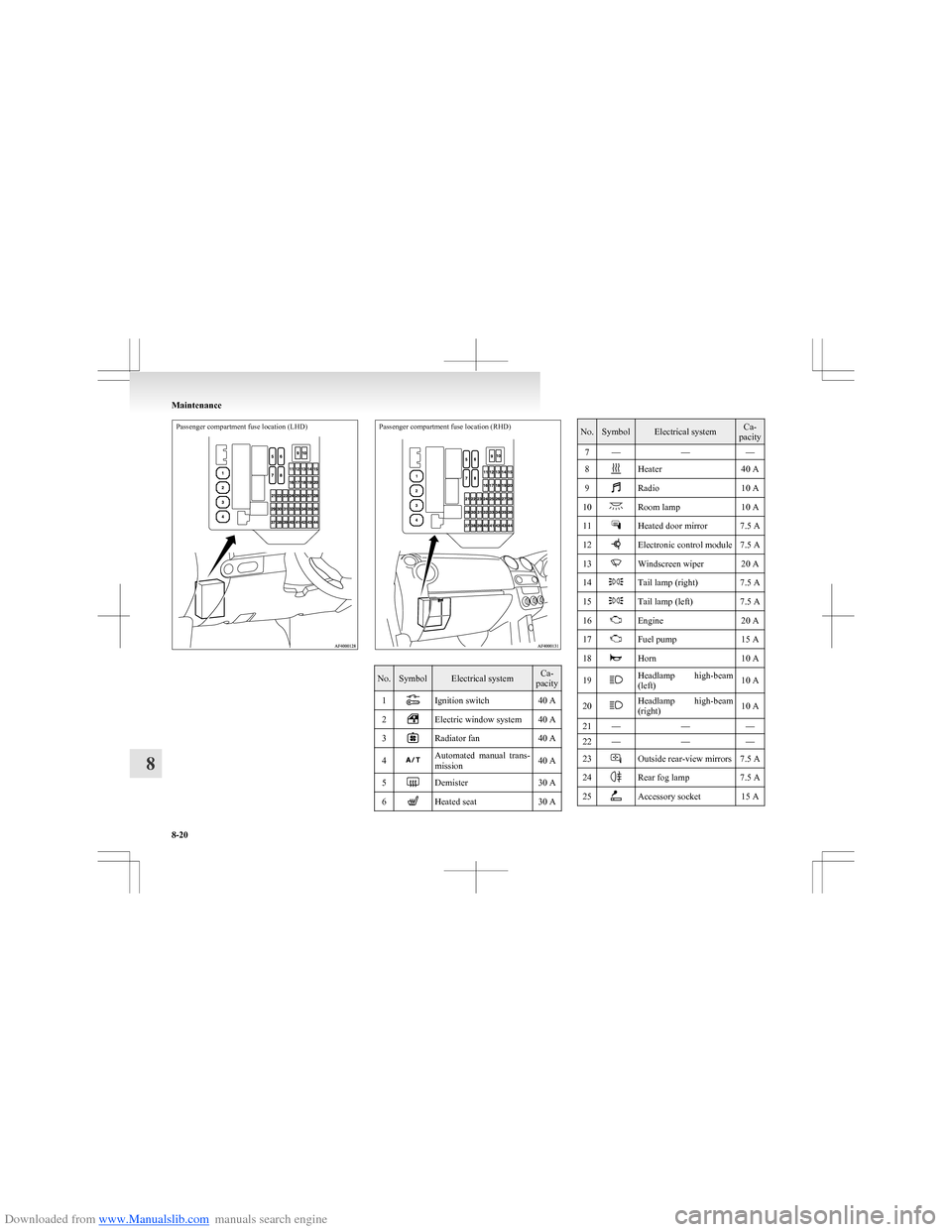
Downloaded from www.Manualslib.com manuals search engine Passenger compartment fuse location (LHD)Passenger compartment fuse location (RHD)
No.SymbolElectrical systemCa-
pacity1Ignition switch40 A2Electric window system40 A3Radiator fan40 A4Automated manual trans-
mission40 A5Demister30 A6Heated seat30 ANo.SymbolElectrical systemCa-
pacity7———8Heater40 A9Radio10 A10Room lamp10 A11Heated door mirror7.5 A12Electronic control module7.5 A13Windscreen wiper20 A14Tail lamp (right)7.5 A15Tail lamp (left)7.5 A16Engine20 A17Fuel pump15 A18Horn10 A19Headlamp high-beam
(left)10 A20Headlamp high-beam
(right)10 A21———22———23Outside rear-view mirrors7.5 A24Rear fog lamp7.5 A25Accessory socket15 A
Maintenance
8-20
8