audio MITSUBISHI COLT 2009 10.G Owner's Manual
[x] Cancel search | Manufacturer: MITSUBISHI, Model Year: 2009, Model line: COLT, Model: MITSUBISHI COLT 2009 10.GPages: 273, PDF Size: 17.28 MB
Page 172 of 273
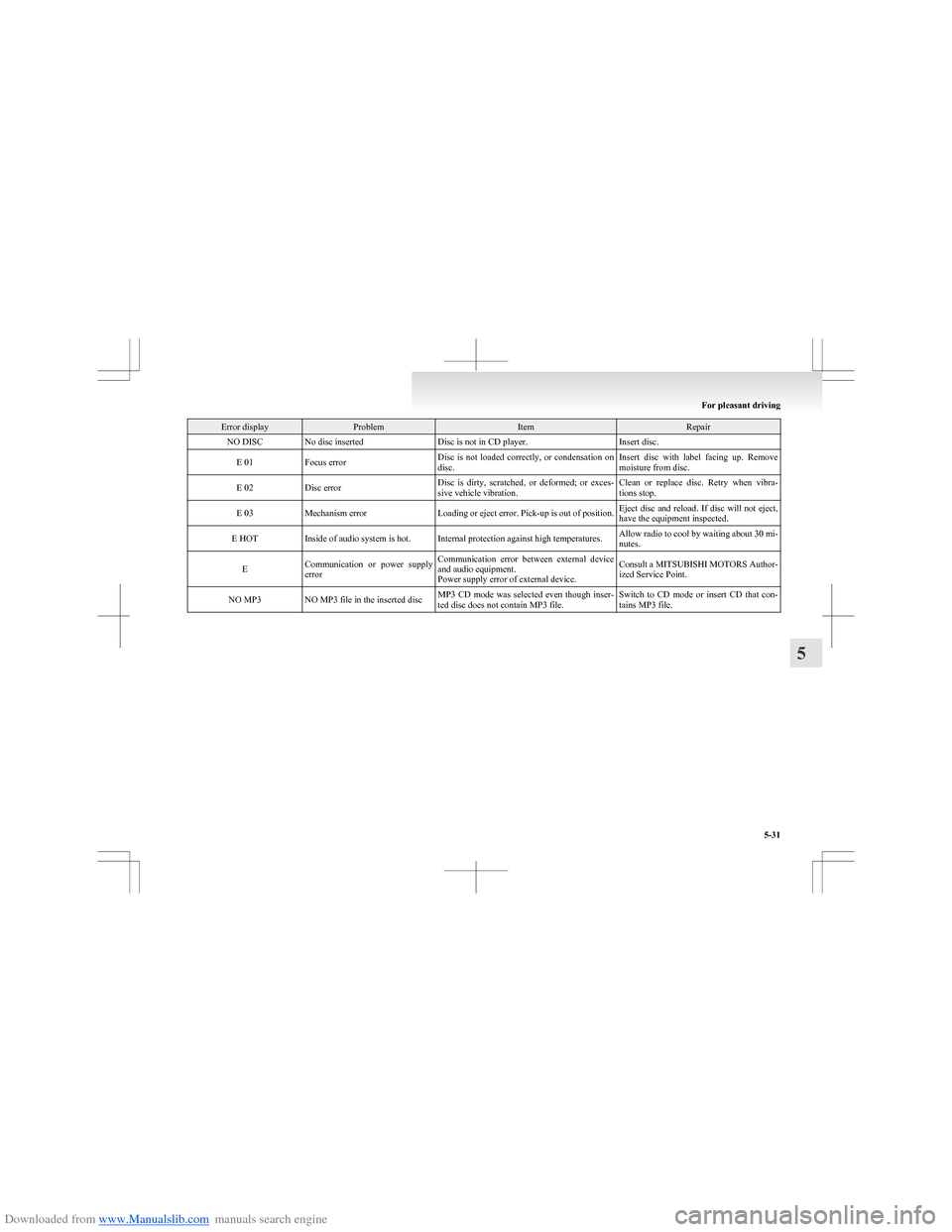
Downloaded from www.Manualslib.com manuals search engine Error displayProblemItemRepairNO DISCNo disc insertedDisc is not in CD player.Insert disc.E 01Focus errorDisc is not loaded correctly, or condensation on
disc.Insert disc with label facing up. Remove
moisture from disc.E 02Disc errorDisc is dirty, scratched, or deformed; or exces-
sive vehicle vibration.Clean or replace disc. Retry when vibra-
tions stop.E 03Mechanism errorLoading or eject error. Pick-up is out of position.Eject disc and reload. If disc will not eject,
have the equipment inspected.E HOTInside of audio system is hot.Internal protection against high temperatures.Allow radio to cool by waiting about 30 mi-
nutes.ECommunication or power supply
errorCommunication error between external device
and audio equipment.
Power supply error of external device.Consult a MITSUBISHI MOTORS Author-
ized Service Point.NO MP3NO MP3 file in the inserted discMP3 CD mode was selected even though inser-
ted disc does not contain MP3 file.Switch to CD mode or insert CD that con-
tains MP3 file.
For pleasant driving
5-31
5
Page 173 of 273
Downloaded from www.Manualslib.com manuals search engine Handling of compact discsE00723000207
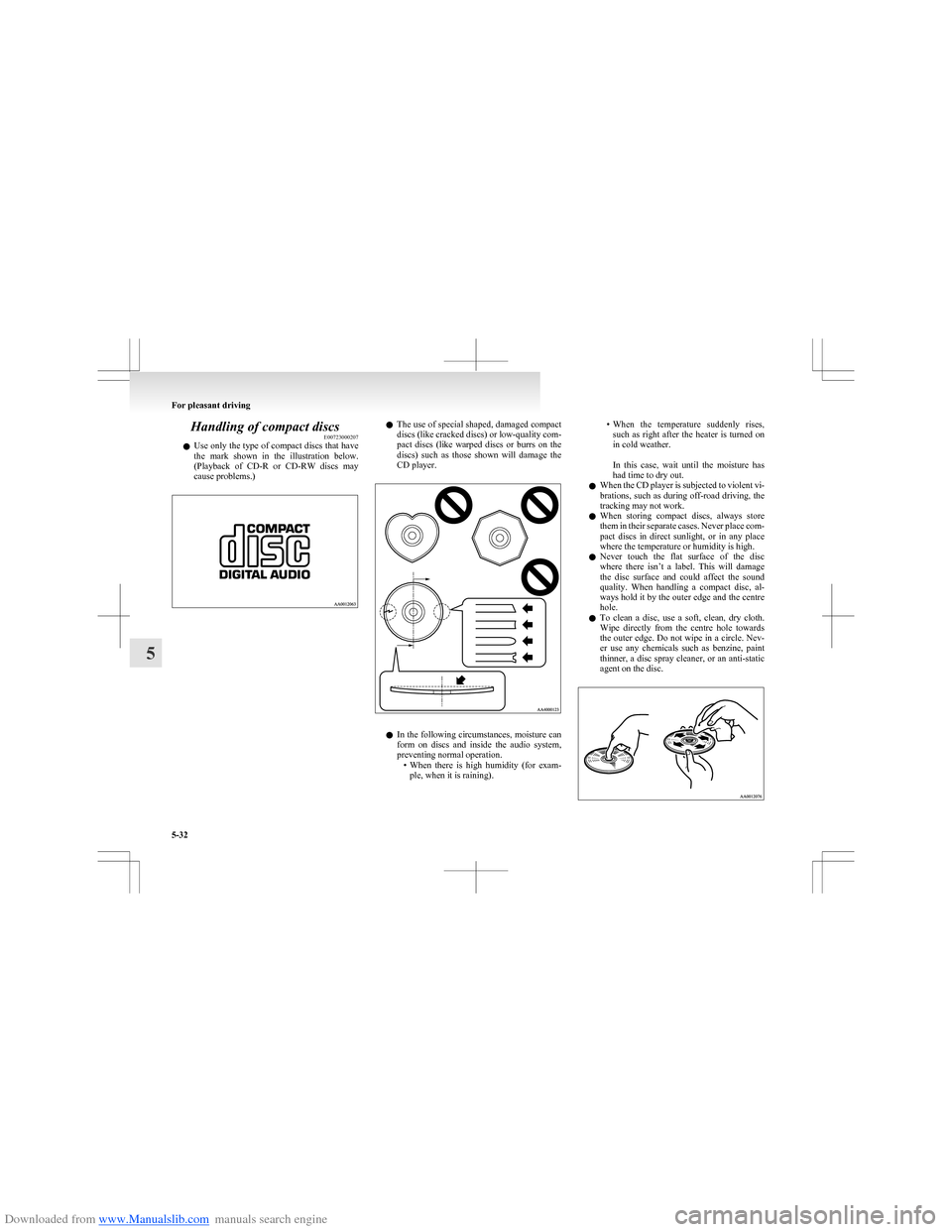
l Use only the type of compact discs that have
the mark shown in the illustration below.
(Playback of CD-R or CD-RW discs may
cause problems.)l The use of special shaped, damaged compact
discs (like cracked discs) or low-quality com-
pact discs (like warped discs or burrs on the
discs) such as those shown will damage the
CD player.
l In the following circumstances, moisture can
form on discs and inside the audio system,
preventing normal operation. •When there is high humidity (for exam-
ple, when it is raining).
• When the temperature suddenly rises,
such as right after the heater is turned on
in cold weather.
In this case, wait until the moisture has
had time to dry out.
l When the CD player is subjected to violent vi-
brations, such as during off-road driving, the
tracking may not work.
l When storing compact discs, always store
them in their separate cases. Never place com-
pact discs in direct sunlight, or in any place
where the temperature or humidity is high.
l Never touch the flat surface of the disc
where there isn’t a label. This will damage
the disc surface and could affect the sound
quality. When handling a compact disc, al-
ways hold it by the outer edge and the centre
hole.
l To clean a disc, use a soft, clean, dry cloth.
Wipe directly from the centre hole towards
the outer edge. Do not wipe in a circle. Nev-
er use any chemicals such as benzine, paint
thinner, a disc spray cleaner, or an anti-static
agent on the disc.
For pleasant driving
5-32
5
Page 175 of 273
Downloaded from www.Manualslib.com manuals search engine Digital clock*E00711800338
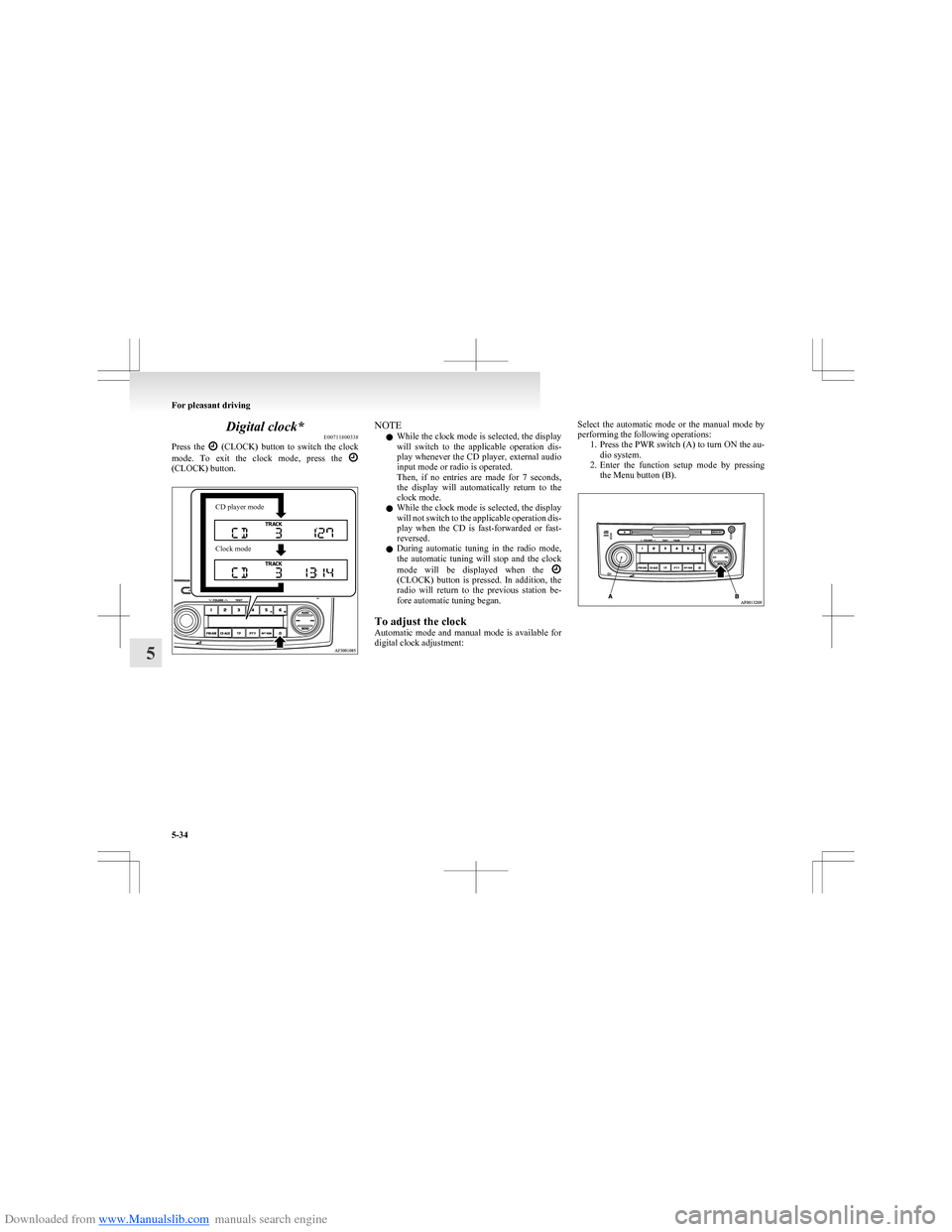
Press the
(CLOCK) button to switch the clock
mode. To exit the clock mode, press the
(CLOCK) button.
CD player modeClock modeNOTE
l While the clock mode is selected, the display
will switch to the applicable operation dis-
play whenever the CD player, external audio
input mode or radio is operated.
Then, if no entries are made for 7 seconds,
the display will automatically return to the
clock mode.
l While the clock mode is selected, the display
will not switch to the applicable operation dis-
play when the CD is fast-forwarded or fast-
reversed.
l During automatic tuning in the radio mode,
the automatic tuning will stop and the clock
mode will be displayed when the
(CLOCK) button is pressed. In addition, the
radio will return to the previous station be-
fore automatic tuning began.
To adjust the clock
Automatic mode and manual mode is available for
digital clock adjustment:
Select the automatic mode or the manual mode by
performing the following operations: 1.Press the PWR switch (A) to turn ON the au-
dio system.
2. Enter the function setup mode by pressing
the Menu button (B).
For pleasant driving
5-34
5
Page 264 of 273
Downloaded from www.Manualslib.com manuals search engine A
Accessory (Installation) 04
Accessory socket 5-37
Active stability control system (ASC) 4-30 Indication lamp 4-31
Additional equipment 8-18
Air conditioning Automatic air conditioning 5-07
Important operation tips for the air condition-
ing 5-11
Air purifier 5-12
Airbag 2-22
Front passenger’s airbag OFF indication
lamp 2-25
Front passenger’s airbag ON-OFF switch 2-25
Antenna 5-33
Anti-lock brake system (ABS) 4-27 Warning lamp 4-28
Audio Error codes 5-30
Handling of compact discs 5-32
LW/MW/FM electronic tuning radio with CD
player 5-12
Auto Stop & Go (AS&G) system 4-13
Automated manual transmission 4-19 Oil 9-16
Automatic air conditioning 5-07
B
Battery 8-10Charge warning lamp 3-19
Discharged battery (Emergency starting) 6-02
Specification 9-11
Bonnet 8-03
Brake Anti-lock brake 4-27
Brake assist system 4-27
Braking 4-25
Fluid 8-09,9-16
Parking brake 4-06
Parking brake lever stroke 8-16
Pedal free play 8-16
Warning lamp 3-17
Bulb capacity 8-23
C
Capacities 9-16
Cargo loads 4-36
Catalytic converter 8-02
Central door locks 1-07
Changing a fuse 8-21
Charge warning lamp 3-19
Chassis number 9-02
Check engine warning lamp 3-18
Child restraint 2-13
Child-protection rear doors 1-09
Cleaning Exterior of your vehicle 7-03
Genuine leather 7-02
Interior of your vehicle 7-02
Plastic, vinyl leather, etc 7-02
Clock 5-34
Clutch Fluid 8-09
Pedal free play 8-15
Coat hooks 5-43
Combination headlamps and dipper switch 3-20
Coming home light 3-22
Compact spare wheel 6-13
Cool box 5-39
Coolant (engine) 8-07,9-16
Cruise control 4-32
Cup holder 5-42
D
Dead Lock System 1-07
Demister (rear window) 3-29
Digital clock 5-34
Dipper (High/Low beam change) 3-21
Door ajar warning lamp 3-19
Doors Central door locks 1-07
Child-protection 1-09
Dead Lock System 1-07
Lock and unlock 1-05
Driving, alcohol and drugs 4-02
E
Economical driving 4-02
Electric power steering system 4-29
Electric remote-controlled outside rear-view mir-
rors 4-09
Electric window control 1-11
Electrical system 9-11
Electronic immobilizer (Anti-theft starting sys-
tem) 1-02
Emergency starting 6-02
Emergency stop signal system 4-26
Engine
Coolant 8-07,9-16
High coolant temperature warning lamp 3-19
Number 9-03
Oil 8-05
Oil and filter 9-16
Overheating 6-04
Specifications 9-09
Used engine oils safety instructions and disposal
information 05
Error codes 5-30
Exterior and interior lamp operation 8-18
Alphabetical index
1