lock MITSUBISHI COLT 2009 10.G Workshop Manual
[x] Cancel search | Manufacturer: MITSUBISHI, Model Year: 2009, Model line: COLT, Model: MITSUBISHI COLT 2009 10.GPages: 273, PDF Size: 17.28 MB
Page 135 of 273
Downloaded from www.Manualslib.com manuals search engine Cruise control*E00609100623
Cruise control is an automatic speed control system
that keeps a set speed. It can be activated at about
40 km/h (25 mph) or more.CAUTIONl When you do not wish to drive at a set
speed, turn off the cruise control for safety.
l Do not use cruise control when driving
conditions will not allow you to stay at
the same speed, such as in heavy traffic
or on roads that are winding, icy, snow-
covered, wet, slippery, on a steep down-
hill slope.
l On vehicles with M/T, do not move the
gearshift lever to the “N” (Neutral) posi-
tion while driving at a set speed without
depressing the clutch pedal. The engine
will run too fast and might be damaged.
NOTE
l Cruise control may not be able to keep your
speed on uphills or downhills.
l Your speed may decrease on a steep uphill.
You may use the accelerator pedal if you
want to stay at your set speed.
l Your speed may increase to more than the
set speed on a steep downhill. You have to
use the brake to control your speed. As a re-
sult, the set speed driving is deactivated.
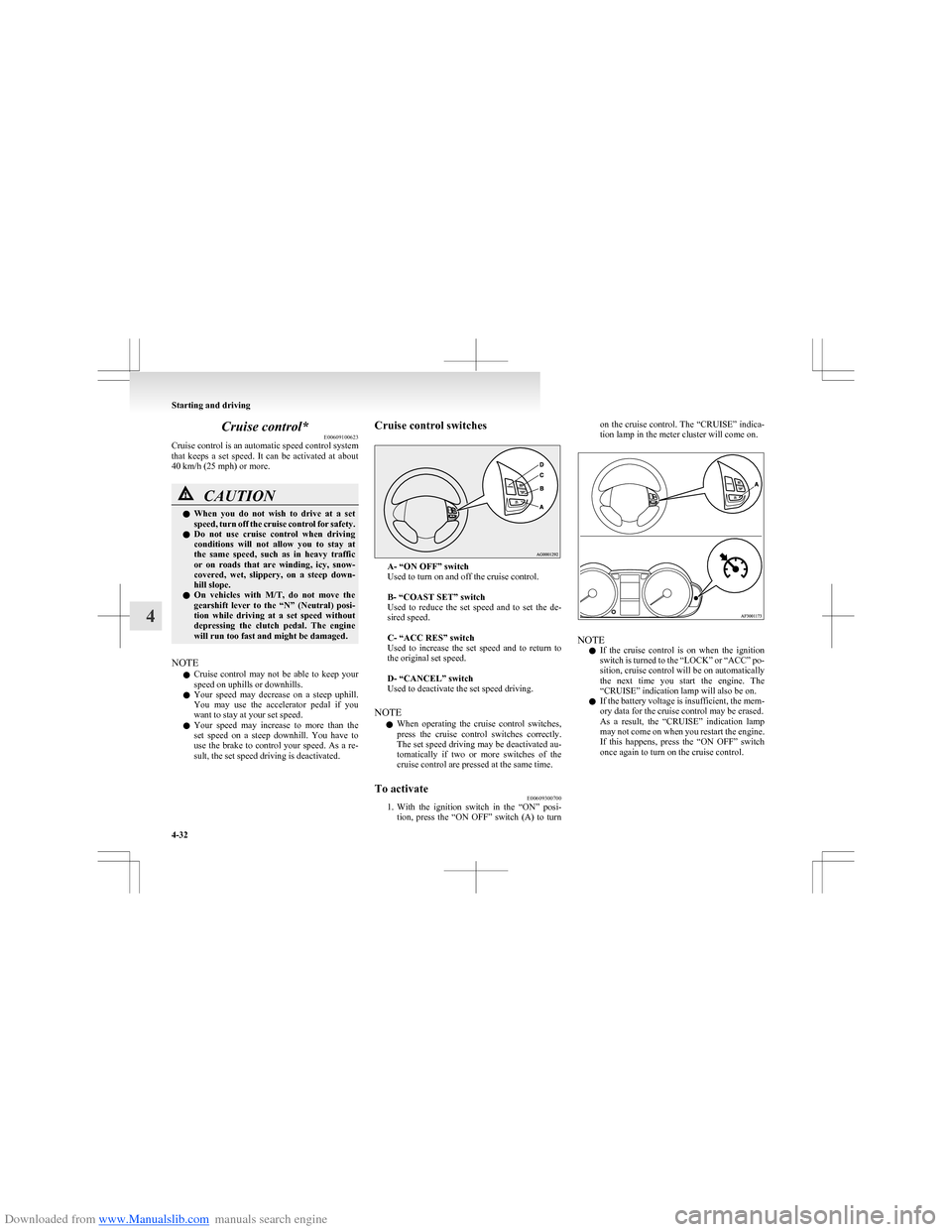
Cruise control switches
A- “ON OFF” switch
Used to turn on and off the cruise control.
B- “COAST SET” switch
Used to reduce the set speed and to set the de-
sired speed.
C- “ACC RES” switch
Used to increase the set speed and to return to
the original set speed.
D- “CANCEL” switch
Used to deactivate the set speed driving.
NOTE l When operating the cruise control switches,
press the cruise control switches correctly.
The set speed driving may be deactivated au-
tomatically if two or more switches of the
cruise control are pressed at the same time.
To activate E00609300700
1.With the ignition switch in the “ON” posi-
tion, press the “ON OFF” switch (A) to turn
on the cruise control. The “CRUISE” indica-
tion lamp in the meter cluster will come on.
NOTE
l If the cruise control is on when the ignition
switch is turned to the “LOCK” or “ACC” po-
sition, cruise control will be on automatically
the next time you start the engine. The
“CRUISE” indication lamp will also be on.
l If the battery voltage is insufficient, the mem-
ory data for the cruise control may be erased.
As a result, the “CRUISE” indication lamp
may not come on when you restart the engine.
If this happens, press the “ON OFF” switch
once again to turn on the cruise control.
Starting and driving
4-32
4
Page 139 of 273
Downloaded from www.Manualslib.com manuals search engine l“CRUISE” indication lamp is turned OFF.Cargo loads
E00609901240
Cargo loads precautionsCAUTIONl When loading luggage, be careful to the
following. •Stow cargo and luggage in the luggage
compartment whenever possible.
• Distribute cargo or luggage evenly not
to be unbalanced in weight of a load.
• Do not place cargo or luggage on the
instrument panel.
Also, do not stack up cargo or luggage
on the front passenger’s seat or the
rear seats.
Having the driver’s vision blocked,
and your cargo being thrown inside
the cabin if you suddenly have to
brake can cause a serious accident or
injury.Trailer towing E00610000488
In order to tow a trailer with your vehicle, have a
trailer towing device that meets all relevant regula-
tions in your area, mounted consult a
MITSUBISHI MOTORS Authorized Service Point.
The regulations concerning the towing of a trailer
may differ from country to country. You are ad-
vised to obey the regulations in each area.CAUTIONl Danger of Accident!
A towing bar should be fitted according
to MITSUBISHI MOTORS guidelines.
NOTE
l If you are going to tow a trailer, pay careful
attention to the following points.
Maximum towable weight with brake
and maximum trailer-nose weight
Never exceed the maximum towable weight with
brake and the maximum trailer-nose weight as lis-
ted in the specifications.
(Refer to page 9-07.)
If you tow a trailer at an altitude of more than
1,000 m above sea-level, reduce your weight by
10 % of the gross combination weight for every in-
crease of 1,000 m above sea-level, as the engine out-
put is lowered owing to decrease in atmospheric
pressure.
Starting and driving
4-36
4
Page 142 of 273
Downloaded from www.Manualslib.com manuals search engine Ventilators.................................................................................... 5-02
Heater*..........................................................................................5-04
Automatic air conditioning* ......................................................... 5-07
Important operation tips for the air conditioning..........................5-11
Air purifier .................................................................................... 5-12
LW/MW/FM electronic tuning radio with CD player* ................5-12
To use the external audio input function ......................................5-27
Steering wheel audio remote control switches* ...........................5-28
Error codes .................................................................................... 5-30
Handling of compact discs ........................................................... 5-32
Antenna ......................................................................................... 5-33
Digital clock* ............................................................................... 5-34
Sun visors ..................................................................................... 5-36
Vanity mirror ................................................................................ 5-37
Accessory socket .......................................................................... 5-37
Interior lamps ................................................................................ 5-38
Storage spaces...............................................................................5-39
Cup holder .................................................................................... 5-42
Rear shelf panel* .......................................................................... 5-42
Coat hooks* .................................................................................. 5-43For pleasant driving5
Page 145 of 273
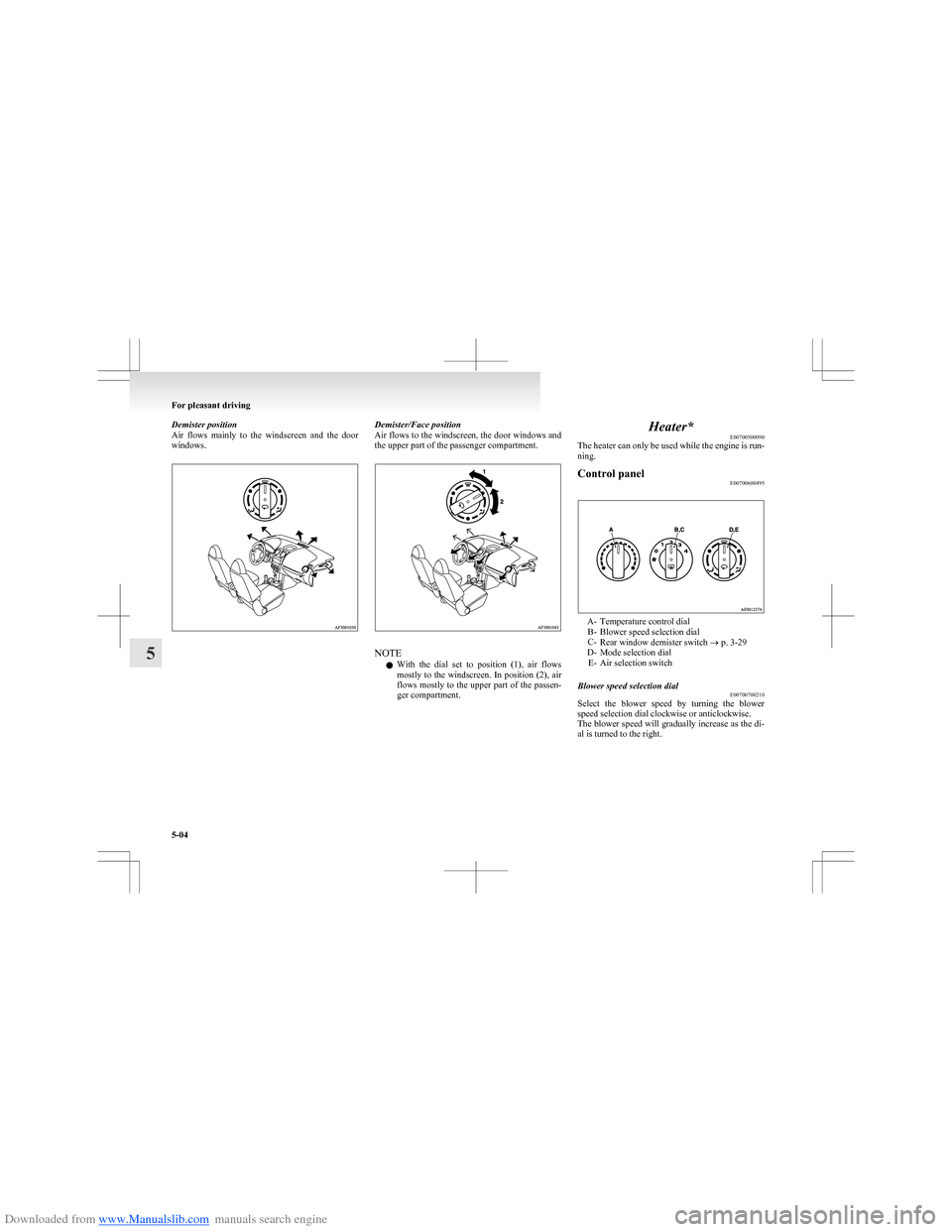
Downloaded from www.Manualslib.com manuals search engine Demister position
Air flows mainly to the windscreen and the door
windows.Demister/Face position
Air flows to the windscreen, the door windows and
the upper part of the passenger compartment.
NOTE
l With the dial set to position (1), air flows
mostly to the windscreen. In position (2), air
flows mostly to the upper part of the passen-
ger compartment.
Heater* E00700500090
The heater can only be used while the engine is run-
ning.Control panel E00700600495
A- Temperature control dial
B- Blower speed selection dial
C- Rear window demister switch ® p. 3-29
D- Mode selection dial E- Air selection switch
Blower speed selection dial E00700700210
Select the blower speed by turning the blower
speed selection dial clockwise or anticlockwise.
The blower speed will gradually increase as the di-
al is turned to the right.
For pleasant driving
5-04
5
Page 146 of 273
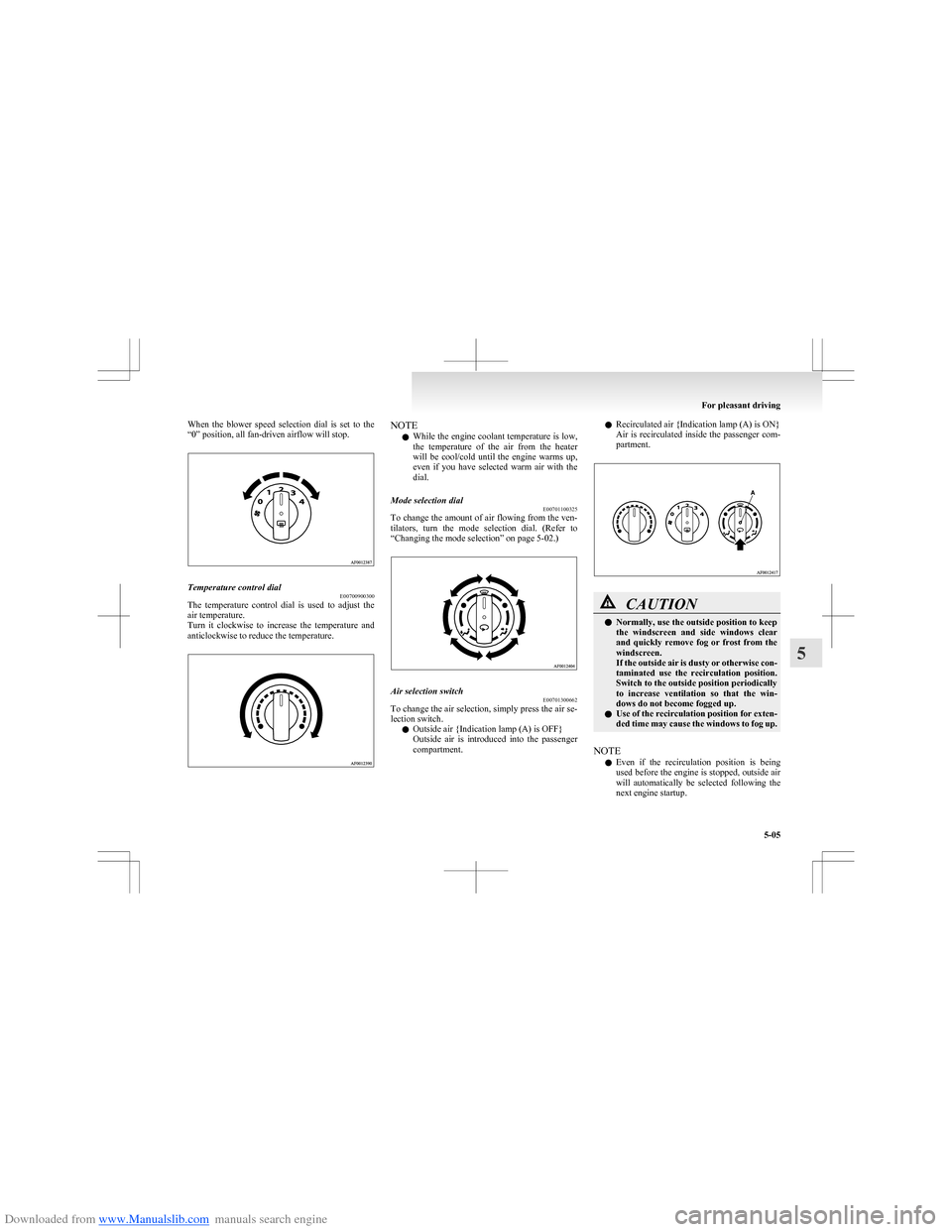
Downloaded from www.Manualslib.com manuals search engine When the blower speed selection dial is set to the
“0” position, all fan-driven airflow will stop.Temperature control dial E00700900300
The temperature control dial is used to adjust the
air temperature.
Turn it clockwise to increase the temperature and
anticlockwise to reduce the temperature.
NOTE
l While the engine coolant temperature is low,
the temperature of the air from the heater
will be cool/cold until the engine warms up,
even if you have selected warm air with the
dial.Mode selection dial E00701100325
To change the amount of air flowing from the ven-
tilators, turn the mode selection dial. (Refer to
“Changing the mode selection” on page 5-02.)
Air selection switch E00701300662
To change the air selection, simply press the air se-
lection switch.
l Outside air {Indication lamp (A) is OFF}
Outside air is introduced into the passenger
compartment.
l Recirculated air {Indication lamp (A) is ON}
Air is recirculated inside the passenger com-
partment.CAUTIONl Normally, use the outside position to keep
the windscreen and side windows clear
and quickly remove fog or frost from the
windscreen.
If the outside air is dusty or otherwise con-
taminated use the recirculation position.
Switch to the outside position periodically
to increase ventilation so that the win-
dows do not become fogged up.
l Use of the recirculation position for exten-
ded time may cause the windows to fog up.
NOTE
l Even if the recirculation position is being
used before the engine is stopped, outside air
will automatically be selected following the
next engine startup.
For pleasant driving
5-05
5
Page 147 of 273
Downloaded from www.Manualslib.com manuals search engine Operating the heater systemE00701800393
Heating
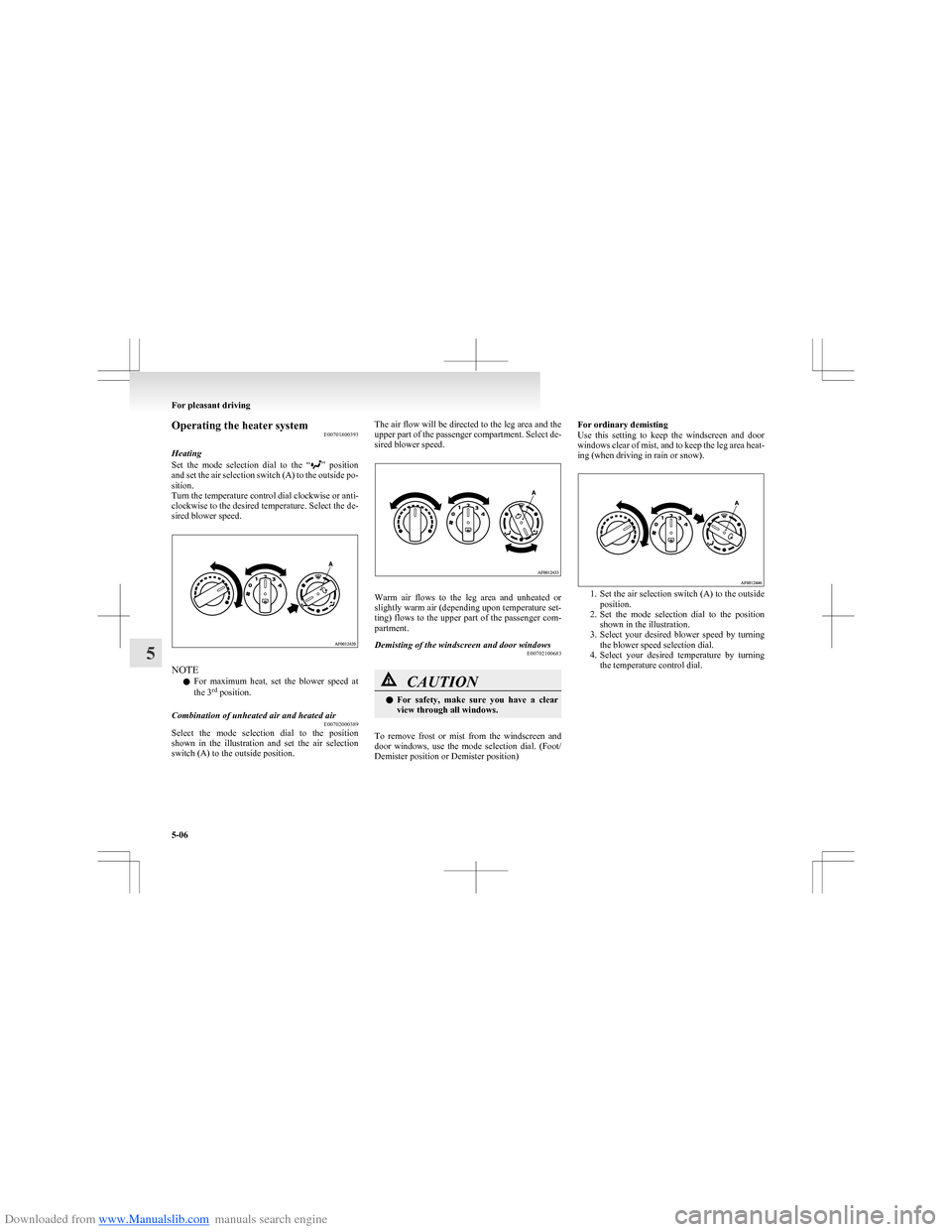
Set the mode selection dial to the “
” position
and set the air selection switch (A) to the outside po-
sition.
Turn the temperature control dial clockwise or anti-
clockwise to the desired temperature. Select the de-
sired blower speed.
NOTE
l For maximum heat, set the blower speed at
the 3 rd
position.
Combination of unheated air and heated air
E00702000389
Select the mode selection dial to the position
shown in the illustration and set the air selection
switch (A) to the outside position.
The air flow will be directed to the leg area and the
upper part of the passenger compartment. Select de-
sired blower speed.
Warm air flows to the leg area and unheated or
slightly warm air (depending upon temperature set-
ting) flows to the upper part of the passenger com-
partment.
Demisting of the windscreen and door windows E00702100683CAUTIONlFor safety, make sure you have a clear
view through all windows.
To remove frost or mist from the windscreen and
door windows, use the mode selection dial. (Foot/
Demister position or Demister position)
For ordinary demisting
Use this setting to keep the windscreen and door
windows clear of mist, and to keep the leg area heat-
ing (when driving in rain or snow).
1. Set the air selection switch (A) to the outside
position.
2. Set the mode selection dial to the position
shown in the illustration.
3. Select your desired blower speed by turning
the blower speed selection dial.
4. Select your desired temperature by turning
the temperature control dial.
For pleasant driving
5-06
5
Page 148 of 273
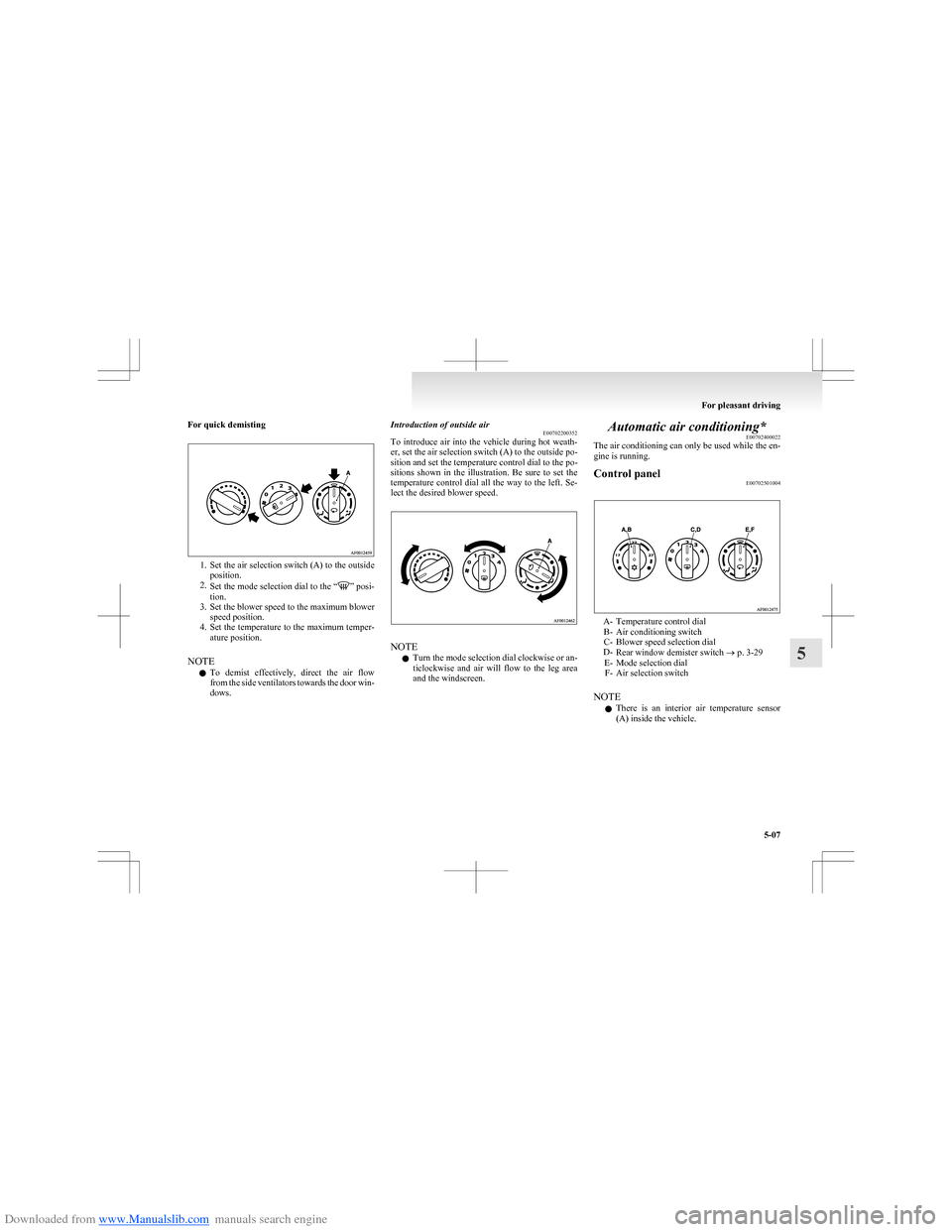
Downloaded from www.Manualslib.com manuals search engine For quick demisting
1.Set the air selection switch (A) to the outside
position.
2. Set the mode selection dial to the “
” posi-
tion.
3. Set the blower speed to the maximum blower
speed position.
4. Set the temperature to the maximum temper-
ature position.
NOTE l To demist effectively, direct the air flow
from the side ventilators towards the door win-
dows.
Introduction of outside air E00702200352
To introduce air into the vehicle during hot weath-
er, set the air selection switch (A) to the outside po-
sition and set the temperature control dial to the po-
sitions shown in the illustration. Be sure to set the
temperature control dial all the way to the left. Se-
lect the desired blower speed.
NOTE
l Turn the mode selection dial clockwise or an-
ticlockwise and air will flow to the leg area
and the windscreen.
Automatic air conditioning* E00702400022
The air conditioning can only be used while the en-
gine is running.Control panel E00702501004
A- Temperature control dial
B- Air conditioning switch
C- Blower speed selection dial
D- Rear window demister switch ® p. 3-29
E- Mode selection dial F- Air selection switch
NOTE l There is an interior air temperature sensor
(A) inside the vehicle.
For pleasant driving
5-07
5
Page 149 of 273
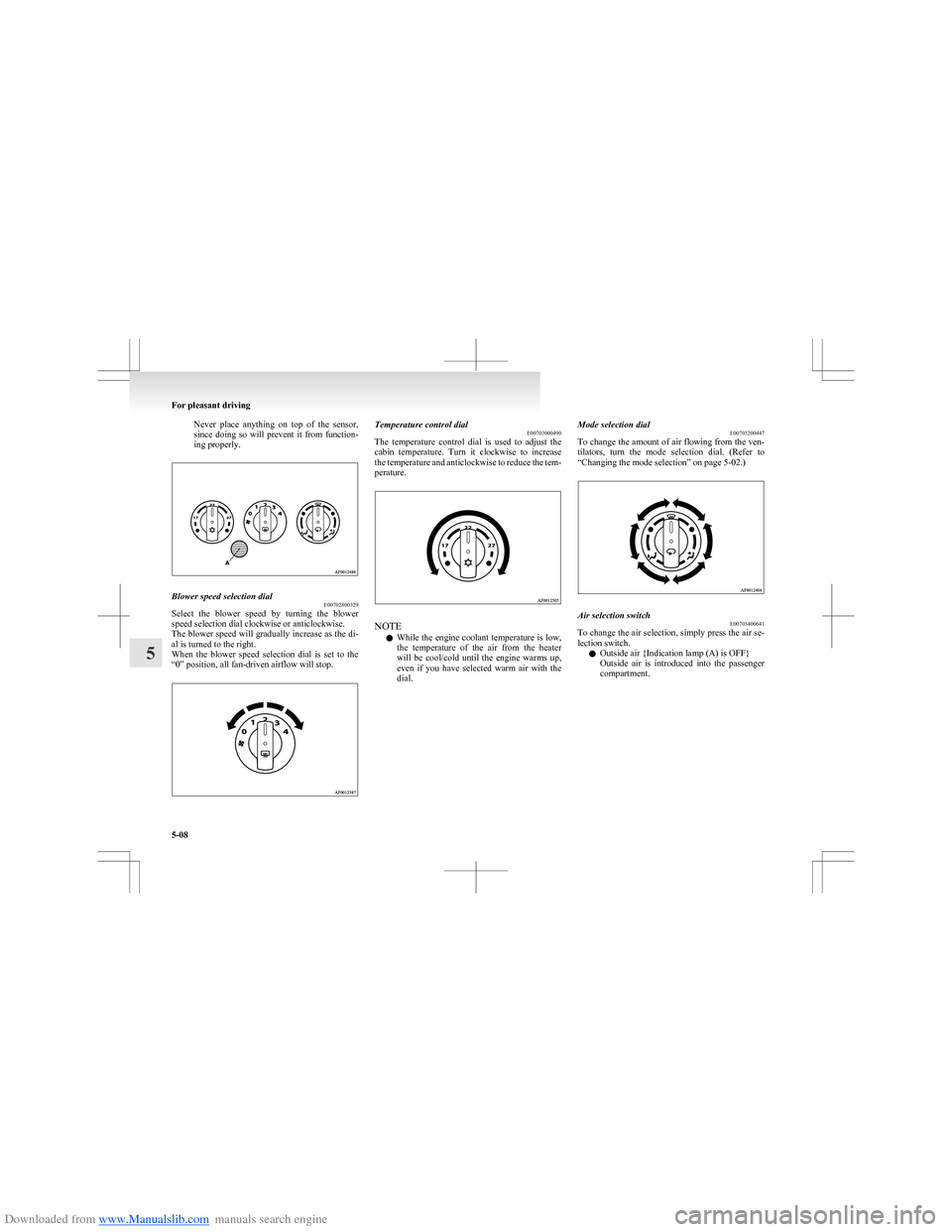
Downloaded from www.Manualslib.com manuals search engine Never place anything on top of the sensor,
since doing so will prevent it from function-
ing properly.Blower speed selection dial E00702800329
Select the blower speed by turning the blower
speed selection dial clockwise or anticlockwise.
The blower speed will gradually increase as the di-
al is turned to the right.
When the blower speed selection dial is set to the
“0” position, all fan-driven airflow will stop.
Temperature control dial E00703000490
The temperature control dial is used to adjust the
cabin temperature. Turn it clockwise to increase
the temperature and anticlockwise to reduce the tem-
perature.
NOTE
l While the engine coolant temperature is low,
the temperature of the air from the heater
will be cool/cold until the engine warms up,
even if you have selected warm air with the
dial.
Mode selection dial E00703200447
To change the amount of air flowing from the ven-
tilators, turn the mode selection dial. (Refer to
“Changing the mode selection” on page 5-02.)Air selection switch E00703400641
To change the air selection, simply press the air se-
lection switch.
l Outside air {Indication lamp (A) is OFF}
Outside air is introduced into the passenger
compartment.
For pleasant driving
5-08
5
Page 151 of 273
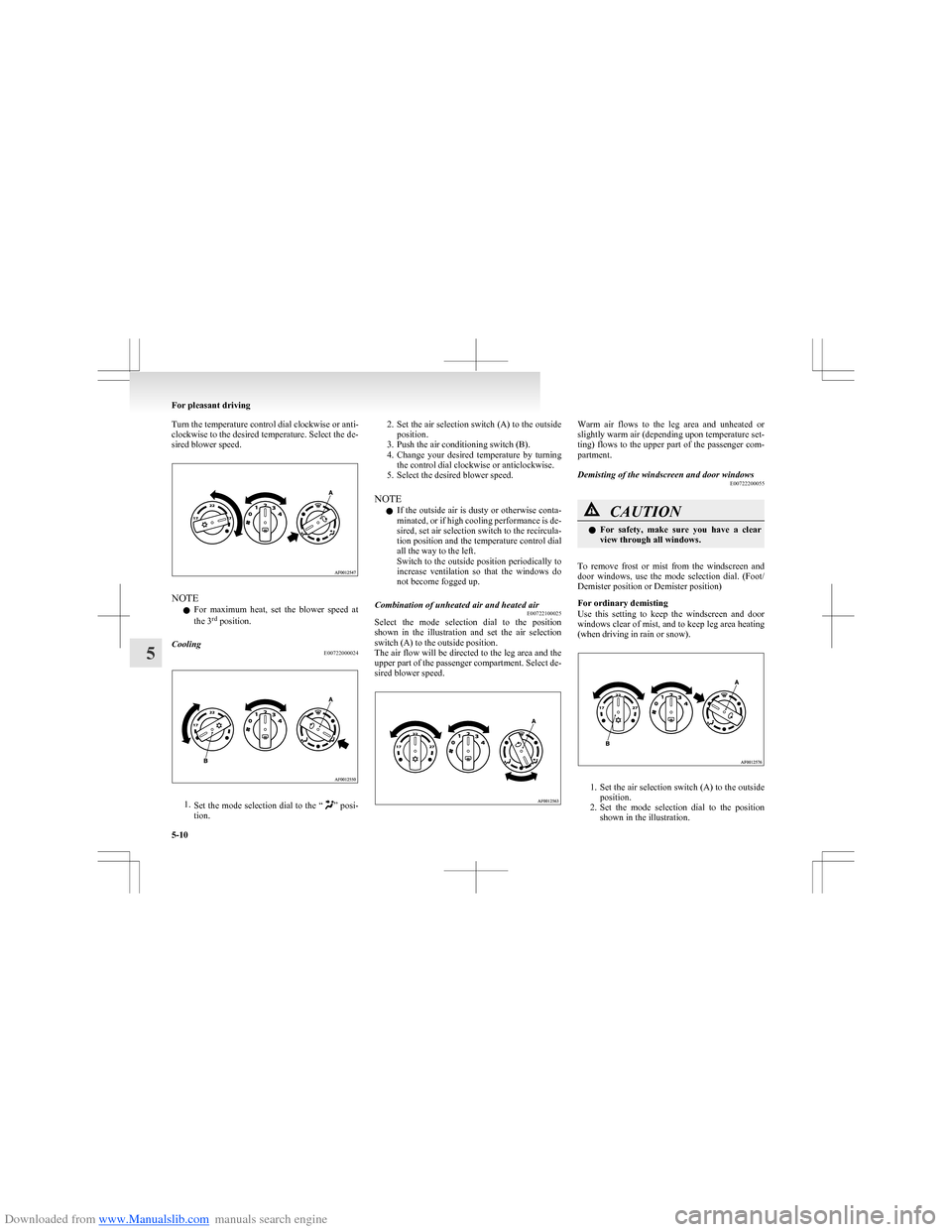
Downloaded from www.Manualslib.com manuals search engine Turn the temperature control dial clockwise or anti-
clockwise to the desired temperature. Select the de-
sired blower speed.
NOTE
l For maximum heat, set the blower speed at
the 3 rd
position.
Cooling
E00722000024
1.Set the mode selection dial to the “” posi-
tion.
2. Set the air selection switch (A) to the outside
position.
3. Push the air conditioning switch (B).
4. Change your desired temperature by turning
the control dial clockwise or anticlockwise.
5. Select the desired blower speed.
NOTE l If the outside air is dusty or otherwise conta-
minated, or if high cooling performance is de-
sired, set air selection switch to the recircula-
tion position and the temperature control dial
all the way to the left.
Switch to the outside position periodically to
increase ventilation so that the windows do
not become fogged up.Combination of unheated air and heated air E00722100025
Select the mode selection dial to the position
shown in the illustration and set the air selection
switch (A) to the outside position.
The air flow will be directed to the leg area and the
upper part of the passenger compartment. Select de-
sired blower speed.
Warm air flows to the leg area and unheated or
slightly warm air (depending upon temperature set-
ting) flows to the upper part of the passenger com-
partment.Demisting of the windscreen and door windows E00722200055CAUTIONlFor safety, make sure you have a clear
view through all windows.
To remove frost or mist from the windscreen and
door windows, use the mode selection dial. (Foot/
Demister position or Demister position)
For ordinary demisting
Use this setting to keep the windscreen and door
windows clear of mist, and to keep leg area heating
(when driving in rain or snow).
1. Set the air selection switch (A) to the outside
position.
2. Set the mode selection dial to the position
shown in the illustration.
For pleasant driving
5-10
5
Page 154 of 273
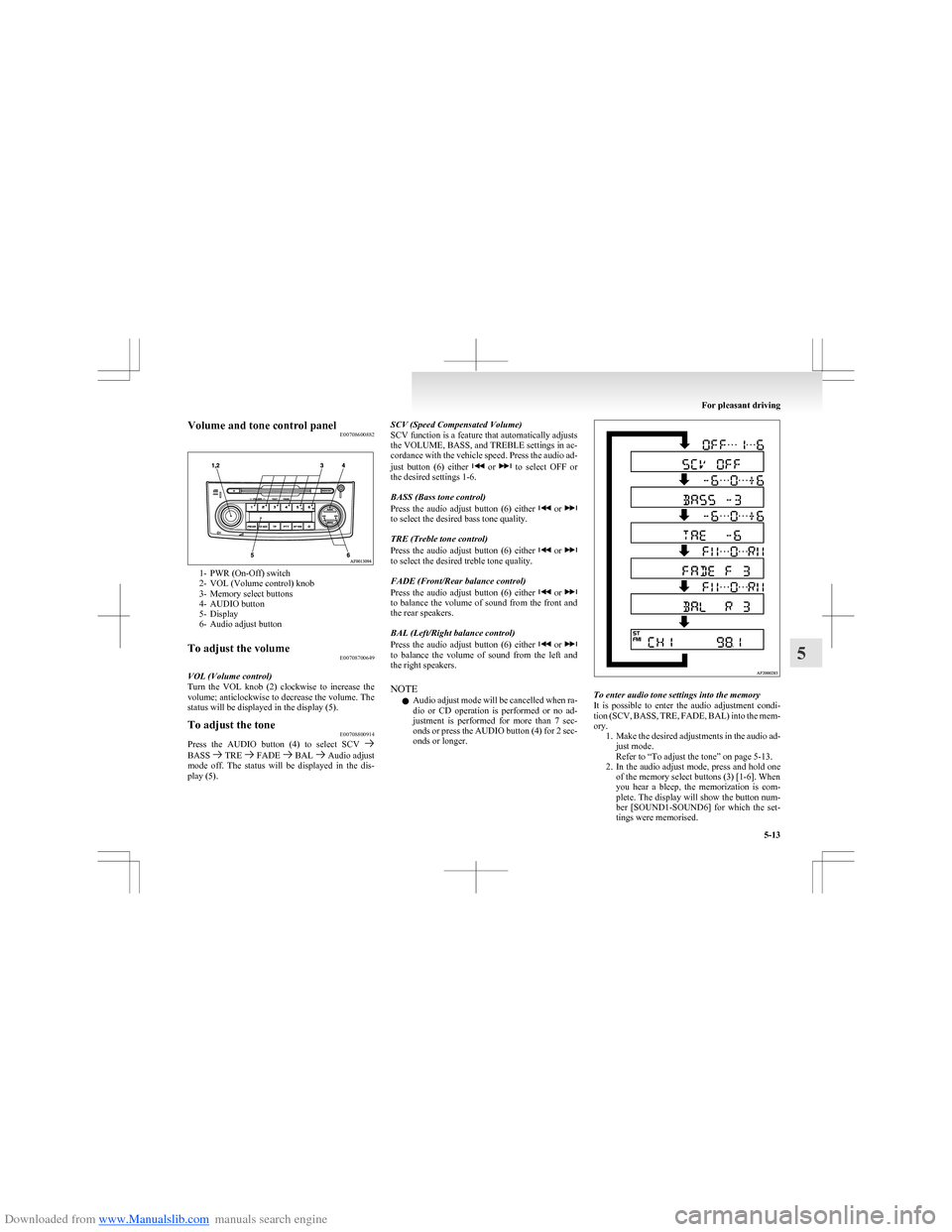
Downloaded from www.Manualslib.com manuals search engine Volume and tone control panelE00708600882
1- PWR (On-Off) switch
2- VOL (Volume control) knob
3- Memory select buttons
4- AUDIO button
5- Display
6- Audio adjust button
To adjust the volume E00708700649
VOL (Volume control)
Turn the VOL knob (2) clockwise to increase the
volume; anticlockwise to decrease the volume. The
status will be displayed in the display (5).
To adjust the tone E00708800914
Press the AUDIO button (4) to select SCV BASS TRE FADE BAL Audio adjust
mode off. The status will be displayed in the dis-
play (5).
SCV (Speed Compensated Volume)
SCV function is a feature that automatically adjusts
the VOLUME, BASS, and TREBLE settings in ac-
cordance with the vehicle speed. Press the audio ad-
just button (6) either
or to select OFF or
the desired settings 1-6.
BASS (Bass tone control)
Press the audio adjust button (6) either
or to select the desired bass tone quality.
TRE (Treble tone control)
Press the audio adjust button (6) either
or to select the desired treble tone quality.
FADE (Front/Rear balance control)
Press the audio adjust button (6) either
or to balance the volume of sound from the front and
the rear speakers.
BAL (Left/Right balance control)
Press the audio adjust button (6) either
or to balance the volume of sound from the left and
the right speakers.
NOTE l Audio adjust mode will be cancelled when ra-
dio or CD operation is performed or no ad-
justment is performed for more than 7 sec-
onds or press the AUDIO button (4) for 2 sec-
onds or longer.
To enter audio tone settings into the memory
It is possible to enter the audio adjustment condi-
tion (SCV, BASS, TRE, FADE, BAL) into the mem-
ory. 1.Make the desired adjustments in the audio ad-
just mode.
Refer to “To adjust the tone” on page 5-13.
2. In the audio adjust mode, press and hold one
of the memory select buttons (3) [1-6]. When
you hear a bleep, the memorization is com-
plete. The display will show the button num-
ber [SOUND1-SOUND6] for which the set-
tings were memorised.
For pleasant driving
5-13
5