lock MITSUBISHI COLT 2009 10.G Repair Manual
[x] Cancel search | Manufacturer: MITSUBISHI, Model Year: 2009, Model line: COLT, Model: MITSUBISHI COLT 2009 10.GPages: 273, PDF Size: 17.28 MB
Page 158 of 273
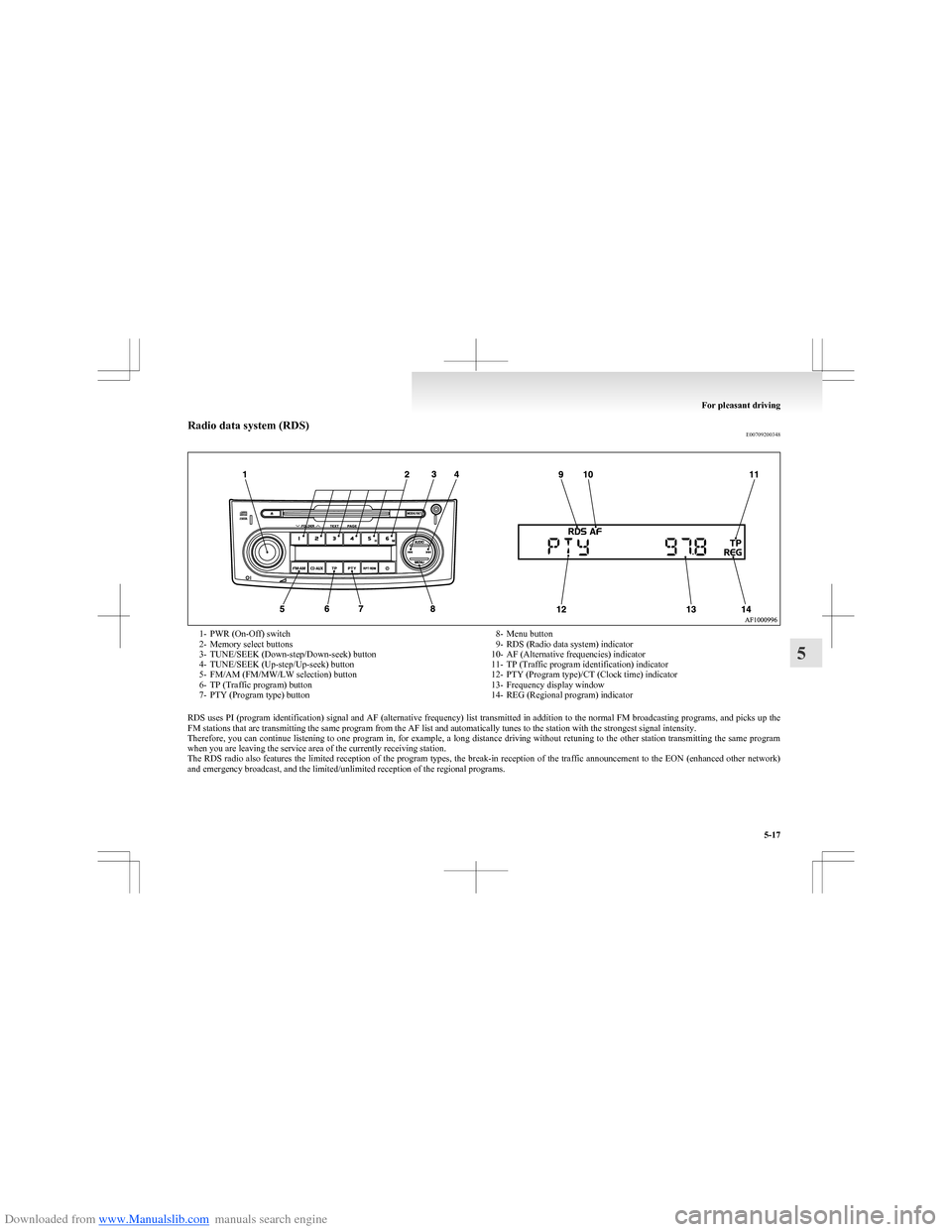
Downloaded from www.Manualslib.com manuals search engine Radio data system (RDS)E007092003481- PWR (On-Off) switch
2- Memory select buttons
3- TUNE/SEEK (Down-step/Down-seek) button
4- TUNE/SEEK (Up-step/Up-seek) button
5- FM/AM (FM/MW/LW selection) button
6- TP (Traffic program) button
7- PTY (Program type) button8- Menu button
9- RDS (Radio data system) indicator
10- AF (Alternative frequencies) indicator
11- TP (Traffic program identification) indicator
12- PTY (Program type)/CT (Clock time) indicator
13- Frequency display window
14- REG (Regional program) indicator
RDS uses PI (program identification) signal and AF (alternative frequency) list transmitted in addition to the normal FM broadcasting programs, and picks up the
FM stations that are transmitting the same program from the AF list and automatically tunes to the station with the strongest signal intensity.
Therefore, you can continue listening to one program in, for example, a long distance driving without retuning to the other station transmitting the same program
when you are leaving the service area of the currently receiving station.
The RDS radio also features the limited reception of the program types, the break-in reception of the traffic announcement to the EON (enhanced other network)
and emergency broadcast, and the limited/unlimited reception of the regional programs.
For pleasant driving
5-17
5
Page 159 of 273
Downloaded from www.Manualslib.com manuals search engine AF (Alternative Frequencies) functionE00720900146
The AF function finds a station broadcasting the
same program and selects the station with the stron-
gest signal of AF lists.
The AF function is turned on (with the AF indica-
tor (10) shown on the display) at all times unless
you manually switch it off.
The AF function can be turned ON and OFF.
Refer to “Function setup mode” on page 5-20.CT (Clock Time) function E00721000128
The clock can be set automatically by using the sig-
nal from the local RDS stations. Refer to “Digital
clock” on page 5-34.
REG (Regional) function E00721100015
REG function limits to receive the stations broad-
casting regional programs.
Regional programming and regional networks are
organized differently depending on the country or
area (they may be changed according to the hour,
state, or broadcast area), so if you don’t want to re-
ceive the regional programs automatically, you can
set up REG ON not to receive regional programs.
The REG function can be turned ON and OFF.
Refer to “Function setup mode” on page 5-20.
PI (Program Identification) search function E00721200175
When travelling long distance and the recalled pre-
set station is weak, the radio searches another fre-
quency broadcasting the same programming with
the same PI code in AF list.
If there are no frequencies broadcasting the same
programming, the radio searches a frequency broad-
casting the regional programming. The radio suc-
ceeds in searching the regional programming, then
the display shows the REG indicator (14).
If the radio does not succeed in searching the re-
gional programming, the radio returns to the recal-
led preset station.
The PI function can be turned ON and OFF on
some vehicles.
Refer to “Function setup mode” on page 5-20.
NOTE l While searching, the audio system is muted.
The display shows “WAIT” or “SEARCH”.PTY (Program Type) E00721300264
RDS broadcasts are classified according to pro-
gram type (PTY) as follows. Use the TUNE/SEEK
button (3 or 4) to select your desired PTY.
1. NEWS
2. AFFAIRS (Current affairs)
3. INFO (Information)
4. SPORT
5. EDUCATE (Education)
6. DRAMA
7. CULTURE
8. SCIENCE
9. VARIED
10. POP M (Pop music)
11. ROCK M (Rock music)
12. EASY M (Easy music)
13. LIGHT M (Light classics)
14. CLASSICS
15. OTHER M (Other music)
16. WEATHER (Weather information)
17. FINANCE
18. CHILDREN
19. SOCIAL
20. RELIGION
21. PHONE IN
22. TRAVEL
23. LEISURE
24. JAZZ
25. COUNTRY
26. NATION M (National music)
27. OLDIES
28. FOLK M (Folk music)
29. DOCUMENT
30. TEST
31. ALARM
To search for a broadcast of desired program type: 1. Press the PTY button (7).
2. Press the TUNE/SEEK button (3 or 4) for
less than 1 second at a time to select your de-
sired PTY.
3. Two seconds after a desired PTY has been se-
lected, the radio will begin to search for a
broadcast of your selected PTY. During
search, the selected PTY on the display
blinks and the radio will begin to search for a
broadcast of your selected PTY.
For pleasant driving
5-18
5
Page 174 of 273
Downloaded from www.Manualslib.com manuals search engine lDo not use a ball point pen, felt pen, pencil,
etc. to write on the label surface of the disc.
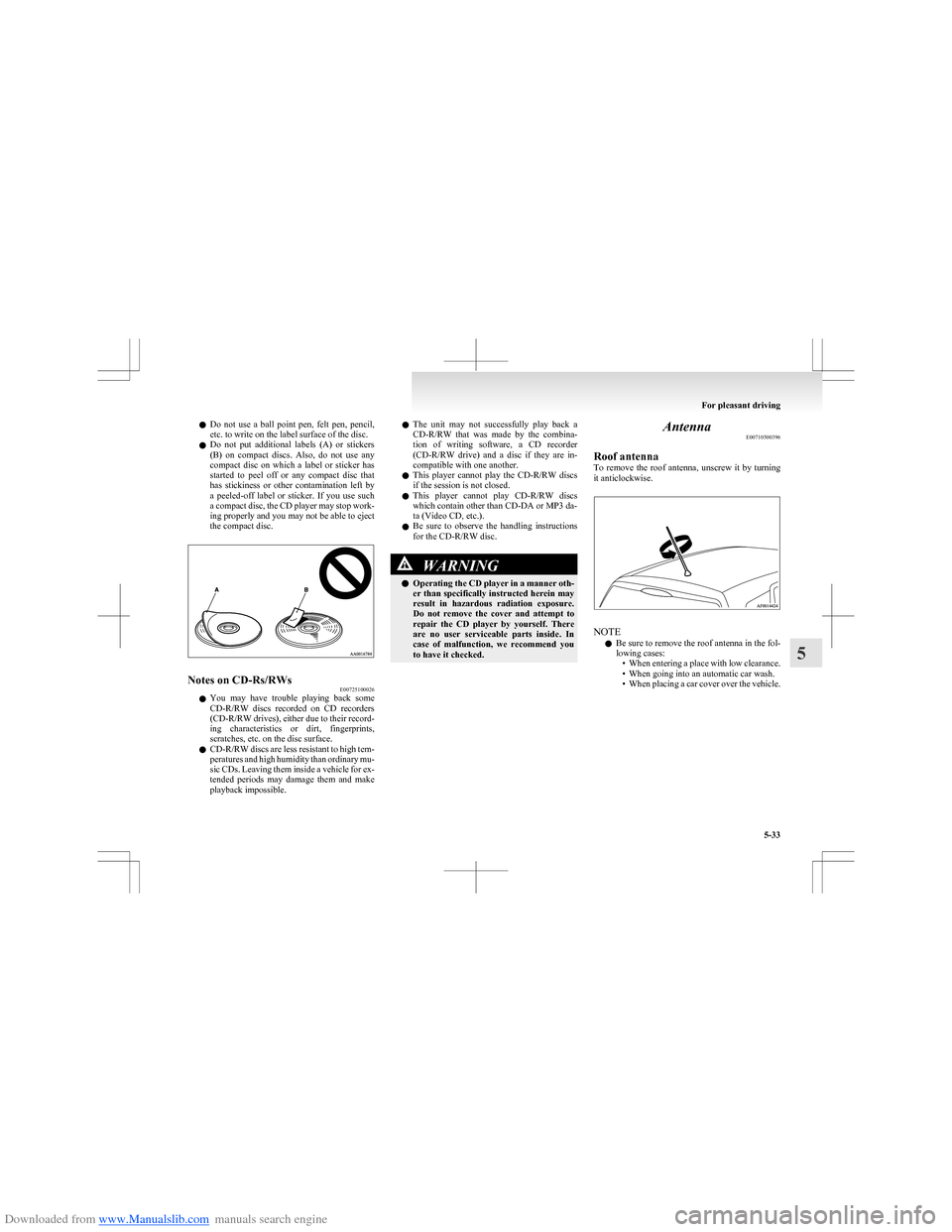
l Do not put additional labels (A) or stickers
(B) on compact discs. Also, do not use any
compact disc on which a label or sticker has
started to peel off or any compact disc that
has stickiness or other contamination left by
a peeled-off label or sticker. If you use such
a compact disc, the CD player may stop work-
ing properly and you may not be able to eject
the compact disc.Notes on CD-Rs/RWs E00725100026
lYou may have trouble playing back some
CD-R/RW discs recorded on CD recorders
(CD-R/RW drives), either due to their record-
ing characteristics or dirt, fingerprints,
scratches, etc. on the disc surface.
l CD-R/RW discs are less resistant to high tem-
peratures and high humidity than ordinary mu-
sic CDs. Leaving them inside a vehicle for ex-
tended periods may damage them and make
playback impossible.
l The unit may not successfully play back a
CD-R/RW that was made by the combina-
tion of writing software, a CD recorder
(CD-R/RW drive) and a disc if they are in-
compatible with one another.
l This player cannot play the
CD-R/RW discs
if the session is not closed.
l This player cannot play
CD-R/RW discs
which contain other than CD-DA or MP3 da-
ta (Video CD, etc.).
l Be sure to observe the handling instructions
for the CD-R/RW disc.WARNINGl Operating the CD player in a manner oth-
er than specifically instructed herein may
result in hazardous radiation exposure.
Do not remove the cover and attempt to
repair the CD player by yourself. There
are no user serviceable parts inside. In
case of malfunction, we recommend you
to have it checked.Antenna E00710500396
Roof antenna
To remove the roof antenna, unscrew it by turning
it anticlockwise.
NOTE
l Be sure to remove the roof antenna in the fol-
lowing cases: •When entering a place with low clearance.
• When going into an automatic car wash.
• When placing a car cover over the vehicle.
For pleasant driving
5-33
5
Page 175 of 273
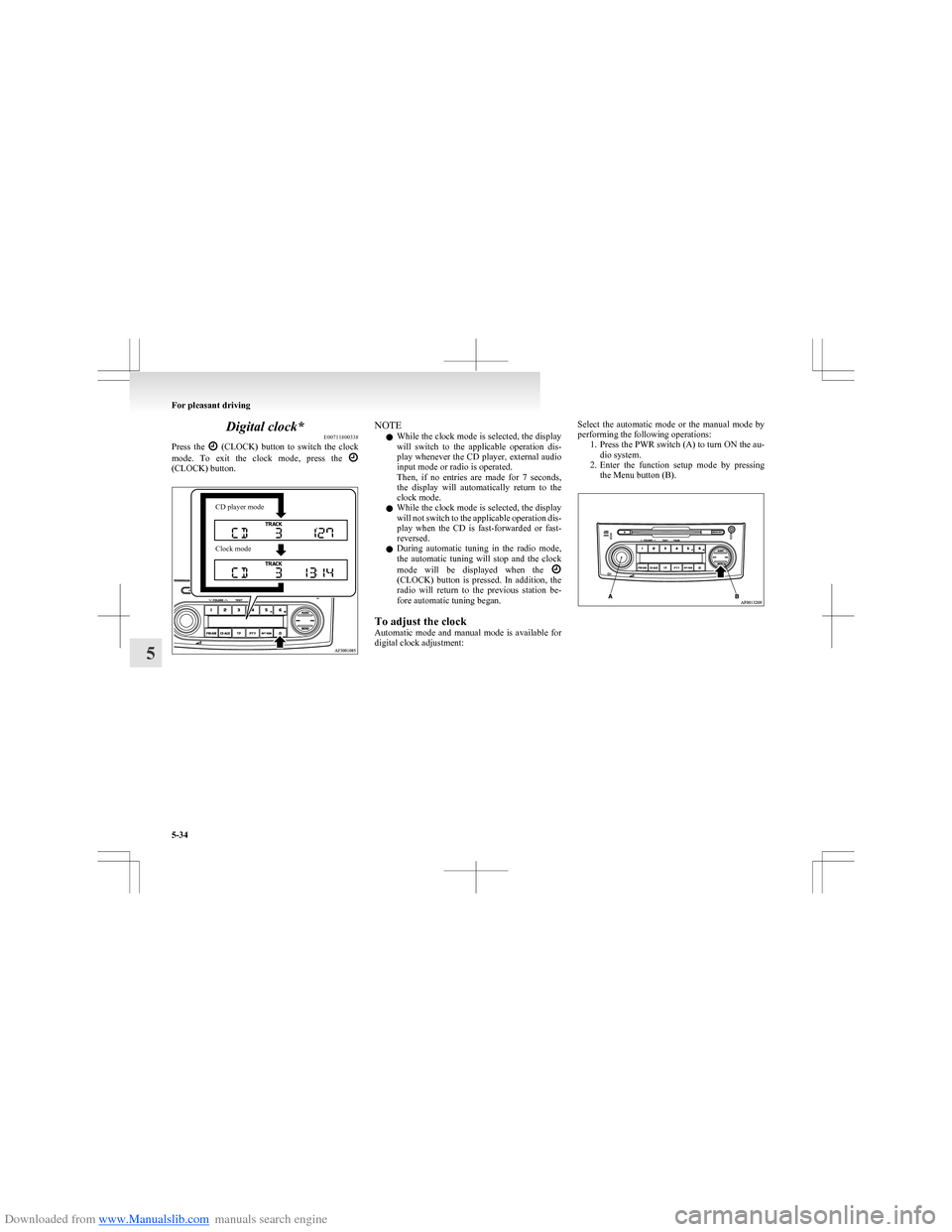
Downloaded from www.Manualslib.com manuals search engine Digital clock*E00711800338
Press the
(CLOCK) button to switch the clock
mode. To exit the clock mode, press the
(CLOCK) button.
CD player modeClock modeNOTE
l While the clock mode is selected, the display
will switch to the applicable operation dis-
play whenever the CD player, external audio
input mode or radio is operated.
Then, if no entries are made for 7 seconds,
the display will automatically return to the
clock mode.
l While the clock mode is selected, the display
will not switch to the applicable operation dis-
play when the CD is fast-forwarded or fast-
reversed.
l During automatic tuning in the radio mode,
the automatic tuning will stop and the clock
mode will be displayed when the
(CLOCK) button is pressed. In addition, the
radio will return to the previous station be-
fore automatic tuning began.
To adjust the clock
Automatic mode and manual mode is available for
digital clock adjustment:
Select the automatic mode or the manual mode by
performing the following operations: 1.Press the PWR switch (A) to turn ON the au-
dio system.
2. Enter the function setup mode by pressing
the Menu button (B).
For pleasant driving
5-34
5
Page 176 of 273
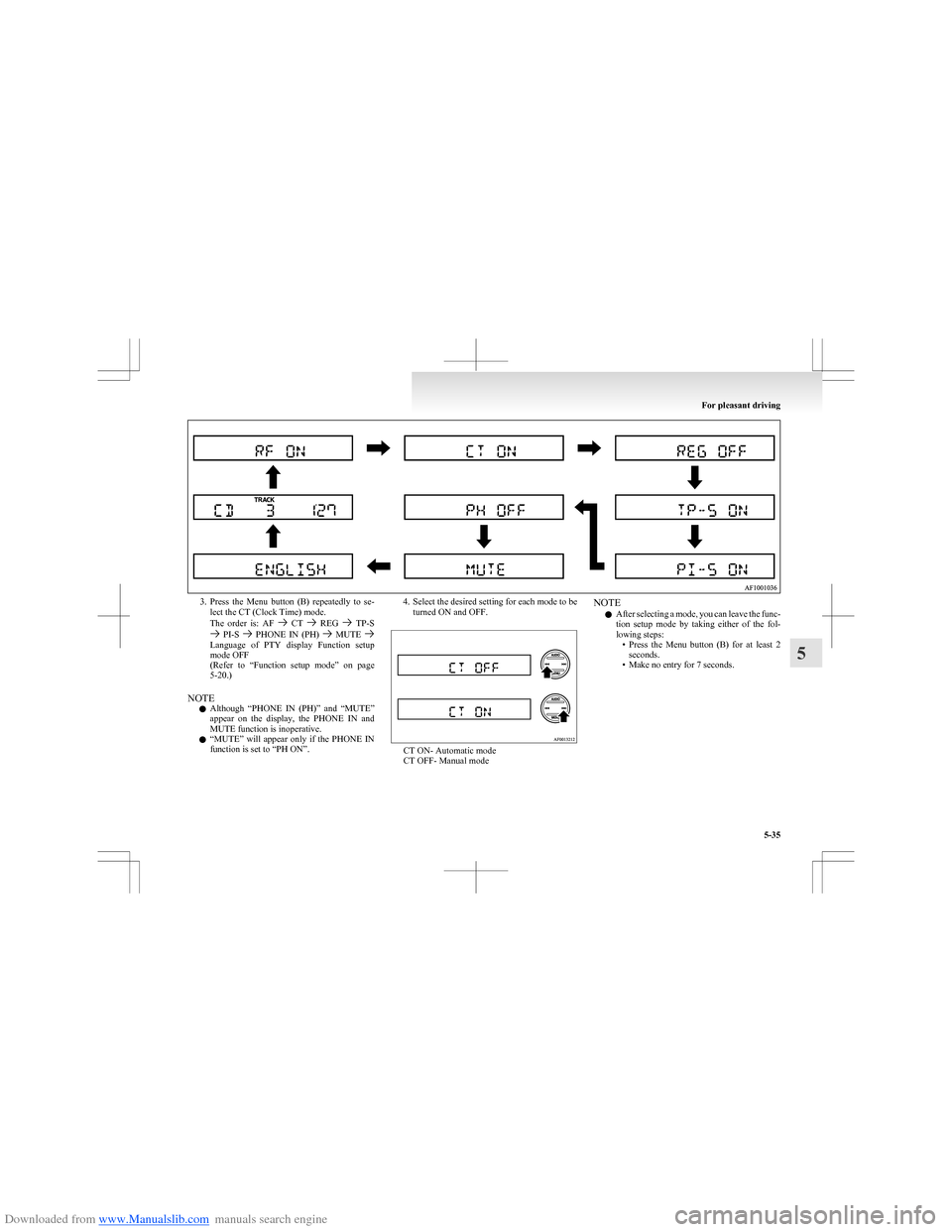
Downloaded from www.Manualslib.com manuals search engine 3.Press the Menu button (B) repeatedly to se-
lect the CT (Clock Time) mode.
The order is: AF
CT REG TP-S PI-S PHONE IN (PH) MUTE Language of PTY display Function setup
mode OFF
( Refer to “Function setup mode” on page
5-20.)
NOTE l Although “PHONE IN (PH)” and “MUTE”
appear on the display, the PHONE IN and
MUTE function is inoperative.
l “
MUTE” will appear only if the PHONE IN
function is set to “PH ON”.
4. Select the desired setting for each mode to be turned ON and OFF.
CT ON- Automatic mode
CT OFF- Manual mode
NOTE
l After selecting a mode, you can leave the func-
tion setup mode by taking either of the fol-
lowing steps: •Press the Menu button (B) for at least 2
seconds.
• Make no entry for 7 seconds.
For pleasant driving
5-35
5
Page 177 of 273
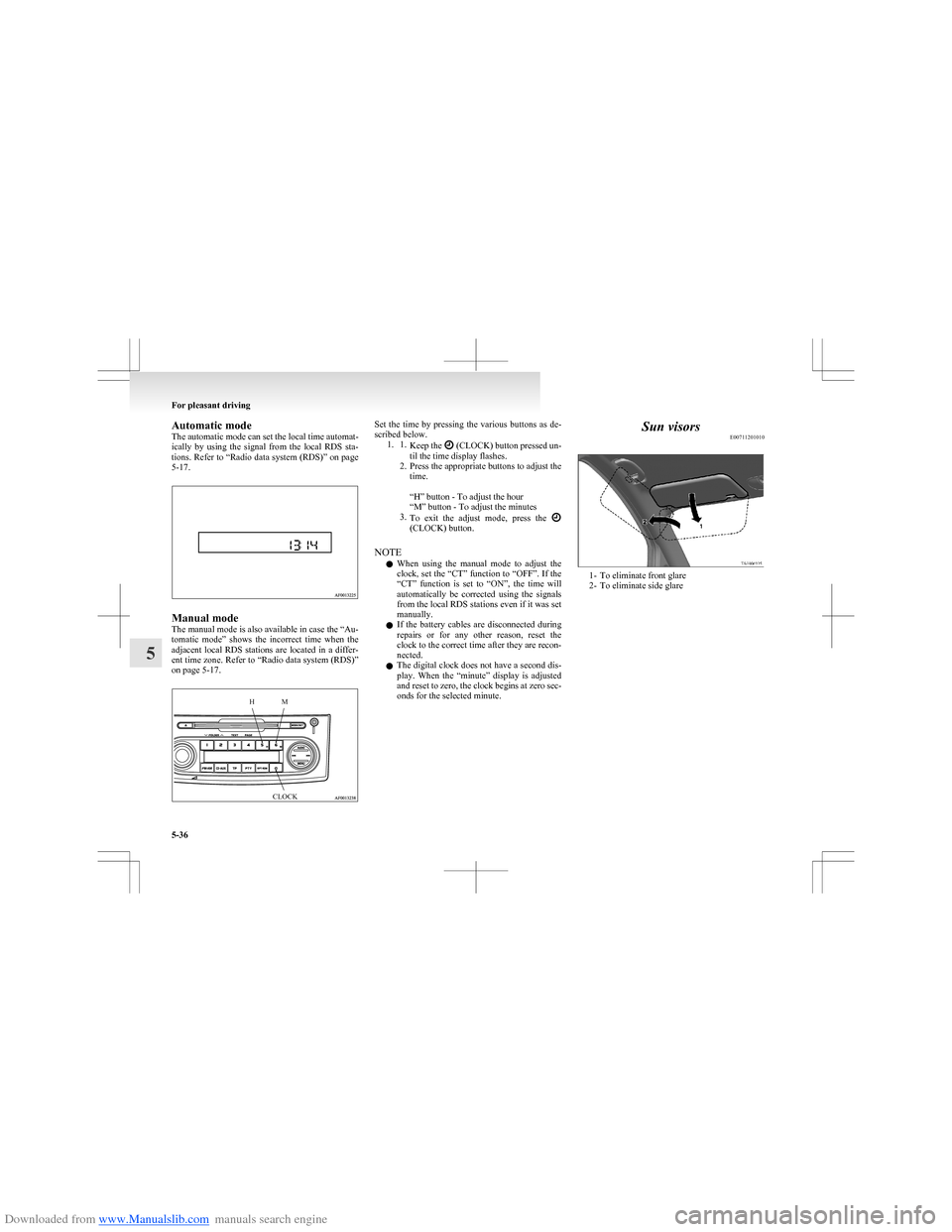
Downloaded from www.Manualslib.com manuals search engine Automatic mode
The automatic mode can set the local time automat-
ically by using the signal from the local RDS sta-
tions. Refer to “Radio data system (RDS)” on page
5-17.
Manual mode
The manual mode is also available in case the “Au-
tomatic mode” shows the incorrect time when the
adjacent local RDS stations are located in a differ-
ent time zone. Refer to “Radio data system (RDS)”
on page 5-17.
HMCLOCKSet the time by pressing the various buttons as de-
scribed below. 1. 1. Keep the
(CLOCK) button pressed un-
til the time display flashes.
2. Press the appropriate buttons to adjust the
time.
“H” button - To adjust the hour
“M” button - To adjust the minutes
3. To exit the adjust mode, press the
(CLOCK) button.
NOTE l When using the manual mode to adjust the
clock, set the “CT” function to “OFF”. If the
“CT” function is set to “ON”, the time will
automatically be corrected using the signals
from the local RDS stations even if it was set
manually.
l If the battery cables are disconnected during
repairs or for any other reason, reset the
clock to the correct time after they are recon-
nected.
l The digital clock does not have a second dis-
play. When the “minute” display is adjusted
and reset to zero, the clock begins at zero sec-
onds for the selected minute.
Sun visors E00711201010
1- To eliminate front glare
2- To eliminate side glare
For pleasant driving
5-36
5
Page 179 of 273
Downloaded from www.Manualslib.com manuals search engine Interior lampsE00712000799
The interior lamps go on when a door or tailgate is
opened.
When all doors and tailgate are closed, the interior
lamps are illuminated and dimmed gradually for 15
seconds then go out.
However, the interior lamps go out immediately
without being dimmed in the following cases:
l The ignition switch is turned “ON”.
l All doors and tailgate are locked using the
key mechanism of the driver’s door, the lock
knob of the driver’s door, or the remote con-
trol switch of the keyless entry system.
NOTE l The dimming period is adjustable.
For further information, we recommend you
to consult a MITSUBISHI MOTORS Author-
ized Service Point.
l If you leave the lamps on without running
the engine, you will run down the battery. Be-
fore you leave the vehicle, make sure that all
the lamps are off.Room lamp with map lamps E00724300018
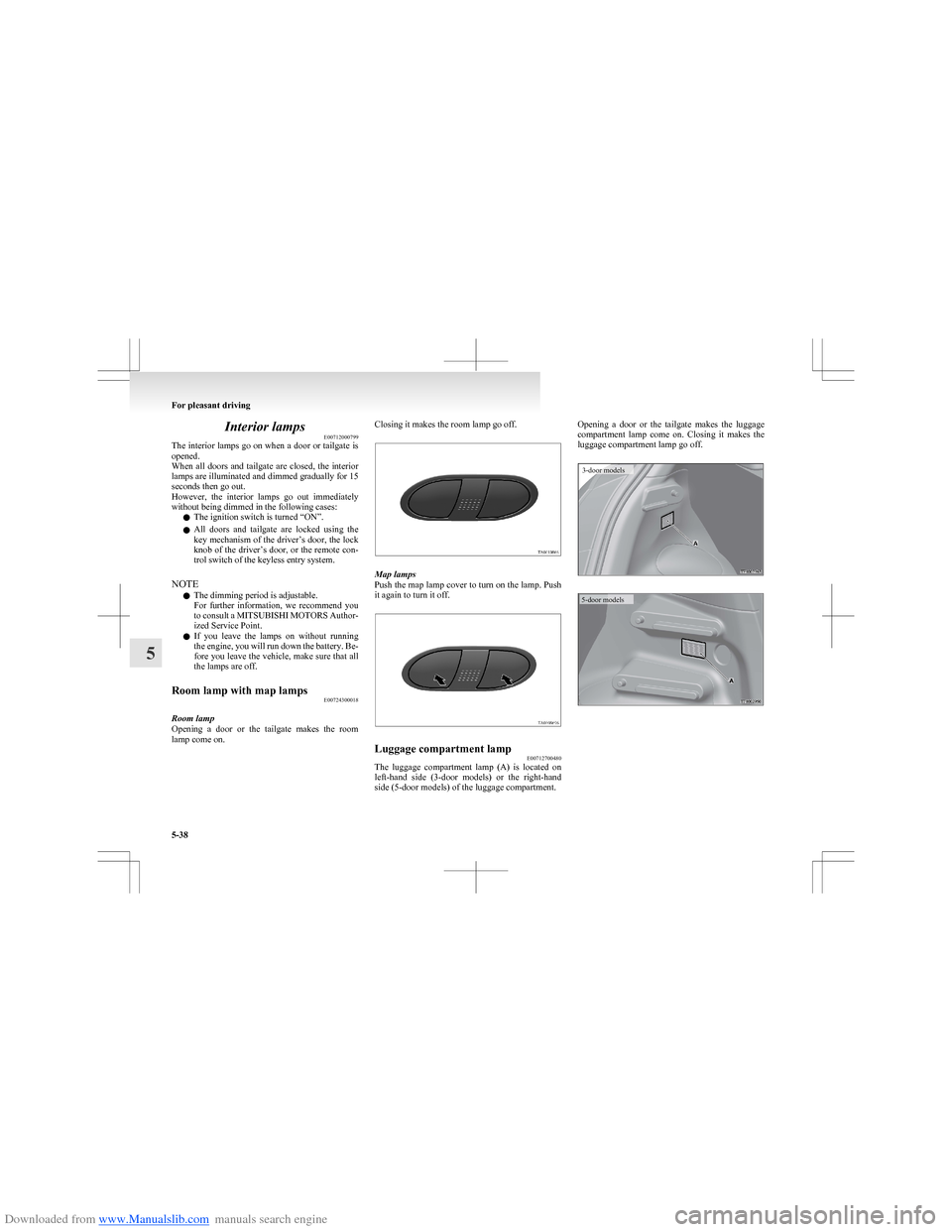
Room lamp
Opening a door or the tailgate makes the room
lamp come on.
Closing it makes the room lamp go off.
Map lamps
Push the map lamp cover to turn on the lamp. Push
it again to turn it off.
Luggage compartment lamp E00712700480
The luggage compartment lamp (A) is located on
left-hand side (3-door models) or the right-hand
side (5-door models) of the luggage compartment.
Opening a door or the tailgate makes the luggage
compartment lamp come on. Closing it makes the
luggage compartment lamp go off.3-door models5-door models
For pleasant driving
5-38
5
Page 184 of 273
Downloaded from www.Manualslib.com manuals search engine NOTEl Do not place heavy luggage (more than
about 1 kg) on the rear shelf panel.
5-door models
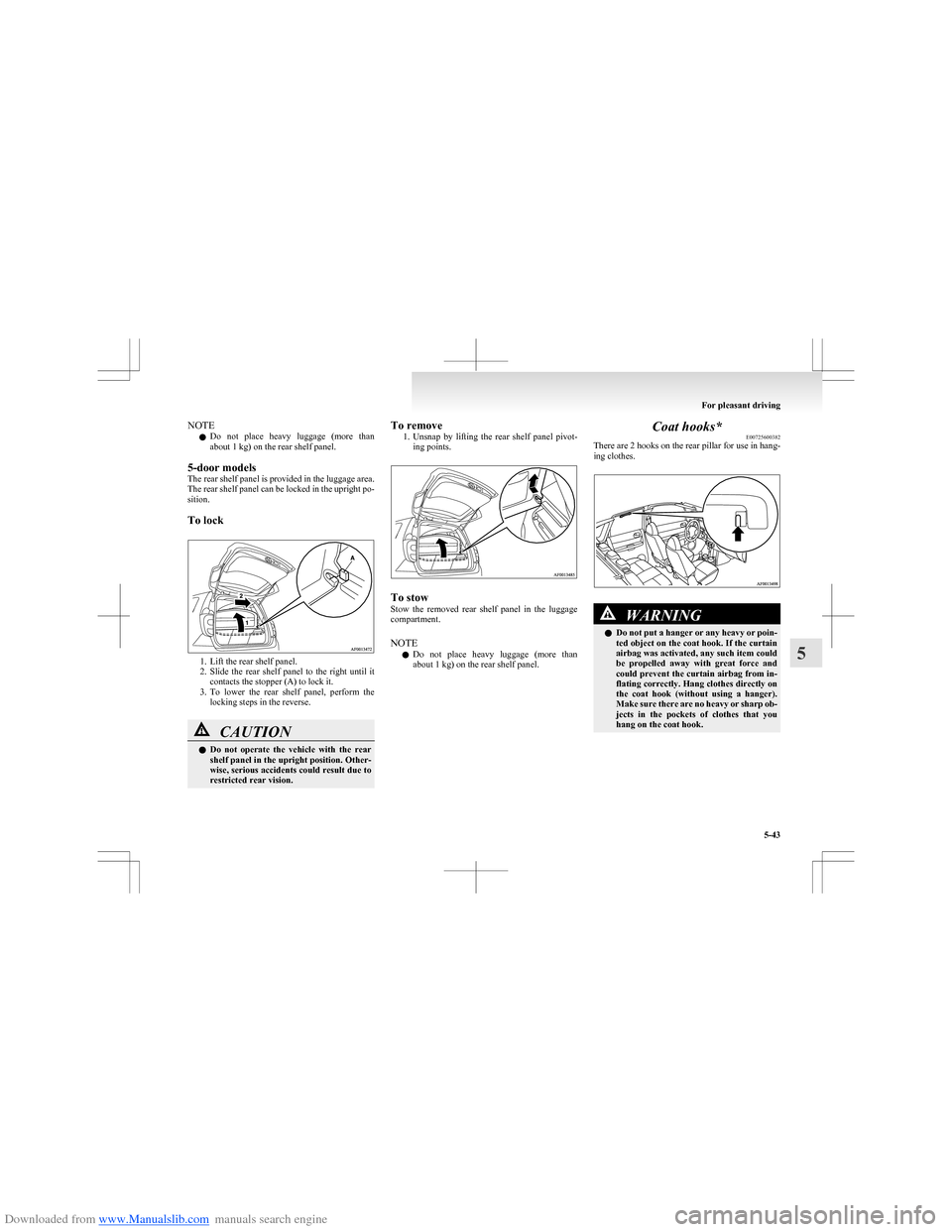
The rear shelf panel is provided in the luggage area.
The rear shelf panel can be locked in the upright po-
sition.
To lock
1. Lift the rear shelf panel.
2. Slide the rear shelf panel to the right until it
contacts the stopper (A) to lock it.
3. To lower the rear shelf panel, perform the
locking steps in the reverse.
CAUTIONl Do not operate the vehicle with the rear
shelf panel in the upright position. Other-
wise, serious accidents could result due to
restricted rear vision.To remove
1.Unsnap by lifting the rear shelf panel pivot-
ing points.
To stow
Stow the removed rear shelf panel in the luggage
compartment.
NOTE l Do not place heavy luggage (more than
about 1 kg) on the rear shelf panel.
Coat hooks* E00725600382
There are 2 hooks on the rear pillar for use in hang-
ing clothes.WARNINGl Do not put a hanger or any heavy or poin-
ted object on the coat hook. If the curtain
airbag was activated, any such item could
be propelled away with great force and
could prevent the curtain airbag from in-
flating correctly. Hang clothes directly on
the coat hook (without using a hanger).
Make sure there are no heavy or sharp ob-
jects in the pockets of clothes that you
hang on the coat hook.
For pleasant driving
5-43
5
Page 188 of 273
Downloaded from www.Manualslib.com manuals search engine 4.Connect one end of one jumper cable to the
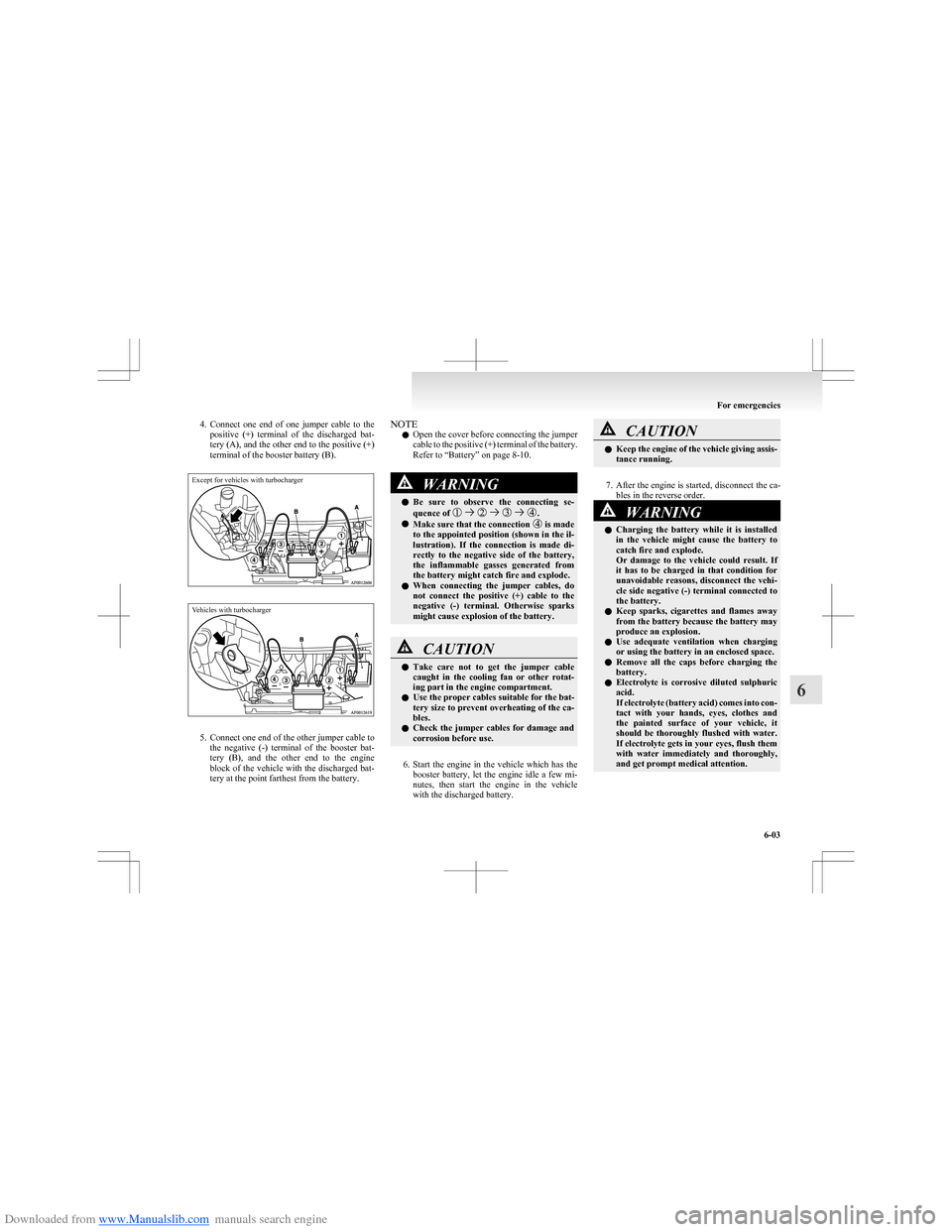
positive (+) terminal of the discharged bat-
tery (A), and the other end to the positive (+)
terminal of the booster battery (B).Except for vehicles with turbochargerVehicles with turbocharger
5. Connect one end of the other jumper cable to
the negative (-) terminal of the booster bat-
tery (B), and the other end to the engine
block of the vehicle with the discharged bat-
tery at the point farthest from the battery.
NOTE
l Open the cover before connecting the jumper
cable to the positive (+) terminal of the battery.
Refer to “Battery” on page 8-10.WARNINGl Be sure to observe the connecting se-
quence of .
l Make sure that the connection is made
to the appointed position (shown in the il-
lustration). If the connection is made di-
rectly to the negative side of the battery,
the inflammable gasses generated from
the battery might catch fire and explode.
l When connecting the jumper cables, do
not connect the positive (+) cable to the
negative (-) terminal. Otherwise sparks
might cause explosion of the battery.
CAUTIONl Take care not to get the jumper cable
caught in the cooling fan or other rotat-
ing part in the engine compartment.
l Use the proper cables suitable for the bat-
tery size to prevent overheating of the ca-
bles.
l Check the jumper cables for damage and
corrosion before use.
6. Start the engine in the vehicle which has the
booster battery, let the engine idle a few mi-
nutes, then start the engine in the vehicle
with the discharged battery.
CAUTIONl Keep the engine of the vehicle giving assis-
tance running.
7. After the engine is started, disconnect the ca-
bles in the reverse order.
8.
WARNINGl Charging the battery while it is installed
in the vehicle might cause the battery to
catch fire and explode.
Or damage to the vehicle could result. If
it has to be charged in that condition for
unavoidable reasons, disconnect the vehi-
cle side negative (-) terminal connected to
the battery.
l Keep sparks, cigarettes and flames away
from the battery because the battery may
produce an explosion.
l Use adequate ventilation when charging
or using the battery in an enclosed space.
l Remove all the caps before charging the
battery.
l Electrolyte is corrosive diluted sulphuric
acid.
If electrolyte (battery acid) comes into con-
tact with your hands, eyes, clothes and
the painted surface of your vehicle, it
should be thoroughly flushed with water.
If electrolyte gets in your eyes, flush them
with water immediately and thoroughly,
and get prompt medical attention.
For emergencies
6-03
6
Page 189 of 273
Downloaded from www.Manualslib.com manuals search engine CAUTIONlDo not attempt to start the engine by pull-
ing or pushing the vehicle.
It could damage your vehicle.
l Always wear protective eye goggles when
working near the battery.
l Keep the battery out of the reach of chil-
dren.
NOTE
l If the vehicle is put in motion without fully
charging the battery, it might cause the loss
of smooth engine operation and the anti-lock
brake warning lamp to illuminate. Refer to
“ Anti-lock brake system (ABS)” on page
4-27.
l For Clear Tec models, press the “Auto Stop
& Go (AS&G) OFF” switch to deactivate the
Auto Stop & Go (AS&G) system and pre-
vent the engine from automatically stopping
before the battery is sufficiently charged. Re-
fer to “To deactivate” on page 4-16.
Engine overheating E00800601839
If the high coolant temperature warning lamp flash-
es during the engine is running, the engine may be
overheating. If this occurs, take the following cor-
rective measures: 1. Stop the vehicle in a safe place.
2. Check whether steam is coming from the en-
gine compartment.
[ If steam does not come from the engine com-
partment]
With the engine still running, raise the bon-
net to ventilate the engine compartment.
NOTE l For Clear Tec models, press the “Auto Stop
& Go (AS&G) OFF” switch to deactivate the
Auto Stop & Go (AS&G) system before stop-
ping the vehicle. Refer to “To deactivate” on
page 4-16.
[If steam is coming from the engine compart-
ment]
Stop the engine, and when the steam stops,
raise the bonnet to ventilate the engine com-
partment. Restart the engine.WARNINGl Do not open the bonnet while steam is com-
ing from the engine compartment. It
could cause steam or hot water to spurt
out, causing burns. Hot water could spurt
out even when there is no steam coming
out, and some parts will be very hot. Be
very careful when opening the bonnet.WARNINGl Be careful of hot steam, which could blow
off the reserve tank cap.
l Do not attempt to remove the radiator
cap while the engine is hot.
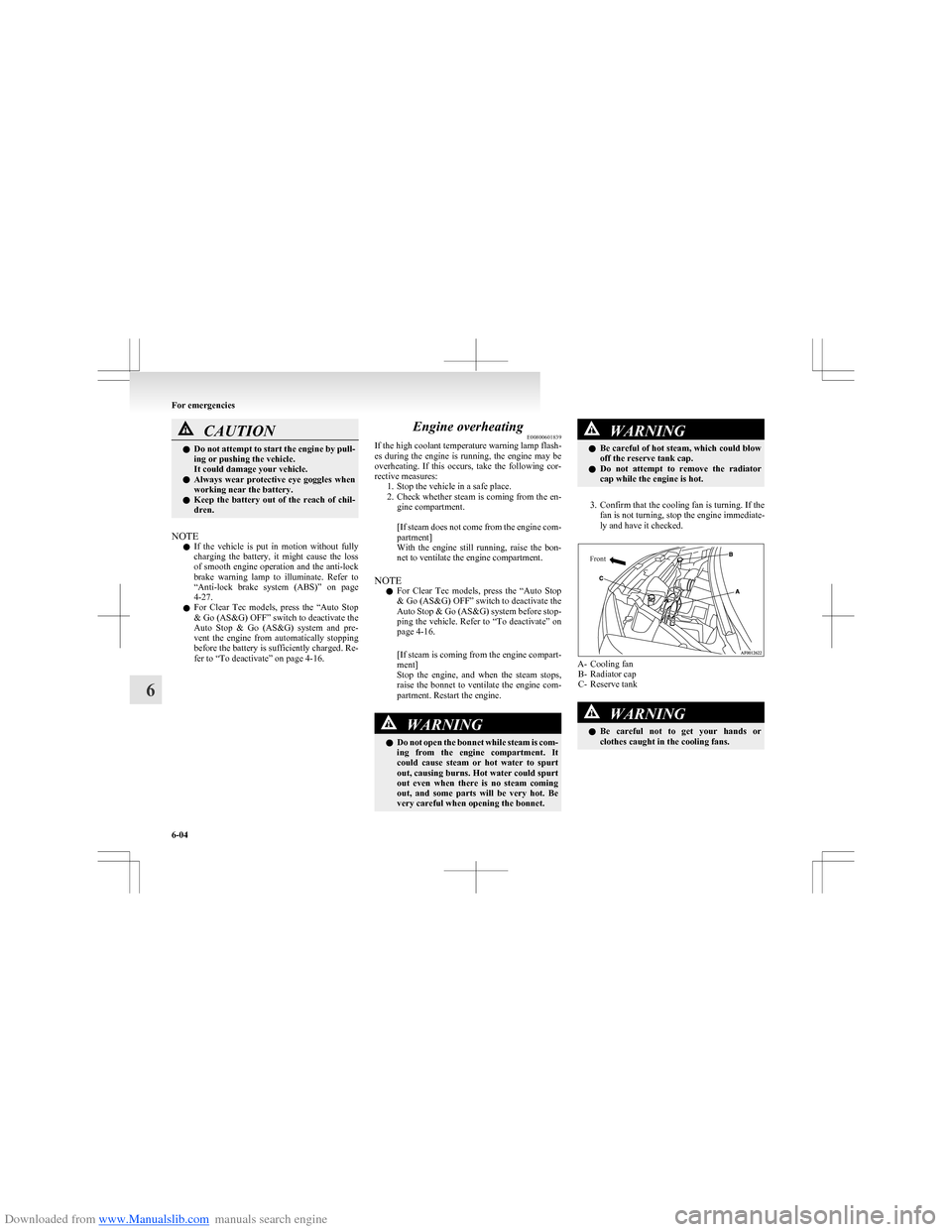
3. Confirm that the cooling fan is turning. If the
fan is not turning, stop the engine immediate-
ly and have it checked.
Front
A- Cooling fan B- Radiator cap
C- Reserve tank
WARNINGl Be careful not to get your hands or
clothes caught in the cooling fans.
For emergencies
6-04
6