are MITSUBISHI COLT 2009 10.G Manual Online
[x] Cancel search | Manufacturer: MITSUBISHI, Model Year: 2009, Model line: COLT, Model: MITSUBISHI COLT 2009 10.GPages: 273, PDF Size: 17.28 MB
Page 143 of 273
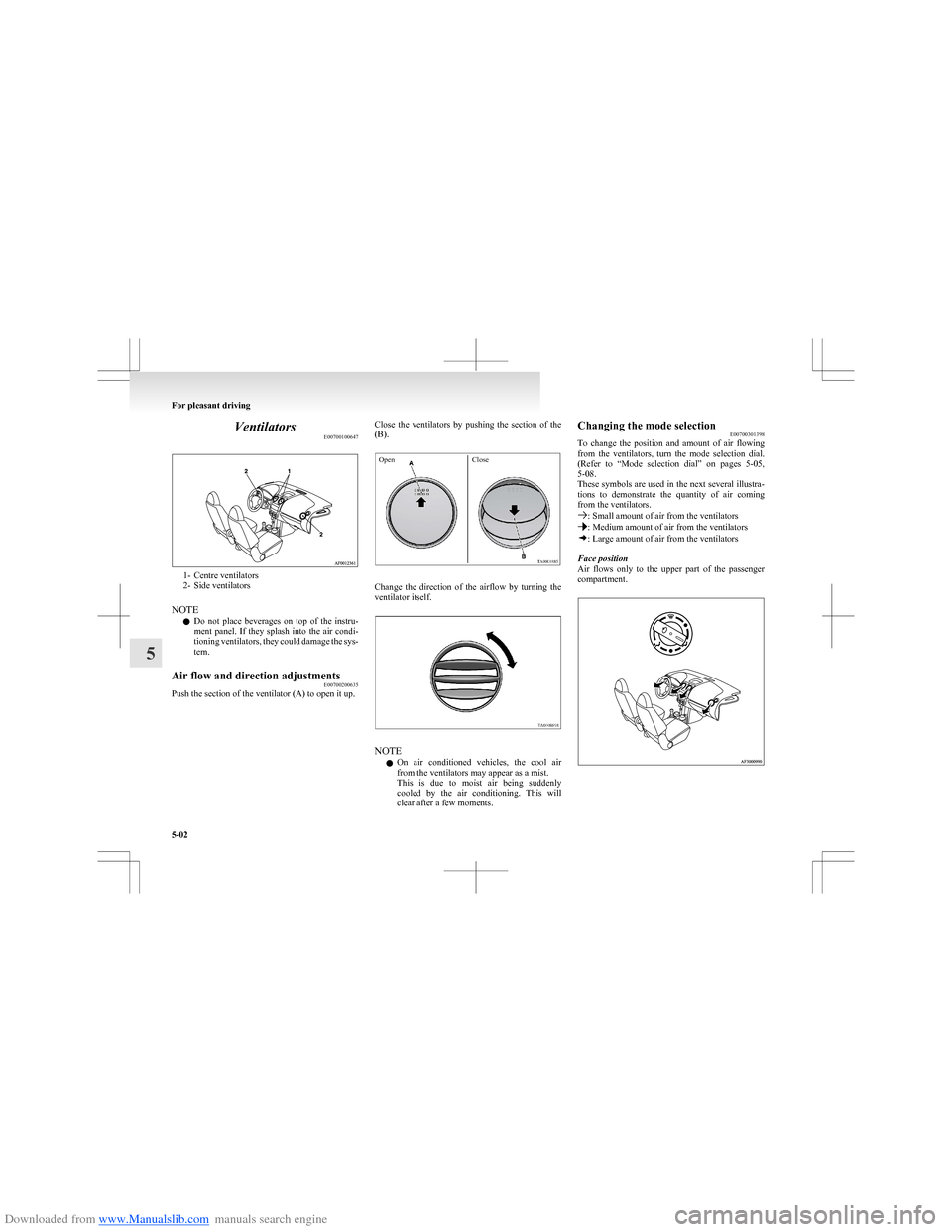
Downloaded from www.Manualslib.com manuals search engine VentilatorsE00700100647
1- Centre ventilators
2- Side ventilators
NOTE l Do not place beverages on top of the instru-
ment panel. If they splash into the air condi-
tioning ventilators, they could damage the sys-
tem.
Air flow and direction adjustments E00700200635
Push the section of the ventilator (A) to open it up.
Close the ventilators by pushing the section of the
(B).OpenClose
Change the direction of the airflow by turning the
ventilator itself.
NOTE
l On air conditioned vehicles, the cool air
from the ventilators may appear as a mist.
This is due to moist air being suddenly
cooled by the air conditioning. This will
clear after a few moments.
Changing the mode selection E00700301398
To change the position and amount of air flowing
from the ventilators, turn the mode selection dial.
(Refer to “Mode selection dial” on pages 5-05,
5-08.
These symbols are used in the next several illustra-
tions to demonstrate the quantity of air coming
from the ventilators.
: Small amount of air from the ventilators: Medium amount of air from the ventilators: Large amount of air from the ventilators
Face position
Air flows only to the upper part of the passenger
compartment.
For pleasant driving
5-02
5
Page 144 of 273
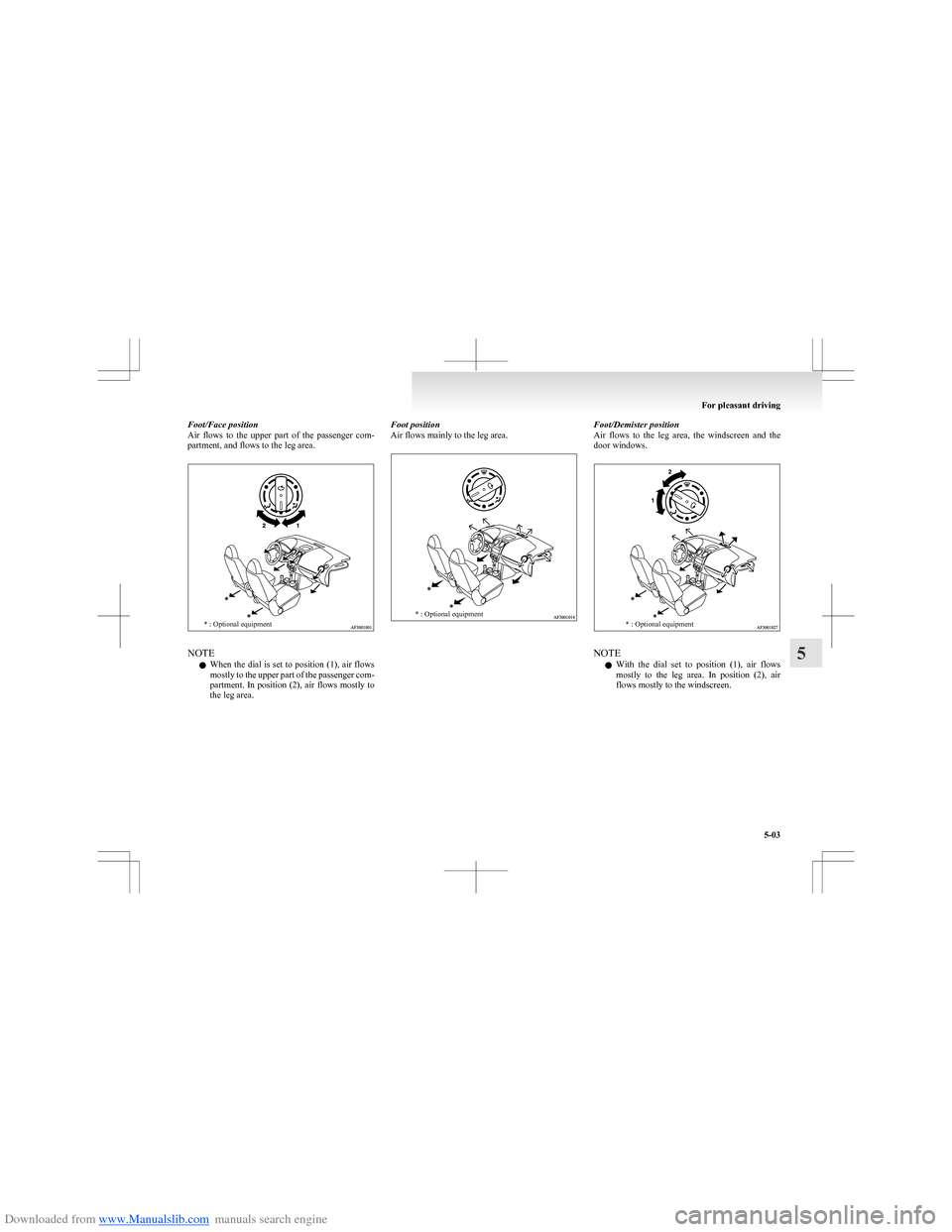
Downloaded from www.Manualslib.com manuals search engine Foot/Face position
Air flows to the upper part of the passenger com-
partment, and flows to the leg area.* : Optional equipment
NOTE
l When the dial is set to position (1), air flows
mostly to the upper part of the passenger com-
partment. In position (2), air flows mostly to
the leg area.
Foot position
Air flows mainly to the leg area.* : Optional equipmentFoot/Demister position
Air flows to the leg area, the windscreen and the
door windows.* : Optional equipment
NOTE
l With the dial set to position (1), air flows
mostly to the leg area. In position (2), air
flows mostly to the windscreen.
For pleasant driving
5-03
5
Page 147 of 273
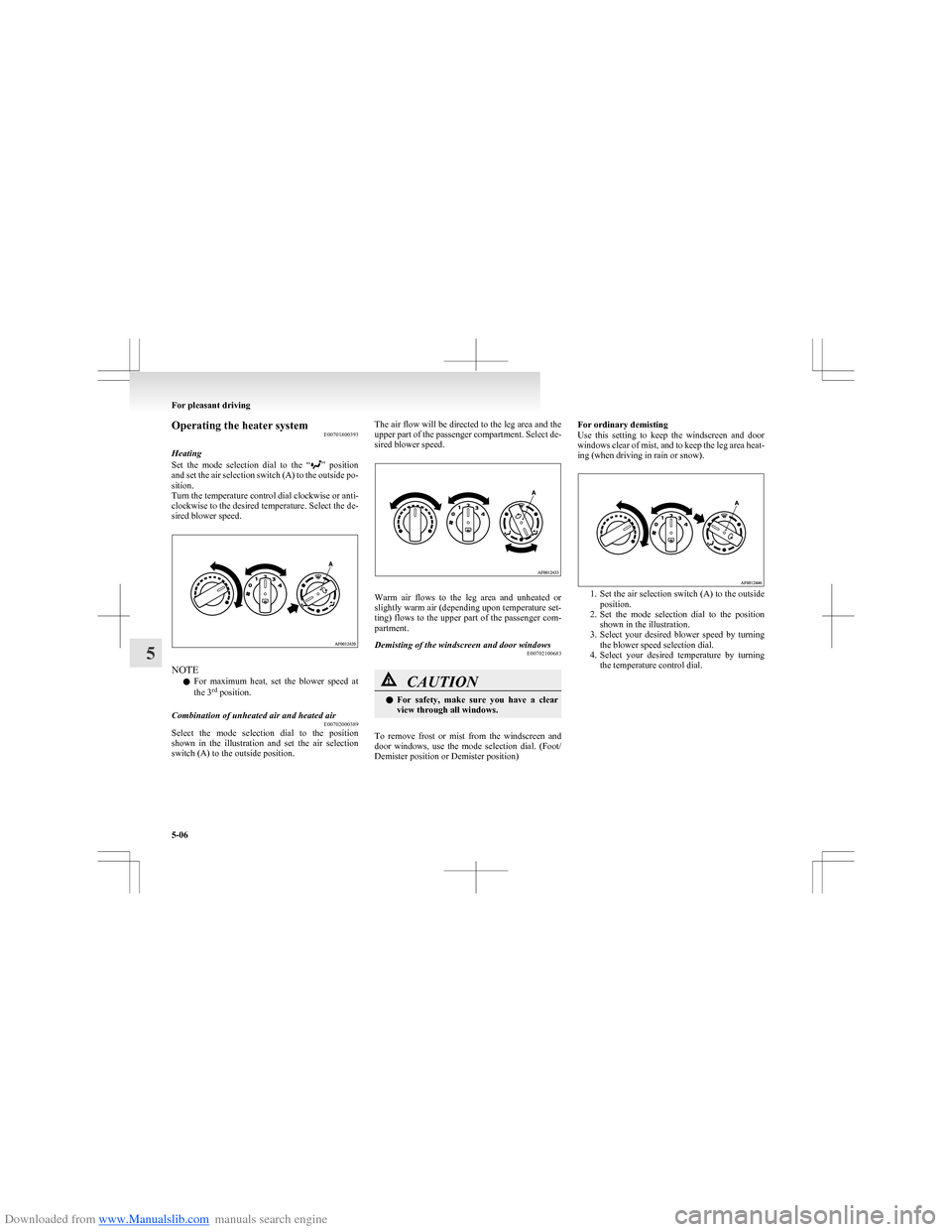
Downloaded from www.Manualslib.com manuals search engine Operating the heater systemE00701800393
Heating
Set the mode selection dial to the “
” position
and set the air selection switch (A) to the outside po-
sition.
Turn the temperature control dial clockwise or anti-
clockwise to the desired temperature. Select the de-
sired blower speed.
NOTE
l For maximum heat, set the blower speed at
the 3 rd
position.
Combination of unheated air and heated air
E00702000389
Select the mode selection dial to the position
shown in the illustration and set the air selection
switch (A) to the outside position.
The air flow will be directed to the leg area and the
upper part of the passenger compartment. Select de-
sired blower speed.
Warm air flows to the leg area and unheated or
slightly warm air (depending upon temperature set-
ting) flows to the upper part of the passenger com-
partment.
Demisting of the windscreen and door windows E00702100683CAUTIONlFor safety, make sure you have a clear
view through all windows.
To remove frost or mist from the windscreen and
door windows, use the mode selection dial. (Foot/
Demister position or Demister position)
For ordinary demisting
Use this setting to keep the windscreen and door
windows clear of mist, and to keep the leg area heat-
ing (when driving in rain or snow).
1. Set the air selection switch (A) to the outside
position.
2. Set the mode selection dial to the position
shown in the illustration.
3. Select your desired blower speed by turning
the blower speed selection dial.
4. Select your desired temperature by turning
the temperature control dial.
For pleasant driving
5-06
5
Page 148 of 273
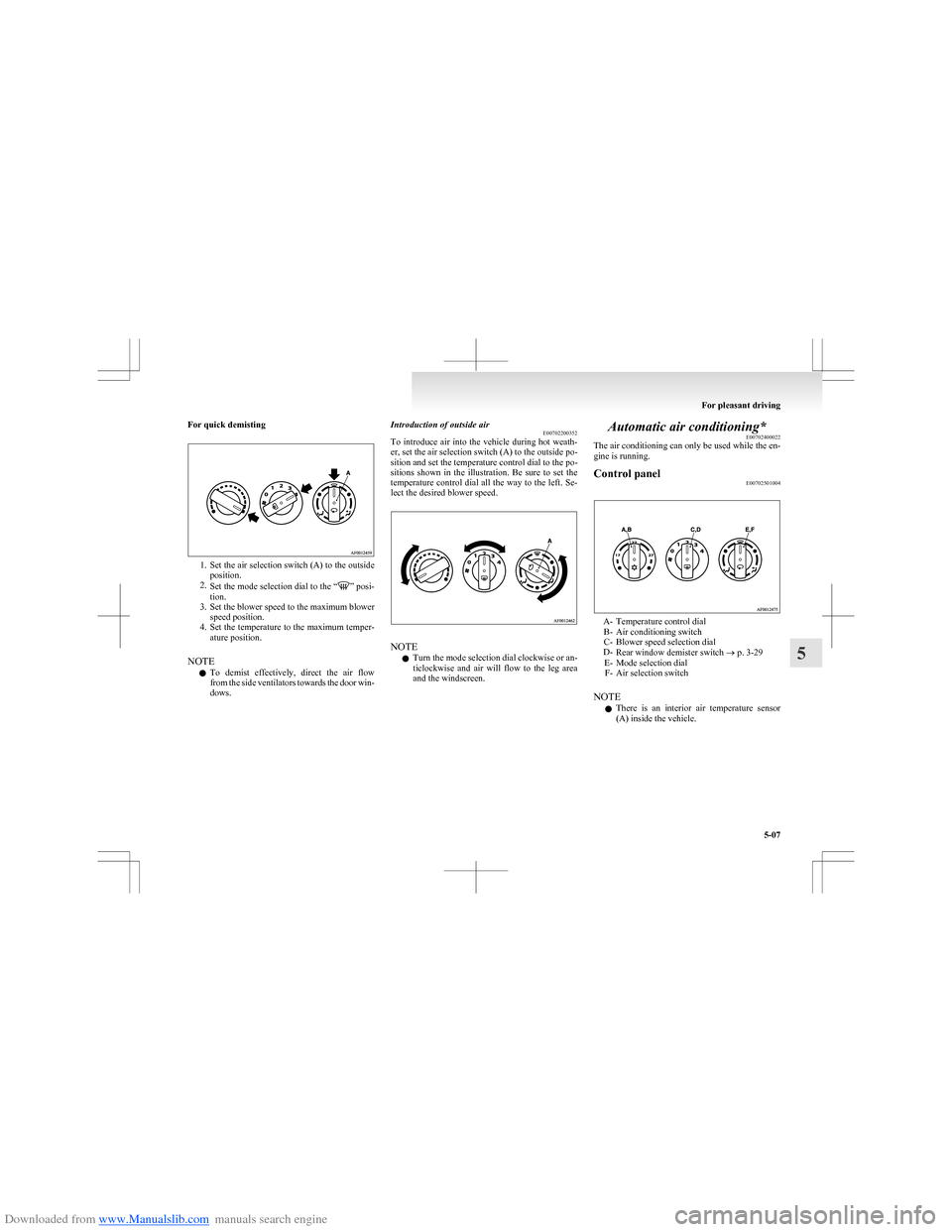
Downloaded from www.Manualslib.com manuals search engine For quick demisting
1.Set the air selection switch (A) to the outside
position.
2. Set the mode selection dial to the “
” posi-
tion.
3. Set the blower speed to the maximum blower
speed position.
4. Set the temperature to the maximum temper-
ature position.
NOTE l To demist effectively, direct the air flow
from the side ventilators towards the door win-
dows.
Introduction of outside air E00702200352
To introduce air into the vehicle during hot weath-
er, set the air selection switch (A) to the outside po-
sition and set the temperature control dial to the po-
sitions shown in the illustration. Be sure to set the
temperature control dial all the way to the left. Se-
lect the desired blower speed.
NOTE
l Turn the mode selection dial clockwise or an-
ticlockwise and air will flow to the leg area
and the windscreen.
Automatic air conditioning* E00702400022
The air conditioning can only be used while the en-
gine is running.Control panel E00702501004
A- Temperature control dial
B- Air conditioning switch
C- Blower speed selection dial
D- Rear window demister switch ® p. 3-29
E- Mode selection dial F- Air selection switch
NOTE l There is an interior air temperature sensor
(A) inside the vehicle.
For pleasant driving
5-07
5
Page 151 of 273
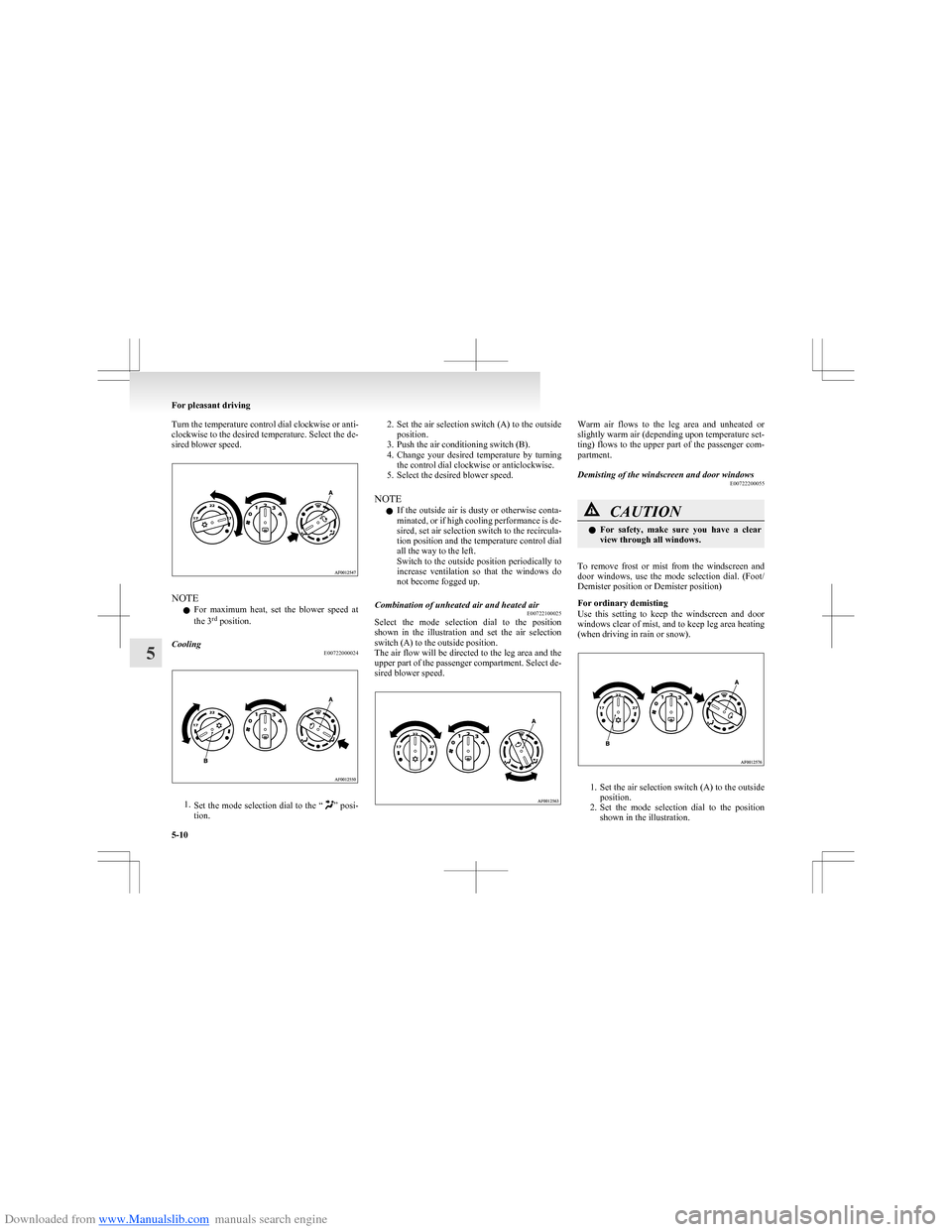
Downloaded from www.Manualslib.com manuals search engine Turn the temperature control dial clockwise or anti-
clockwise to the desired temperature. Select the de-
sired blower speed.
NOTE
l For maximum heat, set the blower speed at
the 3 rd
position.
Cooling
E00722000024
1.Set the mode selection dial to the “” posi-
tion.
2. Set the air selection switch (A) to the outside
position.
3. Push the air conditioning switch (B).
4. Change your desired temperature by turning
the control dial clockwise or anticlockwise.
5. Select the desired blower speed.
NOTE l If the outside air is dusty or otherwise conta-
minated, or if high cooling performance is de-
sired, set air selection switch to the recircula-
tion position and the temperature control dial
all the way to the left.
Switch to the outside position periodically to
increase ventilation so that the windows do
not become fogged up.Combination of unheated air and heated air E00722100025
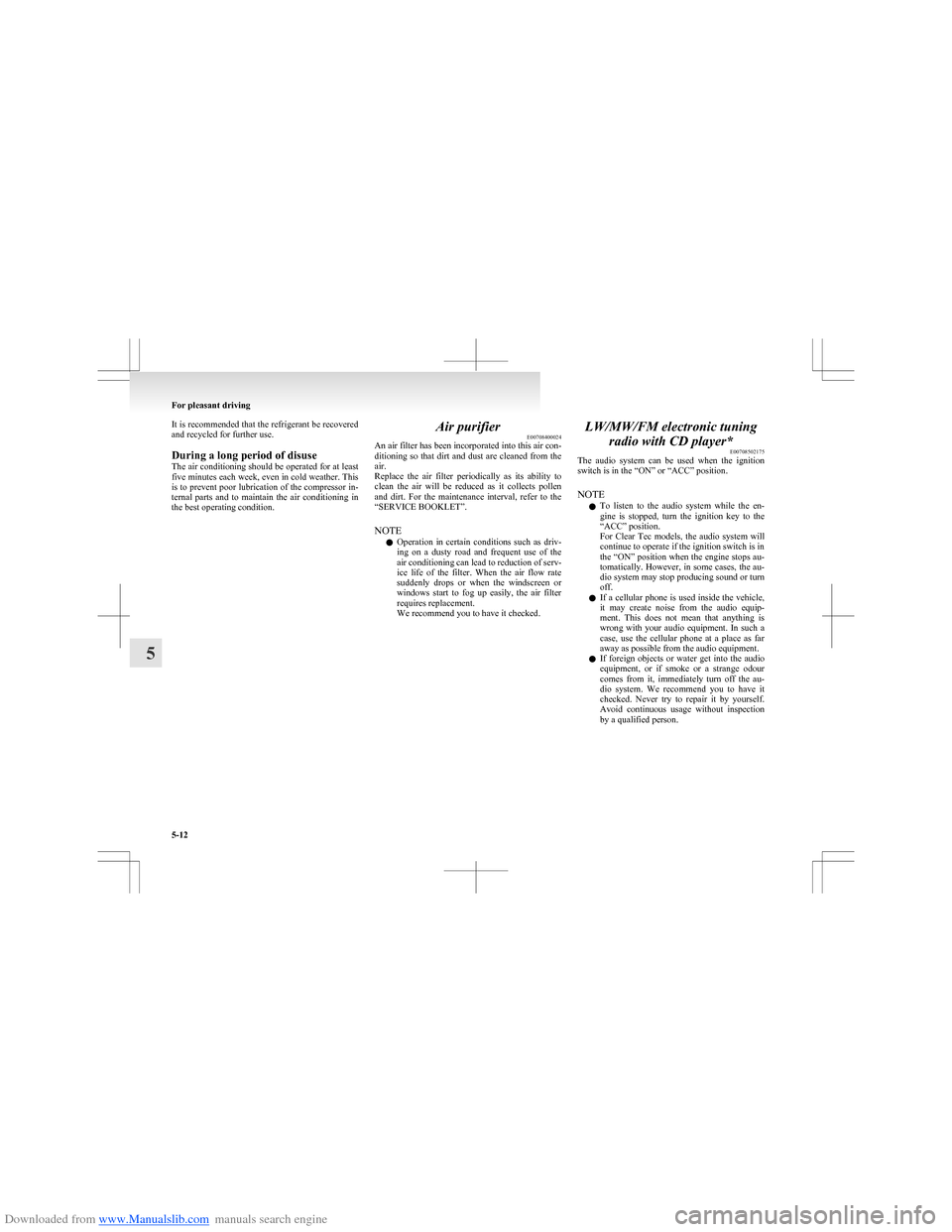
Select the mode selection dial to the position
shown in the illustration and set the air selection
switch (A) to the outside position.
The air flow will be directed to the leg area and the
upper part of the passenger compartment. Select de-
sired blower speed.
Warm air flows to the leg area and unheated or
slightly warm air (depending upon temperature set-
ting) flows to the upper part of the passenger com-
partment.Demisting of the windscreen and door windows E00722200055CAUTIONlFor safety, make sure you have a clear
view through all windows.
To remove frost or mist from the windscreen and
door windows, use the mode selection dial. (Foot/
Demister position or Demister position)
For ordinary demisting
Use this setting to keep the windscreen and door
windows clear of mist, and to keep leg area heating
(when driving in rain or snow).
1. Set the air selection switch (A) to the outside
position.
2. Set the mode selection dial to the position
shown in the illustration.
For pleasant driving
5-10
5
Page 153 of 273
Downloaded from www.Manualslib.com manuals search engine It is recommended that the refrigerant be recovered
and recycled for further use.
During a long period of disuse
The air conditioning should be operated for at least
five minutes each week, even in cold weather. This
is to prevent poor lubrication of the compressor in-
ternal parts and to maintain the air conditioning in
the best operating condition.Air purifier E00708400024
An air filter has been incorporated into this air con-
ditioning so that dirt and dust are cleaned from the
air.
Replace the air filter periodically as its ability to
clean the air will be reduced as it collects pollen
and dirt. For the maintenance interval, refer to the
“SERVICE BOOKLET”.
NOTE l Operation in certain conditions such as driv-
ing on a dusty road and frequent use of the
air conditioning can lead to reduction of serv-
ice life of the filter. When the air flow rate
suddenly drops or when the windscreen or
windows start to fog up easily, the air filter
requires replacement.
We recommend you to have it checked.LW/MW/FM electronic tuning
radio with CD player* E00708502175
The audio system can be used when the ignition
switch is in the “ON” or “ACC” position.
NOTE l To listen to the audio system while the en-
gine is stopped, turn the ignition key to the
“ACC” position.
For Clear Tec models, the audio system will
continue to operate if the ignition switch is in
the “ON” position when the engine stops au-
tomatically. However, in some cases, the au-
dio system may stop producing sound or turn
off.
l If a cellular phone is used inside the vehicle,
it may create noise from the audio equip-
ment. This does not mean that anything is
wrong with your audio equipment. In such a
case, use the cellular phone at a place as far
away as possible from the audio equipment.
l If foreign objects or water get into the audio
equipment, or if smoke or a strange odour
comes from it, immediately turn off the au-
dio system. We recommend you to have it
checked. Never try to repair it by yourself.
Avoid continuous usage without inspection
by a qualified person.
For pleasant driving
5-12
5
Page 157 of 273
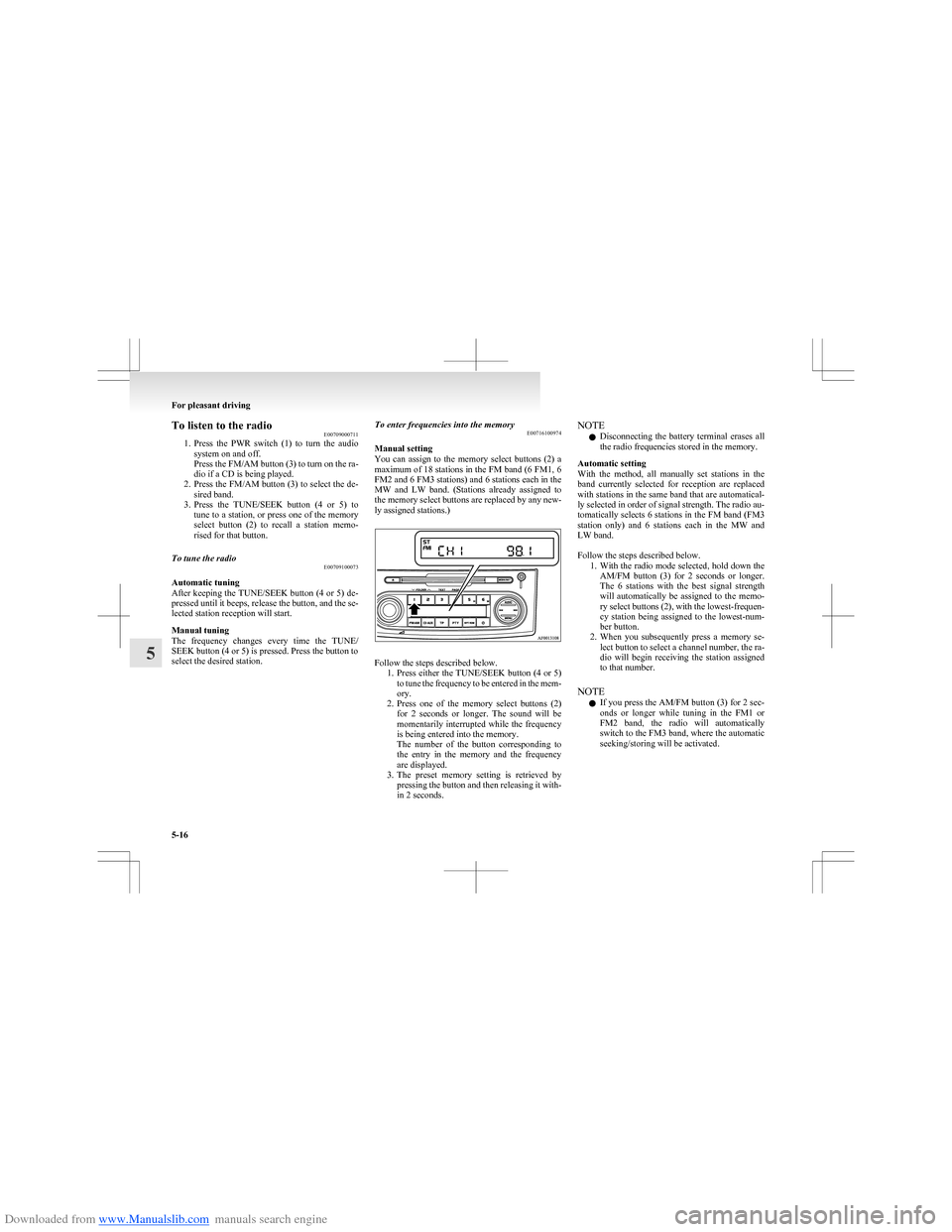
Downloaded from www.Manualslib.com manuals search engine To listen to the radioE00709000711
1. Press the PWR switch (1) to turn the audio
system on and off.
Press the FM/AM button (3) to turn on the ra-
dio if a CD is being played.
2. Press the FM/AM button (3) to select the de-
sired band.
3. Press the TUNE/SEEK button (4 or 5) to
tune to a station, or press one of the memory
select button (2) to recall a station memo-
rised for that button.To tune the radio E00709100073
Automatic tuning
After keeping the TUNE/SEEK button (4 or 5) de-
pressed until it beeps, release the button, and the se-
lected station reception will start.
Manual tuning
The frequency changes every time the TUNE/
SEEK button (4 or 5) is pressed. Press the button to
select the desired station.
To enter frequencies into the memory E00716100974
Manual setting
You can assign to the memory select buttons (2) a
maximum of 18 stations in the FM band (6 FM1, 6
FM2 and 6 FM3 stations) and 6 stations each in the
MW and LW band. (Stations already assigned to
the memory select buttons are replaced by any new-
ly assigned stations.)
Follow the steps described below. 1.Press either the TUNE/SEEK button (4 or 5)
to tune the frequency to be entered in the mem-
ory.
2. Press one of the memory select buttons (2)
for 2 seconds or longer. The sound will be
momentarily interrupted while the frequency
is being entered into the memory.
The number of the button corresponding to
the entry in the memory and the frequency
are displayed.
3. The preset memory setting is retrieved by
pressing the button and then releasing it with-
in 2 seconds.
NOTE
l Disconnecting the battery terminal erases all
the radio frequencies stored in the memory.
Automatic setting
With the method, all manually set stations in the
band currently selected for reception are replaced
with stations in the same band that are automatical-
ly selected in order of signal strength. The radio au-
tomatically selects 6 stations in the FM band (FM3
station only) and 6 stations each in the MW and
LW band.
Follow the steps described below. 1.With the radio mode selected, hold down the
AM/FM button (3) for 2 seconds or longer.
The 6 stations with the best signal strength
will automatically be assigned to the memo-
ry select buttons (2), with the lowest-frequen-
cy station being assigned to the lowest-num-
ber button.
2. When you subsequently press a memory se-
lect button to select a channel number, the ra-
dio will begin receiving the station assigned
to that number.
NOTE l If you press the AM/FM button (3) for 2 sec-
onds or longer while tuning in the FM1 or
FM2 band, the radio will automatically
switch to the FM3 band, where the automatic
seeking/storing will be activated.
For pleasant driving
5-16
5
Page 158 of 273
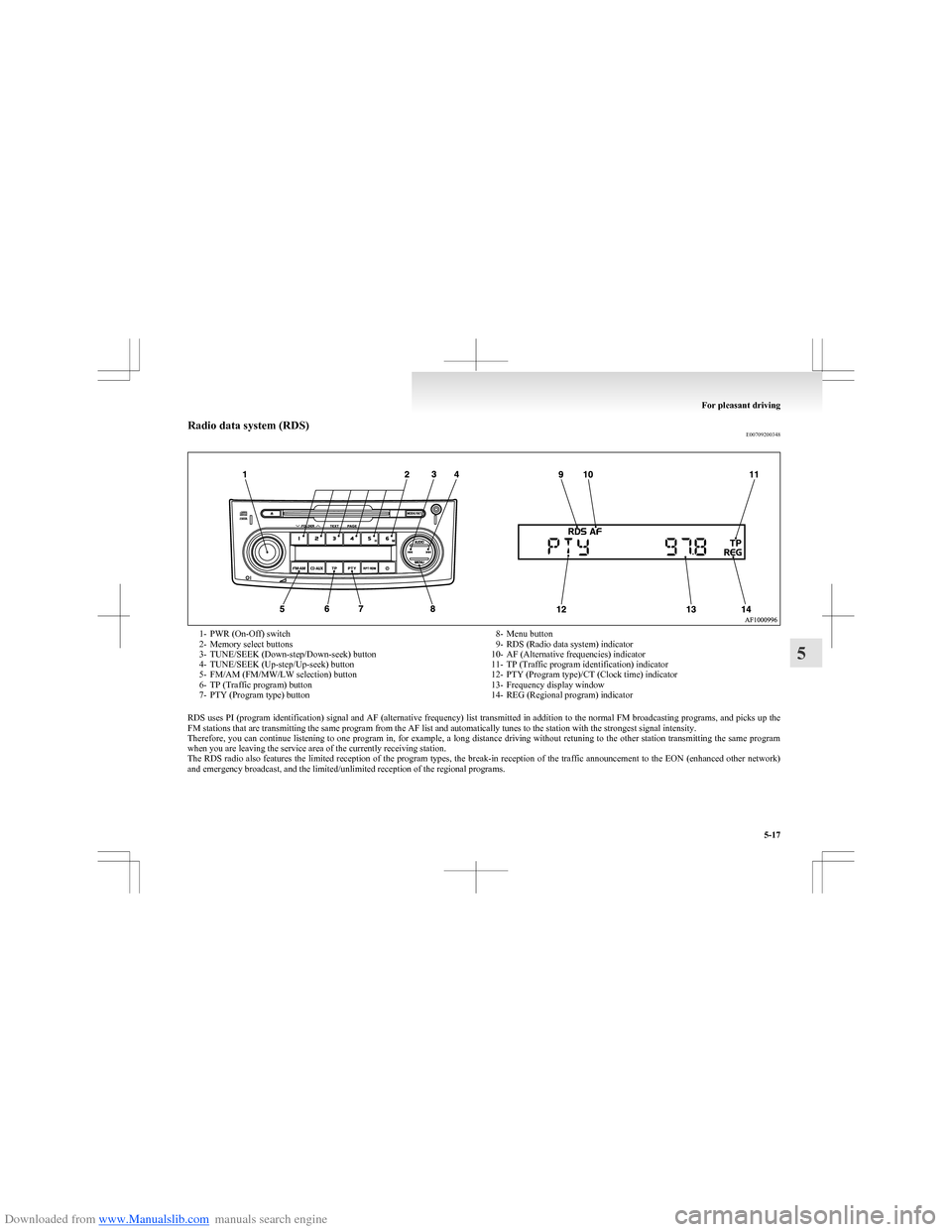
Downloaded from www.Manualslib.com manuals search engine Radio data system (RDS)E007092003481- PWR (On-Off) switch
2- Memory select buttons
3- TUNE/SEEK (Down-step/Down-seek) button
4- TUNE/SEEK (Up-step/Up-seek) button
5- FM/AM (FM/MW/LW selection) button
6- TP (Traffic program) button
7- PTY (Program type) button8- Menu button
9- RDS (Radio data system) indicator
10- AF (Alternative frequencies) indicator
11- TP (Traffic program identification) indicator
12- PTY (Program type)/CT (Clock time) indicator
13- Frequency display window
14- REG (Regional program) indicator
RDS uses PI (program identification) signal and AF (alternative frequency) list transmitted in addition to the normal FM broadcasting programs, and picks up the
FM stations that are transmitting the same program from the AF list and automatically tunes to the station with the strongest signal intensity.
Therefore, you can continue listening to one program in, for example, a long distance driving without retuning to the other station transmitting the same program
when you are leaving the service area of the currently receiving station.
The RDS radio also features the limited reception of the program types, the break-in reception of the traffic announcement to the EON (enhanced other network)
and emergency broadcast, and the limited/unlimited reception of the regional programs.
For pleasant driving
5-17
5
Page 159 of 273
Downloaded from www.Manualslib.com manuals search engine AF (Alternative Frequencies) functionE00720900146
The AF function finds a station broadcasting the
same program and selects the station with the stron-
gest signal of AF lists.
The AF function is turned on (with the AF indica-
tor (10) shown on the display) at all times unless
you manually switch it off.
The AF function can be turned ON and OFF.
Refer to “Function setup mode” on page 5-20.CT (Clock Time) function E00721000128
The clock can be set automatically by using the sig-
nal from the local RDS stations. Refer to “Digital
clock” on page 5-34.
REG (Regional) function E00721100015
REG function limits to receive the stations broad-
casting regional programs.
Regional programming and regional networks are
organized differently depending on the country or
area (they may be changed according to the hour,
state, or broadcast area), so if you don’t want to re-
ceive the regional programs automatically, you can
set up REG ON not to receive regional programs.
The REG function can be turned ON and OFF.
Refer to “Function setup mode” on page 5-20.
PI (Program Identification) search function E00721200175
When travelling long distance and the recalled pre-
set station is weak, the radio searches another fre-
quency broadcasting the same programming with
the same PI code in AF list.
If there are no frequencies broadcasting the same
programming, the radio searches a frequency broad-
casting the regional programming. The radio suc-
ceeds in searching the regional programming, then
the display shows the REG indicator (14).
If the radio does not succeed in searching the re-
gional programming, the radio returns to the recal-
led preset station.
The PI function can be turned ON and OFF on
some vehicles.
Refer to “Function setup mode” on page 5-20.
NOTE l While searching, the audio system is muted.
The display shows “WAIT” or “SEARCH”.PTY (Program Type) E00721300264
RDS broadcasts are classified according to pro-
gram type (PTY) as follows. Use the TUNE/SEEK
button (3 or 4) to select your desired PTY.
1. NEWS
2. AFFAIRS (Current affairs)
3. INFO (Information)
4. SPORT
5. EDUCATE (Education)
6. DRAMA
7. CULTURE
8. SCIENCE
9. VARIED
10. POP M (Pop music)
11. ROCK M (Rock music)
12. EASY M (Easy music)
13. LIGHT M (Light classics)
14. CLASSICS
15. OTHER M (Other music)
16. WEATHER (Weather information)
17. FINANCE
18. CHILDREN
19. SOCIAL
20. RELIGION
21. PHONE IN
22. TRAVEL
23. LEISURE
24. JAZZ
25. COUNTRY
26. NATION M (National music)
27. OLDIES
28. FOLK M (Folk music)
29. DOCUMENT
30. TEST
31. ALARM
To search for a broadcast of desired program type: 1. Press the PTY button (7).
2. Press the TUNE/SEEK button (3 or 4) for
less than 1 second at a time to select your de-
sired PTY.
3. Two seconds after a desired PTY has been se-
lected, the radio will begin to search for a
broadcast of your selected PTY. During
search, the selected PTY on the display
blinks and the radio will begin to search for a
broadcast of your selected PTY.
For pleasant driving
5-18
5
Page 160 of 273
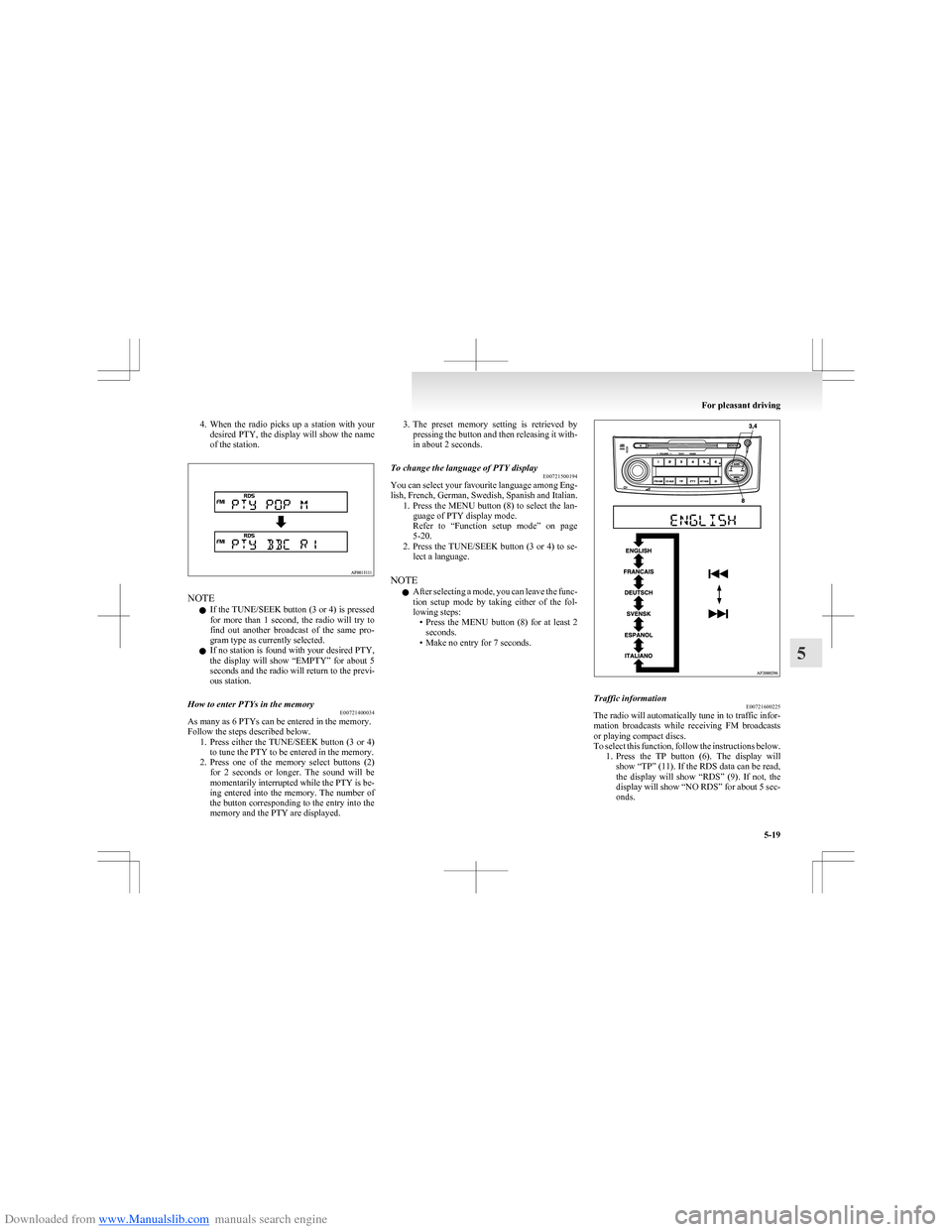
Downloaded from www.Manualslib.com manuals search engine 4.When the radio picks up a station with your
desired PTY, the display will show the name
of the station.
NOTE
l If the TUNE/SEEK button (3 or 4) is pressed
for more than 1 second, the radio will try to
find out another broadcast of the same pro-
gram type as currently selected.
l If no station is found with your desired PTY,
the display will show “EMPTY” for about 5
seconds and the radio will return to the previ-
ous station.
How to enter PTYs in the memory E00721400034
As many as 6 PTYs can be entered in the memory.
Follow the steps described below. 1.Press either the TUNE/SEEK button (3 or 4)
to tune the PTY to be entered in the memory.
2. Press one of the memory select buttons (2)
for 2 seconds or longer. The sound will be
momentarily interrupted while the PTY is be-
ing entered into the memory. The number of
the button corresponding to the entry into the
memory and the PTY are displayed.
3. The preset memory setting is retrieved by
pressing the button and then releasing it with-
in about 2 seconds.To change the language of PTY display E00721500194
You can select your favourite language among Eng-
lish, French, German, Swedish, Spanish and Italian. 1.Press the MENU button (8) to select the lan-
guage of PTY display mode.
Refer to “Function setup mode” on page
5-20.
2. Press the TUNE/SEEK button (3 or 4) to se-
lect a language.
NOTE l After selecting a mode, you can leave the func-
tion setup mode by taking either of the fol-
lowing steps: •Press the MENU button (8) for at least 2
seconds.
• Make no entry for 7 seconds.
Traffic information E00721600225
The radio will automatically tune in to traffic infor-
mation broadcasts while receiving FM broadcasts
or playing compact discs.
To select this function, follow the instructions below. 1.Press the TP button (6). The display will
show “TP” (11). If the RDS data can be read,
the display will show “RDS” (9). If not, the
display will show “NO RDS” for about 5 sec-
onds.
For pleasant driving
5-19
5