Service reminder MITSUBISHI COLT 2011 Owner's Manual (in English)
[x] Cancel search | Manufacturer: MITSUBISHI, Model Year: 2011, Model line: COLT, Model: MITSUBISHI COLT 2011Pages: 274, PDF Size: 17.88 MB
Page 2 of 274
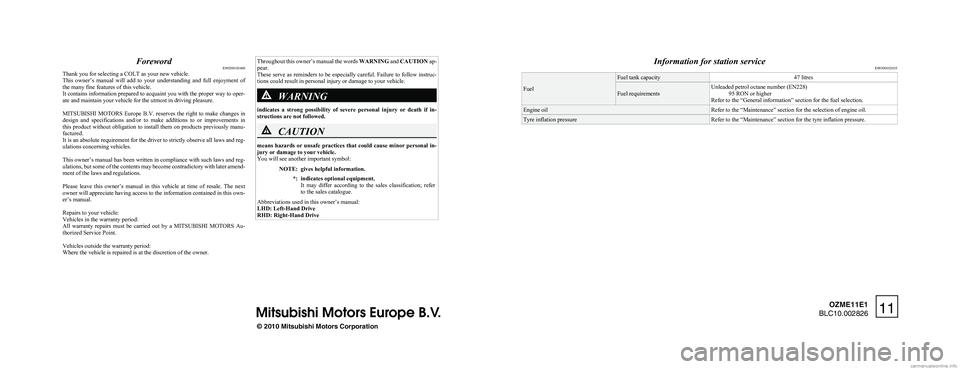
ForewordE09200103460
Thank you for selecting a COLT as your new vehicle.
This owner’s manual will add to your understanding and full enjoyment of
the many fine features of this vehicle.
It contains information prepared to acquaint you with the proper way to oper-
ate and maintain your vehicle for the utmost in driving pleasure.
MITSUBISHI MOTORS Europe B.V. reserves the right to make changes in
design and specifications and/or to make additions to or improvements in
this product without obligation to install them on products previously manu-
factured.
It is an absolute requirement for the driver to strictly observe all laws and reg-
ulations concerning vehicles.
This owner’s manual has been written in compliance with such laws and reg-
ulations, but some of the contents may become contradictory with later amend-
ment of the laws and regulations.
Please leave this owner’s manual in this vehicle at time of resale. The next
owner will appreciate having access to the information contained in this own-
er’s manual.
Repairs to your vehicle:
Vehicles in the warranty period:
All warranty repairs must be carried out by a MITSUBISHI MOTORS Au-
thorized Service Point.
Vehicles outside the warranty period:
Where the vehicle is repaired is at the discretion of the owner.
Throughout this owner’s manual the words WARNING and CAUTION ap-
pear.
These serve as reminders to be especially careful. Failure to follow instruc-
tions could result in personal injury or damage to your vehicle.WARNING
indicates a strong possibility of severe personal injury or death if in-
structions are not followed.
CAUTION
means hazards or unsafe practices that could cause minor personal in-
jury or damage to your vehicle.
You will see another important symbol:
NOTE:gives helpful information.*:indicates optional equipment.
It may differ according to the sales classification; refer
to the sales catalogue.
Abbreviations used in this owner’s manual:
LHD: Left-Hand Drive
RHD: Right-Hand Drive
Information for station service E09300102435
Fuel
Fuel tank capacity47 litresFuel requirementsUnleaded petrol octane number (EN228)
95 RON or higher
Refer to the “General information” section for the fuel selection.Engine oilRefer to the “Maintenance” section for the selection of engine oil.Tyre inflation pressureRefer to the “Maintenance” section for the tyre inflation pressure.
© 2010 Mitsubishi Motors Corporation11
OZME11E1
BLC10.002826
Page 78 of 274
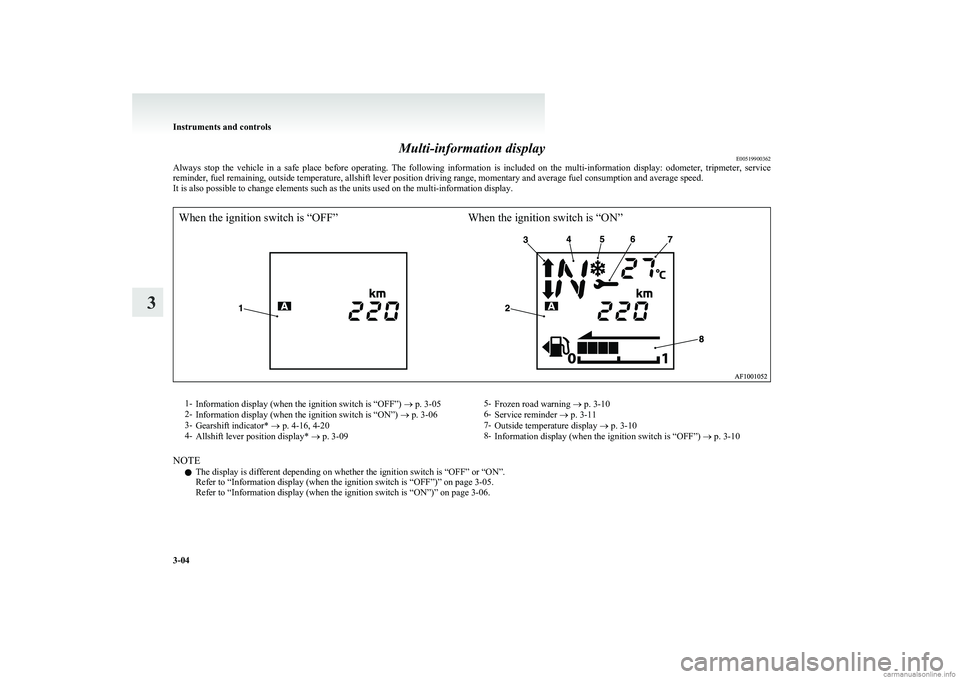
Multi-information displayE00519900362
Always stop the vehicle in a safe place before operating. The following information is included on the multi-information display: odometer, tripmeter, service
reminder, fuel remaining, outside temperature, allshift lever position driving range, momentary and average fuel consumption and average speed.
It is also possible to change elements such as the units used on the multi-information display.
When the ignition switch is “OFF”When the ignition switch is “ON”1- Information display (when the ignition switch is “OFF”) ® p. 3-05
2- Information display (when the ignition switch is “ON”) ® p. 3-06
3- Gearshift indicator* ® p. 4-16, 4-20
4- Allshift lever position display* ® p. 3-095-
Frozen road warning ® p. 3-10
6- Service reminder ® p. 3-11
7- Outside temperature display ® p. 3-10
8- Information display (when the ignition switch is “OFF”) ® p. 3-10
NOTE
l The display is different depending on whether the ignition switch is “OFF” or “ON”.
Refer to “Information display (when the ignition switch is “OFF”)” on page 3-05.
Refer to “Information display (when the ignition switch is “ON”)” on page 3-06.
Instruments and controls
3-04
3
Page 79 of 274
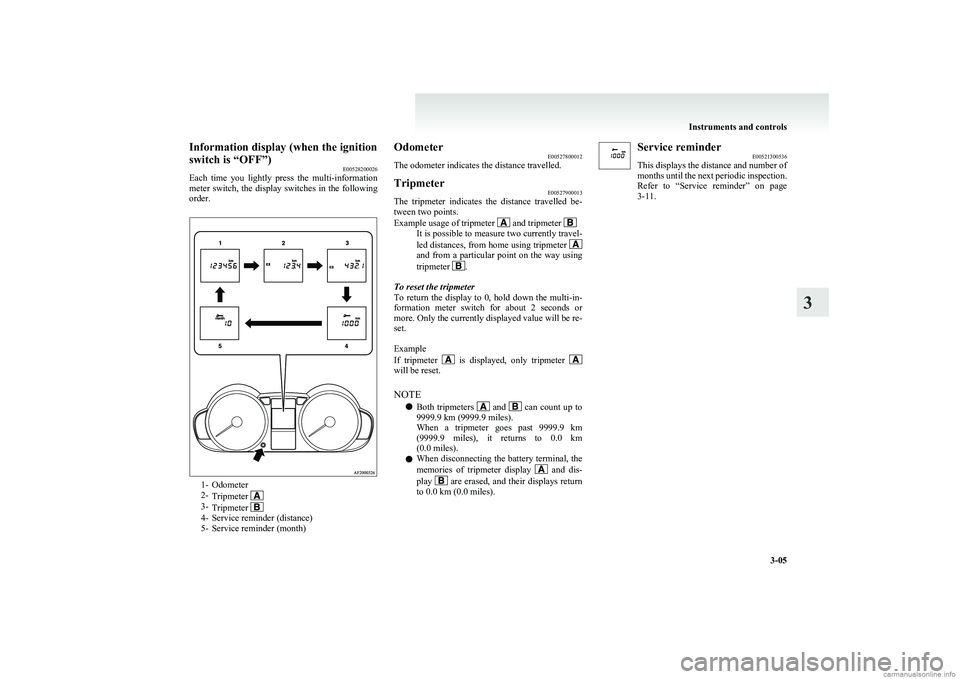
Information display (when the ignition
switch is “OFF”) E00528200026
Each time you lightly press the multi-information
meter switch, the display switches in the following
order.
1- Odometer
2- Tripmeter
3-Tripmeter 4- Service reminder (distance)
5- Service reminder (month)
Odometer E00527800012
The odometer indicates the distance travelled.Tripmeter E00527900013
The tripmeter indicates the distance travelled be-
tween two points.
Example usage of tripmeter
and tripmeter It is possible to measure two currently travel-
led distances, from home using tripmeter
and from a particular point on the way using
tripmeter .
To reset the tripmeter
To return the display to 0, hold down the multi-in-
formation meter switch for about 2 seconds or
more. Only the currently displayed value will be re-
set.
Example
If tripmeter
is displayed, only tripmeter will be reset.
NOTE l Both tripmeters
and can count up to
9999.9 km (9999.9 miles).
When a tripmeter goes past 9999.9 km
( 9999.9 miles), it returns to 0.0 km
(0.0 miles).
l When disconnecting the battery terminal, the
memories of tripmeter display
and dis-
play are erased, and their displays return
to 0.0 km (0.0 miles).
Service reminder E00521300536
This displays the distance and number of
months until the next periodic inspection.
Refer to “Service reminder” on page
3-11.
Instruments and controls
3-05
3
Page 81 of 274
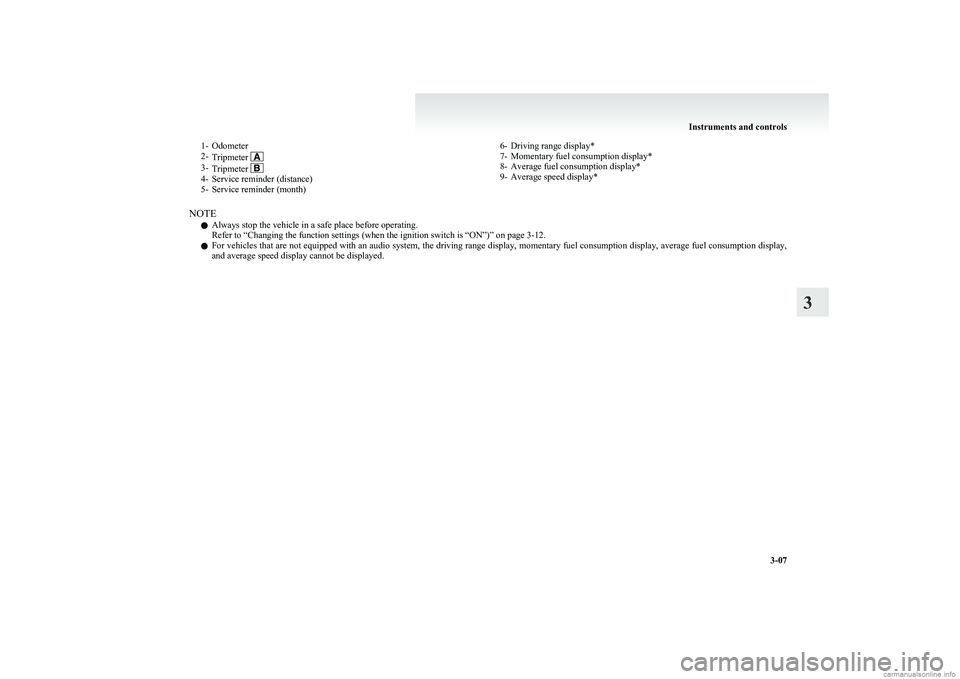
1- Odometer
2- Tripmeter
3-Tripmeter 4- Service reminder (distance)
5- Service reminder (month)
6- Driving range display*
7- Momentary fuel consumption display*
8- Average fuel consumption display*
9- Average speed display*
NOTE
l Always stop the vehicle in a safe place before operating.
Refer to “Changing the function settings (when the ignition switch is “ON”)” on page 3-12.
l For vehicles that are not equipped with an audio system, the driving range display, momentary fuel consumption display, average fuel consumption display,
and average speed display cannot be displayed.
Instruments and controls
3-07
3
Page 82 of 274
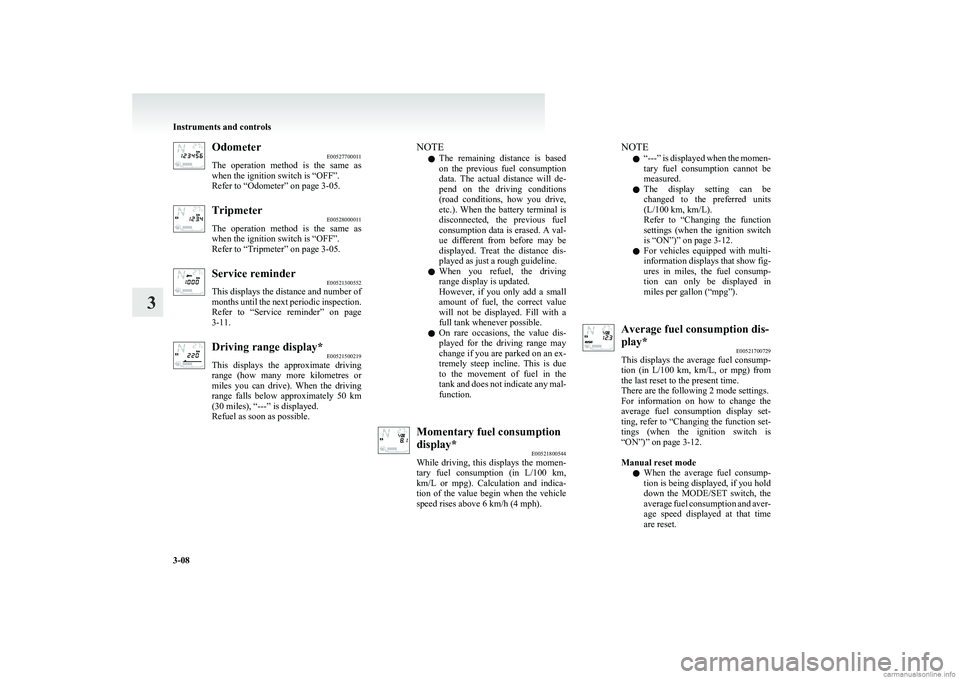
OdometerE00527700011
The operation method is the same as
when the ignition switch is “OFF”.
Refer to “Odometer” on page 3-05.Tripmeter E00528000011
The operation method is the same as
when the ignition switch is “OFF”.
Refer to “Tripmeter” on page 3-05.Service reminder E00521300552
This displays the distance and number of
months until the next periodic inspection.
Refer to “Service reminder” on page
3-11.Driving range display* E00521500219
This displays the approximate driving
range (how many more kilometres or
miles you can drive). When the driving
range falls below approximately 50 km
(30 miles), “---” is displayed.
Refuel as soon as possible.NOTE
l The remaining distance is based
on the previous fuel consumption
data. The actual distance will de-
pend on the driving conditions
(road conditions, how you drive,
etc.). When the battery terminal is
disconnected, the previous fuel
consumption data is erased. A val-
ue different from before may be
displayed. Treat the distance dis-
played as just a rough guideline.
l When you refuel, the driving
range display is updated.
However, if you only add a small
amount of fuel, the correct value
will not be displayed. Fill with a
full tank whenever possible.
l On rare occasions, the value dis-
played for the driving range may
change if you are parked on an ex-
tremely steep incline. This is due
to the movement of fuel in the
tank and does not indicate any mal-
function.Momentary fuel consumption
display* E00521800544
While driving, this displays the momen-
tary fuel consumption (in L/100 km ,
km/L or mpg). Calculation and indica-
tion of the value begin when the vehicle
speed rises above 6 km/h (4 mph).NOTE
l “
---” is displayed when the momen-
tary fuel consumption cannot be
measured.
l The display setting can be
changed to the preferred units
(L/100 km, km/L).
Refer to “Changing the function
settings (when the ignition switch
is “ON”)” on page 3-12.
l For vehicles equipped with multi-
information displays that show fig-
ures in miles, the fuel consump-
tion can only be displayed in
miles per gallon (“mpg”).Average fuel consumption dis-
play* E00521700729
This displays the average fuel consump-
tion (in L/100 km, km/L, or mpg) from
the last reset to the present time.
There are the following 2 mode settings.
For information on how to change the
average fuel consumption display set-
ting, refer to “Changing the function set-
tings (when the ignition switch is
“ON”)” on page 3-12.
Manual reset mode
l When the average fuel consump-
tion is being displayed, if you hold
down the MODE/SET switch, the
average fuel consumption and aver-
age speed displayed at that time
are reset.
Instruments and controls
3-08
3
Page 85 of 274
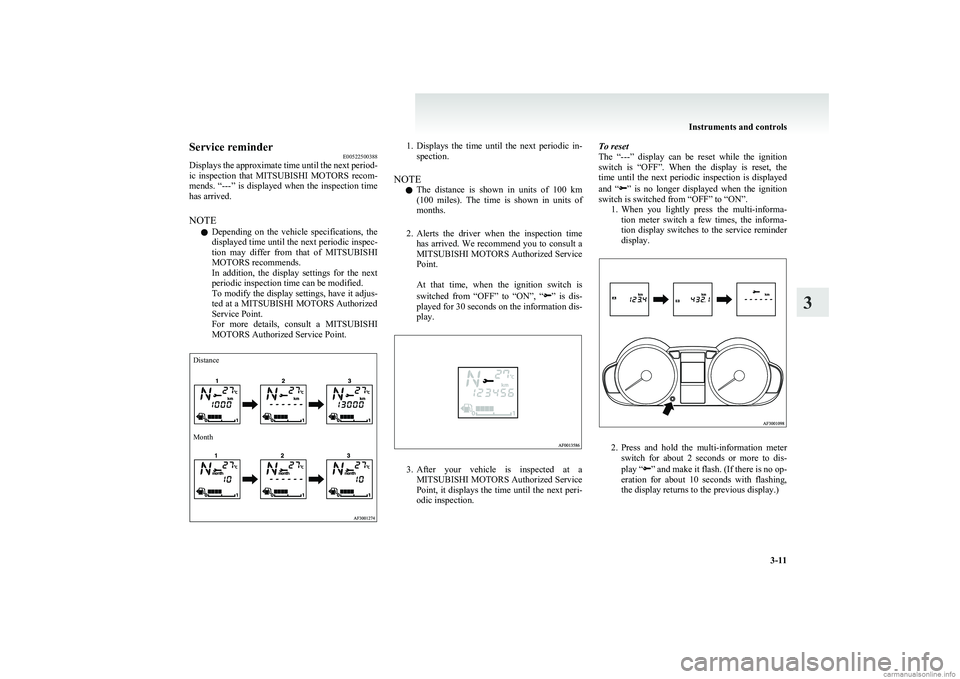
Service reminderE00522500388
Displays the approximate time until the next period-
ic inspection that MITSUBISHI MOTORS recom-
mends. “---” is displayed when the inspection time
has arrived.
NOTE l Depending on the vehicle specifications, the
displayed time until the next periodic inspec-
tion may differ from that of MITSUBISHI
MOTORS recommends.
In addition, the display settings for the next
periodic inspection time can be modified.
To modify the display settings, have it adjus-
ted at a MITSUBISHI MOTORS Authorized
Service Point.
For more details, consult a MITSUBISHI
MOTORS Authorized Service Point.DistanceMonth1. Displays the time until the next periodic in-
spection.
NOTE l The distance is shown in units of 100 km
( 100 miles). The time is shown in units of
months.
2. Alerts the driver when the inspection time
has arrived. We recommend you to consult a
MITSUBISHI MOTORS Authorized Service
Point.
At that time, when the ignition switch is
switched from “OFF” to “ON”, “
” is dis-
played for 30 seconds on the information dis-
play.
3. After your vehicle is inspected at a
MITSUBISHI MOTORS Authorized Service
Point, it displays the time until the next peri-
odic inspection.
To reset
The “---” display can be reset while the ignition
switch is “OFF”. When the display is reset, the
time until the next periodic inspection is displayed
and “
” is no longer displayed when the ignition
switch is switched from “OFF” to “ON”. 1.When you lightly press the multi-informa-
tion meter switch a few times, the informa-
tion display switches to the service reminder
display.
2. Press and hold the multi-information meter
switch for about 2 seconds or more to dis-
play “
” and make it flash. (If there is no op-
eration for about 10 seconds with flashing,
the display returns to the previous display.)
Instruments and controls
3-11
3
Page 267 of 274
Modification/alterations to the electrical or fuel sys-
tems 05
Multi-information display 3-04
O
Oil pressure warning lamp 3-19
Oil Automated manual transmission oil 9-16
Engine oil 8-05
Manual transmission oil 9-16
Operation under adverse driving conditions 6-22
Other specifications 9-13
Outside rear-view mirrors 4-08
Electric remote-controlled outside rear-view mir-
rors 4-09
Manual remote-controlled outside rear-view mir-
rors 4-09
Overheating 6-04
P
Parking 4-07Parking brake 4-06
Parking brake lever stroke 8-16
Position lamps Bulb capacity 8-24
Replacement 8-25
Power steering System 4-29
Precautions to observe when using wipers and wash-
ers 3-29
Pregnant women restraint 2-12
Puncture (Tyre changing) 6-15
R
Radio
LW/MW/FM electronic tuning radio with CD
player 5-12
Rain sensor 3-26
Rear combination lamps Bulb capacity 8-24
Replacement 8-27
Rear fog lamp Bulb capacity 8-24
Indication lamp 3-17
Replacement 8-27,8-29
Switch 3-24
Rear shelf panel 5-42
Rear turn-signal lamps Bulb capacity 8-24
Replacement 8-27
Rear window demister switch 3-29
Rear-view mirror Inside 4-08
Outside 4-08
Replacement of lamp bulbs 8-23
Reversing lamps Bulb capacity 8-24
Replacement 8-27,8-29
Room lamp 5-38
Room lamps & map lamps Bulb capacity 8-24
Replacement 8-31
Running-in recommendations 4-04
S
Safe driving techniques 4-03
Seat belt 2-10 Adjustable seat belt anchor 2-11
Child restraint 2-13
Inspection 2-22
Pregnant women restraint 2-12
Pretensioner 2-13
Seat belt reminder/warning lamp 2-11
Seat Adjustment 2-04
Arrangement 2-03
Front seat 2-04
Head restraints 2-06
Heated seats 2-06
Service precaution 8-02
Side turn-signal lamps Bulb capacity 8-24
Replacement 8-26
Snow tyres 8-14
Spare wheel 6-13
Spark plug 9-11
Specifications 9-02
Speedometer 3-03
Starting 4-11
Steering Power steering system 4-29
Steering wheel height adjustment 4-07
Steering wheel lock 4-11
Stop lamps Bulb capacity 8-23
Replacement 8-27
Storage spaces 5-39
Sun visors 5-36
Supplemental restraint system 2-22 Curtain airbag system 2-30
How the Supplemental Restraint System
works 2-25
Servicing 2-34
Side airbag system 2-30
Warning lamp 2-33
T
Tachometer 3-03
Tail lamp Bulb capacity 8-24
Replacement 8-27
Alphabetical index
3