four wheel drive MITSUBISHI ECLIPSE CROSS 2018 Owner's Manual (in English)
[x] Cancel search | Manufacturer: MITSUBISHI, Model Year: 2018, Model line: ECLIPSE CROSS, Model: MITSUBISHI ECLIPSE CROSS 2018Pages: 417, PDF Size: 74.06 MB
Page 140 of 417
Continuously variable transmission (CVT)
Features and controls 5-61
5
If your vehicle is equipped with the spor- tronic steering wheel paddle shifter, you can manually shift the transmission up and down. Refer to “Sports mode” on page 5-65. The transmission prevents unnecessary upshifts even when the accelerator pedal isreleased and ensures smooth driving. According to the condi
tions, the transmission
will automatically shift to a lower gear ratioto achieve stronger engine braking. This may help reduce your need to use the service brake.
N00560301104
As an additional safety precaution, modelsequipped with a CVT have a shift-lock devicethat holds the selector lever in the “P” (PARK) position. To move the selector lever from the “P” (PARK) position to anotherposition, follow the steps below. 1. Press and hold the brake pedal down. 2. Press and hold the lock button.
3. Move the selector lever to the desired position.
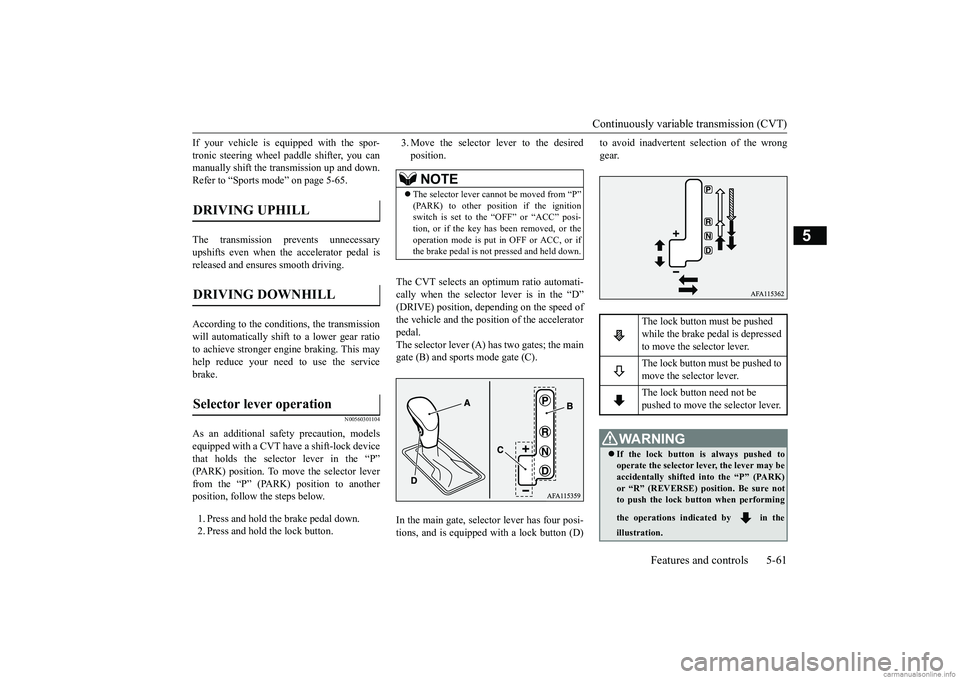
The CVT selects an optimum ratio automati- cally when the selector lever is in the “D” (DRIVE) position, depending on the speed of the vehicle and the position of the acceleratorpedal. The selector lever (A) has two gates; the main gate (B) and sports mode gate (C). In the main gate, selector lever has four posi- tions, and is equipped with a lock button (D)
to avoid inadvertent selection of the wrong gear.
DRIVING UPHILL DRIVING DOWNHILL Selector lever operation
NOTE
The selector lever cannot be moved from “P” (PARK) to other position if the ignitionswitch is set to the “OFF” or “ACC” posi- tion, or if the key has been removed, or the operation mode is put in OFF or ACC, or ifthe brake pedal is not
pressed and held down.
The lock button must be pushed while the brake pedal is depressed to move the selector lever. The lock button must be pushed to move the selector lever. The lock button need not be pushed to move the selector lever.
WA R N I N G If the lock button is always pushed to operate the selector lever, the lever may beaccidentally shifted into the “P” (PARK) or “R” (REVERSE) position. Be sure not to push the lock button when performing the operations indicated by in the illustration.
BK0252700US.bo
ok 61 ページ 2017年10月4日 水曜日 午後4時54分
Page 148 of 417
S-AWC (Super-All Wheel Control) (if so equipped)
Features and controls 5-69
5
N00583100043
The currently selected drive mode is dis- played on the multi-information display. In addition, when the drive mode is changed, the selected mode appears on the interruptdisplay screen of the information screen in the multi-information display. The drive mode display will appear on theinformation screen for a few seconds, and then the original screen will return.
N00542501087
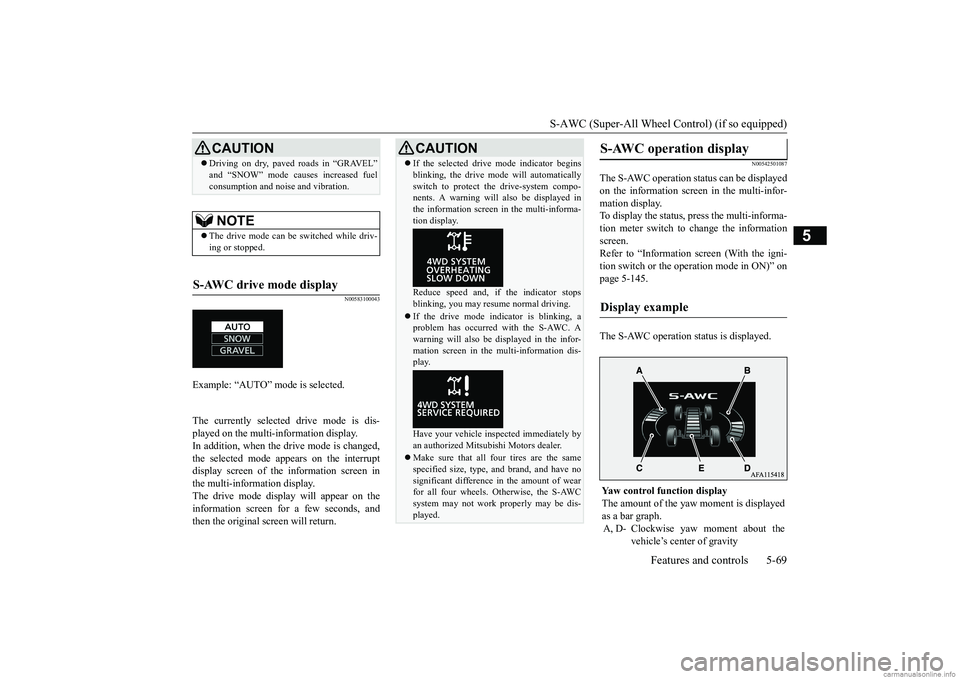
The S-AWC operation status can be displayed on the information screen in the multi-infor-mation display. To display the status, press the multi-informa- tion meter switch to change the informationscreen. Refer to “Information screen (With the igni- tion switch or the operation mode in ON)” onpage 5-145. The S-AWC operation status is displayed.
Driving on dry, paved roads in “GRAVEL” and “SNOW” mode causes increased fuel consumption and noise and vibration.NOTE
The drive mode can be switched while driv- ing or stopped.
S-AWC drive mode display
Example: “AUTO” mode is selected.
CAUTION
CAUTION If the selected drive mode indicator begins blinking, the drive mode will automatically switch to protect the drive-system compo- nents. A warning will also be displayed in the information screen in the multi-informa-tion display. Reduce speed and, if the indicator stops blinking, you may resume normal driving. If the drive mode indicator is blinking, a problem has occurred with the S-AWC. A warning will also be displayed in the infor-mation screen in the multi-information dis- play. Have your vehicle inspected immediately by an authorized Mitsubishi Motors dealer. Make sure that all four tires are the same specified size, type, and brand, and have no significant difference in the amount of wear for all four wheels. Otherwise, the S-AWCsystem may not work properly may be dis- played.
S-AWC operation display
Display example
Yaw control function display The amount of the yaw
moment is displayed
as a bar graph. A, D- Clockwise yaw moment about the
vehicle’s center of gravity
BK0252700US.bo
ok 69 ページ 2017年10月4日 水曜日 午後4時54分
Page 150 of 417
4-wheel drive operation
Features and controls 5-71
5
When turning a sharp corner in “GRAVEL” position at low speed, a slight difference in steering may be experienced similar to feel- ing as if the brakes were applied. This iscalled tight corner braking and results from each of the four tires being at a different dis- tance from the corner. The phenomenon istypical of 4-wheel drive vehicles. If this occurs, either straighten out the steering wheel or change to another mode. Set the drive mode-selector to “SNOW” in accordance with the road conditions, and thengradually depress the accelerator pedal for a smooth start.
Set the drive mode-selector to “GRAVEL” and then gradually depress the accelerator pedal for a smooth start. Keep the pressure onthe accelerator pedal as constant as possible, and drive at low speed.
CAUTION Setting the drive mode-selector to “GRAVEL” and “SNOW” position to drive on dry paved road wi
ll increase fuel con-
sumption, with possible noise and vibration generation.
Turning sharp corners On snowy or icy roads
NOTE
The use of snow tires is recommended.
Maintain a safe distance between vehicles, avoid sudden braking, and use engine brak- ing (downshifting).CAUTION Avoid sudden braking, sudden acceleration and sharp turning. Skidding occurs and con- trol of the vehicle could be lost.
Driving on sandy or muddy roads
CAUTION Do not force the vehicle or drive recklessly on sandy surfaces. In comparison with nor- mal road surfaces, the engine and other drive-system components are put underexcessive strain when driving on such a sur- face. This could lead to accidents. If any of the following conditions occur while the vehicle is being driven, immedi- ately park your vehicle in a safe place andfollow these procedures:NOTE
• If the engine coolant temperature display
flashes on the information screen in the multi-information display or the engine power drops suddenly.Refer to “Engine overheating” on page 8-4.• If the “ ” warning display and “SLOW DOWN” or the “ ” warning display and “SERVICE REQUIRED” appear on the information screen in the multi-information display.Refer to “Warning display” on page 5-63.WA R N I N G When attempting to rock your vehicle out of a stuck position, be sure that the area around the vehicle is clear of people andphysical objects. The rocking motion may cause the vehicle to suddenly launch for- ward/backward, causing injury or dam-age to nearby people or objects.NOTE
Avoid sudden braking, sudden acceleration and sharp turning; such operations could result in the vehicle becoming stuck.CAUTION
BK0252700US.bo
ok 71 ページ 2017年10月4日 水曜日 午後4時54分
Page 151 of 417
Inspection and maintenance foll
owing rough road operation
5-72 Features and controls
5
Your vehicle may not provide sufficient hill climbing ability and engine braking on steep slope. Avoid driving on steep slopes eventhough the vehicle is an 4-wheel drive vehi- cle.
N00537800085
If the electrical circuits become wet, furtheroperation of the vehicle will be impossible; therefore, avoid driving through water unlessabsolutely necessary. If driving through water is unavoidable, use the following procedure: Check the depth of the water and the terrain before attempting to drive through it. Drive
slowly to avoid creating excessive water splashing.
N00530700085
After operating the vehicle in rough road con- ditions, be sure to perform the following inspection and maintenance procedures: Check that the vehicle has not been dam- aged by rocks, gravel, etc.
Carefully wash the vehicle with water. Drive the vehicle slowly while lightly depressing the brake pedal in order to dry out the brakes. If the brakes still do notfunction properly, contact an authorized Mitsubishi Motors dealer or a repair facil- ity of your choice as soon as possible tohave the brakes checked. Remove the insects, dried grass, etc. clog- ging the radiator core. After driving through water, check the engine, transaxle and differential oil. If the oil or grease is milky or cloudy because of water contamination, it mustbe replaced with new oil. Check the inside of the vehicle. If water entry is found, dry the carpet etc. Inspect the headlights. If water is in the headlight housing, have it drained at an authorized Mitsubishi Motors dealer or arepair facility of your choice.
N00530801230
Since the driving torque can be applied to thefour wheels, the driving performance of the
If the vehicle becomes stuck in sandy or muddy roads, it can often be moved with a rocking motion. Move the selector lever alternately between the “D” (DRIVE) and “R” (REVERSE) positions while pressinglightly on the accelerator pedal. Driving on rough road can cause rust on the vehicle; wash the vehicle thoroughly as soon as possible after such use.
Climbing/descending sharp grades Driving through water
NOTE
CAUTION Never drive through water that is deep enough to cover wheel hubs, axles or exhaust pipe. Do not change the selector lever posi-tion while driving through water. Frequent driving through water can adversely affect the life span of the vehicle;consult an authorized Mitsubishi Motors dealer or a repair facility of your choice and take the necessary measures to prepare,inspect, and repair the vehicle. After driving through water, apply the brakes to be sure they are functioning properly. If the brakes are wet and not functioning prop- erly, dry them out by driving slowly whilelightly depressing the brake pedal. Inspect each part of the vehicle carefully.
Inspection and maintenance following rough road opera-tion
Cautions on the handling of 4-wheel drive vehicles Tires and wheels
BK0252700US.bo
ok 72 ページ 2017年10月4日 水曜日 午後4時54分
Page 152 of 417
Service brake
Features and controls 5-73
5
vehicle when operating in 4-wheel drive is greatly affected by the condition of the tires. Pay close attention to the tires. Install only the specified tires on all wheels. Refer to “Tires and wheels” on page 11-7. Be sure all four tires and wheels are the same size and type. When it is necessary to replace any of thetires or wheels, replace all four. All tires should be rotated before the wear difference between the front and rear tires is recognizable.
Good vehicle performance cannot be expected if there is a difference in wear between tires. Refer to “Tire rotation” on page 9-17. Check the tire inflation pressure regularly.
N00517500275
Overuse of the brake can cause weakening, resulting in poor brake response and prema- ture wear of the brake pads.When driving down a long or steep hill, use engine braking by downshifting.
CAUTION Always use tires of the same size, type, and brand that have no wear differences. Using tires of different size, type, brands or degree of wear, will increase the differential oil tem- perature and result in possible damage to thedriving system. Further, the drive train will be subject to excessive loading, possibly leading to oil leakage, component seizure, orother serious failures.
To w i n g
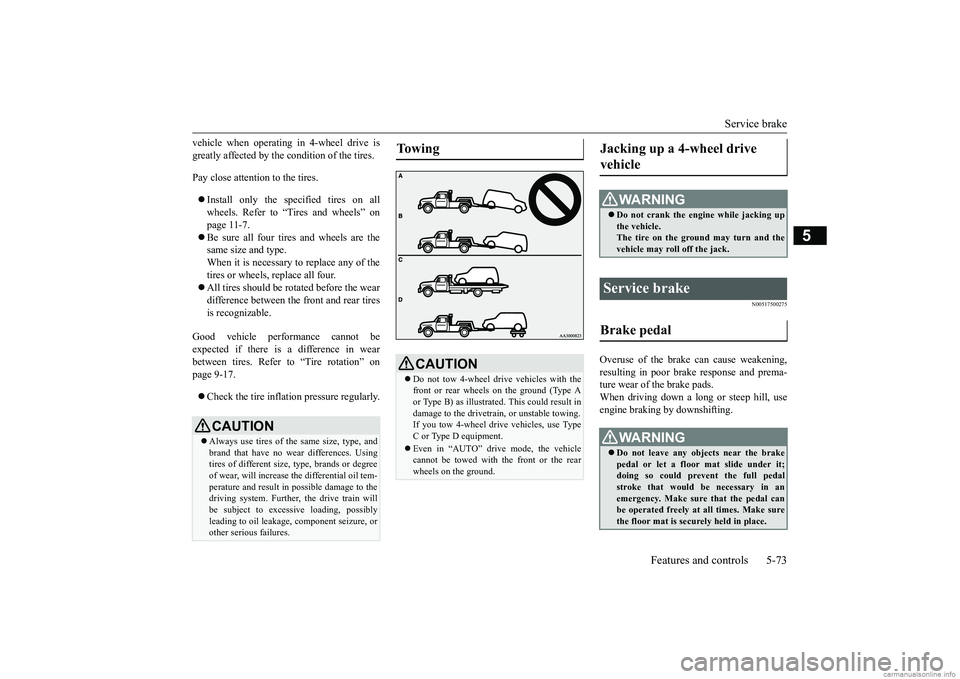
CAUTION Do not tow 4-wheel drive vehicles with the front or rear wheels on the ground (Type Aor Type B) as illustrated. This could result in damage to the drivetrain, or unstable towing. If you tow 4-wheel dr
ive vehicles, use Type
C or Type D equipment. Even in “AUTO” drive mode, the vehicle cannot be towed with the front or the rear wheels on the ground.
Jacking up a 4-wheel drive vehicle
WA R N I N G Do not crank the engine while jacking up the vehicle.The tire on the ground may turn and the vehicle may roll off the jack.
Service brake Brake pedal
WA R N I N G Do not leave any objects near the brake pedal or let a floor mat slide under it; doing so could prevent the full pedal stroke that would be necessary in anemergency. Make sure that the pedal can be operated freely at all times. Make sure the floor mat is securely held in place.
BK0252700US.bo
ok 73 ページ 2017年10月4日 水曜日 午後4時54分
Page 158 of 417
Anti-lock braking system
Features and controls 5-79
5
Operation of anti-lock braking system is not restricted situations where brakes are applied suddenly. This system may also prevent the wheels from locking whenyou drive over manh
oles, steel roadwork
plates, road markings, or any uneven road surface. When the anti-lock braking system is in use, you may feel the brake pedal vibrat- ing and hear a unique sound. It may alsofeel as if the pedal resists being pressed.In this situation, simply hold the brake pedal down firmly. Do not pump the brake, which will result in reducedbraking performance.
N00531601701
Warning light Warning display If there is a malfunction in the system, the anti-lock braking system warning light will come on and the warning display will appearon the information screen in the multi-infor- mation display. Under normal conditions,
the anti-lock brak-
ing system warning light only comes on when the ignition switch is turned to the “ON” position or the operation mode is put in ONand goes off a few seconds later.
N00531701669
Avoid hard braking and high-speed driv- ing. Stop the vehicle in a safe place.Test the system by restarting the engine and driving at a speed of approximately 12 mph (20 km/h) or higher.If the warning light/display then remains off during driving, there is no abnormal condition.
CAUTION The anti-lock braking system cannot prevent accidents. It is your responsibility to take safety precautions and to drive carefully. To prevent failure of the anti-lock braking system, be sure all four wheels and tires are the same size and the same type.NOTE
A whining sound is emitted from the engine compartment when dr
iving immediately
after starting the engine. These are the nor- mal sounds the anti-lock braking system makes when performing a self-check. It doesnot indicate a malfunction.
The anti-lock braking system can be used after the vehicle has reached a speed over approximately 6 mph (10 km/h). It stops working when the vehicle slows below 3 mph (5 km/h).
Anti-lock braking system warn- ing light / display
NOTE
CAUTION Any of the following indicates that the anti- lock braking system is not functioning and only the standard brak
e system is working.
(The standard brake system is functioning normally.) If this happens, take your vehicleto an authorized Mitsubishi Motors dealer or a repair facility of your choice. • When the ignition switch is in the “ON”position or the operation mode is put in ON, the warning light does not come on or itremains on and does not go off• The warning light comes on while driving• The warning display appears while driving
If the warning light/display illu- minate while driving If only the anti-lock braking sys- tem warning light/display illumi- nate
BK0252700US.bo
ok 79 ページ 2017年10月4日 水曜日 午後4時54分
Page 160 of 417
Active stability control (ASC) Features and controls 5-81
5
Warning light
Warning display If there is a malfunction in the system, the warning light will come on and the warningdisplay will appear on the information screen in the multi-information display. Under normal conditions, the warning lightcome on when the ignition switch is turned tothe “ON” position or the operation mode is put in ON, and goes off after the engine has started.
N00559100147
The Active stability control (ASC) takesoverall control of the anti-lock braking sys- tem, traction control function and skid control function to help maintain the vehicle’s control
and traction. Please read this section in con- junction with the page on the anti-lock brak- ing system, traction control function and skid control function. Anti-lock braking system
P.5-78
Traction control function
P.5-82
Skid control function
P.5-82
WA R N I N GDo not stop the engine while the vehicle is moving. Stopping the engine would make the steering wheel extremely hard to turn, possibly resulting in an accident.NOTE
During repeated full-lock turning of the steering wheel (for example, while you are manoeuvring the vehicle into a parking space), a protection function may be acti-vated to prevent overheating of the power steering system. This function will make the steering wheel gradually harder to turn. Inthis event, limit your tu
rning of the steering
wheel for a while. When the system has cooled down, the steering effort will returnto normal. If you turn the steering wheel while the vehi- cle is stationary with the headlights on, the headlights may become dim. This behavior is not abnormal. The headlights will return totheir original brightness after a short while.
Electric power steering system warning light/display
CAUTION If the warning display appears while the engine is running, have the vehicle inspected by an authorized Mitsubishi Motors dealer ora repair facility of your choice as soon as possible. It may become harder to turn the steering wheel.
Active stability control (ASC)
CAUTION Do not over-rely on the ASC. Even the ASC cannot prevent the natural laws of physics from acting on the vehicle. This system, like any other system, has limits and cannot helpyou to maintain traction and control of the vehicle in all circumstances. Reckless driv- ing can lead to accidents. It is the driver’sresponsibillty to drive carefully, This means taking into account the traffic, road and envi- ronmental conditions. Be sure to use the same specified type and size of tire on all four wheels. Otherwise, theASC may not work properly. Do not install any aftermarket limited slip differential (LSD) on your vehicle. The ASC may stop functioning properly.
BK0252700US.bo
ok 81 ページ 2017年10月4日 水曜日 午後4時54分