connect MITSUBISHI ECLIPSE CROSS 2020 Owner's Manual (in English)
[x] Cancel search | Manufacturer: MITSUBISHI, Model Year: 2020, Model line: ECLIPSE CROSS, Model: MITSUBISHI ECLIPSE CROSS 2020Pages: 427, PDF Size: 78.05 MB
Page 27 of 427
Telematics Control Unit (TCU) (if so equipped) 3-6 General information
3
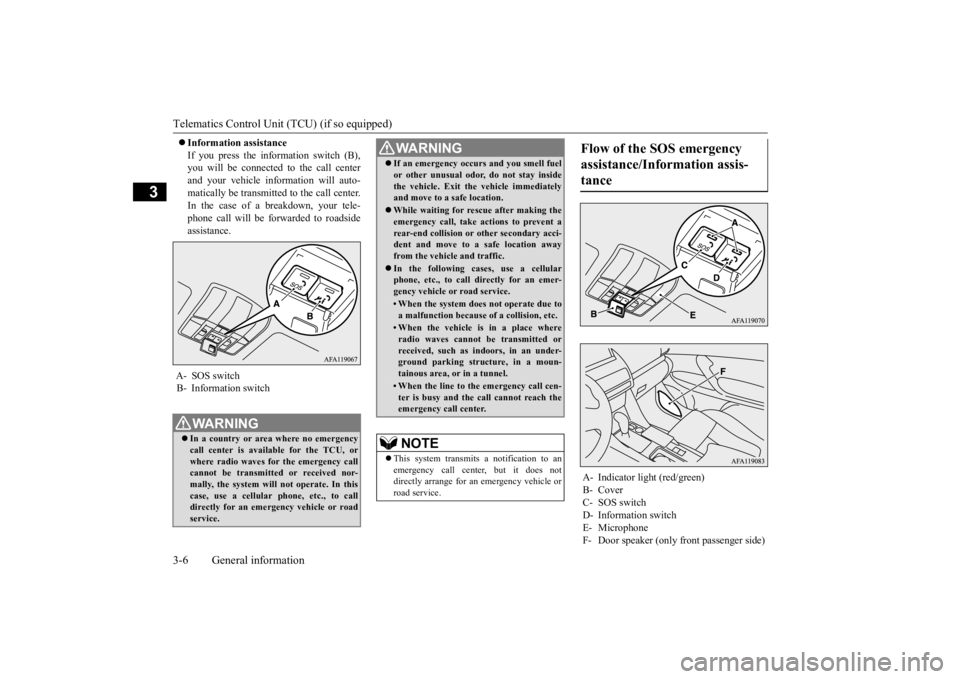
Information assistance If you press the information switch (B), you will be connected to the call center and your vehicle information will auto-matically be transmitted to the call center. In the case of a breakdown, your tele- phone call will be forwarded to roadsideassistance.
A- SOS switch B- Information switch
WA R N I N G In a country or area where no emergency call center is available for the TCU, or where radio waves for the emergency callcannot be transmitted or received nor- mally, the system will not operate. In this case, use a cellular phone, etc., to calldirectly for an emergency vehicle or road service.
If an emergency occurs and you smell fuel or other unusual odor, do not stay inside the vehicle. Exit the vehicle immediately and move to a safe location. While waiting for rescue after making the emergency call, take actions to prevent a rear-end collision or other secondary acci-dent and move to a safe location away from the vehicle and traffic. In the following cases, use a cellular phone, etc., to call directly for an emer- gency vehicle or road service.• When the system does not operate due toa malfunction because of a collision, etc.• When the vehicle is in a place whereradio waves cannot be transmitted orreceived, such as indoors, in an under- ground parking structure, in a moun- tainous area, or in a tunnel.• When the line to the emergency call cen-ter is busy and the call cannot reach theemergency call center.NOTE
This system transmits a notification to an emergency call center, but it does notdirectly arrange for an emergency vehicle or road service.WA R N I N G
Flow of the SOS emergency assistance/Information assis- tance
A- Indicator light (red/green) B- CoverC- SOS switchD- Information switch E- Microphone F- Door speaker (only front passenger side)
BK0277700US.bo
ok 6 ページ 2019年3月8日 金曜日 午前9時23分
Page 28 of 427
Telematics Control Unit (TCU) (if so equipped)
General information 3-7
3
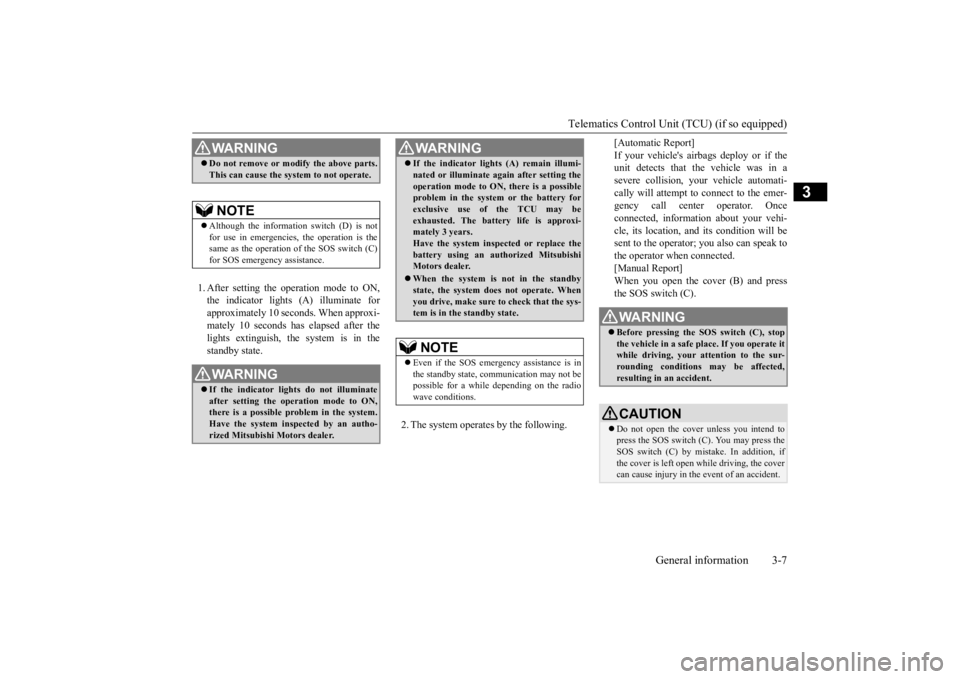
1. After setting the operation mode to ON, the indicator lights (A) illuminate for approximately 10 seconds. When approxi-mately 10 seconds has elapsed after the lights extinguish, the system is in the standby state.
2. The system operates by the following.
[Automatic Report] If your vehicle's airbags deploy or if the unit detects that the vehicle was in a severe collision, your vehicle automati-cally will attempt to connect to the emer- gency call center operator. Once connected, information about your vehi-cle, its location, and its condition will be sent to the operator; you also can speak to the operator when connected.[Manual Report]When you open the cover (B) and press the SOS switch (C).
WA R N I N G Do not remove or modify the above parts. This can cause the system to not operate.NOTE
Although the information switch (D) is not for use in emergencies, the operation is the same as the operation of the SOS switch (C)for SOS emergency assistance.WA R N I N G If the indicator lights do not illuminate after setting the operation mode to ON,there is a possible problem in the system. Have the system inspected by an autho- rized Mitsubishi Motors dealer.
If the indicator lights (A) remain illumi- nated or illuminate again after setting the operation mode to ON, there is a possible problem in the system or the battery for exclusive use of the TCU may beexhausted. The battery life is approxi- mately 3 years. Have the system inspected or replace thebattery using an authorized Mitsubishi Motors dealer. When the system is not in the standby state, the system does not operate. When you drive, make sure to check that the sys-tem is in the standby state.NOTE
Even if the SOS emergency assistance is in the standby state, communication may not be possible for a while depending on the radiowave conditions.WA R N I N G
WA R N I N G Before pressing the SOS switch (C), stop the vehicle in a safe place. If you operate it while driving, your attention to the sur- rounding conditions may be affected,resulting in an accident.CAUTION Do not open the cover unless you intend to press the SOS switch (C). You may press the SOS switch (C) by mistake. In addition, if the cover is left open while driving, the covercan cause injury in the event of an accident.
BK0277700US.bo
ok 7 ページ 2019年3月8日 金曜日 午前9時23分
Page 29 of 427
Telematics Control Unit (TCU) (if so equipped) 3-8 General information
3
3. The green indicator light blinks and the system calls the emergency call center. 4. The green indicator light blinks slowly, and the location and vehicle information is transmitted to the emergency call cen- ter.5. When the green indicator light changes from a blinking state to an illumination state a conversation with an operator ofthe emergency call center is available.
6. The emergency call center arranges for dispatch of the emergency vehicle asrequired.
NOTE
Do not press the SOS switch (C) unless there is an emergency such as an accident or sud- den illness. If an emergency vehicle, etc. is dispatched unnecessarily, you may be charged.WA R N I N G If the red indicator light illuminates as fol- lows, directly arrange an emergency vehi-cle or road service with a cellular phone, etc.• When the red indicator light remainsilluminated. (There is a possible problem in the system.)• When the red indicator light illuminatesfor 60 seconds. (The vehicle may be inthe place where radio waves cannot be transmitted and received.)
WA R N I N G Do not replace the speakers. If they are replaced, the voice of the operator at the emergency call center may not be audible. If the speakers need to be replaced due to a problem, etc., we recommend you con-sult an authorized Mitsubishi Motors dealer. An error may occur between the actual report point and the point reported to the emergency call center. Mutually confirmthe report point and the object through the phone call with the operator of the emergency call center.NOTE
If the vehicle side microphone (E) and/or the speakers fail, you cannot talk with the opera- tor of the emergency call center. An emergency call cannot be disconnected from the vehicle side.
BK0277700US.bo
ok 8 ページ 2019年3月8日 金曜日 午前9時23分
Page 33 of 427
Modifications to and racing of your vehicle 3-12 General information
3
the FCC Rules. These limits are designed to provide reasonable protection against harmful interference in a residential installation. This equipment generates, uses and can radi-ate radio frequency energy and, if not installed and used in accordance with the instructions, may cause harmful interferenceto radio communications. However, there is no guarantee that interfer- ence will not occur in a particular installation.If this equipment does cause harmful interfer-ence to radio or television reception, which can be determined by turning the equipment off and on, the user is encouraged to try tocorrect the interference by one or more of the following measures: Reorient or relocate the receiving antenna. Increase the separation between the equipment and receiver. Connect the equipment into an outlet on a circuit different from that to which thereceiver is connected. Consult the dealer or an experienced radio/TV technician for help.
N00301601218
This vehicle should not be modified withnon-Mitsubishi Motors genuine parts.
Mitsubishi Motors designs and manufactures high quality vehicles with an emphasis on safety and durability. Modifications using non-Mitsubishi Motors genuine parts mayaffect the performance, safety and/or durabil- ity of your vehicle, and may violate applica- ble state and/or federal regulations. DAMAGE OR PERFORMANCE PROB- LEMS RESULTING FROM MODIFICA- TIONS TO OR RACING OF YOUR VEHICLE ARE NOT COVEREDUNDER WARRANTY. Examples of modifications to your vehicle that can cause damage or performance prob- lems include the following: Failure to use Mitsubishi Motors genuine parts Failure to use required fuel and fluids Failure to use proper size tires and wheels Modification of the fuel, intake, exhaust, emission, suspension, engine, drive train or electrical wiring systems Modification of any onboard com- puter/control module, including repro- gramming, or replacing/adding chips to any onboard computer/control module
Review the Warranty and Maintenance Man- ual for further details regarding warranty cov- erage.
N00301701293
The installation of accessories, optional parts, etc., should only be performed within the limits prescribed by law, and inaccordance with the guidelines and warn- ings contained within the documents accompanying this vehicle.Only Mitsubishi Motors approved acces- sories should be fitted to your vehicle. Improper installation of electrical parts could cause a fire. Refer to the “Modifica- tion/alterations to the electrical or fuel systems” section within this owner’s man-ual.
Modifications to and racing of your vehicle
Installation of accessories
CAUTION Before any electrical or electronic accesso- ries are installed, consult an authorized Mitsubishi Motors dealer. Your vehicle is equipped with a diagnosis connector (data link connector) for checking and servicing the electronic control system.Mitsubishi Motors does not recommend con- necting a device other than the Scan Tool for inspections and service to this connectorbecause an unexpected problem could result. In addition, malfunctions caused by connect- ing a device other than the Scan Tool maynot be covered under warranty.
BK0277700US.bo
ok 12 ページ 2019年3月8日 金曜日 午前9時23分
Page 61 of 427
Child restraint systems 4-26 Seat and restraint systems
4
N00419001212
N00419101314
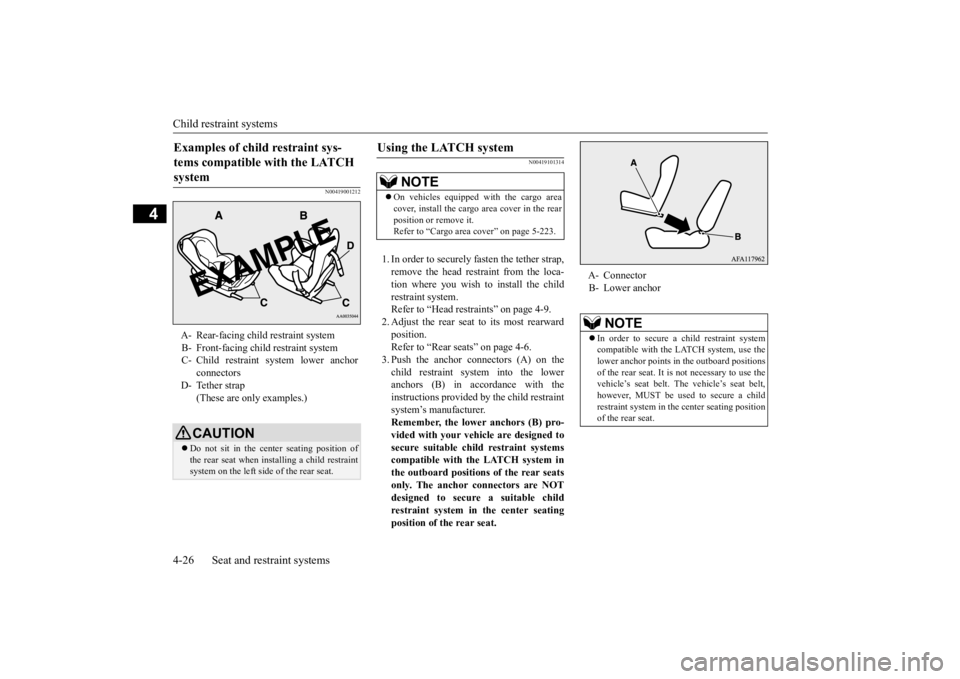
1. In order to securely fasten the tether strap, remove the head restraint from the loca-tion where you wish to install the child restraint system. Refer to “Head restraints” on page 4-9.2. Adjust the rear seat to its most rearward position. Refer to “Rear seats” on page 4-6.3. Push the anchor connectors (A) on the child restraint system into the lower anchors (B) in accordance with theinstructions provided by the child restraint system’s manufacturer. Remember, the lower anchors (B) pro-vided with your vehicle are designed to secure suitable child restraint systems compatible with the LATCH system inthe outboard positions of the rear seats only. The anchor connectors are NOT designed to secure a suitable childrestraint system in the center seating position of the rear seat.
Examples of child restraint sys- tems compatible with the LATCH system A- Rear-facing child restraint system B- Front-facing child restraint systemC- Child restraint system lower anchor
connectors
D- Tether strap
(These are only examples.)CAUTION Do not sit in the center seating position of the rear seat when installing a child restraint system on the left side of the rear seat.
Using the LATCH system
NOTE
On vehicles equipped with the cargo area cover, install the cargo area cover in the rear position or remove it. Refer to “Cargo area cover” on page 5-223.
A- Connector B- Lower anchor
NOTE
In order to secure a child restraint system compatible with the LATCH system, use the lower anchor points in the outboard positions of the rear seat. It is not necessary to use thevehicle’s seat belt. The vehicle’s seat belt, however, MUST be used to secure a child restraint system in the center seating positionof the rear seat.
BK0277700US.bo
ok 26 ページ 2019年3月8日 金曜日 午前9時23分
Page 101 of 427
Free-hand Advanced Security Transmitter (F.A.S.T.-key) (if so equipped) 5-20 Features and controls
5
N00568001136
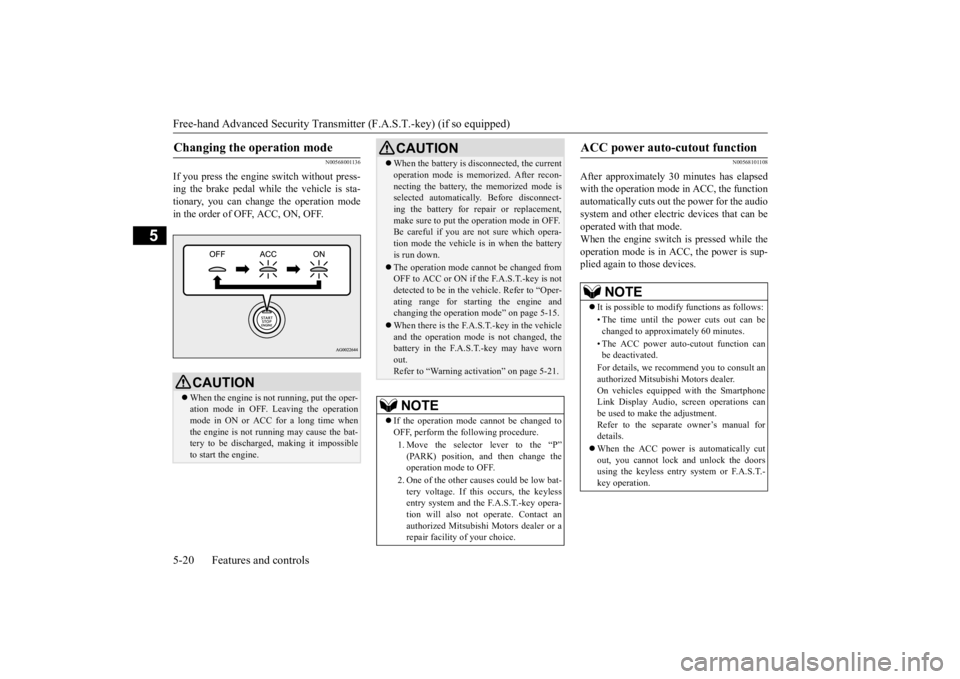
If you press the engine switch without press- ing the brake pedal while the vehicle is sta-tionary, you can change the operation mode in the order of OFF, ACC, ON, OFF.
N00568101108
After approximately 30 minutes has elapsed with the operation mode in ACC, the functionautomatically cuts out the power for the audio system and other electric devices that can be operated with that mode.When the engine switch is pressed while the operation mode is in ACC, the power is sup- plied again to those devices.
Changing the operation mode
CAUTION When the engine is not running, put the oper- ation mode in OFF. Leaving the operationmode in ON or ACC for a long time when the engine is not running may cause the bat- tery to be discharged, making it impossibleto start the engine.
When the battery is disconnected, the current operation mode is memorized. After recon- necting the battery, the memorized mode is selected automatically. Before disconnect- ing the battery for repair or replacement,make sure to put the operation mode in OFF. Be careful if you are not sure which opera- tion mode the vehicle is in when the batteryis run down. The operation mode cannot be changed from OFF to ACC or ON if th
e F.A.S.T.-key is not
detected to be in the vehicle. Refer to “Oper- ating range for starting the engine andchanging the operation mode” on page 5-15. When there is the F.A.S.T.-key in the vehicle and the operation mode is not changed, the battery in the F.A.S.T.-key may have worn out.Refer to “Warning activation” on page 5-21.NOTE
If the operation mode cannot be changed to OFF, perform the following procedure. 1. Move the selector lever to the “P” (PARK) position, and then change the operation mode to OFF. 2. One of the other causes could be low bat- tery voltage. If this occurs, the keyless entry system and the F.A.S.T.-key opera- tion will also not operate. Contact anauthorized Mitsubishi Motors dealer or a repair facility of your choice.CAUTION
ACC power auto-cutout function
NOTE
It is possible to modify functions as follows: • The time until the power cuts out can be changed to approximately 60 minutes. • The ACC power auto-cutout function can be deactivated. For details, we recommend you to consult an authorized Mitsubishi Motors dealer. On vehicles equipped with the SmartphoneLink Display Audio, screen operations can be used to make the adjustment. Refer to the separate owner’s manual fordetails. When the ACC power is automatically cut out, you cannot lock and unlock the doors using the keyless entry system or F.A.S.T.- key operation.
BK0277700US.bo
ok 20 ページ 2019年3月8日 金曜日 午前9時23分
Page 121 of 427
Liftgate 5-40 Features and controls
5
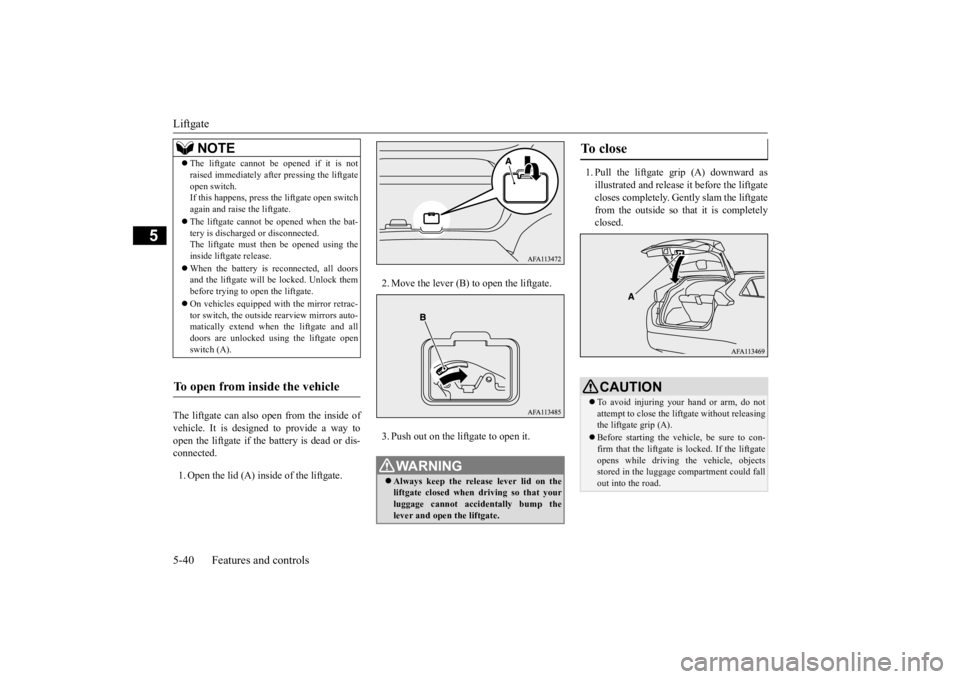
The liftgate can also open from the inside of vehicle. It is designed to provide a way to open the liftgate if the battery is dead or dis- connected. 1. Open the lid (A) inside of the liftgate.
2. Move the lever (B) to open the liftgate. 3. Push out on the liftgate to open it.
1. Pull the liftgate grip (A) downward as illustrated and release it before the liftgate closes completely. Gently slam the liftgatefrom the outside so
that it is completely
closed.
NOTE
The liftgate cannot be opened if it is not raised immediately after pressing the liftgate open switch. If this happens, press the liftgate open switch again and raise the liftgate. The liftgate cannot be opened when the bat- tery is discharged or disconnected.The liftgate must then be opened using the inside liftgate release. When the battery is reconnected, all doors and the liftgate will be locked. Unlock them before trying to open the liftgate. On vehicles equipped with the mirror retrac- tor switch, the outside rearview mirrors auto-matically extend when the liftgate and all doors are unlocked using the liftgate open switch (A).
To open from inside the vehicle
WA R N I N G Always keep the release lever lid on the liftgate closed when driving so that your luggage cannot accidentally bump the lever and open the liftgate.
To close
CAUTION To avoid injuring your hand or arm, do not attempt to close the liftgate without releasingthe liftgate grip (A). Before starting the vehicle, be sure to con- firm that the liftgate
is locked. If the liftgate
opens while driving the vehicle, objects stored in the luggage compartment could fallout into the road.
BK0277700US.bo
ok 40 ページ 2019年3月8日 金曜日 午前9時23分
Page 126 of 427
Power window control
Features and controls 5-45
5
stopped. However, once the driver’s door or the front passenger’s door is opened, the power windows cannot be operated.
N00549001182
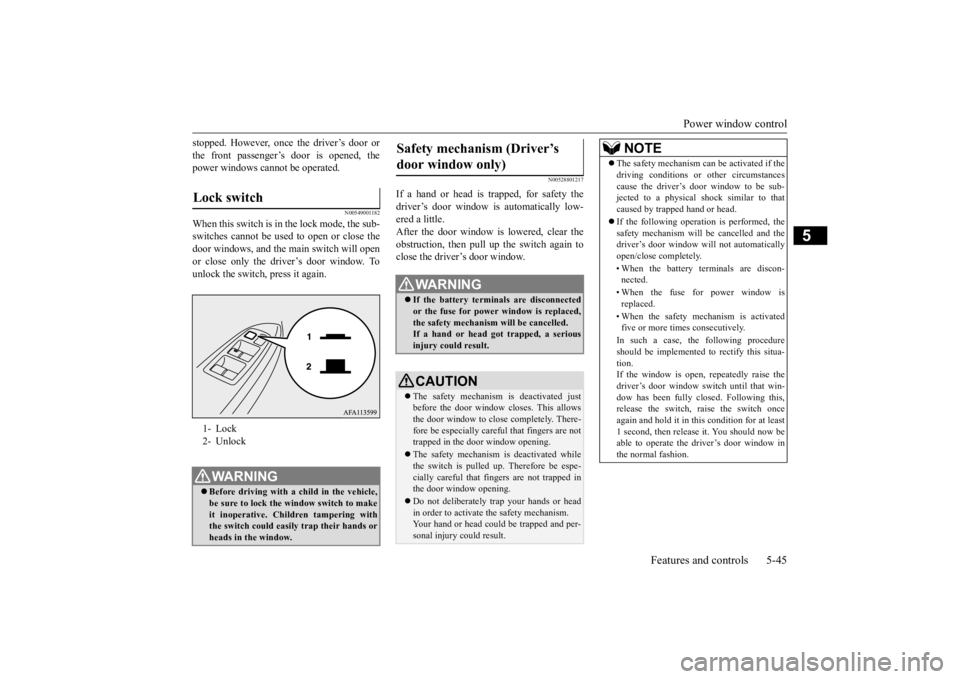
When this switch is in the lock mode, the sub-switches cannot be used to open or close the door windows, and the main switch will openor close only the driver’s door window. Tounlock the switch, press it again.
N00528801217
If a hand or head is trapped, for safety thedriver’s door window is automatically low- ered a little. After the door window is lowered, clear theobstruction, then pull up the switch again to close the driver’s door window.
Lock switch 1- Lock2- UnlockWA R N I N G Before driving with a child in the vehicle, be sure to lock the window switch to make it inoperative. Children tampering withthe switch could easily trap their hands or heads in the window.
Safety mechanism (Driver’s door window only)
WA R N I N G If the battery terminals are disconnected or the fuse for power window is replaced, the safety mechanism will be cancelled. If a hand or head got trapped, a seriousinjury could result.CAUTION The safety mechanism is deactivated just before the door window closes. This allowsthe door window to close completely. There- fore be especially careful that fingers are not trapped in the door window opening. The safety mechanism is deactivated while the switch is pulled up. Therefore be espe- cially careful that fingers are not trapped in the door window opening. Do not deliberately trap your hands or head in order to activate the safety mechanism.Your hand or head could be trapped and per- sonal injury could result.
NOTE
The safety mechanism can be activated if the driving conditions or other circumstances cause the driver’s door window to be sub- jected to a physical shock similar to that caused by trapped hand or head. If the following operation is performed, the safety mechanism will be cancelled and thedriver’s door window will not automatically open/close completely. • When the battery terminals are discon- nected. • When the fuse for power window is replaced. • When the safety mechanism is activated five or more times consecutively. In such a case, the following procedure should be implemented to rectify this situa- tion.If the window is open, repeatedly raise the driver’s door window switch until that win- dow has been fully closed. Following this,release the switch, raise the switch once again and hold it in this condition for at least 1 second, then release it. You should now beable to operate the driver’s door window in the normal fashion.
BK0277700US.bo
ok 45 ページ 2019年3月8日 金曜日 午前9時23分
Page 232 of 427
Multi-information display
Features and controls 5-151
5
N00578300063
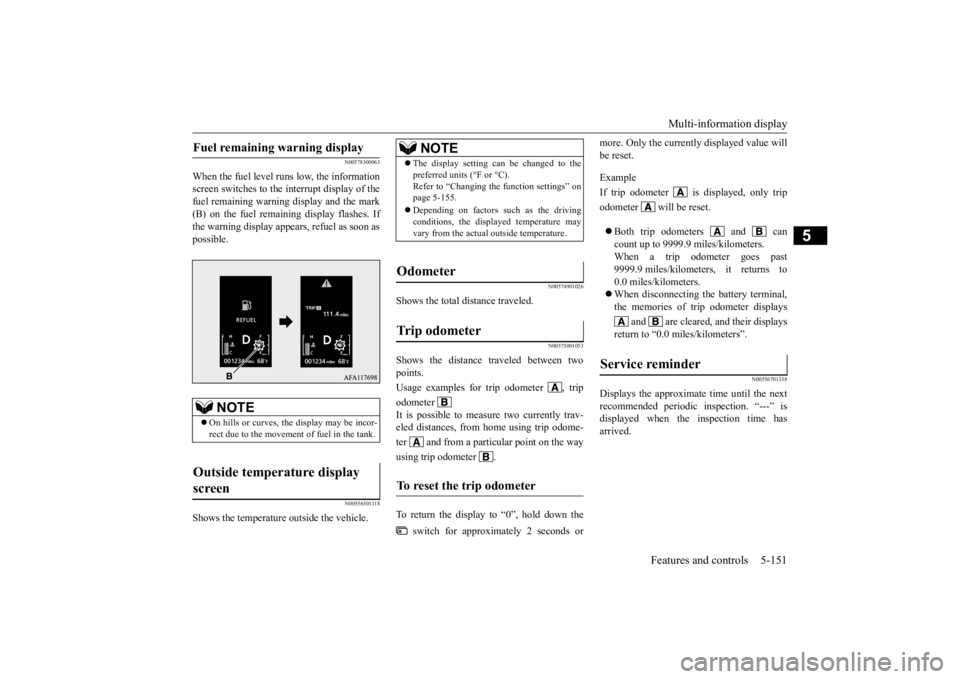
When the fuel level runs low, the information screen switches to the interrupt display of thefuel remaining warning display and the mark (B) on the fuel remaining display flashes. If the warning display appears, refuel as soon aspossible.
N00556501118
Shows the temperature outside the vehicle.
N00574901026
Shows the total distance traveled.
N00575001053
Shows the distance traveled between twopoints. Usage examples for trip odometer , tripodometer It is possible to measure two currently trav- eled distances, from home using trip odome- ter and from a particular point on the wayusing trip odometer . To return the display to “0”, hold down the
switch for approximately 2 seconds or
more. Only the currently displayed value will be reset. Example If trip odometer is displayed, only tripodometer will be reset. Both trip odometers and can count up to 9999.9 miles/kilometers.When a trip odometer goes past 9999.9 miles/kilometers, it returns to 0.0 miles/kilometers. When disconnecting the battery terminal, the memories of trip odometer displays
and are cleared, and their displays
return to “0.0 miles/kilometers”.
N00556701338
Displays the approximate time until the nextrecommended periodic inspection. “---” isdisplayed when the inspection time has arrived.
Fuel remaining warning display
NOTE
On hills or curves, the display may be incor- rect due to the movement of fuel in the tank.
Outside temperature display screen
NOTE
The display setting can be changed to the preferred units (°F or °C). Refer to “Changing the function settings” on page 5-155. Depending on factors such as the driving conditions, the displayed temperature may vary from the actual outside temperature.
Odometer Trip odometer To reset the trip odometer
Service reminder
BK0277700US.book
151 ページ 2019年3月8日 金曜日 午前9時23分
Page 235 of 427

Multi-information display 5-154 Features and controls
5
N00578500023
This displays the average speed from the last reset to the present.There are 2 types of mode setting of manual reset and automatic reset. Refer to “Changing the reset mode for aver-age fuel consumption and average speed” on page 5-157. For the method for changing the averagespeed display setting, refer to “Changing the function settings” on page 5-155.
N00578600037
While driving, the instant fuel consumption is shown with a bar graph. The “ ” mark in the instant fuel gauge shows the average fuel consumption. When the instant fuel consumption surpassesthe average fuel consumption, the instant fuel consumption is displayed with a green bar graph.Be conscious of maintaining the instant fuel consumption above the average fuel con-
sumption, it can help you drive with the better fuel consumption.
N00568701032
This indicator will be displayed when fuel-efficient driving is achieved.
N00578700038
This function displays how fuel-efficientlyyou are driving under different driving condi- tions. The ECO drive assist display will change asfollows if you do fuel-efficient driving using the accelerator in a way well matched with the vehicle speed.
Average fuel consumption may vary depend- ing on the driving conditions (road condi- tions, how you drive, etc.) The actual fuel consumption may differ from the fuel con- sumption displayed, so treat the fuel con-sumption displayed as just a rough guideline. Disconnecting the battery cable will erase from memory the manual reset mode or auto reset mode setting for the average fuel con- sumption display. The display setting can be changed to the preferred units {mpg (US), mpg (UK),L/100km or km/L}. Refer to “Changing the function settings” on page 5-155.
Average speed display
NOTE
NOTE
The average speed display can be reset sepa- rately in both auto reset mode and manual reset mode. “---” is displayed when the average speed cannot be measured. The initial (default) setting is “Auto reset mode”. The display setting can be changed to the preferred units (mph or km/h). Refer to “Changing the function settings” on page 5-155. Disconnecting the battery cable will erase from memory the manual reset mode or autoreset mode setting for the average speed dis- play.
Instant fuel consumption dis- play
NOTE
When the instant fuel
consumption cannot be
measured, a bar graph is not shown. The display setting can be changed to the preferred units {mpg (US), mpg (UK), L/100km or km/L}.Refer to “Changing the function settings” on page 5-155. It is possible to cancel the green bar graph. Refer to “Changing the function settings” on page 5-155.
ECO indicator ECO Drive Assist
BK0277700US.book
154 ページ 2019年3月8日 金曜日 午前9時23分