jack MITSUBISHI ENDEAVOR 2004 Service Repair Manual
[x] Cancel search | Manufacturer: MITSUBISHI, Model Year: 2004, Model line: ENDEAVOR, Model: MITSUBISHI ENDEAVOR 2004Pages: 3870, PDF Size: 98.47 MB
Page 253 of 3870
HYDRAULIC UNIT CHECK Required Special Tools:
MB991958: Scan Tool (MUT-III Sub Assembly)
MB991824: Vehicle Communication Interface (V.C.I.) MB991827: MUT-III USB Cable MB991910: MUT-III Main Harness A
1. Jack up the vehicle. Then support the vehicle with rigid racks at the specified
jack-up points or place the front or rear wheels on the rollers of the braking
force tester.
2. Release the parking brake, and feel the drag force (drag torque) on each road
wheel. When using the braking force tester, take a reading of the brake drag
force.
3. Connect scan tool MB991958 to the data link connec
tor. also under special conditions, such as driving on a rough
road.
NOTE: For vehicles with ASC, refer to HYDRAULIC UNIT CHECK
.
CAUTION:
The roller of the braking force tester and the tire
should be dry during testing. When testing the front brakes, apply the parking
brake. When testing the rear brakes, stop the
front wheels with chocks.
CAUTION: To prevent damage to scan tool MB991958,
always turn the ignition switch to the
"LOCK" (OFF) position before connecting or
disconnecting scan tool MB991958.
2004 Mitsubishi Endeavor LS
2004 BRAKES Anti-Lock Braking System (ABS) - Endeavor
Page 1239 of 3870
Courtesy of MITSUBISHI MOTOR SALES OF AMERICA
.
3. Replace the radiator cap if the reading does not remain at or above the limit.
ENGINE COOLANT REPLACEMENT 1. Drain the water from the radiator, heater core and engine after unplugging the
radiator drain plug and removing the radiator cap.
2. Drain the water in the water jacket by unplugging the drain plug of the cylinder
block. For the right bank side on AWD vehicles, drain the engine coolant from
the water feed tube assembly of the transfer box.
3. Remove the radiator condenser tank assembly and drain the coolant.
4. Drain the coolant then clean the path of the coolant by injecting water into the
radiator from the radiator cap area.
WARNING:When removing the radiator cap, use care to avoid
contact with hot coolant or steam. Place a shop
towel over the cap and turn the cap
counterclockwise a little to let the pressure escape
through the vinyl tube. After relieving the steam
pressure, remove the cap by slowly turning it
counterclockwise.
2004 Mitsubishi Endeavor Limited 2004 ENGINE Engine Cooling - Endeavor
Page 1541 of 3870
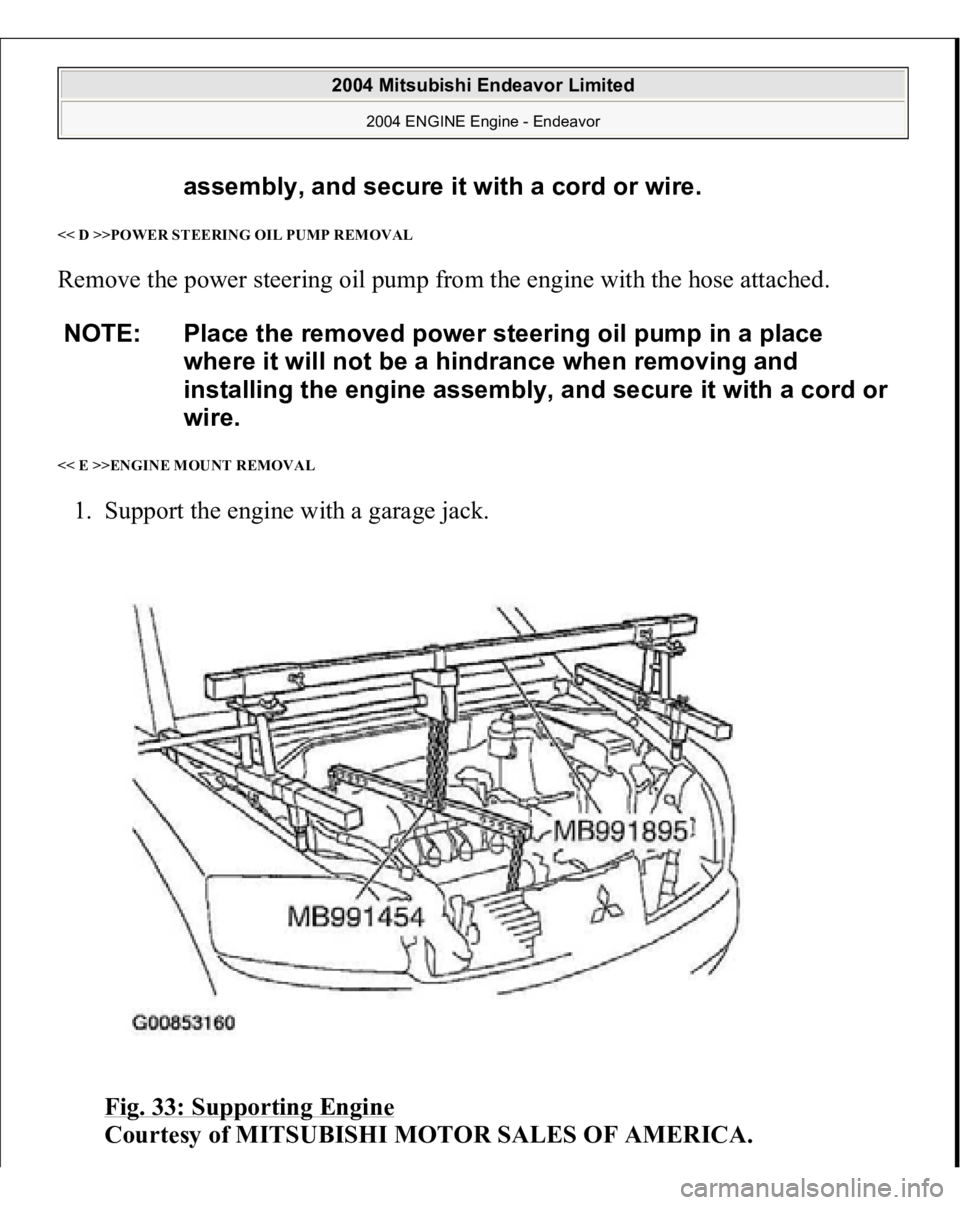
<< D >>POWER STEERING OIL PUMP REMOVAL Remove the power steering oil pump from the engine with the hose attached. << E >>ENGINE MOUNT REMOVAL 1. Support the engine with a garage jack.
Fig. 33: Supporting Engine
Courtesy of MITSUBISHI MOTOR SALES OF AMERICA.
assembly, and secure it with a cord or wire.
NOTE: Place the removed power steering oil pump in a place
where it will not be a hindrance when removing and
installing the engine assembly, and secure it with a cord or
wire.
2004 Mitsubishi Endeavor Limited
2004 ENGINE Engine - Endeavor
Page 1543 of 3870
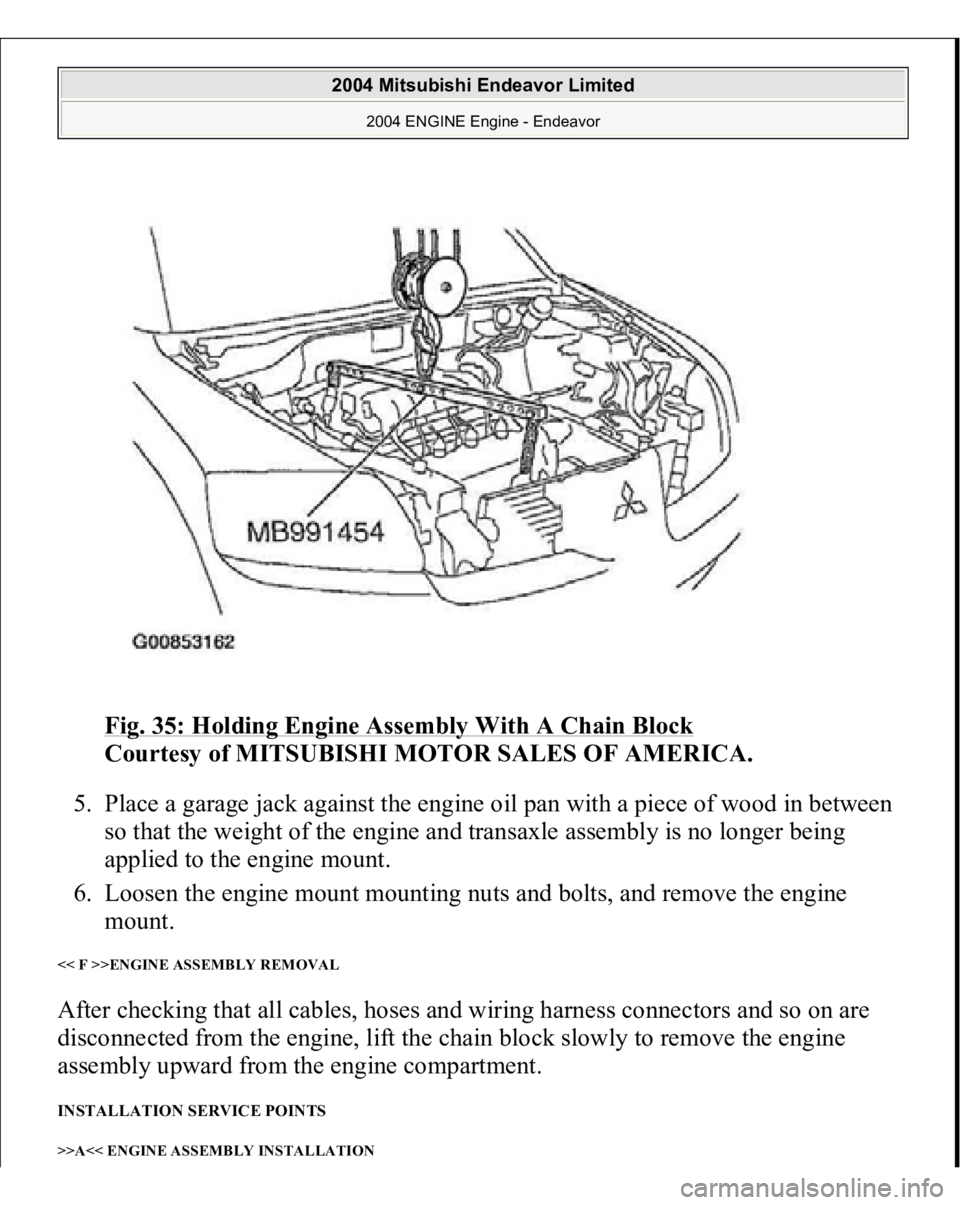
Fig. 35: Holding Engine Assembly With A Chain Block
Courtesy of MITSUBISHI MOTOR SALES OF AMERICA.
5. Place a garage jack against the engine oil pan with a piece of wood in between
so that the weight of the engine and transaxle assembly is no longer being
applied to the engine mount.
6. Loosen the engine mount mounting nuts and bolts, and remove the engine
mount.
<< F >>ENGINE ASSEMBLY REMOVAL After checking that all cables, hoses and wiring harness connectors and so on are
disconnected from the engine, lift the chain block slowly to remove the engine
assembly upward from the engine compartment. INSTALLATION SERVICE POINTS >>A<< ENGINE ASSEMBLY INSTALLATION
2004 Mitsubishi Endeavor Limited
2004 ENGINE Engine - Endeavor
Page 1544 of 3870
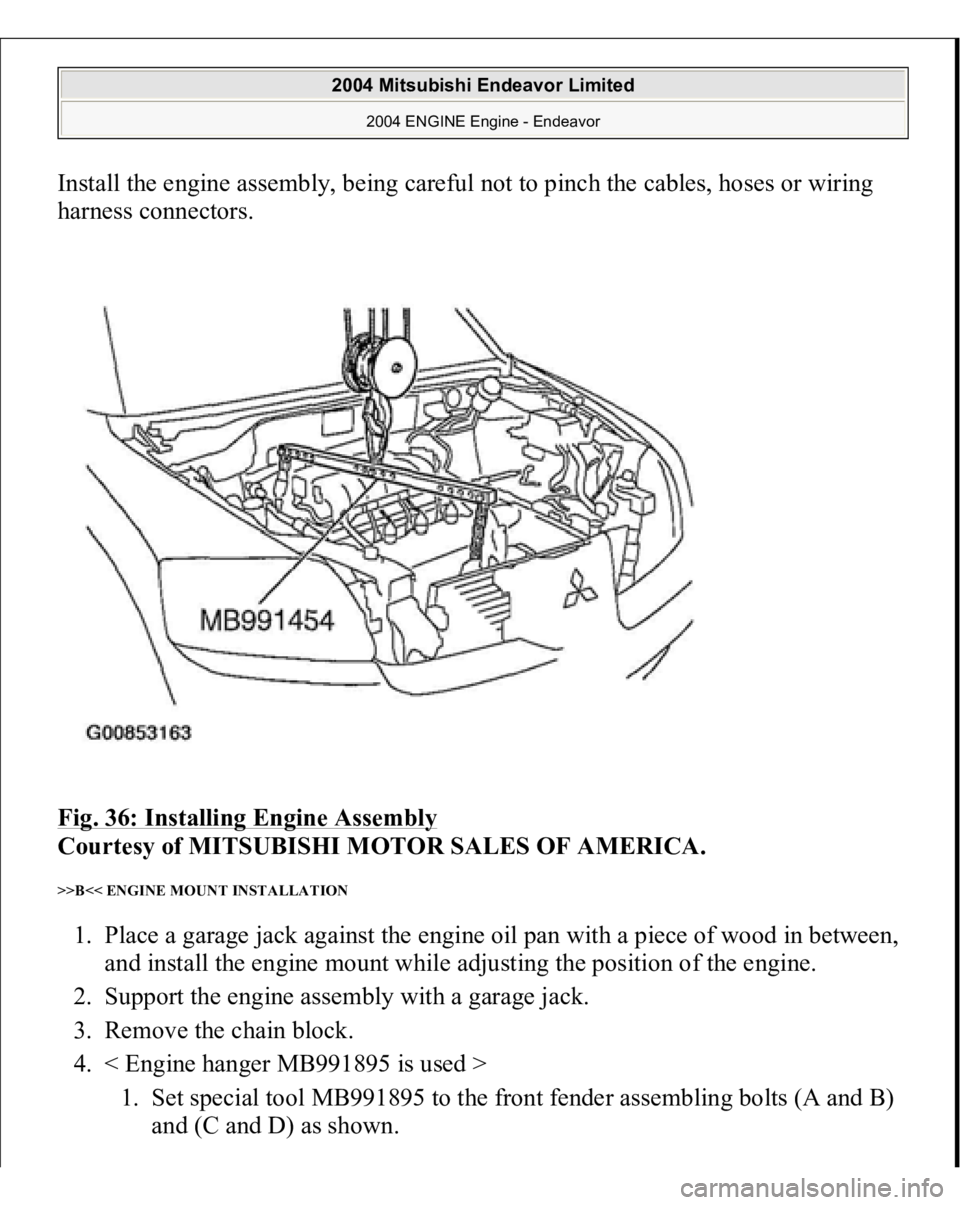
Install the engine assembly, being careful not to pinch the cables, hoses or wiring
harness connectors.
Fig. 36: Installing Engine Assembly
Courtesy of MITSUBISHI MOTOR SALES OF AMERICA.
>>B<< ENGINE MOUNT INSTALLATION 1. Place a garage jack against the engine oil pan with a piece of wood in between,
and install the engine mount while adjusting the position of the engine.
2. Support the engine assembly with a garage jack.
3. Remove the chain block.
4. < Engine hanger MB991895 is used >
1. Set special tool MB991895 to the front fender assembling bolts (A and B)
and
(C and D
) as shown.
2004 Mitsubishi Endeavor Limited
2004 ENGINE Engine - Endeavor
Page 1824 of 3870
2004 BODY & ACCESSORIES
Video Entertainment System - Endeavor
VIDEO ENTERTAINMENT SYSTEM (VES) GENERAL DESCRIPTION The VES enables images from a DVD player to be watched on a rear-seat display.
It also other commercially available video equipment and game machines to be
connected. BASIC OPERATIONS This chapter describes basic operations for playing a disc in the DVD player and for
playback from an external device connected to the auxiliary input jacks. For other
operations, please refer to the relevant information.
DVD player Auxiliary input jacks (connecting a commercially available video device or
game machine)
SPECIAL TOOL
2004 Mitsubishi Endeavor LS
2004 BODY & ACCESSORIES Video Entertainment System - Endeavor
2004 Mitsubishi Endeavor LS
2004 BODY & ACCESSORIES Video Entertainment System - Endeavor
Page 2886 of 3870
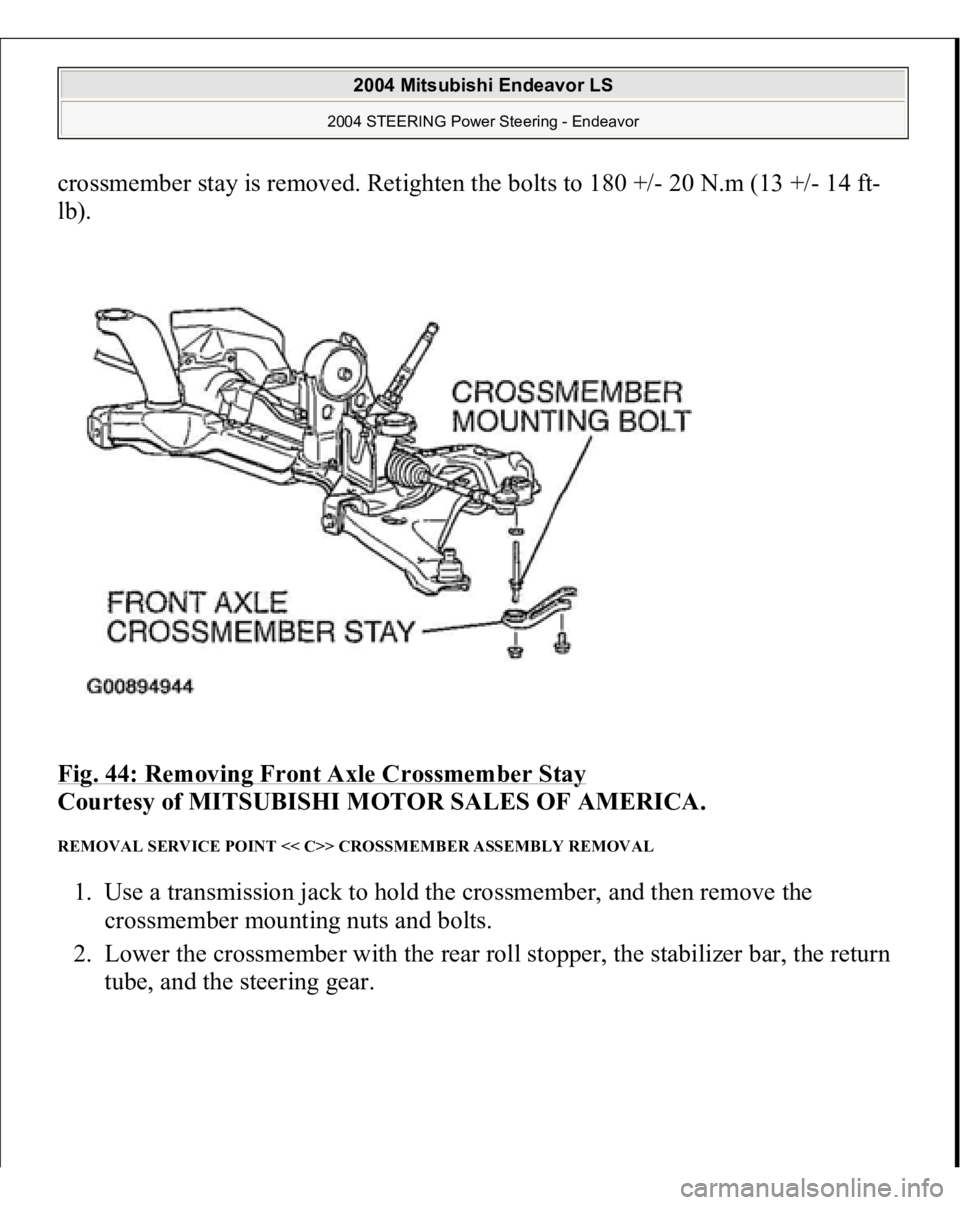
crossmember stay is removed. Retighten the bolts to 180 +/- 20 N.m (13 +/- 14 ft-
lb).
Fig. 44: Removing Front Axle Crossmember Stay
Courtesy of MITSUBISHI MOTOR SALES OF AMERICA.
REMOVAL SERVICE POINT << C>> CROSSMEMBER ASSEMBLY REMOVAL 1. Use a transmission jack to hold the crossmember, and then remove the
crossmember mounting nuts and bolts.
2. Lower the crossmember with the rear roll stopper, the stabilizer bar, the return
tube, and the steerin
g gear.
2004 Mitsubishi Endeavor LS
2004 STEERING Power Steering - Endeavor
Page 2887 of 3870
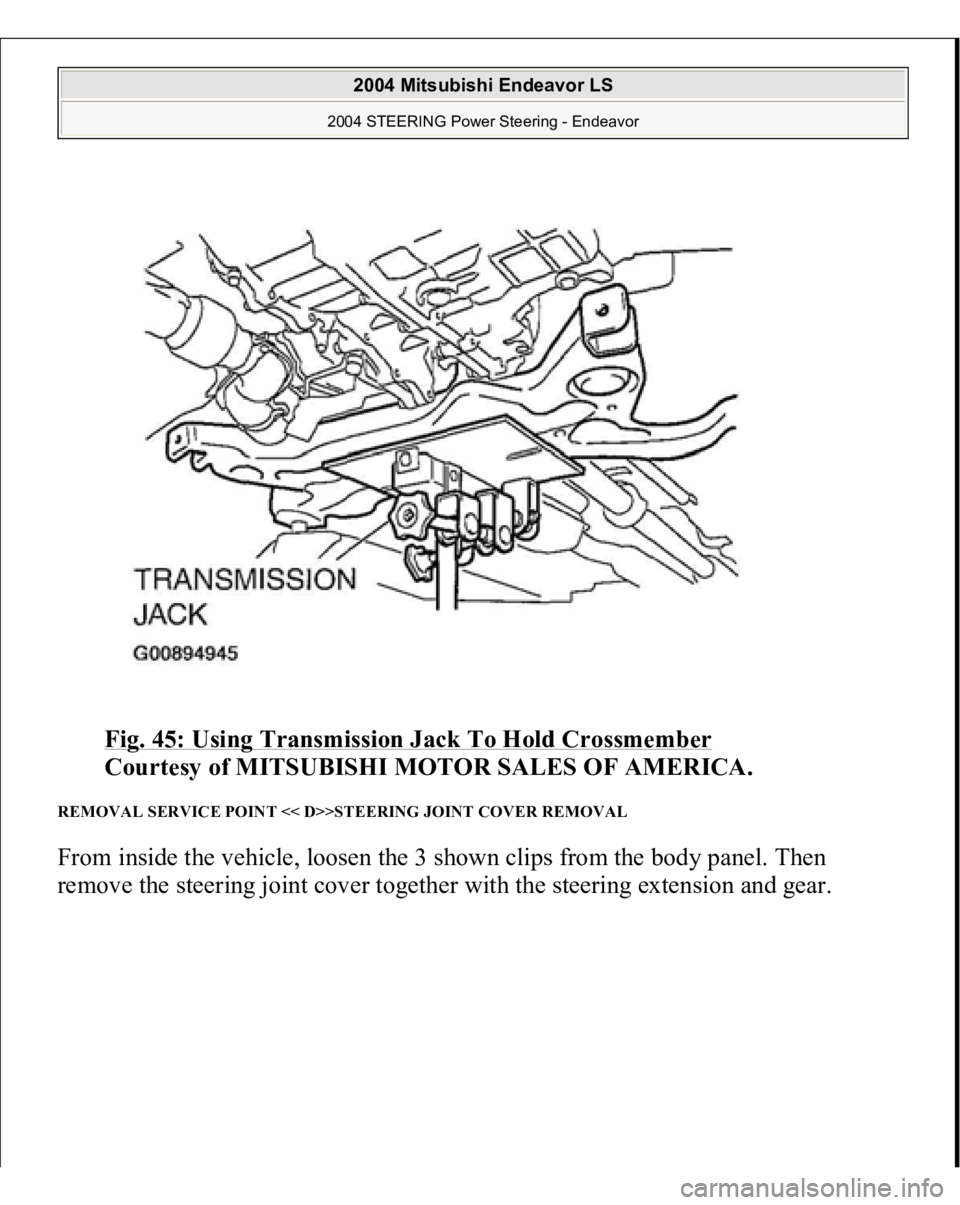
Fig. 45: Using Transmission Jack To Hold Crossmember
Courtesy of MITSUBISHI MOTOR SALES OF AMERICA.
REMOVAL SERVICE POINT << D>>STEERING JOINT COVER REMOVAL From inside the vehicle, loosen the 3 shown clips from the body panel. Then
remove the steering joint cover together with the steering extension and gear.
2004 Mitsubishi Endeavor LS
2004 STEERING Power Steering - Endeavor
Page 2944 of 3870
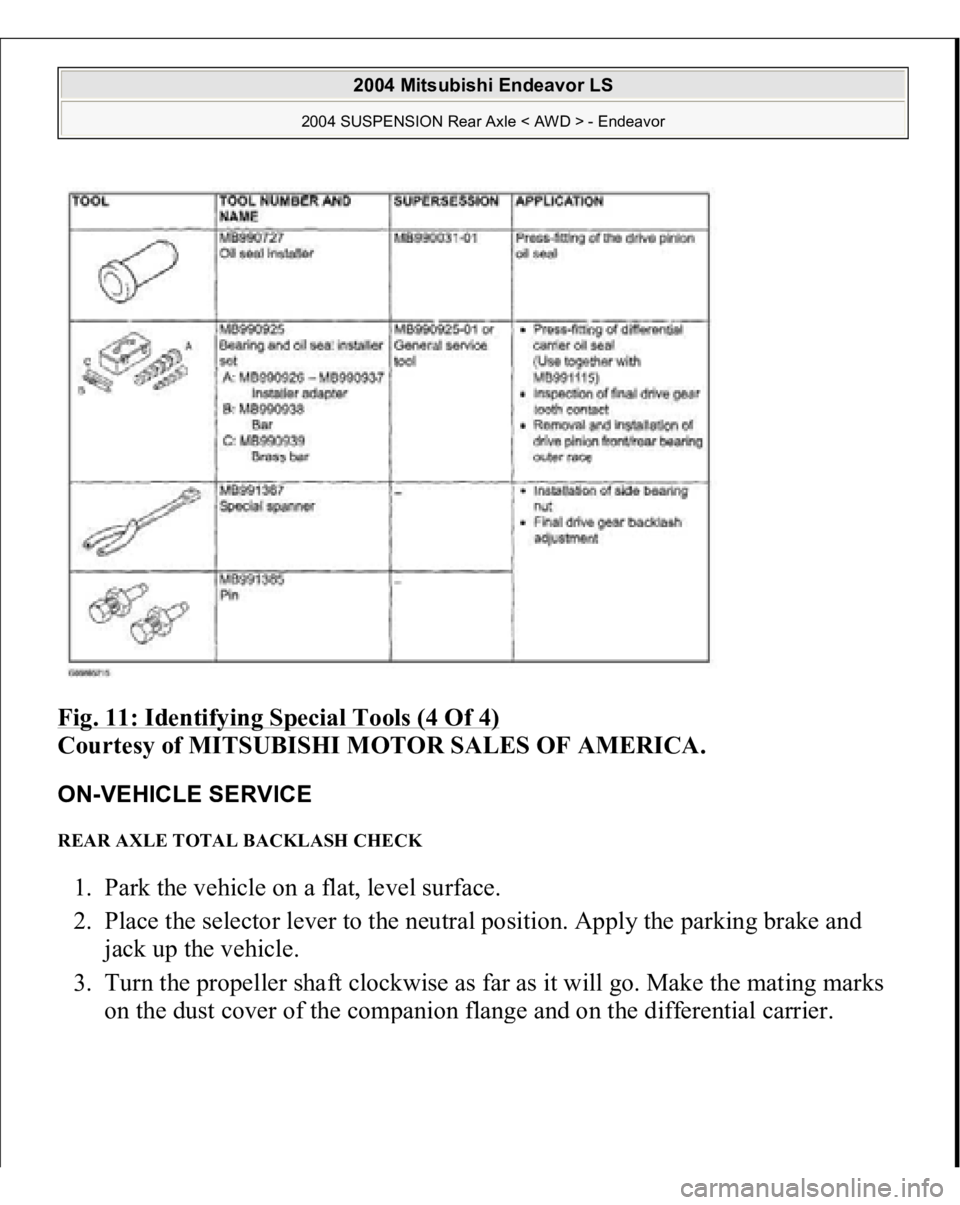
Fig. 11: Identifying Special Tools (4 Of 4)
Courtesy of MITSUBISHI MOTOR SALES OF AMERICA.
ON-VEHICLE SERVICE REAR AXLE TOTAL BACKLASH CHECK 1. Park the vehicle on a flat, level surface.
2. Place the selector lever to the neutral position. Apply the parking brake and
jack up the vehicle.
3. Turn the propeller shaft clockwise as far as it will go. Make the mating marks
on the dust cover of the com
panion flan
ge and on the differential carrier.
2004 Mitsubishi Endeavor LS
2004 SUSPENSION Rear Axle < AWD > - Endeavor
Page 3514 of 3870
1. Jack up the vehicle. Then support the vehicle with rigid racks at the specified
jack-up points or place the front or rear wheels on the rollers of the braking
force tester.
2. Release the parking brake, and feel the drag force (drag torque) on each road
wheel. When using the braking force tester, take a reading of the brake drag
force.
3. Connect scan tool MB991958 to the data link connec
tor. CAUTION:
The roller of the braking force tester and the tire
should be dry during testing. When testing the front brakes, apply the parking
brake. When testing the rear brakes, stop the
front wheels with chocks.
CAUTION: To prevent damage to scan tool MB991958,
always turn the ignition switch to the
"LOCK" (OFF) position before connecting or
disconnecting scan tool MB991958.
2004 Mitsubishi Endeavor LS
2004 BRAKES Traction Control, Active Skid Control System - Endeavor