lock MITSUBISHI iMiEV 2014 1.G User Guide
[x] Cancel search | Manufacturer: MITSUBISHI, Model Year: 2014, Model line: iMiEV, Model: MITSUBISHI iMiEV 2014 1.GPages: 262, PDF Size: 26.84 MB
Page 41 of 262
Quick charging (charging method with quick charger) 3-26 General information/Charging
3
6. Insert the quick charge connector com- pletely into the quick charge port to begincharging. For connecting and di
sconnecting, follow
the instruction manual for each quickcharger.
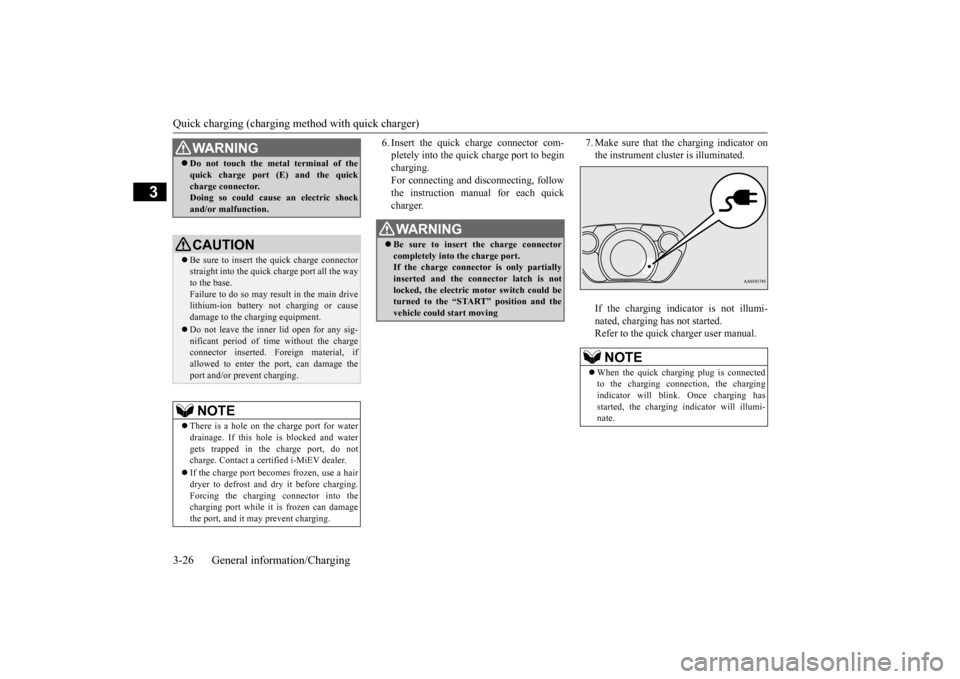
7. Make sure that the charging indicator on the instrument cluster is illuminated. If the charging indicator is not illumi- nated, charging has not started. Refer to the quick charger user manual.
WA R N I N G Do not touch the metal terminal of the quick charge port (E) and the quickcharge connector.Doing so could cause an electric shock and/or malfunction.CAUTION Be sure to insert the quick charge connector straight into the quick charge port all the wayto the base. Failure to do so may result in the main drive lithium-ion battery not charging or causedamage to the charging equipment. Do not leave the inner lid open for any sig- nificant period of ti
me without the charge
connector inserted.
Foreign material, if
allowed to enter the port, can damage theport and/or prevent charging.NOTE
There is a hole on the charge port for water drainage. If this hole
is blocked and water
gets trapped in the charge port, do not charge. Contact a certified i-MiEV dealer. If the charge port becomes frozen, use a hair dryer to defrost and dry it before charging.Forcing the charging connector into the charging port while it
is frozen can damage
the port, and it may prevent charging.
WA R N I N G Be sure to insert the charge connector completely into the charge port. If the charge connector is only partially inserted and the connector latch is notlocked, the electric motor switch could be turned to the “START” position and the vehicle could start moving
NOTE
When the quick charging plug is connected to the charging connection, the chargingindicator will blink.
Once charging has
started, the charging i
ndicator will illumi-
nate.
BK0209800US.book 26 ページ 2014年1月14日 火曜日 午前9時26分
Page 43 of 262

Charging troubleshooting guide 3-28 General information/Charging
3
N01202300022
Charging troubleshooting guide
Symptom
Possible cause
Possible solution
Charging cannot be started.
The electric motor switch is in the ON position.
Before charging, place the electric motor switch in the “LOCK” position.
The main drive lithium-ion battery is already fully charged.
Charging cannot be performed if the ma
in drive lithium-ion
battery is already
fully charged. Charging automatically turns off if the main drive lithium-ion battery is fully charged.
The temperature of the main drive lithium-ion battery
is too high or too
low to charge.
Confirm the main drive lithium-ion battery temperature. Refer to “Cautions and acti
ons to deal with intense heat” on page 3-7 and “Cau-
tions and actions to deal wi
th intense cold” on page 3-9.
The 12V starter battery is dis- charged.
The main drive lithium-ion battery can be charged if the vehicle electrical sys- tems cannot be turned on. If the battery is
discharged, charge or jump start the
12V starter battery. Refer to
“Jump-starting” on page 8-2.
The vehicle has a malf
unction. The vehicle or charger
may have a malfunction. Confir
m if the warning light on
the meter is illuminated. Confirm if the indicator on the charger is indicating a malfunction. If a warning is displayed,
stop charging and contact a certified i-
MiEV dealer.
Regular charging can- not be started.
There is no electrical power coming from the outlet.
Confirm that there has not been a power fa
ilure. Make sure the breaker is on. If
an outlet with a timer device installed
is used, power will onl
y be available at
the time set by the timer. Confirm if the POWER indicator on
the control box
is illuminated.
The charge connector is not con- nected correctly.
Confirm the charge connector
is connected correctly.
Charging Timer by MiEV remote cannot be started.
Refer to “Action to be taken when the MiEV Remote
system does not operate correctly” on page 3-48.
BK0209800US.book 28 ページ 2014年1月14日 火曜日 午前9時26分
Page 44 of 262
Charging troubleshooting guide
General information/Charging 3-29
3
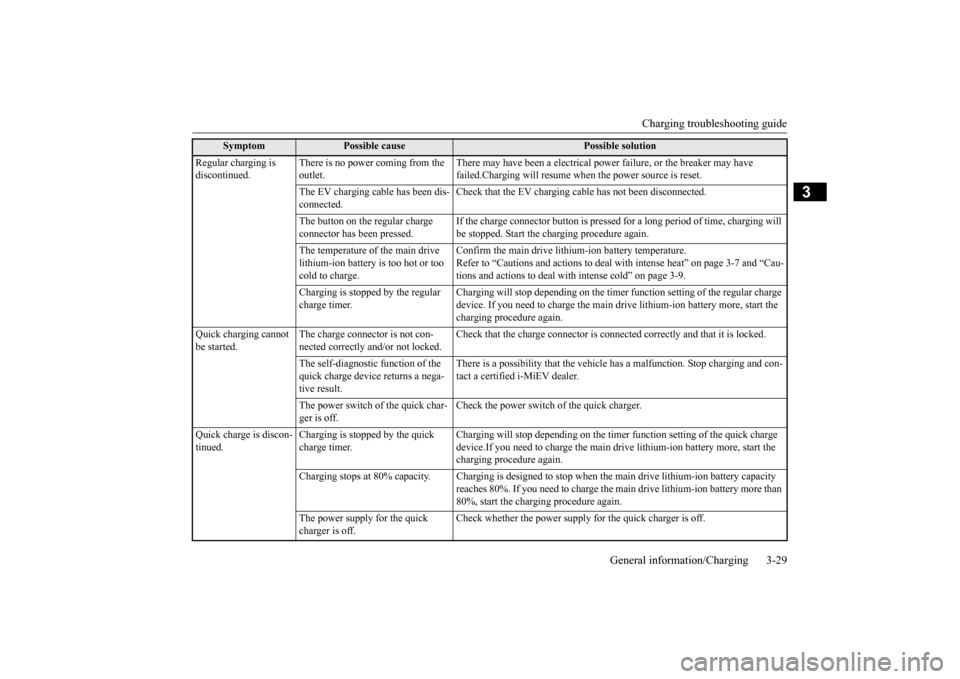
Regular charging is discontinued.
There is no power coming from the outlet.
There may have been a electrical power
failure, or the
breaker may have
failed.Charging will resume when
the power source is reset.
The EV charging cable has been dis- connected.
Check that the EV charging ca
ble has not been disconnected.
The button on the regular charge connector has been pressed.
If the charge connector button is pressed
for a long period of time, charging will
be stopped. Start the charging procedure again.
The temperature of the main drive lithium-ion battery is too hot or too cold to charge.
Confirm the main drive lithium-ion battery temperature. Refer to “Cautions and actions to deal
with intense heat” on page 3-7 and “Cau-
tions and actions to deal w
ith intense cold” on page 3-9.
Charging is stopped by the regular charge timer.
Charging will stop depending on
the timer function settin
g of the regular charge
device. If you need to charge the main
drive lithium-ion battery more, start the
charging procedure again.
Quick charging cannot be started.
The charge connector is not con- nected correctly and/or not locked.
Check that the charge connector is conn
ected correctly and that it is locked.
The self-diagnostic function of the quick charge device returns a nega- tive result.
There is a possibility that the vehicle ha
s a malfunction. Stop charging and con-
tact a certified i-MiEV dealer.
The power switch of the quick char- ger is off.
Check the power switch of the quick charger.
Quick charge is discon- tinued.
Charging is stopped by the quick charge timer.
Charging will stop depending on the time
r function setting of the quick charge
device.If you need to charge
the main drive lithium-ion battery more, start the
charging procedure again.
Charging stops at 80% capacity. Charg
ing is designed to stop when the ma
in drive lithium-ion battery capacity
reaches 80%. If you need to charge the ma
in drive lithium-ion battery more than
80%, start the charging procedure again.
The power supply for the quick charger is off.
Check whether the power supply for the quick charger is off.
Symptom
Possible cause
Possible solution
BK0209800US.book 29 ページ 2014年1月14日 火曜日 午前9時26分
Page 45 of 262
High-Voltage components 3-30 General information/Charging
3
N01205700027
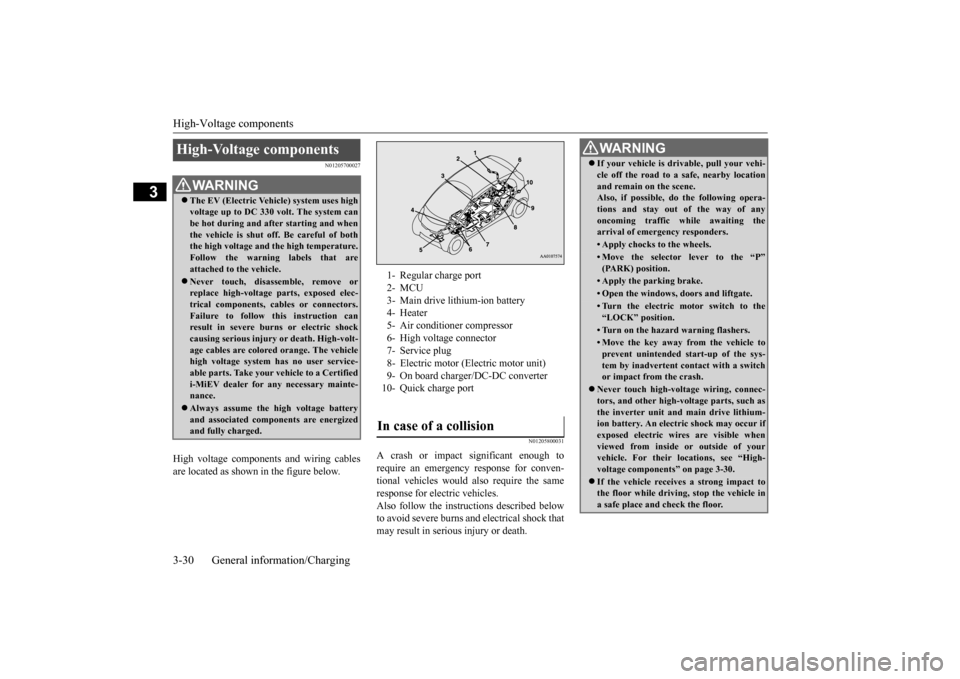
High voltage components and wiring cables are located as shown in the figure below.
N01205800031
A crash or impact significant enough to require an emergency response for conven- tional vehicles would
also require the same
response for electric vehicles. Also follow the instruct
ions described below
to avoid severe burns a
nd electrical shock that
may result in serious injury or death.
High-Voltage components
WA R N I N G The EV (Electric Vehicle) system uses high voltage up to DC 330 volt. The system canbe hot during and after starting and when the vehicle is shut off. Be careful of both the high voltage and
the high temperature.
Follow the warning labels that are attached to the vehicle. Never touch, disassemble, remove or replace high-voltage parts, exposed elec- trical components, cables or connectors.Failure to follow this instruction can result in severe burns
or electric shock
causing serious injury
or death. High-volt-
age cables are colore
d orange. Th
e vehicle
high voltage system has no user service- able parts. Take your
vehicle to a Certified
i-MiEV dealer for an
y necessary mainte-
nance. Always assume the hi
gh voltage battery
and associated compon
ents are energized
and fully charged.
1- Regular charge port 2- MCU 3- Main drive lithium-ion battery 4- Heater5- Air conditioner compressor 6- High voltage connector 7- Service plug8- Electric motor (Electric motor unit) 9- On board charger/DC-DC converter 10- Quick charge portIn case of a collision
WA R N I N G If your vehicle is dr
ivable, pull your vehi-
cle off the road to a safe, nearby locationand remain on the scene.Also, if possible, do
the follow
ing opera-
tions and stay out of the way of any oncoming traffic while awaiting thearrival of emergency responders.• Apply chocks to the wheels.• Move the selector
lever to the “P”
(PARK) position.• Apply the parking brake.• Open the windows,
doors and liftgate.
• Turn the electric motor switch to the “LOCK” position.• Turn on the hazard warning flashers.• Move the key away fr
om the vehicle to
prevent unintended start-up of the sys-tem by inadvertent contact with a switch or impact from the crash.
Never touch high-vol
tage wiring, connec-
tors, and other high-vol
tage parts, such as
the inverter unit and main drive lithium-ion battery. An electric shock may occur if exposed electric wires are visible when viewed from inside
or outside of your
vehicle. For their locations, see “High- voltage components” on page 3-30. If the vehicle receives a strong impact to the floor while driving, stop the vehicle in a safe place and check the floor.
BK0209800US.book 30 ページ 2014年1月14日 火曜日 午前9時26分
Page 51 of 262
MiEV Remote System 3-36 General information/Charging
3
N01203701020
The Charging Timer can be set as follows. ON timer: Time from the present to when charging will begin. OFF timer: Time from the start of charg- ing to the end of charging
To set the timer, the following conditions must be met. Selector lever: “P” (PARK) position Electric motor switch: “LOCK”position EV charging cable (regular charger): Con- nected
Charging Timer
WA R N I N G Improper charging can result in a fire, property damage, and serious injury or death.Before Charging Timer, carefully read and follow the instructions in “Precaution on Charging the Main Drive Lithium-ionBattery” on page 3-14 and “Regular charging (charging me
thod with rated AC
120 V outlet)” on page 3-15.NOTE
Charging Timer cannot be used with a quick charging system.
BK0209800US.book 36 ページ 2014年1月14日 火曜日 午前9時26分
Page 57 of 262
MiEV Remote System 3-42 General information/Charging
3
N01203901022
There are two methods to cancel Charging Timer. By using the MiEV Remote By operating the electric motor switch on the vehicle
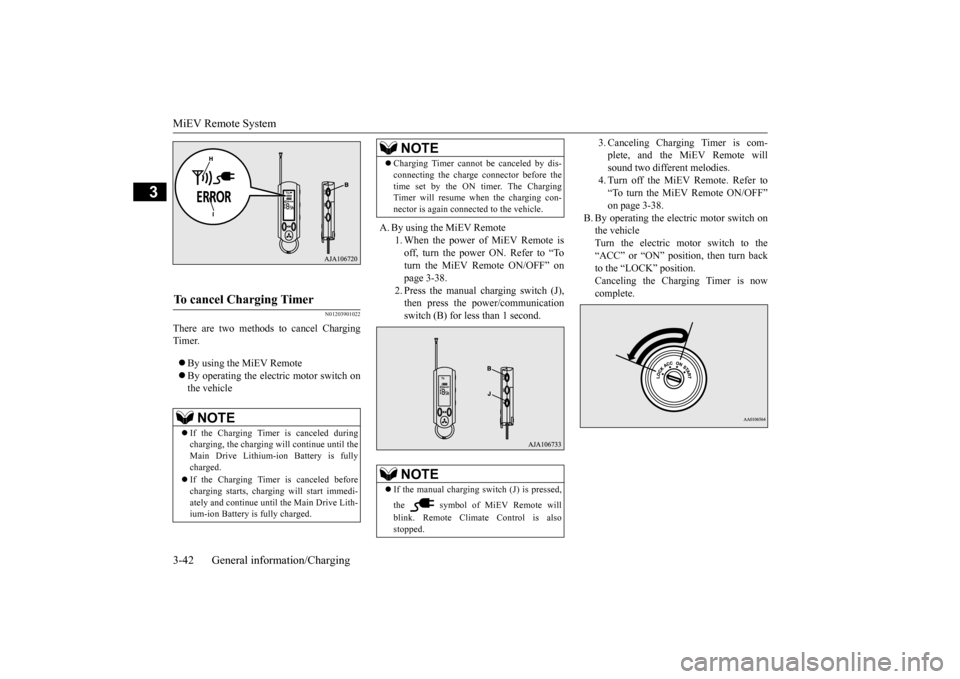
A. By using the MiEV Remote
1. When the power of MiEV Remote is off, turn the power ON. Refer to “To turn the MiEV Remote ON/OFF” onpage 3-38. 2. Press the manual charging switch (J), then press the power/communicationswitch (B) for less than 1 second.
3. Canceling Charging Timer is com- plete, and the MiEV Remote willsound two different melodies. 4. Turn off the MiEV Remote. Refer to “To turn the MiEV Remote ON/OFF”on page 3-38.
B. By operating the electric motor switch on the vehicleTurn the electric motor switch to the “ACC” or “ON” position, then turn back to the “LOCK” position. Canceling the Charging Timer is now complete.
To cancel Charging Timer
NOTE
If the Charging Timer is canceled during charging, the charging wi
ll continue until the
Main Drive Lithium-ion Battery is fullycharged. If the Charging Timer is canceled before charging starts, charging
will start immedi-
ately and continue until the Main Drive Lith- ium-ion Battery is fully charged.
Charging Timer cannot be canceled by dis- connecting the charge
connector before the
time set by the ON timer. The ChargingTimer will resume when the charging con- nector is again connected to the vehicle.NOTE
If the manual charging sw
itch (J) is pressed,
the symbol of MiEV Remote will blink. Remote Climate Control is also stopped.NOTE
BK0209800US.book 42 ページ 2014年1月14日 火曜日 午前9時26分
Page 58 of 262
MiEV Remote System
General information/Charging 3-43
3
N01204201035
N01204301036
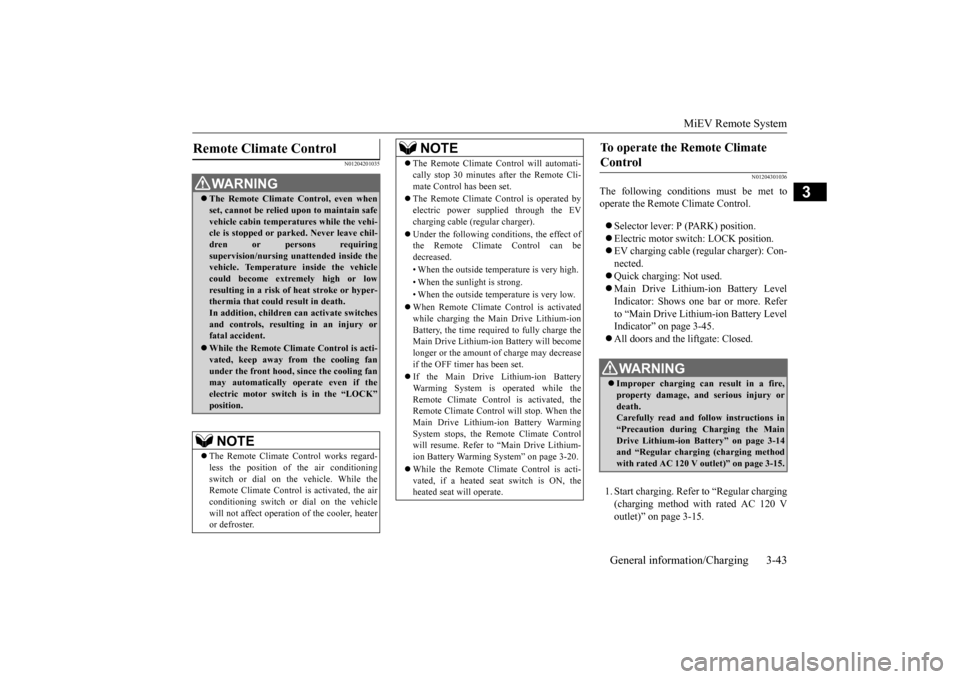
The following conditions must be met to operate the Remote Climate Control. Selector lever:
P (PARK) position.
Electric motor switch: LOCK position. EV charging cable (re
gular charger): Con-
nected. Quick charging: Not used. Main Drive Lithium-ion Battery Level Indicator: Shows one bar or more. Refer to “Main Drive Lithium-ion Battery LevelIndicator” on page 3-45. All doors and the liftgate: Closed. 1. Start charging. Refer to “Regular charging (charging method with rated AC 120 V outlet)” on page 3-15.
Remote Climate Control
WA R N I N G The Remote Climate Control, even when set, cannot be relied upon to maintain safevehicle cabin temperatures while the vehi- cle is stopped or park
ed. Never leave chil-
dren or persons requiringsupervision/nursing unattended inside the vehicle. Temperature inside the vehicle could become extremely high or lowresulting in a risk of
heat stroke or hyper-
thermia that could result in death. In addition, children
can activate switches
and controls, resulting in an injury or fatal accident. While the Remote Climate Control is acti- vated, keep away from
the cooling fan
under the front hood,
since the cooling fan
may automatically operate even if the electric motor switch is in the “LOCK” position.NOTE
The Remote Climate Control works regard- less the position of the air conditioningswitch or dial on the vehicle. While the Remote Climate Control is activated, the air conditioning switch or di
al on the vehicle
will not affect operation
of the cooler, heater
or defroster.
The Remote Climate Control will automati- cally stop 30 minutes after the Remote Cli-mate Control has been set. The Remote Climate Control is operated by electric power s
upplied through the EV
charging cable (regular charger). Under the following c
onditions, the effect of
the Remote Climate Control can be decreased. • When the outside temperature is very high. • When the sunlight is strong.• When the outside temperature is very low. When Remote Climate Control is activated while charging the Main Drive Lithium-ion Battery, the time required to fully charge theMain Drive Lithium-ion Battery will become longer or the amount of charge may decrease if the OFF timer has been set. If the Main Drive Lithium-ion Battery Warming System is operated while theRemote Climate Control is activated, the Remote Climate Control will stop. When the Main Drive Lithium-ion Battery WarmingSystem stops, the Remote Climate Control will resume. Refer to “Main Drive Lithium- ion Battery Warming System” on page 3-20. While the Remote Climate Control is acti- vated, if a heated seat switch is ON, theheated seat will operate.NOTE
To operate the Remote Climate Control
WA R N I N G Improper charging can result in a fire, property damage, and serious injury ordeath. Carefully read and fo
llow instructions in
“Precaution during Charging the MainDrive Lithium-ion Battery” on page 3-14 and “Regular chargi
ng (charging method
with rated AC 120 V ou
tlet)” on page 3-15.
BK0209800US.book 43 ページ 2014年1月14日 火曜日 午前9時26分
Page 63 of 262
MiEV Remote System 3-48 General information/Charging
3
N01204901032
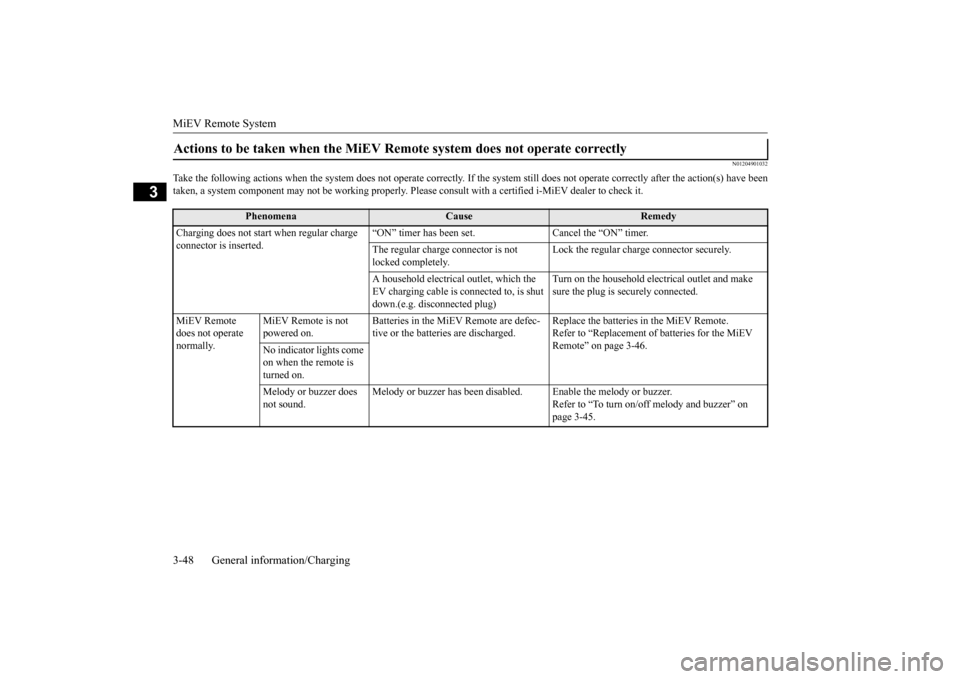
Take the following actions when the system does not operate correctly. If the system still does not operate correctly after the
action(s) have been
taken, a system component may not be wo
rking properly. Please consult with a
certified i-MiEV de
aler to check it.
Actions to be taken when the MiEV Remo
te system does not operate correctly
Phenomena
Cause
Remedy
Charging does not start when regular charge connector is inserted.
“ON” timer has been set. Cancel the “ON” timer. The regular charge connector is not locked completely.
Lock the regular charge connector securely.
A household electrical
outlet, which the
EV charging cable is connected to, is shut down.(e.g. disconnected plug)
Turn on the household elec
trical outlet and make
sure the plug is securely connected.
MiEV Remote does not operate normally.
MiEV Remote is not powered on.
Batteries in the MiEV Remote are defec- tive or the batteries are discharged.
Replace the batteries in the MiEV Remote. Refer to “Replacement of batteries for the MiEV Remote” on page 3-46.
No indicator lights come on when the remote is turned on. Melody or buzzer does not sound.
Melody or buzzer has been disabl
ed. Enable the melody or buzzer.
Refer to “To turn on/off melody and buzzer” on page 3-45.
BK0209800US.book 48 ページ 2014年1月14日 火曜日 午前9時26分
Page 64 of 262
MiEV Remote System
General information/Charging 3-49
3
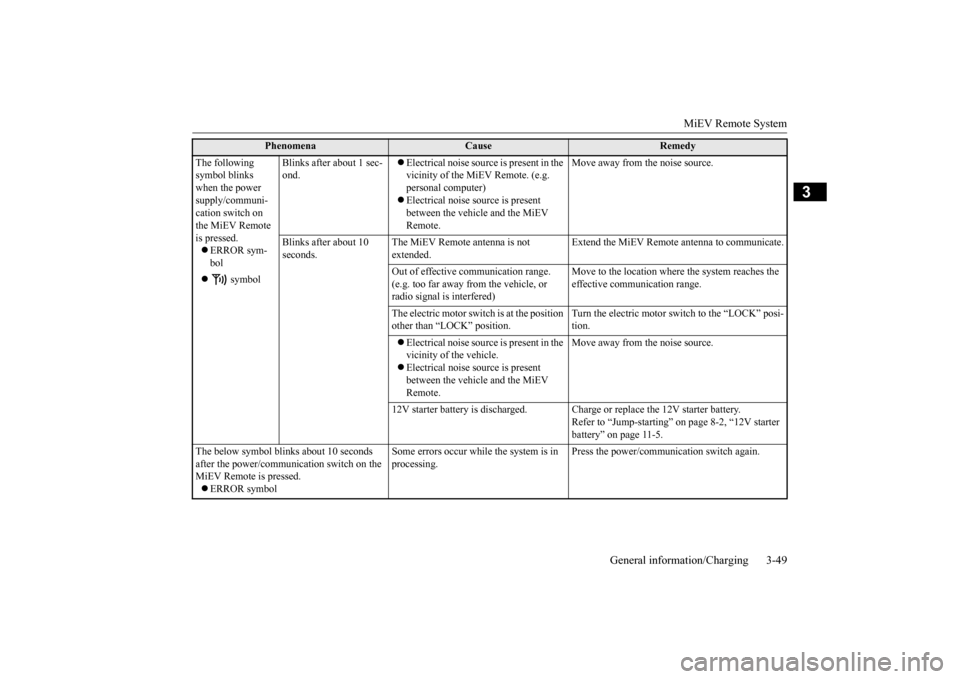
The following symbol blinks when the power supply/communi- cation switch on the MiEV Remote is pressed. ERROR sym- bol
symbol
Blinks after about 1 sec- ond.
Electrical noise source is present in the vicinity of the MiEV Remote. (e.g. personal computer) Electrical noise s
ource is present
between the vehicl
e and the MiEV
Remote.
Move away from the noise source.
Blinks after about 10 seconds.
The MiEV Remote antenna is not extended.
Extend the MiEV Remote
antenna to communicate.
Out of effective
communication range.
(e.g. too far away from the vehicle, or radio signal is interfered)
Move to the location where the system reaches the effective communication range.
The electric motor switch is at the position other than “LOCK” position.
Turn the electric motor switch to the “LOCK” posi- tion.
Electrical noise source is present in the vicinity of the vehicle. Electrical noise s
ource is present
between the vehicl
e and the MiEV
Remote.
Move away from the noise source.
12V starter battery is discharged. Charg
e or replace the 12V starter battery.
Refer to “Jump-starting” on page 8-2, “12V starter battery” on page 11-5.
The below symbol blinks about 10 seconds after the power/communi
cation switch on the
MiEV Remote is pressed. ERROR symbol
Some errors occur while
the system is in
processing.
Press the power/communication switch again.
Phenomena
Cause
Remedy
BK0209800US.book 49 ページ 2014年1月14日 火曜日 午前9時26分
Page 65 of 262
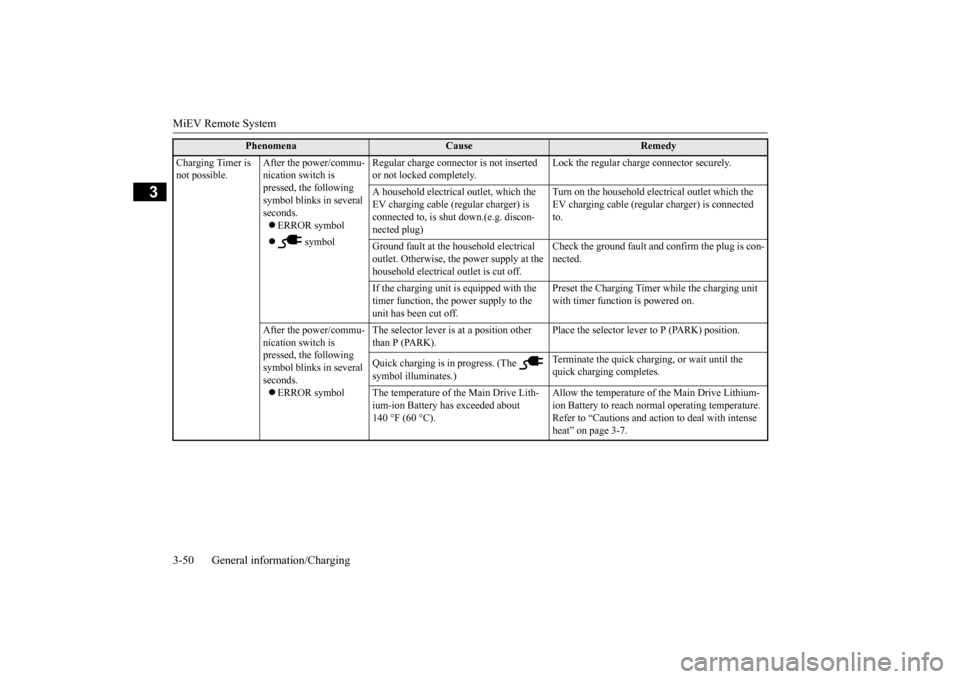
MiEV Remote System 3-50 General information/Charging
3
Charging Timer is not possible.
After the power/commu- nication switch is pressed, the following symbol blinks in several seconds. ERROR symbol
symbol
Regular charge connector is not inserted or not locked completely.
Lock the regular charge connector securely.
A household electrical
outlet, which the
EV charging cable (regular charger) is connected to, is shut down.(e.g. discon-nected plug)
Turn on the household electrical outlet which the EV charging cable (regular charger) is connected to.
Ground fault at the h
ousehold electrical
outlet. Otherwise, the power supply at the household electrical
outlet is cut off.
Check the ground fault and confirm the plug is con- nected.
If the charging unit is
equipped with the
timer function, the power supply to the unit has been cut off.
Preset the Charging Timer while the charging unit with timer function is powered on.
After the power/commu- nication switch is pressed, the following symbol blinks in several seconds. ERROR symbol
The selector lever is
at a position other
than P (PARK).
Place the selector leve
r to P (PARK) position.
Quick charging is in progress. (The symbol illuminates.)
Terminate the quick charging, or wait until the quick charging completes.
The temperature of the Main Drive Lith- ium-ion Battery has exceeded about 140 °F (60 °C).
Allow the temperature of the Main Drive Lithium- ion Battery to reach norma
l operating temperature.
Refer to “Cautions and action to deal with intense heat” on page 3-7.
Phenomena
Cause
Remedy
BK0209800US.book 50 ページ 2014年1月14日 火曜日 午前9時26分