light MITSUBISHI iMiEV 2017 1.G Owner's Manual
[x] Cancel search | Manufacturer: MITSUBISHI, Model Year: 2017, Model line: iMiEV, Model: MITSUBISHI iMiEV 2017 1.GPages: 296, PDF Size: 7.79 MB
Page 45 of 296
Charging troubleshooting guide
General information/Charging 3-31
3
N01202301032
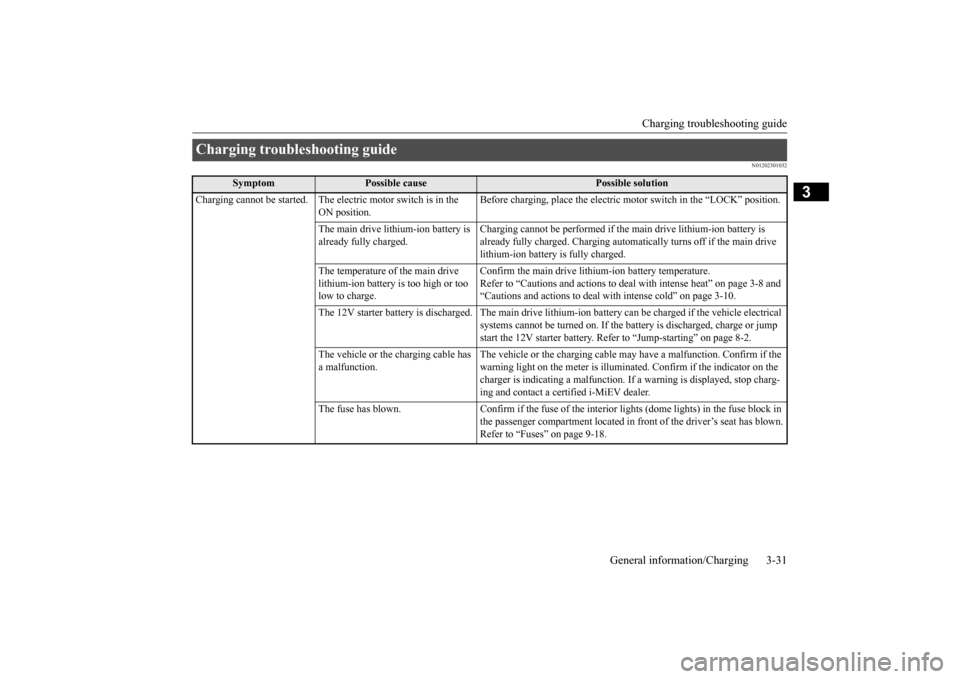
Charging troubleshooting guide
Symptom
Possible cause
Possible solution
Charging cannot be started. The elec
tric motor switch is in the
ON position.
Before charging, place the electric motor switch in the “LOCK” position.
The main drive lithium-ion battery is already fully charged.
Charging cannot be performed if the
main drive lithium-ion battery is
already fully charged. Charging automa
tically turns off if the main drive
lithium-ion battery is fully charged.
The temperature of the main drive lithium-ion battery is too high or too low to charge.
Confirm the main drive lithium-ion battery temperature. Refer to “Cautions and actions to deal
with intense heat” on page 3-8 and
“Cautions and actions to deal with intense cold” on page 3-10.
The 12V starter battery is discharged. The main drive lith
ium-ion battery can be charge
d if the vehicle electrical
systems cannot be turned on. If the batte
ry is discharged, charge or jump
start the 12V starter battery. Refer
to “Jump-starting” on page 8-2.
The vehicle or the charging cable has a malfunction.
The vehicle or the charging cable ma
y have a malfunction. Confirm if the
warning light on the meter is illuminated. Confirm if the indicator on the charger is indicating a malfunction. If
a warning is displayed, stop charg-
ing and contact a cer
tified i-MiEV dealer.
The fuse has blown. Confirm if the fuse of the in
terior lights (dome lights) in the fuse block in
the passenger compartment located in front of the driver’s seat has blown. Refer to “Fuses” on page 9-18.
BK0220401US.book 31 ページ 2015年6月3日 水曜日 午前7時42分
Page 50 of 296
MiEV Remote System 3-36 General information/Charging
3
N01203401056
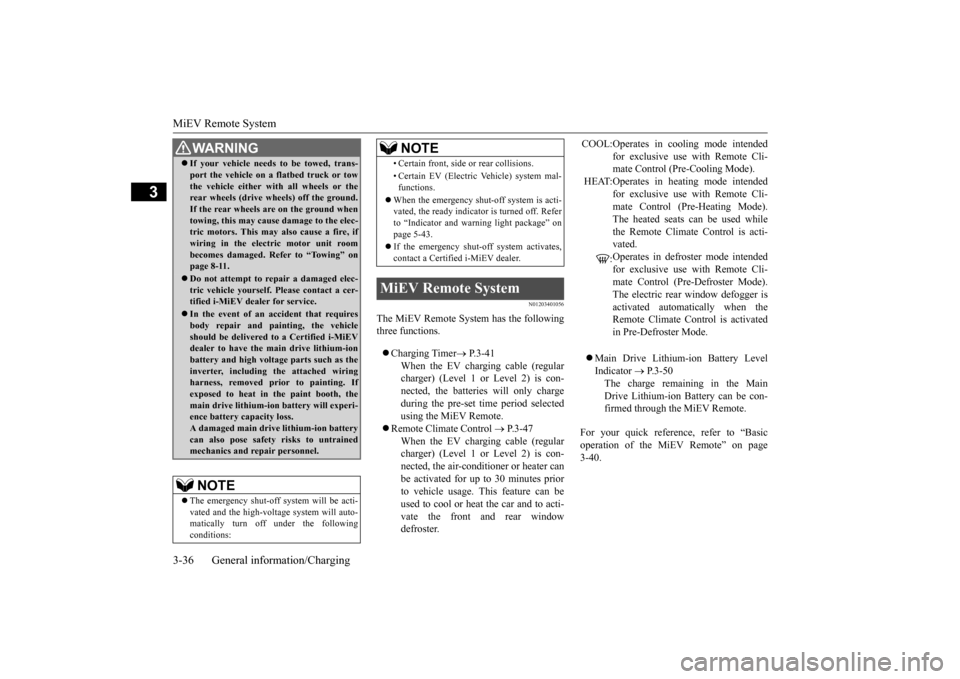
The MiEV Remote System has the following three functions. Charging Timer
P.3-41
When the EV charging cable (regular charger) (Level 1 or Level 2) is con-nected, the batteries will only charge during the pre-set
time period selected
using the MiEV Remote.
Remote Climate Control
P.3-47
When the EV charging cable (regular charger) (Level 1 or Level 2) is con-nected, the air-conditi
oner or heater can
be activated for up to 30 minutes prior to vehicle usage. This feature can beused to cool or heat the car and to acti- vate the front and rear window defroster.
Main Drive Lithium-ion Battery Level Indicator
P.3-50
The charge remaining in the Main Drive Lithium-ion Battery can be con-firmed through the MiEV Remote.
For your quick reference, refer to “Basic operation of the MiEV Remote” on page 3-40.
If your vehicle needs to be towed, trans- port the vehicle on a
flatbed truck or tow
the vehicle either with all wheels or therear wheels (drive
wheels) off the ground.
If the rear wheels are on the ground when towing, this may cause damage to the elec-tric motors. This may also cause a fire, if wiring in the electric motor unit room becomes damaged. Refer to “Towing” onpage 8-11. Do not attempt to repair a damaged elec- tric vehicle yourself. Please contact a cer- tified i-MiEV dealer for service. In the event of an ac
cident that requires
body repair and painting, the vehicle should be delivered
to a Certified i-MiEV
dealer to have the main drive lithium-ion battery and high voltage
parts such as the
inverter, including the attached wiringharness, removed prior to painting. If exposed to heat in the paint booth, the main drive lithium-ion battery will experi-ence battery capacity loss. A damaged main drive lithium-ion battery can also pose safety risks to untrainedmechanics and repair personnel.NOTE
The emergency shut-off
system will be acti-
vated and the high-volta
ge system will auto-
matically turn off under the following conditions:WA R N I N G
• Certain front, side or rear collisions. • Certain EV (Electric Vehicle) system mal- functions.
When the emergency shut
-off system is acti-
vated, the ready indicato
r is turned off. Refer
to “Indicator and warning light package” on page 5-43. If the emergency shut-off system activates, contact a Certifie
d i-MiEV dealer.
MiEV Remote System
NOTE
COOL:Operates in cooling mode intended
for exclusive use with Remote Cli- mate Control (P
re-Cooling Mode).
HEAT:Operates in heating mode intended
for exclusive use with Remote Cli- mate Control (P
re-Heating Mode).
The heated seats can be used while the Remote Climate Control is acti- vated. : Operates in defroster mode intended for exclusive use with Remote Cli- mate Control (Pre-Defroster Mode). The electric rear
window defogger is
activated automatically when theRemote Climate Control is activated in Pre-Defroster Mode.
BK0220401US.book 36 ページ 2015年6月3日 水曜日 午前7時42分
Page 51 of 296

MiEV Remote System
General information/Charging 3-37
3
WA R N I N G Individuals who use
implantable pace-
makers or implanta
ble cardiovascular-
defibrillators
should keep away from the
external and internal
transmitters. The
electromagnetic waves used in the MiEVRemote System may affect the operation of implantable pacemakers and implant- able cardiovascular-defibrillators. Individuals using ot
her electro-medical
apparatus besides implantable pacemak-ers and implantable
cardiovascular-defi-
brillators should
check with the
manufacturer of the apparatus to confirmthe effect of the el
ectromagnetic waves
used by the MiEV Remote System. The electromagnetic waves may affect theoperations of the el
ectro-medical appara-
tus. Never use the MiEV Remote near medical equipment. Electrom
agnetic waves could
adversely affect th
e medical equipment.
MiEV Remote
Glass antenna
Keep the MiEV Remote in the place where children will not touch or play with theremote. When bringing the MiEV Remote on flights, do not press any switches on theMiEV Remote while on the plane. If a switch is pressed on the plane, the MiEV Remote emits electromagnetic waveswhich like cell phones and other wireless devices, could interfere with systems on the airplane.When carrying the MiEV Remote in a bag, be careful that no switches on the MiEV Remote can be pressed by mistake.CAUTION Never disassemble or modify the MiEV Remote. No user servic
eable parts are inside
except batteries. Disassembling or modifying the MiEV Remote or removing a label from the MiEV Remote may violate regulations. WA R N I N G
NOTE
The MiEV Remote syst
em uses radio waves.
The MiEV Remote can operate withinapproximately 328 feet (100 m) from thevehicle. In the following environments or situations, the MiEV Remote may not transmit andreceive radio waves correctly. As a result, the remote may not
operate properly.
• When the vehicle a
nd the MiEV Remote
are separated by a
concrete wall.
• When there is a metal wall between the vehicle and the MiEV Remote. • When the vehicle is surrounded by other tall vehicles. • When the vehicle and/or the MiEV Remote is near a facility
emitting strong radio
waves, such as a television tower, a trans-former substation, a
broadcasting station or
an airport. • When other electrical equipment such as computers or cell-phones are placed near the MiEV Remote. • When the MiEV Remote touches some- thing metallic, or is
covered by a metal
object. • When batteries for the MiEV Remote are weak.
Melody and buzzer from the MiEV Remote can be turned on or off. Refer to “To turn on/
off melody and buzzer”
on page 3-49.
BK0220401US.book 37 ページ 2015年6月3日 水曜日 午前7時42分
Page 52 of 296
MiEV Remote System 3-38 General information/Charging
3
N01203501044
The transmitter signal will reach further when the antenna of the MiEV Remote isfully extended and held upright. The onboard antenna is printed on the right side delta glass
of the vehicle.
When the MiEV Remote is not used for more than 30 seconds, the MiEV Remote willautomatically turn off. Some charge facilities
have a timer function
which turns the power supply on and off automatically. When using a charge facility with this timer function, please adjust thecharging time set by the MiEV Remote to be consistent with the timer used by the charg- ing facility. When you need additi
onal MiEV Remotes,
please contact a certified i-MiEV dealer. Upto four MiEV Remotes
can be used per vehi-
cle. You may hear operating sounds such as sounds from the cooli
ng fan and air condi-
tioning compressor when the Remote Cli-mate Control is activated even if the electric motor switch is in “LOCK” position during timer charging. This is normal.Refer to “Remote Climate Control” on page 3-47.NOTE
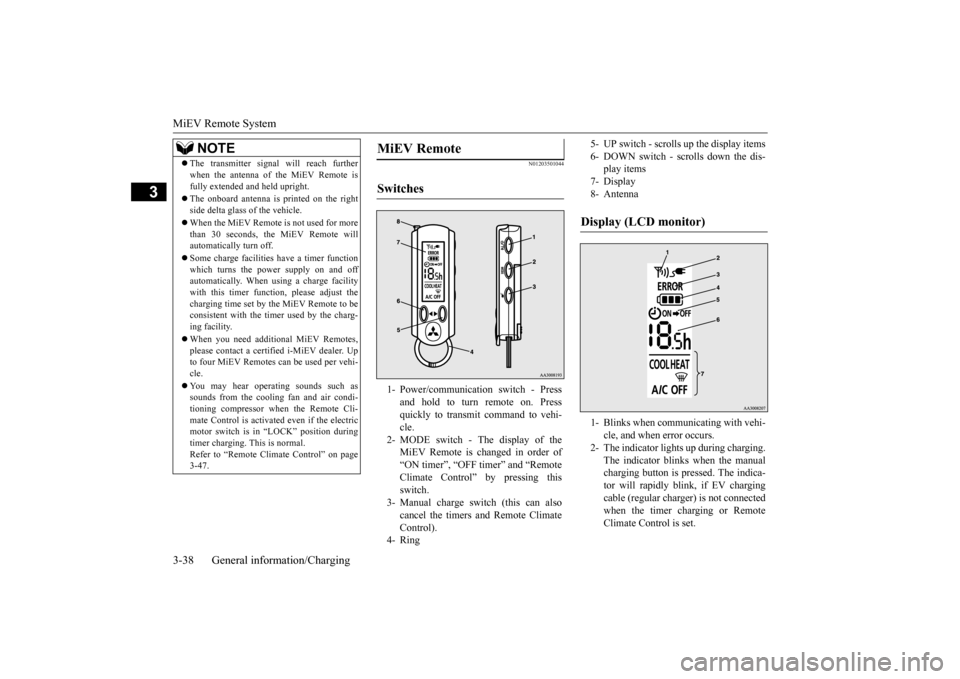
MiEV Remote Switches 1- Power/communication switch - Press
and hold to turn remote on. Pressquickly to transmit command to vehi- cle.
2- MODE switch - The display of the
MiEV Remote is changed in order of “ON timer”, “OFF timer” and “Remote Climate Control” by pressing thisswitch.
3- Manual charge switch (this can also
cancel the timers and Remote Climate Control).
4- Ring
5- UP switch - scrolls
up the display items
6- DOWN switch - scrolls down the dis-
play items
7- Display 8- AntennaDisplay (LCD monitor) 1- Blinks when communicating with vehi-
cle, and when error occurs.
2- The indicator lights up during charging.
The indicator blinks when the manualcharging button is pressed. The indica- tor will rapidly blink, if EV charging cable (regular charge
r) is not connected
when the timer charging or Remote Climate Control is set.
BK0220401US.book 38 ページ 2015年6月3日 水曜日 午前7時42分
Page 53 of 296
MiEV Remote System
General information/Charging 3-39
3
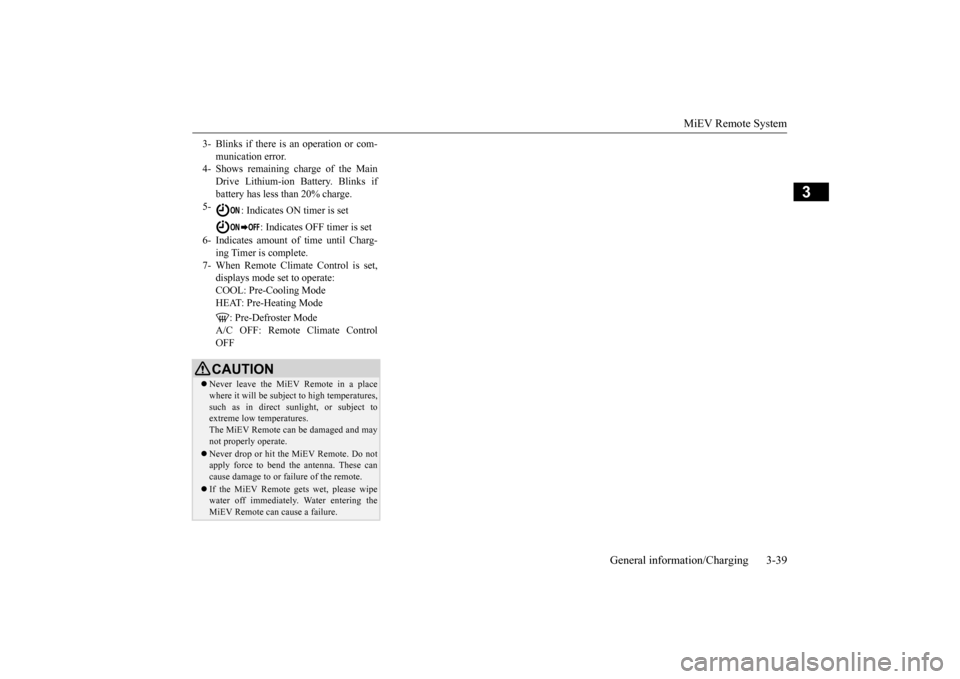
3- Blinks if there is an operation or com-
munication error.
4- Shows remaining charge of the Main
Drive Lithium-ion Battery. Blinks if battery has less than 20% charge.
5-
: Indicates ON timer is set
: Indicates OFF timer is set
6- Indicates amount of time until Charg-
ing Timer is complete.
7- When Remote Climate Control is set,
displays mode set to operate:COOL: Pre-Cooling Mode HEAT: Pre-Heating Mode
: Pre-Defroster Mode
A/C OFF: Remote Climate ControlOFFCAUTION Never leave the MiEV Remote in a place where it will be subject to high temperatures,such as in direct s
unlight, or subject to
extreme low temperatures. The MiEV Remote can
be damaged and may
not properly operate. Never drop or hit the MiEV Remote. Do not apply force to bend the antenna. These can cause damage to or failure of the remote. If the MiEV Remote gets wet, please wipe water off immediately.
Water entering the
MiEV Remote can cause a failure.
BK0220401US.book 39 ページ 2015年6月3日 水曜日 午前7時42分
Page 62 of 296
MiEV Remote System 3-48 General information/Charging
3
N01204301036
The following conditi
ons must be met to
operate the Remote Climate Control. Selector lever:
P (PARK) position.
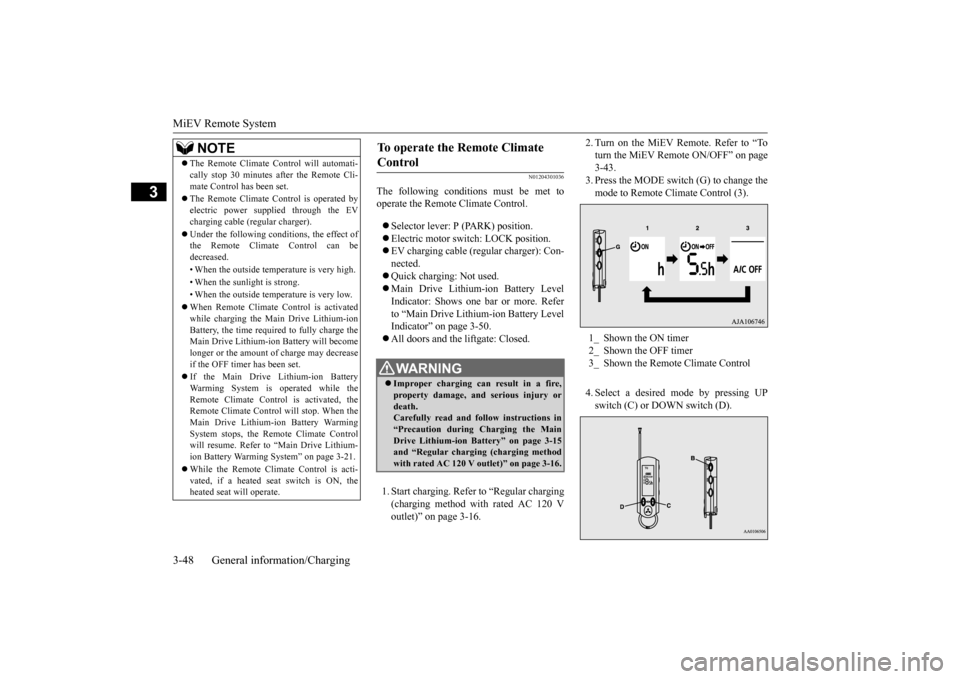
Electric motor switch: LOCK position. EV charging cable (regular charger): Con- nected. Quick charging: Not used. Main Drive Lithium-ion Battery Level Indicator: Shows one bar or more. Refer to “Main Drive Lithium-ion Battery LevelIndicator” on page 3-50. All doors and the liftgate: Closed. 1. Start charging. Refer to “Regular charging (charging method with rated AC 120 V outlet)” on page 3-16.
2. Turn on the MiEV Remote. Refer to “To turn the MiEV Remote ON/OFF” on page3-43. 3. Press the MODE switch (G) to change the mode to Remote Climate Control (3). 4. Select a desired
mode by pressing UP
switch (C) or DOWN switch (D).
The Remote Climate Control will automati- cally stop 30 minutes after the Remote Cli-mate Control has been set. The Remote Climate Control is operated by electric power s
upplied through the EV
charging cable (regular charger). Under the following conditions, the effect of the Remote Climate Control can be decreased. • When the outside temp
erature is very high.
• When the sunlight is strong.• When the outside temperature is very low. When Remote Climate Control is activated while charging the Main Drive Lithium-ion Battery, the time required to fully charge theMain Drive Lithium-ion Battery will become longer or the amount of charge may decrease if the OFF timer has been set. If the Main Drive Lithium-ion Battery Warming System is operated while theRemote Climate Control is activated, the Remote Climate Control
will stop. When the
Main Drive Lithium-ion Battery WarmingSystem stops, the Remote Climate Control will resume. Refer to “Main Drive Lithium- ion Battery Warming System” on page 3-21. While the Remote Climate Control is acti- vated, if a heated seat switch is ON, theheated seat
will operate.
NOTE
To operate the Remote Climate Control
WA R N I N G Improper charging ca
n result in a fire,
property damage, and serious injury ordeath. Carefully read and follow instructions in “Precaution during Charging the MainDrive Lithium-ion Battery” on page 3-15 and “Regular chargi
ng (charging method
with rated AC 120 V outlet)” on page 3-16.
1_ Shown the ON timer 2_ Shown the OFF timer3_ Shown the Remote Climate Control
BK0220401US.book 48 ページ 2015年6月3日 水曜日 午前7時42分
Page 66 of 296
MiEV Remote System 3-52 General information/Charging
3
N01204901032
Take the following actions when the system does not operate correctly. If the system still does not operate correctly after the
action(s) have been
taken, a system component may not be wo
rking properly. Please consult with a
certified i-MiEV de
aler to check it.
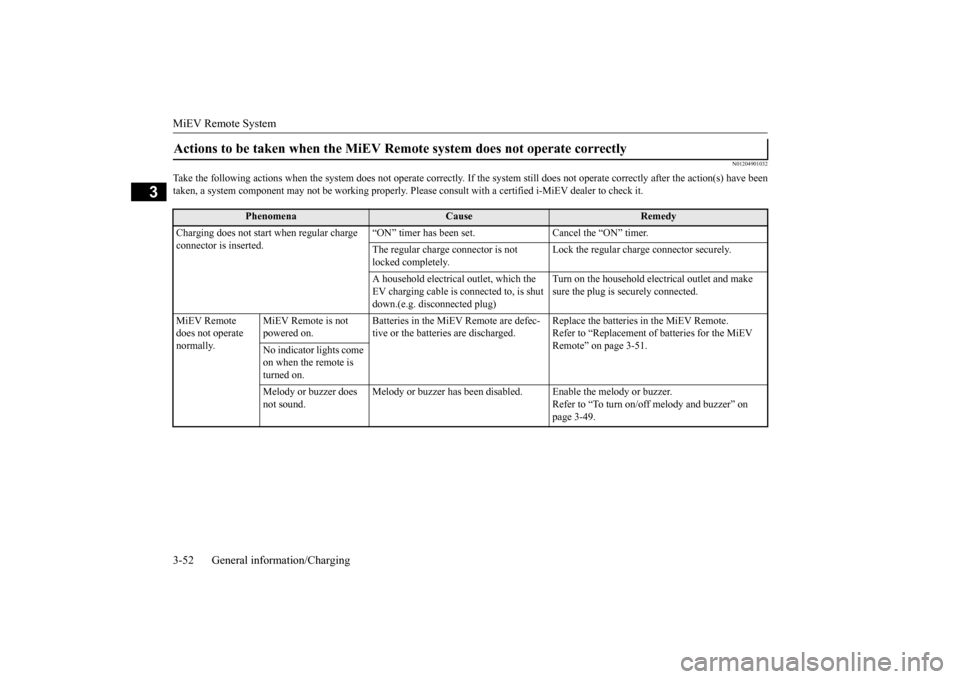
Actions to be taken when the MiEV Remo
te system does not operate correctly
Phenomena
Cause
Remedy
Charging does not start when regular charge connector is inserted.
“ON” timer has been set. Cancel the “ON” timer. The regular charge connector is not locked completely.
Lock the regular charge connector securely.
A household electrical
outlet, which the
EV charging cable is connected to, is shut down.(e.g. disconnected plug)
Turn on the household elec
trical outlet and make
sure the plug is securely connected.
MiEV Remote does not operate normally.
MiEV Remote is not powered on.
Batteries in the MiEV Remote are defec- tive or the batteries are discharged.
Replace the batteries in the MiEV Remote. Refer to “Replacement of batteries for the MiEV Remote” on page 3-51.
No indicator lights come on when the remote is turned on. Melody or buzzer does not sound.
Melody or buzzer has been disabl
ed. Enable the melody or buzzer.
Refer to “To turn on/off melody and buzzer” on page 3-49.
BK0220401US.book 52 ページ 2015年6月3日 水曜日 午前7時42分
Page 75 of 296
Front seats
Seat and restraint systems 4-3
4
Safety equipment cannot prevent injury or death in all motor vehi
cle accidents. You can
help reduce the risk of injury or death, how- ever, by following the instructions in this manual.
N00401800386
Position the driver’s seat
as far back as possi-
ble while maintaining a position that still enables you to fully apply the pedals, easily control the steering wh
eel and safely operate
the vehicle.
N00401900303
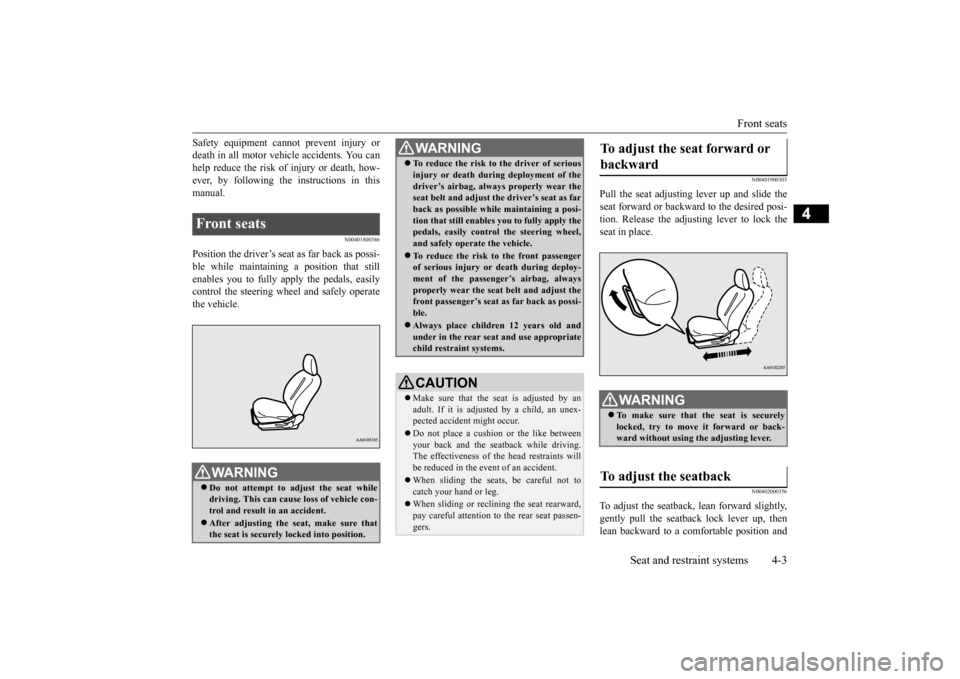
Pull the seat adjusting lever up and slide theseat forward or backwa
rd to the desired posi-
tion. Release the adjusting lever to lock the seat in place.
N00402000356
To adjust the seatback,
lean forward slightly,
gently pull the seatback lock lever up, then lean backward to a comfortable position and
Front seats
WA R N I N G Do not attempt to adjust the seat while driving. This can cause loss of vehicle con- trol and result
in an accident.
After adjusting the se
at, make sure that
the seat is securely locked into position.
To reduce the risk to the driver of serious injury or death during deployment of thedriver’s airbag, always
properly wear the
seat belt and adjust th
e driver’s seat as far
back as possible while maintaining a posi- tion that still enables
you to fully apply the
pedals, easily control the steering wheel, and safely operate the vehicle. To reduce the risk to the front passenger of serious injury or
death during deploy-
ment of the passeng
er’s airbag, always
properly wear the seat
belt and adjust the
front passenger’s seat as far back as possi- ble. Always place childr
en 12 years old and
under in the rear seat
and use appropriate
child restraint systems.CAUTION Make sure that the seat is adjusted by an adult. If it is adjusted by a child, an unex- pected accident might occur. Do not place a cushion
or the like between
your back and the seatback while driving. The effectiveness of the head restraints willbe reduced in the event of an accident. When sliding the seats, be careful not to catch your hand or leg. When sliding or reclining the seat rearward, pay careful attention to
the rear seat passen-
gers.WA R N I N G
To adjust the seat forward or backward
WA R N I N G To make sure that the seat is securely locked, try to move
it forward or back-
ward without using th
e adjusting lever.
To adjust the seatback
BK0220401US.book 3 ページ 2015年6月3日 水曜日 午前7時42分
Page 77 of 296
Rear seats
Seat and restraint systems 4-5
4
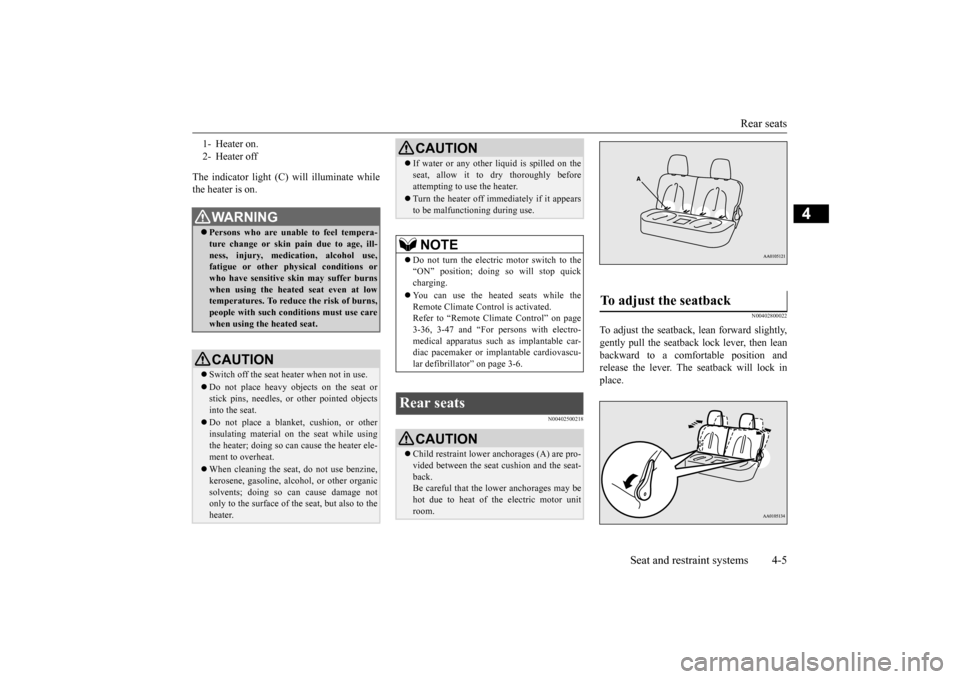
The indicator light (C) will illuminate while the heater is on.
N00402500218
N00402800022
To adjust the seatback,
lean forward slightly,
gently pull the seatback lock lever, then lean backward to a comfortable position and release the lever. The seatback will lock inplace.
1- Heater on. 2- Heater offWA R N I N G Persons who are unable to feel tempera- ture change or skin
pain due to age, ill-
ness, injury, medication, alcohol use, fatigue or other phys
ical conditions or
who have sensitive sk
in may suffer burns
when using the heated seat even at low temperatures. To reduce the risk of burns,people with such conditions must use care when using the heated seat.CAUTION Switch off the seat heater when not in use.Do not place heavy objects on the seat or stick pins, needles, or
other pointed objects
into the seat. Do not place a blanket,
cushion, or other
insulating material on the seat while usingthe heater; doing so can
cause the heater ele-
ment to overheat. When cleaning the seat, do not use benzine, kerosene, gasoli
ne, alcohol, or other organic
solvents; doing so can cause damage not only to the surface of the seat, but also to theheater.
If water or any other li
quid is spilled on the
seat, allow it to dry thoroughly beforeattempting to use the heater. Turn the heater off immediately if it appears to be malfunctioning during use.NOTE
Do not turn the electric motor switch to the “ON” position; doing
so will stop quick
charging. You can use the heated seats while the Remote Climate Control is activated. Refer to “Remote Climate Control” on page 3-36, 3-47 and “For persons with electro-medical apparatus such
as implantable car-
diac pacemaker or im
plantable cardiovascu-
lar defibrillator” on page 3-6.
Rear seats
CAUTION Child restraint lower anchorages (A) are pro- vided between the seat
cushion and the seat-
back. Be careful that the lower anchorages may be hot due to heat of th
e electric motor unit
room.CAUTION
To adjust the seatback
BK0220401US.book 5 ページ 2015年6月3日 水曜日 午前7時42分
Page 82 of 296
Seat belts 4-10 Seat and restraint systems
4
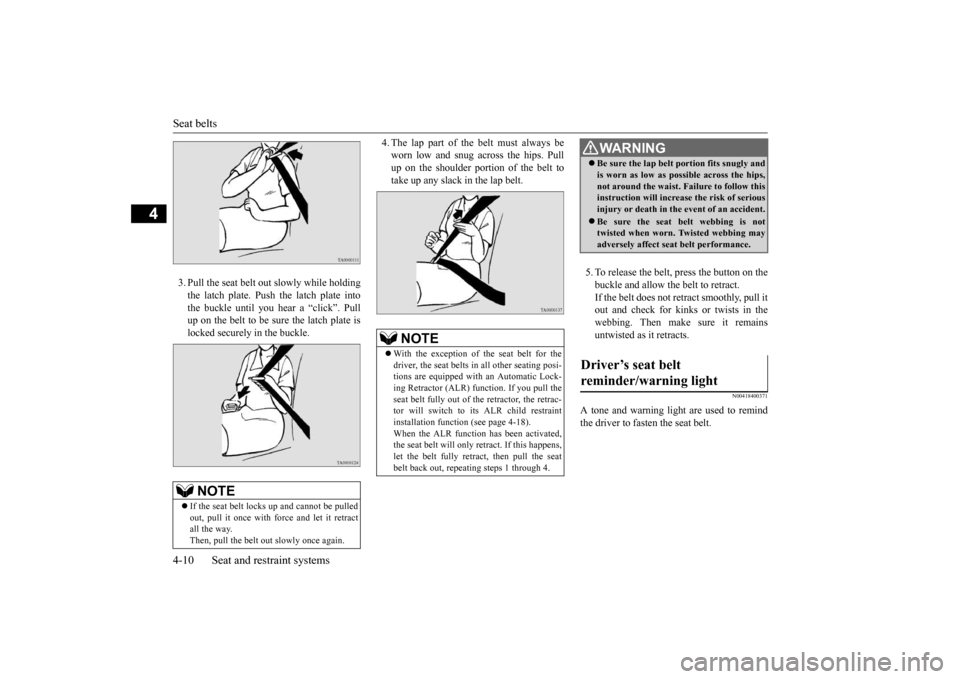
3. Pull the seat belt out slowly while holding the latch plate. Push the latch plate into the buckle until you hear a “click”. Pull up on the belt to be su
re the latch plate is
locked securely in the buckle.
4. The lap part of the belt must always be worn low and snug across the hips. Pullup on the shoulder portion of the belt to take up any slack
in the lap belt.
5. To release the belt,
press the button on the
buckle and allow the belt to retract. If the belt does not retract smoothly, pull it out and check for kinks or twists in thewebbing. Then make sure it remains untwisted as it retracts.
N00418400371
A tone and warning light are used to remind the driver to fasten the seat belt.
NOTE
If the seat belt locks
up and cannot be pulled
out, pull it once with force and let it retract all the way. Then, pull the belt out
slowly once again.
NOTE
With the exception of the seat belt for the driver, the seat belts in all other seating posi-tions are equipped with an Automatic Lock- ing Retractor (ALR) function. If you pull the seat belt fully out of th
e retractor, the retrac-
tor will switch to its ALR child restraint installation function
(see page 4-18).
When the ALR function has been activated,the seat belt will only re
tract. If this happens,
let the belt fully retract, then pull the seat belt back out, repeating steps 1 through 4.
WA R N I N G Be sure the lap belt portion fits snugly and is worn as low as possible across the hips,not around the waist. Failure to follow thisinstruction will increase the risk of serious injury or death in the
event of an accident.
Be sure the seat belt webbing is not twisted when worn. Twisted webbing may adversely affect seat belt performance.
Driver’s seat belt reminder/warning light
BK0220401US.book 10 ページ 2015年6月3日 水曜日 午前7時42分