CD changer MITSUBISHI L200 2004 Owner's Manual (in English)
[x] Cancel search | Manufacturer: MITSUBISHI, Model Year: 2004, Model line: L200, Model: MITSUBISHI L200 2004Pages: 264, PDF Size: 4.14 MB
Page 128 of 264
FOR PLEASANT DRIVING
UKW/MW/LW electronic tuning radio with
tape player*
EH30E-E
The audio system can be used when the ignition key is in the “ON”
or “ACC” position.
NOTE
(1) To listen to the audio system while the engine is stopped, turn
the ignition key to the “ACC” position.
(2) When a cellular phone is used inside the vehicle, noise may
be produced from the audio equipment. This does not mean
that something is wrong with the audio equipment. In such a
case, use the cellular phone at a place as far as possible from
the audio equipment.(3) A CD player or a CD autochanger can be connected to this
audio system.
The CD player or the CD autochanger can be operated by
the switch of the audio body. Refer to “To listen to a CD” on
page 6-14.
(4) In case of misuse (entry of a foreign object or water, smoke or
odor, etc.), immediately turn off the audio system and have it
checked at an authorized MITSUBISHI dealer. Never try to
repair it by yourself. Avoid continuous usage without inspec-
tion by a qualified person.
6-2
06engL2_240082_4 22-01-2004 13:07 Page 6-2
Page 139 of 264
FOR PLEASANT DRIVING
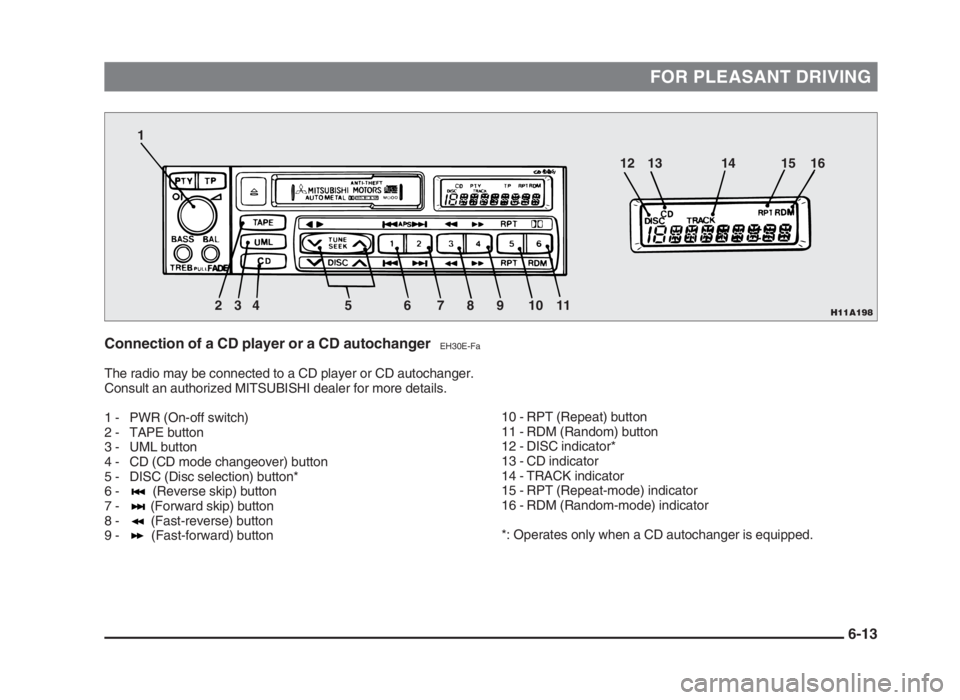
Connection of a CD player or a CD autochangerEH30E-Fa
The radio may be connected to a CD player or CD autochanger.
Consult an authorized MITSUBISHI dealer for more details.
1 - PWR (On-off switch)
2 - TAPE button
3 - UML button
4 - CD (CD mode changeover) button
5 - DISC (Disc selection) button*
6 - (Reverse skip) button
7 - (Forward skip) button
8 - (Fast-reverse) button
9 - (Fast-forward) button
10 - RPT (Repeat) button
11 - RDM (Random) button
12 - DISC indicator*
13 - CD indicator
14 - TRACK indicator
15 - RPT (Repeat-mode) indicator
16 - RDM (Random-mode) indicator
*: Operates only when a CD autochanger is equipped.
6-13
H11A1982 1
34 5 6 7 8 9 10 1112 13 14 15 16
06engL2_240082_4 22-01-2004 13:07 Page 6-13
Page 140 of 264
FOR PLEASANT DRIVING
To listen to a CD
1. Press the CD button (4), and the CD
mode will be selected, starting a play-
back.
NOTE
If the system is equipped with a CD auto-
changer, press the DISC button (5), to se-
lect another disc.
Every time the side of the DISC button
is pressed, the next disc is selected and
every time the side of the button is
pressed, changeover to the previous disc
is made.
2. To adjust the volume and tone, refer
to the section “How to adjust the vol-
ume and tone” on page 6-4.
3. To stop the CD, turn off the power by
pressing the PWR switch (1) to make
changeover to the other mode by
pressing the TAPE button (2) or UML
button (3).
4. For information concerning the han-
dling of compact discs, refer to the
section “Handling of compact discs”
on page 6-17.
How to fast forward/reverse the
disc
Fast forward
The disc is fast forwarded only while the
button (9) is kept pressed. Release the
button, and playback will start.
Fast reverse
The disc is turned back only while the
button (8) is kept pressed. Release the
button, and playback will start.
To find the start of a desired track
The start of each track on a disc can
be found by using the or button
(6 or 7).
Track up:
Press the button (7) the number of
tracks to skip over.
The frequency-display window will display
the number of tracks selected.
Track down:
Press the button (6) the number of
tracks to skip over.
The frequency-display window will display
the number of tracks selected.
How to repeat the same track
You can repeatedly listen to the same
track by pressing the RPT button (10).
Press the RPT button, and the RPT indi-
cator (15) will light.
To release, press the button again.
To change the order of discs
played back
Press the RDM button (11), and the RDM
indicator (16) will light and random tracks
for playback will be selected randomly
from all discs loaded into the CD auto-
changer. To release, press the button
again.
6-14
06engL2_240082_4 22-01-2004 13:07 Page 6-14