clutch MITSUBISHI LANCER 2014 8.G Service Manual
[x] Cancel search | Manufacturer: MITSUBISHI, Model Year: 2014, Model line: LANCER, Model: MITSUBISHI LANCER 2014 8.GPages: 434, PDF Size: 57.5 MB
Page 179 of 434
Multi-information display 5-112 Features and controls
5
N00555001305
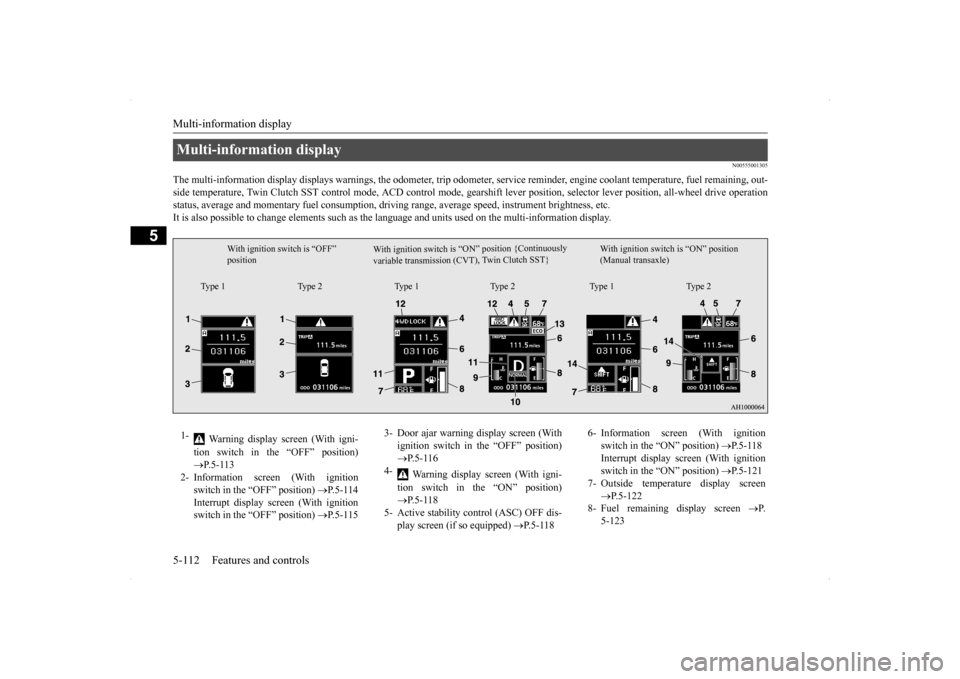
The multi-information display displays warn
ings, the odometer, trip odometer, service re
minder, engine coolant temperature, fue
l remaining, out-
side temperature, Twin Clutch SST control mode, ACD control
mode, gearshift lever position, selector lever position, all-wheel
drive operation
status, average and momentary fuel consumption, driving range, average speed, instrument brightness, etc. It is also possible to change elements such as th
e language and units used on the multi-information display.
Multi-information display
W i t h i g n i t i o n s w i t c h i s “ O N ” p o s i t i o n { C o nt i n u o us l y
v a r i a b l e t r a n s m i s s i o n ( C V T ) , Tw
i n C l u t c h S ST }
With ignition switch is “OFF” position
With ignition switch is “ON” position (Manual transaxle)
Type 1 Type 2 Type 1 Type 2 Type 1 Type 2
1-
Warning display screen (With igni- tion switch in the “OFF” position) P.5-113
2- Information screen (With ignition
switch in the “OFF” position)
P.5-114
Interrupt display screen (With ignition switch in the “OFF” position)
P.5-115
3- Door ajar warning display screen (With
ignition switch in the “OFF” position) P.5-116
4-
Warning display screen (With igni- tion switch in the “ON” position) P.5-118
5- Active stability control (ASC) OFF dis-
play screen (if so equipped)
P.5-118
6- Information screen (With ignition
switch in the “ON” position)
P.5-118
Interrupt display screen (With ignition switch in the “ON” position)
P.5-121
7- Outside temperature display screen
P.5-122
8- Fuel remaining display screen
P.
5-123
Page 180 of 434
Multi-information display
Features and controls 5-113
5
N00555100136
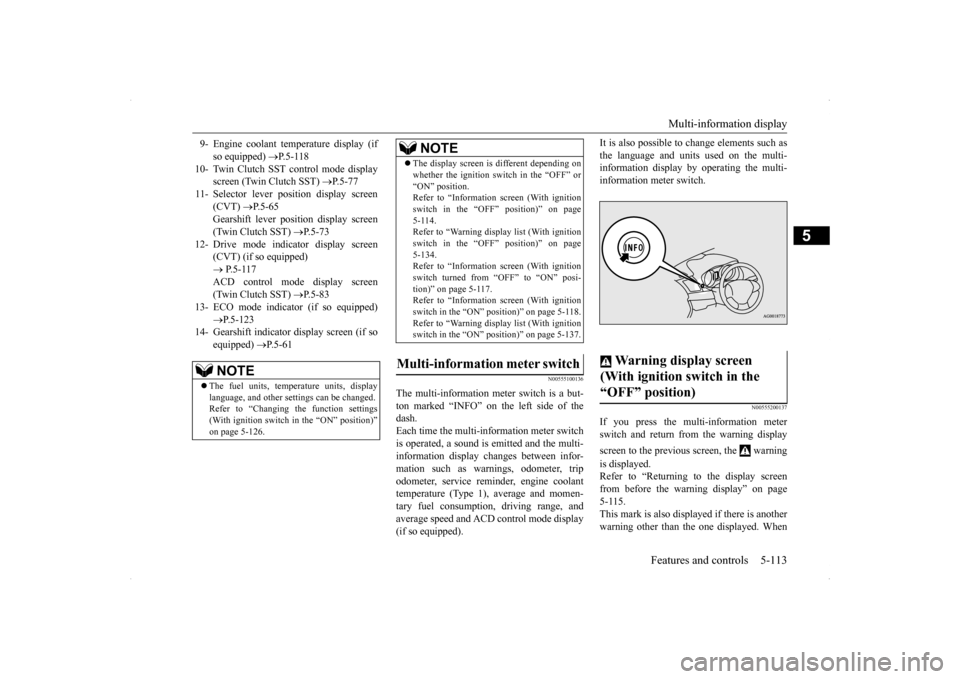
The multi-information meter switch is a but- ton marked “INFO” on the left side of the dash. Each time the multi-information meter switchis operated, a sound is emitted and the multi- information display changes between infor- mation such as warnings, odometer, tripodometer, service reminder, engine coolant temperature (Type 1), average and momen- tary fuel consumption, driving range, andaverage speed and ACD control mode display (if so equipped).
It is also possible to change elements such as the language and units used on the multi- information display by operating the multi- information meter switch.
N00555200137
If you press the multi-information meterswitch and return from the warning display screen to the previous screen, the warning is displayed. Refer to “Returning to the display screen from before the warning display” on page 5-115.This mark is also displayed if there is anotherwarning other than the one displayed. When
9- Engine coolant temperature display (if
so equipped)
P.5-118
10- Twin Clutch SST control mode display
screen (Twin Clutch SST)
P.5-77
11- Selector lever position display screen
(CVT)
P.5-65
Gearshift lever position display screen (Twin Clutch SST)
P.5-73
12- Drive mode indicator display screen
(CVT) (if so equipped) P.5-117 ACD control mode display screen(Twin Clutch SST)
P.5-83
13- ECO mode indicator (if so equipped)
P.5-123
14- Gearshift indicator display screen (if so
equipped)
P.5-61
NOTE
The fuel units, temperature units, display language, and other settings can be changed.Refer to “Changing the function settings (With ignition switch in the “ON” position)” on page 5-126.
The display screen is different depending on whether the ignition switch in the “OFF” or “ON” position. Refer to “Information screen (With ignition switch in the “OFF” position)” on page5-114. Refer to “Warning displa
y list (With ignition
switch in the “OFF” position)” on page5-134. Refer to “Information screen (With ignition switch turned from “OFF” to “ON” posi-tion)” on page 5-117. Refer to “Information screen (With ignition switch in the “ON” position)” on page 5-118.Refer to “Warning displa
y list (With ignition
switch in the “ON” position)” on page 5-137.
Multi-information meter switch
NOTE
Warning display screen (With ignition switch in the “OFF” position)
Page 189 of 434
Multi-information display 5-122 Features and controls
5
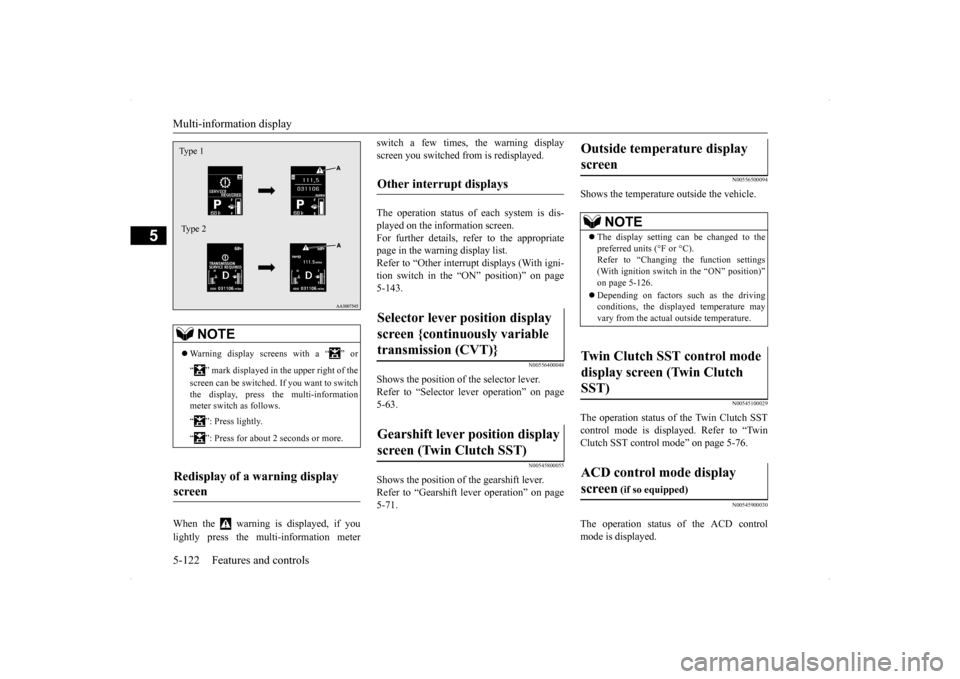
When the warning is displayed, if you lightly press the multi-information meter
switch a few times, the warning display screen you switched from is redisplayed. The operation status of each system is dis- played on the information screen. For further details, refer to the appropriate page in the warning display list.Refer to “Other interrupt displays (With igni-tion switch in the “ON” position)” on page 5-143.
N00556400048
Shows the position of the selector lever. Refer to “Selector lever operation” on page 5-63.
N00545800055
Shows the position of the gearshift lever. Refer to “Gearshift lever operation” on page5-71.
N00556500094
Shows the temperature outside the vehicle.
N00545100029
The operation status of the Twin Clutch SST control mode is displayed. Refer to “Twin Clutch SST control mode” on page 5-76.
N00545900030
The operation status of the ACD control mode is displayed.
NOTE
Warning display screens with a “ ” or “ ” mark displayed in the upper right of the screen can be switched. If you want to switch the display, press the multi-information meter switch as follows. “ ”: Press lightly. “ ”: Press for about 2 seconds or more.
Redisplay of a warning display screen Type 1 Type 2
Other interrupt displays Selector lever position display screen {continuously variable transmission (CVT)} Gearshift lever position display screen (Twin Clutch SST)
Outside temperature display screen
NOTE
The display setting can be changed to the preferred units (°F or °C).Refer to “Changing the function settings (With ignition switch in the “ON” position)” on page 5-126. Depending on factors such as the driving conditions, the displayed temperature mayvary from the actual outside temperature.
Twin Clutch SST control mode display screen (Twin Clutch SST) ACD control mode display screen
(if so equipped)
Page 190 of 434
Multi-information display
Features and controls 5-123
5
Refer to “ACD control mode” on page 5-83.
N00568700019
This indicator will be displayed when fuel- efficient driving is achieved.
N00556600125
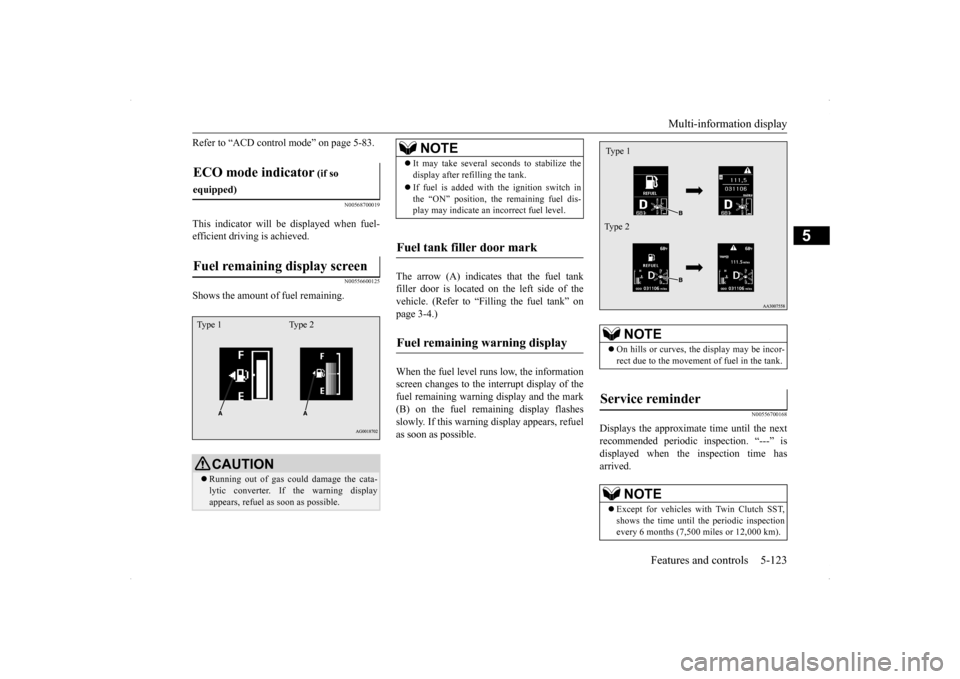
Shows the amount of fuel remaining.
The arrow (A) indicates that the fuel tank filler door is located on the left side of thevehicle. (Refer to “Filling the fuel tank” on page 3-4.) When the fuel level runs low, the information screen changes to the interrupt display of the fuel remaining warning display and the mark(B) on the fuel remaining display flashes slowly. If this warning display appears, refuel as soon as possible.
N00556700168
Displays the approximate time until the nextrecommended periodic inspection. “---” isdisplayed when the inspection time has arrived.
ECO mode indicator
(if so
equipped)Fuel remaining display screen
CAUTION Running out of gas could damage the cata- lytic converter. If the warning display appears, refuel as soon as possible.
Type 1 Type 2
NOTE
It may take several seconds to stabilize the display after refilling the tank. If fuel is added with the ignition switch in the “ON” position, the remaining fuel dis-play may indicate an incorrect fuel level.
Fuel tank filler door mark Fuel remaining warning display
NOTE
On hills or curves, the display may be incor- rect due to the movement of fuel in the tank.
Service reminder
NOTE
Except for vehicles with Twin Clutch SST, shows the time until the periodic inspection every 6 months (7,500 miles or 12,000 km).Type 1 Type 2
Page 191 of 434
Multi-information display 5-124 Features and controls
5
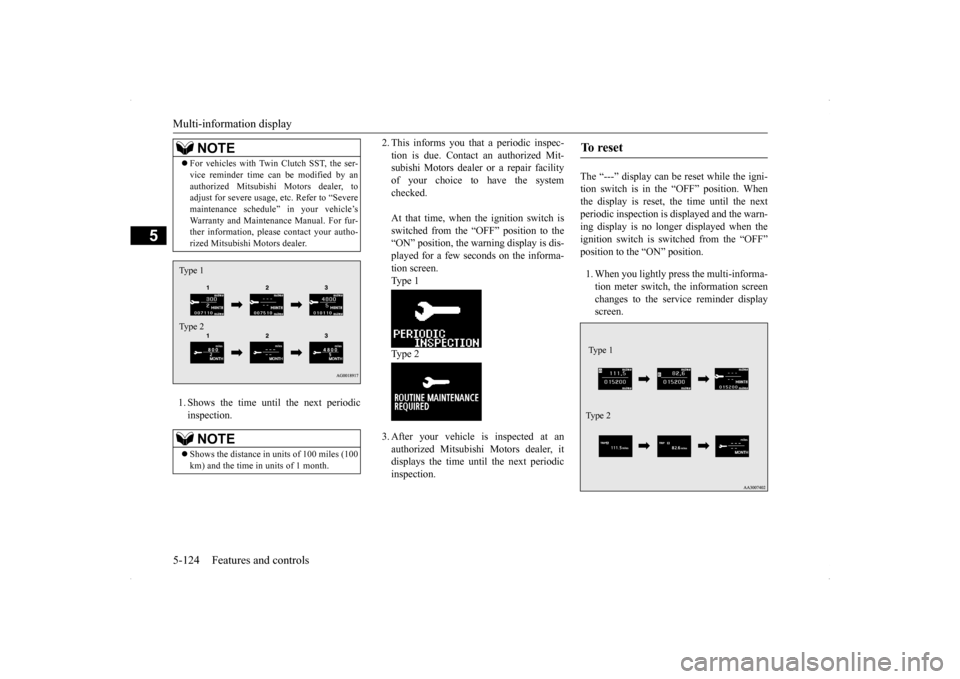
1. Shows the time until the next periodic inspection.
2. This informs you that a periodic inspec- tion is due. Contact an authorized Mit- subishi Motors dealer or a repair facility of your choice to have the systemchecked. At that time, when the ignition switch is switched from the “OFF” position to the “ON” position, the warning display is dis- played for a few seconds on the informa-tion screen.Type 1 Type 2 3. After your vehicle is inspected at an authorized Mitsubishi Motors dealer, itdisplays the time until the next periodicinspection.
The “---” display can be reset while the igni- tion switch is in the “OFF” position. Whenthe display is reset, the time until the next periodic inspection is displayed and the warn- ing display is no longer displayed when theignition switch is switched from the “OFF” position to the “ON” position. 1. When you lightly press the multi-informa- tion meter switch, the information screen changes to the service reminder displayscreen.
For vehicles with Twin Clutch SST, the ser- vice reminder time can be modified by an authorized Mitsubishi Motors dealer, to adjust for severe usage, etc. Refer to “Severe maintenance schedule” in your vehicle’sWarranty and Maintenance Manual. For fur- ther information, please contact your autho- rized Mitsubishi Motors dealer.NOTE
Shows the distance in uni
ts of 100 miles (100
km) and the time in units of 1 month.NOTE
Type 1 Type 2
To r e s e t Type 1 Ty p e 2
Page 193 of 434
Multi-information display 5-126 Features and controls
5
N00556801153
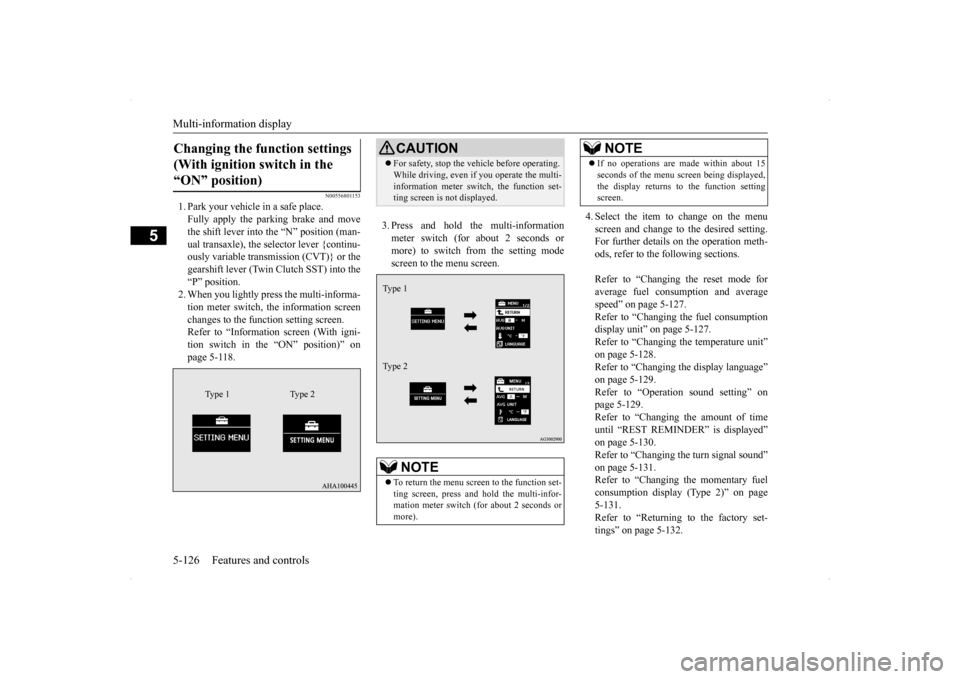
1. Park your vehicle in a safe place. Fully apply the parking brake and move the shift lever into the “N” position (man-ual transaxle), the selector lever {continu- ously variable transmission (CVT)} or the gearshift lever (Twin Clutch SST) into the“P” position.2. When you lightly press the multi-informa- tion meter switch, the information screen changes to the function setting screen.Refer to “Information screen (With igni- tion switch in the “ON” position)” on page 5-118.
3. Press and hold the multi-information meter switch (for about 2 seconds or more) to switch from the setting modescreen to the menu screen.
4. Select the item to change on the menu screen and change to the desired setting. For further details on the operation meth- ods, refer to the following sections. Refer to “Changing the reset mode for average fuel consumption and average speed” on page 5-127.Refer to “Changing the fuel consumption display unit” on page 5-127. Refer to “Changing the temperature unit”on page 5-128. Refer to “Changing the display language” on page 5-129.Refer to “Operation sound setting” on page 5-129. Refer to “Changing the amount of timeuntil “REST REMINDER” is displayed” on page 5-130. Refer to “Changing the turn signal sound”on page 5-131. Refer to “Changing the momentary fuel consumption display (Type 2)” on page5-131. Refer to “Returning to the factory set- tings” on page 5-132.
Changing the function settings (With ignition switch in the “ON” position)
Type 1 Type 2
CAUTION For safety, stop the vehicle before operating. While driving, even if you operate the multi- information meter switch, the function set- ting screen is not displayed.NOTE
To return the menu screen to the function set- ting screen, press and hold the multi-infor-mation meter switch (for about 2 seconds or more).Type 1 Type 2
If no operations are made within about 15 seconds of the menu screen being displayed, the display returns to the function setting screen.NOTE
Page 207 of 434
Indicator light, warning light, an
d information screen display list
5-140 Features and controls
5
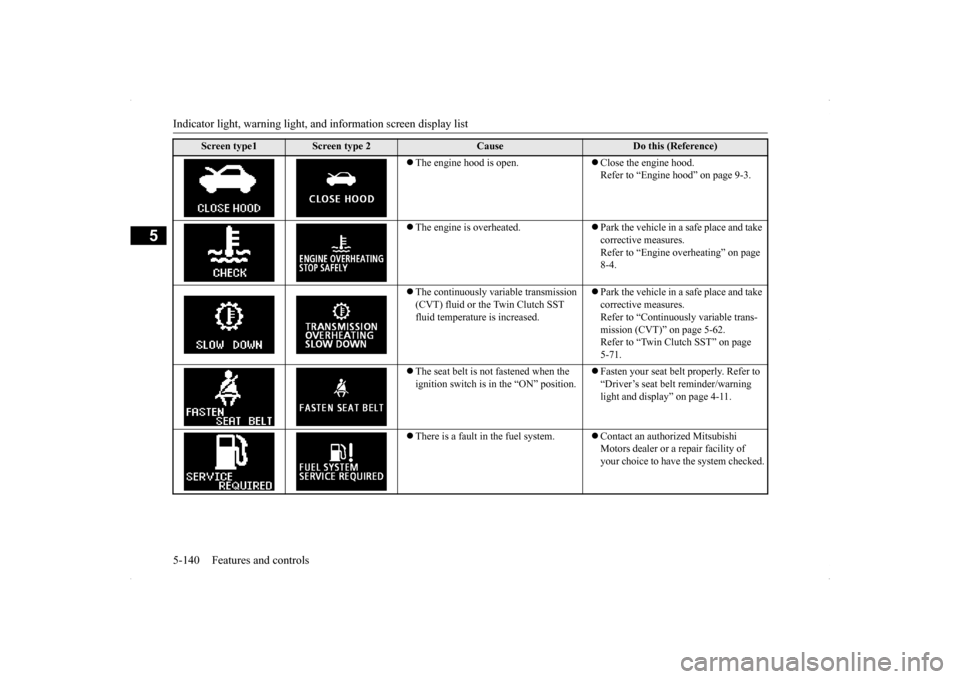
The engine hood is open.
Close the engine hood. Refer to “Engine hood” on page 9-3.
The engine is overheated.
Park the vehicle in a safe place and take corrective measures.Refer to “Engine overheating” on page 8-4.
The continuously variable transmission (CVT) fluid or the Twin Clutch SST fluid temperature is increased.
Park the vehicle in a safe place and take corrective measures.Refer to “Continuously variable trans- mission (CVT)” on page 5-62. Refer to “Twin Clutch SST” on page 5-71.
The seat belt is not fastened when the ignition switch is in the “ON” position.
Fasten your seat belt properly. Refer to “Driver’s seat belt reminder/warning light and display” on page 4-11.
There is a fault in the fuel system.
Contact an authorized Mitsubishi Motors dealer or a repair facility of your choice to have the system checked.
Screen type1
Screen type 2
Cause
Do this (Reference)
Page 209 of 434
Indicator light, warning light, an
d information screen display list
5-142 Features and controls
5
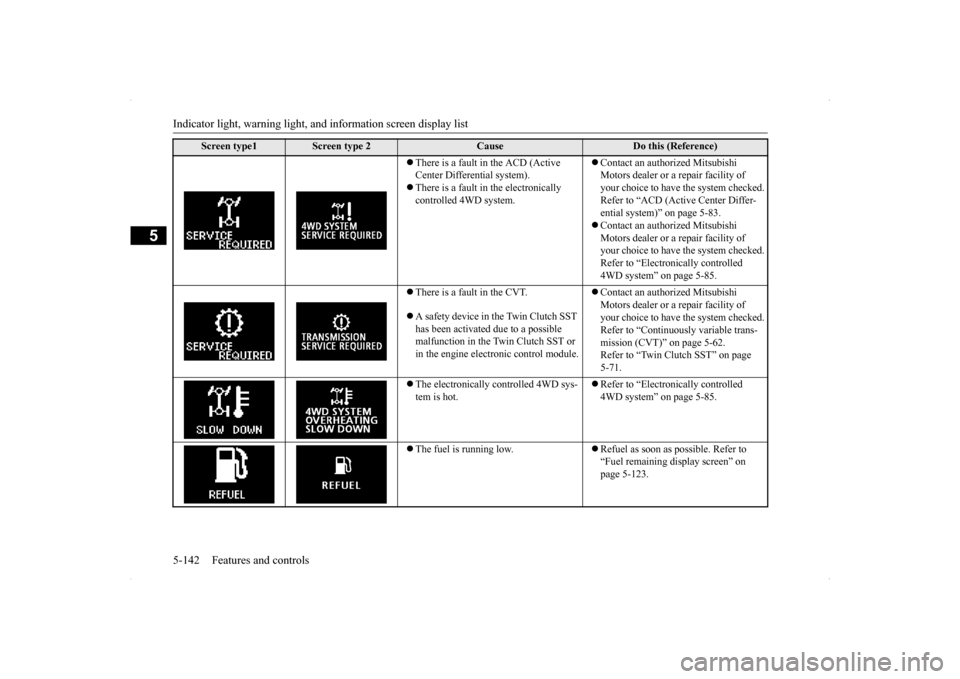
There is a fault in the ACD (Active Center Differential system). There is a fault in the electronically controlled 4WD system.
Contact an authorized Mitsubishi Motors dealer or a repair facility of your choice to have the system checked.Refer to “ACD (Active Center Differ- ential system)” on page 5-83. Contact an authorized Mitsubishi Motors dealer or a repair facility of your choice to have the system checked. Refer to “Electronically controlled 4WD system” on page 5-85.
There is a fault in the CVT. A safety device in the Twin Clutch SST has been activated due to a possible malfunction in the Twin Clutch SST or in the engine electronic control module.
Contact an authorized Mitsubishi Motors dealer or a repair facility of your choice to have the system checked.Refer to “Continuously variable trans- mission (CVT)” on page 5-62. Refer to “Twin Clutch SST” on page 5-71.
The electronically controlled 4WD sys- tem is hot.
Refer to “Electronically controlled 4WD system” on page 5-85.
The fuel is running low.
Refuel as soon as possible. Refer to “Fuel remaining display screen” on page 5-123.
Screen type1
Screen type 2
Cause
Do this (Reference)
Page 213 of 434
Warning lights 5-146 Features and controls
5
N00520300147 N00520400467
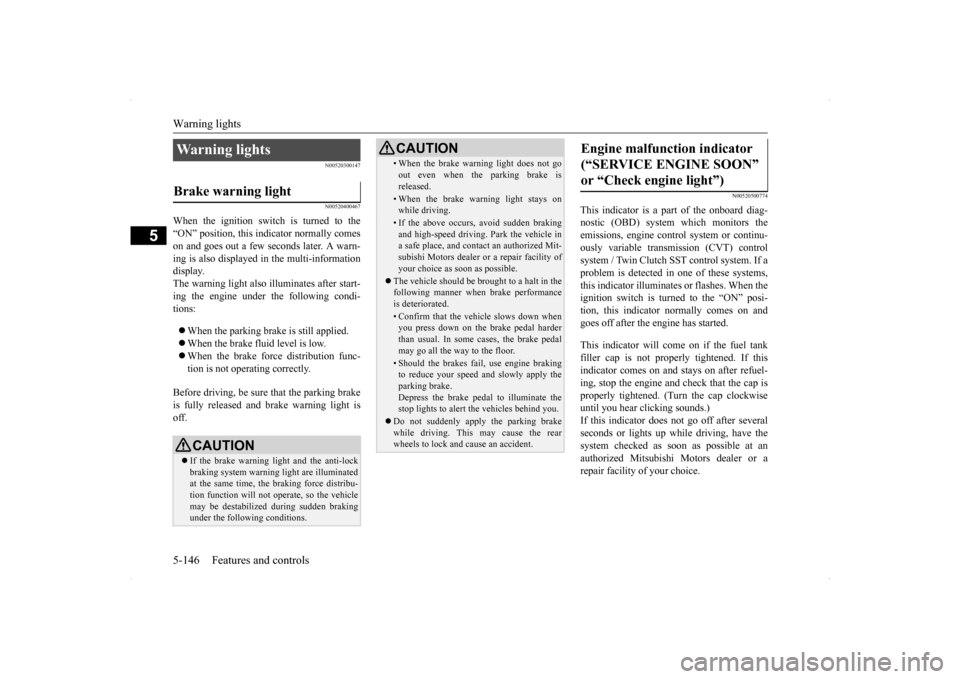
When the ignition switch is turned to the “ON” position, this indicator normally comeson and goes out a few seconds later. A warn- ing is also displayed in the multi-information display.The warning light also illuminates after start-ing the engine under the following condi- tions: When the parking brake is still applied. When the brake fluid level is low. When the brake force distribution func- tion is not operating correctly.
Before driving, be sure that the parking brake is fully released and brake warning light isoff.
N00520500774
This indicator is a part of the onboard diag- nostic (OBD) system which monitors the emissions, engine contro
l system or continu-
ously variable transmission (CVT) control system / Twin Clutch SST control system. If a problem is detected in one of these systems,this indicator illuminates or flashes. When theignition switch is turned to the “ON” posi- tion, this indicator normally comes on and goes off after the engine has started. This indicator will come on if the fuel tank filler cap is not properly tightened. If this indicator comes on and stays on after refuel- ing, stop the engine and check that the cap isproperly tightened. (Turn the cap clockwise until you hear clicking sounds.) If this indicator does not go off after severalseconds or lights up while driving, have the system checked as soon as possible at an authorized Mitsubishi Motors dealer or arepair facility of your choice.
Warning lights Brake warning light
CAUTION If the brake warning light and the anti-lock braking system warning light are illuminated at the same time, the braking force distribu-tion function will not operate, so the vehicle may be destabilized during sudden braking under the following conditions.
• When the brake warning light does not go out even when the parking brake is released.• When the brake warning light stays onwhile driving.• If the above occurs, avoid sudden brakingand high-speed driving. Park the vehicle in a safe place, and contact an authorized Mit- subishi Motors dealer or a repair facility ofyour choice as soon as possible.
The vehicle should be brought to a halt in the following manner when brake performance is deteriorated.• Confirm that the vehicle slows down whenyou press down on the brake pedal harder than usual. In some cases, the brake pedalmay go all the way to the floor.• Should the brakes fail, use engine brakingto reduce your speed and slowly apply the parking brake. Depress the brake pedal to illuminate thestop lights to alert the vehicles behind you.
Do not suddenly apply the parking brake while driving. This may cause the rear wheels to lock and cause an accident.CAUTION
Engine malfunction indicator (“SERVICE ENGINE SOON” or “Check engine light”)
Page 214 of 434
Information screen display
Features and controls 5-147
5
N00520600296
This light comes on in the event of a malfunc- tion in the charging system or when the igni- tion switch is turned to the “ON” position (engine off). A warning is also displayed inthe multi-information display. When the engine is started,
the light should go out.
Check to make sure that the light has goneout before driving.
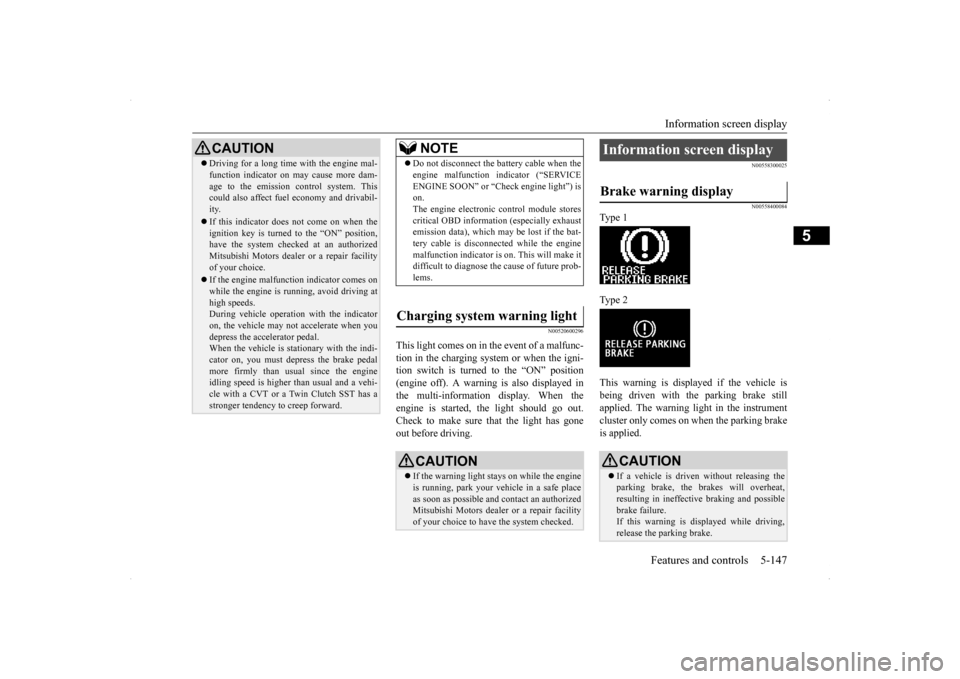
N00558300025 N00558400084
Type 1 Type 2 This warning is displayed if the vehicle is being driven with the parking brake still applied. The warning light in the instrumentcluster only comes on when the parking brake is applied.
CAUTION Driving for a long time with the engine mal- function indicator on may cause more dam- age to the emission control system. This could also affect fuel economy and drivabil- ity. If this indicator does not come on when the ignition key is turned to the “ON” position,have the system checked at an authorized Mitsubishi Motors dealer or a repair facility of your choice. If the engine malfunction indicator comes on while the engine is running, avoid driving athigh speeds. During vehicle operation with the indicator on, the vehicle may not accelerate when youdepress the accelerator pedal. When the vehicle is stationary with the indi- cator on, you must depress the brake pedalmore firmly than usual since the engine idling speed is higher than usual and a vehi- cle with a CVT or a Twin Clutch SST has astronger tendency to creep forward.
NOTE
Do not disconnect the battery cable when the engine malfunction indicator (“SERVICE ENGINE SOON” or “Check engine light”) is on. The engine electronic control module storescritical OBD information (especially exhaust emission data), which may be lost if the bat- tery cable is disconnected while the enginemalfunction indicator is on. This will make it difficult to diagnose the cause of future prob- lems.
Charging system warning light
CAUTION If the warning light stays on while the engine is running, park your vehicle in a safe place as soon as possible and contact an authorizedMitsubishi Motors dealer or a repair facility of your choice to have the system checked.
Information screen display Brake warning display
CAUTION If a vehicle is driven without releasing the parking brake, the brakes will overheat, resulting in ineffective braking and possible brake failure.If this warning is displayed while driving, release the parking brake.